1
Problem
Possible Solutions
Problem
Possible Solutions
Cannot pair
the speaker
with my
Bluetooth®
device
•M
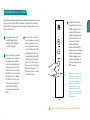
ake sure your V5BT is discoverable. Refer to “Pairing with your V5BT”
on page 6.
• Make sure the Bluetooth feature on your device is turned on.
• Your Bluetooth device may be out of range – try moving it closer to
the V5BT.
• Turn the V5BT off and back on.
• Make sure your Bluetooth device supports the A2DP (stereo Bluetooth)
profile.
• Make sure when connecting to a PC or Mac computer that you select
the “Wren Speaker” as the audio output device within the audio settings
menu of the computer. You may need to play an audio track to make the
connection.
Paired
Bluetooth®
device will not
connect
• If your device requires a passkey, make sure you entered 0000
(four zeroes).
• Turn the V5BT off and on again.
• Clear the speaker memory (see Step 4 on page 11). Remove the Wren
speaker from the list of paired devices on your Bluetooth device.
Then pair the device and the Wren speaker again.
Speaker
indicates a
connection,
but is not
playing music
• Turn off or disable Bluetooth on all other paired devices nearby,
then reconnect the source device you want to hear.
• Turn the V5BT off and on again.
• Make sure the transport controls of the audio device are set to
playback audio.
• Make sure your Wren V5BT is not muted, and the volume is up.
• Make sure your Bluetooth®-enabled device is playing audio.
No audio
from a
Bluetooth®
device
• Make sure your Bluetooth device and/or your V5BT are not positioned near
other devices that generate electromagnetic interference, e.g., cordless
phones, microwave ovens, wireless routers, or other Bluetooth devices.
• Refer to the owner’s guide or technical support for your Bluetooth device
to make sure you know how it pairs with other Bluetooth devices.
• Make sure your Wren V5BT is not muted, and the volume is up.
• Make sure your Bluetooth®-enabled device is playing audio.
• Your Bluetooth device may be out of range – try moving it closer to
your V5BT.
• Turn the V5BT off and back on.
Poor sound
quality from
a Bluetooth®
device
• Your Bluetooth device may be out of range. Try moving it closer to the V5BT.
• Make sure your Bluetooth device and/or you V5BT are not positioned near
other devices that generate electromagnetic interference, e.g., cordless
phones, microwave ovens, wireless routers, or other Bluetooth devices.
• Reduce the number of applications running on your Bluetooth device.
Running multiple applications can reduce the amount of internal resources
available to transmit audio. Closing non-essential applications may improve
audio quality.
• Try turning off your device’s Wi-Fi®.
• Try unpairing and then re-pairing your Bluetooth device to your V5BT.
• Turn the V5BT off and back on.
• Clear the memory of your V5BT following step 4 on page 11. The Bluetooth
source indicator on the control panel of your V5BT will blink amber
once every second to indicate that the “discoverable” mode is engaged.
Then re-pair your device following instructions on page 6.
English
Troubleshooting Tips
Questions? Visit wrensound.com/support for additional help.
14
15