1
20
21
EUROPORT EPA300/EPA900
Quick Start Guide
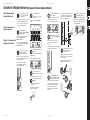
EUROPORT EPA300/EPA900 Adding Effects
Step 5:
Adding Effects
Set the EFFECT [LEVEL] knob on the
DIGITAL EFFECTS PROCESSOR to
approximately a 75% setting.
Coloque el mando EFFECT [LEVEL] del DIGITAL
EFFECTS PROCESSOR a aproximadamente el 75%.
Paso 5:
Adición de efectos
Étape 5 :
Ajout des effets
Réglez le bouton EFFECT [LEVEL] de la section
DIGITAL EFFECTS PROCESSOR à environ 75 %
du maximum.
While speaking, singing, or playing,
turn the channel EFFECTS knob up to the
desired level on each channel to which
you wish to add effects.
Mientras habla o canta al micrófono o toca su
instrumento, suba el mando EFFECTS de canal hasta
conseguir el nivel que quiera en cada uno de los
canales en los que vaya a añadir los efectos.
Tout en parlant, chantant ou jouant, montez le
bouton EFFECTS de la voie jusqu'à obtenir le niveau
d'effet souhaité pour la voie.
Scroll through the available effects by
turning the PROGRAM [PUSH] knob.
The number in the display will flash.
Desplácese por los distintos efectos disponibles
girando el mando PROGRAM [PUSH]. El número que
aparece en la pantalla parpadeará.
Faites défiler les effets avec le bouton PROGRAM
[PUSH]. Le numéro clignote.
Adjust the EFFECT [LEVEL] knob on the
DIGITAL EFFECTS PROCESSOR up or down
from the initial 75% setting to achieve
your desired overall effects level in the main mix.
Ajuste hacia arriba o abajo el mando EFFECT [LEVEL]
del DIGITAL EFFECTS PROCESSOR con respecto a su
posición de partida del 75% hasta conseguir en la
mezcla principal el nivel de efectos final que quiera.
Press the PROGRAM [PUSH] knob to select
the effect. The number will stop flashing
Pulse el mando PROGRAM [PUSH] para
activar el efecto elegido. El número dejará de
parpadear en pantalla.
Réglez le bouton EFFECT [LEVEL] de la zone DIGITAL
EFFECTS PROCESSOR (depuis sa position initiale à
75 % de sa course)jusqu'à obtenir le niveau global
d'effet souhaité dans le mixage général.
Appuyez sur le bouton PROGRAM [PUSH] pour
sélectionner l'effet. Le numéro cesse de clignoter.
behringer.com
behringer.com