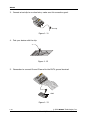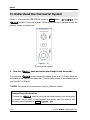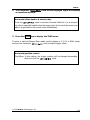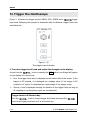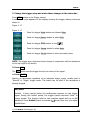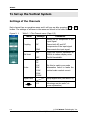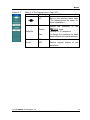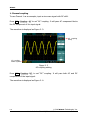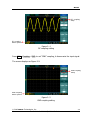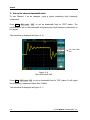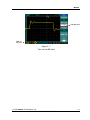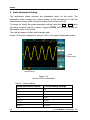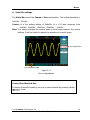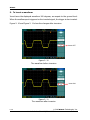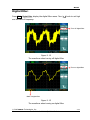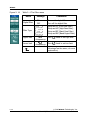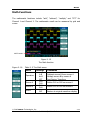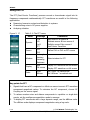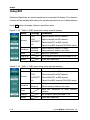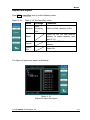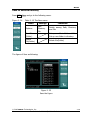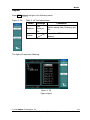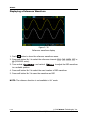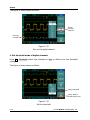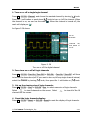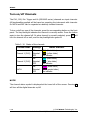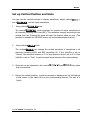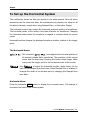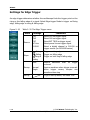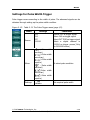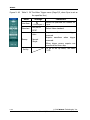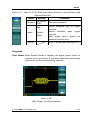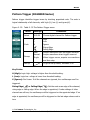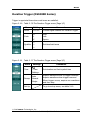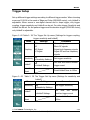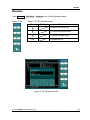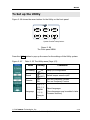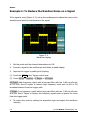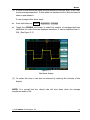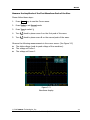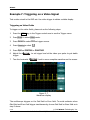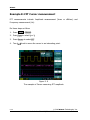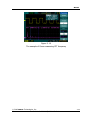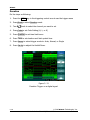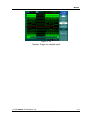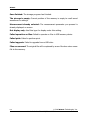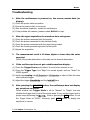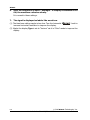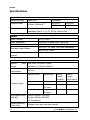
1
User’s Guide RIGOL Publication number UGA07107-1110 July 2008 DS1000E, DS1000D Series Digital Oscilloscopes DS1102E, DS1052E, DS1102D, DS1052D © 2008 RIGOL Technologies, Inc. All Rights Reserved RIGOL © 2008 RIGOL Technologies, Inc. All Rights Reserved RIGOL products are protected by patent law in and outside of P.R. China. Information in this publication replaces all previously corresponding material. RIGOL Technologies, Inc. reserves the right to modify or change part of or all the specifications and pricing policies at company’s sole decision. NOTE: RIGOL is registered trademark of RIGOL Technologies, Inc. © 2008 RIGOL Technologies, Inc. User’s Guide for DS1000E, DS1000D Series I RIGOL Safety Notices Review the following safety precautions carefully before operating the instrument to avoid any personal injuries or damages to the instrument and any products connected to it. To avoid potential hazards use the instrument as specified by this user’s guide only. The instrument should be serviced by qualified personnel only. To Avoid Fire or Personal Injury Use Proper Power Cord. Use the power cord designed for the instrument and authorized in your country only. Connect and Disconnect Accessories. Do not connect or disconnect probes or test leads while they are connected to a voltage source Ground The Instrument. The oscilloscope is grounded through the grounding conductor of the power cord. To avoid electric shock the instrument grounding conductor(s) must be grounded properly. Before making connections to the input or output terminals of the instrument. Connect The Probe. The probes’ ground terminals are at the same voltage level of the instrument ground. Do not connect the ground terminals to a high voltage. Observe All Terminal Ratings. To avoid fire or shock hazard, observe all ratings and marks on the instrument. Follow the user’s guide for further ratings information before making connections to the instrument. Do Not Operate Without Covers. Do not operate the instrument with covers or panels removed. Use Proper Fuse. Use the fuse of the type, voltage and current ratings as specified for the instrument. Avoid Circuit or Wire Exposure. Do not touch exposed connections and components when power is on. Do Not Operate With Suspected Failures. If suspected damage occurs with the instrument, have it inspected by qualified service personnel before further operations. II © 2008 RIGOL Technologies, Inc. User’s Guide for DS1000E, DS1000D Series RIGOL Provide Proper Ventilation. Refer to the installation instructions for proper ventilation of the instrument. Do not operate in wet/damp conditions Do not operate in an explosive atmosphere Keep product surfaces clean and dry The disturbance test of all the models meet the limit values of A in the standard of EN 61326: 1997+A1+A2+A3, but can’t meet the limit values of B. Measurement Category The DS1000E, DS1000D series Digital Oscilloscope is intended to be used for measurements in Measurement Category I. Measurement Category Definitions Measurement Category I is for measurements performed on circuits not directly connected to MAINS. Examples are measurements on circuits not derived from MAINS, and specially protected (internal) MAINS derived circuits. In the latter case, transient stresses are variable; for that reason, the transient withstand capability of the equipment is made known to the user. WARNING IEC Measurement Category I. The input terminals may be connected to circuit terminal in IEC Category I installations for voltages up to 300 VAC. To avoid the danger of electric shock, do not connect the inputs to circuit’s voltages above 300 VAC. Transient overvoltage is also present on circuits that are isolated from mains. The DS1000E, DS1000D series Digital Oscilloscopes is designed to safely withstand occasional transient overvoltage up to 1000Vpk. Do not use this equipment to measure circuits where transient overvoltage could exceed this level. © 2008 RIGOL Technologies, Inc. User’s Guide for DS1000E, DS1000D Series III RIGOL Safety Terms and Symbols Terms in This Guide. These terms may appear in this guide: ! WARNING: Warning statements identify conditions or practices that could result in injury or loss of life. ! CAUTION: Caution statements identify conditions or practices that could result in damage to this product or other property. Terms on the Product: These terms may appear on the product: DANGER indicates an injury hazard may be immediately accessible. WARNING indicates an injury hazard may be not immediately accessible. CAUTION indicates that a potential damage to the instrument or other property might occur. Symbols on the Product: These symbols may appear on the Instrument: ! Hazardous Refer to Protective Grounding Voltage Instructions Earth Terminal Terminal Chassis IV Test of Grounding Terminal © 2008 RIGOL Technologies, Inc. User’s Guide for DS1000E, DS1000D Series RIGOL General-Purpose Oscilloscopes This book covers the following four types of DS1000E, DS1000D Series Digital Oscilloscopes: DS1102E, DS1052E, DS1102D, DS1052D. (With Logic Analyzer) RIGOL DS1000E, DS1000D Series Digital Oscilloscopes provide exceptional waveform viewing and measurements in a compact, lightweight package. The DS1000E, DS1000D series is ideal for production test, field service, research, design, education and training applications involving analog/digital circuits test and troubleshooting, as well as education and training. Features of DS1000E, DS1000D Series: Dual Channel, Bandwidth: 100MHz (DS1102E, DS1102D) 50MHz (DS1052E, DS1052D) Optional 16 digital channels (DS1000D series), each channel can be turned on or off independently, or in a 8 bit group Mono/Color TFT LCD Displays at 320× 234 resolution USB storage and printing supports, software upgradeable via USB connectivity Adjustable waveform intensity, more effective waveform viewing One-touch automatic setup for ease of use (AUTO) Saves 10 Waveforms, 10 setups, supports CSV and bitmap format Newly designed Delayed Scan Function, easy to give attention to both details and overview of a waveform 20 Automatic measurements Automatic cursor tracking measurements Waveform recorder, record and replay dynamic waveforms User selectable fast offset calibration Built-in FFT function, Frequency Counter Digital filters, includes LPF, HPF, BPF, BRF Pass/Fail Function, optically isolated Pass/Fail output Add, Subtract and Multiply Mathematic Functions Advanced trigger types include: Edge, Video, Pulse width, Slope, Alternative, © 2008 RIGOL Technologies, Inc. User’s Guide for DS1000E, DS1000D Series V RIGOL Pattern and Duration (DS1000D series) Adjustable trigger sensitivity Multiple Language User Interface Pop-up menu makes it easy to read and easy to use Built-in Chinese and English help system Easy-to-use file system supports Chinese & English characters input VI © 2008 RIGOL Technologies, Inc. User’s Guide for DS1000E, DS1000D Series RIGOL Content Safety Notices .......................................................................................... II General-Purpose Oscilloscopes ................................................................... V Chapter 1 : Getting Started ............................................................... 1-1 The Front Panel and User Interface ..........................................................1-2 To Inspect the Instrument .......................................................................1-5 To Perform a Functional Check .................................................................1-6 To Compensate Probes ............................................................................1-8 Digital Leads (DS1000D Series) ................................................................1-9 To Display a Signal Automatically ........................................................... 1-11 To Understand the Vertical System ......................................................... 1-12 To Understand the Horizontal System ..................................................... 1-14 To Trigger the Oscilloscope .................................................................... 1-16 Chapter 2 : Operating Your Oscilloscope ........................................... 2-1 To Set up the Vertical System ..................................................................2-2 Settings of the Channels .....................................................................2-2 Math Functions ................................................................................ 2-13 Using REF ....................................................................................... 2-16 Set up LA Channel (DS1000D Series) ................................................. 2-23 Turn on/off Channels ........................................................................ 2-28 Set up Vertical Position and Scale ...................................................... 2-29 To Set up the Horizontal System............................................................. 2-30 To Set up the Trigger System ................................................................. 2-36 Settings for Edge Trigger .................................................................. 2-38 Settings for Pulse Width Trigger ......................................................... 2-39 Settings for Video Trigger.................................................................. 2-41 Slope Trigger ................................................................................... 2-45 Alternative Trigger ............................................................................ 2-47 Pattern Trigger (DS1000D Series) ...................................................... 2-51 Duration Trigger (DS1000D Series) .................................................... 2-53 Trigger Setup ................................................................................... 2-55 To Set up the Sampling System .............................................................. 2-61 To Set up the Display System ................................................................. 2-65 To Store and Recall ............................................................................... 2-67 To Set up the Utility .............................................................................. 2-75 © 2008 RIGOL Technologies, Inc. User’s Guide for DS1000E, DS1000D Series VII RIGOL The I/O setup ................................................................................. 2-77 Preference ...................................................................................... 2-78 Self-Calibration ................................................................................ 2-79 Pass/Fail ......................................................................................... 2-80 Mask Setting ................................................................................... 2-81 Print Setting .................................................................................... 2-85 Waveform Recorder ......................................................................... 2-86 Language ....................................................................................... 2-91 To Measure Automatically ..................................................................... 2-92 The automatic measurement of voltage parameters ............................ 2-96 The automatic measurement of time parameters ................................ 2-97 To Measure with Cursors ....................................................................... 2-98 Manual Mode .................................................................................. 2-99 Track Mode ....................................................................................2-102 Auto mode .....................................................................................2-104 To Use Run Control Buttons .................................................................2-105 Chapter 3 Example Example Example Example Example Example Example Example Example Example Chapter 4 : Application & Examples ................................................... 3-1 1: Taking Simple Measurements ................................................. 3-1 2: View a Signal Delay Caused by a Circuit................................... 3-2 3: Capture a Single-Shot Signal .................................................. 3-3 4: To Reduce the Random Noise on a Signal ................................ 3-4 5: Making Cursor Measurements ................................................. 3-6 6: The application of the X-Y operation ....................................... 3-8 7: Triggering on a Video Signal ................................................. 3-10 8: FFT Cursor measurement ..................................................... 3-12 9: Pass/Fail Test...................................................................... 3-14 10: Triggering on a Digital Signal .............................................. 3-15 : Prompt Messages & Troubleshooting .............................. 4-1 Prompting Message ................................................................................ 4-1 Troubleshooting ..................................................................................... 4-3 Chapter 5 : Specifications .................................................................. 5-1 Specifications ......................................................................................... 5-2 General Specifications ............................................................................. 5-6 Chapter 6 : Appendix ......................................................................... 6-1 Appendix A: Accessories.......................................................................... 6-1 VIII © 2008 RIGOL Technologies, Inc. User’s Guide for DS1000E, DS1000D Series RIGOL Appendix B: Warranty .............................................................................6-2 Appendix C: Care and Cleaning ................................................................6-3 Appendix D: Contact RIGOL ....................................................................6-4 Index ................................................................................................... 6-1 © 2008 RIGOL Technologies, Inc. User’s Guide for DS1000E, DS1000D Series IX RIGOL Chapter 1 : Getting Started This chapter covers the following topics: The front panel and user interface To inspect the instrument To perform a functional check To compensate probes To use digital leads To display a signal automatically To understand the vertical system To understand the horizontal system To trigger the oscilloscope © 2008 RIGOL Technologies, Inc. User’s Guide for DS1000E, DS1000D Series 1-1 RIGOL The Front Panel and User Interface The first thing to do with a new oscilloscope is to know its front panel. This chapter helps to be familiar with the layout of the knobs and keys and how to use them. Read the chapter carefully before further operations. Figure 1- 1, Front Panel; the knobs are used most often and are similar to the knobs on other oscilloscopes. The buttons allow you to use some of the functions directly but also bring up soft button menus on the screen, which enable the access to many measurement features associated with advanced functions, mathematics, and reference or to run control features. The front panel of DS1000E: The front panel of DS1000D: Figure 1- 1 Front Panel Figure of DS1000E, DS1000D Series Oscilloscope 1-2 © 2008 RIGOL Technologies, Inc. User’s Guide for DS1000E, DS1000D Series RIGOL Multi-function Common Menu Knob Buttons Run Control Buttons Trigger Control Horizontal Control Vertical Control USB Host Logic Analyzer Port Signal Input Channel EXT Trigger Probe Input Compensation Figure 1- 2 Front Panel Instruction Notation definitions in this User’s Guide: Throughout this manual, notation symbols of buttons and knobs are the same to those on front-panel. A box around the name of the key denotes MENU function buttons on front-panel, such as Measure. ( ) denotes the multi-function knob . denotes the two POSITION knobs. denotes the two SCALE knobs. denotes the LEVEL knob. The name with a drop shadow denotes the menu operating key, such as WAVEFORM soft key in STORAGE menu. © 2008 RIGOL Technologies, Inc. User’s Guide for DS1000E, DS1000D Series 1-3 RIGOL Running status Location of waveform window Trigger point in memory in memory Trigger point in waveform window Channel 1 Menu Channel 2 Waveform display window Figure 1- 3 Display screen (Analog channels only) Running status Digital channels Digital channels turned off turned on Channel 1 Digital channels Channel coupling and vertical div. Horizontal time base div. Trigger offset Figure 1- 4 User Interface (Analog and Digital channels) 1-4 © 2008 RIGOL Technologies, Inc. User’s Guide for DS1000E, DS1000D Series RIGOL To Inspect the Instrument When you get a new DS1000E, DS1000D series oscilloscope, please inspect the instrument according to the following steps: 1. Inspect the shipping container for damage. Keep a damaged shipping container or cushioning material until the contents of the shipment have been checked for completeness and the instrument has been checked mechanically and electrically. 2. Check the accessories. Accessories supplied with the instrument are listed in "Appendix A: Accessories" in this guide. If the contents are incomplete or damaged, please notify your RIGOL Sales Representative. 3. Inspect the instrument. In case there is any mechanical damage or defect, or the instrument does not operate properly or fails performance tests, please notify the RIGOL Sales Representative. If the shipping container is damaged, or the cushioning materials show signs of stress, please notify the carrier as well as the RIGOL sales office. Keep the shipping materials for the carrier’s inspection. RIGOL offices will arrange for repair or replacement at RIGOL’s option without waiting for claim settlement. © 2008 RIGOL Technologies, Inc. User’s Guide for DS1000E, DS1000D Series 1-5 RIGOL To Perform a Functional Check Perform this quick functional check to verify that the instrument is operating correctly. 1. Turn on the instrument. Use the power cord designed for the oscilloscope only. Use a power source that delivers 100 to 240 VACRMS, 45Hz to 440Hz. Turn on the instruments, and wait until the display shows the waveform window. Push the Storage button, select Storage in the top menu box and push the Factory menu box. Power button Storage button Figure 1- 5 Turn on and Check the instrument ! WARNNING: To avoid electric shock, be sure the oscilloscope is properly grounded. 2.Input a signal to a channel of the oscilloscope DS1000E series: 2 channels input + 1 external trigger channel input DS1000D series: 2 channels input + 1 external trigger channel input +16 channels digital input Do the following steps: ① Set the switch on the probe to 10X and connect the probe to Channel 1 on the 1-6 © 2008 RIGOL Technologies, Inc. User’s Guide for DS1000E, DS1000D Series RIGOL oscilloscope: Align the slot in the probe connector with the key on the CH 1 BNC. Push to connect, and twist to the right to lock the probe in place. Attach the probe tip and ground lead to the PROBE COMP connector. Probe compensator Figure 1- 6 Attach the probe ② Set the probe attenuation to 10X. To do this, push CH1→Probe→10X. Probe scale Figure 1- 7 Set attenuation on the probe Figure 1- 8 Set attenuation in the menu ③ Push the AUTO button. Within a few seconds, a square wave will display. ④ Push the OFF button or push the CH1 button again to turn off Channel 1. Push the CH2 button to turn on channel 2, repeat steps 2 and 3. NOTE: The signal output from Probe compensator should only be used for probe compensation, not for calibration. © 2008 RIGOL Technologies, Inc. User’s Guide for DS1000E, DS1000D Series 1-7 RIGOL To Compensate Probes Perform this adjustment to match the characteristics of the probe and the channel input. This should be performed whenever attaching a probe to any input channel for the first time. 1. From CH1 menu, set the Probe attenuation to 10X (press CH1→Probe→10X). Set the switch to 10X on the probe and connect it to CH1 of the oscilloscope. When using the probe hook-tip, inserting the tip onto the probe firmly to ensure a proper connection. Attach the probe tip to the Probe compensator connector and the reference lead to the ground pin, Select CH1, and then press AUTO. 2. Check the shape of the displayed waveform. Over compensated Correctly Compensated Under Compensated Figure 1-9 Figure 1- 9 Probe Compensation 3. If necessary, use a non-metallic tool to adjust the trimmer capacitor on the probe for the flattest square wave possible as displayed on the oscilloscope. 4. Repeat as necessary. ! 1-8 WARNNING: To avoid electric shock while using the probe, be sure the perfection of the insulated cable, and do not touch the metallic portions of the probe head while it is connected with a voltage source. © 2008 RIGOL Technologies, Inc. User’s Guide for DS1000E, DS1000D Series RIGOL Digital Leads (DS1000D Series) Digital leads are provided only for DS1000D series which have Logic Analyzer. 1. Switch off power supply of the device under test if necessary to avoid short circuit. Since no voltage is applied to the leads at this step, you may keep the oscilloscope on. 2. Connect one end of the flat cable FC1868 to the Logic Analyzer Input; connect the other end to Logic Head LH1116. An identifier is located on each end of the flat cable; it can only be connected in one way. It is unnecessary to switch off power supply of your oscilloscope when connecting the cable. Figure 1- 10 Connect the digital leads ! CAUTION: Use only FC1868, LH1116, TC1100 and LC1150 made by RIGOL for specified DS1000D series. © 2008 RIGOL Technologies, Inc. User’s Guide for DS1000E, DS1000D Series 1-9 RIGOL 3. Connect a test clip to one lead wire; make sure it’s connection good. Test clip Figure 1- 11 4. Test your device with the clip. Figure 1- 12 5. Remember to connect Ground Channel to the DUT’s ground terminal. GND Figure 1- 13 1-10 © 2008 RIGOL Technologies, Inc. User’s Guide for DS1000E, DS1000D Series RIGOL To Display a Signal Automatically The oscilloscope has an automated feature to display the input signal best-fit. The input signal should be 50Hz or higher and a duty cycle is greater than 1%. Press the AUTO button, the oscilloscope automatically sets up VERTICAL, HORIZONTAL and TRIGGER controls to display the input signal. Adjust the controls manually to get the best results if necessary. Connect a signal to the Channel 1 (CH1). 1. Connect a signal to the oscilloscope as described above. 2. Press AUTO. The oscilloscope may change the current settings to display the signal; and adjusts the vertical and horizontal scaling, the trigger coupling, type, position, slope, level, and mode. © 2008 RIGOL Technologies, Inc. User’s Guide for DS1000E, DS1000D Series 1-11 RIGOL To Understand the Vertical System Figure 1- 14 shows the VERTICAL controls, CH1, CH2, MATH, REF , and OFF buttons and vertical , knobs. Following the exercise of the buttons, knobs, and the status bar to be familiar with the vertical parameters settings. Figure 1- 14 The vertical window 1. Center the signal on the display with the knob. The knob moves the signal vertically, and it is calibrated. Note that turning the knob, a voltage value is displayed for a short time indicating its value with respect to the ground reference located at the center of the screen. Also notice that the ground symbol on the left side of the display moves in conjunction with the knob. Measurement hints If the channel is DC coupled, measuring the DC component of the signal by simply noting its distance from the ground symbol. If the channel is AC coupled, the DC component of the signal is blocked, allow you to use greater sensitivity to display the AC component of the signal. 1-12 © 2008 RIGOL Technologies, Inc. User’s Guide for DS1000E, DS1000D Series RIGOL Vertical offset back to 0 shortcut key Turn the knob to change the vertical display position of channel and press the knob to set the vertical display position back to 0 as a shortcut key, this is especially helpful when the trace position is far out of the screen and want it to get back to the screen center immediately. 2. Change the vertical setup and notice that each change affects the status bar differently. View the status bar which is on the bottom of the screen to understand the vertical scale. Change the vertical scale by turning the in the status bar. Press OFF button to turn off the channel. knob and notice the change Coarse/Fine Shortcut key The Coarse/Fine vertical control can be set by simply pressing the vertical knob. © 2008 RIGOL Technologies, Inc. User’s Guide for DS1000E, DS1000D Series 1-13 RIGOL To Understand the Horizontal System Figure 1- 15 shows the HORIZONTAL controls: MENU button, and knobs of horizontal system. Following the exercise to familiarize with the buttons, knobs, and status bar. Figure 1- 15 The horizontal system 1. Turn the knob and notice the change in the status bar. The horizontal knob changes the sweep speed in a 1-2-5 step sequence, and displays the value in the status bar. The time base ranges of the oscilloscope is from 2ns/div* to 50s/div. * NOTE: The speed of horizontal scan varies by different models. Delayed Scan Shortcut key To press the knob in the horizontal control area on the front-panel is another way to enter or exit Delayed Scan mode and it is equal to the following menu operations, MENU→Delayed→ON. 1-14 © 2008 RIGOL Technologies, Inc. User’s Guide for DS1000E, DS1000D Series RIGOL 2. The horizontal on waveform window knob moves displayed signal horizontally Horizontal offset back to 0 shortcut key Press the knob to set the horizontal offset to 0 as a shortcut key, this is especially helpful when the trigger point is far out of the screen and want it to get back to the screen center immediately. 3. Press the MENU key to display the TIME menu. To enter or exit the Delayed Scan mode, set the display to Y-T, X-Y or ROLL mode, and turn the horizontal knob to adjust trigger offset. Horizontal position control Trig-Offset: In this setting, the trigger position will be changed horizontally when you turn the knob. © 2008 RIGOL Technologies, Inc. User’s Guide for DS1000E, DS1000D Series 1-15 RIGOL To Trigger the Oscilloscope Figure 1- 16 shows the trigger control: MENU, 50%, FORCE and a trigger level knob. Following the exercise to familiarize with the buttons, trigger level knob and status bar. Figure 1- 16 The trigger control window 1. Turn the trigger Level knob and notice the changes on the display. As you turn the knob or pressing the 50% button, two things will happen on the display for a short time. First, the trigger level value is displayed at the bottom-left of the screen. If the trigger is DC coupled, it is displayed as a voltage value. If the trigger is AC coupled or LF reject, it is displayed as a percentage of the trigger range. Second, a line is displayed showing the location of the trigger level (as long as AC coupling or low frequency reject are not selected). 双 Trigger Level to 0 Shortcut key Turn the knob to change trigger level value and press the knob to set trigger level back to 0 as a shortcut key. 1-16 © 2008 RIGOL Technologies, Inc. User’s Guide for DS1000E, DS1000D Series RIGOL 2. Change the trigger setup and notice these changes in the status bar. Press MENU button in the Trigger control. A soft button menu appears on the display showing the trigger setting choices as shown in Figure 1- 17 . Figure 1- 17 · Press the trigger Mode button and choose Edge. · Press the trigger Source button to select CH1. · Press the trigger Slope button to choose . · Press the trigger Sweep button to select Auto. · Press the trigger Set Up button to enter secondary menu. NOTE: The trigger type, slope and source change in conjunction with the status bar on the top-right of the screen. 3. Press 50% The 50% button sets the trigger level to the center of the signal. 4. Press FORCE Starting an acquisition regardless of an adequate trigger signal, usually used in “Normal” or “Single” trigger mode. This button has no effect if the acquisition is already stopped. Key point: Holdoff: A time interval before the oscilloscope response to next trigger signal. During this holdoff period, the trigger system becomes “blind” to trigger signals. This function helps to view complex signals such as an AM waveform. Press Holdoff button to activate ( ) knob, then turn it to adjust Holdoff time. © 2008 RIGOL Technologies, Inc. User’s Guide for DS1000E, DS1000D Series 1-17 RIGOL 1-18 © 2008 RIGOL Technologies, Inc. User’s Guide for DS1000E, DS1000D Series RIGOL Chapter 2 : Operating Your Oscilloscope By now, a user should understand the VERTICAL, HORIZONTAL and TRIGGER control systems and knows how to determine the system setup by status bar of a DS1000E, DS1000D series digital oscilloscope. This chapter will go through all groups of front-panel buttons, knobs and menus; and further the knowledge of the operation by hints in this guide. It is recommended to perform all of the following exercises to get the most of the powerful measurement capabilities of the oscilloscope. This chapter covers the following topics: To set up the vertical system ( CH1, CH2, MATH, REF, LA, OFF, Vertical To set up the horizontal system , Vertical ( MENU, Horizontal Horizontal ) , ) To set up the trigger system ( , MENU, 50%, FORCE) To set up the sampling system ( Acquire) To set up the display system ( Display) To save and recall waveforms, CSV format, bmp format and other setups ( Storage) To set up utility ( Utility) To measure automatically ( Measure) To measure with cursors ( Cursor) To use run control buttons ( AUTO, RUN/STOP) © 2008 RIGOL Technologies, Inc. User’s Guide for DS1000E, DS1000D Series 2-1 RIGOL To Set up the Vertical System Settings of the Channels Each channel has an operation menu and it will pop up after pressing CH1 or CH2 button. The settings of all items in the menu are shown in the table below. Figure 2- 1 Table 2- 1 The Channel menu (Page 1/2) Menu Settings AC Coupling DC GND ON BW Limit OFF Probe 1X 5X 10X 50X 100X 500X 1000X Blocks the DC component of the input Signal Passes both AC and DC components of the input signal Disconnects the input signal Limits the channel bandwidth to 20MHz to reduce display noise. Get full bandwidth. Set this to match your probe attenuation factor to make the vertical scale readout correct Setup digital filter (See table 2-4) Digital filter 1/2 2-2 Comments Go to the next menu page (The followings are the same, no more explanation) © 2008 RIGOL Technologies, Inc. User’s Guide for DS1000E, DS1000D Series RIGOL Figure 2- 2 Table 2- 2 The Channel menu (Page 2/2) Menu Settings 2/2 Comments Back to the previous menu page (The followings are the same, no more explanation) Selects Coarse Volts/Div Fine Invert ON OFF the resolution of the knob Defines a 1-2-5 sequence. To change the resolution to small steps between the coarse settings. Turn on the invert function. Restore original display of the waveform. © 2008 RIGOL Technologies, Inc. User’s Guide for DS1000E, DS1000D Series 2-3 RIGOL 1. Channel coupling To use Channel 1 as an example, input a sine wave signal with DC shift. Press CH1→Coupling→AC to set “AC” coupling. It will pass AC component blocks the DC component of the input signal. The waveform is displayed as Figure 2- 3: AC coupling setup AC coupling status symbol Figure 2- 3 AC coupling setting Press CH1→Coupling→DC, to set “DC” coupling. It will pass both AC and DC components of the input signal. The waveform is displayed as Figure 2- 4: 2-4 © 2008 RIGOL Technologies, Inc. User’s Guide for DS1000E, DS1000D Series RIGOL DC coupling setup DC coupling status symbol Figure 2- 4 DC coupling setting Press CH1→Coupling→GND, to set “GND” coupling, it disconnects the input signal. The screen displays as Figure 2-5: GND coupling setup GND coupling status symbol Figure 2- 5 GND coupling setting © 2008 RIGOL Technologies, Inc. User’s Guide for DS1000E, DS1000D Series 2-5 RIGOL 2. Set up the channel bandwidth limit To use Channel 1 as an example, input a signal containing high frequency component. Press CH1 → BW Limit → OFF, to set up bandwidth limit to “OFF” status. The oscilloscope is set to full bandwidth and passing the high frequency component in the signal. The waveform is displayed as Figure 2- 6: Turn off the BW limit Figure 2- 6 Turn off the BW limit Press CH1→BW Limit→ON, to set up bandwidth limit to “ON” status. It will reject the frequency component higher than 20MHz. The waveform is displayed as Figure 2- 7: 2-6 © 2008 RIGOL Technologies, Inc. User’s Guide for DS1000E, DS1000D Series RIGOL 20M BW limit Mark of BW limit Figure 2- 7 Turn on the BW limit © 2008 RIGOL Technologies, Inc. User’s Guide for DS1000E, DS1000D Series 2-7 RIGOL 3. Probe Attenuation Setting The oscilloscope allows selecting the attenuation factor for the probe. The attenuation factor changes the vertical scaling of the oscilloscope so that the measurement results reflect the actual voltage levels at the probe tip. To change (or check) the probe attenuation setting, press the CH1 or CH2 button (according to which channel in using). Toggle the Probe soft button to match the attenuation factor of the probe. This setting remains in effect until changed again. Figure 2-8 shows an example for using a 1000:1 probe and its attenuation factor. Probe attenuation Vertical volt/div. Figure 2- 8 Use the 1000:1 attenuation Table 2- 3 Probe setting 2-8 Probe attenuation factors Corresponding settings 1:1 1X 5:1 5X 10:1 10X 50:1 50X 100:1 100X 500:1 500X 1000:1 1000X © 2008 RIGOL Technologies, Inc. User’s Guide for DS1000E, DS1000D Series RIGOL 4. Volts/Div settings The Volts/Div control has Coarse or Fine configuration. The Vertical Sensitivity is 2mV/div - 10V/div. Coarse: It is the default setting of Volts/Div in a 1-2-5-step sequence from 2mV/div、5mV/div、10mV/div、20mV/div……10V/div. Fine: This setting changes the vertical scale to small steps between the coarse settings. It will be helpful to adjust the waveform in smooth steps. Fine adjustment Fine adjustment data Figure 2- 9 Fine configurations Coarse/Fine Shortcut key: To change Coarse/Fine setting, not only by menu but also by pressing vertical knob © 2008 RIGOL Technologies, Inc. User’s Guide for DS1000E, DS1000D Series 2-9 RIGOL 5. To invert a waveform Invert turns the displayed waveform 180 degrees, as respect to the ground level. When the oscilloscope is triggered on the inverted signal, the trigger is also inverted. Figure 2- 10 and Figure 2- 11 show the changes after inversion. Invert OFF Figure 2- 10 The waveform before inversion Invert ON Figure 2- 11 The waveform after inversion 2-10 © 2008 RIGOL Technologies, Inc. User’s Guide for DS1000E, DS1000D Series RIGOL Digital Filter: Press CH1→Digital filter, display the digital filter menu. Turn ( and low limit of frequency. ) knob to set high Turn off digital filter Figure 2- 12 The waveform when turning off digital filter Turn on digital filter Mark of digital filter Figure 2- 13 The waveform when turning on digital filter © 2008 RIGOL Technologies, Inc. User’s Guide for DS1000E, DS1000D Series 2-11 RIGOL Figure 2- 14 Table 2- 4 The Filter menu Menu Digital Filter Settings ON OFF Lower limit Turn on the digital filter Turn off the digital filter Setup Setup Setup Setup Filter Type Upper limit Comments <frequency> <frequency> as as as as LPF (Low Pass Filter) HPF (High Pass Filter) BPF (Band Pass Filter) BRF (Band Reject Filter) Turn ( ) knob to set high limit Turn ( ) knob to set low limit Back to higher level menu (The followings are the same, no more explanation) 2-12 © 2008 RIGOL Technologies, Inc. User’s Guide for DS1000E, DS1000D Series RIGOL Math Functions The mathematic functions include “add”, “subtract”, “multiply” and “FFT” for Channel 1 and Channel 2. The mathematic result can be measured by grid and cursor. MATH scale Figure 2- 15 The Math function Figure 2- 16 Table 2- 5 The Math menu Menu Operation Source A Source B Invert Settings A+B A-B A× B FFT CH1 CH2 CH1 CH2 ON OFF Comments Add source A and source B Subtract source B from source A Multiply source B by source A Fast Fourier Transform Define CH1 or CH2 as source A Define CH1 or CH2 as source B Invert the MATH waveform. Restore to original waveform display. © 2008 RIGOL Technologies, Inc. User’s Guide for DS1000E, DS1000D Series 2-13 RIGOL Using the FFT The FFT (Fast Fourier Transform) process converts a time-domain signal into its frequency components mathematically. FFT waveforms are useful in the following applications: Measuring harmonic content and distortion in systems Characterizing noise in DC power supplies Analyzing vibration Figure 2- 17 Table 2- 6 The FFT menu Menu Settings Comments Operate A+B A-B AxB FFT Add source A to source B Subtract source B from source A Multiply source B by source A Fast Fourier Transform Source CH1 CH2 Define CH1 or CH2 as FFT source Window Rectangle Hanning Hamming Blackman Select window for FFT Display Split Full screen Display FFT waveform on half screen Scale Vrms dBVrms Set “Vrms ” as vertical unit Set “dBVrms ” as vertical unit Display FFT waveform on full screen Key points for FFT 1. 2. 3. 2-14 Signals that have a DC component or offset can cause incorrect FFT waveform component magnitude values. To minimize the DC component, choose AC Coupling on the source signal. To reduce random noise and aliases components in repetitive or single-shot events, set the oscilloscope acquisition mode to average. To display FFT waveforms with a large dynamic range, use the dBVrms scale. The dBVrms scale displays component magnitudes using a log scale. © 2008 RIGOL Technologies, Inc. User’s Guide for DS1000E, DS1000D Series RIGOL Selecting an FFT Window The oscilloscopes provide four FFT windows. Each window is a trade-off between frequency resolution and amplitude accuracy. What you want to measure and your source signals characteristics help determine which window to use. Use the following guidelines to select the best window. Table 2- 7 FFT Windows Window Rectangle Hanning Hamming Blackman Features Best for measuring Best frequency Resolution and worst magnitude resolution. This is essentially the same as no window. Transients or bursts, the signal levels before and after the event are nearly equal. Equal-amplitude sine waves with fixed frequencies. Broadband random noise with a relatively slow varying spectrum. Better frequency, poorer magnitude accuracy than Rectangular. Hamming has slightly better frequency resolution than Hanning. Sine, periodic, and narrow-band random noise. Transients or bursts where the signal levels before and after the events are significantly different. Best magnitude, worst frequency resolution. Single frequency waveforms, to Find higher order harmonics. Key points: FFT Resolution: the quotient between sampling rate and number of FFT points. With a fixed FFT points, the lower sampling rate results in better resolution. Nyquist Frequency The highest frequency that any real-time digitizing oscilloscope can acquire without aliasing. It’s normally half of the sample rate. This frequency is called the Nyquist frequency. Frequency above the Nyquist frequency will be under sampled, causing a situation known as aliasing. © 2008 RIGOL Technologies, Inc. User’s Guide for DS1000E, DS1000D Series 2-15 RIGOL Using REF Reference Waveforms are saved waveforms to be selected for display. The reference function will be available after saving the selected waveform to non-volatile memory. Press REF button to display reference waveform menu. Figure 2- 18 Table 2- 8 REF menu when using internal memory Menu Source Location Settings Comments CH1 Select channel1 as REF channel CH2 Select channel2 as REF channel MATH/FFT Select Math/FFT as REF channel LA Select LA as REF channel (DS1000D series) Internal External Select memory location in scope Select memory location out scope Save Save REF waveform Imp./Exp. Go to import/export menu(see table 2-10) Reset Reset REF waveform Figure 2- 19 Table 2- 9 REF menu when using external memory Menu Source Location 2-16 Settings Comments CH1 Select channel1 as REF channel CH2 Select channel2 as REF channel MATH/FFT Select Math/FFT as REF channel LA Select LA as REF channel (DS1000D series) Internal External Select memory location in scope Select memory location out scope Save Save REF waveform to outer memory location Import Go to import menu(see table 2-14) Reset Reset REF waveform © 2008 RIGOL Technologies, Inc. User’s Guide for DS1000E, DS1000D Series RIGOL Import and Export Press REF →Imp./Exp. and go to the following menu. Figure 2- 20 Table 2- 10 The Imp./Exp. menu Menu Settings Comments Explorer Path Directory File Switch to Path, directory or file Export Export the REF file from internal memory to export memory (see table 2-11) Import Import the REF file to internal memory Delete File Delete file The figure of import and export as following Figure 2- 21 Import of export the figure © 2008 RIGOL Technologies, Inc. User’s Guide for DS1000E, DS1000D Series 2-17 RIGOL Export Press REF→Imp./Exp.→Export and go to the following menu. Figure 2- 22 Table 2- 11 The Export menu Menu Settings Comments Move the cursor up Move the cursor down To delete chosen letter Save Execute the operation The figure of export as following. Figure 2- 23 Figure export 2-18 © 2008 RIGOL Technologies, Inc. User’s Guide for DS1000E, DS1000D Series RIGOL Save to External Memory Press REF→Save and go to the following menu. Figure 2- 24 Table 2- 12 The Save menu Menu Explorer Settings Path Directory File Comments Switch among Path, Directory and File New File (Folder) Set up new file in Path and File. Set up new folder in directory. Delete File(Folder) Delete file(Folder) The figure of Save as following: Figure 2- 25 Save the figure © 2008 RIGOL Technologies, Inc. User’s Guide for DS1000E, DS1000D Series 2-19 RIGOL New File (or New Folder) Press REF→Save→New File (or New Folder) and go to the following menu. Figure 2- 26 Table 2- 13 The New File menu Menu Settings Comments Move the cursor up Move the cursor down To delete chosen letter Save Execute the operation The figure of key in as following File name key in Spell key in Character window Switch Chinese/English Switch Capital on/off Figure 2- 27 Chinese Input 2-20 © 2008 RIGOL Technologies, Inc. User’s Guide for DS1000E, DS1000D Series RIGOL Import Press REF→Import and go to the following menu. Figure 2- 28 Table 2- 14 The Import menu Menu Explorer Settings Path Directory File Import Comments Switch among Path, Directory and File Import the REF file into internal memory The figure of import as following. Figure 2- 29 Figure import © 2008 RIGOL Technologies, Inc. User’s Guide for DS1000E, DS1000D Series 2-21 RIGOL Displaying a Reference Waveform Figure 2- 30 Reference waveform display 1. Push REF button to show the reference waveform menu. 2. Press soft button No.1 to select the reference channel: CH1, CH2, MATH, FFT or LA (DS1000D series). 3. Turn vertical to a suitable position. and vertical to adjust the REF waveform 4. Press soft button No.2 to select the save location of REF waveform. 5. Press soft button No.3 to save the waveform as REF. NOTE: The reference function is not available in X-Y mode. 2-22 © 2008 RIGOL Technologies, Inc. User’s Guide for DS1000E, DS1000D Series RIGOL Set up LA Channel (DS1000D Series) Single channel or group channels can be chosen ON or OFF, and also can set the size of waveform. Change display location of digital channel on screen and select threshold style. Press LA function button and go to the following menu. Figure 2- 31 Table 2- 15 The LA menu Menu Settings Comments D7-D0 Set up channel group D7-D0 (see table 2-16) D15-D8 set up channel group D15-D8 (see 2-17) Current Threshold User <D15-D0> TTL CMOS ECL User <Threshold Voltage> Select channel by turning ( ) knob Select mode of whole digital channels. The threshold voltage can set by user when in user-defined style. Set threshold voltage by turning ( knob. ) 1. Display and re-line up the digital channels (1) Press LA→D7-D0 or D15-D8 and go to the group channel setting menu. Turn on or turn off the display of the digital channels. (2) Press LA→current and choose digital channel by turning ( channel will display in red color. (3) Turn vertical ) knob. The chosen knob to re-position the channel in screen. © 2008 RIGOL Technologies, Inc. User’s Guide for DS1000E, DS1000D Series 2-23 RIGOL The figure of menu shows as follow. Select running channel Running channel Figure 2- 32 Turn on the digital channel 2. Set threshold mode of digital channels Press LA→Threshold, select logic standard or User to define your own threshold voltage. The figure of menu shows as follow. Setup threshold Setup data of threshold by user Figure 2- 33 Set the threshold 2-24 © 2008 RIGOL Technologies, Inc. User’s Guide for DS1000E, DS1000D Series RIGOL Threshold explanation LOGIC STANDARD THRESHOULD VLOTAGE TTL 1.4V CMOS 2.5V ECL -1.3V User -8V to +8V © 2008 RIGOL Technologies, Inc. User’s Guide for DS1000E, DS1000D Series 2-25 RIGOL Set up Channel Group Press LA→D7-D0 or D15-D8; turn on/off the channel single, or in a group. Also you can change the size of waveforms in 8 bits as a group. See table 2-16 and 2-17 Figure 2- 34 Table 2- 16 The Digital Channel menu (Page 1) Menu Settings Comments channel D7-D0 Turn on or off single channel of D7-D0 D7-D0 Turn on Turn off Turn on or off all 8 channels together Size Display 8 channels in a single screen Display 16 channels in a single screen Reset Reset waveform of channel D7-D0 Figure 2- 35 Table 2- 17 The Digital Channel menu (Page 2) Menu 2-26 Settings Comments channel D15-D8 Turn on or off single channel of D15-D8 D15-D8 Turn on Turn off Turn on or off 8 channels together Size Display 8 channels in a single screen Display 16 channels in a single screen Reset Reset waveform of channel D15-D8 © 2008 RIGOL Technologies, Inc. User’s Guide for DS1000E, DS1000D Series RIGOL 1. Turn on or off a single logic channel Press LA→D7-D0→Channel, and choose the wanted channel by turning ( ) knob. Press No. 1 soft button or push down ( ) knob to turn on /off the channel. When the channel is on, we can see the mark ( ). When the channel is turned off; the mark will display as ( ). As figure 2-36 shows. On-off channels Channel list and status of on-off Figure 2- 36 Turn on or off the digital channel 2. Force turn on or off all logic channels Press LA→D7-D0→Turn On / Turn Off (or D15-D8 →Turn On / Turn Off) will force to turn all the channels on/off. If you want to turn on/off any single channel instead, select the Channel by turning ( ) knob, then press No. 1 soft button or ( ) knob. 3.Set up the viewing size of logic channels: Press LA→D7-D0→Size, or D15-D8→Size, to select wave size of logic channels. Select to view 8 channels on the screen;Select channels on the screen. to view all of the 16 4.Reset the logic channels display: Press LA→D7-D0→Reset, or D15-D8→Reset to reset the display of logic channels. © 2008 RIGOL Technologies, Inc. User’s Guide for DS1000E, DS1000D Series 2-27 RIGOL Turn on/off Channels The CH1, CH2, Ext. Trigger and LA (DS1000D series) channels are input channels. All functionalities applied will be based on operating the instrument with channels. So MATH and REF can be regarded as relatively isolated channels. To turn on/off any one of the channels, press the corresponding button on the front panel. The key backlight indicates the channel is currently active. Press the button again to turn the channel off. Or when channel is currently selected, press OFF will turn the channel off as well, and the key backlight also goes off. Table 2- 18 Status of the channels Channel Mode Settings Status Indicator Channel 1 (CH1) ON Selected OFF CH1 (black letter) CH1 (yellow letter) No indicator Channel 2 (CH2) ON Selected OFF CH2 (black letter) CH2 ( blue letter) No indicator MATH ON Selected OFF Math (black letter) Math (purple letter) No indicator NOTE: The channel status symbol is displayed at the lower-left of the screen. Pressing LA will turn all the digital channels on/off. 2-28 © 2008 RIGOL Technologies, Inc. User’s Guide for DS1000E, DS1000D Series RIGOL Set up Vertical Position and Scale You can use the vertical controls to display waveforms, adjust vertical and , and set input parameters. 1. Using vertical knob. The vertical control changes the position of signal waveforms in all channels (including MATH and REF). The resolution changes according to the vertical level set. Pressing this knob will clear the channel offset to zero. (The function is available for DS1000D series, but not includes digital channel.) 2. Using vertical knob. The vertical can change the vertical sensitivity of waveforms in all channels (including MATH and REF, excluding LA). If the Volts/Div is set to “Coarse”, the waveform scales in a 1-2-5 step sequence from 2 mV to 5 V. If the Volts/Div is set to “Fine”, it scales to small steps between the coarse settings. 3. Channels can be adjusted by the vertical they are selected. and only when 4. During the vertical position, a position message is displayed on the left bottom of the screen, in the same color as the corresponding channel. The unit is V (Volts). © 2008 RIGOL Technologies, Inc. User’s Guide for DS1000E, DS1000D Series 2-29 RIGOL To Set up the Horizontal System The oscilloscope shows the time per division in the scale readout. Since all active waveforms use the same time base, the oscilloscope only displays one value for all the active channels, except when using Delayed Scan, or Alternative Trigger. The horizontal controls can change the horizontal scale and position of waveforms. The horizontal center of the screen is the time reference for waveforms. Changing the horizontal scale causes the waveform to expand or contract about the screen center. Horizontal position changes the displayed waveform position, relative to the trigger point. The Horizontal Knobs : The horizontal knob adjusts the horizontal position of all channel (include Math) waveforms. The resolution of this control varies with the time base. Pressing this button clears trigger offset and moves the trigger point to the horizontal center of the screen. : Use to select the horizontal time/div (scale factor) for the main or the Delayed Scan time base. When Delayed Scan is enabled, it changes the width of the window zone by changing the Delayed Scan time base. Horizontal Menu. Press the horizontal MENU button to display the horizontal menu. The settings of this menu are listed in the following table. 2-30 © 2008 RIGOL Technologies, Inc. User’s Guide for DS1000E, DS1000D Series RIGOL Figure 2- 37 Table 2- 19 The Horizontal menu Menu Delayed Time Base Settings Comments ON OFF Turn on Delayed Scan mode Turn off the Delayed Scan mode Y-T Show the relative relation between vertical voltage and horizontal time. Show CH1 value at X axis; CH2 value at Y axis. In Roll Mode, the waveform display updates from right to left. X-Y Roll Sa Rate Show system sample rate Trig-offset Reset Adjust to the center ① ② ③ ④ ⑤ Figure 2- 38 Status bar and mark for Horizontal control © 2008 RIGOL Technologies, Inc. User’s Guide for DS1000E, DS1000D Series 2-31 RIGOL Marks Indicator ① The current waveform window’s position in the memory. ② The trigger position in the memory. ③ The trigger position in the current waveform windows. ④ The horizontal time base (main time base). ⑤ The trigger’s horizontal offset according to the center of the window. Key Points Y-T: The conventional oscilloscope display format. It shows the voltage of a waveform record (on the vertical axis) as it varies over time (on the horizontal axis). X-Y: XY format displays channel 1 in the horizontal axis and channel 2 in the vertical axis. Roll Mode: In this mode, the waveform display rolls from right to left. No trigger or horizontal offset control of waveforms is available during Roll Mode, and it’s only available when set to 500 ms/div or slower. Slow Scan Mode: This mode is available when the horizontal time base is set to 50ms/div or slower. In this mode, the oscilloscope acquires sufficient data for the left part to the trigger point, then wait for trigger, when trigger occurs, it continues to draw the rest part from the trigger point to the end of the right side. When choosing this mode to view low frequency signals, it is recommended that the channel coupling be set as DC. Time/Div: Horizontal scale. If the waveform acquisition is stopped (using the RUN/STOP button), the Time/Div control expands or compresses the waveform. 2-32 © 2008 RIGOL Technologies, Inc. User’s Guide for DS1000E, DS1000D Series RIGOL Delayed Scan: The Delayed Scan is a magnified portion of the main waveform window. Use Delayed Scan to locate and horizontally expand part of the main waveform window for a more detailed (higher horizontal resolution) analysis of signal. The Delayed Scan time base setting cannot be set slower than the Main time base setting. Waveform to be horizontally expanded Time base of Delayed Scan Expanded waveform in horizontal Main timebase Figure 2- 39 Delayed Scan window The following steps show you how to use Delayed Scan. 1. Connect a signal to the oscilloscope and obtain a stable display. 2. Press horizontal MENU→Delayed→ON or press horizontal knob to enter Delayed Scan mode. The screen splits into two parts. The upper half displays the main waveform window and the lower half displays an expanded portion of the main waveform window. This expanded portion of the main window is called the Delayed Scan window. Two blocks shaded at the upper half; the un-shaded portion is expanded in the lower half. The horizontal and knobs control the size and position of the Delayed Scan. The value at bottom of the screen is the main time base and the © 2008 RIGOL Technologies, Inc. User’s Guide for DS1000E, DS1000D Series 2-33 RIGOL value on the center bottom means the Delayed Scan time. Use the horizontal portion. knob to change the position of the expanded Use the horizontal To change the main time base, turn off the Delayed Scan mode. Since both the main and Delayed Scan are displayed; there are half as many vertical divisions so the vertical scaling is doubled. Notice the changes in the status bar. knob to adjust the Delayed Scan resolution. Delayed Scan Shortcut Key: Delayed Scan function can be activated not only by menu but also by pressing horizontal knob. 2-34 © 2008 RIGOL Technologies, Inc. User’s Guide for DS1000E, DS1000D Series RIGOL X-Y Format This format is useful for studying phase relationships between two signals. Channel 1 in the horizontal axis(X) and channel 2 in the vertical axis(Y), the oscilloscope uses a none-trigger acquisition mode, data is displayed as dots. Figure 2- 40 X-Y display format NOTE:In Y-T format, all sample rates are available. But in X-Y format, 100 MSa/s is not available. In common, deceasing the sample rate can display the wavefrom better. The following modes or functions will not work in X-Y format. LA Function (DS1000D series) Automatic Measurements Cursor Measurements REF and MATH Operations Delayed Scan Mode Vector Display Mode Horizontal knob Trigger Controls © 2008 RIGOL Technologies, Inc. User’s Guide for DS1000E, DS1000D Series 2-35 RIGOL To Set up the Trigger System The trigger determines when the oscilloscope starts to acquire data and display a waveform. When a trigger is set up properly, it can convert unstable displays or blank screens into meaningful waveforms. When the oscilloscope starts to acquire a waveform, it collects enough data so that it can draw the waveform to the left of the trigger point. The oscilloscope continues to acquire data while waiting for the trigger condition to occur. After it detects a trigger, the oscilloscope continues to acquire enough data so that it can draw the waveform to the right of the trigger point. The trigger control area on the front panel includes a knob and three buttons: : The knob that set the trigger level; press the knob and the level will reset to zero. 50%: The instant execute button setting the trigger level to the vertical midpoint between the peaks of the trigger signal FORCE: Force to create a trigger signal and the function is mainly used in Normal and Single mode MENU: The button that activates the trigger controls menu. Figure 2- 41 Trigger controls 2-36 © 2008 RIGOL Technologies, Inc. User’s Guide for DS1000E, DS1000D Series RIGOL Trigger Modes The oscilloscope provides seven trigger modes: Edge, Pulse, Slope, Video, Alternative, Pattern (only for DS1000D series) and Duration trigger (only for DS1000D series). Edge: An edge trigger occurs when the trigger input passes through a specified voltage level in the specified slope direction. Pulse: Use this trigger type to catch pulses with certain pulse width. Video: Use video trigger on fields or lines for standard video signals. Slope: The oscilloscope begins to trigger according to the signal rising or falling speed. Alternative: Trigger on non-synchronized signals Pattern: To Trigger through detecting a specified code. Duration: To trigger within a specified time on the conditions of a specified code © 2008 RIGOL Technologies, Inc. User’s Guide for DS1000E, DS1000D Series 2-37 RIGOL Settings for Edge Trigger An edge trigger determines whether the oscilloscope finds the trigger point on the rising or the falling edge of a signal. Select Edge trigger Mode to trigger on Rising edge, falling edge or rising & falling edge. Figure 2- 42 Table 2- 20 The Edge Trigger menu Menu Source Slope Sweep Set up 2-38 Settings Comments CH1 CH2 EXT AC Line D15-D0 Select CH1 as trigger signal Select CH2 as trigger signal Select EXT TRIG as trigger signal Select power line as trigger signal Select a digital channel in D15-D0 as trigger source (for DS1000D series) Rising Falling Rising & Falling Trigger on rising edge Trigger on falling edge Trigger on both ring & falling edge Auto Acquire waveform even no trigger occurred Acquire waveform when trigger occurred. When trigger occurs, acquire one waveform then stop Normal Single To go to Set Up menu, see table 2-38 © 2008 RIGOL Technologies, Inc. User’s Guide for DS1000E, DS1000D Series RIGOL Settings for Pulse Width Trigger Pulse trigger occurs according to the width of pulse. The abnormal signals can be detected through setting up the pulse width condition. Figure 2- 43 Table 2- 21 The Pulse Trigger menu (page 1/2) Menu Source Settings CH1 CH2 EXT D15-D0 Comments Selects CH1 as trigger signal Select CH2 as trigger signal Select EXT TRIG as trigger signal Select a digital channel in D15-D0 as trigger source( Only for DS1000D series) (+Pulse width When Settings less than) (+Pulse width more than) (+Pulse width equal to) (-Pulse width less than) (-Pulse width more than) (-Pulse width equal to) <Width> To select pulse condition Set required pulse width © 2008 RIGOL Technologies, Inc. User’s Guide for DS1000E, DS1000D Series 2-39 RIGOL Figure 2- 44 Table 2- 22 The Pulse Trigger menu (page 2/2) Menu Settings Auto Sweep Normal Single Set Up Comments Acquire waveform even no trigger occurred Acquire waveform when trigger occurred. When trigger occurs, acquire one waveform and then stop To go to Set Up menu, see table 2-38 NOTE: The Pulse width adjust range is 20ns ~ 10s. When the condition is met, it will trigger and acquire the waveform. 2-40 © 2008 RIGOL Technologies, Inc. User’s Guide for DS1000E, DS1000D Series RIGOL Settings for Video Trigger Choose video trigger to trigger on fields or lines of NTSC, PAL, or SECAM standard video signals. Trigger coupling preset to DC. Figure 2- 45 Table 2- 23 The Video Trigger menu (Page 1/2) Menu Source Settings CH1 CH2 EXT Selects CH1 as trigger source Select CH2 as trigger source Select EXT TRIG as trigger source Normal polarity Triggers on negative going sync pulses Inverted polarity Triggers on positive going sync pulses Polarity Sync Comments All Lines Line Num Trigger on all lines Trigger on an specified line Odd field Even field Select to trigger on odd field Select to trigger on even field © 2008 RIGOL Technologies, Inc. User’s Guide for DS1000E, DS1000D Series 2-41 RIGOL Figure 2- 46 Table 2- 24 The Video Trigger menu (Page 2/2, when Sync is set as the specified line) Menu Line Num Standard Settings Comments < Line sync > Select the specified line number for sync PAL/SECM NTSC Auto Sweep Normal Single Set Up 2-42 Select Video standard Acquire waveform even no trigger occurred Acquire waveform when trigger occurred. When trigger occurs, acquire one waveform and then stop To go to set up menu, see table 2-39 © 2008 RIGOL Technologies, Inc. User’s Guide for DS1000E, DS1000D Series RIGOL Figure 2- 47 Table 2- 25 The Video menu (When the Sync is set as All lines, Odd field and Even field) Menu Settings Standard PAL/SECAM NTSC Auto Sweep Set Up Normal Single Comments Select Video standard Acquire waveform even no trigger occurred Acquire waveform when trigger occurred. When trigger occurs, acquire one waveform and then stop To go to set up menu, see table 2-39 Key points Sync Pulses: When Normal Polarity is selected, the trigger always occurs on negative-going sync pulses. If the video signal has positive-going sync pulses, use the inverted Polarity selection. Figure 2- 48 Video Trigger: Line Synchronization © 2008 RIGOL Technologies, Inc. User’s Guide for DS1000E, DS1000D Series 2-43 RIGOL Figure 2- 49 Video Trigger: Field Synchronization 2-44 © 2008 RIGOL Technologies, Inc. User’s Guide for DS1000E, DS1000D Series RIGOL Slope Trigger Slope trigger sets the oscilloscope as the positive/negative slope trigger within the specified time. Figure 2- 50 Table 2- 26 The Slope Trigger menu (Page 1/2) Menu Settings CH1 Source CH2 EXT When Time Comments Set channel 1 as trigger source Set channel 2 as trigger source Set EXT. channel as trigger source To select the pulse condition <Time Set > To set slope time Figure 2- 51 Table 2- 27 The Slope Trigger menu (Page2/2) Menu Settings Select the level that can be adjusted Vertical by Auto Sweep Normal Single Set Up Comments Acquire waveform even when no trigger condition is met. Acquire waveform when trigger condition is met. When trigger condition is met, acquire one waveform and then stop To go to set up menu. See table 2-38 © 2008 RIGOL Technologies, Inc. User’s Guide for DS1000E, DS1000D Series 2-45 RIGOL NOTE: Slope time can be set from 20ns to 10s. When a signal meets the trigger condition, scope will execute the acquisition. You can adjust LEVEL A/ LEVEL B or both simultaneous by turning the 2-46 knob. © 2008 RIGOL Technologies, Inc. User’s Guide for DS1000E, DS1000D Series RIGOL Alternative Trigger When alternative trigger is on, the trigger sources come from two vertical channels. This mode can be used to observe two non-related signals. You can choose two different trigger modes for the two vertical channels. The options are as follows: Edge, Pulse, Slope and video. The info of the trigger level of the two channels will be displayed on the upper-right of the screen. Figure 2- 52 Table 2- 28 The Alternative menu (Trigger Type: Edge) Menu Select Type Slope Set Up Settings CH1 CH2 Edge (Rising) (Falling) Comments Set trigger mode for Channel 1 Set trigger mode for Channel 2 Set Edge Trigger as the trigger type Trigger on rising edge Trigger on falling edge To go to set up menu. See table 2-38 © 2008 RIGOL Technologies, Inc. User’s Guide for DS1000E, DS1000D Series 2-47 RIGOL Figure 2- 53 Table 2- 29 (Trigger Type: Pulse, Page 1/2) Menu Settings Comments CH1 Set trigger mode for Channel 1 Set trigger mode for Channel 2 Select CH2 Type Set Pulse channel Pulse Trigger for the (+Pulse width less than) (+Pulse width more than) (+Pulse width equal to) When (-Pulse width less than) To select pulse condition (-Pulse width more than) (-Pulse width equal to) Figure 2- 54 Table 2- 30 The Alternative menu (Trigger Type: Pulse, Page 2/2) Menu Setting Set Up 2-48 Settings <pulse width> Comments Set the width of the pulse To go to set up menu. See table 2-38 © 2008 RIGOL Technologies, Inc. User’s Guide for DS1000E, DS1000D Series RIGOL Figure 2- 55 Table 2- 31 The Alternative menu (Trigger Type: Slope, Page 1/2) Menu Select Type Settings CH1 CH2 Slope When Figure 2- 56 Comments Set trigger mode for Channel 1 Set trigger mode for Channel 2 Set Slope Trigger for the vertical channel Set trigger condition Table 2- 32 The Alternative menu (Trigger Type: Slope Page 2/2) Menu Time Vertical Set Up Settings <Time Set > Comments Set slope time Select the level to be adjusted by To go to set up menu. See table 2-38 © 2008 RIGOL Technologies, Inc. User’s Guide for DS1000E, DS1000D Series 2-49 RIGOL Figure 2- 57 Table 2- 33 The Alternative menu (Trigger Type: Video, Page 1/2) Menu Settings CH1 Select Type Polarity Comments CH2 Set trigger mode for Channel 1 Set trigger mode for Channel 2 Video Video Trigger for the channel Normal polarity Inverted polarity Triggers on negative going sync pulses Triggers on positive going sync pulses Figure 2- 58 Table 2- 34 The Alternative menu (Trigger Mode: Video, Page 2/2) Menu Sync Line Num Standard Set Up 2-50 Settings Comments ALL lines Line Num Trigger on all lines Trigger on an specified line Odd field Even field Select to trigger on odd field or even field <Lines Set > PAL/SECM NTSC Select the specified line number for sync Select Video standard To go to set up menu, see table 2-39 © 2008 RIGOL Technologies, Inc. User’s Guide for DS1000E, DS1000D Series RIGOL Pattern Trigger (DS1000D Series) Pattern trigger identifies trigger terms by checking appointed code. The code is logical relationship of all channels, with high (H), low (L) and ignore(X). Figure 2- 59 Table 2- 35 The Pattern Trigger menu Menu Settings Comments Select D15-D0 Choose digital channel for Pattern trigger Code H L X High Low Ignore Rising Edge Falling Edge Auto Normal Single Acquire waveform even no trigger occurred Acquire waveform when trigger occurred When trigger occurs, acquire one waveform and then stop Sweep Set Up To go to set up menu, see table 2-40 Key Points: H (High): Logic high: voltage is higher than threshold setting. L (Low): Logic low: voltage is lower than threshold setting. X (Ignore): Don’t care. If all the channels are ignored, the oscilloscope won’t be triggered. Rising Edge ( ) or Falling Edge ( ): Set the code as an edge of the channel, rising edge or falling edge. When the edge is appointed, if code settings of other channels are all true, the oscilloscope will be triggered on the appointed edge. If no edge is appointed, the oscilloscope will be triggered on the last edge whose code is true. © 2008 RIGOL Technologies, Inc. User’s Guide for DS1000E, DS1000D Series 2-51 RIGOL Edge of appointed code You can only appoint one code as edge. If you have appointed an edge, then appointed another edge in a different channel, and the first appointed edge will be set to X (Ignore). 2-52 © 2008 RIGOL Technologies, Inc. User’s Guide for DS1000E, DS1000D Series RIGOL Duration Trigger (DS1000D Series) Trigger in appointed time when code terms are satisfied. Figure 2- 60 Table 2- 36 The Duration Trigger menu (Page 1/2) Menu Settings Comments Select D15-D0 Choose digital channel for Duration Trigger Code H L X High Low Ignore Qualifier < > = Set time limit terms Figure 2- 61 Table 2- 37 The Duration Trigger menu (Page 2/2) Menu Time Sweep Set Up Settings <Time Setting> Auto Normal Single Comments Set duration and limit symbol time Acquire waveform even no trigger occurred Acquire waveform when trigger occurred When trigger occurs, acquire one waveform and then stop To go to set up menu, see table 2-40 © 2008 RIGOL Technologies, Inc. User’s Guide for DS1000E, DS1000D Series 2-53 RIGOL Key Points: H (High): Logic high: voltage is higher than threshold setting. L (Low): Logic low: voltage is lower than threshold setting. X (Ignore): Don’t care. If all the channels are ignored, the oscilloscope won’t be triggered. Qualifier: A timer begins when code terms are satisfied. Duration trigger occurred in the time set by the qualifier. 2-54 © 2008 RIGOL Technologies, Inc. User’s Guide for DS1000E, DS1000D Series RIGOL Trigger Setup Set up different trigger settings according to different trigger modes. When choosing source as D15-D0 in the mode of Edge and Pulse (DS1000D series), only Holdoff is adjustable. When source is non-digital channel and in slope trigger, only trigger coupling, trigger sensitivity and Holdoff can be set. For video trigger, Sensitivity and Holdoff can be set. For the pattern trigger and the duration trigger (DS1000D series), only Holdoff is adjustable. Figure 2- 62 Table 2- 38 The Trigger Set Up menu (Settings for trigger coupling, trigger sensitivity and holdoff) Menu Coupling Sensitivity Holdoff Settings DC AC HF Reject LF Reject <Sensitivity Setting> <Holdoff Setting> Holdoff Reset Comments Allow all signals pass Block DC signals Reject high frequency signals Reject DC and low frequency signals Set trigger sensitivity Set time slot before another trigger event Reset Holdoff time to 100ns Figure 2- 63 Table 2- 39 The Trigger Set Up menu (Settings for sensitivity and holdoff) Menu Sensitivity Holdoff Holdoff Reset Settings <Sensitivity Setting> <Holdoff Setting> Comments Set trigger sensitivity Set time slot before another trigger event Reset Holdoff 100ns © 2008 RIGOL Technologies, Inc. User’s Guide for DS1000E, DS1000D Series time to 2-55 RIGOL Figure 2- 64 Table 2- 40 The Trigger Set Up menu (Settings only for holdoff) Menu Holdoff Holdoff Reset 2-56 Settings Comments <Holdoff Setting> Set time slot before another trigger event Reset Holdoff time to 100ns © 2008 RIGOL Technologies, Inc. User’s Guide for DS1000E, DS1000D Series RIGOL Trigger Holdoff Trigger Holdoff can stabilize complex waveform, such as the pulse range. Holdoff time is the oscilloscope’s waiting period before starting a new trigger. During Holdoff, oscilloscope will not trigger until Holdoff ends. For instance: To trigger on the first pulse on a group of them, users can set the holdoff time to Pulse cluster width. Trigger site Trigger holdoff Time of holdoff Figure 2- 65 Trigger Holdoff To use trigger Holdoff: 1. 2. 3. 4. Press the trigger MENU button to display Trigger Menu. Press Set Up key to display trigger set up menu. Turn the multi function knob ( ) to change Holdoff time until waveform is stable. Pushing Trigger Hold off reset can reset the Holdoff time to its default value. © 2008 RIGOL Technologies, Inc. User’s Guide for DS1000E, DS1000D Series 2-57 RIGOL Trigger Key points 1. Trigger Source: Trigger can occur from several sources: Input channels (CH1 and CH2), AC Line, Ext. CH1 or CH2: It is the most commonly used trigger source. The channel works when selected as a trigger source whatever displayed or not. Ext Trig: The instrument can be triggered from a third source while acquiring data from CH1 and CH2. For example, to trigger from an external clock or with a signal from another part of the test circuit. The Ext trigger sources use an external trigger signal connected to the EXT TRIG connector. Ext uses the signal directly; it has a trigger level range of -1.2V to +1.2V. AC Line: AC power can be used to display signals related to the power line frequency, such as lighting equipment and power supply devices. The oscilloscope gets triggered on its AC power input; an AC trigger signal is not required. When AC Line is selected as trigger source, the oscilloscope automatically set coupling to DC, set trigger level to 0V. 2. Sweep Mode: The sweep mode determines how the oscilloscope behaves in the absence of a trigger event. The oscilloscope provides three trigger modes: Auto, Normal, and Single. Auto: This sweep mode allows the oscilloscope to acquire waveforms even when it does not detect a trigger condition. If no trigger condition occurs while the oscilloscope is waiting for a specific period (as determined by the time-base setting), it will force itself to trigger. When forcing invalid triggers, the oscilloscope cannot synchronize the waveform, and the waveform seems to roll across the display. If valid triggers occur, the display becomes stable on the screen. Any factor results in the un-stability of waveforms can be detected by Auto 2-58 © 2008 RIGOL Technologies, Inc. User’s Guide for DS1000E, DS1000D Series RIGOL Trigger, such as the output of Power supply. NOTE: When horizontal control is set under 50 ms/div, Auto mode allows the oscilloscope not to capture trigger signal. Normal: The Normal mode allows the oscilloscope to acquire a waveform only when it is triggered. If no trigger occurs, the oscilloscope keeps waiting, and the previous waveform, if any, will remain on the display. Single: In Single mode, after pressing the RUN/STOP key, the oscilloscope waits for trigger. While the trigger occurs, the oscilloscope acquires one waveform then stop. 3. Coupling: Trigger coupling determines which signal component passing to the trigger circuit. Coupling types include AC, DC, LF Reject and HF Reject. AC: AC coupling blocks DC components and attenuates the signal below 10Hz. DC: DC coupling passes both AC and DC components. LF Reject: LF Reject coupling blocks DC component, and attenuates all signal with a frequency lower than 8 kHz. HF Reject: HF Reject coupling attenuates all signals with a frequency higher than 150 kHz. 4. Pre-trigger/delayed trigger: The data collected before and after trigger. The trigger position is typically set at the horizontal center of the screen. In the full-screen display the 6div data of pre-trigger and delayed trigger can be surveyed. More data (14div) of pre-trigger and 1s delayed trigger can be surveyed by adjusting the horizontal knob. © 2008 RIGOL Technologies, Inc. User’s Guide for DS1000E, DS1000D Series 2-59 RIGOL This feature is very useful to study the events that led up to the trigger point. Everything to the right of the trigger point is called post-trigger information. The delay range (pre-trigger and post-trigger information) depends on the sweep speed selected. 5. Adjustable trigger sensitivity To avoid the influence of noise from the physical world, and get the stable trigger, the trigger circuit has adopted Stickiness. In DS1000E, DS1000D series, the stickiness is adjustable from 0.1div-1.0div, which means when it sets to 1.0div, the trigger circuit will not affect any signal with peak-peak amplitude less than 1.0div, so as to avoid the influence of the noise. 2-60 © 2008 RIGOL Technologies, Inc. User’s Guide for DS1000E, DS1000D Series RIGOL To Set up the Sampling System As figure 2-66 shows, the Acquire button at the MENU of the front panel. Acquire setup button Figure 2- 66 The Front panel MENU Press the Acquire button, the interface menu as follows: Figure 2- 67 Table 2- 41 The Acquire menu Menu Settings Comments Acquisition Normal Average Peak Detect Normal Acquisition mode Average Acquisition mode Peak Detect Acquisition mode Averages 2 to 256 Step by multiple of two. Set average times from 2 to 256 Sampling Real-Time Equ-Time Real-time sampling mode Equivalent sampling mode Mem Depth Long Mem Normal Set up memory as 512k or 1M Set up memory as 8k or 16k Sinx/x ON OFF Set the insert mode to sinx/x Set the insert mode to line © 2008 RIGOL Technologies, Inc. User’s Guide for DS1000E, DS1000D Series 2-61 RIGOL The waveform displayed on the screen will change in conjunction with the setting of Acquire menu. Figure 2- 68 Signal that contains noise, and without average sampling Figure 2- 69 Display signal after average sampling NOTE: Select Real-time acquisition to observe the single-shot or pulse signals. Select Equ-Time to observe high frequency repetitive signals. 2-62 To reduce the displayed random noise, select Average Acquisition. And this © 2008 RIGOL Technologies, Inc. User’s Guide for DS1000E, DS1000D Series RIGOL mode would make the screen refresh slower. To Avoid signal aliasing, select Peak Detect Acquisition. Figure 2- 70 Signal with Peak Detect Acquisition The Peak Detect effect is shown as the figure above. Stop Acquisition: When the scope is acquiring waveforms, the waveforms is in a live status; when acquisition is stopped, frozen waveform will be displayed, the position and scale can still be adjusted by vertical control and horizontal control. © 2008 RIGOL Technologies, Inc. User’s Guide for DS1000E, DS1000D Series 2-63 RIGOL Key Points Real-time Sampling: The oscilloscope has Real-time sampling rate up to 1GSa/s. At the time base 50ns or faster, the oscilloscopes use the sine(x)/x interpolation to expand the horizontal time base. Equivalent sampling: Known as Repetitive sampling to get up to 40ps of horizontal resolution (equivalent 25Gsa/s). This mode is good for observing repetitive signals, and it is not recommended for single-shot or pulse. Normal: Oscilloscope acquires signal by equal time interval. Average Acquisition: Apply averaging to your signal to remove uncorrelated noise and improve measurement accuracy. Reduces random or uncorrelated noise in the signal display. The averaged waveform is a running average over a specified number of acquisitions from 2 to 256. Peak Detect: Peak Detect mode captures the maximum and minimum values of a signal. Finds highest and lowest record points over many acquisitions. 2-64 © 2008 RIGOL Technologies, Inc. User’s Guide for DS1000E, DS1000D Series RIGOL To Set up the Display System Figure 2- 71 shows the menu button for the display system on the front panel. Display setup button Figure 2- 71 The Front Panel MENU Press the Display button to pop up the menu for the settings of the display system. Figure 2- 72 Table 2- 42 The Display menu (Page 1/2) Menu Type Setting Vectors Dots Display waveforms as vectors Display waveforms as dots Clear all existing waveforms from screen Clear Infinite persist OFF Intensity Comments <percentage > The sample points remain displayed until turn the persistence “OFF”. Turn off the persistence function Set up waveform intensity © 2008 RIGOL Technologies, Inc. User’s Guide for DS1000E, DS1000D Series 2-65 RIGOL Figure 2- 73 Table 2- 43 The Display menu (Page 2/2) Menu Settings Comments Display grids and coordinates on the screen Turn off the grids Turn off the grids and coordinates Grid Brightness Menu Display < percentage > 1s 2s 5s 10s 20s Infinite Set up grid brightness Set the time before menu fades away. The menu will be hidden after the set time of last button pressing. Key points: Display type: Display type includes Vector and Dot. In vectors type, oscilloscope connects dots through digital interpolation including both linearity and sin(x)/x. Sin(x)/x interpolation is suitable for Real-time sampling and will be more effective at 50ns or faster time base. Refresh rate: It is an important performance of digital oscilloscopes. It means the number of display refreshing per second and it will affect the ability to observe signal. Adjusting waveform intensity Default setup of multi-function knob ( 2-66 ) is adjusting waveform intensity. © 2008 RIGOL Technologies, Inc. User’s Guide for DS1000E, DS1000D Series RIGOL To Store and Recall Figure 2- 74 shows the menu button for the storage system on the front panel. Storage setup button Figure 2- 74 The Front Panel MENU Press the Storage button to show the menu for the settings of the storage system. Waveforms and setups can be stored in and recalled from, both internal memory and external memory. The waveform file, setup file, bitmap and CSV file in external memory can be created and deleted. System supports English/Chinese key in. Waveform and setup, the menu as following: Figure 2- 75 Table 2- 44 The Storage menu Menu Storage Settings Comments Waveform Setups Bit map CSV Factory Store or recall waveform Store or recall instrument setups Create or delete bit map files Create or delete CSV files Recall factory setups Internal Go to menu for internal memory operation (see table 2-48) External Go to menu for external memory operation (see table 2-49) Disk Mana. Go to disk manage menu (see table 2-50) © 2008 RIGOL Technologies, Inc. User’s Guide for DS1000E, DS1000D Series 2-67 RIGOL For factory default setups, the menu is as following: Figure 2- 76 Table 2- 45 The Storage menu Menu Storage Figure 2- 77 Comments Store or recall waveform Store or recall instrument setups Create or delete bit map files Create or delete CSV files Recall factory setups Load Recall factory setups or files Disk Mana. Go to disk manage menu (see table 2-50) Table 2- 46 The Storage menu (For CSV) Menu Storage Data Depth Para Save External Disk Mana. 2-68 Settings Waveform Setups Bit map CSV Factory Settings Waveform Setups Bitmap CSV Factory Displayed Maximum On Off Comments Store or recall waveform Store or recall setups Create or delete bit map files Create or delete CSV files Recall factory setups Save currently displayed waveform data to CSV file Save the whole waveform data in memory to CSV file Save the current oscilloscope settings in different format with the same file name Go to menu for external memory operation (see table 2-49) Go to disk manage menu (see table 2-50) © 2008 RIGOL Technologies, Inc. User’s Guide for DS1000E, DS1000D Series RIGOL Figure 2- 78 Table 2- 47 The Storage menu (For bitmap) Menu Storage Para Save External Disk Mana. Settings Waveform Setups Bit map CSV Factory On Off Comments Store or recall waveform Store or recall setups Create or delete bit map files Create or delete CSV files Recall factory setups Save the current oscilloscope settings in different format with the same file name Go to menu for external memory operation(see table 2-49) Go to disk manage menu (see table 2-50) © 2008 RIGOL Technologies, Inc. User’s Guide for DS1000E, DS1000D Series 2-69 RIGOL Internal Memory Press Storage→Internal to go to the following menu. Figure 2- 79 Table 2- 48 The Internl Memory menu Menu Internal 2-70 Sett ings Comments Int_ 00 (N) . . . Int_ 09 (N) Set up the location of files in internal memory Load Recall waveform files and setup files from the internal memory location Save Save waveform files and setup files to the internal memory location Delete File (Folder) Delete the selected location file (folder) © 2008 RIGOL Technologies, Inc. User’s Guide for DS1000E, DS1000D Series RIGOL External Memory Press Storage→External to go to the following menu. Figure 2- 80 Table 2- 49 The Memory menu Menu Explorer Settings Comments Path Directory File Switch among Path, Directory and File New File (Folder) To create new file or folder. Delete File (Folder) Delete the selected location file (folder) Load Recall waveform and setup from USB storage device. Path Back to previous folder Current directory Files File info. Figure 2- 81 File system © 2008 RIGOL Technologies, Inc. User’s Guide for DS1000E, DS1000D Series 2-71 RIGOL Disk Manage Press Storage→Disk Mana. to go to the following menu. Figure 2- 82 Table 2- 50 The Disk Manage menu (Page 1/2) Menu Explorer Figure 2- 83 Path Directory File Comments Switch among Path, Directory and File New folder To create new folder( same as new files, see table 2-13) Delete File Delete file Load Recall waveform, setup, recorded waveform, Pass/Fail file Table 2- 51 The Disk Manage menu (Page 2/2) Menu 2-72 Settings Settings Comments Rename To rename a file (see table 2-52) Disk info Display disk information © 2008 RIGOL Technologies, Inc. User’s Guide for DS1000E, DS1000D Series RIGOL Rename Press Storage→Disk Mana.→Rename to go to the following menu. Figure 2- 84 Table 2- 52 The Rename menu Menu Settings Comments To move the cursor up To move the cursor down To delete chosen letter OK Rename the file Figure 2- 85 Rename the file © 2008 RIGOL Technologies, Inc. User’s Guide for DS1000E, DS1000D Series 2-73 RIGOL Factory The oscilloscope has default settings and can be recalled at anytime by user. Memory location Specify the memory location to save/recall the waveforms and setups. Load Recall saved waveforms, setups and default settings. Save Save waveforms and setups. NOTE: 1. Select Save stores not only the waveforms, but also the current settings of the oscilloscope. 2. To ensure the setups being saved properly, only after the settings are changed for more than 5 seconds can the user turn off the instrument. The oscilloscope can store 10 settings permanently and can restore at anytime. 2-74 © 2008 RIGOL Technologies, Inc. User’s Guide for DS1000E, DS1000D Series RIGOL To Set up the Utility Figure 2- 86 shows the menu button for the Utility on the front panel. System function setup button Figure 2- 86 The Front panel MENU Press the Utility button to pop up the menu for the settings of the Utility system. Figure 2- 87 Table 2- 53 The Utility menu (Page 1/3) Menu Setting I/O setting Sound Counter Comments Setup I/O configuration (ON) (OFF) OFF ON Switch beeper sound on/off Turn off Frequency Counter Turn on Frequency Counter 简体中文 繁体中文 Language English 日本语 François Select languages (More languages may be added in later firmware versions) … © 2008 RIGOL Technologies, Inc. User’s Guide for DS1000E, DS1000D Series 2-75 RIGOL Figure 2- 88 Table 2- 54 The Utility menu (Page 2/3) Menu Figure 2- 89 Settings Comments Pass/Fail Setup Pass/Fail test Record Setup Waveform Recorder Print set Setup printing Table 2- 55 The Utility menu (Page 3/3) Menu Settings Comments Preference Go to preference menu Self-Cal Execute Self-calibration System Info Display system information NOTE: Self-Cal: Oscilloscope will calibrate parameter of vertical system (CH1, CH2, and Ext), horizontal system and trigger system. 2-76 © 2008 RIGOL Technologies, Inc. User’s Guide for DS1000E, DS1000D Series RIGOL The I/O setup Press Utility→I/O setting to go to the following menu. Figure 2- 90 Table 2- 56 The I/O Setup menu Menu RS-232 Baud Display 300 . . Comments Set RS-232 baud rate as 300, 2400, 4800, 9600, 19200 or 38400. 38400 GPIB# 0-30 Set the GPIB address from 0-30. © 2008 RIGOL Technologies, Inc. User’s Guide for DS1000E, DS1000D Series 2-77 RIGOL Preference Press Utility→Preference to go to the following menu Figure 2- 91 Table 2- 57 The Preference menu Menu Display Comments Screen saver 1 min . . 5 hour OFF Set up screen saver timer Expand Refer. Ground Center Set up waveform expand reference Set up sticky state of CH1, CH2, Math, Ref, Trig Level and Trig Offset Sticky key Skin vertical Classical Modern Tradition Succinct Set up skin style NOTE: Screen saver: This function extends the life of LCD backlighting system. Expand reference: When changing the volts/div. for channels, the signal expands or compresses around the signal ground level, or the center of the screen. When Center is selected, the waveform will expand or compress around the center of the display. When Ground is selected, the channel ground level will remain the same position on the display and waveform will zoom about the ground level. Sticky key: If sticky feature is turned ON, when adjusting positions (CH1, CH2, Math, Ref, Trig level and Trig offset), the object will stop at zero position until next adjustment, for the ease of getting back to initial positions. 2-78 © 2008 RIGOL Technologies, Inc. User’s Guide for DS1000E, DS1000D Series RIGOL Self-Calibration The Self-Calibration adjusts the internal circuitry to get the best accuracy. Use these functions to calibrate the vertical and horizontal systems. For maximum accuracy at any time, run this calibration if the ambient temperature changes by 5°C or more. Before running this procedure, do these steps: 1. 2. Disconnect any probes or cables from all channel inputs, otherwise failure or damage to the oscilloscope may occur. Push the Utility button and select Self-Cal. The self-calibration menu is displayed as Figure 2-92. Figure 2- 92 NOTE: The oscilloscope must have been working or warm-up at least 30-minutes before running self-calibration to get best accuracy. © 2008 RIGOL Technologies, Inc. User’s Guide for DS1000E, DS1000D Series 2-79 RIGOL Pass/Fail The Pass/Fail function monitors changes of signals and output pass or fail signals by comparing the input signal that is within the pre-defined mask. Press Utility→Pass/Fail to go to the following menu. Figure 2- 93 Table 2- 58 The Pass/Fail menu (Page 1/2) Menu ON OFF Turn on Pass/Fail test Turn off Pass/Fail test Source CH1 CH2 Select Pass/Fail test on CH1 Select Pass/Fail test on CH2 Operate (RUN) ■ (STOP) Pass/Fail test stopped, press to run Pass/Fail test running, press to stop ON Turn on Pass/Fail information display Turn off Pass/Fail information display OFF Table 2- 59 The Pass/Fail menu (Page 2/2) Menu Settings Fail Output Stop on Output Mask Setting 2-80 Comments Enable Test Msg display Figure 2- 94 Setting Pass ON OFF Comments Output when Fail detected Output when Pass detected condition condition Stop test when output occur Continue test when output occur Go to mask setting menu © 2008 RIGOL Technologies, Inc. User’s Guide for DS1000E, DS1000D Series RIGOL Mask Setting Press Utility→Pass/Fail→Mask Setting to go to the following menu. Figure 2- 95 Table 2- 60 The Mask setting menu (Page 1/2) Menu X Mask Y Mask Settings < x div> < y div> Create Mask Location Figure 2- 96 Comments Set horizontal clearance waveform (0.04div-4.00div) to the Set vertical clearance to the waveform (0.04div-4.00div) Create a test mask according to the above clearance Internal External Set the memory location of the mask files. Table 2- 61 The Mask setting menu (Page 2/2) When the save as Internal memory Menu Settings Comments Save Store created test mask into internal memory Load Recall mask setting file from internal memory Imp./Exp. Go to import/export menu (same as REF import/export menu. See table 2-10) © 2008 RIGOL Technologies, Inc. User’s Guide for DS1000E, DS1000D Series 2-81 RIGOL Figure 2- 97 Table 2- 62 The Mask setting menu (Page 2/2) When the save as external memory Menu 2-82 Settings Comments Save Go to save menu (same as REF save menu. See table 2-12) Load Go to load menu see table 2-63 Import Go to import menu. (same as REF import menu see table 2-14) © 2008 RIGOL Technologies, Inc. User’s Guide for DS1000E, DS1000D Series RIGOL Load Press Utility→Pass/Fail→Mask Setting→Load to go to the following menu. Figure 2- 98 Table 2- 63 The Load menu Menu Explorer Load Settings Path Directory File Comments Switch among Path, Directory and File Recall the specified file NOTE: Pass/Fail function is unavailable in X-Y mode. © 2008 RIGOL Technologies, Inc. User’s Guide for DS1000E, DS1000D Series 2-83 RIGOL Pass/Fail connection In Pass/Fail testing output circuit, the Oscilloscope adopts the technique of Optical Isolation. It needs to connect to another circuit to fulfill the function. Before connecting to an external circuit, make sure the maximum voltage/current does not exceed 400V/100mA. The output device has no polarity limit and can be connect arbitrarily. Figure 2- 99 Schematic Diagram of Pass/Fail output 2-84 © 2008 RIGOL Technologies, Inc. User’s Guide for DS1000E, DS1000D Series RIGOL Print Setting The oscilloscope supports external printers. Press Utility→Print set to go to the following menu. Figure 2- 100 Table 2- 64 The Print Set menu Menu Settings Print Comments Execute print function Inverted ON OFF invert the color for print print original color Palette Gray scale Color Set up print color © 2008 RIGOL Technologies, Inc. User’s Guide for DS1000E, DS1000D Series 2-85 RIGOL Waveform Recorder Waveform recorder records input waveforms from CH1 and CH2, with a maximum record length of 1000 frames. This performance can also be activated by the Pass/Fail test output, which makes this function especially useful to capture abnormal signals in long term without keeping an eye watching it. Press Utility→Record→Mode→Record to go to the following menu. Waveform recorder: Record the waveforms with specified interval. Figure 2- 101 Table 2- 65 The Record menu (Page 1/2) Menu Comments Mode Record Play back Storage OFF Select record mode Select play back mode Select storage mode Turn off all recorder functions Source CH1 CH2 P/F-OUT Select record source channel End Frame Operate 2-86 Settings <1-1000> (Run) (Stop) Set number of record frames Record stopped, press to Start recording Recording, press to stop © 2008 RIGOL Technologies, Inc. User’s Guide for DS1000E, DS1000D Series RIGOL Figure 2- 102 Table 2- 66 The Record menu (Page 2/2) Menu Interval Settings <1.00ms-1000s> Comments Set time interval © 2008 RIGOL Technologies, Inc. User’s Guide for DS1000E, DS1000D Series 2-87 RIGOL Play back: Play back the recorded waveforms. Figure 2- 103 Table 2- 67 The Record menu (Page 1/2) Menu Settings (Run) Operate (Stop) Figure 2- 104 Play stopped, press to Start playback Playing, press to stop Set repeat play mode Set single time play mode Play mode Interval Comments <1.00ms-20s> Set up interval Table 2- 68 The Record menu (Page 2/2) Menu Settings Start Frame <1-1000> Current Frame <1-1000> End Frame <1-1000> Comments Set start frame Select current frame to be played Set End frame NOTE: the RUN/STOP button can also replay or continue the waveform display. 2-88 © 2008 RIGOL Technologies, Inc. User’s Guide for DS1000E, DS1000D Series RIGOL Storage: Store recorded waveforms to non-volatile memory according to setup frames. Figure 2- 105 Table 2- 69 The Storage menu (Page 1/2) Menu Start Frame End Frame Location Figure 2- 106 Settings <1-1000> <1-1000> Internal external Comments Set first frame to be saved Set last frame to be saved Set up Store location Table 2- 70 The Storage menu (Page 1/2) When the save to Internal memory Menu Settings Comments Save Save recorded waveform to internal memory location Load Recall recorded waveform from internal memory location Imp./Exp. Go to import/export menu (same as REF import/export menu. See table 2-10) © 2008 RIGOL Technologies, Inc. User’s Guide for DS1000E, DS1000D Series 2-89 RIGOL Figure 2- 107 Table 2- 71 The Storage menu When the save as external memory Menu 2-90 Settings Comments Save Go to save menu (same as REF save menu. See table 2-12) Load Go to load menu see table 2-63 Import Go to import menu. (same as REF import menu see table 2-14) © 2008 RIGOL Technologies, Inc. User’s Guide for DS1000E, DS1000D Series RIGOL Language The oscilloscopes have multi-language user menu, choose as your desire. Press Utility→Language to select the language. Figure 2- 108 The Language menu © 2008 RIGOL Technologies, Inc. User’s Guide for DS1000E, DS1000D Series 2-91 RIGOL To Measure Automatically The Measure button in the menu area activates the automatic measurement function. The instruction below shows the powerful measurement function of the oscilloscopes. Auto measurement Figure 2- 109 The Front Panel MENU Menu explanation: Press the Measure button to display the menu for the settings of the Automatic Measurements. The oscilloscopes provide 20 auto measurements: Vpp, Vmax, Vmin, Vtop, Vbase, Vamp, Vavg, Vrms, Overshoot, Preshoot, Freq, Period, Rise Time, Fall Time, Delay1-2 , Delay1-2 , +Width, -Width, +Duty, -Duty (10 voltage and 10 timing measurements). Figure 2- 110 Table 2- 72 The Measure menu Menu Source CH1 CH2 Comments Select CH1 or CH2 as source channel for measurement Voltage Select to measure voltage parameter Time Select to measure time parameter Clear Clear measurement result on screen Display All 2-92 Settings OFF ON Turn off all measurement result Turn on al measurement result © 2008 RIGOL Technologies, Inc. User’s Guide for DS1000E, DS1000D Series RIGOL 1. Voltage Measurements Figure 2- 111 Table 2- 73 The Voltage Measurements menu (Page 1/3) Menu Figure 2- 112 Comments Vmax Measure maximum voltage of a waveform Vmin Measure minimum voltage of a waveform Vpp Measure Peak-to-Peak Voltage Vtop Measure a flat top voltage of a square waveform Table 2- 74 The Voltage Measurements menu (Page 2/3) Menu Figure 2- 113 Settings Settings Comments Vbase Measure a flat base voltage of a square waveform Vamp Measure voltage between Vtop and Vbase Vavg Measure average voltage of a waveform Vrms Measure Root Mean Square Voltage of a waveform Table 2- 75 The Voltage Measurements menu (Page 3/3) Menu Settings Comments Overshoot Measure overshoot in percentage of an edge Preshoot Measure preshoot in percentage of an edge © 2008 RIGOL Technologies, Inc. User’s Guide for DS1000E, DS1000D Series 2-93 RIGOL 2. Time Measurements Figure 2- 114 Table 2- 76 The Time Measurements menu (Page 1/3) Menu Figure 2- 115 Comments Period Measure Period of a waveform Freq Measure Frequency of a waveform Rise time Measure Rise Time of a rising edge Fall time Measure Fall Time of a falling edge Table 2- 77 The Time Measurements menu (Page 2/3) Menu Figure 2- 116 Settings Settings Comments +Width Measure +Pulse Width of a pulse wave -Width Measure –Pulse Width of a pulse wave +Duty Measure +Duty Cycle of a pulse wave -Duty Measure –Duty Cycle of a pulse wave Table 2- 78 The Time Measurements menu (Page 3/3) Menu Settings Comments Delay1→2 Measure the signals delay between two channels at the rising edge Delay1→2 Measure the signals delay between two channels at the falling edge NOTE: The results of the automatic measurements will be displayed on the bottom of the screen. Maximum 3 results could be displayed at the same time. When there is no room, the next new measurement result will make the previous results moving left out of screen. 2-94 © 2008 RIGOL Technologies, Inc. User’s Guide for DS1000E, DS1000D Series RIGOL 3. Using Automatic Measurement 1. Select the signal channel for measuring. CH1 or CH2 according to the signal of interest. Press soft buttons as follows: Measure→Source→CH1 or CH2. 2. To see all measurement values, set the Display All to ON. 18 measurement parameters will be displayed on the screen. 3. Select parameters page for measuring; select voltage or time parameters pages by pressing soft button as follows: Measure → Voltage or time → Vmax, Vmin…… 4. To get the measured value on the screen; select the parameters of interest by pressing the soft button on the right of the menu, and read the data on the bottom of the screen. If the data is displayed as “*****”, it means the parameter cannot be measured in current condition. 5. Clear the measure values: press Clear and all of the auto measure values would disappear from the screen. Clear measured data from screen Turn on/off the mass measurement Figure 2- 117 Measurement display © 2008 RIGOL Technologies, Inc. User’s Guide for DS1000E, DS1000D Series 2-95 RIGOL The automatic measurement of voltage parameters The oscilloscope provides automatic voltage measurements including Vpp, Vmax, Vmin, Vavg, Vamp, Vrms, Vtop, Vbase, Overshoot and Preshoot. Figure 2- 118 below shows a pulse with some of the voltage measurement points. Overshoot Vmax Vtop Vpp Vamp Vbase Vmin Preshoot Figure 2- 118 Voltage parameters Vpp: Peak-to-Peak Voltage. Vmax: The maximum amplitude. The most positive peak voltage measured over the entire waveform. Vmin: The minimum amplitude. The most negative peak voltage measured over the entire waveform. Vamp: Voltage between Vtop and Vbase of a waveform Vtop: Voltage of the waveform’s flat top, useful for square/pulse waveforms. Vbase: Voltage of the waveform’s flat base, useful for square/pulse waveforms. Overshoot: Defined as (Vmax-Vtop)/Vamp, useful for square and pulse waveforms. Preshoot: Defined as (Vmin-Vbase)/Vamp, useful for square and pulse waveforms. Average: The arithmetic mean over the entire waveform. Vrms: The true Root Mean Square voltage over the entire waveform. 2-96 © 2008 RIGOL Technologies, Inc. User’s Guide for DS1000E, DS1000D Series RIGOL The automatic measurement of time parameters The oscilloscope provides time parameters auto-measurements include Frequency, Period, Rise Time, Fall Time, +Width, -Width, Delay 1→2 , Delay 1→2 , +Duty and -Duty. Figure 2- 119 shows a pulse with some of the time measurement points. Rise Time Fall Time 90% 50% 10% +Width -Width Figure 2- 119 Time parameters Rise Time: Time that the leading edge of the first pulse in the waveform takes to rise from 10% to 90% of its amplitude. Fall Time: Time that the falling edge of the first pulse in the waveform takes to fall from 90% to 10% of its amplitude. +Width: The width of the first positive pulse in 50% amplitude points. -Width: The width of the first negative pulse in the 50% amplitude points. Delay 1→2 : The delay between the two channels at the rising edge. Delay 1→2 : The delay between the two channels at the falling edge. +Duty: +Duty Cycle, defined as +Width/Period -Duty: -Duty Cycle, defined as -Width/Period © 2008 RIGOL Technologies, Inc. User’s Guide for DS1000E, DS1000D Series 2-97 RIGOL To Measure with Cursors Figure 2- 120 displays the Cursor button on the front-panel. Cursor measurement Figure 2- 120 The Front Panel MENU The cursor measurement has three modes: Manual, Track and Auto Measure. 1. Manual: In this mode, the screen displays two parallel cursors. Move the cursors to make custom voltage or time measurements of the signal. The values are displayed on the boxes below the menu. Before using cursors, make sure to set the Signal Source as the channel for measuring. 2. Track: In this mode, the screen displays two cross cursors. The cross cursor sets the position on the waveform automatically. Adjust cursor’s horizontal position on the waveform by rotating the multifunctional knob ( ). The oscilloscope displays the values of the coordinates on the boxes below the menu. 3. Auto Measure: This mode will take effect with Automatic Measurements. The instruments will display cursors while measuring parameters automatically. These cursors demonstrate the electrical meanings of these measurements. NOTE: The Auto Measure mode for Cursor measuring will take no effect without automatic measurements. 2-98 © 2008 RIGOL Technologies, Inc. User’s Guide for DS1000E, DS1000D Series RIGOL Manual Mode Figure 2- 121 Table 2- 79 The Manual Mode menu Menu Mode Settings Comments Manual Adjust the cursor to measure X/Y parameters manually X Type Y Source CH1 CH2 MATH/ FFT LA Shown as vertical line to measure the horizontal parameters Shown as horizontal line to measure the vertical parameters Select the measurement signal source. (LA is only for DS1000D series) In this mode, the oscilloscope measures the Y or X coordinate values of the cursors, and the increments between the two cursors. To do manual Cursor Measurements, please do as the following steps: 1. Select the Manual mode for cursor measurement by pressing soft button as: Cursor→Mode→Manual. 2. Select channel Source for measurements by pressing soft button as: Cursor→Source→CH1, CH2, MATH (FFT) or LA (DS1000D series) NOTE: While measuring the channel of MATH, the results are valued with “d” (division) as units. 3. Select the cursors type by pressing soft button as Cursor→Type→X or Y. 4. Move the cursors to adjust the increment between the cursors: (Details in the following Table) © 2008 RIGOL Technologies, Inc. User’s Guide for DS1000E, DS1000D Series 2-99 RIGOL Table 2- 80 The Cursor menu Cursor Increment X Cursor A Y X Cursor B Y Operation Turn the multifunctional knob ( cursor A horizontally Turn the multifunctional knob ( cursor A vertically ) to move Turn the multifunctional knob ( cursor B horizontally Turn the multifunctional knob ( cursor B vertically ) to move ) to move ) to move NOTE: Cursor could be moved only when the curse function menu is displayed. 5. To get measurement values: Position of Cursor 1 (time cursor centered on the midpoint of screen; Voltage cursor centered on channel ground level). Position of Cursor 2 (same as above). Horizontal space between cursor 1 and 2 (△X): Time between cursors (1/△X), units in Hz, kHz, MHz, GHz. Vertical space between cursor 1 and 2 (△Y): Voltage between cursors If you choose the source as LA (DS1000D series), the measurement value is as follows: Position of Cursor 1 (time cursor centered on the midpoint of screen). Position of Cursor 2 (time cursor centered on the midpoint of screen). Cursor 1 value: Hex. Cursor 1 value: Binary. Cursor 2 value: Hex. Cursor 2 value: Binary. NOTE: The values will be automatically displayed on the right upper corner of screen when the cursor function menu is hidden or displaying other menus. 2-100 © 2008 RIGOL Technologies, Inc. User’s Guide for DS1000E, DS1000D Series RIGOL Key Points Cursor Y: Cursors Y appear as horizontal lines on the display to measure vertical parameters. Usually it is used to measure the Volts. When the source is set as function, the units are assigned to the function. Cursor X: Cursor X appears as vertical lines on the display to measure horizontal parameters. Usually it indicates the time of trigger excursion. When the source is set as FFT, X means frequency. © 2008 RIGOL Technologies, Inc. User’s Guide for DS1000E, DS1000D Series 2-101 RIGOL Track Mode Figure 2- 122 Table 2- 81 The Track Mode menu Menu Settings Comments Mode Track Set Track mode measurement Cursor A CH1 CH2 None Set Cursor A in conjunction with CH1, CH2 or turn off Cursor A Cursor B CH1 CH2 None Set Cursor B in conjunction with CH1, CH2 or turn off Cursor B in cursor CurA (Cursor A) Turn the multifunctional knob ( to move cursor A horizontally ) CurB (Cursor B) Turn the multifunctional knob ( to move cursor B horizontally ) In cursor track mode, the cursors move together with the selected waveform. To do Track mode Cursor Measurements, follow these steps: 1. Select the Track mode for cursor measurement by pressing soft button as: Cursor→Mode→Track. 2. Select channel Source for Cursor A and Cursor B by pressing soft button as: Cursor→Cursor A or Cursor B→CH1, CH2 or None. 3. Move the cursors to adjust the horizontal positions of the cursors: (Details in the following Table) Table 2- 82 The Cursor usage Cursor 2-102 Operation Cursor A Turn the multifunctional knob ( ) to move cursor A horizontally Cursor B Turn the multifunctional knob ( ) to move Cursor B horizontally © 2008 RIGOL Technologies, Inc. User’s Guide for DS1000E, DS1000D Series RIGOL NOTE: Moving cursor horizontally is not allowed when other (not tracking cursor) menu is activated. 4. To get measurement value: Position of Cursor 1 (Time cursor centered on the midpoint of screen; Voltage cursor centered on channel ground level). Position of Cursor 2 (Time cursor centered on the midpoint of screen; Voltage cursor centered on channel ground level). Read the horizontal space between Cursor 1 and 2 (△X): Time between cursors, units in seconds. (1/△X), units in Hz, kHz, MHz, GHz. Vertical space between cursor 1 and 2 (△Y): Voltage between cursors, units in V. © 2008 RIGOL Technologies, Inc. User’s Guide for DS1000E, DS1000D Series 2-103 RIGOL Auto mode Figure 2- 123 Table 2- 83 The Auto Mode menu Menu Mode Settings Comments Auto Display the cursors for the current automatic measuring. (See the following figure) Figure 2- 124 Auto Measure Mode of Cursor Measurement There will be no cursor display if no parameters are chosen in Measure menu. The oscilloscope could move cursor automatically to measure 20 parameters in Measure menu. 2-104 © 2008 RIGOL Technologies, Inc. User’s Guide for DS1000E, DS1000D Series RIGOL To Use Run Control Buttons The run control buttons include AUTO (auto setting) and RUN/STOP. Auto: The AUTO features automatic adjustments to produce a usable display of the input signal. Press AUTO button, the following menu appears. Figure 2- 125 Table 2- 84 The Auto menu Menu Settings Comments Multi-Cycle Press to display multi-cycle waveform on the screen Single Cycle Press to display single cycle waveform on the screen Rise Edge Fall Edge (Cancel) Press to display the waveform’s rising edge and measure its rise time automatically Press to display the waveform’s falling edge and measure its fall time automatically Press to cancel all the Auto Set actions, the oscilloscope will recover to its previous status © 2008 RIGOL Technologies, Inc. User’s Guide for DS1000E, DS1000D Series 2-105 RIGOL Auto-set functions After the AUTO is pressed the oscilloscope is configured to the following defaults: Table 2- 85 The Auto menu Menu Settings Display format Y-T Acquire mode Normal Vertical coupling Adjust to AC or DC according to the signal. Vertical “V/div” Adjusted Volts/Div Coarse Bandwidth limit Full Signal Invert OFF Horizontal position Center Horizontal “S/div” Adjust to right position Trigger type Edge Trigger source Find the channel with input signal automatically. Trigger coupling DC Trigger voltage Midpoint setting Trigger mode Auto knob Trigger offset RUN/STOP: Run or Stop waveform acquiring. NOTE: In STOP status, the volts/div and horizontal time base can be adjusted in a fixed limit. That is, to zoom in/out the signal in vertical and horizontal directions. 2-106 © 2008 RIGOL Technologies, Inc. User’s Guide for DS1000E, DS1000D Series RIGOL Chapter 3 : Application & Examples Example 1: Taking Simple Measurements The function is used to observe an unknown signal; to display, measure frequency, and peak-to-peak amplitude. To quickly display a signal, please do the steps as follow: 1. Set the probe and the channel attenuations to 10X 2. Connect signal to CH1 with the probe 3. Press the AUTO button The oscilloscope sets the vertical, horizontal, and trigger controls at the best status automatically. To optimize the waveform display, adjust these controls manually to meet the requirements. Selecting Automatic Measurements The oscilloscope takes automatic measurements on most signals. To measure the frequency and the peak-to-peak amplitude, do these steps as follows: 1. Measure peak-to-peak amplitude Press Measure→Source→CH1 to set measurement source Press Voltage →Vpp to select peak-to-peak measurements and the result will be displayed on the screen. 2.Measure frequency. Press Measure→Source→CH1 to set measurement source Press Time→Freq to select frequency measurements and the result will be displayed on the screen. NOTE: The frequency, period, and peak-to-peak measurements are shown on the screen and are updated periodically. © 2008 RIGOL Technologies, Inc. User’s Guide for DS1000E, DS1000D Series 3-1 RIGOL Example 2: View a Signal Delay Caused by a Circuit This example is to test the input and output signals of a circuit and observe the signal delay. First, set the probe and the channel attenuation to 10X and connect CH1 probe to the input, CH2 to the output of the circuit. Do these steps as follow: 1. Display the signals (CH1 and CH2): (1) Press the AUTO button (2) Adjust the vertical and the horizontal scale by turning the appropriate ranges for display. (3) Press the CH1 button to select Channel 1, and turn the vertical knob to adjust the vertical position of Channel 1 waveform. (4) Press the CH2 button to select Channel 2, and turn the vertical knob to adjust the vertical position of Channel 2 waveform. 2. knobs to Measure the delay time when a signal going through the circuit. Auto-measuring the delay: (1) Press Measure→Source→CH1 to set measurement source. (2) Press Time to select the measurement Type. (3) Press Delay 1→2 to display the result on the screen. You can see the change of the waveform in the following figure: Figure 3- 1 Delay of the signals 3-2 © 2008 RIGOL Technologies, Inc. User’s Guide for DS1000E, DS1000D Series RIGOL Example 3: Capture a Single-Shot Signal To capture a single event, it needs to gather some pre-test knowledge of the signal in order to set up the trigger level and slope correctly. For example, if the event is derived from TTL logic, a trigger level of 2 volts should work on a rising edge. The following steps show how to use the oscilloscope to capture a single event. 1. Set the probe and the channel attenuations to 10X. 2. Set up the trigger. (1) (2) (3) (4) (5) (6) Press Press Press Press Press Press 3. Turn the vertical and horizontal knobs to adjust the Volts/Div and the Time base in a proper range for the signal 4. Turn the 5. Press RUN/STOP button to start capturing. When the trigger conditions are met, data appears on the display representing the data points that the oscilloscope obtained with one acquisition. the MENU button in the Trigger control area to display the menu. Edge to select the trigger mode Slope to select Source to select CH1 Sweep to select Single Set Up→Coupling to select DC knob to adjust trigger level This function helps to capture the occurrence easily, such as the noisy with large amplitude; set the trigger level higher a little above the normal level and press RUN/STOP and wait. When noise occurs, the instrument will record the waveform before and after the trigger. Adjust the button in the horizontal control area and change the level of the trigger position, will get the inverted delay trigger. It is useful to observe the waveform before the occurrence of the noise. © 2008 RIGOL Technologies, Inc. User’s Guide for DS1000E, DS1000D Series 3-3 RIGOL Example 4: To Reduce the Random Noise on a Signal If the signal is noisy (Figure 3- 2), set up the oscilloscope to reduce the noise on the waveform and avoid its interference to the signal. Figure 3- 2 Waveform display 1. Set the probe and the channel attenuations to 10X. 2. Connect a signal to the oscilloscope and obtain a stable display. 3. Improve the trigger by setting the Coupling. (1) Press the MENU in the Trigger control area. (2) Press Set Up→Coupling→LF Reject or HF Reject HF Reject (High frequency reject) adds a low pass filter with the -3 dB cut-off point at 150 kHz. Use HF rejects to remove high frequency noise such as AM or FM broadcast stations from the trigger path. LF Reject (Low frequency reject) adds a high pass filter with the -3 dB cut-off point at 8 kHz. Use LF Reject to remove low frequency signals such as power line noise from the trigger path. 4. 3-4 To reduce the noise by setting the acquisition type and adjust the waveform intensity. © 2008 RIGOL Technologies, Inc. User’s Guide for DS1000E, DS1000D Series RIGOL (1) If there is noise within the signal and the waveform looks too wide, in this case, choose average acquisition. In this mode the waveform will be thin and easy to observe and measure. To use average follow these steps. Press soft button as Acquire→Acquisition→Average Toggle the Averages soft button to select the number of averages that best eliminates the noise from the displayed waveform. It can be adjusted from 2256. (See Figure 3-3) Figure 3- 3 Waveform display (2) To reduce the noise it can also be achieved by reducing the intensity of the display. NOTE: It is normal that the refresh rate will slow down when the average acquisition mode is ON. © 2008 RIGOL Technologies, Inc. User’s Guide for DS1000E, DS1000D Series 3-5 RIGOL Example 5: Making Cursor Measurements There are 20 build-in automatic measurements. They can also be conducted using cursors to make time and voltage measurements of a waveform quickly. Measure the Peak Frequency of the First Sinc Waveform To measure the ringing frequency at the rising edge of a signal, do these steps: 1. Press Cursor key to see the Cursor menu. 2. Press Mode to set Manual mode. 3. Press Type to select X. 4. Turn ( ) knob to place cursor A on the first peak of the wave. 5. Turn ( ) knob to place cursor B on the second peak of the wave. Observe the delta in time and frequency displayed on the screen. Figure 3- 4 Waveform display 3-6 © 2008 RIGOL Technologies, Inc. User’s Guide for DS1000E, DS1000D Series RIGOL Measure the Amplitude of the First Waveform Peak of the Sinc. Please follow these steps: 1. Press Cursor key to see the Cursor menu. 2. Press Mode to set Manual mode 3. Press Type to select Y. 4. Turn ( ) knob to place cursor A on the first peak of the wave. 5. Turn ( ) knob to place cursor B on the second peak of the wave. Observe the following measurements in the cursor menu: (See Figure 3-5) The delta voltage (peak-to-peak voltage of the waveform) The voltage at Cursor 1 The voltage at Cursor 2 Figure 3- 5 Waveform display © 2008 RIGOL Technologies, Inc. User’s Guide for DS1000E, DS1000D Series 3-7 RIGOL Example 6: The application of the X-Y operation Viewing Phase Changes through a Network Theme: Connect the oscilloscope to monitor the input and output of the circuit and capture the phase changes. To view the input and output of the circuit in an X-Y display, do these steps: 1. From the probe menu set the attenuation to 10X. Set the switch to 10X on the probes. 2. Connect the CH 1 probe to the input of the network, and connect the CH 2 probe to the output. 3. If the channels are not displayed, press the CH1 and CH2 buttons. 4. Press the AUTO button 5. Adjust the vertical signals on each channel knob to display approximately the same amplitude 6. Press the MENU in horizontal control area to display the menu 7. Press the Time Base soft button to select X-Y The oscilloscope displays a Lissajous pattern representing the input and output characteristics of the circuit 8. Adjust the vertical waveform display. and knobs to a desirable 9. Apply the Ellipse method to observe the phase difference between the two channels. (See Figure 3-6) 3-8 © 2008 RIGOL Technologies, Inc. User’s Guide for DS1000E, DS1000D Series RIGOL Signal must be centered in X D A B C Figure 3- 6 Ellipse method to observe the phase difference Sin = A/B or C/D, where = phase shift (in degrees) between the two signals. From the formula above, you could get: = arcsine (A/B) or arcsine (C/D) If the main axis of the ellipse is at I and III quadrant, must be in the range of (0~π/2) or (3π/2~2π). If the main axis is at II and IV quadrant, must be in the range of (π/2~π) or (π~3π/2). © 2008 RIGOL Technologies, Inc. User’s Guide for DS1000E, DS1000D Series 3-9 RIGOL Example 7: Triggering on a Video Signal Test a video circuit in the DVD set. Use video trigger to obtain a stable display. Triggering on Video Fields To trigger on the video fields, please do as the following steps: 1 Press the MENU key in the Trigger control area to see the Trigger menu. 2 Press Mode to select Video mode. 3 Press Source to select CH1 as trigger source. 4 Press Polarity to select 5 Press Sync as Odd Field or Even Field. 6 Adjust the trigger. 7 Turn the horizontal . to set trigger level at the video sync pulse to get stable knob to see a complete waveform on the screen. Figure 3- 7 Waveform display The oscilloscope triggers on the Odd field or Even field. To avoid confusion when Odd field and Even field trigger simultaneously, choose Odd field or Even field as in step 5 above. 3-10 © 2008 RIGOL Technologies, Inc. User’s Guide for DS1000E, DS1000D Series RIGOL Triggering on the Video Lines 1. Press the MENU key in the Trigger control area to see the trigger menu. 2. Press Mode to select Video. 3. Press Source to select CH1 as trigger source. 4. Press Polarity to select 5. Press Sync to select Line Num. 6. Turn ( . ) knob to trigger on a specified line number. 7. Adjust the to set trigger level at the video sync pulse to get a stable trigger. 8. Turn the horizontal knob to observe a complete waveform on the screen. Figure 3- 8 Waveform display © 2008 RIGOL Technologies, Inc. User’s Guide for DS1000E, DS1000D Series 3-11 RIGOL Example 8: FFT Cursor measurement FFT measurements include: Amplitude measurement (Vrms or dBVrms) and Frequency measurement (Hz). Do these steps as follow: 1. Press Cursor→Manual. 2. Press Type to select X or Y. 3. Press Source to select FFT. 4. Turn ( ) knob to move the cursor to an interesting point. Figure 3- 9 The example of Cursor measuring FFT amplitude 3-12 © 2008 RIGOL Technologies, Inc. User’s Guide for DS1000E, DS1000D Series RIGOL Figure 3- 10 The example of Cursor measuring FFT frequency © 2008 RIGOL Technologies, Inc. User’s Guide for DS1000E, DS1000D Series 3-13 RIGOL Example 9: Pass/Fail Test When running test function the oscilloscope automatically examines the input signal, compared to the already built waveform mask. If the waveform “touches” the mask, a “Fail” occurs, otherwise the test passes. When needed, a programmable output can be used for external automatic control applications, such as the automatic failure product kick-out in a production line. The output is built in as a standard feature, and is optically isolated. Do the steps as following: 1. Press Utility→Pass/Fail. 2. Press Enable Test and select ON. 3. Press Mask Setting→Load. 4. Press Load to recall the saved mask or press X Mask and Y Mask to adjust the horizontal limit and vertical limit then press Create Mask to create a new mask. 5. Press Output to select the expected outputting waveforms. 6. Press Operate to start the test. Figure 3- 11 Waveform display 3-14 © 2008 RIGOL Technologies, Inc. User’s Guide for DS1000E, DS1000D Series RIGOL Example 10: Triggering on a Digital Signal The triggering way, especially to the Digital Signal, which the Pattern and Duration triggering are use for to carry on when triggering system was being used. The two triggering ways are only allowed to a digital signal. Pattern Do the steps as following: 1. Press the MENU key in the triggering control area to see the trigger menu 2. Press Mode to select Pattern mode 3. Turn ( )knob to select the channel you want to set 4. Press Code to set Code Setting (H, L, X, , or ) 5. Press Sweep to select trigger mode to: Auto, Normal, or Single 6. Press Set Up to adjust the Holdoff time. Figure 3- 12 Pattern Trigger on a digital signal © 2008 RIGOL Technologies, Inc. User’s Guide for DS1000E, DS1000D Series 3-15 RIGOL Duration Do the steps as following: 1. Press the MENU key in the triggering control area to see the trigger menu 2. Press Mode to select Duration mode 3. Turn ( ))knob to select the channel you want to set 4. Press Code to set Code Setting (H, L, or X) 5. Press Qualifier to set time limit terms 6. Press Time to set duration and limit symbol time 7. Press Sweep to select trigger mode to: Auto, Normal, or Single 8. Press Set Up to adjust the Holdoff time. Figure 3- 13 Duration Trigger on a digital signal 3-16 © 2008 RIGOL Technologies, Inc. User’s Guide for DS1000E, DS1000D Series RIGOL Figure 3- 14 Duration Trigger on a digital signal © 2008 RIGOL Technologies, Inc. User’s Guide for DS1000E, DS1000D Series 3-17 RIGOL Chapter 4 : Prompt Messages & Troubleshooting Prompting Message Setting at limit: The setting is at limit, can not be adjusted any further. Trigger level at limit: The trigger level is at limit while turning the knob. Trigger position at limit: The trigger position is at the start or the end point of the memory space while turning the horizontal knob to adjust the trigger offset. Volts/Div at limit: The Volts/Div is at the limit of the full range while turning the vertical knob. Vertical position at limit: The vertical position of waveform is at full range while turning the vertical knob. No active cursor: The cursor source while using the Track cursor measurements. Delayed scale at limit: It is at the full range of horizontal resolution under the Delayed Scan mode while turning the horizontal knob. Delayed position at limit: The horizontal position of the zoom window is at limit under the Delayed Scan mode while turning the horizontal knob. Function not available: This function is not available under current setting or the current setting is fixed without any adjustment. Sampling at limit: The sampling rate is at limit under the X-Y mode. Real Time Div at limit: The time base is up to the highest horizontal resolution under the Real-Time sampling mode. Time/div at limit: The horizontal scale is up to the highest horizontal resolution under the Equivalent-sampling mode. Memory position at limit: The Memo Offset is at the full range of the memory. © 2008 RIGOL Technologies, Inc. User’s Guide for DS1000E, DS1000D Series 4-1 RIGOL Save finished: The storage progress has finished. The storage is empty: Current position of the memory is empty to recall saved waveforms or settings. Measurement already selected: The measurement parameter you pressed is already displayed on screen. Dot display only: Use Dots type for display under this setting. Failed operation on files: Failed to operate on files in USB memory device Failed print: Failed to perform print. Failed upgrade: Failed to upgrade from a USB drive Files are covered: The original file will be replaced by a new file when store a new file to the memory. 4-2 © 2008 RIGOL Technologies, Inc. User’s Guide for DS1000E, DS1000D Series RIGOL Troubleshooting 1. (1) (2) (3) (4) After the oscilloscopes is powered on, the screen remains dark (no display): Check the power cable connection. Ensure the power switch is turned on. After the above inspection, restart the oscilloscope. If the problem still remains, please contact RIGOL for help. 2. (1) (2) (3) (4) (5) After the signal acquisition the waveform does not appear: Check the probes connected with the signals. Check the probes connected to the channels firmly. Check the probes connected with the object being tested. Check the circuit generates signal at the test point. Repeat the acquisition. 3. The measurement result is 10 times higher or lower than the value expected. Check if the probe attenuation is the same as the channel attenuation. 4. If the oscilloscope does not get a stable waveform display: (1) Check the Trigger Source and notice if it is set to the channel in use. (2) Check the Trigger Type. Use “Edge” for normal signals, and use “Video” for VIDEO signals. (3) Switch the coupling into HF Rejection or LF Rejection in order to filter the noise which disturbs trigger. (4) Adjust the trigger Sensitivity and the hold off time. 5. After pressing the RUN/STOP button, the oscilloscope does not display any waveform on screen. Check whether the Trigger Mode is set to “Normal” or “Single” and see whether the trigger level is out of the signal range. If yes, set the trigger level in proper range by turning the knob or pressing the 50% button. Or set the Trigger Mode as “AUTO”. Moreover, push AUTO button to display the waveform on screen. © 2008 RIGOL Technologies, Inc. User’s Guide for DS1000E, DS1000D Series 4-3 RIGOL 6. After the Acquisition is set to “Averages” or Display Persistence is set ON, the waveform refreshes slowly. It is normal in these settings. 7. The signal is displayed as ladder like waveform. (1) The time base setting maybe is too slow. Turn the horizontal knob to increase horizontal resolution to improve the display. (2) Maybe the display Type is set to “Vectors” set it to “Dots” mode to improve the display. 4-4 © 2008 RIGOL Technologies, Inc. User’s Guide for DS1000E, DS1000D Series RIGOL Chapter 5 : Specifications All specifications apply to DS1000E, DS1000D Series Oscilloscopes and a probe with the Attenuation switch set to 10X unless noted otherwise. To meet these specifications, two conditions must first be met: The instrument must have been operating continuously for thirty minutes within the specified operating temperature. Do perform the Self Cal operation, accessible through the Utility menu, if the operating temperature changes by more than 5°C. All specifications are guaranteed unless noted “typical”. © 2008 RIGOL Technologies, Inc. User’s Guide for DS1000E, DS1000D Series 5-1 RIGOL Specifications Acquisition Sampling Modes Sampling Rate Averages Real-Time Equivalent 1GSa/s, 200MSa/s[1] DS1102X DS1052X 25GSa/s 10GSa/s N time acquisitions, all channels simultaneously, N is selectable from 2, 4, 8, 16, 32, 64, 128 and 256. Inputs Input Coupling DC, AC, GND Input Impedance 1MΩ± 2%, in parallel with 15pF± 3pF Probe Attenuation Factors 1X, 5X, 10X, 50X, 100X, 500X,1000X Maximum Input Voltage Time delay between channel (typical) 400V (DC+AC Peak, 1MΩ input impedance) 40V (DC+AC Peak) [1] 500ps Horizontal Sample Range Rate Waveform interpolation Record Length Scan speed Range (Sec/div) Sample Rate and Delay Time 5-2 Real-Time: 13.65Sa/s-1GSa/s Equivalent: 13.65Sa/s-25GSa/s Sin(x)/x Channel Mode Sample rate Record Length (normal) Record Length (long record) Single channel 1GSa/s 16Kpts N.A. Single channel 500MSa/s Or lower 16 Kpts 1Mpts Double channel 500MSa/s Or lower 8 Kpts 512Kpts 2ns/div~50s/div, DS1102X 5ns/div~50s/div, DS1052X 1-2-5 Sequence ± 50ppm (over any 1ms time interval) © 2008 RIGOL Technologies, Inc. User’s Guide for DS1000E, DS1000D Series RIGOL Accuracy Delta Time Measurement Accuracy (Full Bandwidth) Single-shot: ± (1 sample interval + 50ppm × reading + 0.6 ns) >16 averages: ± (1sample interval + 50ppm × reading + 0.4 ns) Vertical A/D converter 8-bit resolution, each channel samples simultaneously[2] Volts/div Range 2mV/div~10V/div at input BNC Maximum Input Analog channel maximum input voltage CAT I 300Vrms, 1000Vpk;instantaneous voltage 1000Vpk CAT II 100Vrms,1000Vpk RP2200 10:1:CAT II 300Vrms RP3200 10:1:CAT II 300Vrms RP3300 10:1:CAT II 300Vrms Offset Range ± 40V(200mV-10V), Analog Bandwidth 100MHz (DS1102D,DS1102E) 50MHz (DS1052D, DS1052E) Single-shot Bandwidth 80MHz (DS1102D, DS1102E) 50MHz (DS1052D, DS1052E) Selectable Analog Bandwidth Limit (typical) 20MHz Lower Frequency Limit (AC –3dB) ≤5Hz (at input BNC) Rise Time at BNC, typical <3.5ns, <7ns, On (100M, 50M) respectively DC Gain Accuracy 2mV/div-5mV/div: ± 4% (Sample or Average acquisition mode) 10mV/div-10V/div: ± 3% (Sample or Average acquisition mode) DC Measurement Accuracy, Average Acquisition Mode Average of ≥16 Waveforms with vertical position at zero: ± (DC Gain Accuracy× reading+0.1div+1mV) Average of ≥16 Waveforms with vertical position not at zero: ± [DC Gain Accuracy× (reading+vertical position)+(1% of vertical position) + 0.2div] Add 2mV for settings from 2mV/div to 200 mV/div ± 2V(2mV-100mV) © 2008 RIGOL Technologies, Inc. User’s Guide for DS1000E, DS1000D Series 5-3 RIGOL Add 50mV for settings from >200mV/div to 10V/div Delta Volts Measurement Accuracy (Average Acquisition Mode) Delta Volts between any two averages of 16 waveforms acquired under same setup and ambient conditions: ± (DC Gain Accuracy× reading + 0.05 div) Trigger Trigger Sensitivity 0.1div~1.0div (adjustable) Trigger Level Range Internal ± 5 divisions from center of screen EXT ± 1.2V Internal ± (0.3div × V/div)(± 4 divisions from center of screen) EXT ± (6% of setting + 200 mV) Trigger Level Accuracy (typical) applicable for the signal of rising and falling time ≥20ns Normal mode: pre-trigger (262144/ sampling rate), delayed trigger 1s Trigger Offset Slow Scan mode: pre-trigger 6div, delayed trigger 6div Trigger Holdoff range 100ns~1.5s Set Level to (Typical) Input signal frequency ≥50Hz 50% Edge Trigger Edge slope trigger Rising, Falling, Rising + Falling Pulse Trigger Trigger condition (>, <, =) Positive pulse, (>, <, =) negative pulse Pulse Width range 20ns ~10s Video Trigger Video standard & line frequency Support standard NTSC, PAL and SECAM broadcast systems. Line number range: 1~525 (NTSC) and 1~625 (PAL/SECAM) Slope Trigger Trigger condition (>, <, =) Positive slope, (>, <, =) negative slope Time setting 20ns~10s Alternate Trigger Trigger on CH1 Edge, Pulse, Video, Slope Trigger on CH2 Edge, Pulse, Video, Slope [1] Pattern Trigger 5-4 © 2008 RIGOL Technologies, Inc. User’s Guide for DS1000E, DS1000D Series RIGOL Trigger mode D0~D15 select H, L, X, Duration Trigger , [1] Trigger Type D0~D15 select H, L, X Qualifier >, <, = Time setup 20ns~10s Measurements Manual Voltage difference between cursors (∆V) Time difference between cursors (∆T) Reciprocal of ∆T in Hertz (1/∆T) Track Voltage value for Y-axis waveform Time value for X-axis waveform Auto Cursors are visible for Automatic Measurement Cursor Auto Measure Vpp, Vamp, Vmax, Vmin, Vtop, Vbase, Vavg, Vrms, Overshoot, Preshoot, Freq, Period, Rise Time, Fall Time, +Width, -Width, +Duty, -Duty, Delay1→2 , Delay1→2 [1] For DS1000D Series; [2] When sampling is 1GSa/s, only single channel can be used. © 2008 RIGOL Technologies, Inc. User’s Guide for DS1000E, DS1000D Series 5-5 RIGOL General Specifications Display Display Type 5.7 in. (145 mm) diagonal TFT Liquid Crystal Display Display Resolution 320 horizontal × RGB× 234 vertical pixels Display Color 64K color Display Contrast (typical) 150:1 Backlight Brightness(typical) 300 nit Probe Compensator Output Output Voltage(typical) Amplitude ~3Vp-p Frequency(typical) 1kHz Power Supply Voltage 100 ~ 240 VACRMS, 45~440Hz, CAT II Power Consumption Less than 50W Fuse 2A, T rating, 250 V Environmental Ambient Temperature Operating 10℃~ 40℃ Non-operating -20℃~ +60℃ Cooling Method Fan force air flow Humidity +35℃ or below: ≤90% relative humidity +35℃~ +40℃: ≤60% relative humidity Altitude Operating 3,000 m or below Non-operating 15,000 m or below Mechanical Size Heavy 5-6 Width 303mm Height 154mm Depth 133 mm Without package 2.4 kg Packaged 3.8 kg © 2008 RIGOL Technologies, Inc. User’s Guide for DS1000E, DS1000D Series RIGOL IP Degree IP2X Calibration Interval The recommended calibration interval is one year © 2008 RIGOL Technologies, Inc. User’s Guide for DS1000E, DS1000D Series 5-7 RIGOL Chapter 6 : Appendix Appendix A: Accessories Standard Accessories: Probe× 2 (1.5m), 1:1, (10:1) Passive Probes The passive probes have a 6MHz bandwidth with a rating of 150V CAT II when the switch is in the 1X position, and a Full oscilloscope bandwidth with a rating of 300 V CAT II when the switch is in the 10X position. A Power Cord that fits the standard of destination country A USB Cable A Data Cable A Positive Logic Probe 20 Logic Testing Nips 20 Logic Testing Cables A CD-ROM (including User’s Guide and Application Software) A User’s Guide A Warranty Card Optional Accessories: BNC Cable RS232 Cable DS1000E, DS1000D soft carrying case All accessories (standard and optional) are available by contacting your local RIGOL office. © 2008 RIGOL Technologies, Inc. User’s Guide for DS1000E, DS1000D Series 6-1 RIGOL Appendix B: Warranty RIGOL warrants its products’ mainframe and accessories in materials and workmanship within the warranty period. During the period concerned, RIGOL guarantees the free replacement or repair of products which are approved defective. To get repair service or obtain a copy of the whole warranty statement, please contact with your nearest RIGOL sales and service office. RIGOL do not provide any other warranty items except the one being provided by this summary and the warranty statement. The warranty items include but not being subjected to the hint guarantee items related to tradable characteristic and any particular purpose. RIGOL will not take any responsibility in cases regarding to indirect, particular and ensuing damage. 6-2 © 2008 RIGOL Technologies, Inc. User’s Guide for DS1000E, DS1000D Series RIGOL Appendix C: Care and Cleaning General Care Do not store or leave the instrument in where the LCD display will be exposed to direct sunlight for long periods of time. ! CAUTION: To avoid damage to the instrument or probes, do not expose them to sprays, liquids, or solvents. Cleaning If this instrument requires cleaning, disconnect it from all power sources and clean it with a mild detergent and water. Make sure the instrument is completely dry before reconnecting it to a power source. To clean the exterior surface, perform the following steps: 1. Remove loose dust on the outside of the instrument and probes with a lint- free cloth. Take care to avoid scratching the clear plastic display filter. 2. Use a soft cloth dampened with water to clean the instrument. NOTE: To avoid damage to the surface of the instrument or probes, do not use any abrasive or chemical cleaning agents. © 2008 RIGOL Technologies, Inc. User’s Guide for DS1000E, DS1000D Series 6-3 RIGOL Appendix D: Contact RIGOL If you have any problem or requirement during using our products, please contact RIGOL Technologies, Inc. or the local distributors. Domestic: Please call Tel: (86-10) 8070 6688 Fax: (86-10) 8070 5070 Service & Support Hotline: 800 810 0002 9:00 am –5: 00 pm from Monday to Friday Or by e-mail: [email protected] Or mail to: RIGOL Technologies, Inc. 156# CaiHe Village, ShaHe Town, ChangPing District, Beijing, China Post Code: 102206 Overseas: Contact the local RIGOL distributors or sales office. For the latest product information and service, please visit our website: www.rigolna.com 6-4 © 2008 RIGOL Technologies, Inc. User’s Guide for DS1000E, DS1000D Series RIGOL Index 50% ............................... 1-17, 2-36 AC Coupling .............................. 2-4 AC Line .................................... 2-58 Accessories ......................... 6-1, 6-2 Acquire .................................... 2-61 Acquisition ................................ 5-2 Alternative Trigger .................... 2-47 Appendix .................................. 6-1 AUTO ................. 1-11, 2-105, 2-106 Auto Trigger ............................. 2-58 Automatic Measurement ............ 2-92 Average Acquisition ................... 2-64 Bandwidth Limit ......................... 2-6 Blackman Window .................... 2-15 Channel Coupling ....................... 2-4 Cleaning ................................... 6-3 Coarse/Fine ....................... 1-13, 2-9 Cursor ..................................... 2-98 Cursor Measurements......... 2-98, 3-6 DC Coupling .............................. 2-4 Display ..................................... 5-6 Display System ......................... 2-65 Duration Trigger ....................... 2-53 Edge Trigger ............................ 2-38 Envelope .................................. 2-64 Equivalent Sampling .................. 2-64 Ext and Ext/5 ........................... 2-58 Factory Setup ........................... 2-74 FFT ......................................... 2-14 FORCE ............................ 1-17, 2-36 Front panel ............................... 1-2 Functional check ........................ 1-6 GND Coupling ............................ 2-5 Hamming Window..................... 2-15 Hanning Window ...................... 2-15 HF Reject ................................. 2-59 Horizontal ..................................5-2 I/O setup ................................. 2-77 Inputs .......................................5-2 Instant Execute Key ................ 2-105 Invert a waveform .................... 2-10 Language ................................. 2-91 LEVEL ...................................... 2-36 LF Reject ................................. 2-59 Math........................................ 2-13 Measurements ............................5-5 Normal Trigger ......................... 2-59 Nyquist Frequency .................... 2-15 Optional.....................................6-1 Pattern Trigger ......................... 2-51 Power ........................................5-6 Pretrigger ................................ 2-59 Probe Attenuation .......................2-8 Probe compensation....................1-8 Probe Compensator ....................5-6 Prompting messages ...................4-1 Pulse Trigger ............................ 2-39 Random Noise ............................3-4 Realtime Sampling .................... 2-64 Rectangle Window .................... 2-15 REF ......................................... 2-16 Roll Mode Display ..................... 2-32 RUN/STOP ............................. 2-105 Sampling System ...................... 2-61 Save and Recal ......................... 2-67 Self- Calibration ........................ 2-79 Single Trigger ........................... 2-59 Slope Trigger............................ 2-45 © 2008 RIGOL Technologies, Inc. User’s Guide for DS1000E, DS1000D Series 6-1 RIGOL STORAGE ................................ 2-67 Sync Pulses ............................. 2-43 Trigger ...................................... 5-4 Trigger Control......................... 1-16 Trigger System ........................ 2-36 Troubleshooting ......................... 4-3 UTILITY .................................. 2-75 6-2 Vertical ..................................... 5-3 Vertical System .......................... 2-2 Vertical Window ....................... 1-12 Video Signal ............................ 3-10 Video Trigger ........................... 2-41 X-Y ......................................... 2-32 Y-T ......................................... 2-32 © 2008 RIGOL Technologies, Inc. User’s Guide for DS1000E, DS1000D Series