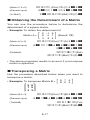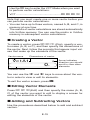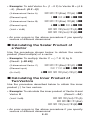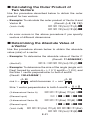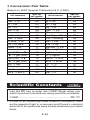
1
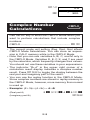
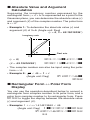
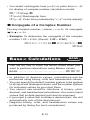
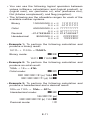
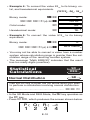
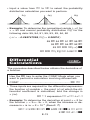
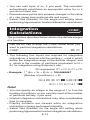
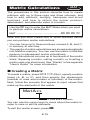
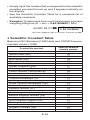
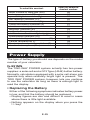
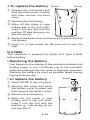
E fx-570MS fx-991MS User’s Guide 2 (Additional Functions) http://world.casio.com/edu_e/ CA 310030-001V08 Important! Please keep your manual and all information handy for future reference. CASIO ELECTRONICS CO., LTD. Unit 6, 1000 North Circular Road, London NW2 7JD, U.K. Contents Before getting started... .......................... 3 kModes .................................................................... 3 Mathematical Expression Calculations and Editing Functions ............................ 4 kReplay Copy .......................................................... 4 kCALC Memory ....................................................... 5 kSOLVE Function .................................................... 5 Scientific Function Calculations ............ 6 kInputting Engineering Symbols .............................. 6 Complex Number Calculations .............. 8 kAbsolute Value and Argument Calculation ............. 9 kRectangular Form ↔ Polar Form Display .............. 9 kConjugate of a Complex Number ........................ 10 Base-n Calculations .............................. 10 Statistical Calculations ......................... 12 Normal Distribution .................................................. 12 Differential Calculations ....................... 13 Integration Calculations ....................... 14 Matrix Calculations ............................... 15 kCreating a Matrix ................................................. kEditing the Elements of a Matrix .......................... kMatrix Addition, Subtraction, and Multiplication ... kCalculating the Scalar Product of a Matrix ........... kObtaining the Determinant of a Matrix ................. kTransposing a Matrix ........................................... kInverting a Matrix ................................................. kDetermining the Absolute Value of a Matrix ......... E-1 15 16 16 16 17 17 18 18 Vector Calculations ............................... 18 kCreating a Vector ................................................. kEditing Vector Elements ....................................... kAdding and Subtracting Vectors .......................... kCalculating the Scalar Product of a Vector .......... kCalculating the Inner Product of Two Vectors ...... kCalculating the Outer Product of Two Vectors ..... kDetermining the Absolute Value of a Vector ........ 19 19 19 20 20 21 21 Metric Conversions ............................... 22 Scientific Constants .............................. 23 Power Supply ........................................ 25 Specifications ........................................ 27 See the “fx-95MS/fx-100MS/fx-115MS/fx-570MS/fx-991MS User’s Guide” for details about the following items. Removing and Replacing the Calculator’s Cover Safety Precautions Handling Precautions Two-line Display Before getting started... (except for “Modes”) Basic Calculations Memory Calculations Scientific Function Calculations Equation Calculations Statistical Calculations Technical Information E-2 Before getting started... k Modes Before starting a calculation, you must first enter the correct mode as indicated in the table below. • The following table shows the modes and required operations for the fx-570MS and fx-991MS. fx-570MS and fx-991MS Modes To perform this type of calculation: Basic arithmetic calculations Complex number calculations Standard deviation Regression calculations Base-n calculations Solution of equations Matrix calculations Vector calculations Perform this key operation: To enter this mode: F1 COMP F2 CMPLX FF1 FF2 FF3 FFF1 FFF2 FFF3 SD REG BASE EQN MAT VCT • Pressing the F key more than three times displays additional setup screens. Setup screens are described where they are actually used to change the calculator setup. • In this manual, the name of the mode you need to enter in order to perform the calculations being described is indicated in the main title of each section. Example: Complex Number Calculations CMPLX Note! • To return the calculation mode and setup to the initial defaults shown below, press A B 2(Mode) =. Calculation Mode: Angle Unit: Exponential Display Format: Complex Number Display Format: Fraction Display Format: Decimal Point Character: E-3 COMP Deg Norm 1, Eng OFF a+b i a b/c Dot • Mode indicators appear in the upper part of the display, except for the BASE indicators, which appear in the exponent part of the display. • Engineering symbols are automatically turned off while the calculator is the BASE Mode. • You cannot make changes to the angle unit or other display format (Disp) settings while the calculator is in the BASE Mode. • The COMP, CMPLX, SD, and REG modes can be used in combination with the angle unit settings. • Be sure to check the current calculation mode (SD, REG, COMP, CMPLX) and angle unit setting (Deg, Rad, Gra) before beginning a calculation. Mathematical Expression Calculations and Editing Functions COMP Use the F key to enter the COMP Mode when you want to perform mathematical expression calculations or edit expressions. COMP ............................................................ F 1 k Replay Copy Replay copy lets you recall multiple expressions from replay so they are connected as a multi-statement on the screen. • Example: Replay memory contents: 1+1 2+2 3+3 4+4 5+5 6+6 Multi-statement: 4 + 4:5 + 5:6 + 6 Use [ and ] to display the expression 4 + 4. Press A [(COPY). • You can also edit expressions on the display and perform other multi-statement operations. For more details E-4 about using multi-statements, see “Multi-statements” in the separate “User’s Guide.” • Only the expressions in replay memory starting from the currently displayed expression and continuing to the last expression are copied. Anything before the displayed expression is not copied. COMP k CALC Memory CMPLX • CALC memory lets you temporarily store a mathematical expression that you need to perform a number of times using different values. Once you store an expression, you can recall it, input values for its variables, and calculate a result quickly and easily. • You can store a single mathematical expression, with up to 79 steps. Note that CALC memory can be used in the COMP Mode and CMPLX Mode only. • The variable input screen shows the values currently assigned to the variables. • Example: Calculate the result for Y = X2 + 3X – 12 when X = 7 (Result: 58 ), and when X = 8 (Result: 76 ). (Input the function.) p y p u p x K + 3 p x , 12 C (Input 7 for X? prompt.) 7= (Input 8 for X? prompt.) C8= (Store the expression.) • Note that the expression you store is cleared whenever you start another operation, change to another mode, or turn off the calculator. k SOLVE Function The SOLVE function lets you solve an expression using variable values you want, without the need to transform or simply the expression. • Example: C is the time it would take for an object thrown straight up with initial velocity A to reach height B. Use the formula below to calculate initial velocity A for a height of B = 14 meters and a time of C = 2 seconds. Gravitational acceleration is D = 9.8 m/s2. (Result: A = 16.8 ) E-5 B AC – (B?) (A?) (C?) (D?) (A?) 1 DC 2 2 p2pup1-pk, R1\2T-ph-pkK AI 14 = ] 2= 9l8= [[ AI • Since the SOLVE function uses Newton’s Method, certain initial values (assumed values) can make it impossible to obtain solutions. In this case, try inputting another value that you assume to be near the solution and perform the calculation again. • The SOLVE function may be unable to obtain a solution, even though a solution exists. • Due to certain idiosyncrasies of Newton’s method, solutions for the following types of functions tend to be difficult to calculate. Periodic functions (i.e. y = sin x) Functions whose graph produce sharp slopes (i.e. y = ex, y = 1/x) Discontinuous functions (i.e. y = x ) • If an expression does not include an equals sign (=), the SOLVE function produces a solution for expression = 0. Scientific Function Calculations COMP Use the F key to enter the COMP Mode when you want to perform scientific function calculations. COMP ............................................................ F 1 k Inputting Engineering Symbols COMP EQN CMPLX • Turning on engineering symbols makes it possible for you to use engineering symbols inside your calculations. E-6 • To turn engineering symbols on and off, press the F key a number of times until you reach the setup screen shown below. Disp 1 • Press 1. On the engineering symbol setting screen that appears, press the number key ( 1 or 2) that corresponds to the setting you want to use. 1(Eng ON): Engineering symbols on (indicated by “Eng” on the display) 2(Eng OFF): Engineering symbols off (no “Eng” indicator) • The following are the nine symbols that can be used when engineering symbols are turned on. To input this symbol: Perform this key operation: Ak k (kilo) M (Mega) AM G (Giga) Ag T (Tera) At m (milli) Am µ (micro) AN n (nano) An p (pico) Ap f (femto) Af Unit 103 106 109 1012 10–3 10–6 10–9 10–12 10–15 • For displayed values, the calculator selects the engineering symbol that makes the numeric part of the value fall within the range of 1 to 1000. • Engineering symbols cannot be used when inputting fractions. • Example: 9 10 = 0.9 m (milli) Eng F ..... 1(Disp) 1 9 \ 10 = 0. 9 ⫼1 m 900. When engineering symbols are turned on, even standard (non-engineering) calculation results are displayed using engineering symbols. E-7 AP J Complex Number Calculations 0.9 9 ⫼1 m 900. CMPLX Use the F key to enter the CMPLX Mode when you want to perform calculations that include complex numbers. CMPLX ........................................................... F 2 • The current angle unit setting (Deg, Rad, Gra) affects CMPLX Mode calculations. You can store an expression in CALC memory while in the CMPLX Mode. • Note that you can use variables A, B, C, and M only in the CMPLX Mode. Variables D, E, F, X, and Y are used by the calculator, which frequently changes their values. You should not use these variables in your expressions. • The indicator “R↔I” in the upper right corner of a calculation result display indicates a complex number result. Press A r to toggle the display between the real part and imaginary part of the result. • You can use the replay function in the CMPLX Mode. Since complex numbers are stored in replay memory in the CMPLX Mode, however, more memory than normal is used up. • Example: (23 i)(45 i) 68 i (Real part 6) 2+3i+4+5i= Ar (Imaginary part 8 i) E-8 k Absolute Value and Argument Calculation Supposing the imaginary number expressed by the rectangular form z = a + bi is represented as a point in the Gaussian plane, you can determine the absolute value (r) and argument ( ) of the complex number. The polar form is r⬔. • Example 1: To determine the absolute value (r) and argument () of 3+4i (Angle unit: Deg) (r = 5, = 53.13010235°) Imaginary axis Real axis (r 5 ) ( 53.13010235 °) AAR3+4iT= AaR3+4iT= • The complex number can also be input using the polar form r⬔. • Example 2: 2 ⬔ 45 1 i (Angle unit: Deg) L 2 A Q 45 = Ar k Rectangular Form ↔ Polar Form Display You can use the operation described below to convert a rectangular form complex number to its polar form, and a polar form complex number to its rectangular form. Press A r to toggle the display between the absolute value (r) and argument ( ). • Example: 1 i ↔ 1.414213562 ⬔ 45 1+iAY=Ar L 2 A Q 45 A Z = A r (Angle unit: Deg) E-9 • You select rectangular form (a+bi) or polar form (r⬔ ) for display of complex number calculation results. F... 1(Disp) r 1(a+bi):Rectangular form 2(r⬔): Polar form (indicated by “r⬔ ” on the display) k Conjugate of a Complex Number For any complex number z where z = a+bi, its conjugate (z) is z = a – bi. • Example: To determine the conjugate of the complex number 1.23 + 2.34i (Result: 1.23 – 2.34 i ) A S R 1 l 23 + 2 l 34 i T = Ar Base-n Calculations BASE Use the F key to enter the BASE Mode when you want to perform calculations using Base-n values. BASE ........................................................ F F 3 • In addition to decimal values, calculations can be performed using binary, octal and hexadecimal values. • You can specify the default number system to be applied to all input and displayed values, and the number system for individual values as you input them. • You cannot use scientific functions in binary, octal, decimal, and hexadecimal calculations. You cannot input values that include decimal part and an exponent. • If you input a value that includes a decimal part, the unit automatically cuts off the decimal part. • Negative binary, octal, and hexadecimal values are produced by taking the two’s complement. E-10 • You can use the following logical operators between values in Base-n calculations: and (logical product), or (logical sum), xor (exclusive or), xnor (exclusive nor), Not (bitwise complement), and Neg (negation). • The following are the allowable ranges for each of the available number systems. 1000000000 ⬉ x ⬉ 1111111111 0 ⬉ x ⬉ 0111111111 Octal 4000000000 ⬉ x ⬉ 7777777777 0 ⬉ x ⬉ 3777777777 Decimal –2147483648 ⬉ x ⬉ 2147483647 Hexadecimal 80000000 ⬉ x ⬉ FFFFFFFF 0⬉x⬉ 7FFFFFFF Binary • Example 1: To perform the following calculation and produce a binary result: 101112 110102 1100012 tb Binary mode: 0. b 10111 + 11010 = • Example 2: To perform the following calculation and produce an octal result: 76548 ÷ 1210 5168 Octal mode: to 0. o l l l 4 (o) 7654 \ l l l 1 (d) 12 = • Example 3: To perform the following calculation and produce a hexadecimal and a decimal result: 12016 or 11012 12d16 30110 Hexadecimal mode: th 120 l 2 (or) l l l 3 (b) 1101 = Decimal mode: K E-11 0. H • Example 4: To convert the value 2210 to its binary, octal, and hexadecimal equivalents. (101102 , 268 , 1616 ) tb 0. b l l l 1(d) 22 = 10110. b Octal mode: o 26. o Hexadecimal mode: h 16. H Binary mode: • Example 5: To convert the value 51310 to its binary equivalent. tb 0. l l l 1(d) 513 = Ma t h ERROR Binary mode: b b • You may not be able to convert a value from a number system whose calculation range is greater than the calculation range of the resulting number system. • The message “Math ERROR” indicates that the result has too many digits (overflow). SD Statistical Calculations REG SD Normal Distribution Use the F key to enter the SD Mode when you want to perform a calculation involving normal distribution. SD ........................................................... F F 1 • In the SD Mode and REG Mode, the | key operates as the S key. • Press A D, which produces the screen shown below. P ( Q ( R ( →t 1 2 3 E-12 4 • Input a value from 1 to 4 to select the probability distribution calculation you want to perform. P(t) Q(t) R(t) • Example: To determine the normalized variate (→ t) for x = 53 and normal probability distribution P(t) for the following data: 55, 54, 51, 55, 53, 53, 54, 52 (→t = 0.284747398, P(t) = 0.38974 ) 55 S 54 S 51 S 55 S 53 S S 54 S 52 S 53 A D 4(→t) = A D 1( P( ) D 0.28 F = Differential Calculations COMP The procedure described below obtains the derivative of a function. Use the F key to enter the COMP Mode when you want to perform a calculation involving differentials. COMP ............................................................ F 1 • Three inputs are required for the differential expression: the function of variable x, the point (a) at which the differential coefficient is calculated, and the change in x (∆x). A J expression P a P ∆x T • Example: To determine the derivative at point x = 2 for the function y = 3x2– 5x + 2, when the increase or decrease in x is ∆x = 2 × 10⁻⁴ (Result: 7 ) AJ3pxK,5px+2P2P 2eD4T= E-13 • You can omit input of ∆x, if you want. The calculator automatically substitutes an appropriate value for ∆x if you do not input one. • Discontinuous points and extreme changes in the value of x can cause inaccurate results and errors. • Select Rad (Radian) for the angle unit setting when performing trigonometric function differential calculations. Integration Calculations COMP The procedure described below obtains the definite integral of a function. Use the F key to enter the COMP Mode when you want to perform integration calculations. COMP ............................................................ F 1 • The following four inputs are required for integration calculations: a function with the variable x; a and b, which define the integration range of the definite integral; and n, which is the number of partitions (equivalent to N = 2n) for integration using Simpson’s rule. d expression P a P b P n F • Example: ∫ 15 (2x2 + 3x + 8) dx = 150.6666667 (Number of partitions n = 6) d2pxK+3px+ 8P1P5P6T= Note! • You can specify an integer in the range of 1 to 9 as the number of partitions, or you can skip input of the number of partitions entirely, if you want. • Internal integration calculations may take considerable time to complete. • Display contents are cleared while an integration calculation is being performed internally. • Select Rad (Radian) for the angle unit setting when performing trigonometric function integration calculations. E-14 Matrix Calculations MAT The procedures in this section describe how to create matrices with up to three rows and three columns, and how to add, subtract, multiply, transpose and invert matrices, and how to obtain the scalar product, determinant, and absolute value of a matrix. Use the F key to enter the MAT Mode when you want to perform matrix calculations. MAT ..................................................... F F F 2 Note that you must create one or more matrices before you can perform matrix calculations. • You can have up to three matrices, named A, B, and C, in memory at one time. • The results of matrix calculations are stored automatically into MatAns memory. You can use the matrix in MatAns memory in subsequent matrix calculations. • Matrix calculations can use up to two levels of the matrix stack. Squaring a matrix, cubing a matrix, or inverting a matrix uses one stack level. See “Stacks” in the separate “User’s Guide” for more information. k Creating a Matrix To create a matrix, press A j 1(Dim), specify a matrix name (A, B, or C), and then specify the dimensions (number of rows and number of columns) of the matrix. Next, follow the prompts that appear to input values that make up the elements of the matrix. Ma t A 2 3 2 rows and 3 columns You can use the cursor keys to move about the matrix in order to view or edit its elements. To exit the matrix screen, press t. E-15 k Editing the Elements of a Matrix Press A j 2(Edit) and then specify the name (A, B, or C) of the matrix you want to edit to display a screen for editing the elements of the matrix. k Matrix Addition, Subtraction, and Multiplication Use the procedures described below to add, subtract, and multiply matrices. 1 2 • Example: To multiply Matrix A = 4 0 by –2 5 [ ] [ Matrix B = –1 0 3 2 –4 1 (Matrix A 32) (Element input) 1 (Matrix B 23) ] ([ 3 –8 5 –4 0 12 12 –20 –1 ]) A j 1(Dim) 1(A) 3 = 2 = =2=4=0=D2=5=t A j 1(Dim) 2(B) 2 = 3 = (Element input) D1=0=3=2=D4=1=t (MatAMatB) A j 3(Mat) 1(A) A j 3(Mat) 2(B) = • An error occurs if you try to add, subtract matrices whose dimensions are different from each other, or multiply a matrix whose number of columns is different from that of the matrix by which you are multiplying it. k Calculating the Scalar Product of a Matrix Use the procedure shown below to obtain the scalar product (fixed multiple) of a matrix. • Example: Multiply Matrix C = E-16 [ 2 –1 –5 3 ] by 3. ([ ]) 6 –3 –15 9 (Matrix C 22) A j 1 (Dim) 3(C) 2 = 2 = (Element input) 2=D1=D5=3=t 3 - A j 3(Mat) 3(C) = (3MatC) k Obtaining the Determinant of a Matrix You can use the procedure below to determine the determinant of a square matrix. • Example: To obtain the determinant of 2 –1 6 Matrix A = 5 0 1 (Result: 73 ) 3 2 4 [ A j 1(Dim) 1(A) 3 = 3 = (Matrix A 33) (Element input) ] 2=D1=6=5=0=1= 3=2=4=t A j r 1(Det) A j 3(Mat) 1(A) = (DetMatA) • The above procedure results in an error if a non-square matrix is specified. k Transposing a Matrix Use the procedure described below when you want to transpose a matrix. 5 7 4 • Example: To transpose Matrix B = 8 9 3 5 8 7 9 4 3 [ ([ ]) ] (Matrix B 23) A j 1(Dim) 2(B) 2 = 3 = (Element input) 5=7=4=8=9=3=t (TrnMatB) A j r 2(Trn) A j 3(Mat) 2(B) = E-17 k Inverting a Matrix You can use the procedure below to invert a square matrix. • Example: To invert Matrix C = ([ –0.4 1 –0.8 –1.5 0.5 –1.5 –0.8 0 –0.6 ]) [ –3 6 –11 3 –4 6 4 –8 13 ] (Matrix C 33) A j 1(Dim) 3(C) 3 = 3 = (Element input) D 3 = 6 = D 11 = 3 = D 4 = 6 = 4 = D 8 = 13 = t A j 3(Mat) 3(C) a = (MatC –1) • The above procedure results in an error if a non-square matrix or a matrix for which there is no inverse (determinant = 0) is specified. k Determining the Absolute Value of a Matrix You can use the procedure described below to determine the absolute value of a matrix. • Example: To determine the absolute value of the matrix produced by the inversion in the previous example. ([ (AbsMatAns) 0.4 1 0.8 1.5 0.5 1.5 0.8 0 0.6 ]) A A A j 3(Mat) 4(Ans) = Vector Calculations VCT The procedures in this section describe how to create a vector with a dimension up to three, and how to add, subtract, and multiply vectors, and how to obtain the scalar product, inner product, outer product, and absolute value of a vector. You can have up to three vectors in memory at one time. E-18 Use the F key to enter the VCT Mode when you want to perform vector calculations. VCT ..................................................... F F F 3 Note that you must create one or more vector before you can perform vector calculations. • You can have up to three vectors, named A, B, and C, in memory at one time. • The results of vector calculations are stored automatically into VctAns memory. You can use the matrix in VctAns memory in subsequent vector calculations. k Creating a Vector To create a vector, press A z 1 (Dim), specify a vector name (A, B, or C), and then specify the dimensions of the vector. Next, follow the prompts that appear input values that make up the elements of the vector. Vector name Vc t A1 Dimensions of vector 0. Arrow indicates direction you should scroll to view other elements. Element value You can use the e and r keys to move about the vector in order to view or edit its elements. To exit the vector screen, press t. k Editing Vector Elements Press A z 2(Edit) and then specify the name (A, B, C) of the vector you want to edit to display a screen for editing the elements of the vector. k Adding and Subtracting Vectors Use the procedures described below to add and subtract vectors. E-19 • Example: To add Vector A = (1 –2 3) to Vector B = (4 5 –6). (Result: (5 3 –3) ) (3-dimensional Vector A) (Element input) (3-dimensional Vector B) (Element input) (VctA + VctB) A z 1(Dim) 1(A) 3 = 1=D2=3=t A z 1(Dim) 2(B) 3 = 4=5=D6=t A z 3(Vct) 1(A) + A z 3(Vct) 2(B) = • An error occurs in the above procedure if you specify vectors of different dimensions. k Calculating the Scalar Product of a Vector Use the procedure shown below to obtain the scalar product (fixed multiple) of a vector. • Example: To multiply Vector C = (–7.8 9) by 5. (Result: (–39 45) ) (2-dimensional Vector C) (Element input) (5VctC) A z 1(Dim) 3(C) 2 = D7l8=9=t 5 - A z 3(Vct) 3(C) = k Calculating the Inner Product of Two Vectors Use the procedure described below to obtain the inner product ( ) for two vectors. ⋅ • Example: To calculate the inner product of Vector A and Vector B (Result: – 24 ) ⋅ (VctA VctB) A z 3(Vct) 1(A) A z r 1(Dot) A z 3(Vct) 2(B) = • An error occurs in the above procedure if you specify vectors of different dimensions. E-20 k Calculating the Outer Product of Two Vectors Use the procedure described below to obtain the outer product for two vectors. • Example: To calculate the outer product of Vector A and Vector B (Result: (–3, 18, 13) ) A z 3(Vct) 1(A) A z 3(Vct) 2(B) = (VctAVctB) • An error occurs in the above procedure if you specify vectors of different dimensions. k Determining the Absolute Value of a Vector Use the procedure shown below to obtain the absolute value (size) of a vector. • Example: To determine the absolute value of Vector C (Result: 11.90965994 ) A A A z 3(Vct) 3(C) = (AbsVctC) • Example: To determine the size of the angle (angle unit: Deg) formed by vectors A = (–1 0 1) and B = (1 2 0), and the size 1 vector perpendicular to both A and B. (Result: 108.4349488 °) cos (A ⋅B) (A B) , which becomes cos–1 ⋅ A B A B Size 1 vector perpendicular to both A and B (3-dimensional Vector A) A z 1(Dim) 1(A) 3 = D1=0=1=t (Element input) (3-dimensional Vector B) A z 1(Dim) 2(B) 3 = 1=2=0=t (Element input) ⋅ (VctA VctB) AB AB A z 3(Vct) 1(A) A z r 1(Dot) A z 3(Vct) 2(B) = E-21 (Ans(AbsVctAAbsVctB)) \ R A A A z 3(Vct) 1(A) - A A A z 3(Vct) 2(B) T = (cos–1Ans) (Result: 108.4349488 °) AVg= (VctAVctB) A z 3(Vct) 1(A) A z 3(Vct) 2(B) = (AbsVctAns) A A A z 3(Vct) 4(Ans) = (VctAnsAns) (Result: (– 0.666666666 0.333333333 – 0.666666666) ) A z 3(Vct) 4(Ans) \ g = Metric Conversions COMP Use the F key to enter the COMP Mode when you want to perform metric conversions. COMP ............................................................ F 1 • A total of 20 different conversion pairs are built-in to provide quick and easy conversion to and from metric units. • See the Conversion Pair Table for a complete list of available conversion pairs. • When inputting a negative value, enclose it within parentheses R , T . • Example: To convert –31 degrees Celsius to Fahrenheit R D 31 T A c 38 = ( –3 1 ) °C °F – 23.8 38 is the Celsius-to-Fahrenheit conversion pair number. E-22 u Conversion Pair Table Based on NIST Special Publication 811 (1995). To perform this conversion: Input this pair number: To perform this conversion: Input this pair number: in → cm cm → in ft → m m → ft yd → m m → yd mile → km km → mile n mile → m m → n mile acre → m2 m2 → acre r gal (US) →r r → gal (US) r gal (UK) →r r → gal (UK) pc → km km → pc km/h → m/s m/s → km/h 01 02 03 04 05 06 07 08 09 10 11 12 13 14 15 16 17 18 19 20 oz → g g → oz lb → kg kg → lb atm → Pa Pa → atm mmHg → Pa Pa → mmHg hp → kW kW → hp kgf/cm2→ Pa Pa → kgf/cm2 kgf•m → J J → kgf•m lbf/in2 → kPa kPa → lbf/in2 °F → °C C → °F J → cal cal → J 21 22 23 24 25 26 27 28 29 30 31 32 33 34 35 36 37 38 39 40 Scientific Constants COMP Use the F key to enter the COMP Mode when you want to perform calculations using scientific constants. COMP ............................................................ F 1 • A total of 40 commonly-used scientific constants, such as the speed of light in a vacuum and Planck’s constant are built-in for quick and easy lookup whenever you need them. E-23 • Simply input the number that corresponds to the scientific constant you want to look up and it appears instantly on the display. • See the Scientific Constant Table for a complete list of available constants. • Example: To determine how much total energy a person weighing 65kg has (E = mc2 = 5.841908662 × 10¹⁸ ) 65 L 28 K = 65 Co 2 5.841908662 18 28 is the “speed of light in vacuum” constant number. u Scientific Constant Table Based on ISO Standard (1992) data and CODATA recommended values (1998). To select this constant: proton mass (mp) neutron mass (mn) electron mass (me) muon mass (mµ) Bohr radius (a0) Planck constant (h) nuclear magneton (µN) Bohr magneton (µ B) Planck constant, rationalized ( ) fine-structure constant (α) classical electron radius (re) Compton wavelength (λ c) proton gyromagnetic ratio (γ p) proton Compton wavelength (λ cp) neutron Compton wavelength (λ cn) Rydberg constant (R∞) atomic mass unit (u) proton magnetic moment (µ p) electron magnetic moment (µ e) neutron magnetic moment (µ n) muon magnetic moment (µ µ ) Faraday constant (F) elementary charge (e) Avogadro constant (NA) Boltzmann constant (k) E-24 Input this scientific constant number: 01 02 03 04 05 06 07 08 09 10 11 12 13 14 15 16 17 18 19 20 21 22 23 24 25 To select this constant: molar volume of ideal gas (Vm) molar gas constant (R) speed of light in vacuum (C 0) first radiation constant (C 1) second radiation constant (C 2) Stefan-Boltzmann constant (σ) electric constant (ε 0) magnetic constant (µ 0) magnetic flux quantum (φ 0) standard acceleration of gravity (g) conductance quantum (G 0) characteristic impedance of vacuum (Z 0) Celsius temperature (t) Newtonian constant of gravitation (G) standard atmosphere (atm) Input this scientific constant number: 26 27 28 29 30 31 32 33 34 35 36 37 38 39 40 Power Supply The type of battery you should use depends on the model number of your calculator. fx-991MS The TWO WAY POWER system actually has two power supplies: a solar cell and a G13 Type (LR44) button battery. Normally, calculators equipped with a solar cell alone can operate only when relatively bright light is present. The TWO WAY POWER system, however, lets you continue to use the calculator as long as there is enough light to read the display. • Replacing the Battery Either of the following symptoms indicates battery power is low, and that the battery should be replaced. • Display figures are dim and difficult to read in areas where there is little light available. • Nothing appears on the display when you press the 5 key. E-25 u To replace the battery Screw Screw 1 Remove the five screws that hold the back cover in place and then remove the back cover. 2 Remove the old battery. 3 Wipe off the sides of new battery with a dry, soft cloth. Load it into the unit with the positive k side facing up (so you can see it). 4 Replace the back cover and secure it in place with the five screws. 5 Press 5 to turn power on. Be sure not to skip this step. fx-570MS This calculator is powered by single G13 Type (LR44) button battery. • Replacing the Battery Dim figures on the display of the calculator indicate that battery power is low. Continued use of the calculator when the battery is low can result in improper operation. Replace the battery as soon as possible when display figures become dim. • To replace the battery 1 Press A i to turn off power. 2 Remove the screw that holds the battery cover in place and then remove the battery cover. 3 Remove the old battery. 4 Wipe off the sides of new battery with a dry, soft cloth. Load it into the unit with the positive k side facing up (so you can see it). E-26 Screw 5 Replace the battery cover and secure it in place with the screw. 6 Press 5 to turn power on. Auto Power Off Calculator power automatically turns off if you do not perform any operation for about six minutes. When this happens, press 5 to turn power back on. Specifications Power Supply: fx-570MS: Single G13 Type button battery (LR44) fx-991MS: Solar cell and a single G13 Type button battery (LR44) Battery Life: fx-570MS: Approximately 9,000 hours continuous display of flashing cursor. Approximately 3 years when left with power turned off. fx-991MS: Approximately 3 years (1 hour use per day). Dimensions: 12.7 (H) 78 (W) 154.5 (D) mm 1/2⬙ (H) 31/16⬙ (W) 61/16⬙ (D) Weight: 105 g (3.7 oz) including battery Power Consumption: 0.0002 W Operating Temperature: 0°C to 40°C (32°F to 104°F) E-27 CASIO COMPUTER CO., LTD. 6-2, Hon-machi 1-chome Shibuya-ku, Tokyo 151-8543, Japan SA0403-F Printed in China