1
ENGLISH
BASIC OPERATIONS –AUDIO CD–
ADVANCED OPERATIONS –AUDIO CD–
PLAYING A SPECIFIC PART
OF A SPECIFIC TRACK
REPEAT PLAY (PLAYING THE
SAME TRACKS REPEATEDLY)
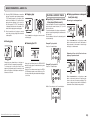
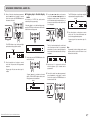
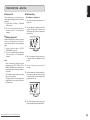
7 Searching a specific part of a
track (search)
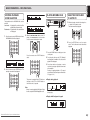
7 Playing all tracks repeatedly (alltrack repeat)
While listening to a track being played, it is possible
to search a specific part of that track by a forward or
backward search.
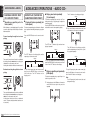
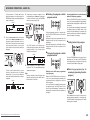
This function repeatedly plays all the tracks. Repeat
play is possible even during random play or program
play.
Forward searching through the track now
playing
Press the REPEAT button on the remote control
unit.
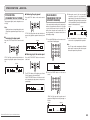
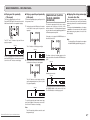
7 Playing one track repeatedly
(1-track repeat)
The “A-” indicator on the display now lights.
Light up
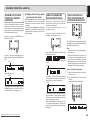
This function repeatedly plays one track only. Even
during random play or program play, it repeats the
track being played.
Press the REPEAT button on the remote control unit
twice while the track to be repeated is playing.
The “RPT” and “1” indicators light, and track now
playing is repeated.
Light up
TTL
The “RPT” indicator on the display lights, and the
repeat play of all the tracks starts.
The search (forward search) mode is established
by holding down the ¡/¢ button on the player
or ¡ button on the remote control unit.
Holding down the button initiates a forward search.
TTL
TRK
3 4
5 6
RPT
7 8
TIME
Downloaded From Disc-Player.com Marantz Manuals
14
5 6
7 8
TIME
2.
3 4
5 6
A–
7 8
TIME
9 10 11 12 13 14 15 16 17 18
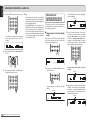
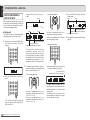
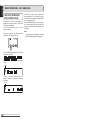
Press the A-B button on the remote control unit
at the end point of the part to be repeated.
The “A-B” indicator on the display now lights,
and the designated part (from point A to point
B) is played repeatedly.
Light up
9 10 11 12 13 14 15 16 17 18
To stop 1-track repeat play and resume normal play,
press the REPEAT button on the remote control unit
to turn off the “RPT” indicator on the display.
TTL
1 2
TRK
3 4
5 6
A– B
7 8
TIME
9 10 11 12 13 14 15 16 17 18
9 10 11 12 13 14 15 16 17 18
To stop all-track repeat play and resume normal
play, press the REPEAT button on the remote
control unit twice. The “RPT” indicator on the
display goes off.
7 Playing a specific part repeatedly
(A-B repeat)
To stop A-B repeat play and resume normal play,
press the A-B button on the remote control unit to
turn off the “A-B” indicator on the display.
This function repeatedly plays a specific part of a
track that you want to hear.
Note:
1.
The search (backward search) mode is established
by holding down the 4/1 button on the player or
1 button on the remote control unit.
Holding down the button initiates a backward
search. (Returns during backward searches are
not constant.)
3 4
RPT 1
1 2
TRK
Light up
1 2
Backward searching through the track now
playing
1 2
TRK
TTL
During play, press the A-B button on the remote
control unit at the start point of the part to be
repeated.
The A-B repeat play function cannot be used
during random play.