1
uTV™ guide
Table of contents
Your uTV™ ......................................................................1
Overview of your uTV™..................................................2
Package contents ...........................................................3
uTV™ description...........................................................4
Installation ......................................................................6
Daily usage of the Unitron uTV™ .................................15
Warnings.......................................................................23
Troubleshooting guide..................................................26
Declaration of Conformity ............................................29
Your uTV™
Hearing healthcare professional: _____________________
_________________________________________________
Telephone: _______________________________________
Serial number of uTV: ______________________________
Warranty: ________________________________________
Date of purchase: __________________________________
1
Overview of your uTV™
Congratulations on choosing the Unitron uTV. It
expands the way you hear your world by wirelessly
connecting your hearing instruments to your TV and
other entertainment or communication devices. All
sounds are transmitted in stereo sound, for full
enjoyment of movies or other TV programs. Your
hearing healthcare professional can program your
hearing instruments so you can still hear conversation
in the room while watching TV or listening to music.
What’s more, with uDirect you can switch to a phone
call or have a conversation with a simple touch of a
button. Please read this user guide to discover how
easy it is to benefit from all the features of your uTV.
For further information, please visit the Unitron
website www.unitron.com.
2
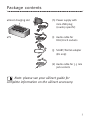
Package contents
uDirect charging slot
(h) Power supply with
mini-USB plug
(country specific)
uTV
(i) Audio cable for
RCA/Cinch sockets
(j) SCART/Peritel adapter
(EU only)
(k) Audio cable for 3.5 mm
jack sockets
Note: please see your uDirect guide for
complete information on the uDirect accessory.
3
uTV™ description
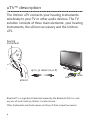
The Unitron uTV connects your hearing instruments
wirelessly to your TV or other audio devices. The TV
solution consists of three main elements: your hearing
instruments, the uDirect accessory and the Unitron
uTV.
hearing
instrument
up to 30 meters (100 ft)
cable
uTV
uDirect
Bluetooth® is a registered trademark owned by the Bluetooth SIG, Inc. and
any use of such marks by Unitron is under license.
Other trademarks and trade names are those of their respective owners.
4
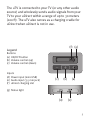
The uTV is connected to your TV (or any other audio
source) and wirelessly sends audio signals from your
TV to your uDirect within a range of up to 30 meters
(100 ft). The uTV also serves as a charging cradle for
uDirect when uDirect is not in use.
(f) (g)
Legend
Buttons
(a) ON/OFF button
(b) Volume control (up)
(c) Volume control (down)
Inputs
(d) Power input (mini-USB)
(e) Audio input (3.5 mm jack)
(f) uDirect charging slot
(c)
(b)
(a)
(g) Status light
(d)
(e)
5
Installation
Step 1: Connecting the uTV
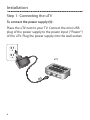
To connect the power supply (h):
Place the uTV next to your TV. Connect the mini-USB
plug of the power supply to the power input (“Power”)
of the uTV. Plug the power supply into the wall socket.
uTV
6
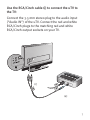
Use the RCA/Cinch cable (i) to connect the uTV to
the TV:
Connect the 3.5 mm stereo plug to the audio input
(“Audio IN”) of the uTV. Connect the red and white
RCA/Cinch plugs to the matching red and white
RCA/Cinch output sockets on your TV.
(i)
(e)
7
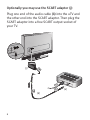
Optionally you may use the SCART adaptor (j):
Plug one end of the audio cable (k) into the uTV and
the other end into the SCART adaptor. Then plug the
SCART adaptor into a free SCART output socket of
your TV.
(j)
(e)
(k)
8
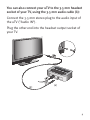
You can also connect your uTV to the 3.5 mm headset
socket of your TV, using the 3.5 mm audio cable (k):
Connect the 3.5 mm stereo plug to the audio input of
the uTV (“Audio IN”).
Plug the other end into the headset output socket of
your TV.
(k)
(e)
9
When connecting the uTV to the 3.5 mm
headset socket of your TV you are able to adjust the
volume via your TV remote control.
Many TVs will switch off their loudspeakers
when plugging the 3.5 mm jack into the headset
socket – the TV will not be audible for other people.
In such a case use the Cinch/RCA or SCART socket as
described above. For further information on volume
adjustment please refer to step 6 below. The Unitron
uTV can also be connected to any other audio source
such as an MP3 player, PC or home sound system
using the stereo plug cable (k).
10
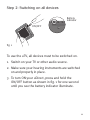
Step 2: Switching on all devices
Battery
indicator
ON/OFF
fig. 1
To use the uTV, all devices must to be switched on.
1. Switch on your TV or other audio source.
2. Make sure your hearing instruments are switched
on and properly in place.
3. To turn ON your uDirect, press and hold the
ON/OFF button as shown in fig. 1 for one second
until you see the battery indicator illuminate.
11
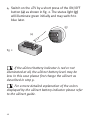
4. Switch on the uTV by a short press of the ON/OFF
button (a) as shown in fig. 2. The status light (g)
will illuminate green initially and may switch to
blue later.
(g)
(a)
fig. 2
If the uDirect battery indicator is red or not
illuminated at all, the uDirect battery level may be
low. In this case please first charge the uDirect as
described in step 9.
For a more detailed explanation of the colors
displayed by the uDirect battery indicator please refer
to the uDirect guide.
12
Step 3: Pairing uDirect and uTV
Before starting to use the uTV, it must be paired with
your uDirect. The pairing procedure controls which
Bluetooth devices are permitted to communicate with
each other.
Make sure both devices are switched on as described
in step 2.
You do not need to insert uDirect into the uTV
charging slot (f) during pairing.
Pairing needs to be completed only once for
each device you wish to use with your uDirect.
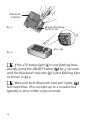
• Initiate the pairing process on your uDirect by
pressing the Bluetooth pairing button for 2
seconds as shown in fig. 3 until the Bluetooth
indicator is fast flashing blue. Your uDirect will
remain in the pairing mode for two minutes or until
the pairing is completed.
13
Bluetooth
indicator
fig. 3
Bluetooth pairing
button 2 sec
(g)
(a) 5 sec
fig. 4
If the uTV status light (g) is not flashing blue
already, press the ON/OFF button ( a ) for 5 seconds
until the Bluetooth indicator (g) is fast flashing blue
as shown in fig 4.
Wait until both Bluetooth indicator lights, ( g )
turn solid blue. This can take up to 2 minutes but
typically is done within a few seconds.
14
Daily usage of the Unitron uTV™
First switch on devices as described in step 2.
Step 4: Wearing your uDirect
During operation uDirect must be worn around the
neck:
• To place uDirect around the neck, you may need to
unplug the neckloop plug as shown in fig. 5.
fig. 5
neckloop
plug
fig. 6
• Plug in the neckloop as shown in fig. 6. This will
activate the built-in antenna and is necessary for
the uDirect to communicate with your hearing
instruments.
15
• After switching uDirect ON, it automatically
recognizes your Unitron wireless hearing instruments.
In cases of interference with other hearing
instruments, please contact your hearing healthcare
professional.
Step 5: Listening to your TV
You will hear the sound of your TV directly in your
hearing instruments.
If you cannot hear the sound of your TV through
uTV please repeat steps 1 to 4.
The uTV system supports Bluetooth operation up to a
range of 30 m (100 ft). Line-of-sight between your
uDirect and the uTV is not required. However,
interference in the environment by walls or furniture
may reduce the operating range.
If the uDirect moves out of range of the uTV the wireless
audio transmission will be terminated. If uDirect is then
moved back into range of the uTV, it will automatically
resume streaming to your hearing instruments.
It may take up to 10 seconds until the streaming
resumes. Both the Bluetooth streaming light indicators
on the uDirect and on the uTV (g) should be solid blue
during streaming.
16
If the uTV status light (g)
• is green, make sure TV sound and uDirect are
switched on.
• blinks blue, you are in paused mode. Press the
uDirect main button (b) to resume streaming.
Step 6: Adjusting the volume of the TV signal
First, set the volume of the TV speakers at the level to
suit other viewers.
• If the uTV is connected to your TV with the
RCA/Cinch cable (i) or the SCART adaptor (j), adjust
the volume on the uTV by pressing the +/– volume
control (b) and (c). Depending on the model of your
hearing instruments you may also control the
volume directly from your hearing instruments.
(c)
(b)
(c)
(b)
• If your uTV is connected to the headphone socket
of your TV, you may also use your TV remote
17
control to adjust volume via the TV directly. Please
refer to the TV user guide for more details on
setting the TV volume.
If your TV is connected to a satellite receiver or a
cable box, make sure the volumes of these additional
devices are set to a medium level for best audio
quality results.
Step 7: Pause and phone calls during
operation
Access button
To pause the audio transmission from your TV, press
the uDirect access button.
During pause:
• The Bluetooth indicators on both the uDirect and
uTV (g) will blink blue on both devices.
• Your hearing instruments will switch back to the
most recent hearing program.
18
To resume hearing your TV, press the uDirect access
button again.
If you have paired uDirect with your mobile phone,
you can still receive phone calls, even when watching
TV via uTV. In the case of an incoming call, uDirect
automatically stops transmitting the audio signal from
your TV and sends the signal from your mobile phone
to your hearing instruments.
Access button
To pick up a call, press the uDirect access button.
To resume hearing your TV, press the access button
again and the phone call will be ended.
To refuse a call, press and hold the uDirect access
button for 2 seconds.
Please refer to the uDirect guide for pairing
instructions of uDirect with the mobile phone or other
entertainment and communication devices such as
radios or personal computers.
19
Step 8: Switching off uTV and uDirect
To switch off the devices:
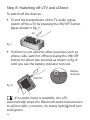
• To end the transmission of the TV audio signal,
switch off the uTV by pressing the ON/OFF button
(a) as shown in fig. 7.
(a)
fig. 7
• If uDirect is not used for other purposes such as
phone calls, switch it off by pressing the ON/OFF
button for about two seconds as shown in fig. 8
until you see the battery indicator turn red.
Battery
indicator
ON/OFF
fig. 8
If no audio input is available, the uTV
automatically stops the Bluetooth audio transmission
to uDirect after 3 minutes. Its status light (g) will turn
solid green.
20
Step 9: Charging uDirect™
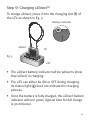
To charge uDirect, place it into the charging slot (f) of
the uTV as shown in fig. 9.
Battery indicator
uDirect
(f)
fig. 9
uTV
• The uDirect battery indicator will be yellow to show
that uDirect is charging.
• The uTV can either be ON or OFF during charging.
Its status light (g) does not indicate the charging
process.
• Once the battery is fully charged, the uDirect battery
indicator will turn green (typical time for full charge
is 90 minutes).
21
• We recommend that the uDirect is switched off for
charging.
When charging the uDirect for the first time,
leave it charging for at least three hours, even if the
battery indicator turns green earlier. After the initial
charging, you may leave uDirect in the uDirect slot on
the uTV for an unlimited time.
For safety reasons, recharge the battery only
with chargers supplied by Unitron. If other chargers
are used they must be USB certified (5.0 VDC / 500
mA).
22
Warnings
Please carefully read the warnings section in the
uDirect guide.
Keep this device out of reach of children under 3
years.
Interference with medical devices. These Unitron
devices use low-power, digitally coded
transmission to communicate to your hearing
instruments. Although unlikely, interference with
medical devices such as pacemakers is possible.
Therefore persons using medical devices such as
pacemakers are not permitted to use this device.
Use only hearing instruments that have been
specially programmed for you by your hearing
healthcare professional.
Changes or modifications to any of the devices that
were not explicitly approved by Unitron are not
permitted.
External devices may only be connected if they
have been tested in accordance with corresponding
IECXXXXX standards. Only use accessories
approved by Unitron.
23
Information on product safety
Turn off the uTV when not in use.
Always plug in the uDirect neckloop and wear it
around the neck when transmitting signals to your
hearing instruments.
Protect the device connectors, plugs, charging slot
and power supply from dirt and debris.
Protect all devices from excessive moisture
(bathing or swimming areas) and heat sources
(radiator, TV top). Protect devices from excessive
shock and vibration.
Clean devices using a damp cloth. Never use
household cleaning products (washing powder,
soap, etc.) or alcohol to clean them. Never use a
microwave or other heating devices to dry any of
the devices.
The digitally-coded, inductive transmission
technology used in these devices is extremely
reliable and experiences virtually no interference
from other devices. It should be noted, however,
that when operating the system near computer
equipment, larger electronic installation or other
24
strong electromagnetic fields, it may be necessary
to be at least 60 cm (24”) away from the interfering
device to ensure proper operation.
X-ray radiation, CT or MRI scans may destroy or
adversely affect the correct functioning of the
devices.
Do not use these devices in areas where electronic
equipment is prohibited.
Keep the uTV at least 30 cm (1 ft) from the body
during operation.
25
Troubleshooting guide
Most probable cause
Remedy
None of the indicator lights on uDirect and uTV (g) turned solid blue
• Devices are not turned on
• uDirect and uTV are not
paired
• Switch on devices as shown in step 2
• Repeat step 3
I see a rapidly flashing blue indicator light (g) on the uTV
• uTV is in Bluetooth pairing
mode
• Go to step 3
Only one of the blue indicator lights turned solid blue
• One of the devices is
connected to another
Bluetooth device
• Make sure to switch off all other
Bluetooth devices except uDirect and
uTV
Both indicator lights on uDirect and uTV (g) are solid blue but I cannot
hear the TV
• uDirect is out of range of
the hearing instruments
• uDirect is not correctly
programmed for your
heairng instruments
26
• Wear uDirect around the neck and
correctly secure the neckloop
• Turn all devices OFF and ON again.
Ask your hearing healthcare
professional to regroup your uDirect
and hearing instruments
Most probable cause
Remedy
I cannot hear the sound from the TV via uDirect
• The devices are switched off • Make sure all devices are switched on.
See step 2
• The cables are not plugged • Repeat step 1
in correctly
• There is no audio signal on • Make sure TV is not muted.
Select a medium volume level on the
uTV. The light indicator (g)
TV set
is green
Make sure the audio cable uses an
“OUT” port
• Indicated by blue blinking status lights
• uTV is in pause mode
on both devices. A short press of the
uDirect access button will un-pause
and resume
• Bring devices closer to each other.
• The distance between
30 meters (100 ft) is the maximum in
uDirect and the uTV is
free field
too great
To avoid streaming interruptions, make
sure you wear uDirect correctly and
keep the Bluetooth device within the
operating range
27
Most probable cause
Remedy
The volume during streaming is not comfortable (too low or too high)
• If uTV is connected to the RCA/Cinch
• The different TV audio
or the SCART socket of your TV, adjust
sources have different
the volume by using the +/– buttons
output volumes
of the uTV (b), (c)
If the uTV is connected to the headset
output of the TV, you alternatively
may adjust the volume using the TV
volume control
Adjust volume of your satellite
receiver or cable box
Adjust the volume on the hearing
instruments
After connecting the uTV, the TV loudspeaker is
switched off
• Choose another audio output on your
• You have selected the
TV set such as RCA/Cinch or SCART
headset output of the TV set
For any problems not listed in the guide, contact your hearing healthcare
professional. If you do not have a hearing healthcare professional, please
contact the nearest office listed on the back page of this booklet.
28
Declaration of Conformity
Hereby Unitron declares that this uTV meets the
requirements of the Radio and Telecommunications
Terminal Equipment Directive 1999/5/EC. The full text
of the Declaration of Conformity can be obtained from
the address below.
Manufacturer:
Unitron Hearing Ltd.
20 Beasley Drive, P.O. Box 9017,
Kitchener, ON N2G 4X1 Canada
29
This device complies with Part 15 of the FCC Rules and
with RSS-210 of Industry Canada. Operation is subject
to the following two conditions:
1) this device may not cause harmful interference,
and
2) this device must accept any interference
received, including interference that may cause
undesired operation.
Changes or modifications made to this device not
expressly approved by Unitron may void the FCC
authorization to operate this device.
FCC/IC RF Radiation Exposure Statement
This equipment complies with FCC/IC radiation
exposure limits set forth for an uncontrolled
environment. End users must follow the specific
operating instructions for satisfying RF exposure
compliance. This transmitter must not be co-located
or operating in conjunction with any other antenna or
transmitter.
30
Unitron Distributors
Corporate Office/International
20 Beasley Drive, P.O. Box 9017, Kitchener, ON N2G 4X1 Canada
Australia
Level 2, Norwest Quay, 21 Solent
Circuit, Baulkham Hills, NSW,
NSW 2153
Belgium
Baron de Vironlaan, 60
b-1700 Dilbeek
Canada
20 Beasley Drive, P.O. Box 9017,
Kitchener, ON N2G 4X1
China
No. 78, Qi Ming Road,
Export Processing Zone District B,
Suzhou Industrial Park, P.R. 215021
Denmark
Nitivej 10, DK-2000 Frederiksberg
European Representative
Daimlerstrasse 22, 70736
Fellbach-Oeffingen, Germany
France
5 bis, rue Maryse Bastié - BP 15
69671 Bron Cedex, France
New Zealand
10/215 Rosedale Rd., M277 Private
Bag, 300987, Albany, Auckland
South Africa
First Floor – Selborne House,
Fourways Golf Park, Roos Street,
Fourways, Johannesburg
Spain
Avenida de la Industria nº13/15,
Polígono de Canastell,
03690 Sant Vicent del Raspeig.
Alicante, España
Sweden
Förmansvägen 2, 4 tr
SE-11743, Stockholm, Sweden
United Kingdom
St. George House, Cygnet Court,
Centre Park, Warrington, Cheshire
WA1 1PD
U.S.A.
Suite A, 2300 Berkshire Lane North,
Plymouth, MN 55441
Netherlands
Ir. D.S. Tuijnmanweg 10,
4131 PN VIANEN
Unitron Hearing Ltd.
20 Beasley Drive, P.O. Box 9017,
Kitchener, ON N2G 4X1 Canada
D i st r i b u to r
www.unitron.com
10-035 029-5836-02