1
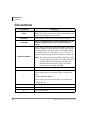
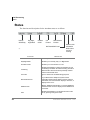
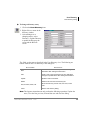
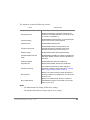
The Admin tab contains the following sections:
FIELD
DESCRIPTION
Multiple Attendant
Allow multiple Attendant operations.
BLF Refresh Rate
Enables the Attendant to define the refresh rate for
polling the CTX for BLF/DSS status. The minimum rate
is 1 second. The default is 3.
Automatic Dialing
Enable/Disable automatic dialing. Console will transfer
call as soon as name or DN is matched.
Automatic Hold
Enable/Disable automatic hold.
Activate Incoming Call
Enable/Disable activate incoming call. PC will
automatically switch to operating as the CIX IP
Attendant Console when a new call comes in.
Default Transfer
Enable/Disable default transfer (Blind transfer).
Anticipate DTMF Tone with
Flash
Enable/Disable the DTMF Tone dialog to anticipate use
after Flash. Disable if Flash is used for Call Waiting on
telco lines.
Continuous DTMF
Enable/Disable the continuous DTMF tone.
Show BLF Tab
Displays/Hides the BLF tab from the Call Monitor.
Activate Line Prompt
This enables the Prompt to be visible (during the
appropriate conditions). See Control Panel, “Prompts
Tab” on page 41 and “Prompts” on page 11.
Max. Caller ID
Maximum of Caller ID. Allow the Caller ID telephone
numbers to display in the Caller ID list. The valid value
is from 0 to 20.
Max. Called Number
Maximum of Called Number. Allow the numbers of
Called Numbers display on the Called List. The valid
value is from 0 to 10.
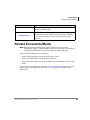
Notes
• The Administrator can change all the above settings.
• The Operator/Attendant can change only PC level settings.
Strata CIX IP Attendant Console
11/07
49