1
Einstellung der Sprache
Instellen van de taal
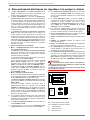
Bei Netzwiederkehr ist in der Displayanzeige die Auswahl
der Sprache möglich.
Wanneer het net weer ter beschikking staat, kan in het
display de taal gekozen worden.
Dazu die Taste ENTER (↵) betätigen und
Druk hiervoor op de ENTER-toets (↵) en
Gewünschte Sprache mit Pfeiltasten (⇑ und ⇓) einstellen
Stel de gewenste talen via de pijltoetsen (⇑ en ⇓) in
Gewählte Sprache mit Taste ENTER (↵) bestätigen
Druk op de ENTER-toets (↵) om uw keuze te bevestigen
Mit Pfeiltaste (⇓) zur Betriebsanzeige
Met de pijltoets (⇓) komt u naar het weergavedisplay
Setting the language
When the network is available again, the language can be
selected on the display. Proceed as follows:
Press the ENTER (↵) key and
Set the required language using the arrow keys (⇑ and ⇓)
Confirm the selected language with the ENTER (↵) key
Press the arrow key (⇓) to go to the operation display
Réglage de la langue
Språkinställning
När nätet återkommer kan man välja språk på bildskärmen.
Tryck på tangenten ENTER (↵) och ställ in
önskat språk med piltangenterna (⇑ och ⇓).
Bekräfta valt språk med tangenten ENTER (↵).
Med piltangenten kommer man tillbaka till (⇓)
driftsindikeringen.
Nastavitev jezika
Il est possible de choisir la langue désirée pour l’affichage
à l’écran au retour du courant
Pri ponovnem delu na omrežju je prek prikaza na zaslonu
mogoče izbrati jezik.
Appuyez alors sur la touche ENTER (↵) et
V ta namen pritisnite tipko ENTER (↵) in
choisissez la langue que vous désirez avec les touches
pourvues de flèches (⇑ et ⇓)
nastavite s tipkama s puščico (⇑ in ⇓) željen jezik.
Confirmez la langue choisie avec la touche ENTER (↵)
Izbran jezik nato s tipko ENTER (↵) potrdite.
S tipko s puščico (⇓) pridete k prikazu obratovalnega stanja.
Utilisez la touche (⇓) pour revenir à l’affichage de
fonctionnement
Ustawienia języka
Nastavení jazyka
Po włączeniu urządzenia możliwe jest dokonanie wyboru
języka na wyświetlaczu.
Při návratu sítě je na zobrazení displeje možné si
vybrat jazyk.
W tym celu należy przycisnąć klawisz ENTER (↵) i
Pro výběr stiskněte tlačítko ENTER (↵) a
ustawić przy pomocy klawiszy ze strzałkami (⇑ i ⇓)
żądany język
Nastavte požadovaný jazyk šipkovými tlačítky (⇑ a ⇓)
Zvolený jazyk potvrďte tlačítkem ENTER (↵)
Šipkovým tlačítkem (⇓) k ukazateli provozu
Impostazione della lingua
Al ritorno della tensione di rete, è possibile selezionare
la lingua sul display.
A tale scopo, premere il tasto ENTER (↵) e
Selezionare la lingua desiderata utilizzando i tasti
freccia (⇑ e ⇓)
Confermare la lingua selezionata premendo il tasto
ENTER (↵)
Tornare alla visualizzazione di funzionamento con
il tasto freccia (⇓)
potwierdzić wybrany język za pomocą klawisza ENTER (↵)
za pomocą klawisza ze strzałką (⇓) przejść do wskazań
roboczych
工作语言选择
当恢复供电时可在电子显示器上进行工作语言选择.
操作时请击回车键 ENTER (↵) 确认, 然后
按箭头键 (⇑ 和 ⇓) 选择想要的工作语言
再次击回车键 ENTER (↵) 以对选定的语言进行确认
按箭头键(⇓)进入工作显示