1
Dish Upgrade
Upgrade of original 46 cm Satellite dish with new 51cm
Multi-Satellite dish
Dish Upgrade
Upgrade of original 46 cm Satellite dish with new 51cm
Multi-Satellite dish
Elevati
on
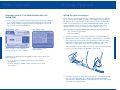
9. Power on one of your satellite receivers and display the ‘Point Dish’ screen on
the TV by pressing ‘Menu’ on the remote and selecting the ‘System Set-up’
option, then ‘Installation’ and finally select ‘Point Dish/Signal’. You will see
one of the two screens displayed below.
‘Single satellite’ screen
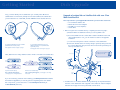
uth
m
i
Az
Pivot Bolt
Mast Clamp
Mast Clamp
Bolts
Skew Bolts
Elevation/Skew
Bracket
Elevation Bolts
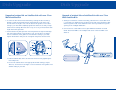
Ensure ‘Satellite’ is set to Nimiq 91– message will
indicate “Wrong Satellite”
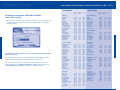
‘Dual satellite’ screen
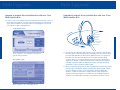
10. Turn the dish assembly back and forth very slowly, until the signal strength
bar turns green to indicate the signal. Ensure that your body is not blocking
the signal path between the dish and the satellite! Note: If you cannot find
the signal, turn the dish assembly back to the original azimuth setting
(compass direction). Loosen the elevation bolts and increase the elevation
angle by two degrees. Tighten the elevation bolts and try turning the dish
assembly slowly back and forth. Repeat these steps, raising and lowering
the elevation, until you find the satellite signal.
11. Once you have the signal, turn the dish assembly back and forth very slightly
until the signal strength bar displays the maximum signal strength. Tighten
the mast clamp bolts. Then, loosen the elevation bolts and adjust the
elevation of the dish up and down slightly until the signal strength bar
displays the maximum signal. Do not adjust the skew setting! Tighten all
the bolts in the satellite dish assembly so that the dish cannot be moved.
Ensure ‘Satellite’ is set to ‘Bell ExpressVu 82’
6
7