1
Model GXT900/950 Series
®
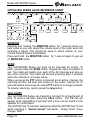
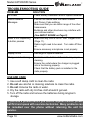
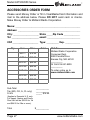
GXT900/950 SERIES QUICK REFERENCE CHART
MENU
Channel
Group Mode
1~42
Off
MENU
On
Group Code
ID Setting
0~142
1~10
Caller ID
4 digit code (0~9),
Press MON to
choose each digit
Ring Tone
0~5
Privacy
Scrambler
Power
eVOX
Silent Operation
Roger Beep
Call Tone
Vibrate
Off
On/Off
H/M/L
oF~9
On/Off
On/Off
1~10
On/Off
Press and hold the
MENU button for
5 seconds
WX Channel
WX Alert
1~15 for GXT950
1~10
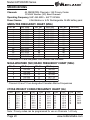
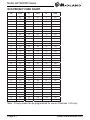
CTCSS
1~38
DCS
1~104
On/Off
MONITOR
Pressing and holding the MONITOR button for 1 second will let you
hear noise so you can adjust the volume level of the radio when not
receiving a signal. This should be used to check activity on your
current channel before transmitting.
Press and hold the MONITOR button for 1 second again to get out
of MONITOR mode.
SCAN
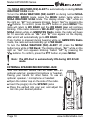
Your GXT900/950 Series can scan all 42 channels for activity. To
enter, quickly press the SCAN button. Repeat the same procedure to
exit. Your radio will rapidly scan each of the 42 channels and stop on
any active channel. Your radio will resume scanning after 4 seconds
when the channel is no longer active.
When you press the PTT button to transmit on an active channel, the
scanning function will stop and remain on the active channel for 10
seconds before resuming scan when PTT button is no longer pressed.
To resume scanning, quickly press the / button.
CALL ALERT
Your GXT900/950 Series can transmit a call alert for a fixed length of
time. To send a call alert, press the CALL button. The TX icon will
appear while transmitting a call alert and a tone can be heard on the
speaker for confirmation.
The GXT900 has 10 call alert selections while the GXT950 has 15 call
alerts including 5 “animal sound” call alerts - Turkey, Duck, Crow,
Cougar, Wolf.
Page 10
www.midlandradio.com