1
P.16
Guide de l’utilisateur
Your installer can add customized features such as turning on the radio, opening sliding doors, etc.
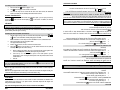
x To access a Level 2 feature, press and hold the
button until you hear a “beep within three
seconds of hearing the “beep”, release the
button and press and release the
button
once more.
will be displayed. This display means that you are now in Level 2. Simply
press the corresponding button to access the desired feature.
x To access a Level 3 feature, press and hold the
Détails
button until you hear a “beep”; within three
seconds of hearing the “beep”, release the
button.
will be displayed. This display
means that you are now in Level 1. Simply press the corresponding button to access the
desired feature.
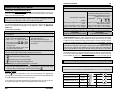
Sonorité
x To access a Level 1 feature, press and hold the
Icône
Accessing the Multi-Level Features and Other Transmitter Functions
Touche actionnée
: ..................................................................................... customized feature 4
Fonction
¾
Mélodie
¾
+
¾
x2
: ................................................................................... customized feature 3
+
: .................................................................................... customized feature 2
¾
Démarrage
(mode
démarrage
sécuritaire)
¾
¾
Actionnez les touches
et deux fois en
3 secondes.
ou :
Appuyez sur les touches
pendant 1 seconde (bip)
puis actionnez-les à
nouveau pendant
1 seconde (mélodie).
¾
¾
Mélodie
¾
Aucune
: .................................................................................. customized feature 1
+
¾
Arrêt
(mode
démarrage
sécuritaire)
¾
¾
button until you hear a “beep”; within three
Démarrage/Arrêt lorsqu’en mode démarrage sécuritaire :
seconds of hearing the “beep”, release the
button and press and release the
button two
more times.
will be displayed. This display means that you are now in Level 3. Simply
press the corresponding button to access the desired feature.
¾
x Appuyez sur
¾
¾
¾
x Appuyez sur
¾
¾
: .................................................................................... ARRÊT
: .................................................................................... DÉMARR.
¾
: ................................................................................ DÉVERR.
¾
x Appuyez sur les touches
: .................................................................................... COFFRE
x Appuyez sur
ou
x Appuyez sur
x Appuyez sur
x Appuyez sur
¾
+
+
+
¾
¾
: .............................................................. VERR.
simultanément: ....................................................................... DÉVERR.
simultanément: .......................................................................... DÉMARR.
simultanément: .......................................................................... ARRÊT
x Appuyez sur les touches
+
simultanément : ................................................... VERR.
Option 1:
x Appuyez sur
be flashing. Simply press and release the
button until you reach the desired location and
proceed with the adjustment by pressing the or
buttons.
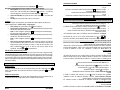
Your installer can customize the system as to personalize these multi-level features in an order that
best suits you. Your options are:
x Appuyez sur
button and press and release the
button three more times. There will be two quick “beeps”
indicating that you are now in the transmitter functions adjustment menu. The Hour position will
: ................................................................................... COFFRE
button until you hear a “beep”; within three seconds of hearing the “beep”, release the
¾
x To access the transmitter functions (clock and alarm adjustments), press and hold the
Level 1 (requires pressing the
button 1X)
Æ
Multi car operation
Level 2 (requires pressing the
button 2X)
Æ
Basic features
Level 3 (requires pressing the
button 3X)
Æ
Customized features
Remarque : Votre installateur doit configurer chaque télécommande utilisée avec un second
véhicule.
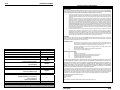
Cette option permet au possesseur de deux véhicules munis de Télédémarreur de même série de
contrôler les deux Télédémarreurs avec une seule télécommande. Pour contrôler le second
véhicule, appuyez simultanément sur la touche
et la touche de la fonction désirée.
Basic features
Æ
Multi car operation
Level 3 (requires pressing the
button 3X)
Æ
Customized features
Level 1 (requires pressing the
button 1X)
Æ
Customized features
Level 2 (requires pressing the
button 2X)
Æ
Multi car operation
Level 3 (requires pressing the
button 3X)
Æ
Basic features
Option 3:
d’un choc normal) en donnant un signal d’avertissement (ce qui ne déclenchera pas une situation
d’alarme). Veuillez noter que si le moteur est en marche suite à un démarrage à distance, le
détecteur de choc est désactivé.
Option 4:
P.16
Accèsprioritaire
Æ
button 2X)
Cette option pratique permet à l’utilisateur de ne déverrouiller que la portière du conducteur, d’une
button 1X)
simple pression de la touche
sur la télécommande. Pour déverrouiller les autres portières, il ne
suffit que d’une seconde pression.
Level 1 (requires pressing the
Level 2 (requires pressing the
Régimemultivéhicule
Option 2 (by default):
User Guide