1
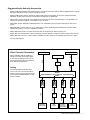
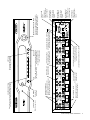
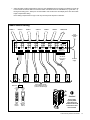
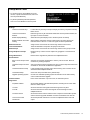
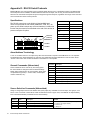
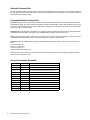
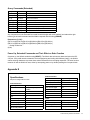
Setup Menu Chart
• To access the menu, press MENU on the IR
remote; or press and hold the knob, and touch
the front panel MENU key.
• To perform password protected operations,
enter “2-3-6” and ENTER on the front panel.
Settings
Lockout Front Panel Keys
Lockout all front panel keys except for Display and the key sequence for Setup
Menu access.
Lockout Front Panel IR
Detector
Detection ignores any IR commands visible from the front panel IR window; IR
input jack on rear is still active.
Enable Display Blanking
Allows the front panel display to turn off after a period of inactivity.
Enable Feedback for Private
Viewing
When enabled, this feature causes a brief break in the video signal as an
indication that an “IR lock” or “view lock” signal has been implemented.
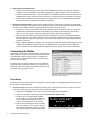
Name the Sources
Assign custom short names and custom long names to each source.
Learn IR Commands
Teach the AVM-562 to respond to 3rd party IR commands.
Name Groups
Assign custom short names and custom long names to each group of zones.
Assign Outputs to Groups
Divide the array of Cat 5 receiver outputs into geographic or functional zone
”groups”.
Assign Restrictions
Restrict source signals from particular zone wallplate/receivers
Save/Load File
Save Current Setup to Flash
Card
Save the current setup configuration to memory card in rear slot. Does not
overwrite any existing setup files.
Load New Setup from Flash
Card
Scan and choose firmware upgrades from card or import setup data saved from
an AVAtrix or saved from the AVAtrix PC application.
Load Demonstration Setup
Loads example setup including custom short and long source names and 24
simulated remote Wallplate locations.
Load Default Setup
Clears user setup and loads factory default setup.
Upgrade Operating System
Choose from available operating system firmware files on the flash memory
card to install a firmware upgrade.
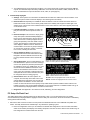
Contact Installer
Enter contact information. Up to four lines, 42 characters per line.
Diagnostics
Expander Address
Shows letter address of all detected expanders, including the six native AVM562 Cat 5 matrix outputs.
Local IR
Shows on/off times of IR signals received through the front panel.
Zone IR
Shows on/off times and carrier of IR signals received through the Cat 5
wallplate/receivers.
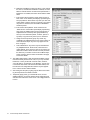
Firmware Version
Shows the firmware version loaded on each component of the AVAtrix system,
and the firmware upgrades available on a flash card loaded in the card slot.
Source and Control
Restrictions
Shows the parental restrictions on sources to wallplate/receivers and local
output.
Audio Authority AVAtrix User Manual
19