1
DartDisk User Guide
I/O Errors
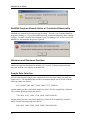
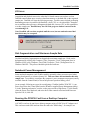
Acquisition and playback errors arise when the I/O board cannot convert data, or when
DartDisk cannot cannot store or retrieve data from memory or the hard disk, at the requested
sample rate. DartDisk will issue the following message. Possible causes include performing
demanding processes in parallel with DartDisk, a slow CPU, or a slow hard disk. Remedies
are to terminate other processes, defragment the hard disk, increase CPU or disk capabilities,
or reduce sample rate. DartDisk may also fail if the progress window is moved on the
screen during I/O.
Note: DartDisk will save data acquired until the error, but use caution because final
data blocks may be corrupted.
Disk Fragmentation and Maximum Sample Rate
On older hard disks, fragmentation can degrade the maximum sample rate. Disks can be
defragmented by clicking My Computer | Files | Properties | Tools | Defragment Now in
Windows 95/98 or My Computer | Local Disk | Properties | Tools | Defragment Now in
Windows 2000/XP. This process should be performed with care.
Notebook Power Management
Some notebook computers (such Toshiba models) optionally reduce processor speed when
running from batteries, to conserve battery life. This can reduce the maximum achievable
sample rate. To avoid this, reconfigure the computer’s power management program (usually
available from the Control Panel) to run at full processor speed on battery power.
As an example, following are steps for reconfiguring a Toshiba Satellite 2250CDT: 1) run
Power Saver from the Control Panel (not the Windows-supplied Power Management utility),
2) in the "Running on batteries" section, set the power mode to High Power, 3) click Details,
select the Power Save Mode tab, and move the 4 slider controls associated with Processor
Speed to Full, 4) click OK.
Running the PCMCIA Card from a Desktop Computer
A PCMCIA card can be run from a desktop computer using a PCMCIA to PCI adapter card.
This card costs under $200 and can allow the card to do "double duty", for example, in a
15