1
Chapter 8
Switching
Introduction ................................................................................................... 8-4
Switch Ports ................................................................................................... 8-5
Enabling and Disabling Switch Ports ........................................................ 8-5
Speed and Duplex Mode ......................................................................... 8-7
Switch Instances on 48-Port Switches ...................................................... 8-9
Port Trunking ........................................................................................ 8-10
Link Aggregation Control Protocol (LACP) ............................................. 8-11
Packet Storm Protection ........................................................................ 8-12
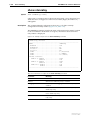
Port Mirroring ....................................................................................... 8-12
Port Security .......................................................................................... 8-13
Virtual Local Area Networks (VLANs) ............................................................ 8-14
Dynamic VLAN Assignment ................................................................... 8-14
802.1x Guest VLAN ............................................................................... 8-16
VLAN Tagging ....................................................................................... 8-16
VLAN Membership of Untagged Packets ............................................... 8-19
Creating VLANs ..................................................................................... 8-20
Summary of VLAN Tagging Rules ........................................................... 8-22
VLAN Interaction with Trunk Groups ...................................................... 8-22
Static and Dynamic VLANs ..................................................................... 8-22
Protected VLANs ................................................................................... 8-23
Private VLANs ........................................................................................ 8-23
VLAN Relaying ............................................................................................. 8-25
Configuring VLAN Relaying ................................................................... 8-27
The Layer 2 Switching Process ...................................................................... 8-28
The Ingress Rules ................................................................................... 8-28
The Learning Process ............................................................................. 8-29
The Forwarding Process ......................................................................... 8-30
The Egress Rules .................................................................................... 8-30
Quality of Service .................................................................................. 8-31
Layer 2 Filtering ........................................................................................... 8-31
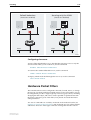
Securing a Single VLAN through Switch Filters ....................................... 8-32
Hardware Packet Filters ................................................................................ 8-33
Classifier-Based Packet Filters ....................................................................... 8-34
Ordering Filter Entries ............................................................................ 8-35
Configuring Filters ................................................................................. 8-36
Filter Modes in 48-Port Switches ............................................................ 8-36
Layer 3 Based Packet Filters .......................................................................... 8-38
Layer 3 Filter Matches ............................................................................ 8-38
Layer 3 Filter Entries .............................................................................. 8-38
Access Control Lists (ACLs) ........................................................................... 8-39
Triggers ........................................................................................................ 8-40
8-2
AlliedWare OS Software Reference
Configuration Examples ...............................................................................
One Switch to Extend a Local LAN .........................................................
VLAN with Untagged Ports ....................................................................
VLAN with Tagged Ports ........................................................................
Meshed Network with VLAN Tagged Ports .............................................
Command Reference ...................................................................................
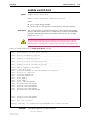
activate switch port ...............................................................................
add lacp port .........................................................................................
add switch filter ....................................................................................
add switch hwfilter classifier ..................................................................
add switch l3filter entry .........................................................................
add switch l3filter match .......................................................................
add switch trunk ...................................................................................
add vlan bridge .....................................................................................
add vlan port .........................................................................................
add vlanrelay .........................................................................................
create switch trunk ................................................................................
create vlan ............................................................................................
create vlanrelay .....................................................................................
delete lacp port .....................................................................................
delete switch filter .................................................................................
delete switch hwfilter classifier ..............................................................
delete switch l3filter ..............................................................................
delete switch l3filter entry .....................................................................
delete switch trunk ................................................................................
delete vlan bridge ..................................................................................
delete vlan port .....................................................................................
delete vlanrelay .....................................................................................
destroy switch trunk ..............................................................................
destroy vlan ...........................................................................................
destroy vlanrelay ...................................................................................
disable lacp ...........................................................................................
disable lacp debug ................................................................................
disable switch ageingtimer ....................................................................
disable switch debug .............................................................................
disable switch filter vlansecure ...............................................................
disable switch hwfilter ...........................................................................
disable switch l3filter .............................................................................
disable switch learning ..........................................................................
disable switch mirror .............................................................................
disable switch port ................................................................................
disable vlan debug ................................................................................
disable vlanrelay ....................................................................................
disable vlanrelay debug .........................................................................
enable lacp ............................................................................................
enable lacp debug .................................................................................
enable switch ageingtimer .....................................................................
enable switch bist ..................................................................................
enable switch debug .............................................................................
enable switch filter vlansecure ...............................................................
enable switch hwfilter ...........................................................................
enable switch l3filter .............................................................................
enable switch learning ..........................................................................
enable switch mirror ..............................................................................
enable switch port .................................................................................
enable vlan debug .................................................................................
enable vlanrelay ....................................................................................
enable vlanrelay debug ..........................................................................
purge lacp .............................................................................................
8-41
8-41
8-41
8-43
8-44
8-48
8-48
8-49
8-51
8-53
8-55
8-58
8-60
8-61
8-62
8-64
8-65
8-66
8-67
8-68
8-69
8-69
8-70
8-70
8-71
8-71
8-72
8-73
8-74
8-74
8-75
8-75
8-76
8-76
8-77
8-78
8-78
8-79
8-79
8-80
8-80
8-81
8-82
8-82
8-83
8-83
8-84
8-85
8-86
8-87
8-87
8-88
8-88
8-88
8-89
8-90
8-91
8-92
8-92
Software Version 2.8.1
C613-03120-00 REV A
Switching
8-3
reset lacp port counter .......................................................................... 8-93
reset switch ........................................................................................... 8-93
reset switch port ................................................................................... 8-94
set lacp port .......................................................................................... 8-95
set lacp priority ...................................................................................... 8-96
set switch ageingtimer .......................................................................... 8-96
set switch hwfilter classifier ................................................................... 8-97
set switch hwfilter mode ..................................................................... 8-100
set switch l3ageingtimer ...................................................................... 8-101
set switch l3filter entry ........................................................................ 8-102
set switch l3filter match ...................................................................... 8-105
set switch mirror ................................................................................. 8-107
set switch port .................................................................................... 8-108
set switch qos ..................................................................................... 8-113
set switch trunk ................................................................................... 8-115
set vlan port ........................................................................................ 8-116
show lacp ............................................................................................ 8-117
show lacp port .................................................................................... 8-118
show lacp port counter ....................................................................... 8-120
show lacp trunk .................................................................................. 8-121
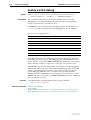
show switch ........................................................................................ 8-122
show switch counter ........................................................................... 8-124
show switch debug ............................................................................. 8-126
show switch fdb .................................................................................. 8-127
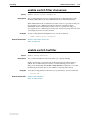
show switch filter ................................................................................ 8-129
show switch hwfilter ........................................................................... 8-131
show switch l3filter ............................................................................. 8-133
show switch port ................................................................................. 8-135
show switch port counter .................................................................... 8-138
show switch port intrusion .................................................................. 8-142
show switch qos .................................................................................. 8-143
show switch trunk ............................................................................... 8-144
show vlan ............................................................................................ 8-145
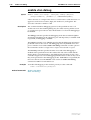
show vlan debug ................................................................................. 8-147
show vlanrelay .................................................................................... 8-148
Software Version 2.8.1
C613-03120-00 REV A
8-4
AlliedWare OS Software Reference
Introduction
This chapter gives an overview of Layer 1 (the physical layer), 2 (the data link
layer), and 3 (the network layer) switching, and describes the support for
switching and how to configure and operate the switching functions.
The switch, also referred to as a MAC (media access control) bridge, a data link
relay, or a Layer 2 switch, can connect multiple Local Area Network (LAN)
segments together to form an extended LAN. Stations connected to different
LANs can be configured to communicate with one another as if they were on
the same LAN. It can also divide one physical LAN into multiple Virtual LANs
(VLANs). Stations connected to each other on the same extended LAN can be
grouped in separate VLANs, so that a station in one VLAN can communicate
directly with other stations in the same VLAN, but must go through higher
layer routing protocols to communicate with stations in other VLANs.
The switch operates at the data link layer, transparent to higher layer protocols,
transferring frames between the data link layers of the networks to which it is
attached. A bridge accesses each physical link according to the rules for that
particular network. Access may not always be instant, so a bridge must be
capable of storing and forwarding frames. Since the switch can store and
forward frames, it can examine and discard or admit frames according to their
VLAN tag fields. The switch can also examine the address fields of the frames
and forward the frames based on knowledge of which network contains the
station with an address matching the frame’s destination address. In this way,
the switch can act as an intelligent filtering device, redirecting or blocking the
movement of frames between networks.
Because the switch may receive frames faster than it can forward them, the
switch has Quality of Service (QoS) queues in which frames await transmission
according to their priority.
The switch can be used to:
■
Increase the physical extent and/or the maximum number of stations on a
LAN.
LANs are limited in their physical extent by the signal distortion and
propagation delay characteristics of the media. The switch overcomes this
limitation by receiving a frame on one LAN and then retransmitting the
frame on another LAN, using the normal access methods for each LAN. The
physical characteristics of the LAN media also place a practical limit on the
number of stations that can be connected to a single LAN segment. The
switch overcomes this limitation by joining LAN segments together to form
an extended LAN capable of supporting more stations than either of the
individual LANs.
■
Connect LANs that have a common data link layer protocol but different
physical media, for example, Ethernet 10BASET, 100BASET, and 10BASEF.
■
Increase the availability of LANs by allowing multiple redundant paths to
be physically configured, and selected dynamically, using the Spanning
Tree algorithm.
■
Reduce the load on a LAN or increase the effective bandwidth of a LAN,
by filtering traffic.
■
Prioritise the transmission of data with high Quality of Service
requirements.
Software Version 2.8.1
C613-03120-00 REV A
Switching
8-5
By using Virtual LANs (VLANs), a single physical LAN can be separated into
multiple Virtual LANs. VLANs can be used to:
■
Further improve LAN performance, as broadcast traffic is limited to LAN
segments serving members of the VLAN to which the sender belongs.
■
Provide security, as frames are forwarded to those stations belonging to the
sender’s VLAN, and not to stations in other VLANs on the same physical
LAN.
■
Reduce the cost of moving or adding stations to function or security based
LANs, as this generally requires only a change in the VLAN configuration.
Switch Ports
The term port is used frequently in switch terminology. Each port in a switch is
associated with one of the physical interfaces on the switch. Each port is
uniquely identified by a port number. The switch supports a number of
features at the physical level that allows it to be connected in a variety of
physical networks. This physical layer (Layer 1) versatility includes:
■
Enabling and disabling Ethernet ports.
■
Autonegotiation of port speed and duplex mode for all 10/100 Ethernet
ports and copper gigabit ports.
■
Manual setting of port speed and duplex mode for all 10/100 Ethernet
ports and copper gigabit ports.
■
Port trunking.
■
Packet storm protection.
■
Port mirroring.
■
Support for SNMP management.
■
Link triggers for fibre ports.
Enabling and Disabling Switch Ports
By default, all switch ports are enabled. An enabled port is available to receive
and transmit packets. Its operational status and administrative status in the
Interfaces MIB is up.
Enabling ports
To enable a switch port, use the commands:
enable switch port={port-list|all} [other options]
A switch port that has been disabled by the Port Security feature (“Port
Security” on page 8-13) cannot be enabled using the enable switch port
command. Instead, use the set switch port command on page 8-108 and set
learn=0.
Software Version 2.8.1
C613-03120-00 REV A
8-6
AlliedWare OS Software Reference
Resetting ports
Resetting Ethernet ports at the hardware level discards all frames queued for
reception or transmission on the port, restarts autonegotiation of port speed
and duplex mode, and resets port counters. To reset ports, use the command:
reset switch port={port-list|all}
To reset port counters without resetting the ports, use the command:
reset switch port={port-list|all} counter
Disabling ports
A disabled port is not available to receive and transmit packets. It does not
send or receive any frames and its administrative status in the Interfaces MIB is
down.
You can disable base switch ports at the hardware or software level. Disabling a
port at the hardware level has the same effect as physically removing the cable
or turning off the optics. Disabling a port at the software level only takes the
link down in software.
We recommend disabling ports at the hardware level. This ensures that the
port at the other end of the link realises that the port is down. To do this, use
the command:
disable switch port={port-list|all} link=disable
Uplink module ports can only be disabled at the software level. To disable a
port at the software level, use the command:
disable switch port={port-list|all}
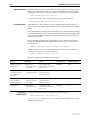
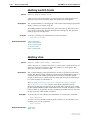
The following table further describes the options.
If you...
by using...
then...
and Status is...
and Link State is...
disable a port at the
hardware level
disable switch
port=port-number
link=disable
port hardware and
software link functionality
both turn off
DISABLED
Down
disable a port at the
software level (take
the link down in
software)
disable switch
port=port-number
software link functionality
turns off but port
hardware stays on
DISABLED
Up
bring the link up in
software without
re-enabling the port
disable switch
port=port-number
link=enable
software link functionality
stays off but port
hardware turns on
DISABLED
Up
enable a port
enable switch
port=port-number
port hardware and
software link functionality
both turn on
ENABLED
Up
Displaying
information
To display information about switch ports, use the command:
show switch port[={port-list|all}]
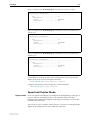
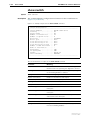
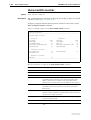
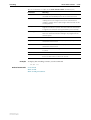
Figure 8-1, Figure 8-2 and Figure 8-3 show the possible combinations of status
and link state for a port.
Software Version 2.8.1
C613-03120-00 REV A
Switching
8-7
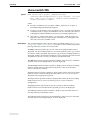
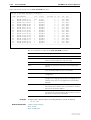
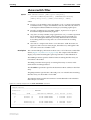
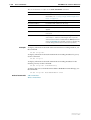
Figure 8-1: Output of the show switch port command when the port is enabled
Switch Port Information
------------------------------------------------------Port .......................... 13
Description ................. Status ...................... ENABLED
Link State .................. Up
.
.
.
Figure 8-2: Output of the show switch port command when the port is disabled at the
software level
Switch Port Information
------------------------------------------------------Port .......................... 13
Description ................. Status ...................... DISABLED
Link State .................. Up
.
.
.
Figure 8-3: Output of the show switch port command when the port is disabled at the
hardware level
Switch Port Information
------------------------------------------------------Port .......................... 13
Description ................. Status ...................... DISABLED
Link State .................. Down
.
.
.
Resetting ports at the hardware level discards all frames queued for reception
or transmission on the port, and restarts autonegotiation of port speed and
duplex mode. Ports are reset using the command:
reset switch port={port-list|all} [counter]
To display information about switch ports, use the command:
show switch port[={port-list|all}]
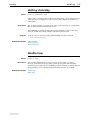
Speed and Duplex Mode
Duplex mode
Ports can operate in full duplex or half duplex mode depending on the type of
port it is. When in full duplex mode, a port transmits and receives data
simultaneously. When in half duplex mode, the port transmits or receives but
not both at the same time.
You can set a port to use either of these options, or allow it to autonegotiate the
duplex mode with the device at the other end of the link.
Software Version 2.8.1
C613-03120-00 REV A
8-8
AlliedWare OS Software Reference
Speed options
The switch supports ports with the following speed options:
■
RJ-45 base ports on Rapier 24i and Rapier 48i switches: 10 or 100Mbps
■
fibre base ports on Rapier 16fi switches: 100Mbps
■
AT-A35 fibre uplink modules: 1000Mbps
■
AT-A39 RJ-45 copper uplink modules: 10, 100 or 1000Mbps
■
AT-A40 and AT-A41 fibre uplink modules: 100Mbps
■
AT-A42 GBIC uplink modules: 1000Mbps
You can set a port to use one of these speed options, or allow it to autonegotiate
the speed with the device at the other end of the link.
Autonegotiation
Autonegotiation lets the port adjust its speed and duplex mode to
accommodate the device connected to it. When the port connects to another
autonegotiating device, they negotiate the highest possible speed and duplex
mode for both of them.
By default, all ports autonegotiate except 100Mbps fibre ports. Setting the port
to a fixed speed and duplex mode may be necessary when connecting to a
device that cannot autonegotiate.
Configuring speed
and duplex
To set the speed and duplex mode, use the command:
set switch port={port-list|all} [speed={autonegotiate|
10Mauto|10Mhalf|10Mfull|10Mhauto|10Mfauto|100Mauto|
100Mhalf|100Mfull|100Mhauto|100Mfauto|1000Mhalf|
1000Mfull|1000Mhauto|1000Mfauto}] [other-parameters]
The speed parameter combines speed, duplex mode, and autonegotiation
support in a single setting. Options are in the following categories:
■
autonegotiate—the autonegotiate option. If you specify this option, the
port negotiates both speed and duplex mode. This is the default, except for
100Mbps fibre ports whose default is 100Mfull.
■
fixed modes—options that do not contain “auto”, such as 100Mfull. If you
specify one of these options, the port operates at that speed and duplex
setting instead of autonegotiating with its link partner. For example,
100Mfull means that the port transmits data at 100 Mbps full duplex
mode.
■
autonegotiate fixed speed and duplex mode—options that contain a speed
and duplex mode and “auto”, such as 100Mfauto. If you specify one of
these options, the port enters into autonegotiation with its link partner, but
advertises that speed and duplex mode as the only mode it supports. For
example, 100Mfauto means that the port advertises that it can only
support 100Mbps full duplex mode and 100Mhauto means that it only
advertises 100Mbps half duplex mode.
■
autonegotiate fixed speed—the 10Mauto and 100Mauto options. If you
specify one of these options, the port enters into autonegotiation with its
link partner, and negotiates the duplex mode but advertises that speed as
the only speed it supports. For example, 100Mauto means that the port
advertises both half and full duplex mode at the one specified speed.
Make sure that the configuration of the switch matches the configuration of the
device at the other end of the link. In particular, avoid having one end
autonegotiate if the other end is fixed. For example, if you set one end of a link
to autonegotiate and other to 100Mfull, the autonegotiating end cannot
determine that the fixed end is full duplex capable. Therefore, the
Software Version 2.8.1
C613-03120-00 REV A
Switching
8-9
autonegotiating end selects 100Mbps half-duplex operation. Using 100Mfauto
at the “fixed” end of the link would allow the autonegotiating end to
autonegotiate 100Mbps full-duplex mode. This gains the benefits of
autonegotiation while forcing operation at the desired speed.
Also, if you override a port’s autonegotiation by setting it to a fixed speed and
duplex mode, automatic MDI/MDI-X detection is also overridden. The port
defaults to MDI-X.
To display current speed and duplex mode settings, use the show switch port
command on page 8-135.
To activate autonegotiation at any time on ports that are set to autonegotiate,
use the activate switch port command on page 8-48.
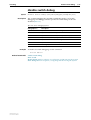
Port types and speed
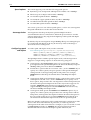
For different types of port, the valid options are shown in the following table.
10/100
copper
ports on
Rapier 24i
Rapier 48i
100 fibre
ports on
Rapier 16fi
AT-A39
uplink
AT-A35
AT-A42
uplinks
AT-A40
AT-A41
uplinks
10Mhalf
Yes
-
Yes
-
-
10Mfull
Yes
-
Yes
-
-
100Mhalf
Yes
Yes
Yes
-
Yes
100Mfull
Yes
Yes
Yes
-
Yes
1000Mhalf
-
-
Yes
-
-
1000Mfull
-
-
Yes
Yes
-
10Mauto
Yes
-
Yes
-
-
10Mhauto
Yes
-
Yes
-
-
10Mfauto
Yes
-
Yes
-
-
100Mauto
Yes
-
Yes
-
-
100Mhauto
Yes
-
Yes
-
Yes
100Mfauto
Yes
-
Yes
-
Yes
1000Mhauto
-
-
Yes
-
-
1000Mfauto
-
-
Yes
Yes
-
Yes
-
Yes
Yes
Yes
Speed
autonegotiate
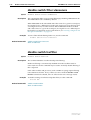
Switch Instances on 48-Port Switches
The Rapier 48i has two switch instances, known as instance “0” and “1”. Ports
1 to 24 and the uplink port 49 are on instance 0. Ports 25 to 48 and the uplink
port 50 are on instance 1.
There are minor restrictions on 48-port switches for some features, such as port
trunking, private vlans, protected vlans, and classifier-based packet filters. See
the related sections for more information:
Software Version 2.8.1
C613-03120-00 REV A
■
“Port Trunking” on page 8-10
■
“Private VLANs” on page 8-23
■
“Protected VLANs” on page 8-23
■
“Filter Modes in 48-Port Switches” on page 8-36
8-10
AlliedWare OS Software Reference
Port Trunking
Port trunking, also known as port bundling or link aggregation, allows a number
of ports to be configured to join together to make a single logical connection of
higher bandwidth. This can be used where a higher performance link is
required, and makes links even more reliable. Port trunking must be
configured on both ends of the link, or network loops may result.
The switch supports static 802.3ad link aggregation, and is also compatible
with third party devices that do not support static 802.3ad link aggregation.
The switch supports up to 6 trunk groups, of up to 8 switch ports each. The two
gigabit Ethernet ports can also be grouped together to form a trunk group. On
48-port switches, avoid having a trunk group that spans multiple switch
instances. It is not possible for a trunk group to include both 10/100 Ethernet
and gigabit Ethernet ports. Ports in the trunk group do not have to be
contiguous.
To create or destroy port trunk groups on the switch, use the commands:
create switch trunk=trunk [port=port-list] [select={macsrc|
macdest|macboth|ipsrc|ipdest|ipboth}] [speed={10M|100M|
1000M}]
destroy switch trunk=trunk
Port trunk groups can be destroyed on the switch only when no ports belong to
them.
All the ports in a trunk group must have the same VLAN configuration: they
must belong to the same VLANs and have the same tagging status. All ports in
a trunk group must be added to VLANs together, and can only be deleted from
a VLAN as a group. Similarly, if the tagged or untagged status of the ports is
changed, it must be changed for all ports in the trunk group at the same time.
The members of a trunk group can be specified when it is created, and ports
can be added to or removed from a trunk group by using the commands:
add switch trunk=trunk port=port-list
delete switch trunk=trunk port={port-list|all}
Ports in a trunk group are set to autonegotiate at the trunk speed at full duplex.
When a port is added to a trunk group, the speed setting for the group
overrides the speed setting previously configured for the port. When a port is
removed from a trunk group, the port returns to its previously configured
speed and duplex mode settings.
The speed of the trunk group can either be specified when it is created or set by
using the command:
set switch trunk=trunk [select={macsrc|macdest|macboth|ipsrc|
ipdest|ipboth}] [speed={10M|100M|1000M}]
To display information about trunks on the switch, use the command:
show switch trunk[=trunk]
To display the VLANs to which the ports in the trunk groups belong, use the
command:
show vlan[=all]
Software Version 2.8.1
C613-03120-00 REV A
Switching
8-11
Link Aggregation Control Protocol (LACP)
The implementation of the Link Aggregation Control Protocol (LACP) follows
the IEEE Standard 802.3-2002, CSMA/CD access method and physical layer
specifications.
LACP operates where systems are connected over multiple communications
links. Once LACP has been initially configured and enabled, it automatically
creates trunk groups and assigns appropriate links to their membership. LACP
continues to monitor these groups and dynamically adds or removes links to
them as network changes occur.
LACP achieves this by determining the following:
■
which ports are under LACP control
■
whether each port is in LACP active or LACP passive mode
■
which system has the highest LACP priority
■
the LACP priority of ports
■
whether the periodic timeout is fast or slow
Aggregation criteria
For individual links to be formed into an aggregated group they must meet the
following criteria:
■
originate on the same device
■
terminate on the same device
■
be members of the same VLANs
■
have the same data rate
■
share the same admin port key (assigned by using the add lacp port
command on page 8-49).
■
be operating in full duplex mode
The hardware must also be capable and have the capacity to handle the
number of links to be aggregated.
Aggregated group identification
In order to identify particular aggregated groups, each group is assigned a link
aggregation identifier called a lag ID. The lag ID comprises the following
components for both the local system (called the Actor) followed by their
equivalent components for the remote system (called the Partner):
■
system priority - set by the set lacp priority command on page 8-96.
■
system identifier - the MAC address of the system
■
port key - An identifier - created by the LACP software
■
port priority - set by the add lacp port command on page 8-49.
■
port number - determined by the device connection
The lag ID can be displayed for each aggregated link by entering the show lacp
trunk command on page 8-121
Software Version 2.8.1
C613-03120-00 REV A
8-12
AlliedWare OS Software Reference
Packet Storm Protection
The packet storm protection feature allows the user to set limits on the
reception rate of broadcast, multicast and destination lookup failure packets.
The software allows separate limits to be set for each port, beyond which each
of the different packet types are discarded. The software also allows separate
limits to be set for each of the packet types. Which of these options can be
implemented depends on the model of switch hardware.
By default, packet storm protection is set to none, that is, disabled. It can be
enabled, and each of the limits can be set using the command:
set switch port=port-list [bclimit={none|limit}]
[dlflimit={none|limit}] [mclimit={none|limit}]
Packet storm protection limits cannot be set for each individual port on the
switch, but can be set for each processing block of ports. The processing blocks
are sets of 8 ports (e.g. as many as are applicable of ports 1-8, 9-16 and 17-24)
and each uplink port is a further processing block. Therefore, a 16-port switch
has four processing blocks and a 24-port switch has five. The two uplink ports
are numbered sequentially after the last port, and therefore are 17 and 18 for a
16-port switch, and 25 and 26 for a 24-port switch. Only one limit can be set per
processing block, and then applies to all three packet types. Thus each of the
packet types are either limited to this value or unlimited (none).
The show switch port command displays the packet storm protection settings.
Port Mirroring
Port mirroring allows traffic being received and transmitted on a switch port to
be sent to another switch port, the mirror port, usually to capture data with a
protocol analyser. The mirror port is the only switch port that belongs to no
VLANs, and therefore does not participate in any other switching. Before the
mirror port can be set, it must be removed from all VLANs except the default
VLAN. The port cannot be part of a trunk group. Mirroring four or more ports
may significantly reduce switch performance.
To set a mirror port (and remove it from the default VLAN) use the command:
set switch mirror={none|port}
If another port was previously set as the mirror port, this command returns the
previous mirror port to the default VLAN as an untagged port. Return this port
to any VLANs to which it should belong, by using the add vlan port command,
or set it as a tagged port using the set vlan port command if required.
Either traffic received on a port or traffic transmitted by the port, or both, can
be mirrored. To set a source port whose traffic is to be sent to a mirror port, use
the command:
set switch port={port-list|all} mirror={none|rx|tx|both}
To send packets that match particular criteria to the mirror port, first create a
filter match by using the command:
add switch l3filter match
Then create a filter entry with the action parameter set to sendmirror by using
the command:
add switch l3filter=filter-id entry action=sendmirror.
Software Version 2.8.1
C613-03120-00 REV A
Switching
8-13
By default, when mirroring is disabled, no mirror port is set and no source
ports are set to be mirrored. Mirroring functions when a switch mirror port is
set to a valid port. When mirroring is enabled and the switch mirror port is set
to none, then mirroring can be disabled by using the commands:
enable switch mirror
disable switch mirror
The show switch port and show switch commands display the switch and
port mirroring settings.
Port Security
The port security feature allows control over the stations connected to each
switch port, by MAC address. If enabled on a port, the switch learns MAC
addresses up to a user-defined limit from 1 to 256, then locks out all other MAC
addresses. One of the following options can be specified for the action taken
when an unknown MAC address is detected on a locked port:
•
Discard the packet and take no further action,
•
Discard the packet and notify management with an SNMP trap,
•
Discard the packet, notify management with an SNMP trap and disable
the port.
To enable port security on a port, set the limit for learned MAC addresses to a
value greater than zero, and specify the action to take for unknown MAC
addresses on a locked port. To disable port security on a port, set the limit for
learned MAC addresses to zero or none. Port security can be enabled or
disabled on a port by using the command:
set switch port={port-list|all} learn={none|0|1..256}
[intrusionaction={discard|trap|disable}]
If intrusionaction is set to trap or disable, a list of MAC addresses for devices
that are active on a port, but which are not allowed or learned for the port, can
be displayed (Figure 8-27 on page 8-142) by using the command:
show switch port={port-list|all} intrusion
If a port is disabled by the Port Security function, use the set switch port
command on page 8-108 and set learn=0.
A switch port can be manually locked before it reaches the learning limit by
using the command:
activate switch port={port-list|all} lock
Addresses can be manually added to a port locked list up to a total of 256 MAC
addresses, and the learning limit can be extended to accommodate them. Use
the command:
add switch filter action={forward|discard} destaddress=macadd
port=port [entry=entry] [learn] [vlan={vlan-name|1..4094}]
Learned addresses on locked ports can be saved as part of the switch
configuration, so that they become part of the configuration after a power
cycle. Use the command:
create config=filename
If the configuration is not saved when there is a locked list for a port, the
learning process begins again after the switch is restarted.
Software Version 2.8.1
C613-03120-00 REV A
8-14
AlliedWare OS Software Reference
Virtual Local Area Networks (VLANs)
A Virtual LAN (VLAN) is a logical, software-defined subnetwork. It allows
similar devices on the network to be grouped together into one broadcast
domain, regardless of their physical location in the network. Multiple VLANs
can be used to group workstations, servers, stacks, and other network
equipment connected to the switch, according to similar data and security
requirements.
Decoupling logical broadcast domains from the physical wiring topology
offers several advantages, including the ability to:
■
Move devices and people with minimal, or no, reconfiguration
■
Change a device’s broadcast domain and access to resources without
physically moving the device, by software reconfiguration or by moving its
cable from one switch port to another
■
Isolate parts of the network from other parts by placing them in different
VLANs
■
Share servers and other network resources without losing data isolation or
security
■
Direct broadcast traffic to only those devices that need to receive it thereby
reducing traffic across the network
■
Connect 802.1q-compatible switches together through one port on each
switch
Devices that are members of the same VLAN exchange data with each other
through the switch’s switching capabilities. To exchange data between devices
in separate VLANs, the switch’s routing capabilities are used. The switch
passes VLAN status information, indicating whether a VLAN is up or down, to
the Internet Protocol (IP) module. IP uses this information to determine route
availability.
The switch has a maximum of 255 VLANs, ranging from a VLAN identifier
(VID) of 1 to 4094.
When the switch is first powered up, a “default” VLAN is created and all ports
are added to it. In this initial unconfigured state, the switch broadcasts all the
packets it receives to the default VLAN. This VLAN has a VID of 1 and an
interface name of vlan1. It cannot be deleted, and ports can be removed from it
only when they also belong to at least one other VLAN. When all devices on
the physical LAN belong to the same logical LAN (same broadcast domain),
the default settings are acceptable and no additional VLAN configuration is
necessary.
Dynamic VLAN Assignment
Dynamic VLAN assignment allows a supplicant to be placed into a specific
VLAN based on information returned from the RADIUS server during
authentication. This limits the network access of a supplicant to a specific
VLAN that is tied to their authentication, and prevents supplicants from
connecting to VLANs for which they are not authorised. A port's VLAN
assignment is determined by the first supplicant to be authenticated on the
port.
Software Version 2.8.1
C613-03120-00 REV A
Switching
8-15
VLAN assignment is enabled or disabled using the vlanassignment parameter
of a number of port authentication commands. For more information, see
Chapter 44, Port Authentication.
The Configured and Actual fields of the show vlan command show which
ports are configured for the VLAN and which have been dynamically assigned
to the VLAN.
Radius attributes
The RADIUS server provides information to the authenticator using RADIUS
tunnel attributes, as defined in RFC 2868, RADIUS Attributes for Tunnel Protocol
Support. The tunnel attributes that must be configured for VLAN assignment
are:
■
Tunnel-Type
The protocol to be used for the tunnel specified by
Tunnel-Private-Group-Id. VLAN (13) is the only supported value.
■
Tunnel-Medium-Type
The transport medium to be used for the tunnel specified by
Tunnel-Private-Group-Id. 802 (6) is the only supported value.
■
Tunnel-Private-Group-ID
The ID of the tunnel the authenticated user should use. This must be the
name or ID number of a VLAN on the switch.
These tunnel attributes are included in the Access-Accept message from the
RADIUS server to the Authenticator.
Single-host mode
In single host mode, VLAN assignment is as follows:
■
If authentication fails, the supplicant is denied access to the port. The port
is placed in its configured access VLAN, that is, the VLAN it was set up for
in the add vlan command.
■
If the RADIUS server supplies valid VLAN information, the port is placed
in the specified VLAN after configuration.
■
If the RADIUS server supplies invalid VLAN information, the port is
returned to the Unauthorised state, and placed in its configured access
VLAN.
■
If the RADIUS server supplies no VLAN information, the port is placed in
its configured access VLAN after successful authentication.
■
If port authentication is disabled on the port, the port is returned to its
configured access VLAN.
■
When the port is in the Force Authorized, Force Unauthorized or the
Unauthorized state, it is placed in its configured access VLAN.
While the port is in a RADIUS server assigned VLAN, changes to the port's
configured access VLAN do not take effect until the port leaves the assigned
VLAN. This can occur if:
Multi-supplicant mode
Software Version 2.8.1
C613-03120-00 REV A
■
the last authentication session on the port expires
■
the link goes down
■
port authentication is disabled on the port
■
port authentication is disabled on the system
VLAN assignment can be run in multi-supplicant mode, if the multi-supplicant
mode is enabled. In multi-supplicant mode, the behaviour is dictated by which
supplicant is authenticated first.
8-16
AlliedWare OS Software Reference
If the multi-supplicant mode is enabled on a port authentication port, the
behaviour of the first authenticated supplicant is the same as that of a
supplicant in single-supplicant mode. For all further supplicants, the
securevlan parameter specifies the action that is taken when authenticating
any supplicants after the first supplicant has authenticated. There are two
possible actions:
■
securevlan=on
Only those supplicants with a VLAN that is the same as that of the first
authenticated supplicant are authenticated. This is the default, and is the
more secure action.
■
securevlan=off
All further authenticated supplicants are placed in the same VLAN as the
first authenticated supplicant. This action is less secure.
802.1x Guest VLAN
802.1x ports can be configured with a limited access guest VLAN, which is
used when no 802.1x host is currently attached to the port. This limited access
VLAN is defined using the guestvlan parameter.
As soon as a single 802.1x packet is received on the port, it is removed from the
guest VLAN, and put into its configured access VLAN in the Unauthenticated
state. This effectively disables the guest VLAN on the port until the port’s link
goes down.
A guest VLAN can only be configured for a port that is running in singlesupplicant mode.
VLAN Tagging
An Ethernet packet can contain a VLAN tag with fields that specify VLAN
membership and user priority. The VLAN tag is described in IEEE
Standard 802.3ac, and is four octets that can be inserted between the Source
Address and the Type/Length fields in the Ethernet packet (Figure 8-4 on
page 8-17). To accommodate the tag, IEEE Standard 802.3ac also increased the
maximum allowable length for an Ethernet frame to 1522 octets (the minimum
size is 64 octets). IEEE Standard 802.1q specifies how the data in the VLAN tag
switches frames. VLAN-aware devices are able to add the VLAN tag to the
packet header. VLAN-unaware devices cannot set or read the VLAN tag.
Table 8-1 on page 8-16 lists the meaning and use of the fields in the Ethernet
frame. Figure 8-4 on page 8-17 shows the format of VLAN data in an Ethernet
frame. Twelve bits of the tag are the VLAN Identifier (VID), which indicates the
VLAN to which the packet belongs. Table 8-2 on page 8-17 lists the VLAN
Identifier values that have specific meaning.
Table 8-1: Fields in the Ethernet frame for QoS and VLAN switching
Field
Length
Meaning and use
TPID
2 octets
The Tag Protocol Identifier (TPID) is defined by IEEE
Standard 802.1q as 0x81-00.
User Priority
3 bits
The User Priority field is the priority tag for the frame, which
can be used by the switch to determine the Quality of
Service to apply to the frame. The three bit binary number
represents eight priority levels, 0 to 7.
Software Version 2.8.1
C613-03120-00 REV A
Switching
8-17
Table 8-1: Fields in the Ethernet frame for QoS and VLAN switching (cont.)
Field
Length
Meaning and use
CFI
1 bit
The Canonical Format Indicator (CFI flag) indicates whether
all MAC address information that may be present in the
MAC data carried by the frame is in canonical format.
VID
12 bits
The VLAN Identifier (VID) field uniquely identifies the VLAN
to which the frame belongs.
Figure 8-4: Format of user priority and VLAN data in an Ethernet frame
Destination
Address
64 bits
48 bits
TPID
16 bits
Source Type/
Address Length Frame Data
48 bits
16
bits
User
Priority CFI
3 bits
1 bit
Preamble
368-12000
CRC
32 bits
VID
12 bits
0x81-00
SWITCH6
Table 8-2: Reserved VID values
VID value (hex)
Meaning and use of reserved VID values
0
The null VLAN ID. Indicates that the tag header contains only
user priority information; no VLAN Identifier is present in the
frame. This VID value must not be configured in any forwarding
database entry, or used in any management operation. Frames
that contain the null VLAN ID are also known as priority-tagged
frames.
1
The default VID value used for classifying frames on ingress
through an untagged switch port.
FFF
Reserved for implementation use. This VID value must not be
configured in any forwarding database entry, used in any
management operation, or transmitted in a tag header.
Ethernet packets that contain a VLAN tag are referred to as tagged frames, and
switch ports that transmit tagged frames are referred to as tagged ports.
Ethernet packets that do not contain a VLAN tag are referred to as untagged
frames, and switch ports that transmit untagged frames are referred to as
untagged ports. VLANs can consist of simple logical groupings of untagged
ports in which the ports receive and transmit untagged packets. Alternatively,
VLANs can contain only tagged ports or a mixture of tagged and untagged
ports.
The switch is VLAN-aware. It can accept VLAN tagged frames, and supports
the VLAN switching required by such tags. A network can contain a mixture of
VLAN-aware devices, for example, other 802.1q-compatible switches, and
VLAN-unaware devices, for example, workstations and legacy switches that
Software Version 2.8.1
C613-03120-00 REV A
8-18
AlliedWare OS Software Reference
do not support VLAN tagging. The switch can be configured to send VLAN
tagged or untagged frames on each port, depending on whether the devices
connected to the port are VLAN-aware. By assigning a port to two different
VLANs, to one as an untagged port and to another as a tagged port, it is
possible for the port to transmit both VLAN-tagged and untagged frames. A
port must belong to a VLAN at all times unless the port has been set as the
mirror port for the switch.
Every frame admitted by the switch has a VID associated with it. When a frame
arrives on a tagged port, the associated VID is determined from the VLAN tag
the frame had when it arrived. When a frame arrives on an untagged port, it is
associated with the VID of the VLAN for which the incoming port is untagged.
When the switch forwards a frame over a tagged port, it adds a VLAN tag to
the frame. When the switch forwards the frame over an untagged port, it
transmits the frame as a VLAN-untagged frame, not including the VID in the
frame.
The VLAN tag that the switch adds to a frame on egress depends on whether
the frame is switched in Layer 2 or Layer 3. In Layer 3 switching, the switch
determines the destination VLAN from its routing tables. The VID of the
destination VLAN is added to the frame on egress. In Layer 2 switching, the
frame’s source and destination VLANs are the same. The VID that was
associated with the frame on ingress is associated with it on egress.
VLAN membership using VLAN tags
Ports can belong to many VLANs as tagged ports. Because VLAN tags
determine to which VLAN a packet belongs, it is easy to:
•
Share network resources, such as servers and printers, across several
VLANs
•
Configure VLANs that span several switches
For tagged ports, the switch uses the VID of incoming frames, and the frame’s
destination field to switch traffic through a VLAN aware network. Frames are
transmitted only on ports belonging to the required VLAN. Other vendors’
VLAN-aware devices on the network can be configured to accept traffic from
one or more VLANs. A VLAN-aware server can be configured to accept traffic
from many different VLANs, and then return data to each VLAN without
mixing or leaking data into the wrong VLANs.
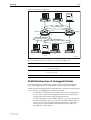
Figure 8-5 on page 8-19 shows a network configured with VLAN tagging.
Table 8-3 on page 8-19 shows the VLAN membership. The server on port 2 on
Switch A belongs to both the admin and marketing VLANs. The two switches
are connected through uplink port 26 on Switch A and uplink port 25 on
Switch B, which belong to both the marketing VLAN and the training VLAN, so
devices on both VLANs can use this link.
Software Version 2.8.1
C613-03120-00 REV A
Switching
8-19
Figure 8-5: VLANs with tagged ports
Training VLAN VID=3
Port 3
Port 22
Port 21
Port 26
Switch A
Switch B
Port 25
Port 1
Port 4
Port 2
Port 23
Admin VLAN VID=2
Marketing VLAN VID=4
VLAN-aware
server
411
SWITCH3
Table 8-3: VLAN membership of example of a network using tagged ports
VLAN
Member ports
Training
3, 26 on Switch A
21, 22, 25 on Switch B
Marketing
2, 4, 26 on Switch A
23, 25 on Switch B
Admin
1, 2 on Switch A
VLAN Membership of Untagged Packets
A VLAN that does not send VLAN-tagged frames is a logical grouping of
ports. All untagged traffic arriving at those ports belongs to that VLAN.
VLANs based on untagged ports are limited because each port can belong only
to one VLAN as an untagged port. Limitations include:
Software Version 2.8.1
C613-03120-00 REV A
•
It is difficult to share network resources, such as servers and printers,
across several VLANs. The routing functions in the switch must be
configured to interconnect using untagged ports only.
•
A VLAN that spans several switches requires a port on each switch for
the interconnection of the various parts of the VLAN. When there are
several VLANs in the switch that span more than one switch, then
many ports are occupied with connecting the VLANs, and so are
unavailable for other devices.
8-20
AlliedWare OS Software Reference
If the network includes VLANs that do not need to share network resources or
span several switches, VLAN membership can usefully be based on untagged
ports. Otherwise, VLAN membership should be determined by tagging (see
“VLAN Tagging” on page 8-16).
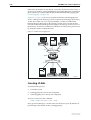
Figure 8-6 on page 8-20 shows two port-based VLANs with untagged ports.
Ports 1-3 belong to the marketing VLAN, and ports 14-16 belong to the training
VLAN. The switch acts as two separate bridges: one that forwards traffic
between the ports belonging to the marketing VLAN, and a second one that
forwards traffic between the ports belonging to the training VLAN. Devices in
the marketing VLAN can communicate with devices in the training VLAN only
by using the switch’s routing functions.
Figure 8-6: VLANs with untagged ports
Port 1
Port 2
Port 3
Marketing VLAN
Switch
Training VLAN
Port 14
Port 15
Port 16
411
SWITCH2
Creating VLANs
To summarise the process:
1.
Create the VLAN.
2.
Add tagged ports to the VLAN, if required.
3.
Add untagged ports to the VLAN, if required.
To create a VLAN, use the command:
create vlan=vlan-name vid=2..4094
Every port must belong to a VLAN unless it is the mirror port. By default, all
ports belong to the default VLAN as untagged ports.
Software Version 2.8.1
C613-03120-00 REV A
Switching
8-21
To add tagged ports to a VLAN, use the command:
add vlan={vlan-name|1..4094} port={port-list|all}
frame=tagged
A port can be tagged for any number of VLANs.
To add untagged ports to a VLAN, use the command:
add vlan={vlan-name|1..4094} port={port-list|all}
[frame=untagged]
A port can be untagged for zero or one VLAN. A port can be added only to the
default VLAN as an untagged port when it is not untagged for another VLAN.
A port cannot transmit both tagged and untagged frames for the same VLAN
(that is, it cannot be added to a VLAN as both a tagged and an untagged port).
To remove ports from a VLAN, use the command:
delete vlan={vlan-name|1..4094} port={port-list|all}
Removing an untagged port from a VLAN returns it to the default VLAN
unless it is a tagged port for another static VLAN. An untagged port can be
deleted from the default VLAN only when the port is a tagged port for another
static VLAN.
Ports tagged for some VLANs and left in the default VLAN as untagged ports
transmit broadcast traffic for the default VLAN. If this is not required, the
unnecessary traffic in the switch can be reduced by deleting those ports from
the default VLAN.
To change the tagging status of a port in a VLAN, use the command:
set vlan={vlan-name|1..4094} port={port-list|all}
frame=tagged
To destroy a VLAN, use the command:
destroy vlan={vlan-name|2..4094|all}
VLANs can be destroyed only when no ports belong to them.
To display the VLANs configured on the switch, use the command:
show vlan[={vlan-name|1..4094|all}]
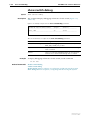
Information that may be useful for troubleshooting a network can be displayed
with the VLAN debugging mode. This is disabled by default, and can be
enabled for a specified time, disabled, and displayed using the commands:
enable vlan={vlan-name|1..4094|all} debug={pkt|all}
[output=console] [timeout={1..4000000000|none}]
disable vlan={vlan-name|1..4094|all} debug={pkt|all}
show vlan debug
To view packet reception and transmission counters for a VLAN, use the
command (see the Interfaces chapter of the switch’s Software Reference):
show interface=vlann counter
Software Version 2.8.1
C613-03120-00 REV A
8-22
AlliedWare OS Software Reference
Summary of VLAN Tagging Rules
When designing a VLAN and adding ports to VLANs, consider the following
rules:
•
Except for the mirror port, each port must belong to at least one static
VLAN. By default, a port is an untagged member of the default VLAN.
•
A port can be untagged for zero or one VLAN. A port that is untagged
for a VLAN transmits frames destined for that VLAN without a VLAN
tag in the Ethernet frame.
•
A port can be tagged for zero or more VLANs. A port that is tagged for
a VLAN transmits frames destined for that VLAN with a VLAN tag,
including the numerical VLAN Identifier of the VLAN.
•
A port cannot be untagged and tagged for the same VLAN.
•
If a mirror port is present, it is not a member of any VLAN.
VLAN Interaction with Trunk Groups
All the ports in a trunk group must have the same VLAN configuration. They
must belong to the same VLANs and have the same tagging status; and they
must be operated on as a group.
Static and Dynamic VLANs
All VLANs you create on the command line are static VLANs. The default
VLAN is also a static VLAN. A port must belong to at least one static VLAN.
Dynamic VLANs are created by GVRP, a GARP application whose purpose is
to propagate VLAN information between VLAN aware switches (see the
Generic Attribute Registration Protocol (GARP) chapter). These dynamic VLANs
are entitled gvrpxxx, where xxx is the VLAN’s VLAN Identifier. Dynamic
VLANs are created only when GVRP is enabled on the switch. GVRP is
disabled by default.
All static VLANs except for the default VLAN can be destroyed by the user.
Dynamic VLANs cannot be directly destroyed by the user, but may be
destroyed according to the operations of GVRP by using the reset garp
command on page 10-15 of Chapter 10, Generic Attribute Registration Protocol
(GARP) or by disabling the GVRP instance.
A user can add, delete, or modify ports for a static VLAN but not for a dynamic
VLAN. Dynamic VLANs created by GVRP include only tagged ports.
Software Version 2.8.1
C613-03120-00 REV A
Switching
8-23
Protected VLANs
Layer 2 traffic is blocked between ports that are members of a protected VLAN.
However, traffic can be Layer 3 switched to another VLAN. This feature
prevents members of a protected VLAN from communicating with each other
but lets members access another network. Layer 3 routing between ports in a
protected VLAN can be prevented by adding a Layer 3 filter. The protected
VLAN feature also allows all of the members of the protected VLAN to be in
the same subnet.
A typical application is a hotel installation where each room has a port for
accessing the Internet. In this situation, it is undesirable to allow
communication between rooms.
To create a protected VLAN, use the create vlan command on page 8-66 with
the protected parameter. Protected VLANs cannot be configured on the same
switch with private VLANs.
You can configure a protected VLAN only within one switch instance. See
“Switch Instances on 48-Port Switches” on page 8-9 for a list of ports within the
same instance.
Private VLANs
A private VLAN contains switch ports that are isolated from other ports in the
VLAN, but can access another network through an uplink port or uplink trunk
group. These ports are called private ports. Private ports may be standalone or
be combined into groups. Standalone private ports can only communicate with
the uplink port, not with other ports in the VLAN. Private ports that are in a
group can communicate with other ports in the group and with the uplink
port, but cannot communicate with the other private ports in the VLAN.
The switch forwards traffic between private ports and the uplink port, and
between private ports within a group, according to its normal forwarding
rules. The only difference is that forwarding to other private ports is blocked
unless the ports are in the same group. Note that all traffic between private
ports is blocked, not only Layer 2 traffic.
A typical application is a hotel installation where each room has a port for
accessing the Internet. In this situation, it is undesirable to allow
communication between rooms. Another application is to simplify IP address
assignment. Ports can be isolated from each other while belonging to the same
subnet.
Figure 8-7 on page 8-24 shows an example of a network using private VLANs.
In this scenario, two service providers are each providing multiple services
through multiple VLANs over separate uplinks. Customers are subscribed to
services from one or both service providers. Each customer’s ports are isolated
from other customers, but communicate with the ISP or ISPs through the
appropriate uplink port. A single customer may use multiple ports, connected
to individual PCs or trunked together to increase bandwidth. If a customer
uses multiple ports, these ports are able to communicate with each other.
Software Version 2.8.1
C613-03120-00 REV A
8-24
AlliedWare OS Software Reference
Figure 8-7: Example network configuration using private VLANs
ISP 1
ISP 2
VLANs 2 and 3
VLANs 11 and 12
Uplink
(trunk group)
Uplink
17
18
19
20
21
22
23
24
1
2
3
4
5
6
7
8
private
port
private
port
private group
(may be a
trunk group)
Customer 1
VLAN 12
ISP 2
25
Customer 3
Customer 2
VLANs 2 and 3
ISP 1
VLANs 2, 3 and 11
ISPs 1 and 2
Membership rules
for private VLANs
private-vlan
Each private VLAN:
•
Must contain one uplink port or uplink trunk group
•
May contain multiple private ports
•
Cannot be configured to span switch instances
•
Cannot contain any non-private ports
•
Cannot be the default VLAN (vlan1)
•
Cannot be configured on the same switch with a protected VLAN
Each private port:
•
Can be a member of multiple private VLANs
•
Cannot be a private port in some VLANs and a non-private port in
other VLANs
•
Cannot be an uplink port in another VLAN
Each uplink port:
•
Can be a member of multiple private VLANs
•
Cannot be configured to span switch instances, so uplink trunks must
be in the same instance
•
Cannot be a member of both private and non-private VLANs
Each private or uplink port:
•
May be tagged or untagged but can only be an untagged member of one
port-based VLAN
•
May be trunked with other ports of the same type
Software Version 2.8.1
C613-03120-00 REV A
Switching
Private VLANs on
48-port switches
Configuring
private VLANs
8-25
Private VLANs on a 48-port switch can consist of only ports from one switch
instance. Both the private ports and the uplink port must be in the same
instance. See “Switch Instances on 48-Port Switches” on page 8-9 for more
details about switch instances.
To create a private VLAN and add ports to it
1.
Create the VLAN.
To create a private VLAN, use the command:
create vlan=vlan-name vid=2..4094 private
2.
Add the uplink port or trunk group.
To add the uplink to a private VLAN, use one of the commands:
add vlan={vlan-name|1..4094} port=port-list
[frame={untagged|tagged}] uplink
where port-list is either a single port number for a single uplink port, or a
list of port numbers for a trunk group. If you are adding a trunk group to
the VLAN as an uplink, the ports must already be trunked together, and
you must specify all the ports.
3.
Add the private ports.
To add a private port or ports to a private VLAN, use one of the
commands:
add vlan={vlan-name|1..4094} port={port-list|all}
[frame={untagged|tagged}] [group]
The group parameter specifies that the listed ports may communicate with
each other, but not with any other private ports in the VLAN.
4.
Delete ports from a private VLAN as necessary.
To delete private ports from a private VLAN, use one of the commands:
delete vlan={vlan-name|1..4094} port=port-list
delete vlan={vlan-name|1..4094} port=all
A private VLAN cannot contain private ports when an uplink is deleted
from the VLAN, because a private VLAN must always have an uplink. To
delete the uplink port or ports and any private ports from a private VLAN,
use the port=all option in the above command.
If the port is a member of a private group, you must delete all ports in the
group at once. This stops groups from having different member ports in
different VLANs.
VLAN Relaying
VLAN relaying allows the passage of traffic between the VLANs on one
switch, for protocols that are not processed by the switch’s routing functions.
Particular protocols or protocol groups can be specified, and filtering occurs on
the basis of protocol identification number. VLAN relaying is similar to the
bridging function of an Allied Telesis router.
Protocol names have been predefined for many protocol types. Those protocols
that are transferred by VLAN relay and that have predefined names are given
in Table 8-4 on page 8-26, with their associated protocol identification numbers.
Software Version 2.8.1
C613-03120-00 REV A
8-26
AlliedWare OS Software Reference
Other protocols can be specified by entering their protocol identification
numbers. Protocols that the switch routes cannot be VLAN relayed. These
include IP, IPX, AppleTalk, STP, and GARP.
Table 8-4: Predefined protocol types implemented by VLAN relay
Protocol Name
Protocol Number
Encapsulation
All802
all SAP protocols
SAP
Netbeui
F0
SAP
SNA Path Control
04
SAP
PROWAY-LAN
0E
SAP
EIA-RS
4E
SAP
PROWAY
8E
SAP
ISO CLNS IS
FE
SAP
AllEthII
all EthII protocols
EthII
XEROX PUP
0200
EthII
PUP Addr Trans
0201
EthII
XEROX NS IDP
0600
EthII
X.75 Internet
0801
EthII
NBS Internet
0802
EthII
ECMA Internet
0803
EthII
Chaosnet
0804
EthII
X.25 Level 3
0805
EthII
XNS Compat
0807
EthII
Banyan Systems
0BAD
EthII
BBN Simnet
5208
EthII
DEC MOP Dump/Ld
6001
EthII
DEC MOP Rem Cons
6002
EthII
DEC LAT
6004
EthII
DEC Diagnostic
6005
EthII
DEC Customer
6006
EthII
DEC LAVC
6007
EthII
RARP
8035
EthII
DEC LANBridge
8038
EthII
DEC Encryption
803D
EthII
IBM SNA
80D5
EthII
SNMP
814C
EthII
AllSNAP
all SNAP protocols
SNAP
VLAN relaying operates in the following stages:
1.
The user creates one or more VLAN relay entities and adds the required
VLANs and protocols to each entity.
2.
The VLAN relay entity attaches to each specified VLAN and receives traffic.
If more than one VLAN relay entity is attached to the same VLAN for the
same protocol type, an intermediate attachment level receives the packet,
duplicates it, and sends it to separate VLAN relay entities as required.
Software Version 2.8.1
C613-03120-00 REV A
Switching
8-27
3.
The VLAN relay entity sends the packet to the appropriate destination
VLAN. Destination addresses are determined from the switch’s learned
address tables. If the destination address cannot be found, the packet is sent
to all ports on all VLANs that are part of the VLAN relay entity. If the packet
is destined for the VLAN on which it was received, the relaying entity does
not send it to that VLAN because the packet causes a destination lookup
failure, and the switch itself sends the packet to all ports in the VLAN.
Configuring VLAN Relaying
To configure VLAN relaying on the switch, first create a VLAN relay entity and
give it a unique name, using the command:
create vlanrelay=name
An existing VLAN relay entity can be disabled or destroyed using the
commands:
disable vlanrelay=name
destroy vlanrelay=name
In many networks, only one VLAN relay entity is required. The following
configurations are examples of situations when more than one VLAN relay
entity is used.
•
If a number of protocols and VLANs are part of VLAN relaying but not
all protocols on all VLANs, then setting up a number of VLAN relay
entities allows only relevant protocols and VLANs to be part of
relaying.
•
If traffic is to be relayed between certain VLANs but not others (for
example, between VLAN 1 and VLAN 2, and between VLAN 1 and
VLAN 3, but not between VLAN 2 and VLAN 3), then separate VLAN
relay entities are required.
To initiate relaying, add the VLANs which packets are to be sent between, and
the desired protocols, to the VLAN relay entity, by using the command:
add vlanrelay=name [protocol=protocoltype] [vlan={vlan-name|
1..4094}]
Protocols are specified by protocol type and number, or by allowing all
protocols of a certain type. A predefined list of common protocols is provided
in Table 8-4 on page 8-26.
VLANs and/or protocols can be removed from an existing VLAN relay entity
by using the command:
delete vlanrelay=name [protocol=protocoltype]
vlan=[{vlan-name|1..4094}]
A count of the packets relayed by the VLAN relay entity or entities, which
shows the packets relayed from and to each VLAN, can be displayed by using
the command:
show vlanrelay[=name]
The traffic being relayed, including the source and destination VLANs and the
relevant VLAN relay entity, can be displayed by using the command:
enable vlanrelay debug
Software Version 2.8.1
C613-03120-00 REV A
8-28
AlliedWare OS Software Reference
VLAN relay debugging can be disabled by using the command:
disable vlanrelay debug
Debugging is disabled by default. It can be enabled for one specified VLAN
relay entity, and can be disabled for all entities or for a specified entity.
The Layer 2 Switching Process
The Layer 2 switching process comprises related but separate processes:
■
The Ingress Rules
■
The Learning Process
■
The Forwarding Process
■
The Egress Rules
Ingress rules admit or discard frames based on their VLAN tagging.
The Learning process learns the MAC addresses and VLAN membership of
frames admitted on each port.
The Forwarding process determines to which ports the frames are forwarded,
and the Quality of Service priority with which they are transmitted.
Finally, Egress rules determine for each frame whether VLAN tags are included
in the Ethernet frames that are transmitted. These processes assume that each
station on the extended LAN has a unique data link layer address, and that all
data link layer frames have a header that includes the source (sender’s) MAC
address and destination (recipient’s) MAC address.
The Ingress Rules
When a frame first arrives at a port, ingress rules for the port check the VLAN
tagging in the frame to determine whether to discard it or forward it to the
learning process.
The first check depends on whether the Acceptable Frame Types parameter is
set to Admit All Frames or to Admit Only VLAN Tagged Frames. A port that
transmits only VLAN tagged frames is automatically set to Admit Only VLAN
Tagged Frames regardless of the VLAN to which the port belongs. The user
cannot change this setting. Frames with a null numerical VLAN Identifier
(VID) are VLAN-untagged frames or frames with priority tagging only.
Every frame received by the switch must be associated with a VLAN. When a
frame is admitted by the Acceptable Frame Types parameter, the second part of
the Ingress Rules associates each untagged frame admitted with the VID of the
VLAN for which the port is untagged.
Every port belongs to one or more VLANs so every incoming frame has a VID
that shows to which VLAN it belongs. The final part of the Ingress Rules
depends on whether Ingress Filtering is enabled for the port. If Ingress Filtering
is disabled, all frames are passed on to the Learning Process, regardless of
which VLAN they belong to. If Ingress Filtering is enabled, frames are
admitted only when they have the VID of a VLAN to which the port belongs.
Otherwise, they are discarded.
Software Version 2.8.1
C613-03120-00 REV A
Switching
8-29
The default settings for the Ingress Rules are to Admit All Frames, and for
Ingress Filtering to be off. This means that if no VLAN configuration has been
done, all incoming frames pass to the learning process, regardless of whether
not they are VLAN tagged. The parameters for each port’s ingress rules can be
configured by using the command:
set switch port={port-list|all} [acceptable={vlan|all}]
[infiltering={on|off}]
The Learning Process
The learning process uses an adaptive learning algorithm, sometimes called
backward learning, to discover the location of each station on the extended LAN.
All frames admitted by the Ingress Rules on any port are passed on to the
Forwarding Process if they are for destinations within the same VLAN. Frames
destined for other VLANs are passed to the layer three protocol, for instance IP.
For every frame admitted, the frame’s source MAC address and numerical
VLAN Identifier (VID) are compared with entries in the forwarding database
for the VLAN (also known as a MAC address table, or a forwarding table)
maintained by the switch. The forwarding database contains one entry for
every unique station MAC address the switch knows in each VLAN.
If the frame’s source address is not already in the forwarding database for the
VLAN, the address is added and an ageing timer for that entry is started. If the
frame’s source address is already in the forwarding database, the ageing timer
for that entry is restarted. Switch learning is enabled by default; it can be
disabled or enabled by using the commands:
DISable SWItch LEarning
ENAble SWItch LEarning
If the ageing timer for an entry in the forwarding database expires before
another frame with the same source address is received, the entry is removed
from the forwarding database. This prevents the forwarding database from
being filled up with information about stations that are inactive or have been
disconnected from the network, while ensuring that entries for active stations
are kept alive in the forwarding database. The ageing timer is enabled by
default; it can be disabled or enabled by using the commands:
enable switch ageingtimer
disable switch ageingtimer
If switch learning is disabled and the ageing timer has aged out all dynamically
learned filter entries, only statically entered MAC source addresses are used to
decide which packets to forward or discard. If the switch finds no matching
entries in the forwarding database during the Forwarding Process, then all
switch ports in the VLAN are flooded with the packet, except the port on
which the packet was received.
The default of the ageing timer is 300 seconds (5 minutes) but can be modified
by using the command:
set switch ageingtimer
The forwarding database relates a station’s (source) address to a port on the
switch, and is used by the switch to determine from which port to transmit
frames with a destination MAC address matching the entry in the station map.
Software Version 2.8.1
C613-03120-00 REV A
8-30
AlliedWare OS Software Reference
To display the contents of the forwarding database, use the command:
show switch fdb [address=macadd] [discard={source|
destination}] [hit={yes|no}] [l3={yes|no}]
[port={portlist|all}] [status={static|dynamic}]
[vlan={vlan-name|1..4094}]
To display general switch settings, including settings for switch learning and
the switch ageing timer, use the command:
show switch
The Forwarding Process
The forwarding process forwards received frames that are to be relayed to
other ports in the same VLAN, filtering out frames on the basis of information
contained in the station map and on the state of the ports. When a frame is
received on the port for a destination in a different VLAN, it is either Layer 3
switched if it is an IP packet, or looked up in the Layer 3 routing tables.
Forwarding occurs only when the port on which the frame was received is in
the Spanning Tree forwarding or disabled states. The destination address is
then looked up in the forwarding database for the VLAN. If the destination
address is not found, the switch floods the frame on all ports in the VLAN
except the port on which the frame was received. If the destination address is
found, the switch discards the frame if the port is not in the STP forwarding or
disabled states, if the destination address is on the same port as the source
address, or if there is a static filter entry for the destination address set to
discard (see “Layer 2 Filtering” on page 8-31). Otherwise, the frame is
forwarded on the indicated port.
This whole process can further be modified by the action of static switch filters.
These are configurable filters that allow switched frames to be checked against
a number of entries.
The forwarding process provides storage for queued frames to be transmitted
over a particular port or ports. More than one transmission queue may be
provided for a given port. The transmission queue where a frame is sent is
determined by the user priority tag in the Ethernet frame and the Quality of
Service mapping (see “Quality of Service” on page 8-31).
The Egress Rules
After the forwarding process determines the ports and transmission queues
from which a frame is forwarded, the Egress Rules for each port determine
whether the outgoing frame is VLAN-tagged with its numerical VLAN
Identifier (VID).
When you add a port to a VLAN, configure it to transmit either untagged or
VLAN tagged packets by using the command:
add vlan={vlan-name|1..4094} port={port-list|all}
[frame={tagged|untagged}]
To change this setting for a port that is already part of a VLAN, use the
command:
set vlan={vlan-name|1..4094} port={port-list|all}
frame={untagged|tagged}
Software Version 2.8.1
C613-03120-00 REV A
Switching
8-31
Quality of Service
The switch hardware has a number of Quality of Service (QoS) egress queues
that can be used to give priority to the transmission of some frames over other
frames on the basis of their user priority tagging. The user priority field in an
incoming frame (with value 0 to 7) determines which of the eight priority levels
the frame is allocated. When a frame is forwarded, it is sent to a QoS egress
queue on the port determined by the mapping of priority levels to QoS egress
queues.
By default, all frames in the first QoS queue are sent before frames in the
second QoS egress queue, and so on, until frames in the last QoS egress queue,
which are sent when there are no frames waiting to be sent in any of the higher
QoS egress queues (strict priority queue scheduling). Other queue scheduling
mechanisms are available if you configure QoS; see “Class of Service (CoS)
Queue Scheduling” on page 39-11 of Chapter 39, Quality of Service (QoS) on
Switch Ports for more information.
The mapping between user priority and a QoS egress queue can be configured
by using the command:
set switch qos
The switch has four QoS egress queues. It has a default mapping of priority
levels to QoS egress queues as defined in IEEE Standard 802.1q (Table 8-5).
Table 8-5: Default priority level to queue mapping for four QoS egress queues
Priority level
QoS Egress Queue
0
1
1
0
2
0
3
1
4
2
5
2
6
3
7
3
To display the mapping of user priority to QoS egress queues, use the
command:
show switch qos
Layer 2 Filtering
The switch has a forwarding database, entries that determine whether frames
are forwarded or discarded over each port. Entries in this forwarding database
are created dynamically by the learning process. A dynamic entry is
automatically deleted from the Forwarding Database when its ageing timer
expires. Filtering is specified in the IEEE Standard 802.1d.
The user can configure static switch filter entries using the command line
interface. Static switch filter entries associate a MAC address with a VLAN and
a port in the VLAN. When the switch receives a frame with a destination
Software Version 2.8.1
C613-03120-00 REV A
8-32
AlliedWare OS Software Reference
address and VLAN Identifier that match those of a static filter entry, the frame
can be either forwarded to the port specified in the static filter entry, or
discarded.
When a port is part of a trunk group, any static switch filters defined to
forward traffic out that port are modified if the port goes link-down. By
changing the egress port for the filter to a port within the trunk group which is
link-up, the switch ensures that traffic flow is not interrupted.
The forwarding database supports queries by the forwarding process as to
whether frames with given values of the destination MAC address field should
be forwarded to a given port.
To add or delete a static switch filter entry, use the command:
add switch filter action={forward|discard} destaddress=macadd
port=port [entry=entry] [learn] [vlan={vlan-name|1..4094}]
delete switch filter port=port entry=entry-list
To display current static and learned switch filter entries, use the command:
show switch filter [port={port-list|all}]
[destaddress=macadd] [entry=entrylist] [vlan={vlan-name|
1..4094}]
For each VLAN, the destination MAC address of a frame to be forwarded is
checked against the forwarding database. If there is no entry for the destination
address and VLAN, the frame is transmitted on all ports in the VLAN that are
in the forwarding or disabled states, except the port on which the frame was
received. This process is referred to as flooding. If an entry is found in the
forwarding database, but the entry is not marked as forwarding or it points to
the same port the frame was received on, the frame is discarded. Otherwise,
the frame is transmitted on the port specified by the entry in the forwarding
database.
Securing a Single VLAN through Switch Filters
On 24-port switches, you can use switch filters to secure only the current
VLAN, instead of securing all VLANs on the switch. To turn on this feature,
you disable “vlansecure” mode for filters (see “Configuring vlansecure” on
page 8-33).
In vlansecure mode (the default situation) a switch filter only allows a host to
access the network through a particular port on the switch. For example, if you
have a PC connected to port 15 in vlan2, and define the following filter, the PC
can only communicate when it is connected to port 15:
add switch filter entry=0 dest=pc-mac-address vlan=2 port=15
action=forward
When you turn off vlansecure mode, the above filter limits the host to accessing
vlan2 through port 15, but does not prevent the host from accessing other
VLANs through other ports in vlan2. For example, if the above filter exists and
you move the PC to another port in vlan2, turning off vlansecure mode
prevents the PC from communicating with devices in vlan2 but allows it access
to other VLANs on the switch. The following figure shows a PC that has been
moved from port 15 to port 16 to illustrate the effect.
Software Version 2.8.1
C613-03120-00 REV A
Switching
8-33
Default behaviour
Securing only the VLAN
(vlansecure enabled)
(vlansecure disabled)
port 15
port 16
port 15
vlan2
vlan2
vlan1
vlan1
port 16
swi-filter
Configuring vlansecure
To turn off the default behaviour, so that the filter prevents access to only the
current VLAN when you move the host, use the command:
disable switch filter vlansecure
To return to the standard filter behaviour, use the command:
enable switch filter vlansecure
To display which mode the filtering behaviour is in, use the command:
show switch filter
Hardware Packet Filters
The switch hardware can be configured to discard, forward, mirror, or change
the priority of packets matching specified criteria at wire speed. Filters can also
be configured to provide a range of Quality of Service (QoS) controls, including
changing the DSCP byte, and actions can be specified for packets that match
the ingress and egress ports of the filter (if set), but do not match the filter’s
other parameters.
Two sets of commands are available, one based on the Packet Classifier (see
Chapter 38, Generic Packet Classifier), and one based on Layer 3 filter matches
and entries. These two filter types cannot be used together. See the sections
Software Version 2.8.1
C613-03120-00 REV A
8-34
AlliedWare OS Software Reference
“Classifier-Based Packet Filters” on page 8-34 and “Layer 3 Based Packet
Filters” on page 8-38 for details about using the filter types.
Classifiers and hardware packet filters can be configured to provide Access
Control List functionality. See the section “Access Control Lists (ACLs)” on
page 8-39 for further details.
When Internet Group Management Protocol (IGMP) snooping is enabled, it
uses a hardware filter, which reduces the number of available filters. IGMP
snooping is enabled by default, but can be disabled to make its filter available
by using the command:
disable igmpsnooping
When IGMP snooping is disabled, multicast packets flood the VLAN.
IGMP snooping cannot be enabled unless a filter is available. To enable IGMP
snooping, use the command:
enable igmpsnooping
For more information, see “IGMP Snooping” on page 26-24 of Chapter 26, IP
Multicasting.
Classifier-Based Packet Filters
The switch hardware can be configured through entries in the Packet Classifier
to copy, drop, forward, and associate QoS attributes to Layer 3 packets that
match the criteria set using the classifier (see Chapter 39, Quality of Service
(QoS) and Chapter 38, Generic Packet Classifier).
Every packet passing through the switch is matched against a series of
classification tables by the Packet Classifier. Packets can be classified according
to:
•
Packet type
•
Physical source/destination port
•
Layer 3 protocol
•
Source/destination IP address
•
Destination IPX address
•
Layer 4 protocol (for example: TCP/UDP/Socket number)
•
Layer 4 source/destination ports
•
Any 16-bit word in the first 64 bytes of a packet
See Chapter 38, Generic Packet Classifier for information on configuring
classifiers.
Hardware-based packet filters can be configured by the user to take action
upon the results of the classification tables. These actions are:
•
Discard the packet
•
Forward the packet
•
Send the packet to the mirror port
Software Version 2.8.1
C613-03120-00 REV A
Switching
8-35
•
Forward the packet to a specified egress port, for unicast packets
•
Send the packet to a Class of Service queue
•
Replace the packet’s 802.1p priority
The filter can also perform the following Quality of Service actions:
•
Replace the packet’s IP TOS value and/or the IP DSCP value.
•
Direct non-unicast packets that were scheduled to be dropped or sent to
the CPU to a specified port.
•
Forward packets that were marked to be dropped. This option allows
bandwidth limiting to be overridden for particular packets.
All actions are also available on packets that match the ingress and egress ports
of the classifier (if either or both are set), but do not match the classifier’s other
parameters.
For more information about the circumstances when hardware filters are useful
for performing QoS on Rapier i switches, see Table 39-1 on page 39-6 in
Chapter 39, Quality of Service (QoS) on Switch Ports.
A classifier-based packet filter comprises a single classifier entry. A number of
filters can be created at one time with the same action by specifying a list of
classifiers, but each classifier is contained in a single filter. The number of
packet filters supported by the switch is determined by the switch model and
how different each filter is.
Ordering Filter Entries
The order of the classifier-based packet filters depends on the order in which
they were entered on the switch. The first entry added becomes filter 1, the
second entry becomes filter 2, and so on. You can see the entries using the
command:
show switch hwfilter [classifier=1..9999]
The switch checks a packet against all the filters, starting at filter 1. Each time a
filter matches the packet, the status of the packet changes. The switch filters the
packet according to its status after it has been compared to every filter. For
example, if filter 1 tells the switch to drop the packet, but filter 3 tells the switch
not to drop the packet, then the switch does not drop the packet.
More than one filter can act on a packet. For example, if filter 4 tells the switch
to send the packet to port 40, and filter 5 tells the switch to change the TOS field
of the packet, then the packet is sent to port 40 with a new TOS field. The
switch is able to carry out the request of both filters 4 and 5.
New filters are always added to the end of the classifier-based filter entries.
This makes the order with which you add filters very important. On 48-port
switches you may also need to change the filter mode when using classifierbased packet filters. See “Filter Modes in 48-Port Switches” on page 8-36 for
more information.
See How to configure port-IP binding for an example of a classifier-based packet
filter configuration, and further discussion about configuring these filters in
the correct order. This is available from the Resource Center on your
Documentation and Tools CD-ROM, or from the website:
www.alliedtelesis.co.uk/en-gb/solutions/techdocs.asp?area=howto
Software Version 2.8.1
C613-03120-00 REV A
8-36
AlliedWare OS Software Reference
Configuring Filters
How to create
classifier-based filters
To create a hardware-based packet filter:
1.
Create the classifier by using the command:
create classifier=1..9999 [classifier-options...]
2.
Create the filter by using the command:
add switch hwfilter classifier=1..9999
[action={setpriority|sendcos|settos|deny|sendeport|
sendmirror|movepriototos|movetostoprio|setipdscp|
sendnonunicasttoport|nodrop|forward}[,...]]
[newipdscp=0..63] [newtos=0..7]
[nomatchaction={setpriority|sendcos|settos|deny|
sendeport|sendmirror|movepriototos|movetostoprio|
setipdscp|sendnonunicasttoport|forward}[,...]]
[nomatchdscp=0..63] [nomatchport=port-number]
[nomatchpriority=0..7] [nomatchtos=0..7]
[port=port-number] [priority=0..7]
3.
Verify the filter by using the command:
show switch hwfilter [classifier=1..9999]
How to delete
classifier-based filters
To stop the switch from filtering packets that match a particular classifier, use
the command:
delete switch hwfilter classifier=1.9999
How to disable and
enable filtering
The switch automatically enables classifier-based packet filtering when you
add the first filter. To disable it, use the command:
disable switch hwfilter
If the switch is not forwarding packets as you expect, disabling filtering may
help with troubleshooting by indicating whether your filters are the cause of
the behaviour. To enable classifier-based packet filtering again, use the
command:
enable switch hwfilter
When Internet Group Management Protocol (IGMP) Snooping is enabled,
hardware filtering is also enabled. IGMP snooping is enabled by default.
Hardware filtering cannot be disabled unless IGMP snooping is first disabled
by using the command:
disable igmpsnooping
Filter Modes in 48-Port Switches
In 48-port switches, you must choose between two ways of filtering using
classifier-based packet filters: port-specific filters first, or non port-specific
filters first.
Port-specific filters apply to traffic either ingressing or egressing a particular
port. They use a classifier which specifies the iport or eport parameter. Non
port-specific filters can apply to all traffic travelling through the switch. Non
port-specific filters are created with a classifier that does not have the iport or
eport parameter specified.
Software Version 2.8.1
C613-03120-00 REV A
Switching
8-37
The switch defaults to port-specific filters first. You can change the filtering
mode on the switch by using the command:
set switch hwfilter mode={psf|npsf}
When to Use
Port-Specific Mode
Use the port-specific psf mode when you want non port-specific filters to
override the port-specific filters for certain circumstances. In the following
example:
■
the first (port-specific) filter stops all traffic from ingressing port 2
■
the second (port-specific) filter allows traffic with the specific IP address
(192.168.2.2) to ingress port 2
■
the third (non port-specific) filter allows any ARP request (prot=0806) to
ingress and egress all ports
create classifier=1 iport=2
create classifier=2 iport=2 ipsa=192.168.2.2
create classifier=3 prot=0806
add swi hwf classifier=1 action=discard
add swi hwf classifier=2 action=nodrop
add swi hwf classifier=3 action=nodrop
In psf mode, you must enter the port-specific filters first. If you add a
port-specific filter after the non port-specific filters, the switch may still use a
matching non port-specific filter when the packet travels between ports on
different switch instances.
When to Use Non
Port-Specific Mode
Use the non port-specific npsf mode when you want port-specific filters to
override the non port-specific filters for certain circumstances. In the following
example, the second (port-specific) filter stops the first (non port-specific) filter
from discarding packets from port 50:
create class=1 ipsa=192.168.1.254/32
create class=4 ipo=50
add switch hwf class=1 ac=dis
add switch hwf class=4 ac=nod
In npsf mode, you must enter the non port-specific filters first. If you add a non
port-specific filter after the port-specific filters, the switch may not use the non
port-specific filter when the packet travels between ports on different switch
instances.
Changing Modes
You can change the filter mode after filters have been entered. When you
change modes, the filter entries remain in the original order. To see which
mode the switch is in, use the command:
show switch hwfilter
Software Version 2.8.1
C613-03120-00 REV A
8-38
AlliedWare OS Software Reference
Layer 3 Based Packet Filters
Layer 3 Filter Matches
As an alternative to classifier-based filters, Layer 3 filter matches can be
configured to determine which fields in each packet are matched, whether
ingress or egress ports are to be matched, and the source and destination class
of IP masks to apply to the packets. An entry added to a filter specifies the
values to be matched for each field and the action to be taken on packets
matching the filter entry. Layer 3 filter matches can perform the same actions as
classifier-based hardware filters, but classifiers match a wider range of packet
types.
Filters can be configured while Layer 3 filtering is disabled or enabled, but it
must be enabled for any of the existing filters to take effect. To enable the Layer
3 filter function, use the enable switch l3filter command on page 8-88. Disable
it with the disable switch l3filter command on page 8-79.
When Internet Group Management Protocol (IGMP) Snooping is enabled,
Layer 3 filtering is also enabled. Layer 3 filtering cannot be disabled unless
IGMP snooping is first disabled, using the command disable igmpsnooping
(see “IGMP Snooping” on page 26-24 of Chapter 26, IP Multicasting). IGMP
snooping is enabled by default.
To add Layer 3 filter match criteria, use the add switch l3filter match
command on page 8-58.
To display hardware-based Layer 3 filtering match criteria configured on the
switch and their filter entries, use the show switch l3filter command on
page 8-133.
Filter match criteria can be changed only when no filter entries belong to them.
To change filter match criteria, delete any entries associated with them, use the
set switch l3filter match command on page 8-105.
To delete the Layer 3 filter match criteria, first delete any entries belonging to it,
use the delete switch l3filter command on page 8-70.
To configure a Layer 3 filter entry, first add the filter match criteria, then add a
filter entry.
Layer 3 Filter Entries
Filter matches specify the aspect of the packet that the filter checks. Filter
entries specify what that aspect must be set to in order for the traffic to be
filtered by the filter. To add a Layer 3 switch filter entry to the match criteria
described above, use the add switch l3filter entry command on page 8-55.
All criteria specified in the filter match should also be set in the filter entry.
Criteria not in the filter match are not valid in the filter entry. The l3filter
parameter specifies the number of the filter match to be modified. Filter match
numbers are in the output of the show switch l3filter command on page 8-133.
Software Version 2.8.1
C613-03120-00 REV A
Switching
8-39
To change the parameters for a filter entry, use the set switch l3filter entry
command on page 8-102.
To delete a Layer 3 filter entry, use the delete switch l3filter entry command on
page 8-70.
Access Control Lists (ACLs)
Classifiers and hardware packet filters can be configured to provide Access
Control List functionality.
For example, to allow WWW servers in the 192.168.10.0 subnet to be accessed
only from the 192.168.20.0 subnet:
1.
Create a classifier to match all WWW traffic to the subnet
Create a classifier to match all WWW traffic to the 192.168.10.0 subnet.
create classifier=1 ipdaddr=192.168.10.0/24 tcpdport=80
2.
Create a hardware packet filter to deny this traffic
add switch hwfilter classifier=1 action=deny
3.
Create a classifier to match the subset of this traffic that is to be allowed
Create a classifier to match WWW traffic from the 192.168.20.0 subnet to
the 192.168.10.0 subnet.
create classifier=2 ipdaddr=192.168.10.0/24
ipsaddr=192.168.20.0/24 tcpdport=80
4.
Create a hardware packet filter to allow this traffic
This filter must be created last so that it is the first filter that the switch
processes.
add switch hwfilter classifier=2 action=nodrop
The nomatchaction parameter can create a hardware filter that acts upon
traffic that does not match the classifier or any other hardware filters. For
example, to allow traffic destined for TCP ports 25 and 80 and UDP port
5151, and block all other traffic, create the following set of classifiers and
filters:
create classifier=1 tcpdport=80
add switch hwfilter classifier=1 action=forward
nomatchaction=deny
create classifier=2 tcpdport=25
add switch hwfilter classifier=2 action=forward
nomatchaction=deny
create classifier=3 udpdport=5151
add switch hwfilter classifier=3 action=forward
nomatchaction=deny
If the nomatchaction is not specified in these filters, all traffic is forwarded,
including traffic that matched the classifiers.
Software Version 2.8.1
C613-03120-00 REV A
8-40
AlliedWare OS Software Reference
Triggers
The Trigger facility can be used to automatically run specified command
scripts when particular triggers are activated. When a trigger is activated by an
event, global parameters and parameters specific to the event are passed to the
script that runs. For a full description of the Trigger facility, see Chapter 59,
Trigger Facility.
The switch can generate triggers to activate scripts when a switch port goes up
or down.
The following section lists the events that may be specified for the Switching
module for the event parameter, the parameters that may be specified as
module-specific-parameters for the Switching module, and the arguments passed
to the script activated by the trigger.
Module
Event
Layer 3 Switching module: module=swi
linkdown
Description
The port link specified by the port parameter has just gone down.
Parameters
The following command parameter must be specified in the create/set trigger
commands:
Script Parameters
Event
Parameter
Description
port=port
The port where the event activates the trigger.
The trigger passes the following parameter to the script:
Argument
Description
%1
The port number of the port that has just gone down.
linkup
Description
The port link specified by the port parameter has just come up.
Parameters
The following command parameter must be specified in the create/set trigger
commands:
Script Parameters
Parameter
Description
port=port
The port where the event activates the trigger.
The trigger passes the following parameter to the script:
Argument
Description
%1
The port number of the port that has just come up.
To create or modify a switch trigger, use the commands:
create trigger=trigger-id module=switch event={linkdown|
linkup} port=port [after=hh:mm] [before=hh:mm]
[{date=date|days=day-list}] [name=name] [repeat={yes|no|
once|forever|count}] [script=filename...] [state={enabled|
disabled}] [test={yes|no|on|off|true|false}]
set trigger=trigger-id [port=port] [after=hh:mm]
[before=hh:mm] [{date=date|days=day-list}] [name=name]
[repeat={yes|no|once|forever|count}] [test={yes|no|on|
off|true|false}]
Software Version 2.8.1
C613-03120-00 REV A
Switching
8-41
Configuration Examples
This section shows the following examples of how to configure Layer 2 switch
functions on the switch:
■
One Switch to Extend a Local LAN
■
VLAN with Untagged Ports
■
VLAN with Tagged Ports
■
Meshed Network with VLAN Tagged Ports
All examples assume that the switch configuration begins from factory default
settings. Note that routing, required for communication between the VLANs, is
not shown in these examples.
One Switch to Extend a Local LAN
The example in Figure 8-8 uses a single switch to connect two (or more)
physical LANs and a server. All the devices connected belong to the same
broadcast domain, and separate collision domains. The learning and
forwarding processes in the switch give this topology better performance than
a single LAN would give, and allow more devices to be attached than would a
single physical LAN.
Figure 8-8: Example of switch with default configuration
Server
Workstation
Workstation
Switch
SWITCH1
No software configuration is required. The default switch settings lets the
switch learn source addresses and forward frames to correct ports as soon as it
is physically connected and powered up.
VLAN with Untagged Ports
The example in Figure 8-9 has two VLANs using untagged ports. Ports 1-3
belong to one broadcast domain, the marketing VLAN, and ports 14-16 belong
to another broadcast domain, the training VLAN. The switch acts as two
separate bridges: one that forwards between the ports belonging to the
marketing VLAN, and a second one that forwards between the ports belonging
to the training VLAN. Devices on ports 2 and 14 can only communicate with
each other by using the switch’s IP routing functions.
Software Version 2.8.1
C613-03120-00 REV A
8-42
AlliedWare OS Software Reference
Figure 8-9: VLANs with untagged ports
Port 1
Port 2
Port 3
Marketing VLAN
Switch
Training VLAN
Port 14
Port 15
Port 16
411
SWITCH2
Table 8-6 shows the parameters used to configure this example. Since there is
only one switch and no loops in this topology, the Spanning Tree Protocol (STP)
is not needed. This example assumes that the switch has factory default
settings.
Table 8-6: Parameters for port-based VLAN example
VLAN name
VLAN ID
Ports
Marketing
VID=2
PORT 1-3
Training
VID=3
PORT 14-16
Configure the switch
1.
Create VLANs.
Create the two VLANs using the following commands on the switch:
create vlan=marketing vid=2
create vlan=training vid=3
2.
Add ports to VLANs.
Add the ports to these VLANs on the switch by using the following
commands:
add vlan=marketing port=1-3
add vlan=training port=14-16
Check the VLAN configuration by using the command:
show vlan
Software Version 2.8.1
C613-03120-00 REV A
Switching
8-43
3.
Check the switch.
Check that the switch is switching across the ports. Traffic on the switch
can be monitored using the command:
show switch port=1-3,14-16 counter
VLAN with Tagged Ports
Figure 8-10 shows a network that must be configured with VLAN tagging,
since the VLAN aware server on port 2 on Switch A belongs to both the admin
VLAN and the marketing VLAN. Using VLAN tags, port 26 on Switch A and
port 25 on Switch B belong to both the marketing VLAN and the training VLAN,
so that devices on both VLANs can use this uplink to communicate with other
devices in the same VLAN on the other switch. There are no loops in this
topology, so STP is not needed.
Figure 8-10: VLANs with tagged ports
Training VLAN VID=3
Port 3
Port 22
Port 21
Port 26
Switch A
Switch B
Port 25
Port 1
Port 2
Port 4
Port 23
Admin VLAN VID=2
Marketing VLAN VID=4
VLAN-aware
server
411
SWITCH3
Table 8-7: Configuration example parameters for VLANs with tagged ports
Switch A
VLAN name VID
Software Version 2.8.1
C613-03120-00 REV A
Switch B
Tagged ports Untagged ports Tagged ports
Untagged ports
Admin
VID=2 PORT 2
PORT 1
Training
VID=3 PORT 26
PORT 3
PORT 25
PORT 21,22
Marketing
VID=4 PORT 2,26
PORT 4
PORT 25
PORT 23
8-44
AlliedWare OS Software Reference
Configure Switch A
1.
Create VLANs.
Create the three VLANs using the following commands on the switch:
create vlan=admin vid=2
create vlan=training vid=3
create vlan=marketing vid=4
2.
Add ports to VLANs.
Add the ports to these VLANs on the switch by using the following
commands:
add vlan=admin port=2 frame=tagged
add vlan=admin port=1
add vlan=training port=26 frame=tagged
add vlan=training port=3
add vlan=marketing port=2,26 frame=tagged
add vlan=marketing port=4
Check the VLAN configuration by using the command:
show vlan
Configure Switch B
1.
Create VLANs.
Create the two VLANs using the following commands on the switch:
create vlan=training vid=3
create vlan=marketing vid=4
2.
Add ports to VLANs.
Add the ports to these VLANs on the switch by using the following
commands:
add vlan=training port=25 frame=tagged
add vlan=training port=21,22
add vlan=marketing port=25 frame=tagged
add vlan=marketing port=23
Check the VLAN configuration by using the command:
show vlan
Check
Check that the switch is switching across the ports. Traffic on Switch A can
be monitored using the command:
show switch port=1-4,26 counter
Traffic on Switch B can be monitored using the command:
show switch port=21-23,25 counter
Meshed Network with VLAN Tagged Ports
In this example, the uplink ports on all three switches connect the VLANs.
Server S on Switch B is VLAN aware, and is shared between all three VLANs.
Software Version 2.8.1
C613-03120-00 REV A
Switching
8-45
The other devices shown are VLAN-unaware end stations, connected to
untagged ports. Because both uplink ports on all three switches belong to the
marketing VLAN, the Spanning Tree Protocol eliminates the loop in this VLAN,
and provides redundancy in case links fail. Because the VLAN-aware shared
server on Switch B, and the uplink ports belong to all three VLANs, these
VLANs must all belong to the same STP.
Figure 8-11: Example of meshed network with VLAN tagged ports
Marketing VLAN
Admin VLAN
Server S
Port 1
Port 2
Port 26
Port 25
Switch A
Admin
Training &
Marketing
VLANs
Marketing VLAN
Port 25
Port 25
Port 23
Port 6
Port 26
Switch B
Port 26
Port 7
Port 24
Switch C
Training VLAN
SWITCH5
Table 8-8 on page 8-46 shows the parameters for creating the VLANs on the
switches and adding ports to the VLANs. Note that by default all VLANs
belong to the default STP, which is disabled at switch start-up.
Note that all three VLANs are created on all three switches, and all uplink
ports belong to all three VLANs. This should be done even though the training
VLAN has no devices on Switch A that need to communicate with Switch B or
C, and Switch C has no devices belonging to the admin VLAN requiring links
to Switch A or B. This is because STP is enabled, and inevitably blocks ports on
one of the three links to prevent a loop in the marketing VLAN. This also
blocks traffic over these ports for the other VLANs. Therefore the training and
admin VLANs must be able to communicate over either of the links on each
switch to ensure full VLAN operation. Failing to include the switches and
uplink ports in the VLANs for which they have no devices attached is likely to
block either the admin or training VLANs access to some of their members. An
alternative is use an enhancement such as MSTP, which allows multiple
Software Version 2.8.1
C613-03120-00 REV A
8-46
AlliedWare OS Software Reference
spanning trees to be configured. See Chapter 9, Multiple Spanning Tree
Protocol (MSTP).
Table 8-8: Parameters for meshed VLAN network with tagged ports
Switch A
VLAN name VID
Tagged
ports
Switch B
Switch C
Untagged Tagged
ports
ports
Tagged
ports
Tagged Tagged
ports
ports
Admin
VID=2 25,26
1
6,25,26
-
25,26
-
Training
VID=3 25,26
-
6,26,25
7
26,25
24
Marketing
VID=4 25,26
2
6,25,26
-
25,26
23
STP
Default STP
Default STP
Default STP
Enabled
Enabled
Enabled
To configure the uplink ports in the above example, use the following
commands:
Configure Switch A
1.
Create VLANs.
Create the three VLANs using the following commands on the switch:
create vlan=admin vid=2
create vlan=training vid=3
create vlan=marketing vid=4
2.
Add ports to VLANs.
Add the ports to these VLANs on the switch by using the following
commands:
add vlan=admin port=25-26 frame=tagged
add vlan=admin port=1
add vlan=training port=25-26 frame=tagged
add vlan=marketing port=25-26 frame=tagged
add vlan=marketing port=2
Check the VLAN configuration by using the command:
show vlan
3.
Enable STP.
All VLANs belong to the default STP, which must be enabled to eliminate
loops in the network. Use the command:
enable stp=default
Configure Switch B
1.
Create VLANs.
Create the three VLANs using the following commands on the switch:
create vlan=admin vid=2
create vlan=training vid=3
create vlan=marketing vid=4
Software Version 2.8.1
C613-03120-00 REV A
Switching
8-47
2.
Add ports to VLANs.
Add the ports to these VLANs on the switch by using the following
commands:
add vlan=admin port=6,25-26 frame=tagged
add vlan=training port=6,25-26 frame=tagged
add vlan=training port=7
add vlan=marketing port=6,25-26 frame=tagged
Check the VLAN configuration by using the command:
show vlan
3.
Enable STP.
All VLANs belong to the default STP, which must be enabled to eliminate
loops in the network. Use the command:
enable stp=default
Configure Switch C
1.
Create VLANs.
Create the three VLANs using the following commands on the switch:
create vlan=admin vid=2
create vlan=training vid=3
create vlan=marketing vid=4
2.
Add ports to VLANs.
Add the ports to these VLANs on the switch by using the following
commands:
add vlan=admin port=25-26 frame=tagged
add vlan=training port=25-26 frame=tagged
add vlan=training port=24
add vlan=marketing port=25-26 frame=tagged
add vlan=marketing port=23
Check the VLAN configuration by using the command:
show vlan
3.
Enable STP.
All VLANs belong to the default STP, which must be enabled to eliminate
loops in the network. Use the command:
enable stp=default
Check that the switch is switching across the ports.
1.
Check the traffic on Switch A.
show switch port=1,2,25,26 counter
2.
Check the traffic on Switch B.
show switch port=6,7,25,26 counter
3.
Check the traffic on Switch C.
show switch port=23-26 counter
Software Version 2.8.1
C613-03120-00 REV A
8-48
activate switch port
AlliedWare OS Software Reference
Command Reference
This section describes the commands available to configure and manage the
switching functions on the switch.
The shortest valid command is denoted by capital letters in the Syntax section.
See “Conventions” on page lxiv of About this Software Reference in the front
of this manual for details of the conventions used to describe command syntax.
See Appendix A, Messages for a complete list of messages and their meanings.
activate switch port
Syntax
ACTivate SWItch POrt={port-list|ALL} {AUTOnegotiate}
{LOCK}
where port-list is a port number, range (specified as n-m), or comma-separated
list of numbers and/or ranges. Port numbers start at 1 and end at m, where m is
the highest numbered Ethernet switch port, including uplink ports.
Description
This command activates autonegotiation of port speed and duplex mode for a
port or a group of ports.
The port parameter specifies the port or ports for which autonegotiation is to
be activated. Only ports in the list that are set to autonegotiate are actually
affected by this command. Ports with a fixed speed setting or that belong to a
trunk group are not modified.
A port that has been added to LACP autonegotiates until it actively becomes
part of an aggregated link (i.e. trunked), when it then operates at the speed of
the aggregated link.
The autonegotiate parameter specifies that the port is to activate the
autonegotiation process. The port begins to autonegotiate link speed and
duplex mode.
The lock parameter manually locks the switch port before it reaches its
learning limit so that no new addresses are automatically learned. The learn
parameter for the port is set to the current number of learned MAC addresses.
Examples
To activate autonegotiation on ports 1-8 and port 10, use the command:
act swi po=1-8,10 auto
Related Commands
show switch port
Software Version 2.8.1
C613-03120-00 REV A
Switching
add lacp port
8-49
add lacp port
Syntax
ADD LACP POrt=[{port-list|ALL}] [ADMinkey=key]
[PRIOrity=priority] [MODe={ACTIve|PASsive}]
[PERiodic={FASt|SLOw}]
where:
Description
■
port-list is a port number, range (specified as n-m), or comma-separated list
of port numbers and/or ranges. Port numbers start at 1 and end at m,
where m is the highest numbered port, including uplink ports.
■
key is an integer from 0 to 65535
■
priority is an integer from 0 to 65535
This command adds a port to LACP's control thus enabling LACP to put it into
an aggregated link. By default, ports are added in the active mode. If a port is
added in the active mode, and its link’s requirements for trunking are met, then
the port and it associated link are automatically aggregated without further
configuration. The same situation applies for a port configured in passive
mode but whose link connects to a remote port configured in active mode. To
run LACP the port must be operating in the full duplex mode.
The port parameter specifies the ports whose parameters are to be modified.
Where none of the ports specified are presently managed by LACP, the
command takes effect if it can be applied to all the specified ports. Where some
of the ports specified are already managed by LACP, and additional ports are
added (by specifying ALL, for example), then the LACP managed ports have
their Key and other parameters changed, and the command succeeds on all the
specified ports.
In the following descriptions, references to an individual port refers to all ports
selected by the port parameter.
The adminkey parameter specifies the Admin LACP port key. This affects the
LACP port key that is generated but does not determine its value. You can use
this parameter to prevent ports from being aggregated when they might
otherwise form a trunk. By default all ports that can be aggregated are given
the same LACP port key. The default for adminkey is 1.
The priority parameter specifies the LACP port priority. The priority assigned is
used where the number of physical links connecting two devices is greater than
the number that can be aggregated. The priority entered is then used to
determine which ports are selected for aggregation. The default of 32,768 (0
being the highest priority) is applied to all ports.
Where the port priority is the same, the port number governs which ports are
selected. The lower the port number, the higher its priority. Excess ports are put
into a standby mode, in which they are effectively disabled. They will remain
in this state unless required to replace inoperative links within their associated
aggregated group.
The mode parameter specifies whether the port runs in LACP passive or active
mode. A port in passive mode begins sending LACPDUs in response to a
received LACPDU; whereas, a port in active mode always sends LACPDUs at
regular intervals specified by the periodic parameter.
Software Version 2.8.1
C613-03120-00 REV A
8-50
add lacp port
AlliedWare OS Software Reference
The periodic parameter specifies the requested rate that the LACP port
receives LACPDU update messages from its partner port. A port in fast mode
receives one LACPDU every second; in slow mode, a port receives one every
thirty seconds.
Examples
To add ports 3 and 5 to LACP, use the command:
add lacp po=3,5
Related Commands
delete lacp port
disable lacp
enable lacp
set lacp port
show lacp port
Software Version 2.8.1
C613-03120-00 REV A
Switching
add switch filter
8-51
add switch filter
Syntax
ADD SWItch FILter ACtion={FORward|DIScard}
DESTaddress=macadd PORT=port [ENTry=entry] [LEARn]
[VLAN={vlan-name|1..4094}]
where:
Description
■
entry is a filter entry number, from 0 to n+1 where n is the highest filter
entry currently defined in the permanent forwarding database. The
permanent forwarding database has a maximum of 320 entries, ranging
from 0 to 319. Each port has its own permanent forwarding database.
■
vlan-name is a unique name from 1 to 32 characters. Valid characters are
uppercase and lowercase letters, digits, the underscore, and hyphen. The
vlan-name cannot be a number or all.
■
port is the number of the switch port or uplink port to which this filter
applies.
■
macadd is an Ethernet six-octet MAC address, expressed as six pairs of
hexadecimal digits delimited by hyphens.
This command adds a single static filter entry to the permanent forwarding
database for a specified port. If the static entry matches an existing dynamic
entry that was learnt by the switch (a match means that the destaddress and
vlan parameters are the same for both entries), the static filter overwrites the
existing dynamic learnt entry. All the received frames that match the static
filter entry are forwarded to the specified port with an action of forward or
discard.
The action parameter specifies the outcome of the forwarding process for the
frame. When forward is specified, the frame is transmitted on the given port or
ports. When discard is specified, the frame is discarded.
The destaddress parameter specifies the value to be matched against the
destination MAC address from frames being filtered. The destination MAC
address must be an individual MAC address.
The port parameter specifies the outbound port over which a frame matching
this filter entry is discarded or forwarded. Whether the ports are tagged ports
or untagged ports is determined by the vlan parameter. When the port
parameter specifies tagged ports, then the vlan parameter is required.
The entry parameter specifies where in the permanent forwarding database the
new entry is added for the specified port. entry cannot be set greater than n+1
where n is the highest filter entry currently defined. When entry is not
specified, the new entry is appended to the bottom of the permanent
forwarding database: the default is n+1 where n is the highest filter entry
currently defined. Static and dynamic entries in the forwarding database are
kept in sorted order determined by their VLAN Identifier and MAC address.
Therefore the entry parameter does not affect the order of the filters in the
forwarding database. The order in which filter entries are displayed by the
show switch filter command is dependent upon the entry parameter.
The learn parameter specifies if the filter being added should be counted and
used as a learned MAC address for intrusion detection. Learned filters are not
totally static, and can be lost if the learning process is stopped by setting the
learn parameter to zero (see the set switch port command).
Software Version 2.8.1
C613-03120-00 REV A
8-52
add switch filter
AlliedWare OS Software Reference
The vlan parameter specifies the VLAN Identifier to which the filter entry is
associated. The vlan parameter is required when the port parameter specifies
tagged ports. When the port parameter specifies untagged ports, the vlan
parameter is not required, and defaults to the VLAN Identifier of the VLAN for
which the ports are untagged. Therefore, when the vlan parameter is not
specified, the ports are treated as untagged ports.
The switch automatically deletes static filter entries for a port if the port is
deleted from the specified VLAN.
Examples
To forward all frames destined for MAC address 00-00-cd-12-34-56 on the
VLAN to which port 3 is an untagged port, use the command:
add swi fil dest=00-00-cd-12-34-56 ac=for po=3
To discard all frames destined for MAC address 00-00-cd-12-34-56 on port 4 in
VLAN 4, use the command:
add swi fil dest=00-00-cd-12-34-56 po=4 ac=dis vlan=4
Related Commands
delete switch filter
show switch filter
Software Version 2.8.1
C613-03120-00 REV A
Switching
add switch hwfilter classifier
8-53
add switch hwfilter classifier
Syntax
ADD SWItch HWFilter CLASSifier=classifier-list
[ACtion={SETPRIORITY|SENDCOS|SETTOS|DENY|SENDEPORT|
SENDMIRROR|MOVEPRIOTOTOS|MOVETOSTOPRIO|SETIPDSCP|
SENDNONUNICASTTOPORT|NODROP|FORWARD}[,...]]
[NEWIPDscp=0..63] [NEWTos=0..7]
[NOMATCHAction={SETPRIORITY|SENDCOS|SETTOS|DENY|
SENDEPORT|SENDMIRROR|MOVEPRIOTOTOS|MOVETOSTOPRIO|
SETIPDSCP|SENDNONUNICASTTOPORT|FORWARD}[,...]]
[NOMATCHDscp=0..63] [NOMATCHPOrt=port-number]
[NOMATCHPRiority=0..7] [NOMATCHTos=0..7]
[POrt=port-number] [PRIOrity=0..7]
where:
Description
■
classifier-list is an integer from 1 to 9999, a range of integers (specified as
1-4), or a comma-separated list of classifier numbers and/or ranges (1, 3,
4-9).
■
port-number is the switch port number from 1 to m where m is the highest
numbered Ethernet switch port, including uplink ports.
This command adds hardware based filters based on the specified classifier(s).
The classifiers in the list must exist, and they must not already be specified as
part of an existing filter entry, neither may they be a duplicate of another
classifier that is already used by a filter entry. The switch hwfilter classifier
commands may not be used with the switch l3filter commands.
The action parameter specifies a comma-separated list of actions to take when
a packet matches the filter criteria specified in this entry. If setpriority is
specified, the packet’s 802.1p priority is set to the value specified by the
priority parameter. If sendcos is specified, the packet is sent to the priority
queue specified by the priority parameter. If settos is specified, the packet’s
TOS (Type of Service) field is set to the value specified by the newtos
parameter. When deny is specified, the packet is discarded. If sendeport is
specified and the frame is not a broadcast, multicast, DLF frame or marked for
dropping or to be sent to the CPU, the new output port is set to the value of the
port parameter. If sendmirror is specified, the packet is sent to the mirror port.
If forward is specified, the packet is forwarded using the default Class of
Service (priority). If movepriototos is specified, the IP TOS field in the frame is
replaced with the 802.1 priority value. If movetostoprio is specified, the 802.1
priority field in the frame is replaced with the IP TOS value, this also
determines the egress priority queue. If setipdscp is specified and the frame is
an IPv4 frame, the Diffserv Codepoint field in the frame is set to the value
specified by the newipdscp parameter. Actions that modify both the IP TOS
and IP DSCP values in the frame are mutually exclusive. If
sendnonunicasttoport is specified, matching frames that are broadcast or DLF,
multicast, marked for dropping or to be sent to the CPU are sent to the egress
port specified by the port parameter. If nodrop is specified, matching frames
previously marked for dropping are not dropped. The default is forward.
If the sendeport action directs packets to a particular egress port, then the
packet is transmitted from the mirror port with a VLAN tag.
The newipdscp parameter indicates the value to set in an IPv4 packet Diffserv
CodePoint field when the action parameter is set to setipdscp.
Software Version 2.8.1
C613-03120-00 REV A
8-54
add switch hwfilter classifier
AlliedWare OS Software Reference
The newtos parameter specifies the new type of service value, assigning a new
value to the TOS precedence field in the IP Header. When this parameter is
used, only when the action parameter is set to settos.
The nomatchaction parameter specifies a comma-separated list of actions to
take when a frame matches both the iport and eport values (if they are
specified in the match) on an associated entry but there is no match for the
frame contents. When setpriority is specified, the packet’s 802.1p priority is set
to the value specified by the priority parameter. When sendcos is specified, the
packet is sent to the priority queue specified by the priority parameter. When
settos is specified, the packet’s TOS (Type of Service) field is set to the value
specified by the newtos parameter. If deny is specified, the packet is discarded.
When sendeport is specified and the frame is not a broadcast, multicast, DLF
frame or marked for dropping or to be sent to the CPU, the new output port is
set to the value of the port parameter. When sendmirror is specified, the packet
is sent to the mirror port. When forward is specified, the packet is forwarded
using the default Class of Service (priority). When movepriototos is specified,
the IP TOS field in the frame is replaced with the 802.1 priority value. When
movetostoprio is specified, the 802.1 priority field in the frame is replaced with
the IP TOS value, this also determines the egress priority queue. When
setipdscp is specified and the frame is an IPv4 frame, the Diffserv Codepoint
field in the frame is set to the value specified by the newipdscp parameter.
Actions that modify both the IP TOS and IP DSCP values in the frame are
mutually exclusive. When sendnonunicasttoport is specified, matching frames
that are broadcast or DLF, multicast, marked for dropping or to be sent to the
CPU are sent to the egress port specified by the port parameter. The default is
forward.
The nomatchdscp parameter indicates the value to set in an IPv4 packet
Diffserv CodePoint field when the nomatchaction parameter is set to
setipdscp. The range of values for this parameter is from 0 to 63.
The nomatchport parameter specifies the new output port number. This port
overrides the egress port selected by the forwarding database.
The nomatchpriority parameter specifies the packet priority. There are eight
levels of priority, from 0 to 7. This parameter is used when the nomatchaction
parameter is set to setpriority or sendcos.
The nomatchtos parameter specifies the new type of service value, assigning a
new value to the TOS precedence field in the IP Header. This parameter is used
when the nomatchaction parameter is set to settos.
The port parameter specifies the new output port number. This port overrides
the egress port selected by the forwarding database.
The priority parameter specifies the packet priority. There are eight levels of
priority, from 0 to 7. This parameter is used when the action parameter is set to
setpriority or sendcos.
Examples
To add hardware filtering entries to the switch based on classifier entries 1 to 5
that drop all matching packets, use the command:
add swi hwf class=1-5 ac=deny
Related Commands
delete switch hwfilter classifier
set switch hwfilter classifier
show switch hwfilter
Software Version 2.8.1
C613-03120-00 REV A
Switching
add switch l3filter entry
8-55
add switch l3filter entry
Syntax
ADD SWItch L3Filter=filter-id ENTry [ACTION={DENY|FORWARD|
SENDCOS|SENDEPORT|SENDMIRROR|SETPRIORITY|SETTOS|
MOVEPRIOTOTOS|MOVETOSTOPRIO|NODROP|
SENDNONUNICASTTOPORT|SETIPDSCP}[,...]]
[DIPaddress=ipadd] [EPORT=port-number] [IPDSCP=0..63]
[IPOrt=port-number] [NEWIPDSCP=0..63] [NEWTOS=0..7]
[PORT=port-number] [PRIORITY=0..7] [PROTOCOL={TCP|UDP|
ICMP|IGMP|protocol}] [SIPADDR=ipadd] [TCPAck={True|
False}] [TCPDport=port-id] [TCPFin={True|False}]
[TCPSport=port-id] [TCPSYn={True|False}] [TOS=0..7]
[TTL=0..255] [TYPE=protocol-type] [UDPSPORT=port-id]
[UDPDPORT=port-id]
where:
Description
■
filter-id is a decimal number in the range 1 to the number of filters defined.
■
ipadd is an IP address in dotted decimal notation.
■
port-number is the switch port number from 1 to m where m is the highest
numbered Ethernet switch port, including uplink ports.
■
protocol is an IP protocol number from 1 to 255.
■
port-id is a TCP/UDP port number with a maximum value less than 65535.
■
protocol-type is a valid protocol-type number. A protocol type number is 2
bytes for Ethernet type II and 802.3 (DSAP/SSAP) encapsulation, or 5
bytes for SNAP encapsulation, and is specified in hexadecimal.
This command adds a filter entry to an existing filter match criteria. All criteria
specified in the filter match should also be set in the filter entry, and criteria not
specified in the filter match are not valid in the filter entry. Up to 126 filter
entries may be created.
The switch hwfilter classifier commands may not be used with the switch
l3filter commands.
The l3filter parameter specifies the number of the filter match (filter-id) for
which the entry is being created. Each filter entry is automatically assigned an
entry-id number. Filter and filter entry numbers are in the output of the show
switch l3filter command on page 8-133.
The action parameter specifies a comma-separated list of actions to take when
a packet matches the filter criteria specified in this entry. If deny is specified,
the packet is discarded. If forward is specified, the packet is forwarded using
the default Class of Service (priority). If sendcos is specified, the packet is sent
to the priority queue specified by the priority parameter. If sendeport is
specified, the new output port is set to the value of the port parameter. If
sendmirror is specified, the packet is sent to the mirror port. If setpriority is
specified, the packet’s 802.1p priority is set to the value specified by the
priority parameter. If settos is specified, the packet’s tos (Type of Service) field
is set to the value specified by the newtos parameter. If movepriototos is
specified, the ip tos field in the frame is replaced with the 802.1 priority value.
If movetostoprio is specified, the 802.1 priority field in the frame is replaced
with the ip tos value, this also determines the egress priority queue. If nodrop
is specified, matching frames previously marked for dropping are not
dropped. If sendeport is specified and the frame is not a broadcast, multicast,
DLF frame or marked for dropping or to be sent to the CPU, the new output
Software Version 2.8.1
C613-03120-00 REV A
8-56
add switch l3filter entry
AlliedWare OS Software Reference
port is set to the value of the port parameter. If sendnonunicasttoport is
specified, matching frames that are broadcast or DLF, multicast, marked for
dropping or to be sent to the CPU are sent to the egress port specified by the
port parameter. If setipdscp is specified and the frame is an IPv4 frame, the
Diffserv Codepoint field in the frame is set to the value specified by the
newipdscp parameter. Actions that modify both the TOS and DSCP values in
the frame are mutually exclusive. The default is forward.
If the sendeport action directs packets to a particular egress port, then the
packet is transmitted from the mirror port with a VLAN tag.
The dipaddr parameter specifies the destination IP addresses to match.
The eport parameter specifies the egress port number to be matched by this
filter entry when the emport parameter in the filter match is true. The default is
no port; that is, the filter entry does not apply to any egress ports. If the emport
parameter in the filter match is false, the eport parameter is ignored, and the
filter entry applies to all egress ports.
The ipdscp parameter indicates the value to match to the IPv4 packet Diffserv
Codepoint field for this entry.
The iport parameter specifies the ingress port number to be matched by this
filter entry, if the import parameter in the filter match is true. The default is no
port; that is, the filter entry does not apply to any ingress ports. If the import
parameter in the filter match is false, the iport parameter is ignored, and the
filter entry applies to all ingress ports.
The newipdscp parameter indicates the value to set in an IPv4 packet Diffserv
Codepoint field when the action parameter is set to setipdscp.
The newtos parameter specifies the new type of service value, assigning a new
value to the TOS precedence field in the IP Header. This parameter is used
when the action parameter is set to settos.
The port parameter specifies the new output port number. This port overrides
the egress port selected by the forwarding database.
The priority parameter specifies the packet priority. There are eight levels of
priority, from 0 to 7. This parameter is used when the action parameter is set to
setpriority or sendcos.
The protocol parameter specifies the IP protocol to match.
The protocol parameter specifies the IP protocol to match if the switch l3filter
match value is set to protocol.
The sipaddr parameter specifies the source IP address to match.
The tcpack parameter specifies the ACK (acknowledgement) flag in the TCP
header to match, if the protocol is TCP. This parameter is required if tcpack is
specified in the add or set switch l3filter match parameter, otherwise it is
invalid.
The tcpdport parameter specifies the destination TCP port to match, if the
protocol is TCP.
Software Version 2.8.1
C613-03120-00 REV A
Switching
add switch l3filter entry
8-57
The tcpfin parameter specifies the FIN flag in the TCP header to match, if the
protocol is TCP. This parameter is required if tcpfin is specified in the ADD or
set switch l3filter match parameter, otherwise it is invalid.
The tcpsport parameter specifies the source TCP port to match, if the protocol
is TCP.
The tcpsyn parameter specifies the SYN flag in the TCP header to match, if the
protocol is TCP. This parameter is required if tcpsyn is specified in the add or
set switch l3filter match parameter, otherwise it is invalid.
The tos parameter specifies the type of service to match.
The ttl parameter specifies the Time to Live to match.
The type parameter specifies a protocol-type number to match. The number is
entered in hexadecimal, e.g. 0800 for an Ethernet type II IP packet. This
parameter may not be used with any other packet field matching criteria, nor
may it be used with the settos action. With all other packet matching criteria
there is an implicit match to an IP protocol Ethernet type II packet.
The udpdport parameter specifies the UDP destination port to match, if the
protocol is UDP.
The udpsport parameter specifies the UDP source port to match, if the protocol
is UDP.
Example
To add a filter to block Telnet sessions, use the commands:
add switch l3filter match=tcpdport,prot
add switch l3filter=1 entry action=deny prot=tcp tcpdport=23
Related Commands
Software Version 2.8.1
C613-03120-00 REV A
delete switch l3filter entry
set switch l3filter entry
show switch l3filter
8-58
add switch l3filter match
AlliedWare OS Software Reference
add switch l3filter match
Syntax
ADD SWItch L3Filter MAtch={DIPaddr|IPDScp|PROTocol|
SIPaddr|TCPAck|TCPFin|TCPDport|TCPSport|TCPSYn|TOS|TTL|
TYPE|UDPDport|UDPSport|NONE}[,...] [DClass={A|B|C|Host|
1..32}] [EMPort={YES|NO|ON|OFf|True|False}]
[IMPort={YES|NO|ON|OFf|True|False}]
[NOMATCHAction={SETPRIORITY|SENDCOS|SETTOS|DENY|
SENDEPORT|SENDMIRROR|MOVEPRIOTOTOS|MOVETOSTOPRIO|
SETIPDSCP|SENDNONUNICASTTOPORT|FORWARD}[,...]]
[NOMATCHDscp=1..63] [NOMATCHPOrt=port-number]
[NOMATCHPRiority=0..7] [NOMATCHTos=0..7] [SClass={A|B|
C|Host|1..32}] [TYpe={802|Ethii|Snap}]
where:
■
Description
port-number is the switch port number from 1 to m where m is the highest
numbered switch port.
This command adds a filter that specifies the matching filter criteria used for
the hardware-based packet filtering mechanism. Up to 16 filters matches may
be created.
Each filter is automatically assigned a filter-id number, which is in the output of
the show switch l3filter command on page 8-133. Once the filter has been
created, entries must be added using the add switch l3filter entry command
on page 8-55.
Enabling the Internet Group Management Protocol (IGMP) with the enable ip
igmp command also enables Layer 3 filtering. IGMP uses two Layer 3 filters, so
the number of available filters is reduced by two. IGMP cannot be enabled
unless two filters are still available.
The switch hwfilter classifier commands may not be used with the switch
l3filter commands.
The match parameter specifies a comma-separated list of packet fields and/or
types to match. There is no default.
The dclass parameter specifies the IP destination address mask to apply to the
destination IP address field in packets when matching destination IP
addresses. If A is specified, the Class A mask 255.0.0.0 is used (mask length of
8). If B is specified, the Class B mask 255.255.0.0 is used (mask length of 16). If C
is specified, the Class C mask 255.255.255.0 is used (mask length of 24). If host
is specified, the host mask 255.255.255.255 is used (mask length of 32). If a
number is specified, a mask of that length is used. The default is for no mask to
be used (mask length of 0). The dclass parameter is required if dipaddr is
specified by the match parameter.
The emport parameter specifies whether the filter applies to all egress ports or
to a specific one. If no, off, or FALSE is specified, the filter is applied to all
egress ports. If yes, on, or true is specified, the filter is applied to the egress
port specified by the eport parameter in the add or set switch l3filter entry
command. The default is false, meaning the filter is applied to all egress ports.
The import parameter specifies whether the filter applies to all ingress ports or
to a specific one. If no, off, or false is specified, the filter is applied to all ingress
ports. If yes, on, or true is specified, the filter is applied to the ingress port
Software Version 2.8.1
C613-03120-00 REV A
Switching
add switch l3filter match
8-59
specified by the iport parameter in the add or set switch l3filter entry
command. The default is false, meaning the filter is applied to all ingress ports.
The nomatchaction parameter specifies a comma-separated list of actions to
take when a frame matches both the iport and eport values (if they are
specified in the match) on an associated entry but there is no match for the
frame contents. If setpriority is specified, the packet’s 802.1p priority is set to
the value specified by the priority parameter. If sendcos is specified, the packet
is sent to the priority queue specified by the priority parameter. If settos is
specified, the packet’s TOS (Type of Service) field is set to the value specified
by the newtos parameter. If deny is specified, the packet is discarded. If
sendeport is specified and the frame is not a broadcast, multicast, DLF frame
or marked for dropping or to be sent to the CPU, the new output port is set to
the value of the port parameter. If sendmirror is specified, the packet is sent to
the mirror port. If forward is specified, the packet is forwarded using the
default Class of Service (priority). If movepriototos is specified, the IP TOS
field in the frame is replaced with the 802.1p priority value. This also
determines the egress priority queue. if setipdscp is specified and the frame is
an IPv4 frame, the Diffserv Codepoint field in the frame is set to the value
specified by the newipdscp parameter. Actions that modify both the IP TOS
and the IP DSCP values in the frame are mutually exclusive. If
sendnonunicasttoport is specified, matching frames that are broadcast or DLF,
multicast, marked for dropping or to be sent to the CPU are sent to the egress
port specified by the port parameter. The default is forward.
The nomatchdscp parameter indicates the value to set in an IPv4 packet
DiffServe CodePoint field if the nomatchaction parameter is set to setipdscp.
The range of values for this parameter is from 0 to 63.
The nomatchport parameter specifies the new output port number. This port
overrides the egress port selected by the forwarding database.
The nomatchpriority parameter specifies the packet priority. There are eight
levels of priority, from 0 to 7. This parameter is used either if the
nomatchaction parameter is set to setpriority or sendcos.
The nomatchtos parameter specifies the new Type of Service value, assigning a
new value to the TOS precedence field in the IP header. This parameter is used
when the nomatchaction parameter is set to settos.
The sclass parameter specifies the IP source address mask to apply to the
source IP address field in packets when matching source IP addresses. If A is
specified, the Class A mask 255.0.0.0 is used (mask length of 8). If B is specified,
the Class B mask 255.255.0.0 is used (mask length of 16). If C is specified, the
Class C mask 255.255.255.0 is used (mask length of 24). If host is specified, the
host mask 255.255.255.255 is used (mask length of 32). If a number is specified,
a mask of that length is used. The default is for no mask to be used (mask
length of 0). The sclass parameter is required if sipaddr is specified by the
match parameter.
The type parameter specifies the format of the protocol-type. This parameter
may be used with the emport and import parameters, but not with the other
packet matching criteria. When other criteria are used, there is an implicit
match to an IP protocol Ethernet type II packet. If 802 is specified, then the
match is on the 2-byte DSAP/SSAP field of an 802.3 packet. If ethii is specified,
then the match is on the 2-byte type field of an Ethernet type II packet. If snap
is specified, then the match is on the 5-byte variable part of the identifier field
of a SNAP packet (SNAP identifiers have the format aa-aa-03-xx-xx-xx-xx-xx).
Software Version 2.8.1
C613-03120-00 REV A
8-60
add switch trunk
Example
AlliedWare OS Software Reference
To add a filter to block Telnet sessions, use the commands:
add swi l3f ma=tcpdport,prot
add swi l3f=1 ent ac=deny prot=tcp tcpd=23
Related Commands
add switch l3filter entry
delete switch l3filter
set switch l3filter match
show switch l3filter
add switch trunk
Syntax
ADD SWItch TRunk=trunk POrt=port-list
where:
Description
■
trunk is a character string 1 to 15 characters long. Valid characters are
uppercase and lowercase letters, digits, the underscore, and hyphen. Do
not name a trunk using the letters lacp. The switch automatically adds this
prefix when it creates an LACP trunk group (or aggregated link).
■
port-list is a port number, range (specified as n-m), or comma-separated list
of numbers and/or ranges. Port numbers start at 1 and end at m, where m
is the highest numbered Ethernet switch port, including uplink ports.
This command adds ports to an existing trunk group on the switch. When a
port is added to a trunk group, its current speed and duplex mode settings are
ignored and the port is set to autonegotiate to the speed of the trunk group and
full duplex mode. Port trunking must be configured on both ends of the link, or
network loops may result.
The trunk parameter specifies the name of the trunk group. The name is not
case sensitive. The name uniquely identifies the trunk group. The specified
trunk group must already exist.
The port parameter specifies the switch ports to be added to the trunk group.
Ports specified must not be in another trunk group, and must have the same
VLAN configuration. They cannot include the switch’s mirroring port. A trunk
group can consist of a maximum of 8 fixed or uplink ports but not a mixture of
both types. On 48-port switches, avoid having a trunk group that spans
multiple switch instances (ports 1-24 form one instance and ports 25-48 form
another instance).
Example
To add ports 5 and 6 to trunk group Trunk1, use the command:
add swi tr=trunk1 po=5,6
Related Commands
create switch trunk
delete switch trunk
destroy switch trunk
set switch trunk
show switch trunk
Software Version 2.8.1
C613-03120-00 REV A
Switching
add vlan bridge
8-61
add vlan bridge
Syntax
ADD VLAN={vlan-name|1..4094} BRIDge
where vlan-name is a unique name for the VLAN 1 to 32 characters long. Valid
characters are uppercase and lowercase letters, digits, the underscore, and
hyphen. The vlan-name cannot be a number or all.
Description
Examples
This command enables bridging between switch ports that are members of the
specified VLAN, and a single virtual port configured on the bridge. Bridging
takes place when the VLAN is attached to the bridge, and has been configured
with a single virtual port. The VLAN can attach to only a single bridge.
To attach the training VLAN to the bridge use the command:
add vlan=training bridg
Related Commands
Software Version 2.8.1
C613-03120-00 REV A
add bridge port in Chapter 17, Bridging
delete vlan bridge
enable bridge in Chapter 17, Bridging
show bridge in Chapter 17, Bridging
show vlan
8-62
add vlan port
AlliedWare OS Software Reference
add vlan port
Syntax
ADD VLAN={vlan-name|1..4094} POrt={port-list|ALL}
[FRAme={TAGged|UNTAGged}]
For private VLANs:
ADD VLAN={vlan-name|1..4094} POrt={port-list|ALL}
[FRAme={TAGged|UNTAGged}] [UPLINk] [GROUP]
where:
Description
■
vlan-name is a unique name from 1 to 32 characters. Valid characters are
uppercase and lowercase letters, digits, the underscore, and hyphen. The
vlan-name cannot be a number or all.
■
port-list is a port number, range (specified as n-m), or comma-separated list
of numbers and/or ranges. Port numbers start at 1 and end at m, where m
is the highest numbered Ethernet switch port, including uplink ports.
This command adds ports to the specified VLAN.
A port cannot be a member of both a private VLAN and a non-private VLAN.
See “Private VLANs” on page 8-23 for more information about configuring
private VLANs.
A port can belong to multiple STPs when the port is a member of more than
one VLAN. If the port being added to the VLAN also belongs to another STP
through concurrent membership of another VLAN, it is not removed from that
VLAN or STP.
If as a result of the port addition, ports are moved from one STP to another STP,
the two affected STPs are initialised if they are currently enabled. Any
previously disabled ports in the STPs are enabled.
The vlan parameter specifies the name or numerical VLAN Identifier of the
VLAN. The name is not case sensitive, although the case is preserved for
display purposes. The vlan must already exist. By default, all ports belong to
the default VLAN, with a numerical VLAN Identifier (VID) of 1.
The port parameter specifies the ports. All the ports in a trunk group must
have the same VLAN configuration. If the command requires that ports be
implicitly deleted from the default VLAN and these ports belong to a trunk
group, then the command fails. The ports must belong to only one STP after
being added to the VLAN. When the command succeeds on a subset of the
specified ports but causes errors on the others, then the command as a whole
fails and has no effect. The mirror port cannot be added to a VLAN.
If the VLAN is a private VLAN and you do not specify the uplink or group
parameter, then the ports are added as individual private ports. Private ports
cannot be added to a private VLAN until the VLAN has an uplink port or
uplink trunk group added to it. The port must not be in a non-private VLAN.
See “Private VLANs” on page 8-23 for information about configuring private
VLANs.
The frame parameter specifies whether a VLAN tag header is included in each
frame transmitted on the specified ports. If tagged is specified, a VLAN tag is
added to frames prior to transmission. The port is then called a tagged port for
this VLAN. If untagged is specified, the frame is transmitted without a VLAN
Software Version 2.8.1
C613-03120-00 REV A
Switching
add vlan port
8-63
tag. The port is then called an untagged port for this VLAN. A port can be
untagged for one and only one of the VLANs to which it belongs, or for none of
the VLANs to which it belongs. A port can have the frame parameter set to
tagged for zero or more VLANs to which it belongs. It is not possible to add an
untagged port to a VLAN when the port is already present in another portbased VLAN, except the default VLAN. When the port is an untagged member
of the default VLAN, adding it untagged to another VLAN deletes it from the
default VLAN. The default setting is untagged.
The group parameter specifies that the listed ports may communicate with
each other, but not with any other private ports in the VLAN, and is valid only
for private VLANs. You can add a group of ports to multiple private VLANs,
as long as the group contains identical ports in each VLAN. See “Private
VLANs” on page 8-23 for information about configuring private VLANs.
The uplink parameter specifies that the ports are to be added to the VLAN as
uplink ports, and is valid only for private VLANs. If more than one port is
specified, then they must be a trunked group. Each private VLAN can have
only one uplink. The port must not be a member of a non-private VLAN. If the
port was in the default VLAN, adding it to another VLAN as an uplink
removes it from the default VLAN. The ports can be in another private VLAN
when they are the uplink for this VLAN. See “Private VLANs” on page 8-23 for
information about configuring private VLANs.
Examples
To add port 4 to the port-based marketing VLAN, use the command:
add vlan=marketing po=4
To add port 25 to the training VLAN as a tagged port, use the command:
add vlan=training po=25 fra=tag
To create vlan2 with two groups of private ports (3-5 and 6-9) connected to an
uplink trunk group (ports 21-24), without any Layer 3 configuration:
1.
Create vlan2, making it private.
cre vlan=vlan2 vid=2 priv
2.
Add the uplink trunk group to the VLAN. The ports must already be
trunked together.
add vlan=vlan2 po=21-24 uplin
3.
Define the groups and add their ports to vlan2.
add vlan=vlan2 po=3-5 group
add vlan=vlan2 po=6-9 group
Related Commands
Software Version 2.8.1
C613-03120-00 REV A
delete vlan port
show vlan
8-64
add vlanrelay
AlliedWare OS Software Reference
add vlanrelay
Syntax
ADD VLANRelay=name [PROTocol=protocoltype]
[VLAN={vlan-name|1..4094}]
where:
Description
■
name is a unique name for the VLAN relay entity 1 to 32 characters long.
Valid characters are uppercase and lowercase letters, digits, the
underscore, and hyphen.
■
protocoltype is either a valid protocol number in hexadecimal notation, or a
recognised protocol name. A protocol number is 1 byte for SAP, 2 bytes for
ETHII, or 5 bytes for an 802.2 SNAP type packet.
■
vlan-name is a unique name from 1 to 32 characters. Valid characters are
uppercase and lowercase letters, digits, the underscore, and hyphen. The
vlan-name cannot be a number or all.
This command adds a protocol number and/or a VLAN to a VLAN relay
entity. At least one protocol and two VLANs must be added to a VLAN relay
entity before the entity can begin relaying packets.
The vlanrelay parameter specifies the unique identifier for the VLAN relay
entity. A VLAN relay entity with this name must already exist.
The protocol parameter specifies an Ethernet protocol number for packets that
are to be relayed. A predefined list of common protocols is provided in
Table 8-4 on page 8-26. To relay one of these protocols, specify the protocol
name as the value for the protocol parameter. There is also the option of
relaying all protocols of a given encapsulation type by use of the keywords
“all802”, “allethii” and “allsnap”.
Use of the “ALL802”, “ALLETHII” and “ALLSNAP” protocols can cause traffic
to be unexpectedly relayed where it is not desired. It is more desirable to
explicitly enter the identification numbers of the protocols to be relayed.
The vlan parameter specifies the name or VLAN identifier of a VLAN to add to
the VLAN relay entity. Adding a VLAN allows packets from that VLAN to be
received and relayed, and packets from other VLANs to be relayed to that
VLAN. The VLAN must already exist, and must be a static VLAN.
Example
To add the VLAN whose ID is 2, and all SAP protocols, to VLAN relay entity
SNARelay, use the command:
add vlanr=snarelay vlan=2 prot=all802
Related Commands
create vlanrelay
delete vlanrelay
destroy vlanrelay
show vlanrelay
Software Version 2.8.1
C613-03120-00 REV A
Switching
create switch trunk
8-65
create switch trunk
Syntax
CREate SWItch TRunk=trunk [POrt=port-list]
[SELect={MACSrc|MACDest|MACBoth|IPSrc|IPDest|IPBoth}]
[SPeed={10M|100M|1000M}]
where:
Description
■
trunk is a character string 1 to 15 characters long. Valid characters are
uppercase and lowercase letters, digits, the underscore, and hyphen.
■
port-list is a port number, range (specified as n-m), or comma-separated list
of numbers and/or ranges. Port numbers start at 1 and end at m, where m
is the highest numbered Ethernet switch port, including uplink ports.
This command creates a trunk group on the switch and optionally adds ports
to it and sets its speed. The switch supports static 802.3ad link aggregation.
Port trunking must be configured on both ends of the link, or network loops
may result. You can create up to six trunk groups.
The trunk parameter specifies the name of the trunk group. The name is not
case sensitive, although the case entered is preserved for display purposes. The
name uniquely identifies the trunk group. The specified trunk group must not
already exist.
The port parameter specifies the switch ports to be added to the trunk group.
Ports specified must not be in another trunk group, and must have the same
VLAN configuration. They cannot include the switch’s mirroring port. A trunk
group can consist of a maximum of 8 fixed or uplink ports but not a mixture of
both types. On 48-port switches, avoid having a trunk group that spans
multiple switch instances (ports 1-24 form one instance and ports 25-48 form
another instance).
The select parameter specifies the port selection criterion for the trunk group.
Each packet to be sent on the trunk group is checked, using the selection
criterion, and a port in the trunk group chosen down which to send the packet.
If macsrc is specified, the source MAC address is used. If macdest is specified,
the destination MAC address is used. If macboth is specified, both source and
destination MAC addresses are used. If IPSRC is specified, the source IP
address is used. If ipdest is specified, the destination IP address is used. If
ipboth is specified, both the source and destination IP addresses are used. The
user of the switch should choose the value of this parameter to try to spread the
load as evenly as possible on the trunk group. The default is macboth.
The speed parameter specifies the speed of the ports in the trunk group. For
gigabit ports, only the 1000M value is allowed. For switch ports, 10M and
100M values are allowed. The default is 100M. When a port is added to a trunk
group, its current speed and duplex mode settings are ignored and the port is
set to autonegotiate to the speed of the trunk group and full duplex mode.
Example
To create a trunk group called Trunk1 containing ports 1 to 4, use the
command:
cre swi tr=Trunk1 po=1-4
Related Commands
Software Version 2.8.1
C613-03120-00 REV A
add switch trunk
delete switch trunk
destroy switch trunk
set switch trunk
show switch trunk
8-66
create vlan
AlliedWare OS Software Reference
create vlan
Syntax
CREate VLAN=vlan-name VID=2..4094 [PROtected]
CREate VLAN=vlan-name VID=2..4094 [PRIvate]
where vlan-name is a unique name from 1 to 32 characters. Valid characters are
uppercase and lowercase letters, digits, the underscore, and hyphen. The
vlan-name cannot be a number or all.
Description
This command creates a VLAN with a unique name and VLAN identifier
(VID), and assigns it to the default STP. You can have a maximum of 254
VLANs. To change the VID of an existing VLAN, that VLAN must be
destroyed and created again with a modified VID.
If you create a private or protected VLAN, you can add ports or groups of ports
to it that are isolated from the other ports in the VLAN. Protected VLANs
cannot be configured on the same switch with private VLANs. See “Protected
VLANs” on page 8-23 and “Private VLANs” on page 8-23 for more
information.
The vlan parameter specifies a unique name for the VLAN. This name can be
more meaningful than the VID and makes administration easier. The VLAN
name is used within the switch; it is not transmitted to other VLAN-aware
devices, or used in the forwarding process or stored in the forwarding
database. If the VLAN name begins with “vlan” and ends with a number, for
instance “vlan1” or “vlan234”, then the number must be the same as the VID
specified. This avoids confusion when identifying to which VLAN subsequent
commands refer.
The vid parameter specifies a unique VLAN identifier for the VLAN. If tagged
ports are added to this VLAN, the specified VID is used in the VID field of the
tag in outgoing frames. If untagged ports are added to this VLAN, the specified
VID acts as an identifier for the VLAN in the forwarding database. The default
port based VLAN has a VID of 1.
The private parameter specifies that the VLAN is a private VLAN. A private
VLAN contains ports or groups of ports that are isolated from the other ports
in the VLAN.
The protected parameter specifies that the VLAN is a protected VLAN. If a
VLAN is protected, Layer 2 traffic is blocked between its ports.
Examples
To create a VLAN named marketing with a VLAN Identifier of 2, use the
command:
cre vlan=marketing vid=2
To create a VLAN named vlan42, which must have a VID of 42, use the
command:
cre vlan=vlan42 vid=42
To create vlan2 and make it a private VLAN, use the command:
cre vlan=vlan2 vid=2 priv
Software Version 2.8.1
C613-03120-00 REV A
Switching
create vlanrelay
8-67
To create a protected VLAN named protvlan with a VLAN Identifier of 3, use
the command:
cre vlan=protvlan vid=3 pro
Related Commands
add vlan port
destroy vlan
show vlan
create vlanrelay
Syntax
CREate VLANRelay=name
where name is a unique name for the VLAN relay entity 1 to 15 characters long.
Valid characters are uppercase and lowercase letters, digits, the underscore,
and hyphen.
Description
This command creates a VLAN relay entity, which can be used to relay packets
of a given protocol type between VLANs. The VLAN relay entity is enabled by
default.
For packet relaying to commence, VLANs and protocol types must be added to
this entry, using the add vlanrelay command on page 8-64.
The vlanrelay parameter specifies the unique identifier for the VLAN relay
entity. No VLAN relay entity with this name may already exist. Comparisons
of VLAN relay entity names are done without regard to the case of letters,
although the case of letters is preserved in order to improve readability. For
example, “relaying” and “RelayOne” are treated as the same VLAN relay
entity name.
Example
To create a VLAN relay entity called SNARelay, use the command:
cre vlanr=snarelay
Related Commands
Software Version 2.8.1
C613-03120-00 REV A
add vlanrelay
delete vlanrelay
destroy vlanrelay
show vlanrelay
8-68
delete lacp port
AlliedWare OS Software Reference
delete lacp port
Syntax
DELete LACP POrt={port-list}
where port-list is a port number, range (specified as n-m), or comma-separated
list of port numbers and/or ranges. Port numbers start at 1 and end at m,
where m is the highest numbered switch port, including uplink ports.
Description
This command removes ports from LACP’s control and LACP frames are no
longer transmitted across the link. It is good practice to delete LACP from ports
that are linked to non-LACP-capable devices.
The port parameter specifies switch ports to be deleted from LACP's control.
Ports specified must be under the control of LACP. All is not a configurable
option; to stop LACP on all ports, use the disable lacp command.
Examples
To delete ports 3 and 5 from LACP, use the command:
del lacp po=3,5
Related Commands
add lacp port
disable lacp
enable lacp
set lacp port
show lacp port
Software Version 2.8.1
C613-03120-00 REV A
Switching
delete switch hwfilter classifier
8-69
delete switch filter
Syntax
DELete SWItch FILter POrt=port ENTry=entry-list
where:
Description
Example
■
port is the number of one of the switch ports or an uplink port.
■
entry-list is an entry number, range (specified as n-m), or comma-separated
list of numbers and/or ranges. Entry numbers start at 0 and end at m,
where m is the highest filter entry currently defined in the permanent
forwarding database. Each port has its own permanent forwarding
database.
This command deletes the specified static filter entry port from the permanent
forwarding database. The static filter is deleted on the port specified by the
port parameter. The entry parameter must specify an existing filter entry in the
permanent forwarding database.
To delete filter entry 9 on port 2, use the command:
del swi fil po=2 ent=9
Related Commands
add switch filter
show switch filter
delete switch hwfilter classifier
Syntax
DELete SWItch HWFilter CLASSifier=classifier-list
where classifier-list is either an integer from 1 to 9999; a range of integers
(specified as 1-4), or a comma-separated list of classifier numbers and/or
ranges (1, 3, 4-9)
Description
This command deletes any hardware-based filters associated with the specified
classifier(s). All of the specified classifiers must exist and must already be
incorporated into a filter entry. The switch hwfilter classifier commands may
not be used with the switch l3filter commands.
The classifier parameter specifies a list of classifiers for which hardware filter
entries are to be deleted.
Examples
To delete hardware filtering entries based on classifiers 1 to 5 from the switch,
use the command:
del swi hwf class=1-5
Related Commands
Software Version 2.8.1
C613-03120-00 REV A
add switch hwfilter classifier
set switch hwfilter classifier
show switch hwfilter
8-70
delete switch l3filter
AlliedWare OS Software Reference
delete switch l3filter
Syntax
DELete SWItch L3Filter=filter-id
where filter-id is a decimal number in the range 1 to the number of filters
defined
Description
Example
This command deletes the specified filter match criteria. A filter match criteria
cannot be deleted if it contains a filter entry. Delete the filter entries and then
delete the filter.
To delete filter 1, use the command:
del swi l3f=1
Related Commands
add switch l3filter match
set switch l3filter match
show switch l3filter
delete switch l3filter entry
Syntax
DELete SWItch L3Filter=filter-id ENTry=entry-id
where:
Description
Example
■
filter-id is a decimal number in the range 1 to the number of filters defined.
■
entry-id is a decimal number in the range 1 to the number of entries
defined.
This command deletes the specified entry from the specified filter. Both the
entry and the filter must already exist. The l3filter parameter specifies the
number of the filter. The entry parameter specifies the number of the entry to
delete. Filter and entry numbers are in the output of the show switch l3filter
command on page 8-133.
To delete entry 3 from filter 1, use the command:
del swi l3f=1 ent=3
Related Commands
add switch l3filter entry
set switch l3filter entry
show switch l3filter
Software Version 2.8.1
C613-03120-00 REV A
Switching
delete vlan bridge
8-71
delete switch trunk
Syntax
DELete SWItch TRunk=trunk POrt={port-list|ALL}
where:
Description
■
trunk is a character string 1 to 15 characters long. Valid characters are
uppercase and lowercase letters, digits, the underscore, and hyphen.
■
port-list is a port number, range (specified as n-m), or comma-separated list
of numbers and/or ranges. Port numbers start at 1 and end at m, where m
is the highest numbered switch Ethernet port, including uplink ports.
This command deletes ports from an existing trunk group on the switch.
The trunk parameter specifies the name of the trunk group. The name is not
case sensitive. The name uniquely identifies the trunk group. The specified
trunk group must already exist.
The port parameter specifies switch ports to be deleted from the trunk group.
Ports specified must be in the specified trunk group. If all is specified, then all
ports in the trunk group are deleted.
Example
To delete port 3 from trunk group Trunk1, use the command:
del swi tr=trunk1 po=3
Related Commands
add switch trunk
create switch trunk
destroy switch trunk
set switch trunk
show switch trunk
delete vlan bridge
Syntax
DElete VLAN={vlan-name|1..4094} BRIDge
where vlan-name is a unique name for the VLAN 1 to 32 characters long. Valid
characters are uppercase and lowercase letters, digits, the underscore, and
hyphen. The vlan-name cannot be a number or all.
Description
Examples
This command deletes a bridge attachment from the specified VLAN.
To attach the training VLAN to the bridge use the command:
del vlan=training brid
Related Commands
Software Version 2.8.1
C613-03120-00 REV A
add vlan bridge
show bridge
show vlan
8-72
delete vlan port
AlliedWare OS Software Reference
delete vlan port
Syntax
DELete VLAN={vlan-name|1..4094} POrt={port-list|ALL}
where:
Description
■
vlan-name is a unique name from 1 to 32 characters. Valid characters are
uppercase and lowercase letters, digits, the underscore, and hyphen. The
vlan-name cannot be a number or all.
■
port-list is a port number, range (specified as n-m), or comma-separated list
of numbers and/or ranges. Port numbers start at 1 and end at m, where m
is the highest numbered switch Ethernet port (including uplink ports).
This command deletes ports from the specified vlan. An untagged port can be
deleted from a VLAN when the port is still a member of a VLAN after the
deletion has occurred. If the port does not belong to a VLAN as a tagged port,
then the port is implicitly added to the default VLAN as an untagged port. It is
not possible to delete a port that belongs only to the default VLAN as an
untagged port.
If the port becomes a tagged port as a result of the deletion; that is, the port
does not belong to any VLAN as an untagged port, then the acceptable switch
parameter for the port is set to VLAN. The user is not able to change the
acceptable parameter for the port.
A tagged port can be deleted from a VLAN if the port is still a member of a
VLAN after the deletion has occurred.
If as a result of the port deletion, ports are moved from one STP to another STP,
the two affected STPs are initialised when they are presently enabled.
Previously disabled ports in the STPs are enabled.
The vlan parameter specifies the name or numerical VLAN Identifier of the
VLAN. The name is not case sensitive. The VLAN must already exist.
The port parameter specifies the ports to be deleted from the VLAN. If all is
specified, then all ports belonging to the VLAN are deleted. When the
command succeeds on a subset of the specified ports but causes errors on the
others, then the command as a whole fails and has no effect.
A port can belong to multiple STPs when the port is a member of more than
one VLAN. If the port being deleted from the VLAN also belongs to another
STP through concurrent membership of another VLAN, it is not removed from
that VLAN or STP.
If a port belongs to a trunk group, all the ports in the trunk group must be
specified. A subset of the ports in a trunk group cannot be deleted from the
VLAN unless they are first removed from the trunk group.
A private VLAN cannot contain any private ports when an uplink is deleted
from the VLAN, because a private VLAN must always have an uplink. To
delete the uplink port or ports and any private ports from a private VLAN, use
the option port=all.
If the port is a member of a private group, you must delete all ports in the
group at once. This stops groups from having different member ports in
different VLANs.
Software Version 2.8.1
C613-03120-00 REV A
Switching
delete vlanrelay
Example
8-73
To delete port 3 from the marketing VLAN, use the command:
del vlan=marketing po=3
Related Commands
add vlan port
show vlan
delete vlanrelay
Syntax
DELete VLANRelay=name [PROTocol=protocoltype]
[VLAN={vlan-name|1..4094}]
where:
Description
■
name is a unique name for the VLAN relay entity 1 to 15 characters long.
Valid characters are uppercase and lowercase letters, digits, the
underscore, and hyphen.
■
protocoltype is either a valid protocol number in hexadecimal notation, or a
recognised protocol name. A protocol number is 1 byte for SAP, 2 bytes for
ETHII, or 5 bytes for an 802.2 SNAP type packet.
■
vlan-name is a unique name from 1 to 32 characters. Valid characters are
uppercase and lowercase letters, digits, the underscore, and hyphen. The
vlan-name cannot be a number or all.
This command deletes a protocol number and/or a VLAN from a VLAN relay
entity. The relay entity must still contain at least one protocol and two VLANs
in order to relay packets.
The vlanrelay parameter specifies the unique identifier for the VLAN relay
entity. A VLAN relay entity with this name must already exist.
The protocol parameter specifies an Ethernet protocol number for packets that
are no longer to be relayed. The protocol number must be currently being
relayed. Table 8-4 on page 8-26 lists predefined protocol types.
The vlan parameter specifies the static VLAN to remove from the VLAN relay
entity. The VLAN can be referenced by name or VLAN ID. The VLAN must
already exist and must currently be part of the VLAN relay entity.
Example
To delete VLAN 2 from VLAN relay entity SNARelay, use the command:
del vlanr=snarelay vlan=2
Related Commands
Software Version 2.8.1
C613-03120-00 REV A
add vlanrelay
create vlanrelay
destroy vlanrelay
show vlanrelay
8-74
destroy switch trunk
AlliedWare OS Software Reference
destroy switch trunk
Syntax
DESTroy SWItch TRunk=trunk
where trunk is a character string 1 to 15 characters long. Valid characters are
uppercase and lowercase letters, digits, the underscore, and hyphen.
Description
This command destroys a trunk group on the switch. The trunk group must be
empty—it must not contain any ports.
The trunk parameter specifies the name of the trunk group. The name is not
case sensitive. The name uniquely identifies the trunk group. The specified
trunk group must already exist.
Example
To destroy a trunk group called Trunk1, use the command:
dest swi tr=trunk1
Related Commands
add switch trunk
create switch trunk
delete switch trunk
set switch trunk
show switch trunk
destroy vlan
Syntax
DESTroy VLAN={vlan-name|2..4094|ALL}
where vlan-name is a unique name from 1 to 32 characters. Valid characters are
uppercase and lowercase letters, digits, the underscore, and hyphen. The
vlan-name cannot be a number or all.
Description
This command destroys the specified static VLAN or all static VLANs in the
switch. The default VLAN, which has a numerical VLAN Identifier (VID) of 1,
cannot be destroyed. If all is specified, then all VLANs except the default
VLAN are destroyed. A VLAN cannot be destroyed when ports still belong to
it or other modules are attached to it.
The reset garp command on page 10-15 of Chapter 10, Generic Attribute
Registration Protocol (GARP) can be used to destroy dynamic VLANs.
However, the dynamic VLANs may be recreated if the switch receives GARP
packets after the RESET GARP command has been executed. Disabling a GVRP
instance destroys all dynamic VLANs created by the GVRP instance. Dynamic
VLANs exist only when GVRP is enabled.
Examples
To destroy the VLAN with the VLAN Identifier of 1234, use the command:
dest vlan=1234
To remove all user created VLANs from the switch, none of which have any
member ports, use the command:
dest vlan=all
Related Commands
create vlan
show vlan
Software Version 2.8.1
C613-03120-00 REV A
Switching
disable lacp
8-75
destroy vlanrelay
Syntax
DESTroy VLANRelay=name
where name is a unique name for the VLAN relay entity 1 to 15 characters long.
Valid characters are uppercase and lowercase letters, digits, the underscore,
and hyphen.
Description
This command destroys a VLAN relay entity. Packet relaying as configured in
this VLAN relay entity immediately stops.
The vlanrelay parameter specifies the unique identifier for the VLAN relay
entity. A VLAN relay entity with this name must already exist.
Example
To destroy the VLAN relay entity called snarelay, use the command:
dest vlanr=snarelay
Related Commands
add vlanrelay
create vlanrelay
delete vlanrelay
disable lacp
Syntax
Description
Related Commands
Software Version 2.8.1
C613-03120-00 REV A
DISable LACP
This command disables the LACP processes on the switch. A warning
message, notification message, and log message are generated when this
command is executed. LACP is disabled by default. LACP port settings that are
changed while LACP is disabled take effect when LACP is re-enabled.
enable lacp
show lacp
8-76
disable lacp debug
AlliedWare OS Software Reference
disable lacp debug
Syntax
Description
DISable LACP DEBug={MSG|PACKet|STATe|TRAce|DEV|PERSistent|
ALL}
This command disables the LACP debugging process, which is disabled by
default. The msg option displays the decoded form of incoming and outgoing
LACP packets.
The packet option displays incoming and outgoing LACP packets in hex. The
state option displays internal state machine changes. The trace option displays
the function call tree.
The dev option displays internal support information. The persistent option
enables the debug state to persist over one reboot.
If all is specified, the debugging process is disabled for all options. The default
is all.
Related Commands
enable lacp debug
show lacp
disable debug active in Chapter 4, Configuring and Monitoring the System
show debug active in Chapter 4, Configuring and Monitoring the System
disable switch ageingtimer
Syntax
Description
Example
DISable SWItch AGEingtimer
This command stops the ageing timer from ageing dynamically learned entries
in the forwarding database. The default setting for the ageing timer is enabled.
To disable the ageing of learned MAC addresses, use the command:
dis swi age
Related Commands
enable switch ageingtimer
set switch ageingtimer
show switch
Software Version 2.8.1
C613-03120-00 REV A
Switching
disable switch debug
8-77
disable switch debug
Syntax
DISable SWItch DEBug={ARL|CMIC|DMA|QOS|S5600|PHY|ALL}
Description
This command disables the specified switch debug mode or all switch
debugging. The debug parameter specifies the switch debug mode to be
disabled (Table 8-9).
Table 8-9: Switch debugging options
Example
Debug Options
Description
ARL
Operations related to the forwarding database.
CMIC
Operations at the CMIC layer
DMA
Operations related to Direct Memory Access requests.
QOS
Operations related to Quality of Service
S5600
Operations related to the switching hardware.
PHY
Operations related to the PHY port interfaces.
ALL
All debug options
To disable all switch debugging, use the command:
dis swi deb=all
Related Commands
Software Version 2.8.1
C613-03120-00 REV A
enable switch debug
show switch
disable debug active in Chapter 4, Configuring and Monitoring the System
show debug active in Chapter 4, Configuring and Monitoring the System
8-78
disable switch filter vlansecure
AlliedWare OS Software Reference
disable switch filter vlansecure
Syntax
Description
DISable SWItch FILter VLANSecure
This command modifies Layer 2 switch filtering by disabling vlansecure mode.
The vlansecure mode is enabled by default.
When vlansecure mode is disabled and a filter exists for a given host and port,
moving the host to a different port in the same VLAN only stops the host from
accessing that VLAN, not other VLANs. When vlansecure mode is enabled
and a filter exists for a given host and port, moving the host to a different port
blocks the host completely. For more information, see “Securing a Single VLAN
through Switch Filters” on page 8-32.
Example
To turn off the default filtering behaviour, use the command:
disable switch filter vlansecure
Related Commands
enable switch filter vlansecure
show switch filter
disable switch hwfilter
Syntax
Description
DISable SWItch HWFilter
This command disables classifier-based packet filtering.
Hardware filtering is automatically disabled when the last filter match is
removed, however this command may be used to manually disable filtering if
this is required.
Some other modules and processes (such as IGMP snooping) require filtering
to be enabled at all times. If any of these are active when the disable switch
hwfilter command is entered, it has no effect and an error message results.
Example
To disable existing classifier-based packet filters, use the command:
dis swi hwf
Related Commands
enable switch hwfilter
show switch hwfilter
Software Version 2.8.1
C613-03120-00 REV A
Switching
disable switch learning
8-79
disable switch l3filter
Syntax
Description
DISable SWItch L3Filter
This command disables hardware-based Layer 3 packet filtering.
Hardware filtering is automatically disabled when the last filter match is
removed; however, this command may be used to manually disable filtering.
Some other modules and processes (such as IGMP snooping) require filtering
to be enabled at all times. If any of these are active when this command is
entered, it has no effect and an error message results.
Example
To disable existing hardware-based Layer 3 packet filters, use the command:
dis swi l3f
Related Commands
enable switch l3filter
show switch l3filter
disable switch learning
Syntax
Description
DISable SWItch LEarning
This command disables the dynamic learning and updating of the forwarding
database. The default setting for the learning function is enabled.
If switch learning is disabled and the ageing timer has aged out all dynamically
learned filter entries, only MAC source addresses that are statically entered are
used to decide which packets to forward or discard. If the switch finds no
matching entries in the forwarding database during the forwarding process,
then all switch ports in the VLAN are flooded with the packet, except the port
on which the packet was received.
Example
To disable the switch learning function, use the command:
dis swi le
Related Commands
Software Version 2.8.1
C613-03120-00 REV A
enable switch learning
show switch
8-80
disable switch mirror
AlliedWare OS Software Reference
disable switch mirror
Syntax
Description
Example
DISable SWItch MIRRor
This command disables traffic mirroring on the switch. Mirrored traffic is
stopped from being sent on the switch’s mirror port. The mirror port and
mirror settings for the sources of mirror traffic remain configured. The default
state of switch mirroring is disabled.
To disable traffic mirroring, use the command:
dis swi mirr
Related Commands
enable switch mirror
set switch mirror
set switch port
show switch
show switch port
disable switch port
Syntax
DISable SWItch POrt={port-list|ALL} [FLOw={JAMming|PAUse}]
[,...] [LINk={ENAble|DISable}]
where port-list is a port number, range (specified as n-m), or comma-separated
list of numbers and/or ranges. Port numbers start at 1 and end at m, where m is
the highest numbered switch Ethernet port, including uplink ports.
Description
This command disables one or more of:
■
a port or group of ports on the switch
■
the link belonging to any specified port(s). This ensures that the device at
the other end of the link realises that the port is down.
■
flow control on the port(s)
When a port is disabled, it no longer sends or receives frames. Ports should be
disabled when faulty wiring or equipment is attached to them, or as a security
measure to stop access from intruders. Switch ports are enabled by default.
The port parameter specifies the port or ports that will be affected by the
command.
The flow parameter specifies the type of flow control to be disable for the port,
one or both of pause and jamming. If you specify pause, that disables flow
control for full duplex ports—the port no longer sends PAUSE frames. If you
specify jamming, that disables flow control for half duplex ports—the port no
Software Version 2.8.1
C613-03120-00 REV A
Switching
disable vlan debug
8-81
longer asserts the jamming signal. You can only specify jamming when
port=all. The pause flow control is enabled by default.
The link parameter specifies whether switch ports are enabled or disabled at
the hardware level. This parameter is valid for ports on the base switch—
uplink module ports can only be disabled at the software level. If disable is
specified, this is the equivalent of disconnecting the cable. If the link parameter
is not specified, the link remains physically enabled.
Example
To disable ports 2, 3, 4 and 6, use the command:
dis swi po=2-4,6
Related Commands
enable switch port
reset switch port
show switch port
disable vlan debug
Syntax
DISable VLAN={vlan-name|1..4094|ALL} DEBug={PKT|ALL}
where vlan-name is a unique name from 1 to 32 characters. Valid characters are
uppercase and lowercase letters, digits, the underscore, and hyphen. The
vlan-name cannot be a number or all.
Description
This command disables packet debugging or all debugging for all VLANS or a
specific one. The default is for all VLAN debugging to be disabled.
The debug parameter specifies the VLAN debugging mode to be disabled. If
PKT is specified, the packet debug mode (displaying raw ASCII packets) is
disabled. If all is specified, all debugging is disabled.
Example
To disable packet debugging on the marketing VLAN, use the command:
dis vlan=marketing deb=pkt
Related Commands
Software Version 2.8.1
C613-03120-00 REV A
enable vlan debug
show vlan debug
8-82
disable vlanrelay
AlliedWare OS Software Reference
disable vlanrelay
Syntax
DISable VLANRelay=name
where name is a unique name for the VLAN relay entity 1 to 15 characters long.
Valid characters are uppercase and lowercase letters, digits, the underscore,
and hyphen.
Description
Example
This command disables packet relaying by the VLAN relay entity. The entity
must exist and must be currently enabled. VLAN relay entities are enabled by
default upon creation.
To disable packet relaying by the VLAN relay entity SNARelay, use the
command:
dis vlanr=snarelay
Related Commands
add vlanrelay
delete vlanrelay
enable vlanrelay
disable vlanrelay debug
Syntax
DISable VLANRelay=name DEBug
where name is a unique name for the VLAN relay entity 1 to 15 characters long.
Valid characters are uppercase and lowercase letters, digits, the underscore,
and hyphen.
Description
This command disables the output of debugging information about packets
relayed by a VLAN relay entity. The relay entity must already exist and VLAN
relay debugging must currently be enabled. Debugging of VLAN relay entities
is disabled by default.
Example
To disable the display of packets relayed by the VLAN relay entity SNARelay,
use the command:
dis vlanr=snarelay deb
Related Commands
add vlanrelay
delete vlanrelay
enable vlanrelay
enable vlanrelay debug
Software Version 2.8.1
C613-03120-00 REV A
Switching
enable lacp debug
8-83
enable lacp
Syntax
Description
Related Commands
ENAble LACP
This command enables LACP on the switch. A notification message and a log
message file are generated when this command is executed. LACP is disabled
by default.
disable lacp
show lacp
enable lacp debug
Syntax
ENAble LACP DEBug={MSG|PACKet|STAte|TRAce|DEV|PERsistent|
ALL}}
Description
This command enables the LACP debugging facility, which is disabled by
default. The msg option displays the decoded form of incoming and outgoing
LACP packets.
The packet option displays all incoming and outgoing LACP packets. The state
option displays internal state machine changes. The trace option displays the
function call tree.
The dev option displays internal support information. The persistent option
enables the debug state to persist over one reboot.
If all is specified, the debugging process is enabled for all options. The default
is all.
Related Commands
Software Version 2.8.1
C613-03120-00 REV A
disable lacp debug
show lacp
disable debug active in Chapter 4, Configuring and Monitoring the System
show debug active in Chapter 4, Configuring and Monitoring the System
8-84
enable switch ageingtimer
AlliedWare OS Software Reference
enable switch ageingtimer
Syntax
Description
ENAble SWItch AGEingtimer
This command enables the ageing timer to age out dynamically learned entries
in the forwarding database. The default setting for the ageing timer is enabled.
If the ageing timer ages out all dynamically learned filter entries, and switch
learning is disabled, only statically entered MAC source addresses are used to
decide which packets to forward or discard. If the switch finds no matching
entries in the forwarding database during the forwarding process, then all
switch ports in the VLAN are flooded with the packet, except the port on
which the packet was received.
Example
To enable the ageing of learned MAC addresses, use the command:
ena swi age
Related Commands
disable switch ageingtimer
set switch ageingtimer
show switch
Software Version 2.8.1
C613-03120-00 REV A
Switching
enable switch bist
8-85
enable switch bist
Syntax
ENAble SWItch BIST=bist
ENAble SWItch BIST=bist INSTance=instance
where:
Description
■
bist is a single integer number.
■
instance is 0 or 1 and specifies a switch instance on 48 port switches.
This command runs a set of built-in self tests on the external packet buffer
memory and internal memories of a switch chip (or instance). The instance
parameter must be specified only for switches with 48 ports. For example
output, see Figure 8-12.
This command should be used by authorised personnel because it affects
network and switch performance. Disconnect switch ports from any live
networks before enabling this command, and reboot the switch afterwards.
Figure 8-12: Example output from the enable switch bist=0 command
INFO - Starting built in self tests, unit 0
INFO - Writing incrementing pattern
...............................................................
INFO - Reading incrementing pattern
...............................................................
INFO - Writing inverted incrementing pattern
...............................................................
INFO - Reading inverted incrementing pattern
...............................................................
INFO - Memory comparison successful
Running other BIST tests
INFO - INITIATE1=0x00003fff INITIATE2=0x0bffffff IN_BIST=2
INFO - Waiting for completion
INFO - INITIATE1=0x00003fff
INFO - INITIATE2=0x0bffffff
INFO - EPIC0.DONE=2
INFO - EPIC1.DONE=2
INFO - EPIC2.DONE=2
INFO - mem=L3 addr=0x09000000
INFO - mem=CAB0 addr=0x0a610000
INFO - mem=CAB1 addr=0x0a620000
INFO - mem=CAB2 addr=0x0a630000
INFO - mem=CAB3 addr=0x0a640000
INFO - mem=CBPDATA0 addr=0x0a6a0000
.
.
.
INFO - mem=XQ25 addr=0x0c690000
INFO - mem=XQ27 addr=0x0c6b0000
INFO - BIST test succesful
Warning (2087309): The SWITCH MUST BE RESTARTED after running the BIST.
Examples
To enable the BIST test, use the command:
ena swi bist=0
Software Version 2.8.1
C613-03120-00 REV A
8-86
enable switch debug
AlliedWare OS Software Reference
enable switch debug
Syntax
Description
ENAble SWItch DEBug={ARL|CMIC|DMA|QOS|S5600|PHY|ALL}
[OUTput=CONsole] [TIMEOut={1..4000000000|NONE}]
This command enables the specified switch debug mode or all switch
debugging. Be aware that enabling debug may flood the receiving Telnet
session or asynchronous port with raw data.
The debug parameter specifies the switch debug mode to be enabled (Table 8-9
on page 8-77). If all is specified, all switch debugging modes are enabled.
Table 8-10: Switch debugging options
Debug Options
Description
ARL
Operations related to the forwarding database.
CMIC
Operations at the CMIC layer.
DMA
Operations related to Direct Memory Access requests.
QOS
Operations related to Quality of Service.
S5600
Operations related to the switching hardware.
PHY
Operations related t the PHY port interfaces.
ALL
All debug options.
The output parameter set to console specifies that the debugging information
produced is sent to the console. The debugging data is by default sent to the
port on which it received the enable switch debug command. Use this option
if the command is used in a script, since a script is not received on a port.
The timeout parameter specifies the time in seconds that switch debugging is
enabled. This reduces the risk of the switch and the display being overloaded
with too much debugging information. This value overrides any previous
switch debugging timeout values, even if they were specified for other
debugging modes. If timeout is not specified, the time out is the most recent
timeout value previously used in an enable vlan debug command, or none if it
has not been previously set.
Example
To enable the ARL switch debugging mode, use the command:
enable switch debug=arl
Related Commands
disable switch debug
show switch
disable debug active in Chapter 4, Configuring and Monitoring the System
show debug active in Chapter 4, Configuring and Monitoring the System
Software Version 2.8.1
C613-03120-00 REV A
Switching
enable switch hwfilter
8-87
enable switch filter vlansecure
Syntax
Description
ENAble SWItch FILter VLANSecure
This command returns Layer 2 switch filtering to its default behaviour by
enabling vlansecure mode. The vlansecure mode is enabled by default.
When vlansecure mode is enabled and a filter exists for a given host and port,
moving the host to a different port blocks the host completely. When
vlansecure mode is disabled and a filter exists for a given host and port,
moving the host to a different port in the same VLAN only stops the host from
accessing that VLAN, not other VLANs.
Example
To turn on the default filtering behaviour, use the command:
enable switch filter vlansecure
Related Commands
disable switch filter vlansecure
show switch filter
enable switch hwfilter
Syntax
Description
ENAble SWItch HWFilter
This command enables hardware-based Layer 3 packet filtering.
Hardware filtering is automatically enabled when the first filter match is
added. This command may be used to re-enable filtering if it has been
temporarily disabled by the disable switch hwfilter command, or to enable
the filtering mechanism prior to the addition of the first filter match.
Example
To enable existing hardware-based Layer 3 packet filters, use the command:
ena swi hwf
Related Commands
Software Version 2.8.1
C613-03120-00 REV A
disable switch hwfilter
show switch hwfilter
8-88
enable switch l3filter
AlliedWare OS Software Reference
enable switch l3filter
Syntax
Description
ENAble SWItch L3Filter
This command enables hardware-based Layer 3 packet filtering.
Hardware filtering is automatically enabled when the first filter match is
added. However this command may be used to re-enable filtering if it has been
temporarily disabled by the disable switch l3filter command, or to enable the
filtering mechanism prior to the addition of the first filter match.
Example
To enable existing hardware-based Layer 3 packet filters, use the command:
ena swi l3f
Related Commands
disable switch l3filter
show switch l3filter
enable switch learning
Syntax
Description
Example
ENAble SWItch LEarning
This command enables the dynamic learning and updating of the forwarding
database. The default setting for the learning function is enabled.
To enable the switch learning function, use the command:
ena swi le
Related Commands
disable switch learning
show switch
enable switch mirror
Syntax
Description
Example
ENAble SWItch MIRRor
This command enables traffic mirroring on the switch. Mirrored traffic is sent
on the switch’s mirror port as long as a valid one is defined and sources of
mirror traffic have been configured. If a packet is Layer 3 switched and
mirrored, then the packet is always transmitted from the mirror port with a
VLAN tag. Four or more ports set to mirror traffic to the mirror port may
significantly reduce switch performance. The default state of mirroring is
disabled.
To enable traffic mirroring, use the command:
ena swi mirr
Related Commands
disable switch mirror
set switch mirror
set switch port
show switch
show switch port
Software Version 2.8.1
C613-03120-00 REV A
Switching
enable switch port
8-89
enable switch port
Syntax
ENAble SWItch POrt={port-list|ALL} [FLOw={JAMming|PAUse}]
[,...]
where port-list is a port number, range (specified as n-m), or comma-separated
list of numbers and/or ranges. Port numbers start at 1 and end at m, where m is
the highest numbered switch Ethernet port, including uplink ports.
Description
This command enables a port or group of ports on the switch, or enables the
flow control mechanism. When the port is enabled, it sends and receives
packets subject to the operation of STP. Enabling the switch port does not affect
STP on the port. Switch ports are enabled by default.
You cannot use this command to enable a port that has been disabled by the
Port Security function. Instead, use the set switch port command on page 8-108
and set learn=0.
The port parameter specifies the port to be enabled, or which are to have flow
control methods enabled.
The flow parameter specifies the type of flow control to be enabled for the port,
one or both of pause and jamming. If you specify pause, that enables flow
control for full duplex ports by sending PAUSE frames. If you specify
jamming, that enables flow control for half duplex ports by asserting the
jamming signal. You can only specify jamming when port=all. The pause flow
control is enabled by default.
Example
To enable ports 2, 4 and 6, use the command:
ena swi po=2,4,6
Related Commands
Software Version 2.8.1
C613-03120-00 REV A
disable switch port
reset switch port
show switch port
8-90
enable vlan debug
AlliedWare OS Software Reference
enable vlan debug
Syntax
ENAble VLAN={vlan-name|1..4094|ALL} DEBug={PKT|ALL}
[OUTput=CONsole] [TIMEOut={1..4000000000|NONE}]
where vlan-name is a unique name from 1 to 32 characters. Valid characters are
uppercase and lowercase letters, digits, the underscore, and hyphen. The
vlan-name cannot be a number or all.
Description
This command enables debugging options for the specified VLAN or all
VLANs. Be aware that enabling debug may flood the receiving Telnet session
or asynchronous port with raw data. The default is for all VLAN debugging to
be disabled.
The debug parameter specifies the debugging mode that is enabled. If pkt is
specified, packet debug mode (displaying raw ASCII packets) is enabled. If all
is specified, all debugging is enabled.
The output parameter set to console specifies that the debugging information
produced is sent to the console. The debugging data is by default sent to the
port on which it received the enable vlan debug command. Use this option if
the command is used in a script, since a script is not received on a port.
The timeout parameter specifies the time in seconds when debugging is
enabled on the specified VLAN. This reduces the risk of the switch and the
display being overloaded with too much debugging information. This value
overrides any previous VLAN debugging timeout values for the VLAN, even if
they were specified for other debugging modes. If timeout is not specified, the
time out is the most recent timeout value used in an enable vlan debug
command or none if none had been set.
Example
To enable all debugging on the marketing VLAN, use the command:
enable vlan=marketing debug=all
Related Commands
disable vlan debug
show vlan debug
Software Version 2.8.1
C613-03120-00 REV A
Switching
enable vlanrelay
8-91
enable vlanrelay
Syntax
ENAble VLANRelay=name
where name is a unique name for the VLAN relay entity 1 to 15 characters long.
Valid characters are uppercase and lowercase letters, digits, the underscore,
and hyphen.
Description
Example
This command enables the relaying of packets by the VLAN relay entity. The
relay entity must already exist and must be currently disabled. VLAN relay
entities are enabled by default upon creation.
To enable packet relaying by the VLAN relay entity SNARelay, use the
command:
ena vlanr=snarelay
Related Commands
Software Version 2.8.1
C613-03120-00 REV A
add vlanrelay
delete vlanrelay
disable vlanrelay
8-92
enable vlanrelay debug
AlliedWare OS Software Reference
enable vlanrelay debug
Syntax
ENAble VLANRelay=name DEBug
where name is a unique name for the VLAN relay entity 1 to 15 characters long.
Valid characters are uppercase and lowercase letters, digits, the underscore,
and hyphen.
Description
This command enables the output of debugging information about packets
relayed by the VLAN relay entity. The relay entity must already exist, and
VLAN relay debugging must be currently disabled. Debugging of VLAN relay
entities is disabled by default.
The format of the output messages from packet debugging is as follows:
vr: 2->3: 0000cd001234 0000cd004321 040403060708090560403
The first part of the output shows which VLANs the packet is being relayed
between. The second part shows the packet, with destination and source MAC
addresses separated from the payload of the packet.
Example
To enable the display of packets relayed by the VLAN relay entity SNARelay,
use the command:
ena vlanr=snarelay deb
Related Commands
add vlanrelay
delete vlanrelay
disable vlanrelay debug
enable vlanrelay
purge lacp
Syntax
Description
Example
PURge LACP
This command destroys all LACP configuration and restores the defaults to all
the configurable parameters. The LACP parameters for all ports are reset to
their defaults. This command returns the LACP module to the status that
existed when first powered on.
To purge the LACP configuration, use the command:
pur lacp
Related Commands
enable lacp
disable lacp
set lacp port
Software Version 2.8.1
C613-03120-00 REV A
Switching
reset switch
8-93
reset lacp port counter
Syntax
RESET LACP POrt[={port-list|ALL}] COUnter
where port-list is a port number, range (specified as n-m), or comma-separated
list of port numbers and/or ranges. Port numbers start at 1 and end at m,
where m is the highest numbered Ethernet switch port, including uplink ports.
Description
This command resets all LACP counters for the specified switch ports.
The port parameter specifies the ports. If all is specified, all port counters in the
switch are reset. The default value is all.
Examples
To reset the LACP counters for all ports, use the command:
reset lacp po cou
Related Commands
purge lacp
show lacp port counter
reset switch
Syntax
Description
Example
RESET SWItch
This command resets the switch module. All dynamic switch information is
cleared. All ports are reset. All counters and timers are reset to zero.
To reset the switch module, use the command:
reset swi
Related Commands
Software Version 2.8.1
C613-03120-00 REV A
show switch
show switch fdb
8-94
reset switch port
AlliedWare OS Software Reference
reset switch port
Syntax
RESET SWItch POrt={port-list|ALL} [COUNTER]
where port-list is a port number, range (specified as n-m), or comma-separated
list of numbers and/or ranges. Port numbers start at 1 and end at m, where m is
the highest numbered Ethernet switch port, including uplink ports.
Description
This command resets a port or group of ports on the switch. All packets
queued for reception or transmission on the port are discarded and switch port
counters are reset to zero. If a port had been disabled at the hardware level
with the disable switch port command on page 8-80, when it is enabled it is
reset at the hardware level and autonegotiation of speed and duplex mode is
activated. This command can be used to try to ensure that packets stuck in a
queue are cleared, perhaps after a packet storm of some nature.
The port parameter specifies the ports to be reset.
The counter parameter specifies that switch port counters be reset only. If the
counter parameter is not used, the switch port is fully reset.
Example
To reset port 3, use the command:
reset swi po=3
Related Commands
disable switch port
enable switch port
show switch port
Software Version 2.8.1
C613-03120-00 REV A
Switching
set lacp port
8-95
set lacp port
Syntax
SET LACP POrt=[{port-list|ALL}] [ADMinkey=key-number]
[PRIOrity=priority] [MODe={ACTIve|PASsive}]
[PERiodic={FASt|SLOw}]
where:
Description
■
port-list is a port number, range (specified as n-m), or comma-separated list
of port numbers and/or ranges. Port numbers start at 1 and end at m,
where m is the highest numbered Ethernet switch port, including uplink
ports.
■
key-number is a integer from 0 to 65535
■
priority is a integer from 0 to 65535
This command modifies the value of parameters for LACP ports.
The port parameter specifies the ports for which parameters are modified. If
the command would succeed on a subset of the ports specified, but cause an
error on the others, then the command as a whole fails and has no effect.
Reference in the descriptions below to an individual port should be taken as a
reference to all ports selected by the port parameter.
The adminkey parameter specifies the Admin LACP port key. This affects the
LACP port key that is generated but does not determine its value. You can use
this parameter to prevent ports from being aggregated when they might
otherwise form a trunk. By default all ports that can be aggregated are given
the same LACP port key. The default for adminkey is 1.
The priority parameter specifies the LACP port priority. This value is used to
decide which ports should be selected when being added to a trunk group
(where there are more links existing between the two devices than the switch is
able to aggregate). The default is one. This means that port number governs
which ports are selected (low port number equals high priority). Excess ports
are put into a standby mode. In this mode they remain untrunked, but still able
replace a link that goes down.
The mode parameter specifies whether the port runs in LACP passive or active
mode. A port in passive mode sends an LACPDU in response to receiving one;
whereas, a port in active mode sends LACPDUs at regular intervals as
specified by the periodic parameter.
The periodic parameter specifies the rate at which the LACP port transmits
updates. A port in fast mode transmits one LACPDU every second; a port in
slow mode transmits one LACPDU every thirty seconds.
Related Commands
Software Version 2.8.1
C613-03120-00 REV A
add lacp port
delete lacp port
show lacp port
8-96
set lacp priority
AlliedWare OS Software Reference
set lacp priority
Syntax
SET LACP PRIOrity=priority
where priority is an integer from 0 to 65535
Description
This command modifies the relative priority of LACP enabled partners.
The priority parameter specifies a numeric value that is used as part of the
system priority calculation. When systems with multiple links connect and use
LACP to control link aggregation, each system compares its system priority
data identifiers to determine which system should control the links. A system
identifier comprises a system priority component (configured by this
parameter) followed the system’s MAC address. Link control is assigned to the
system with the numerically lower system priority data identifier. The default is
32768.
Examples
System A is to connect to system B using LACP and System B is to control their
aggregated links.
System A has a MAC address of 00-00-cd-00-0d-42 and has been assigned an
LACP PRIORITY value of 500. System B has a MAC address of 00-00-cd-00-0d52.
In order to ensure that System B controls the links, its LACP PRIORITY must
be set to a value lower than 500. The LACP PRIORITY on System B is therefore
set to 300. Note that system control is determined by the values set by the
LACP Priority values because these have a greater numeric significance than
MAC Addresses.
set lacp prio=300
Related Commands
show lacp
set switch ageingtimer
Syntax
Description
Example
SET SWItch AGEingtimer=10..1000000
This command sets the threshold value, in seconds, of the ageing timer, after
which a dynamic entry in the Layer 2 forwarding database is automatically
removed. The maximum setting of 1 000 000 seconds is approximately 11 days
13 hours. The default is 300 seconds (5 minutes).
To set the ageing timer to 180 seconds (3 minutes), use the command:
set switch ageingtimer=180
Related Commands
disable switch ageingtimer
enable switch ageingtimer
show switch
Software Version 2.8.1
C613-03120-00 REV A
Switching
set switch hwfilter classifier
8-97
set switch hwfilter classifier
Syntax
SET SWItch HWFilter CLASSifier=1.9999
[ACtion={SETPRIORITY|SENDCOS|SETTOS|DENY|SENDEPORT|
SENDMIRROR|MOVEPRIOTOTOS|MOVETOSTOPRIO|SETIPDSCP|
SENDNONUNICASTTOPORT|NODROP|FORWARD}[,...]]
[NEWIPDscp=0..63] [NEWTos=0..7]
[NOMATCHAction={SETPRIORITY|SENDCOS|SETTOS|DENY|
SENDEPORT|SENDMIRROR|MOVEPRIOTOTOS|MOVETOSTOPRIO|
SETIPDSCP|SENDNONUNICASTTOPORT|FORWARD}[,...]]
[NOMATCHDscp=dscp-value] [NOMATCHPOrt=port-number]
[NOMATCHPRiority=0..7] [NOMATCHTos=0..7]
[POrt=port-number] [PRIOrity=0..7]
where:
Description
■
classifier-list is either an integer from 1 to 9999; a range of integers (specified
as 1-4), or a comma-separated list of classifier numbers and/or ranges (1, 3,
4-9).
■
port-number is the switch port number from 1 to m where m is the highest
numbered Ethernet switch port, including uplink ports.
This command sets the properties of hardware-based filters based on the
specified classifier(s). All of the specified classifiers must exist and must
already be incorporated into a filter entry. The switch hwfilter classifier
commands may not be used with the switch l3filter commands.
A port can belong to multiple STPs when the port is a member of more than
one VLAN. A port can belong to a single STP. This means that when the port is
member of multiple VLANs, all these VLANs must belong to the same STP.
The action parameter specifies a comma-separated list of actions to take when
a packet matches the filter criteria specified in this entry. If setpriority is
specified, the packet’s 802.1p priority is set to the value specified by the
priority parameter. If sendcos is specified, the packet is sent to the priority
queue specified by the priority parameter. If settos is specified, the packet’s
TOS (Type of Service) field is set to the value specified by the newtos
parameter. If deny is specified, the packet is discarded. If sendeport is specified
and the frame is not a broadcast, multicast, DLF frame or marked for dropping
or to be sent to the CPU, the new output port is set to the value of the port
parameter. If sendmirror is specified, the packet is sent to the mirror port. If
forward is specified, the packet is forwarded using the default Class of Service
(priority). If movepriototos is specified, the IP TOS field in the frame is
replaced with the 802.1 priority value. If movetostoprio is specified, the 802.1
priority field in the frame is replaced with the IP TOS value, this also
determines the egress priority queue. If setipdscp is specified and the frame is
an IPv4 frame, the Diffserv Codepoint field in the frame is set to the value
specified by the newipdscp parameter. Actions that modify both the IP TOS
and IP DSCP values in the frame are mutually exclusive. If
sendnonunicasttoport is specified, matching frames that are broadcast or DLF,
multicast, marked for dropping or to be sent to the CPU are sent to the egress
port specified by the port parameter. If nodrop is specified, matching frames
previously marked for dropping are not dropped. The default is forward.
If the sendeport action directs packets to a particular egress port, then the
packet is transmitted from the mirror port with a VLAN tag.
Software Version 2.8.1
C613-03120-00 REV A
8-98
set switch hwfilter classifier
AlliedWare OS Software Reference
The newipdscp parameter indicates the value to set in an IPv4 packet Diffserv
CodePoint field when the action parameter is set to setipdscp. The range of
values for this parameter is from 0 to 63.
The newtos parameter specifies the new type of service value, assigning a new
value to the TOS precedence field in the IP Header. This parameter is used only
when the action parameter is set to settos.
The nomatchaction parameter specifies a comma-separated list of actions to
take when a frame matches both the iport and eport values (if they are
specified in the match) on an associated entry but there is no match for the
frame contents. If setpriority is specified, the packet’s 802.1p priority is set to
the value specified by the priority parameter. If sendcos is specified, the packet
is sent to the priority queue specified by the priority parameter. If settos is
specified, the packet’s TOS (Type of Service) field is set to the value specified
by the newtos parameter. If deny is specified, the packet is discarded. If
sendeport is specified and the frame is not a broadcast, multicast, DLF frame
or marked for dropping or to be sent to the CPU, the new output port is set to
the value of the port parameter. If sendmirror is specified, the packet is sent to
the mirror port. If forward is specified, the packet is forwarded using the
default Class of Service (priority). If movepriototos is specified the IP TOS field
in the frame is replaced with the 802.1 priority value. If movetostoprio is
specified, the 802.1 priority field in the frame is replaced with the IP TOS value,
this also determines the egress priority queue. If setipdscp is specified and the
frame is an IPv4 frame, the Diffserv Codepoint field in the frame is set to the
value specified by the newipdscp parameter. Actions that modify both the IP
TOS and IP DSCP values in the frame are mutually exclusive. If
sendnonunicasttoport is specified, matching frames that are broadcast or DLF,
multicast, marked for dropping or to be sent to the CPU are sent to the egress
port specified by the port parameter. The default is forward.
The nomatchdscp parameter indicates the value to set in an IPv4 packet
Diffserv CodePoint field when the nomatchaction parameter is set to
setipdscp. The range of values for this parameter is from 0 to 63.
The nomatchport parameter specifies the new output port number. This port
overrides the egress port selected by the forwarding database.
The nomatchpriority parameter specifies the packet priority. There are eight
levels of priority, from 0 to 7. This parameter is used only when the
nomatchaction parameter is set to setpriority or sendcos.
The nomatchtos parameter specifies the new type of service value, assigning a
new value to the TOS precedence field in the IP Header. This parameter is used
only when the nomatchaction parameter is set to settos.
The port parameter specifies the new output port number. This port overrides
the egress port selected by the forwarding database.
The priority parameter specifies the packet priority. There are eight levels of
priority from 0 to 7. This parameter is used only when the action parameter is
set to setpriority or sendcos.
Examples
To change the hardware packet filter that acts on traffic matched by classifier 1
so that it to denies this traffic, use the command:
set swi hwf class=1 ac=deny
Software Version 2.8.1
C613-03120-00 REV A
Switching
set switch hwfilter classifier
8-99
To set the transmit priority on all packets matching Classifier 100 to 3, and set
the transmit priority on packets that partially match this classifier to 0, use the
command:
set swi hwf class=100 ac=sendcos nomatcha=sendcos prio=3
nomatchpr=0
Related Commands
Software Version 2.8.1
C613-03120-00 REV A
add switch hwfilter classifier
delete switch hwfilter classifier
set switch hwfilter mode
show switch hwfilter
8-100
set switch hwfilter mode
AlliedWare OS Software Reference
set switch hwfilter mode
Syntax
Description
SET SWItch HWFilter MODe={PSF|NPSF}
This command changes the switch’s classifier-based packet filter mode, and is
only valid for models with 48 ports (two switch instances). Use this command
to ensure that packets are filtered as expected on 48-port switches.
You can change the hardware filter mode after filters have been entered. When
you change modes, the filter entries remain in the original order. For further
information about using this command, see the section “Filter Modes in 48Port Switches” on page 8-36.
The mode parameter specifies the filtering mode the switch is set in. The
default mode is psf.
When you specify psf, the switch expects port-specific filters to be entered first.
Use this mode when you want non port-specific filters to override the portspecific filters for certain circumstances. If you add a port-specific filter after
the non port-specific filters, the switch may still use a matching non portspecific filter when the packet travels between ports on different switch
instances.
When you specify npsf, the switch expects non port-specific filters to be
entered first. Use this mode when you want port-specific filters to override the
non port-specific filters for certain circumstances. If you add a non port-specific
filter after the port-specific filters, the switch may not use the non port-specific
filter when the packet travels between ports on different switch instances.
Examples
To set the hardware filter mode to non port-specific filters first, use the
command:
set swi hwf mod=npsf
Related Commands
add switch hwfilter classifier
delete switch hwfilter classifier
show switch hwfilter
Software Version 2.8.1
C613-03120-00 REV A
Switching
set switch l3ageingtimer
8-101
set switch l3ageingtimer
Syntax
Description
SET SWItch L3Ageingtimer=[30..43200]
This command sets the threshold value of the ageing timer for dynamic entries
in the Layer 3 forwarding database. After a cycle of this timer, entries not used
during the cycle remain in the table but their hit bits are reset to zero. After the
next cycle, entries with hit bit still set to zero are deleted. Therefore, entries in
the table are deleted when they are unused during two consecutive cycles of
the timer. The default is 900 seconds.
This command can be executed only when the hardware forwarding entry
ageing timer is enabled with the enable switch ageingtimer command. This
ageing timer is enabled by default.
Examples
To set the threshold of the Layer 3 forwarding table ageing timer to 30 minutes,
use the command:
set swi l3a=1800
Related Commands
Software Version 2.8.1
C613-03120-00 REV A
disable switch ageingtimer
enable switch ageingtimer
show switch
8-102
set switch l3filter entry
AlliedWare OS Software Reference
set switch l3filter entry
Syntax
SET SWItch L3Filter=filter-id ENTry=entry-id
[ACtion={SETPRIORITY|SENDCOS|SETTOS|DENY|SENDEPORT|
SENDMIRROR|MOVEPRIOTOTOS|MOVETOSTOPRIO|SETIPDSCP|
SENDNONUNICASTTOPORT|FORWARD}[,...]] [DIPaddr=ipadd]
[EPOrt=port-number] [IPOrt=port-number]
[NEWIPDscp=0..63] [NEWTos=0..7] [POrt=port-number]
[PRIOrity=0..7] [PROTocol={TCP|UDP|ICMP|IGMP|protocol}]
[SIPaddr=ipadd] [TCPAck={True|False}]
[TCPDport=port-id] [TCPFin={TRUE|FALSE}]
[TCPSPORT=port-id] [TCPSYn={True|False}] [TOS=0..7]
[TTL=0..255] [TYpe=protocol-type] [UDPSport=port-id]
[UDPDport=port-id]
where:
Description
■
filter-id is a decimal number in the range 1 to the number of filters defined.
■
entry-id is a decimal number in the range 1 to the number of entries
defined.
■
ipadd is an IP address in dotted decimal notation.
■
port-number is the switch port number from 1 to m where m is the highest
numbered Ethernet switch port, including uplink ports.
■
protocol is an IP protocol number from 1 to 255.
■
port-id is an IP port number.
■
protocol-type is a valid protocol-type number. A protocol type number is 2
bytes for Ethernet type II and 802.3 (DSAP/SSAP) encapsulation, or 5
bytes for SNAP encapsulation, and is specified in hexadecimal.
This command modifies the selector values for an existing filter entry. The
l3filter and entry parameters specify the number of the filter and the filter
entry to be modified, respectively. Filter and filter entry numbers are in the
output of the show switch l3filter command on page 8-133. The switch
hwfilter classifier commands may not be used with the switch l3filter
commands.
A port can belong to multiple STPs when the port is a member of more than
one VLAN.
The action parameter specifies a comma-separated list of actions to take when
a packet matches the filter criteria specified in this entry. If deny is specified,
the packet is discarded. If forward is specified, the packet is forwarded using
the default Class of Service (priority). If sendcos is specified, the packet is sent
to the priority queue specified by the priority parameter. If sendeport is
specified, the new output port is set to the value of the port parameter. If
sendmirror is specified, the packet is sent to the mirror port. If setpriority is
specified, the packet’s 802.1p priority is set to the value specified by the
priority parameter. If settos is specified, the packet’s tos (Type of Service) field
is set to the value specified by the newtos parameter. If movepriototos is
specified, the ip tos field in the frame is replaced with the 802.1 priority value.
If movetostoprio is specified, the 802.1 priority field in the frame is replaced
with the ip tos value, this also determines the egress priority queue. If nodrop
is specified, matching frames previously marked for dropping are not
dropped. If sendeport is specified and the frame is not a broadcast, multicast,
DLF frame or marked for dropping or to be sent to the CPU, the new output
Software Version 2.8.1
C613-03120-00 REV A
Switching
set switch l3filter entry
8-103
port is set to the value of the port parameter. If sendnonunicasttoport is
specified, matching frames that are broadcast or DLF, multicast, marked for
dropping or to be sent to the CPU are sent to the egress port specified by the
port parameter. If setipdscp is specified and the frame is an IPv4 frame, the
Diffserv Codepoint field in the frame is set to the value specified by the
newipdscp parameter. Actions that modify both the TOS and DSCP values in
the frame are mutually exclusive. The default is forward.
The dipaddr parameter specifies the destination IP addresses to match.
The eport parameter specifies the egress port number to be matched by this
filter entry, if the emport parameter in the filter match is set to true. The default
is no port, that is, the filter entry does not apply to any egress ports. If the
emport parameter in the filter match is set to false, the eport parameter is
ignored, and the filter entry applies to all egress ports.
The iport parameter specifies the ingress port number to be matched by this
filter entry, if the import parameter in the filter match is set to true. The default
is no port, that is, the filter entry does not apply to any ingress ports. If the
import parameter in the filter match is set to false, the iport parameter is
ignored, and the filter entry applies to all ingress ports.
The newipdscp parameter indicates the value to set in an IPv4 packet Diffserv
CodePoint field when the action parameter is set to setipdscp.
The newtos parameter specifies the new type of service value, assigning a new
value to the TOS precedence field in the IP Header. This parameter is used only
when the action parameter is set to settos.
The port parameter specifies the new output port number. This port overrides
the egress port selected by the forwarding database.
The priority parameter specifies the new packet priority. There are eight levels
of priority from 0 to 7. This parameter is used only when the action parameter
is set to setpriority or sendcos.
The protocol parameter specifies the IP protocol to match.
The sipaddr parameter specifies the source IP address to match.
The tcpack parameter specifies the ACK (acknowledgement) flag in the TCP
header to match when the protocol is TCP. This parameter is required when
tcpack is specified in the add or set switch l3filter match parameter, otherwise
it is invalid.
The tcpdport parameter specifies the destination TCP port to match when the
protocol is TCP.
The tcpfin parameter specifies the FIN flag in the TCP header to match when
the protocol is TCP. This parameter is required when tcpfin is specified in the
add or set switch l3filter match parameter, otherwise it is invalid.
The tcpsport parameter specifies the source TCP port to match, if the protocol
is TCP.
The tcpsyn parameter specifies the SYN flag in the TCP header to match, if the
protocol is TCP. This parameter is required if tcpsyn is specified in the add or
set switch l3filter match parameter, otherwise it is invalid.
Software Version 2.8.1
C613-03120-00 REV A
8-104
set switch l3filter entry
AlliedWare OS Software Reference
The tos parameter specifies the type of service to match.
The ttl parameter specifies the Time to Live to match.
The type parameter specifies a protocol-type number to match. The number is
entered in hexadecimal, e.g. 0800 for an Ethernet type II IP packet. This
parameter may not be used with any other packet field matching criteria, nor
may it be used with the settos action. With all other packet matching criteria
there is an implicit match to an IP protocol Ethernet type II packet.
The udpdport parameter specifies the UDP destination port to match, if the
protocol is UDP.
The udpsport parameter specifies the UDP source port to match, if the protocol
is UDP.
Example
To modify entry 2 of filter 1 to match UDP port 23, use the command:
set swi l3f=1 ent=2 prot=udp tcpd=23
Related Commands
add switch l3filter entry
delete switch l3filter entry
show switch l3filter
Software Version 2.8.1
C613-03120-00 REV A
Switching
set switch l3filter match
8-105
set switch l3filter match
Syntax
SET SWItch L3Filter=filter-id MAtch={DIPaddr|IPDscp|
PROTocol|SIPaddr|TCPAck|TCPFin|TCPDport|TCPSport|
TCPSYn|TOS|TTL|TYPE|UDPDport|UDPSport|NONE}[,...]
[DClass={A|B|C|Host|1..32}] [EMPort={Yes|No|ON|OFF|
True|False}] [IMPort={Yes|No|ON|OFF|True|False}]
[NOMATCHAction={SETPRIORITY|SENDCOS|SETTOS|DENY|
SENDEPORT|SENDMIRROR|MOVEPRIOTOTOS|MOVETOSTOPRIO|
SETIPDSCP|SENDNONUNICASTTOPORT|FORWARD}[,...]]
[NOMATCHDscp=0..63] [NOMATCHPOrt=port-number]
[NOMATCHPRiority=0..7] [NOMATCHTos=0..7] [SClass={A|B|
C|HOST|1..32}] [TYpe={802|Ethii|Snap}]
where:
Description
■
filter-id is a decimal number in a range from 1 to the number of filters
defined.
■
port-number is the switch port number from 1 to m where m is the highest
numbered Ethernet switch port.
This command modifies an existing filter that specifies matching filter criteria
for the packet filtering mechanism. The l3filter parameter specifies the number
of the filter to be modified. Filter numbers are displayed in the output of the
show switch l3filter command on page 8-133. The switch hwfilter classifier
commands may not be used with the switch l3filter commands.
A port can belong to multiple STPs when the port is a member of more than
one VLAN.
The match parameter specifies a comma-separated list of packet fields and/or
types to match. There is no default.
The dclass parameter specifies the IP destination address mask to apply to the
destination IP address field in packets when matching destination IP
addresses. If A is specified, the Class A mask 255.0.0.0 is used (mask length of
8). If B is specified, the Class B mask 255.255.0.0 is used (mask length of 16). If C
is specified, the Class C mask 255.255.255.0 is used (mask length of 24). If host
is specified, the host mask 255.255.255.255 is used (mask length of 32). If a
number is specified, a mask of that length is used.
The emport parameter specifies whether the filter applies to all egress ports or
to a particular egress port specified in a filter entry. If no, off, or false is
specified, the filter is applied to all egress ports. If yes, on, or true is specified,
the filter is applied to the egress port specified by the eport parameter in the
add or set switch l3filter entry command. The default is false, meaning the
filter applies to all egress ports.
The import parameter specifies whether the filter applies to all ingress ports or
to a particular ingress port specified in a filter entry. If no, off, or false is
specified, the filter is applied to all ingress ports. If yes, on, or true is specified,
the filter is applied to the ingress port specified by the iport parameter in the
add or set switch l3filter entry command. The default is false, meaning the
filter applies to all ingress ports.
The nomatchaction parameter specifies a comma-separated list of actions to
take when a frame matches both the iport and eport values (if they are
specified in the match) on an associated entry but there is no match for the
Software Version 2.8.1
C613-03120-00 REV A
8-106
set switch l3filter match
AlliedWare OS Software Reference
frame contents. If setpriority is specified, the packet’s 802.1p priority is set to
the value specified by the priority parameter. If sendcos is specified, the packet
is sent to the priority queue specified by the priority parameter. If settos is
specified, the packet’s TOS (Type of Service) field is set to the value specified
by the newtos parameter. If deny is specified, the packet is discarded. If
sendeport is specified and the frame is not a broadcast, multicast, DLF frame
or marked for dropping or to be sent to the CPU, the new output port is set to
the value of the port parameter. If sendmirror is specified, the packet is sent to
the mirror port. If forward is specified, the packet is forwarded using the
default Class of Service (priority). If movepriototos is specified, the IP TOS
field in the frame is replaced with the 802.1p priority value. This also
determines the egress priority queue. if setipdscp is specified and the frame is
an IPv4 frame, the Diffserv Codepoint field in the frame is set to the value
specified by the newipdscp parameter. Actions that modify both the IP TOS
and the IP DSCP values in the frame are mutually exclusive. If
sendnonunicasttoport is specified, matching frames that are broadcast or DLF,
multicast, marked for dropping or to be sent to the CPU are sent to the egress
port specified by the port parameter. The default is forward.
The nomatchdscp parameter indicates the value to set in an IPv4 packet
DiffServe CodePoint field if the nomatchaction parameter is set to setipdscp.
The nomatchport parameter specifies the new output port number. This port
overrides the egress port selected by the forwarding database.
The nomatchpriority parameter specifies the packet priority. There are eight
levels of priority, from 0 to 7. This parameter is used only when the
nomatchaction parameter is set to setpriority or sendcos.
The nomatchtos parameter specifies the new Type of Service value, assigning a
new value to the TOS precedence field in the IP header. This parameter is used
only when the nomatchaction parameter is set to settos.
The sclass parameter specifies the IP source address mask to apply to the
source IP address field in packets when matching source IP addresses. If A is
specified, the Class A mask 255.0.0.0 is used (mask length of 8). If B is specified,
the Class B mask 255.255.0.0 is used (mask length of 16). If C is specified, the
Class C mask 255.255.255.0 is used (mask length of 24). If host is specified, the
host mask 255.255.255.255 is used (mask length of 32). If a number is specified,
a mask of that length is used.
The type parameter specifies the format of the protocol-type. This parameter
may be used with the emport and import parameters, but not with the other
packet matching criteria. When other criteria are used, there is an implicit
match to an IP protocol Ethernet type II packet. If 802 is specified, then the
match is on the 2-byte DSAP/SSAP field of an 802.3 packet. If ethii is specified,
then the match is on the 2-byte type field of an Ethernet type II packet. If snap
is specified, then the match is on the 5-byte variable part of the identifier field
of a SNAP packet (SNAP identifiers have the format aa-aa-03-xx-xx-xx-xx-xx).
Example
To modify filter 1 to match UDP port, use the command:
set switch l3filter=1 match=udpdport,prot
Related Commands
add switch l3filter entry
add switch l3filter match
delete switch l3filter
show switch l3filter
Software Version 2.8.1
C613-03120-00 REV A
Switching
set switch mirror
8-107
set switch mirror
Syntax
SET SWItch MIRRor={NONE|port}
where port is a single switch port number. Port numbers start at 1 and end at m,
where m is the highest numbered Ethernet switch port.
Description
This command sets the mirror port for the switch, and removes it from the
default VLAN. If another port was previously set as the mirror port, this
command returns it to the default VLAN as an untagged port. The mirror port
is the one where mirrored traffic is sent. Configure the source of mirror traffic
with the set switch port command on page 8-108.
Port mirroring does not duplicate packets. If one mirrored packet is captured in
different ports, only one copy of the packet is sent to the mirror port.
If a packet is Layer 3 switched and mirrored, then the packet is always
transmitted from the mirror port with a VLAN tag.
The mirror parameter specifies the switch port where mirror traffic is to be
sent. The specified port must belong only to the default VLAN as an untagged
or tagged port. The port cannot be part of a trunk group. If the value none is
specified, no mirror port is defined for the switch and mirroring is disabled.
The mirror port cannot be added to any VLAN.
Example
To set the mirror port to port 12, use the command:
set switch mirror=12
Related Commands
Software Version 2.8.1
C613-03120-00 REV A
disable switch mirror
enable switch mirror
set switch port
show switch
show switch port
8-108
set switch port
AlliedWare OS Software Reference
set switch port
Syntax
SET SWItch POrt={port-list|ALL} [ACCeptable={ALL|VLAN}]
[BCLimit={NONE|limit}] [DESCription=[description]]
[DLFLimit={NONE|limit}] [EGResslimit={NONE|DEFault|0|
1000..127000|8..1016}] [IGMPACtion={DENY|REPlace}]
[IGMPFIlter={NONE|filter-id}] [IGMPMAxgroup={NONE|
1..65535}] [INFILTering={OFF|ON}] [INGresslimit={NONE|
DEFAULT|0|64..127000|8..1016}] [LEARn={NONE|0|1..256]
[INTRusionaction={DISAble|DIScard|TRap}]
[MCLimit={NONE|limit}] [MIRRor={BOTH|NONE|RX|TX}]
[MODe={AUTOnegotiate|MASTer|SLAve}] [MULTicastmode={A|
B|C}] [SPeed={AUTOnegotiate|10MAUTo|10MHALf|10MFUll|
10MHAUto|10MFAuto|100MAUto|100MHALf|100MFUll|100MHAUto|
100MFAuto|1000MHALF|1000MFULL|1000MHAUTO|1000MFAUTO}]
where:
Description
■
port-list is a port number, range (specified as n-m), or comma-separated list
of numbers and/or ranges. Port numbers start at 1 and end at m, where m
is the highest numbered switch Ethernet port, including uplink ports.
■
limit is a decimal number, from 0 to the maximum value of the limit
variable based on the particular switch hardware. The maximum packet
storm protection limit is 262143.
■
description is a string 1 to 47 characters long. Valid characters are any
printable characters.
■
filter-id is a decimal number in the range 1 to 99.
This command modifies the value of parameters for switch ports.
The port parameter specifies the ports for which parameters are modified.
When the command succeeds on a subset of the specified ports but causes
errors on the others, then the command as a whole fails and has no effect.
Reference in the descriptions below to an individual port should be taken as a
reference to all ports selected by the port parameter. If packet storm protection
limits are set on the switch, the port parameter must specify complete
processing blocks (see the note after the bclimit parameter description).
While the user may specify set switch port commands using groups of ports,
the create config command on page 5-22 of Chapter 5, Managing
Configuration Files and Software Versions generates a separate set switch port
command for each port.
The acceptable parameter sets the Acceptable Frame Types parameter, in the
Ingress Rules, which controls reception of VLAN-tagged and VLAN-untagged
frames on the port. If all is specified, then the Acceptable Frame Types
parameter is set to Admit All Frames. If VLAN is specified, the parameter is set
to Admit Only VLAN-tagged Frames, and any frame received that carries a
null VLAN Identifier (VID) is discarded by the ingress rules. Untagged frames
and priority-tagged frames carry a null VID. Untagged frames admitted
according to the acceptable parameter have the VID of the VLAN for which the
port is untagged associated with them. The acceptable parameter can be set
only when the port is untagged for one VLAN. In this case, the default is all,
admitting all tagged and untagged frames. If the port is tagged for all the
VLANs to which it belongs, the acceptable parameter is automatically set to
VLAN, and cannot be changed to admit untagged frames.
Software Version 2.8.1
C613-03120-00 REV A
Switching
set switch port
8-109
The bclimit parameter specifies a limit on the rate of reception of broadcast
packets for the port(s). The value of this parameter represents a per second rate
of packet reception above which packets are discarded for broadcast packets. If
the value none or 0 is specified, then packet rate limiting for broadcast packets
is turned off. If another value is specified, the reception of broadcast packets is
limited to this number. See the note below for important information about
packet rate limiting. The default is none.
Limiting packet reception rates for different classes of packets depends on the
particular switch hardware. In particular, groups of ports may have to have the
same limits set, and the same limit may be set for the different types of packets,
depending on the hardware. When packet rate limits are set on switches with
this type of constraint, the most current parameter values supersede earlier
ones. When a command for specific ports changes parameters for other ports, a
message reports these changes.
Packet storm protection limits cannot be set for each individual port on the
switch, but can be set for each processing block of ports. The processing blocks
are sets of 8 ports (e.g. as many as are applicable of ports 1-8, 9-16 and 17-24)
and each uplink port is a further processing block. Therefore, a 16-port switch
has four processing blocks and a 24-port switch has five. The two uplink ports
are numbered sequentially after the last port, and therefore are 17 and 18 for a
16-port and 25 and 26 for a 24-port switch. Only one limit can be set per
processing block, and then applies to all three packet types. Thus each of the
packet types are either limited to this value, or unlimited (none).
The description parameter can be used to describe the port. It is displayed by
the show switch port command on page 8-135, but does not affect the
operation of the switch in any way. You can also enter the parameter without a
value, to remove an existing description. The default is no description.
The dlflimit parameter specifies a limit on the rate of reception of destination
lookup failure packets for the port. The value of this parameter represents a per
second rate of packet reception above which packets will be discarded for
destination lookup failure packets. If the value none or 0 is specified, then
packet rate limiting is turned off for these packets. If another value is specified,
the reception of these packets is limited to this number. See the note after the
bclimit parameter description for important information about packet rate
limiting. The default is none. If packet storm protection limits are set on the
switch, the port parameter must specify complete processing blocks.
A destination lookup failure packet is one for which the switch hardware does
not have a record of the Layer 2 destination address of the packet. These
packets are passed to the CPU for further processing, so limiting the rate of
reception of these packets may be a desirable feature to improve system
performance.
The egresslimit parameter specifies the maximum bandwidth for traffic
egressing a specific port in kbps (10/100 Mbps ports) or Mbps (Gigabit ports).
If none or 0 (zero) is specified, egress limiting is disabled for the specified port.
For 10/100 Mbps ports the input value (1000 to 127000) in kbps is rounded up
to the nearest 1000 (or 1 Mbps). For Gigabit ports the input value (8..1016) in
Mbps is rounded up to the nearest 8 Mbps. The default is none.
The igmpaction parameter specifies the action to take when the number of
multicast group memberships associated with the port reaches the limit set by
igmpmaxgroup. If you specify deny, then additional Membership Reports are
discarded until existing group memberships age out. If you specify replace,
Software Version 2.8.1
C613-03120-00 REV A
8-110
set switch port
AlliedWare OS Software Reference
then additional membership entries will replace existing membership entries.
The default is deny.
The igmpfilter parameter specifies the number of an IGMP filter to apply to
the port. An IGMP filter controls the multicast groups that the port can be a
member of by filtering IGMP Membership Reports from hosts attached to the
port. If you specify a filter number, an IGMP filter with the specified number
must already exist. You can apply an IGMP filter to more than one switch port,
but a single port can have only one filter assigned to it. Specify none to apply
no filter to the port, or to remove an existing filter from the port. The default is
none.
The igmpmaxgroup parameter specifies the maximum number of multicast
groups that the port can join. Specify none to set no limit. The default is none.
For trunk ports, the value of igmpaction, igmpfilter, and igmpmaxgroup for
the master port will apply to the trunk.
The infiltering parameter enables or disables Ingress Filtering of frames
admitted according to the acceptable parameter, on the specified ports. Each
port on the switch belongs to one or more VLANs. If infiltering is set to on,
Ingress Filtering is enabled; frames received on a specified port are admitted
when the port belongs to the VLAN with which the frames are associated.
Conversely, frames are discarded when the port does not belong to the VLAN
with which the frames are associated. Untagged frames admitted by the
acceptable parameter are admitted since they have the numerical VLAN
Identifier (VID) of the VLAN for which the port is an untagged member. If off
is specified, Ingress Filtering is disabled, and no frames are discarded by this
part of the Ingress Rules. The default is off.
The ingresslimit parameter specifies the maximum bandwidth for traffic
ingressing a specific port in kbps (10/100 Mbps ports) or Mbps (Gigabit ports).
If none or 0 (zero) is specified, ingress limiting is disabled for the specified
port. For 10/100 Mbps ports the input value (64..127000) in kbps is rounded up
to the nearest 64kbps if below 1000, otherwise it is rounded up to the nearest
1000 (or 1 Mbps). For Gigabit ports the input value (8..1016) in Mbps is
rounded up to the nearest 8 Mbps. The default is none.
The intrusionaction parameter specifies the action taken when the port
receives packets from addresses that are not part of the learned list of addresses
as specified by the learn parameter. If discard is specified, packets are
discarded that come from MAC addresses not on the port’s learn list. If trap is
specified, these packets are discarded and an SNMP trap is generated. If
disable is specified, the packet is discarded the first time it is received, an
SNMP trap is generated, and the port is disabled. To re-enable the port, disable
the Port Security function on the port. The default is discard.
The learn parameter specifies whether the security feature of limiting the
number of MAC addresses learned on this port is enabled. If none or zero is
specified, all MAC addresses are learned on this port and the Port Security
function is disabled. When a port has been automatically disabled by the
switch's port security, setting the learn parameter to 0 (zero) re-enables it. If a
number from 1 to 256 is specified, the switch stops learning MAC addresses on
this port when the number of MAC addresses is reached, and the port is
locked. If the learn parameter is set to a value lower than the number of MAC
addresses currently learned, then the port is unlocked if previously locked, all
learned MAC addresses are cleared from the forwarding database for the port,
and learning restarts. Packets from other addresses after this time are handled
as intrusion packets (see the intrusionaction parameter). The default is none.
Software Version 2.8.1
C613-03120-00 REV A
Switching
set switch port
8-111
Learned addresses on locked ports can be saved as part of the switch
configuration and become part of the configuration after a power cycle by
using the create config command on page 5-22 of Chapter 5, Managing
Configuration Files and Software Versions. If the configuration is not saved
when there is a locked list for a port, the learning process begins again after the
router is restarted.
The mclimit parameter specifies a limit on the rate of reception of multicast
packets for the port. The value of this parameter represents a per second rate of
packet reception above which packets are discarded for multicast packets. If
the value none or 0 is specified, then packet rate limiting for multicast packets
is turned off. If another value is specified, the reception of multicast packets is
limited to this number. See the note after the bclimit parameter description for
important information about packet rate limiting. The default is none. If packet
storm protection limits are set on the switch, the port parameter must specify
complete processing blocks.
The mirror parameter specifies the role of these ports as a source of mirror
traffic. Be aware that four or more ports set to mirror traffic to the mirror port
may significantly reduce switch performance. If none is specified, no traffic
received or sent on these ports is mirrored. If RX is specified, all traffic received
on these ports is mirrored. If TX is specified, all traffic transmitted is mirrored.
If both is specified, all traffic received and transmitted is mirrored. Traffic is
mirrored only when a mirror port is defined and mirroring is enabled. The
default is none.
The multicastmode parameter indicates how the switch handles traffic
addressed to a multicast group to which the specified port or list of ports
belongs. If A is specified, all traffic is flooded on all ports on the VLAN,
irrespective of whether the ports have joined the multicast group. The effect of
this option is to disable IGMP snooping without disabling IGMP. (See
Chapter 26, IP Multicasting). If B is specified, the traffic is sent to ports that
have joined the multicast group unless no ports have joined, in which case the
traffic is flooded on all ports on the VLAN. If C is specified, the traffic is sent to
ports that have joined the multicast group; if no ports have joined, the traffic is
discarded. This option allows the manager more control over who receives
traffic. The default is B.
The mode parameter applies to gigabit copper interfaces only. It forces the
interface to operate in master or slave mode by setting it to master or slave.
This is not typically required and should be used when the link partner does
not support autonegotiation of master/slave mode. The default is
autonegotiate.
The speed parameter specifies the configured line speed and duplex mode of
the port. For the options supported on each type of port, see “Port types and
speed” on page 8-9. If autonegotiate is specified, the port autonegotiates the
highest mutually possible line speed and duplex mode with the link partner. If
10Mauto or 100Mauto is specified, the port autonegotiates with the link
partner to determine duplex mode but only accepts operation at the specified
speed. If 10Mfauto, 10Mhauto, 100Mfauto, 100Mhauto, 1000Mfauto, or
1000Mhauto is specified, the port autonegotiates with the link partner and
accepts operation at the specified speed and duplex mode. If 10Mhalf,
10Mfull, 100Mhalf, 100Mfull, 1000Mhalf, or 1000Mfull is specified, then
autonegotiation is disabled and the interface must operate at the specified
speed and duplex mode regardless of whether the link partner is capable of
working at that speed. When a port is included in a trunk group, it must
operate at the speed specified for the trunk group and in full duplex mode.
This speed is selected by autonegotiation with the link partner. If the port is
Software Version 2.8.1
C613-03120-00 REV A
8-112
set switch port
AlliedWare OS Software Reference
removed from the trunk group, the previously configured speed and duplex
mode are restored. The default is autonegotiate, except for 100Mbps fibre ports
whose default is 100Mfull.
The following table describes switch port speeds.
Option
Meaning
10Mauto
10Mbps, autonegotiate duplex mode
10Mhalf
10Mbps, half duplex, fixed
10Mfull
10Mbps, full duplex, fixed
10Mhauto
10Mbps, half duplex, autonegotiate
10Mfauto
10Mbps, full duplex, autonegotiate
100Mauto
100Mbps, autonegotiate duplex mode
100Mhalf
100Mbps, half duplex, fixed
100Mfull
100Mbps, full duplex, fixed
100Mhauto
100Mbps, half duplex, autonegotiate
100Mfauto
100 Mbps, full duplex, autonegotiate
1000Mhalf
1000Mbps, half duplex, fixed
1000Mfull
1000Mbps, full duplex, fixed
1000Mhauto
1000Mbps, half duplex, autonegotiate
1000Mfauto
1000Mbps, full duplex, autonegotiate
If you override a port’s autonegotiation by setting it to a fixed speed/duplex
setting, automatic MDI/MDI-X detection is also overridden. The port defaults
to MDI-X.
Examples
To set the speed of port 5 to 10Mbps, half duplex, use the command:
set swi po=5 sp=10Mhalf
To limit the rate of destination lookup failure packets to 1000 packets per
second for the processing block of ports 17-24, use the command:
set swi po=17-24 dlfl=1000
To accept only VLAN-tagged frames on port 2, use the command:
set swi po=2 acc=vlan
To apply IGMP filter 1 to port 12, use the command:
set swi po=12 igmpfi=1
To limit the number of multicast groups that ports 12–23 can join to 50, use the
command:
set swi po=12-23 igmpma=50
Related Commands
disable switch port
enable switch port
show switch port
Software Version 2.8.1
C613-03120-00 REV A
Switching
set switch qos
8-113
set switch qos
Syntax
SET SWItch QOS=P0,P1,P2,P3,P4,P5,P6,P7
where P0-P7 are each numbers from 0-n where n+1 is the number of Quality of
Service egress queues supported
Description
This command maps user priority levels to Quality of Service egress queues.
This command also updates the Quality of Service module Hardware Priority
settings (see the set qos hwpriority command on page 39-32 and the show qos
hwpriority command on page 39-39 in Chapter 39, Quality of Service (QoS) on
Switch Ports.
The qos parameter specifies a comma-separated list of eight values, all of
which must be present. The first value, P0, represents the QoS queue for
priority level 0. The last value, P7, represents the QoS queue for priority level 7.
Similarly, values P1 to P6 represent the QoS queue for the corresponding
priority level.
The switch has four QoS egress queues. Its default QoS values are
1,0,0,1,2,2,3,3, as shown in the following table.
Priority level
Queue
0
1
1
0
2
0
3
1
4
2
5
2
6
3
7
3
Packets that originate on the switch or are routed by the switch’s software have
been assigned a Quality of Service priority of 7. To ensure that these packets are
transmitted promptly, you should not assign priority 7 to a low-numbered
egress queue.
Software Version 2.8.1
C613-03120-00 REV A
8-114
set switch qos
Example
AlliedWare OS Software Reference
This example sets the mapping shown in the following table.
Priority level
Queue
0
0
1
0
2
0
3
1
4
1
5
2
6
2
7
3
To set the above mapping, use the command:
set swi qos=0,0,0,1,1,2,2,3
Related Commands
show switch qos
Software Version 2.8.1
C613-03120-00 REV A
Switching
set switch trunk
8-115
set switch trunk
Syntax
SET SWItch TRunk=trunk [SELect={MACSrc|MACDest|MACBoth|
IPSrc|IPDest|IPBoth}] [SPeed={10M|100M|1000M}]
where trunk is a character string 1 to 15 characters long. Valid characters are
uppercase and lowercase letters, digits, the underscore, and hyphen.
Description
This command sets parameters for the specified trunk group on the switch.
The trunk parameter specifies the name of the trunk group. The name is not
case sensitive. The name uniquely identifies the trunk group. The specified
trunk group must already exist.
The select parameter specifies the port selection criterion for the trunk group.
Each packet to be sent on the trunk group is checked by using the selection
criterion, and a port in the trunk group is chosen to send the packet. If macsrc
is specified, the source MAC address is used. If macdest is specified, the
destination MAC address is used. If macboth is specified, both source and
destination MAC addresses are used. If ipsrc is specified, the source IP address
is used. If ipdest is specified, the destination IP address is used. If ipboth is
specified, both the source and destination IP addresses are used. The user of
the switch should choose the value of this parameter to try to spread the load
as evenly as possible on the trunk group. The default for this parameter is
macboth.
The speed parameter specifies the speed of the ports in the trunk group. For
gigabit fibre ports, only the 1000M value is allowed. For gigabit copper ports,
10M, 100M, and 1000M values are allowed except that the uplink bays of some
units are not 10/100M capable. For 10/100 switch ports, 10M and 100M values
are allowed. The default is 100M. When a port is added to a trunk group, its
current speed and duplex mode settings are ignored and the port uses the
speed of the trunk group and full duplex mode. The ports that are members of
the trunk group are constrained to autonegotiate to the trunk speed only.
Example
To set the speed of a trunk group called Trunk1 to 100 Mbps, use the command:
set swi tr=trunk1 sp=100m
Related Commands
Software Version 2.8.1
C613-03120-00 REV A
add switch trunk
create switch trunk
delete switch trunk
destroy switch trunk
show switch trunk
8-116
set vlan port
AlliedWare OS Software Reference
set vlan port
Syntax
SET VLAN={vlan-name|1..4094} POrt={port-list|ALL}
FRAme={UNTAGged|TAGged}
where:
Description
■
vlan-name is a unique name from 1 to 32 characters. Valid characters are
uppercase and lowercase letters, digits, the underscore, and hyphen. The
vlan-name cannot be a number or all.
■
port-list is a port number, range (specified as n-m), or comma-separated list
of numbers and/or ranges. Port numbers start at 1 and end at m, where m
is the highest numbered switch Ethernet port, including uplink ports.
This command changes the status of ports in a VLAN from tagged to untagged
or vice-versa.
The vlan parameter specifies the name of the VLAN or the numerical VLAN
Identifier of the VLAN. The name is not case sensitive, although the case is
preserved for display purposes. The vlan specified must exist.
The port parameter specifies the port or ports to be changed. The ports must
belong to the VLAN specified. When the command succeeds on a subset of the
specified ports but causes errors on the others, then the command as a whole
fails and has no effect. If all is specified, then all ports in the VLAN change.
The frame parameter specifies whether packets transmitted from a port for the
specified VLAN include a VLAN tag header. If frame is set to untagged, the
port becomes an untagged port for the specified VLAN, and the acceptable
switch parameter for the port is set to all. The user can then change the
acceptable parameter for the port. frame may only be set to untagged when
the port was previously a tagged port in the same VLAN, and is not an
untagged port of another VLAN. If frame is set to tagged, then the port
becomes a tagged port for the VLAN and the acceptable switch parameter for
the port is set to VLAN. The user cannot change the acceptable parameter for
the tagged port. frame can be set to tagged only when the ports were
previously untagged ports in the same VLAN.
Example
To change the status of port 1 of the default VLAN from untagged to tagged,
use the command:
set vlan=default po=1 fra=tagged
Related Commands
add vlan port
delete vlan port
show vlan
Software Version 2.8.1
C613-03120-00 REV A
Switching
show lacp
8-117
show lacp
Syntax
Description
SHow LACP
This command displays the state of LACP on the switch (Figure 8-13,
Table 8-11).
Figure 8-13: Example output from the show lacp command
LACP Information
-----------------------------------------------------------Status .......................... Enabled
Actor System Priority ........... 80-00
Actor System .................... 00-3e-0a-12-00-01
LACP Ports ...................... 1-3,5,7,9-12
Active ........................ 1-3,5
Passive ....................... 7,9-12
Table 8-11: Parameters in output of the show lacp command
Software Version 2.8.1
C613-03120-00 REV A
Parameter
Description
Status
Whether LACP is enabled.
Priority
User-configurable priority of the system. This parameter is
concatenated with the Actor System parameter to generate the
Actor System ID.
Actor System
MAC address of the local system.
LACP Ports
A list of ports currently under LACP control.
Active
A list of ports currently in LACP Active mode.
Passive
A list of ports currently in LACP Passive mode.
8-118
show lacp port
AlliedWare OS Software Reference
show lacp port
Syntax
SHow LACP POrt[={port-list|ALL}]
where port-list is a port number, range (specified as n-m), or comma-separated
list of port numbers and/or ranges. Port numbers start at 1 and end at m,
where m is the highest numbered Ethernet switch port, including uplink ports.
Description
This command displays LACP information about a specific switch port or all of
them (Figure 8-14, Table 8-12).
Figure 8-14: Example output from the show lacp port command
LACP Port Information
---------------------------------------------------------------------------------Actor Port ........................ 1
Trunk Group ................ lacp1
Partner Information
Selected ................. Selected
Partner System Priority ........ 8000
Port Priority .................8000
Partner System
00-3e-0a-12-00-01
LACP Port Number ............. 0001
Port Key ...........................4
Port Key ... .....................6
Port Priority ................... 500
Admin Key .................... 12
Port Number .................... 0002
Mode ....................... Active
Mode ......................... Active
Periodic...................... Fast
Periodic........................ Fast
Individual ..................... No
Individual ....................... No
Synchronised ...................Yes
Synchronised .....................Yes
Collecting .....................Yes
Collecting .......................Yes
Distributing .................. Yes
Distributing .................... Yes
Defaulted ...................... No
Defaulted ........................ No
Expired ........................ No
Expired .......................... No
Actor Churn................ .....No
Partner Churn................ ...No
----------------------------------------------------------------------------------
Table 8-12: Parameters in output of the show lacp port command
Parameter
Meaning
Port
Number of the port.
Trunk Group
Name of trunk group to which the port belongs. It is a name that
LACP has automatically assigned to an aggregated link.You cannot
manually create a trunk starting with the letters LACP. If LACP
created, then the name has the prefix LACP followed by a numeric,
such as LACP72. This number is the same as the new interface index
shown by the show interface command.
Priority
User-configurable priority assigned to the port.
LACP Port Number
LACP encoded port number.
Port Key
Key that LACP has assigned to the port.
Admin Key
User-configurable key assigned to the port.
Mode
The participation mode. If active, the port sends LACPDU packets
regardless of the partner port's participation. If passive, the port
sends LACPDU packets after receiving one from its partner port.
Periodic
User-configurable time period between transmission of periodic
LACPDU packets; one of "Fast" (1 second) or "Slow" (30 seconds).
Individual
User-configurable setting that determines whether the port is an
individual. If no, the port may be aggregated; if yes, it is not
aggregated.
Software Version 2.8.1
C613-03120-00 REV A
Switching
show lacp port
8-119
Table 8-12: Parameters in output of the show lacp port command (cont.)
Examples
Parameter
Meaning
Synchronised
If yes, the port is considered to be in a synchronised state—the port
has been correctly associated with an aggregator.
Collecting
Whether this port has been enabled to receive packets.
Distributing
Whether this port has been enabled to transmit packets.
Defaulted
Whether this system is using defaults for the partner information. If
no, the values have been received from the partner via a LACPDU.
Expired
The port has not received a frame from its partner for 3 times the
periodic time (3 or 90 seconds).
Actor Churn
Whether churning of the actor port has been detected.
Partner Churn
Whether churning of the partner port has been detected.
Partner Information
Information that has been received about the partner port. The
partner port is the port on the connected device.
Partner System
Priority
Partner's system priority.
Partner System
Partner's system identifier.
Port Key
Partner port's key.
Port Priority
Partner port's key priority.
Port Number
Partner port's port number.
Mode
Whether the mode is active or passive. If active, the partner port
sends LACPDU packets regardless of this port's participation. If
passive, the partner port sends LACPDU packets only after receiving
one from this port.
Periodic
The setting of the partner port for the time period between
transmission of periodic LACPDU packets; one of "Fast" (1 second)
or "Slow" (30 seconds).
Individual
The setting of the partner port determining whether the port is an
individual. If no, the partner port is not an individual and may be
aggregated; if yes, it cannot be aggregated.
Synchronised
If yes, the partner system considers the partner port to be in a
synchronised port—the port has been correctly associated with an
aggregator; otherwise, no.
Collecting
Whether the partner port has been enabled for receiving packets.
Distributing
Whether the partner port has been enabled for transmitting packets.
Defaulted
Whether the partner system is using the defaults for this port's
information. If no, the values have been received from this system via
a LACPDU. If yes, the defaults are still in use.
Expired
When the partner port has not received a frame for 3 times the
periodic time (3 or 90 seconds).
To show the LACP port information for all ports, use the command:
sh lacp po
Related Commands
Software Version 2.8.1
C613-03120-00 REV A
add lacp port
delete lacp port
set lacp port
show lacp
8-120
show lacp port counter
AlliedWare OS Software Reference
show lacp port counter
Syntax
SHow LACP POrt[={port-list|ALL}] COUnter
where port-list is a port number, range (specified as n-m), or comma-separated
list of port numbers and/or ranges. Port numbers start at 1 and end at m,
where m is the highest numbered Ethernet switch port, including uplink ports.
Description
This command displays LACP counters for the specified switch ports, or all
switch ports (Figure 8-15, Table 8-13).
Figure 8-15: Example output from the show lacp port counter command
LACP Port Counters
----------------------------------------------------------Port 1
Received:
Transmitted
LACP Pkts................ 0
LACP Pkts ........ 0
Invalid LACP Pkts........ 0
-----------------------------------------------------------
Table 8-13: Parameters in output of the show lacp port counter command
Examples
Parameter
Meaning
Received
Counters for LACP frames received.
LACP Pkts
Number of valid LACPDU frames received.
Invalid LACP Pkts
Number of invalid LACP packets received. This includes those with
an invalid type/length field, subtype field, actor information length
field, partner information length field, collector information length
field, terminator information length field, or invalid frame length.
Transmitted
Counters for LACP packet transmitted.
LACP Pkts
Number of LACPDU frames transmitted.
To show the LACP port counters for all ports, use the command:
sh lacp po cou
Related Commands
reset lacp port counter
show lacp
show lacp port
Software Version 2.8.1
C613-03120-00 REV A
Switching
show lacp trunk
8-121
show lacp trunk
Syntax
Description
SHow LACP TRunk
This command displays the currently dynamically configured trunks for the
LACP module (Figure 8-16).
Figure 8-16: Example output from the show lacp trunk command
LACP Dynamic Trunk Group Information
---------------------------------------------------------------------------------Trunk group name .......... lacp53:
Speed ................... 100 Mbps
Ports in Trunk .......... 10,15
LAG ID:
[(8000,00-00-cd-03-00-79,0005,00,0000),(8000,00-00-cd-08-76-60,0002,00,0000)]
---------------------------------------------------------------------------------
Related Commands
Software Version 2.8.1
C613-03120-00 REV A
show lacp trunk
show lacp
8-122
show switch
AlliedWare OS Software Reference
show switch
Syntax
Description
SHow SWItch
This command displays configuration information for the switch functions
(Figure 8-17, Table 8-14).
Figure 8-17: Example output from the show switch command
Switch Configuration
----------------------------------------------------------Switch Address ............. 00-00-cd-04-e0-75
Learning ................... ON
Ageing Timer ............... ON
Number of Fixed Ports ...... 24
Number of Uplink Ports ..... 0
Mirroring .................. DISABLED
Mirror port ................ None
Ports mirroring on Rx ...... None
Ports mirroring on Tx ...... None
Ports mirroring on Both .... None
Number of WAN Interfaces ... 0
Name of Interface(s) ....... Ageingtime ................. 300
L3 Ageingtime .............. 900
UpTime ..................... 00:04:30
STP Forwarding ............. ENABLED
-----------------------------------------------------------
Table 8-14: Parameters in output of the show switch command
Parameter
Meaning
Switch Address
MAC address of the switch from which the Bridge
Identifier used in the Spanning Tree Algorithm is derived.
Learning
Whether the switch’s dynamic learning and updating of
the forwarding database is enabled.
Ageing Timer
Whether the ageing timer is enabled.
Number of Fixed Ports
Number of fixed Ethernet switch ports.
Number of Uplink Ports
Number of Ethernet uplink ports.
Mirroring
Whether traffic mirroring is enabled.
Mirror port
Switch port where mirror traffic is sent.
Ports mirroring on Rx
Ports that are set to send all the traffic they receive to the
mirror port.
Ports mirroring on Tx
Ports that are set to send all the traffic they transmit to the
mirror port.
Ports mirroring on Both
Ports that are set to send all the traffic they both receive
and transmit to the mirror port.
Number of WAN Interfaces
Total number of installed WAN interfaces.
Name of Interface(s)
Name of the installed WAN interface(s).
Ageingtime
Length in seconds after which a dynamic entry is removed
from the forwarding database.
Software Version 2.8.1
C613-03120-00 REV A
Switching
show switch
8-123
Table 8-14: Parameters in output of the show switch command (cont.)
Example
Parameter
Meaning
L3 Ageingtime
Length in seconds after which a dynamic entry is removed
from the Layer 3 forwarding database.
Uptime
Time in hours:minutes:seconds since the switch was last
powered up, rebooted, or restarted. This is the same value
as the MIB object sysUpTime.
STP Forwarding
Whether STP forwarding is enabled.
To display the configuration of the switch module, use the command:
sh swi
Related Commands
Software Version 2.8.1
C613-03120-00 REV A
reset switch
8-124
show switch counter
AlliedWare OS Software Reference
show switch counter
Syntax
Description
SHow SWItch COUnter
This command displays information about the forwarding counters associated
with the switch (Figure 8-18, Table 8-15).
To display reception and transmission packet counters for the switch, see the
show switch port counter command.
Figure 8-18: Example output from the show switch counter command
Switch Counters
-----------------------------------------------------------Packet DMA counters
Receive:
Packets
Discards
TooFewBuffers
DescriptorsExhausteds
QueueLength
PCI bus counters:
ParityErrors
FatalErrors
407
0
0
0
0
0
0
Transmit:
Packets
Discards
Aborts
DescriptorAreaFilleds
QueueLength
ErrorChannel
708
0
0
0
0
0
General counters:
Resets
0
------------------------------------------------------------
Table 8-15: Parameters in output of the show switch counter command
Parameters
Meaning
Packet DMA counters
Receive
Counters for packets received.
Packets
The number of packets received by the CPU from the switch chip.
Discards
The number of packets received from the switch chip that were
discarded because either the receive queue was greater than
4096, or because the free buffers in the switch were below
BufferLevel3, or because there were no data bytes in the packet.
TooFewBuffers
The number of packets received from the switch chip that were
discarded because the free buffers in the switch were below
BufferLevel3.
DescriptorsExhausteds
The number of times the switch chip reported that it could not
transfer a packet by DMA to a switch buffer because there were
no more receive buffer descriptors.
QueueLength
The number of packets received from the switch chip waiting to
be processed by the CPU.
Transmit
Counters for packets transmitted.
Packets
The number of packets transferred from the CPU to the switch
chip.
Software Version 2.8.1
C613-03120-00 REV A
Switching
show switch counter
8-125
Table 8-15: Parameters in output of the show switch counter command (cont.)
Parameters
Meaning
Discards
The number of packets waiting for transmission that were
discarded when the DMA process was reset due to an error.
Aborts
The number of times transmission of a packet was aborted due to
it taking an excessive length of time for the transmission to
complete, perhaps due to a port being in a blocked state or due
to a busy PCI bus.
DescriptorAreaFilleds
The number of times the transmit descriptor area filled due to a
high rate of transfer of packets from the CPU to the switch chip
or high PCI bus utilisation causing the DMA to proceed slowly.
QueueLength
The number of packets currently queued for transmission, or that
have been transmitted and are waiting to be purged from the
transmit queue.
PCI bus counters
ParityErrors
The number of times the switch chip reported a parity error for a
transaction on the PCI bus.
FatalErrors
The number of times the switch chip reported a fatal error for a
transaction on the PCI bus.
ErrorChannel
The DMA channel for making the transaction for which the error
occurred.
General counters
Resets
Example
The number of times the receive and transmit DMA channels have
been reset due to the occurrence of an error.
To display the switching counters, use the command:
sh swi cou
Related Commands
Software Version 2.8.1
C613-03120-00 REV A
reset switch
show switch
show switch port counter
8-126
show switch debug
AlliedWare OS Software Reference
show switch debug
Syntax
Description
SHow SWItch DEBug
This command displays debugging information for the switch (Figure 8-19,
Table 8-16).
Figure 8-19: Example output from the show switch debug command
Enabled Switch Debug Modes
Output
Timeout
---------------------------------------------------------ARL, DMA
16
12345
----------------------------------------------------------
Table 8-16: Parameters in output of the show switch debug command
Parameter
Meaning
Enabled Switch Debug Modes Whether the debugging option for the switch is ARL, CMIC”,
DMA, QOS, S5600, PHY, or None.
Example
Output
Output device for the switch. This is shown when a debug
mode is enabled.
Timeout
Time in seconds that debugging options for the switch are
enabled. This is shown when a debug mode is enabled.
To display debugging information for the switch, use the command:
sh swi deb
Related Commands
disable switch debug
enable switch debug
disable debug active in Chapter 4, Configuring and Monitoring the System
show debug active in Chapter 4, Configuring and Monitoring the System
Software Version 2.8.1
C613-03120-00 REV A
Switching
show switch fdb
8-127
show switch fdb
Syntax
SHow SWItch FDB[={SW|HW}] [Address=macadd]
[DIScard={SOurce|DEStination}] [HIT={Yes|No}] [L3={Yes|
No}] [POrt={port-list|ALL}] [STAtus={STAtic|DYnamic}]
[VLAN={vlan-name|1..4094}]
where:
Description
■
macadd is an Ethernet six-octet MAC address, expressed as six pairs of
hexadecimal digits delimited by hyphens.
■
port-list is a port number, range (specified as n-m), or comma-separated list
of numbers and/or ranges. Port numbers start at 1 and end at m, where m
is the highest numbered Ethernet switch port, including uplink ports.
■
vlan-name is a unique name from 1 to 32 characters. Valid characters are
uppercase and lowercase letters, digits, the underscore, and hyphen. The
vlan-name cannot be a number or all.
This command displays the contents of the forwarding database (Figure 8-20
on page 8-128, Table 8-17 on page 8-128). It requires a user with Security Officer
privilege when the switch is in security mode.
The fdb parameter specifies the version of the Forwarding Database that is
displayed. The Forwarding Database is stored in hardware and a copy is held
in software. If SW is specified, the software copy of the Forwarding Database is
displayed; if HW is specified, the hardware version is displayed. Under normal
circumstances, the two versions are identical. The default is SW.
The address parameter specifies the MAC address of the device for which the
contents of the Forwarding Database are to be displayed.
The discard parameter specifies whether to display entries in the Forwarding
Database where frames are discarded on the basis of the received frame’s
source or destination address.
The hit parameter specifies whether to display filter entries in the Forwarding
Database where a frame matching the entry either was or was not received
during the latest Ageing Timer period.
The l3 parameter specifies whether to display filter entries in the Forwarding
Database that were or were not created as part of a Layer 3 interface
configuration.
The port parameter specifies that only those entries in the Forwarding
Database that were learned from the specified port are to be displayed.
The status parameter specifies whether to display only static filter entries or
only dynamically-learned filter entries.
The vlan parameter specifies the VLAN identifier of the VLAN for which the
contents of the Forwarding Database are to be displayed.
Software Version 2.8.1
C613-03120-00 REV A
8-128
show switch fdb
AlliedWare OS Software Reference
Figure 8-20: Example output from the show switch fdb command
Switch Forwarding Database (software)
--------------------------------------------------------------------------VLAN MAC Address
Port Status
Discard L3 Hit QOS QSD
--------------------------------------------------------------------------1
00-00-cd-00-45-c7
CPU
static
y
y
0:0 dest
42
00-00-c0-1d-2c-f8
1
dynamic
n
y
0:0 dest
42
00-00-c0-71-e0-e4
1
dynamic
n
y
0:0 dest
42
00-00-cd-00-a4-d6
1
dynamic
n
y
0:0 dest
42
00-00-cd-00-ab-dc
1
dynamic
n
y
0:0 dest
42
00-60-b0-ac-18-51
1
dynamic
n
y
0:0 dest
42
00-90-27-23-a4-e9
1
dynamic
n
y
0:0 dest
42
00-90-27-32-ad-61
1
dynamic
n
y
0:0 dest
42
00-90-27-76-8a-55
1
dynamic
n
y
0:0 dest
42
00-90-27-76-9a-99
1
dynamic
n
y
0:0 dest
42
00-90-27-87-a5-22
1
dynamic
n
y
0:0 dest
42
00-90-27-bd-c8-93
1
dynamic
n
y
0:0 dest
42
00-90-27-bd-c9-7f
1
dynamic
n
y
0:0 dest
42
00-90-27-d0-ae-c2
1
dynamic
n
y
0:0 dest
42
00-90-27-d0-c7-12
1
dynamic
n
y
0:0 dest
42
08-00-09-be-06-cd
1
dynamic
n
y
0:0 dest
---------------------------------------------------------------------------
Table 8-17: Parameters in output of the show switch fdb command
Example
Parameter
Meaning
VLAN
VLAN Identifier of the VLAN.
MAC Address
MAC address as learned from the source address field of a
frame, or entered as part of a static filter entry.
Port
Port from which the MAC address was learned.
Status
Whether the entry was a static filter entry or dynamically
learned.
Discard
Whether to discard frames on the basis of the source address
or the destination address of the received frame.
L3
Whether the entry was created as part of a Layer 3 interface
configuration.
Hit
Whether a frame matching this filter entry was received
during the latest Ageing Timer period. If the Ageing Timer is
enabled, entries with ‘n’ are purged from the Forwarding
Database.
QOS
Quality of Service of the frame. The first number is the QoS
based on the source address. The second number is the QoS
based on the destination address.
QSD
Whether the source address QoS or the destination address
QoS has priority in determining the QoS of frames received
that do not contain priority information.
To display the contents of the Forwarding Database, use the command:
sh swi fdb
Related Commands
enable switch learning
show switch
show switch filter
Software Version 2.8.1
C613-03120-00 REV A
Switching
show switch filter
8-129
show switch filter
Syntax
SHow SWItch FILter [POrt={port-list|ALL}]
[ACtion={FORward|DIScard}] [DESTaddress=macadd]
[ENTry=entry-list] [VLAN={vlan-name|1..4094}]
where:
Description
■
port-list is a port number, range (specified as n-m), or comma-separated list
of numbers and/or ranges. Port numbers start at 1 and end at m, where m
is the highest numbered Ethernet switch port, including uplink ports.
■
macadd is an Ethernet six-octet MAC address, expressed as six pairs of
hexadecimal digits delimited by hyphens.
■
entry-list is an entry number, range (specified as n-m), or comma-separated
list of numbers and/or ranges. Entry numbers start at 0 and end at m,
where m is the highest filter entry currently defined in the Permanent
Forwarding Database. Each port has its own Permanent Forwarding
Database.
■
vlan-name is a unique name from 1 to 32 characters. Valid characters are
uppercase and lowercase letters, digits, the underscore, and hyphen. The
vlan-name cannot be a number or all.
This command displays information about some or all of the static switch filter
entries (Figure 8-21, Table 8-18 on page 8-130). The output can be limited to
display only entries matching the optional parameters as described below.
The action parameter specifies whether frames matching the filter entry are
forwarded or discarded.
The entry parameter must specify an existing filter entry or entries in the
Permanent Forwarding Database.
The destaddress parameter specifies the destination MAC address in the filter
entry.
The port parameter specifies the outbound ports over which frames matching
this filter entry are discarded or forwarded.
The vlan parameter specifies the numerical VLAN Identifier with which the
filter entry is associated.
Figure 8-21: Example output from the show switch filter command
Switch Filters
--------------------------------------------------------------------------VlanSecure ................ ENABLED
Entry
VLAN
Destination Address
Port Action Source
--------------------------------------------------------------------------0
default (1)
aa-ab-cd-00-00-01
1 Forward static
1
default (1)
aa-ab-cd-00-00-02
1 Forward static
0
marketing (2)
aa-ab-cd-00-00-01
2 Discard static
1
marketing (2)
aa-ab-cd-00-00-02
2 Discard learn
---------------------------------------------------------------------------
Software Version 2.8.1
C613-03120-00 REV A
8-130
show switch filter
AlliedWare OS Software Reference
Table 8-18: Parameters in output of the show switch filter command
Examples
Parameter
Meaning
VlanSecure
Whether vlansecure mode is enabled. For more
information, see “Securing a Single VLAN through Switch
Filters” on page 8-32.
Entry
Number identifying the filter entry.
Destination Address
Destination MAC address for the entry.
VLAN
VLAN name and identifier for the entry.
Port
The outbound port to match for the filter entry to be
applied.
Action
Whether the action specified by the filter entry to forward
or discard.
Source
This parameter is either “static” (indicating the filter is a
static filter) or “learned” (indicating the filter is present
either because it has been added with the learn parameter
of the set switch port command, or has been dynamically
learned during normal intrusion detection operation).
To display information about the entire Permanent Forwarding Database, use
the command:
sh swi fil po=all
To display information about the Permanent Forwarding Database for port 3,
use the command:
sh swi fil po=3
To display information about the Permanent Forwarding Database for the
marketing VLAN, use the command:
sh swi fil po=all vlan=marketing
To display the port to which the MAC address 00-00-00-12-34-56 belongs, use
the command:
sh swi fil po=all dest=00-00-00-12-34-56
Related Commands
add switch filter
delete switch filter
Software Version 2.8.1
C613-03120-00 REV A
Switching
show switch hwfilter
8-131
show switch hwfilter
Syntax
Description
SHow SWItch HWFilter [CLASSifier=classifier-list]
This command displays hardware-based filtering entries created when using
the add switch hwfilter classifier command (Figure 8-22, Figure 8-23,
Table 8-19 on page 8-131). If classifier is not specified, the command displays a
summary of all currently-defined filters. If classifier is specified, the command
displays the details of filters that use the specified classifier. All of the specified
classifiers must exist and must already be incorporated into a filter entry. You
can specify either a number from 1 to 9999, a range of numbers (specified as 14), or a comma-separated list of classifier numbers and/or ranges (1, 3, 4-9).
Figure 8-22: Example output from the show switch hwfilter command
Switch Hardware Filter Summary Information
-----------------------------------------------------------Number of Filters .... 12
Status ............... ENABLED
Mode ................. NPSF
Filter ............... 1
Classifier ........... 3
Filter ............... 2
Classifier ........... 100
Filter ............... 3
Classifier ........... 101
------------------------------------------------------------
Figure 8-23: Example output from the show switch hwfilter classifier command
----------------------------------------------------------Filter ............... 1
Classifier ........... 3
Action ............... sp
New IP DSCP .......... New TOS .............. Port ................. Priority ............. 5
No Match Action ...... st, sp
No Match DSCP ........ No Match TOS ......... 2
No Match Port ........ No Match Priority .... 1
-----------------------------------------------------------
Table 8-19: Parameters in output of the show switch hwfilter classifier command
Software Version 2.8.1
C613-03120-00 REV A
Parameter
Meaning
Number of Filter
Current total of filters created with the add switch hwfilter
classifier command.
Status
Whether hardware filtering on the switch is enabled.
8-132
show switch hwfilter
AlliedWare OS Software Reference
Table 8-19: Parameters in output of the show switch hwfilter classifier command
Example
Parameter
Meaning
Mode
Whether the switch expects hardware filters to be ordered with
port-specific filters first (“PSF”), or non port-specific filters first
(“NPSF”). This only displays for models with 48 ports (two switch
instances).
Filter
Filter number.
Classifier
Number of the classifier this filter entry is based on.
Action
Action to take when a packet matches this entry; one or more of
“sp” (SETPRIORITY), “sc” (FORWARD or SENDCOS), “st” (SETTOS),
“dn” (DENY), “se” (SENDEPORT), “sm” (SENDMIRROR), “mpt”
(MOVEPRIOTOTOS) “mtp” (MOVETOSTOPRIO), “sds” (SETIPDSCP),
“sn” (SENDNONUNICASTTOPORT), “nd” (NODROP).
New IP DSCP
New IP DSCP value to assign to packets matching the entry.
New TOS
New TOS value to assign to packets matching the entry.
Port
New output port to use for packets matching the entry.
Priority
New priority value to assign to packets matching the entry.
No Match Action
Action to take when a packet matches the specified ingress/egress
ports for this entry; one or more of “sp” (SETPRIORITY), “sc”
(FORWARD or SENDCOS), “st” (SETTOS), “dn” (DENY), “se”
(SENDEPORT), “sm” (SENDMIRROR), “mpt” (MOVEPRIOTOTOS)
“mtp” (MOVETOSTOPRIO), “sds” (SETIPDSCP), “sn”
(SENDNONUNICASTTOPORT).
No Match DSCP
New IP DSCP value to assign to packets on a partial match.
No Match TOS
New TOS value to assign to packets on a partial match.
No Match Port
New output port to use for packets on a partial match.
No Match Priority
New priority value to assign to packets on a partial match.
To display a summary of all filters, use the command:
sh swi hwf
To display details of the filter that uses classifier 1, use the command:
sh swi hwf class=1
Related Commands
add switch hwfilter classifier
delete switch hwfilter classifier
set switch hwfilter classifier
set switch hwfilter mode
show classifier in Chapter 38, Generic Packet Classifier
Software Version 2.8.1
C613-03120-00 REV A
Switching
show switch l3filter
8-133
show switch l3filter
Syntax
SHow SWItch L3Filter[=filter-id [ENTry=entry-id]]
where:
Description
■
filter-id is a decimal number in the range 1 to the number of filters defined.
■
entry-id is a decimal number in the range 1 to the number of entries
defined.
This command displays hardware-based Layer 3 filtering match criteria and
their filter entries (Figure 8-24, Table 8-20).
Figure 8-24: Example output from the show switch l3filter command
Filter ...............
Matched fields .......
Source address mask ..
Dest. address mask ...
Ingress port mask ....
Egress port mask .....
No match action ......
1
tos, ttl, sipaddr, dipaddr, protocol
255.255.255.0
255.255.255.0
true
true
none
Ent.
S-Address
D-Address
Prot
TTL TOS NewTOS Type
S-Mask
D-Mask
Iport Eport
Port
Syn/Ack/Fin
S-Port
D-Port
Action
------------------------------------------------------------------------------1
192.168.1.0
192.168.2.0
ICMP
30
2
1
0
255.255.255.0
255.255.255.0
2
3
0/0/0
dn
------------------------------------------------------------------------------2
192.168.2.0
192.168.1.0
ICMP
30
2
1
0
255.255.255.0
255.255.255.0
2
3
0/0/0
sc
-------------------------------------------------------------------------------
Table 8-20: Parameters in output of the show switch l3filter command
Software Version 2.8.1
C613-03120-00 REV A
Parameter
Meaning
Filter
Filter number.
Match fields
A list of the fields matched by this filter; one or more of
“tos“, “ttl“, “protocol“, “sipaddr“, “dipaddr“, “tcpsport“,
“tcpdport“, “tcpsyn“, “tcpack“, “tcpfin“, “udpsport“, or
“udpdport“.
Source address mask
Mask to apply to source IP address fields to determine a
match.
Destination address mask
Mask to apply to destination IP address fields to determine
a match.
Ingress port mask
Whether the filter applies to ingress ports.
Egress port mask
Whether the filter applies to egress ports.
8-134
show switch l3filter
AlliedWare OS Software Reference
Table 8-20: Parameters in output of the show switch l3filter command (cont.)
Example
Parameter
Meaning
No Match Action
Action to take when a packet matches the specified ingress/
egress ports for this entry; one or more of “sp”
(SETPRIORITY), “sc” (FORWARD or SENDCOS), “st”
(SETTOS), “dn” (DENY), “se” (SENDEPORT), “sm”
(SENDMIRROR), “mpt” (MOVEPRIOTOTOS), “mtp”
(MOVETOSTOPRIO), “sds” (SETIPDSCP), “sn”
(SENDNONUNICASTTOPORT).
Ent.
Filter entry number.
S-Address, S-Mask, S-Port
Source IP address, source mask and source port to match.
D-Address, D-Mask, D-Port
Destination IP address, destination mask and destination
port to match.
Prot
Protocol to match.
Iport
Ingress port number to match.
Action
Action to take when a packet matches this entry; either
“sp” (SETPRIORITY), “sc” (FORWARD or SENDCOS), “st”
(SETTOS), “dn” (DENY), “se” (SENDEPORT), or “sm”
(SENDMIRROR).
TTL
TTL value to match.
Eport
Egress port number to match.
TOS
TOS value to match.
NewTOS
New TOS value to assign to packets matching the entry.
Type
Value of the protocol-type to match. If a 5 byte hexadecimal
number is shown then the packet type is SNAP, if 2 bytes are
shown then the packet type is either Ethernet type II or
802.3 and (E-II) or (SNAP) is appended respectively.
Port
New output port to use for packets matching the entry.
Priority
New priority value to assign to packets matching the entry.
To display all filters, use the command:
sh swi l3f
To display entry 3 from filter 1, use the command:
sh swi l3f=1 ent=3
Related Commands
add switch l3filter match
add switch l3filter entry
delete switch l3filter
delete switch l3filter entry
disable switch l3filter
enable switch l3filter
set switch l3filter match
set switch l3filter entry
Software Version 2.8.1
C613-03120-00 REV A
Switching
show switch port
8-135
show switch port
Syntax
SHow SWItch POrt[={port-list|All}]
where port-list is a port number, range (specified as n-m), or comma-separated
list of numbers and/or ranges. Port numbers start at 1 and end at m, where m is
the highest numbered Ethernet switch port, including uplink ports.
Description
This command displays general information about the specified switch ports
or all switch ports (Figure 8-25, Table 8-21).
Figure 8-25: Example output from the show switch port command
Switch Port Information
--------------------------------------------------------------------------Port .......................... 1
Description ................... To intranet hub, port 4
Status ........................ ENABLED
Link State .................... Up
UpTime ........................ 00:10:49
Port Media Type ............... ISO8802-3 CSMACD
Configured speed/duplex ....... Autonegotiate
Actual speed/duplex ........... 100 Mbps, full duplex
Configured master/slave mode .. Autonegotiate
Actual master/slave mode ...... Master
Acceptable Frame Types ........ Admit All Frames
Broadcast rate limit .......... 1000fps
Multicast rate limit .......... DLF rate limit ................ Ingress rate limit ............ Egress rate limit ............. Learn limit ................... Intrusion action .............. Discard
Current learned, lock state ... 15, not locked
Relearn ....................... OFF
Mirroring ..................... Tx, to port 22
Is this port mirror port ...... No
Enabled flow control(s) ....... Pause
Send tagged pkts for VLAN(s) .. Port-based VLAN ............... default (1)
Ingress Filtering ............. OFF
Trunk Group ................... STP ........................... company
IGMP Filter ................... None
Max-groups/Joined ............. Undefined/0
IGMP Max-groups Action ........ Deny
Multicast filtering mode ...... (B) Forward all unregistered groups
---------------------------------------------------------------------------
Table 8-21: Parameters in output of the show switch port command
Software Version 2.8.1
C613-03120-00 REV A
Parameter
Meaning
Port
Number of the switch port.
Description
Description of the port.
Status
Whether the port is enabled.
Link state
Whether the link of the port is up or down.
8-136
show switch port
AlliedWare OS Software Reference
Table 8-21: Parameters in output of the show switch port command (cont.)
Parameter
Meaning
Uptime
Hours:minutes:seconds of the elapsed time since the port
was last reset or initialised.
Port Media Type
MAC entity type as defined in the MIB object ifType.
Configured speed/duplex
Port speed and duplex mode configured for this port. Either
“Autonegotiate” or a combination of a speed (one of “10
Mbps”, “100 Mbps”, “1000 Mbps” or “10 Gbps”) and a
duplex mode (one of “default”, half duplex” or “full
duplex”) optionally followed by “(by autonegotiation)”.
Actual speed/duplex
The port speed and duplex mode that this port is actually
running at. A combination of a speed (one of “10 Mbps”,
“100 Mbps”, “1000 Mbps” or “10 Gbps”) and a duplex
mode (either “half duplex” or “full duplex”).
Configured master/slave mode The master/slave mode configured for this port; one of
“Autonegotiate’, “Master”, “Slave”, or “Not applicable”.
Actual master/slave mode
The master/slave mode this port is actually operating in;
one of “-”, “Master”, “Slave”, or “Not applicable”.
Acceptable Frame Types
The frame types that this port will accept; either “Admit All
Frames” or “Admit Only VLAN-tagged Frames”.
Broadcast rate limit
The limit of the rate of reception of broadcast frames for
this port, in frames per second.
Multicast rate limit
The limit of the rate of reception of multicast frames for this
port, in frames per second.
DLF rate limit
The limit of the rate of reception of DLF (destination lookup
failure) frames for this port, in frames per second.
Ingress rate limit
Maximum bandwidth to be received on of this port, or
trunk group if the port is a member of a trunk group.
Measured in Kb/s.
Egress rate limit
Maximum bandwidth to be transmitted out of this port, or
trunk group if the port is a member of a trunk group.
Measured in Kb/s.
Learn limit
The number of MAC addresses that may be learned for this
port. Once the limit is reached, the port is locked against
any new MAC addresses. Either “None” or a number from
1 to 256.
Intrusion action
Action taken on this port when a frame is received from an
unknown MAC address when the port is locked. Either
Discard, Trap, or Disable.
Current learned, lock state
The number of MAC addresses currently learned on this
port and the state of locking for this port. The current
learned parameter is incremented when a Learn Limit is set
for the port. The lock state is either “not locked”, “locked
by limit”, or “locked by command”.
Relearn
Whether dynamic MAC address learning is used on a port
with a learn limit. When off, static is used.
Software Version 2.8.1
C613-03120-00 REV A
Switching
show switch port
8-137
Table 8-21: Parameters in output of the show switch port command (cont.)
Example
Parameter
Meaning
Mirroring
The traffic mirroring mode for traffic transmitted and
received by this port; one of “None”, “Rx” (for traffic
received by this port), “Tx” (for traffic sent on this port), or
“Both”. If mirroring is enabled, the port where mirrored
frames are sent, or “no Mirror Port set” if a mirror port has
not been set, is also displayed.
Is this port mirror port
Whether this port is a mirror port; either “Yes” or “No”.
Enabled flow control(s)
The flow control methods enabled for this port; one or
both of “Pause” or “Jamming”, or “-” if flow control is not
enabled on the port.
Send tagged pkts for VLAN(s)
Name and VLAN Identifier (VID) of the tagged VLAN(s), if
any, to which the port belongs.
Port-based VLAN
Name and VLAN Identifier (VID) of the port-based VLAN to
which the port belongs.
Ingress Filtering
Whether ingress filtering is on.
Trunk Group
Name of trunk group to which the port belongs, if any.
STP
Name of the STP to which the port belongs.
IGMP Filter
The IGMP filter applied to the port, or “None” if an IGMP
filter has not been set.
Max-groups/Joined
The maximum number of multicast groups the port can
join, or “Undefined” if a limit has not been set, and the
number of multicast groups that the port is currently a
member of.
IGMP Max-groups Action
The action to take when the port attempts to join more
multicast groups than the maximum allowed; one of
“Deny” or “Replace”.
Multicast filtering mode
The action to take when multicast packets are received via
by port; one of “(A) forward all groups”, “(B) forward all
unregistered groups”, or “(C) filter all unregistered
groups”.
GBIC Information
The following GBIC fields are displayed if the port is a
GBIC port and a valid GBIC is installed in the port.
GBIC vendor name
Name of the GBIC vendor.
GBIC part number
Vendor part number or product name.
GBIC vendor SN
Vendor serial number.
GBIC date code
Vendor manufacturing date code (two digits each for year,
month, day and batch).
To display the configuration for switch port 1, use the command:
sh swi po=1
Related Commands
Software Version 2.8.1
C613-03120-00 REV A
set switch port
8-138
show switch port counter
AlliedWare OS Software Reference
show switch port counter
Syntax
SHow SWItch POrt[={port-list|All}] COUnter
where port-list is a port number, range (specified as n-m), or comma-separated
list of numbers and/or ranges. Port numbers start at 1 and end at m, where m is
the highest numbered Ethernet switch port, including uplink ports.
Description
This command displays counters for a specific switch port or all switch ports
(Figure 8-26 on page 8-139, Table 8-22 on page 8-140).
Software Version 2.8.1
C613-03120-00 REV A
Switching
show switch port counter
Figure 8-26: Example output from the show switch port counter command
Port 1. Fast Ethernet MAC counters:
Combined receive/transmit packets by size (octets) counters:
64
65 512 - 1023
65 - 127
5 1024 - MaxPktSz
128 - 255
0 1519 - 1522
256 - 511
0
General Counters:
Receive
Octets
Pkts
FCSErrors
MulticastPkts
BroadcastPkts
PauseMACCtlFrms
OversizePkts
Fragments
Jabbers
MACControlFrms
UnsupportOpcode
AlignmentErrors
OutOfRngeLenFld
SymErDurCarrier
CarrierSenseErr
UndersizePkts
Transmit
Octets
Pkts
FCSErrors
MulticastPkts
BroadcastPkts
PauseMACCtrlFrm
OversizePkts
Fragments
Jabbers
4340
67
0
65
2
0
0
0
0
PauseCtrlFrms
FrameWDeferrdTx
FrmWExcesDefer
SingleCollsnFrm
MultCollsnFrm
LateCollsns
ExcessivCollsns
CollisionFrames
0
0
0
0
0
0
0
0
246
3
0
0
3
0
0
0
0
0
0
0
0
0
0
0
Layer 3 Counters:
ifInUcastPkts
ifInDiscards
ipInHdrErrors
0 ifOutUcastPkts
0 ifOutErrors
0
Miscellaneous Counters:
DropEvents
ifOutDiscards
taggedPktTx
totalPktTxAbort
0
0
0
0
HW Multicasting Counters:
TTL expired
Bridged Frames
Routed Frames
Receive Drops
Transmit Drops
0
0
0
0
0
Software Version 2.8.1
C613-03120-00 REV A
0
0
0
0
0
8-139
8-140
show switch port counter
AlliedWare OS Software Reference
Table 8-22: Parameters in output from show switch port counter command
Parameter
Description
Ethernet MAC counters
Combined receive/transmit
packets by size (octets)
counters
Number of packets in each size range received and
transmitted.
64
Number of 64 octet packets received and transmitted.
65 - 127
Number of 65 - 127 octet packets received and transmitted.
128 - 255
Number of 128 - 255 octet packets received and
transmitted.
256 - 511
Number of 256 - 511 octet packets received and
transmitted.
512 - 1023
Number of 512 - 1023 octet packets received and
transmitted.
1024 - MaxPktSz
Number of packets received and transmitted with size 1024
octets to the maximum packet length.
1519 - 1522
Number of 1519 - 1522 octet frames received and
transmitted.
General Counters
Receive
Counters for traffic received.
Octets
Number of octets.
Pkts
Number of packets.
FCSErrors
Number of frames containing a Frame Check Sequence
error.
MulticastPkts
Number of multicast packets.
BroadcastPkts
Number of broadcast packets.
PauseMACCtlFrms
Number of valid PAUSE MAC Control frames.
OversizePkts
Number of oversize packets.
Fragments
Number of fragments.
Jabbers
Number of jabber frames.
MACControlFrms
Number of MAC Control frames (Pause and Unsupported).
UnsupportOpcode
Number of MAC Control frames with unsupported opcode
(i.e. not Pause).
AlignmentErrors
Number of frames with alignment errors.
OutOfRngeLenFld
Number of packets with length out of range.
SymErDurCarrier
Number of frames with invalid data symbols.
CarrierSenseErr
Number of false carrier conditions between frames.
UndersizePkts
Number of undersized packets.
Transmit
Counters for traffic transmitted
Octets
Number of octets.
Pkts
Number of packets.
FCSErrors
Number of frames containing a Frame Check Sequence
error.
MulticastPkts
Number of multicast packets.
BroadcastPkts
Number of broadcast packets.
Software Version 2.8.1
C613-03120-00 REV A
Switching
show switch port counter
8-141
Table 8-22: Parameters in output from show switch port counter command (cont.)
Parameter
Description
PauseMACCtlFrms
Number of valid PAUSE MAC Control frames.
OversizePkts
Number of oversize packets.
Fragments
Number of fragments.
Jabbers
Number of jabber frames.
PauseCtrlFrms
Number of Pause control frames.
FrameWDeferrdTx
Number of frames deferred once before successful
transmission.
FrmWExcesDefer
Number of frame aborted after too many deferrals.
SingleCollsnFrm
Number of frames that experienced exactly one collision.
MultCollsnFrm
Number of frames that experienced 2 to 15 collisions
(including late collisions).
LateCollsns
Number of frames that experienced late collisions.
ExcessivCollsns
Number of frames aborted before transmission after 16
collisions.
CollisionFrames
Total number of collisions.
Layer 3 Counters (do not include packets sent to CPU for processing)
ifInUcastPkts
Number of L3 switched unicast packets.
ifInDiscards
Number of packets for Layer 3 interfaces that are discarded.
ipInHdrErrors
Number of packets discarded due to IP header errors.
ifOutUcastPkts
Number of L3 switched unicast packets.
ifOutErrors
Number of L3 switched packets discarded at egress due to
transmission errors.
Miscellaneous Counters
DropEvents
Number of packets discarded at ingress port.
ifOutDiscards
Number of packets for transmission discarded due to
ageing.
taggedPktTx
Number of VLAN tagged packets transmitted.
totalPktTxAbort
Number of Layer 2 and 3 packets aborted during
transmission.
HW Multicasting Counters
TTL expired
Number of packets dropped by the router because their IP
multicasting Time to Live (TTL) counter was too low.
Bridged Frames
Number of IP multicasting packets received on this port and
bridged (L2 switched) out another port.
Routed Frames
Number of IP multicasting packets received on this port and
routed (L3 switched) out another port.
Note that on 48-port switches, when a packet is received on
a port in one switch instance and multicast L3 switched out
a port in the other switch instance, this counter is not
incremented. Ports 1-24 and 49 are in switch instance 0;
ports 25-48 and 50 are in instance 1.
Receive Drops
Software Version 2.8.1
C613-03120-00 REV A
Number of IP multicasting packets dropped by this port on
ingress.
8-142
show switch port intrusion
AlliedWare OS Software Reference
Table 8-22: Parameters in output from show switch port counter command (cont.)
Example
Parameter
Description
Transmit Drops
Number of IP multicasting packets dropped by this port on
egress.
To display counters for switch port 1, use the command:
sh swi po=1 cou
Related Commands
set switch port
show switch counter
show switch port
show switch port intrusion
Syntax
SHow SWItch POrt[={port-list|ALL}] INTRusion
where port-list is a port number, range (specified as n-m), or comma-separated
list of numbers and/or ranges. Port numbers start at 1 and end at m, where m is
the highest numbered Ethernet switch port, including uplink ports.
Description
This command shows a list of MAC addresses for devices that are active on a
port, but which are not valid devices allowed or learned for the port. The list
contains entries when the intrusionaction parameter (set switch port
command) is of the type TRAP (Figure 8-27).
The port parameter specifies the port for which to display the intrusion list.
The default is all.
Figure 8-27: Example output from the show switch port intrusion command
Switch Port Information
---------------------------------------------------------------------------Port 2 13 intrusion(s) detected
00-00-c0-1d-2c-f8 00-90-27-87-a5-22 00-00-cd-01-00-4a
00-d0-b7-4d-93-c0 08-00-5a-a1-02-3f 00-d0-b7-d5-5f-a9
00-b0-d0-20-d1-01 00-90-99-0a-00-49 00-10-83-05-72-83
00-00-cd-00-45-9e 00-00-c0-ad-a3-d0 00-a0-24-8e-65-3c
00-90-27-32-ad-61
----------------------------------------------------------------------------
Example
To display a list of MAC addresses for devices active on port 2, but which are
not valid devices, use the command:
sh swi po=2 intr
Related Commands
set switch port
Software Version 2.8.1
C613-03120-00 REV A
Switching
show switch qos
8-143
show switch qos
Syntax
Description
SHow SWItch QOS
This command displays the current mapping of user priority level to QOS
egress queue for the switch (Figure 8-28, Table 8-23).
Packets that originate on the switch or are routed by the switch’s software have
been assigned a Quality of Service priority of 7. To ensure that these packets are
transmitted promptly, you should not assign priority 7 to a low-numbered
egress queue.
Figure 8-28: Example output from the show switch qos command
Priority Level
QOS egress queue
------------------------------------0 ................... 1
1 ................... 0
2 ................... 0
3 ................... 1
4 ................... 2
5 ................... 2
6 ................... 3
7 ................... 3
Table 8-23: Parameters in output of the show switch qos command
Example
Parameter
Meaning
Priority level
Priority level of the received frame.
QOS egress queue
Quality Of Service egress queue that frames with this
priority level join.
To display the current configuration of the priority level to QOS egress queue
mappings, use the command:
sh swi qos
Related Commands
Software Version 2.8.1
C613-03120-00 REV A
set switch qos
set qos hwpriority in Chapter 39, Quality of Service (QoS) on Switch Ports
show qos hwpriority in Chapter 39, Quality of Service (QoS) on Switch Ports
8-144
show switch trunk
AlliedWare OS Software Reference
show switch trunk
Syntax
SHow SWItch TRunk[=trunk]
where trunk is a character string 1 to 15 characters long. Valid characters are
uppercase and lowercase letters, digits, the underscore, and hyphen.
Description
This command displays information about the specified trunk group, or all
trunk groups on the switch (Figure 8-29, Table 8-24).
The trunk parameter specifies the name of the trunk group. The name is not
case sensitive. The name uniquely identifies the trunk group. The trunk group
specified must already exist.
Figure 8-29: Example output from the show switch trunk command
Switch trunk groups
-----------------------------------------------------------Trunk group name ............... Uplink
Speed .......................... 1000Mbps
Selection criterion ............ Destination MAC address
Ports .......................... 25,26
------------------------------------------------------------
Table 8-24: Parameters in output of the show switch trunk command
Example
Parameter
Meaning
Trunk group name
Name of the trunk group.
Speed
Configured speed of the trunk group ports, either
“10Mbps”, “100Mbps” or “1000Mbps”, or “-” (speed has
not been set yet).
Selection criterion
Selection criterion used to choose the trunk port on which
a packet is to be sent.
Ports
List of the ports in the trunk group, by port number.
To display information about all trunk groups, use the command:
sh swi tr
To display the settings for the Uplink trunk group, use the command:
sh swi tr=uplink
Related Commands
add switch trunk
create switch trunk
delete switch trunk
destroy switch trunk
set switch trunk
Software Version 2.8.1
C613-03120-00 REV A
Switching
show vlan
8-145
show vlan
Syntax
SHow VLAN[={vlan-name|1..4094|ALL}]
where vlan-name is a unique name from 1 to 32 characters. Valid characters are
uppercase and lowercase letters, digits, the underscore, and hyphen. The
vlan-name cannot be a number or all.
Description
This command displays information about the specified VLAN. If no VLAN or
all is specified, then all VLANs are displayed (Figure 8-30, Table 8-25 on
page 8-146).
Figure 8-30: Example output from the show vlan command
VLAN Information
--------------------------------------------------------------------------Name ............... default
Identifier ......... 1
Status ............. static
Private VLAN ....... No
Protected .......... No
Untagged ports ..... 1,3-23
Tagged ports ....... None
Spanning Tree ...... default
Trunk ports ........ None
Mirror port ........ None
Attachments:
Module
Protocol
Format
Discrim
MAC address
------------------------------------------------------------------GARP
Spanning tree
802.2
42
IP
IP
Ethernet 0800
IP
ARP
Ethernet 0806
------------------------------------------------------------------Name ............... v2
Identifier ......... 2
Status ............. dynamic
Private VLAN ....... Yes
Protected .......... No
Untagged ports ..... 2,24
Tagged ports ....... None
Spanning Tree ...... default
Trunk ports ........ None
Mirror port ........ None
Attachments:
Module
Protocol
Format
Discrim
MAC address
------------------------------------------------------------------GARP
Spanning tree
802.2
42
------------------------------------------------------------------Private Uplink:
Uplink ports ...... 21-24
Private Groups:
Group ports ...... 3-5
Group ports ...... 6-9
--------------------------------------------------------------------
Software Version 2.8.1
C613-03120-00 REV A
8-146
show vlan
AlliedWare OS Software Reference
Table 8-25: Parameters in output of the show vlan command
Parameter
Meaning
Name
Name of the VLAN.
Identifier
Numerical VLAN identifier of the VLAN.
Status
Status of the VLAN, either dynamic or static.
Protected
Whether the VLAN is a protected VLAN.
Private
Whether the VLAN is a private VLAN. A private VLAN
contains ports or groups of ports that are isolated from the
other ports in the VLAN.
Untagged Ports
List of untagged ports that belong to the VLAN.
Configured
Specifies which ports are configured for the specified VLAN
if the VLAN has ports that are either assigned to another
VLAN, or configured for another VLAN but assigned to this
VLAN by Dynamic VLAN Assignment.
Actual
Specifies which ports are actually in the specified VLAN if
the VLAN has ports that are either assigned to another
VLAN, or configured for another VLAN but assigned to this
VLAN by Dynamic VLAN Assignment.
Tagged Ports
List of tagged ports that belong to the VLAN.
Spanning Tree
Name of the Spanning Tree Protocol to which the VLAN
belongs.
Trunk ports
List of switch ports that belong to trunk groups. This field is
displayed when a port in the VLAN also belongs to a trunk
group.
Mirror port
Mirror port for the switch, or “None”. Displayed for the
default VLAN only.
Attachments – information about attachments to the VLAN made by other
modules in the switch.
Examples
Module
Name of the software module attached to the VLAN.
Protocol
Name of the protocol, which is determined from the format
and identification number.
Format
Encapsulation format specified by the module.
Discrim
Discriminator specified by the module to identify which
packets of the given format should be received.
MAC Address
Media Access Control source address for which the module
wants to receive packets. This is commonly known as the
Ethernet address.
Uplink ports
For private VLANs, the uplink for the VLAN. This is either a
single uplink port, or a number of ports trunked together.
Group ports
For private VLANs, a list of the private groups in the VLAN
and the port or ports in each group.
To display information on the marketing VLAN, use the command:
sh vlan=marketing
Related Commands
create vlan
destroy vlan
Software Version 2.8.1
C613-03120-00 REV A
Switching
show vlan debug
8-147
show vlan debug
Syntax
Description
SHow VLAN DEBug
This command displays debug information for all VLANs (Figure 8-31,
Table 8-26).
Figure 8-31: Example output from the show vlan debug command
Vlan
Enabled Debug Modes
Output
Timeout
-----------------------------------------------------------Vlan1
PKT
16
NONE
-----------------------------------------------------------Vlan
Enabled Debug Modes
Output
Timeout
-----------------------------------------------------------Vlan4060 None
------------------------------------------------------------
Table 8-26: Parameters in output of the show vlan debug command
Parameter
Meaning
VLAN
String comprising the constant “Vlan” and the VLAN Identifier of
the VLAN.
Enabled Debug Modes Whether the debugging option for the VLAN is PKT or none.
Examples
Output
Output device for the VLAN. This is shown when a debug mode is
enabled.
Timeout
Seconds during which debugging options for the VLAN are
enabled. This is shown when a debug mode is enabled. If a timeout
value is not set, “None” is shown.
To display debugging information for all VLANs, use the command:
sh vlan deb
Related Commands
Software Version 2.8.1
C613-03120-00 REV A
disable vlan debug
enable vlan debug
8-148
show vlanrelay
AlliedWare OS Software Reference
show vlanrelay
Syntax
SHow VLANRelay[=name]
where name is a unique name for the VLAN relay entity 1 to 15 characters long.
Valid characters are uppercase and lowercase letters, digits, the underscore,
and hyphen.
Description
This command displays information about one or all of the currentlyconfigured VLAN relay entities (Figure 8-32, Table 8-27).
The vlanrelay parameter specifies the name of the VLAN relay entity for which
to show information. If the name is not given, information about all VLAN
relay entities is displayed.
Figure 8-32: Example output from the show vlanrelay command
VLAN relay entities
-----------------------------------------------------------Name ............................... SNARelay
Enabled ........................... Yes
Debugging ......................... No
Protocol .......................... 00
Protocol .......................... 04
VLAN .............................. 2 (Accounts)
VLAN .............................. 5 (Admin)
VLAN .............................. 16 (Sales)
Packet counters:
VLAN 2 to VLAN 5 ................. 2345
VLAN 16 ................ 148
VLAN 5 to VLAN 2 ................. 2567
VLAN 16 ................ 754
VLAN 16 to VLAN 2 ................ 174
VLAN 5 ................ 802
------------------------------------------------------------
Table 8-27: Parameters in output of the show vlanrelay command
Parameter
Meaning
Name
Name of the VLAN relay entity.
Enabled
Whether the VLAN relay entity is enabled.
Debugging
Whether packet debugging for the VLAN relay entity is
enabled.
Protocol
Protocol number of each protocol that is relayed by the
VLAN relay entity.
VLAN
Numerical VLAN Identifier and name of each VLAN added
to the VLAN relay entity.
Packet counters
Number of packets relayed between VLANs by this VLAN
relay entity.
Software Version 2.8.1
C613-03120-00 REV A
Switching
show vlanrelay
Example
To show the configuration and counters for the VLAN relay entity SNARelay,
use the command:
sh vlanr=snarelay
Related Commands
Software Version 2.8.1
C613-03120-00 REV A
8-149
add vlanrelay
create vlanrelay
delete vlanrelay
destroy vlanrelay