1
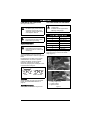
Install Drive Belt
Install Battery on Unit
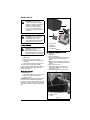
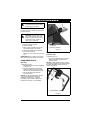
1.Insert battery and route wire harness
through battery cover.
2.Align holes on battery cover and bag
mount; secure with previously removed
hardware.
3.Connect harness (Figure 17).
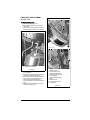
See Figure 16.
1. Route new belt through belt channel.
2. Route belt around transmission pulley
and reinstall transmission bracket and
hardware. Rotate transmission back into
location. Loop belt over crankshaft end.
Install engine pulley with key.
3. Install belt channel guides and drive
pulley guide.
4. Install blade adapter and blade. Make
sure the blade hardware is tightened to
the proper torque. See To install blade:
on page 18.
5. Connect the wheel drive cable spring to
the transmission bracket and rotate drive
cable adjuster to properly adjust drive
cable See WHEEL DRIVE CONTROL
ADJUSTMENT on page 23. See
Figure 15.
6. Connect spark plug wire.
1
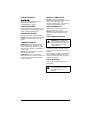
ENGINE/BLADE CONTROL
ADJUSTMENT
NOTICE: The engine/blade control has no
user serviceable adjustments. If releasing the
engine/blade control does not stop the engine
or blade within 3 seconds, take the unit to an
authorized Ariens dealer for repairs.
BATTERY
(911179)
2
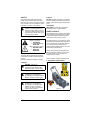
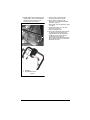
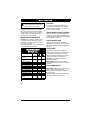
1. Battery Cover
2. Wire Harness
Figure 17
Charge Battery
NOTICE: Engine does not charge the battery.
Battery will require periodic charging to
ensure proper starting. It is recommended to
charge battery on a monthly basis for 6 hours
even if mower is not used.
IMPORTANT: DO NOT attempt to jump start
mower.
IMPORTANT: DO NOT start engine while the
charger is connected to wiring harness.
1.Connect battery charger to the wiring
harness. See Figure 17.
2.Plug charger into 120 VAC outlet.
WARNING: AVOID INJURY.
Read and understand the entire
Safety section before proceeding.
IMPORTANT: Battery charger supplied with
unit is for 120 volt Alternating Current (AC)
outlets only.
3.Charge for 16 – 24 hours.
WARNING: Battery posts,
terminals and related accessories
contain lead and lead
compounds, chemicals known to
the State of California to cause
cancer and reproductive harm.
Wash hands after handling.
IMPORTANT: DO NOT overcharge battery.
Disconnect battery after 24 hours.
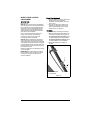
Connect battery charger here.
NOTICE: Unit comes equipped with a
maintenance-free battery that requires no
regular maintenance except charging and
cleaning the terminals.
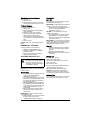
Remove Battery from Unit
1.Disconnect harness.
2.Remove battery cover and battery. Save
mounting hardware for installation.
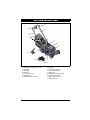
Figure 18
EN - 22