1
Table of Contents
Table of Contents
Product Overview......................................................... 4
Package Contents.................................................... 4
System Requirements.............................................. 4
Introduction............................................................... 5
Features................................................................... 6
Hardware Overview.................................................. 7
Connections........................................................ 7
LEDs................................................................... 8
Installation..................................................................... 9
Before you Begin...................................................... 9
Wireless Installation Considerations....................... 10
Connect to Cable/DSL/Satellite Modem................. 11
Connect to Another Router..................................... 12
Configuration.............................................................. 14
Web-based Configuration Utility............................. 14
Setup Wizard.................................................... 15
Internet Setup................................................... 19
Dynamic (Cable)........................................... 19
PPPoE (DSL)................................................ 20
PPTP............................................................. 21
L2TP.............................................................. 22
Big Pond........................................................ 23
Static (assigned by ISP)................................ 24
D-Link DIR-301 User Manual
Wireless Settings.............................................. 25
Network Settings............................................... 26
DHCP Server Settings...................................... 27
Port Forwarding Rules...................................... 28
Application Rules.............................................. 29
Network Filter.................................................... 30
Website Filter.................................................... 31
Firewall Settings............................................... 32
Advanced Wireless Settings............................. 33
Advanced Network Settings.............................. 34
Administrator Login Name:............................ 35
Administrator Password:............................... 35
Remote Management:................................... 35
Administrator Settings....................................... 35
Time Settings.................................................... 36
System Settings................................................ 37
Firmware Upgrade............................................ 38
System Check................................................... 39
Device Information............................................ 40
Log.................................................................... 41
Stats.................................................................. 42
Wireless Stats................................................... 42
Support............................................................. 43
Table of Contents
Wireless Security....................................................... 44
What is WEP?........................................................ 44
Configure WEP....................................................... 45
What is WPA?........................................................ 46
Configure WPA-PSK.............................................. 47
Configure WPA (RADIUS)...................................... 48
Connect to a Wireless Network................................. 49
Using Windows® XP................................................ 49
Configure WEP....................................................... 50
Configure WPA-PSK.............................................. 52
Troubleshooting......................................................... 54
Wireless Basics.......................................................... 58
What is Wireless?................................................... 59
Tips......................................................................... 61
Wireless Modes...................................................... 62
Networking Basics..................................................... 63
Check your IP address........................................... 63
Statically Assign an IP address.............................. 64
Technical Specifications........................................... 65
Registration................................................................. 67
D-Link DIR-301 User Manual
Section 1 - Product Overview
Product
PackageOverview
Contents
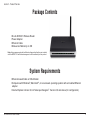
• D-Link DIR-301 Wireless Router
• Power Adapter
• Ethernet Cable
• Manual and Warranty on CD
Note: Using a power supply with a different voltage rating than the one included
with the WBR-1310 will cause damage and void the warranty for this product.
System Requirements
•Ethernet-based Cable or DSL Modem
•Computers with Windows®, Macintosh®, or Linux-based operating systems with an installed Ethernet
adapter
•Internet Explorer Version 6.0 or Netscape Navigator™ Version 6.0 and above (for configuration)
D-Link DIR-301 User Manual
Section 1 - Product Overview
Introduction
D-Link, the industry leader in wireless networking, introduces another breakthrough in wireless connectivity. The
D-Link Wireless G DIR-301 Router which is capable of transferring data with a maximum wireless signal rate of up to
54Mbps* in the 2.4GHz frequency — the same wireless frequency as 802.11b. The D-Link DIR-301 Wireless Router
also offers four Ethernet ports to support multiple computers.
The advanced wireless technology built into the DIR-301 Wireless Router offers data transfer speeds with a maximum
wireless signal rate of up to 54Mbps* through its wireless channels allowing streaming videos and other high bandwidth
applications, such as online gaming events, to operate without the hassle of Ethernet cables. The ability to use high
bandwidth applications also makes streaming real-time programs more enjoyable and more efficient.
With the DIR-301 Wireless Router’s built-in advanced firewall, threats of hackers penetrating your network are minimized.
Some firewall features include functions that allow or disallow certain ports to be open for certain applications. Time
scheduling can be established as a firewall rule so that specific ports will be open at certain times and be closed at
other times. Features like content filtering, MAC filtering, URL blocking, and domain blocking are useful tools to prevent
other unwanted intruders from connecting to your network or browsing restricted sites.
The easy-to-use configuration wizard takes only minutes to setup and guides users step-by-step through configuring the
DIR-301. With all the versatile features and an user-friendly utility, the DIR-301 Wireless Router provides an enhanced
networking experience.
* Maximum wireless signal rate derived from IEEE Standard 802.11g specifications. Actual data throughput will vary. Network conditions and
environmental factors, including volume of network traffic, building materials and construction, and network overhead, lower actual data throughput
rate. Environmental conditions will adversely affect wireless signal range.
D-Link DIR-301 User Manual
Section 1 - Product Overview
Features
•Faster Wireless Networking - The DIR-301 provides up to 54Mbps* wireless connection with other
802.11g wireless clients. This capability allows users to participate in real-time activities online, such as
video streaming, online gaming, and real-time audio. The performance of this 802.11g wireless router
gives you the freedom of wireless networking at speeds 5x faster than 802.11b.
•Compatible with 802.11b and 802.11g Devices - The DIR-301 is still fully compatible with the IEEE
802.11b standard, so it can connect with existing 802.11b PCI, USB and Cardbus adapters.
•Advanced Firewall Features - The Web-based user interface displays a number of advanced network
management features including:
• Content Filtering - Easily applied content filtering based on MAC Address, URL, and/or
Domain Name.
• Filter Scheduling - These filters can be scheduled to be active on certain days or for a
duration of hours or minutes.
• Secure Multiple/Concurrent Sessions - The DIR-301 can pass through VPN sessions. It
supports multiple and concurrent IPSec and PPTP sessions, so users behind the DIR-301
can securely access corporate networks.
• User-friendly Setup Wizard - Through its easy-to-use Web-based user interface, the DIR-301 lets you
control what information is accessible to those on the wireless network, whether from the Internet or from
your company’s server. Configure your router to your specific settings within minutes.
* Maximum wireless signal rate derived from IEEE Standard 802.11g specifications. Actual data throughput will vary. Network conditions and
environmental factors, including volume of network traffic, building materials and construction, and network overhead, lower actual data throughput
rate. Environmental conditions will adversely affect wireless signal range.
D-Link DIR-301 User Manual
Section 1 - Product Overview
Hardware Overview
Connections
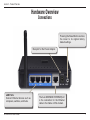
Pressing the Reset Button restores
the router to its original factory
default settings.
Receptor for the Power Adapter.
LAN Ports
Connect Ethernet devices such as
computers, switches, and hubs.
D-Link DIR-301 User Manual
The Auto MDI/MDIX INTERNETport
is the connection for the Ethernet
cable to the Cable or DSL modem.
Section 1 - Product Overview
Hardware Overview
LEDs
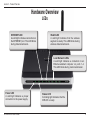
INTERNET LED
A solid light indicates connection on
the INTERNET port. This LED blinks
during data transmission.
WLAN LED
A solid light indicates that the wireless
segment is ready. This LED blinks during
wireless data transmission.
Local Network LEDs
A solid light indicates a connection to an
Ethernet-enabled computer on ports 1-4.
This LED blinks during data transmission.
Power LED
A solid light indicates a proper
connection to the power supply.
D-Link DIR-301 User Manual
Status LED
A blinking light indicates that the
DIR-301 is ready.
Section 2 - Installation
Installation
This section will walk you through the installation process. Placement of the router is very important. Do not place the
router in an enclosed area such as a closet, cabinet, or in the attic or garage.
Before you Begin
Please configure the router with the computer that was last connected directly to your modem. Also, you can only use
the Ethernet port on your modem. If you were using the USB connection before using the router, then you must turn off
your modem, disconnect the USB cable and connect an Ethernet cable to the WAN port on the router, and then turn
the modem back on. In some cases, you may need to call your ISP to change connection types (USB to Ethernet).
If you have DSL and are connecting via PPPoE, make sure you disable or uninstall any PPPoE software such as
WinPoet, Broadjump, or Enternet 300 from your computer or you will not be able to connect to the Internet.
D-Link DIR-301 User Manual
Section 2 - Installation
Wireless Installation Considerations
The D-Link wireless router lets you access your network using a wireless connection from virtually anywhere within
the operating range of your wireless network. Keep in mind, however, that the number, thickness and location of
walls, ceilings, or other objects that the wireless signals must pass through, may limit the range. Typical ranges vary
depending on the types of materials and background RF (radio frequency) noise in your home or business. The key
to maximizing wireless range is to follow these basic guidelines:
1.Keep the number of walls and ceilings between the D-Link router and other network devices to a
minimum - each wall or ceiling can reduce your adapter’s range from 3-90 feet (1-30 meters.) Position
your devices so that the number of walls or ceilings is minimized.
2.Be aware of the direct line between network devices. A wall that is 1.5 feet thick (.5 meters), at a
45-degree angle appears to be almost 3 feet (1 meter) thick. At a 2-degree angle it looks over 42 feet
(14 meters) thick! Position devices so that the signal will travel straight through a wall or ceiling (instead
of at an angle) for better reception.
3.Building Materials make a difference. A solid metal door or aluminum studs may have a negative effect on
range. Try to position access points, wireless routers, and computers so that the signal passes through
drywall or open doorways. Materials and objects such as glass, steel, metal, walls with insulation, water
(fish tanks), mirrors, file cabinets, brick, and concrete will degrade your wireless signal.
4.Keep your product away (at least 3-6 feet or 1-2 meters) from electrical devices or appliances that
generate RF noise.
5.If you are using 2.4GHz cordless phones or X-10 (wireless products such as ceiling fans, lights, and
home security systems), your wireless connection may degrade dramatically or drop completely. Make
sure your 2.4GHz phone base is as far away from your wireless devices as possible. The base transmits
a signal even if the phone in not in use.
D-Link DIR-301 User Manual
10
Section 2 - Installation
Connect to Cable/DSL/Satellite Modem
If you are connecting the router to a cable/DSL/satellite modem, please follow the steps below:
1. Place the router in an open and central location. Do not plug the power adapter into the router.
2. Turn the power off on your modem. If there is no on/off switch, then unplug the modem’s power adapter. Shut down
your computer.
3. Unplug the Ethernet cable (that connects your computer to your modem) from your computer and place it into the
WAN port on the router.
4. Plug an Ethernet cable into one of the four LAN ports on the router. Plug the other end into the Ethernet port on
your computer.
5. Turn on or plug in your modem. Wait for the modem to boot (about 30 seconds).
6. Plug the power adapter to the router and connect to an outlet or power strip. Wait about 30 seconds for the router
to boot.
7. Turn on your computer.
8. Verify the link lights on the router. The power light, WAN light, and the LAN light (the port that your computer is
plugged into) should be lit. If not, make sure your computer, modem, and router are powered on and verify the cable
connections are correct.
9. Skip to page 14 to configure your router.
D-Link DIR-301 User Manual
11
Section 2 - Installation
Connect to Another Router
If you are connecting the D-Link router to another router to use as a wireless access point and/or switch, you will have
to do the following before connecting the router to your network:
• Disable UPnP™
• Disable DHCP
• Change the LAN IP address to an available address on your network. The LAN ports on the router cannot
accept a DHCP address from your other router.
To connect to another router, please follow the steps below:
1. Plug the power into the router. Connect one of your computers to the router (LAN port) using an Ethernet cable.
Make sure your IP address on the computer is 192.168.0.xxx (where xxx is between 2 and 254). Please see the
Networking Basics section for more information. If you need to change the settings, write down your existing settings
before making any changes. In most cases, your computer should be set to receive an IP address automatically in
which case you will not have to do anything to your computer.
2. Open a web browser and enter http://192.168.0.1 and press Enter. When the login window appears, set the user
name to admin and leave the password box empty. Click OK to continue.
3. Click on Advanced and then click Advanced Network. Uncheck the Enable UPnP checkbox. Click Save Settings
to continue.
4. Click Setup and then click Network Settings. Uncheck the Enable DHCP Server server checkbox. Click Save
Settings to continue.
5. Under Router Settings, enter an available IP address and the subnet mask of your network. Click Save Settings to
save your settings. Use this new IP address to access the configuration utility of the router in the future. Close the
browser and change your computer’s IP settings back to the original values as in Step 1.
D-Link DIR-301 User Manual
12
Section 2 - Installation
6. Disconnect the Ethernet cable from the router and reconnect your computer to your network.
7. Connect an Ethernet cable in one of the LAN ports of the router and connect it to your other router. Do not plug
anything into the WAN port of the D-Link router.
8. You may now use the other 3 LAN ports to connect other Ethernet devices and computers. To configure your wireless
network, open a web browser and enter the IP address you assigned to the router. Refer to the Configuration and
Wireless Security sections for more information on setting up your wireless network.
D-Link DIR-301 User Manual
13
Section 3 - Configuration
Configuration
This section will show you how to configure your new D-Link wireless router using the web-based configuration
utility.
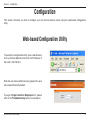
Web-based Configuration Utility
To access the configuration utility, open a web-browser
such as Internet Explorer and enter the IP address of
the router (192.168.0.1).
Enter the user name (admin) and your password. Leave
the password blank by default.
If you get a Page Cannot be Displayed error, please
refer to the Troubleshooting section for assistance.
D-Link DIR-301 User Manual
14
Section 3 - Configuration
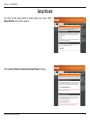
Setup Wizard
You may run the setup wizard to quickly setup your router. Click
Setup Wizard to launch the wizard.
Click Launch Internet Connection Setup Wizard to begin.
D-Link DIR-301 User Manual
15
Section 3 - Configuration
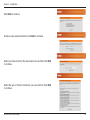
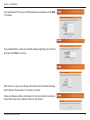
Click Next to continue.
Create a new password and then click Next to continue.
Select your time zone from the drop-down menu and then click Next
to continue.
Select the type of Internet connection you use and then click Next
to continue.
D-Link DIR-301 User Manual
16
Section 3 - Configuration
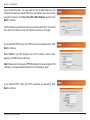
If you selected Dynamic, you may need to enter the MAC address of the
computer that was last connected directly to your modem. If you are currently
using that computer, click Clone Your PC’s MAC Address and then click
Next to continue.
The Host Name is optional but may be required by some ISPs. The default
host name is the device name of the Router and may be changed.
If you selected PPPoE, enter your PPPoE username and password. Click
Next to continue.
Select Static if your ISP assigned you the IP address, subnet mask,
gateway, and DNS server addresses.
Note: Make sure to remove your PPPoE software from your computer. The
software is no longer needed and will not work through a router.
If you selected PPTP, enter your PPTP username and password. Click
Next to continue.
D-Link DIR-301 User Manual
17
Section 3 - Configuration
If you selected L2TP, enter your L2TP username and password. Click Next
to continue.
If you selected Static, enter your network settings supplied by your Internet
provider. Click Next to continue.
Click Connect to save your settings. Once the router is finished rebooting,
click Continue. Please allow 1-2 minutes to connect.
Close your browser window and reopen it to test your Internet connection.
It may take a few tries to initially connect to the Internet.
D-Link DIR-301 User Manual
18
Section 3 - Configuration
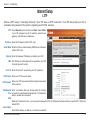
Internet Setup
Dynamic (Cable)
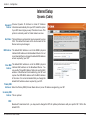
Dynamic IP Choose Dynamic IP Address to obtain IP Address
Address: information automatically from your ISP. Select this option
if your ISP does not give you any IP numbers to use. This
option is commonly used for Cable modem services.
Host Name: The Host Name is optional but may be required by some
ISPs. The default host name is the device name of the
Router and may be changed.
MAC Address: The default MAC Address is set to the WAN’s physical
interface MAC address on the Broadband Router. It is not
recommended that you change the default MAC address
unless required by your ISP.
Clone MAC The default MAC address is set to the WAN’s physical
Address: interface MAC address on the Broadband Router. You
can use the “Clone MAC Address” button to copy the MAC
address of the Ethernet Card installed by your ISP and
replace the WAN MAC address with the MAC address
of the router. It is not recommended that you change the
default MAC address unless required by your ISP.
Primary DNS
Addresses: Enter the Primary DNS (Domain Name Server) server IP address assigned by your ISP.
Secondary DNS
Address: This is optional.
MTU:
Maximum Transmission Unit - you may need to change the MTU for optimal performance with your specific ISP. 1500 is the
default MTU.
D-Link DIR-301 User Manual
19
Section 3 - Configuration
Internet Setup
PPPoE (DSL)
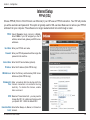
Choose PPPoE (Point to Point Protocol over Ethernet) if your ISP uses a PPPoE connection. Your ISP will provide
you with a username and password. This option is typically used for DSL services. Make sure to remove your PPPoE
software from your computer. The software is no longer needed and will not work through a router.
PPPoE: Select Dynamic (most common) or Static.
Select Static if your ISP assigned you the IP
address, subnet mask, gateway, and DNS server
addresses.
User Name: Enter your PPPoE user name.
Password: Enter your PPPoE password and then retype the
password in the next box.
Service Name: Enter the ISP Service Name (optional).
IP Address: Enter the IP address (Static PPPoE only).
DNS Addresses: Enter the Primary and Secondary DNS Server
Addresses (Static PPPoE only).
Maximum Idle Enter a maximum idle time during which the
Time: Internet connection is m a i n t a i n e d d u r i n g
inactivity. To disable this feature, enable
Auto-reconnect.
MTU: Maximum Transmission Unit - you may need to
change the MTU for optimal performance with
your specific ISP. 1492 is the default MTU.
Connection Mode Select either Always-on, Manual, or Connect-on
Select: demand.
D-Link DIR-301 User Manual
20
Section 3 - Configuration
Internet Setup
PPTP
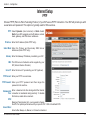
Choose PPTP (Point-to-Point-Tunneling Protocol ) if your ISP uses a PPTP connection. Your ISP will provide you with
a username and password. This option is typically used for DSL services.
PPTP: Select Dynamic (most common) or Static. Select
Static if your ISP assigned you the IP address, subnet
mask, gateway, and DNS server addresses.
IP Address: Enter the IP address (Static PPTP only).
Subnet Mask: Enter the Primary and Secondary DNS Server
Addresses (Static PPTP only).
Gateway: Enter the Gateway IP Address provided by your ISP.
DNS: The DNS server information will be supplied by your
ISP (Internet Service Provider.)
Server IP: Enter the Server IP provided by your ISP (optional).
PPTP Account: Enter your PPTP account name.
PPTP Password: Enter your PPTP password and then retype the
password in the next box.
Maximum Idle Enter a maximum idle time during which the Internet
Time: connection is maintained during inactivity. To disable
this feature, enable Auto-reconnect.
MTU:
Maximum Transmission Unit - you may need to change
the MTU for optimal performance with your specific ISP. 1492 is the default MTU.
Connect Mode:
Select either Always-on, Manual, or Connect-on demand.
D-Link DIR-301 User Manual
21
Section 3 - Configuration
Internet Setup
L2TP
Choose L2TP (Layer 2 Tunneling Protocol) if your ISP uses a L2TP connection. Your ISP will provide you with a
username and password. This option is typically used for DSL services.
L2TP: Select Dynamic (most common) or Static. Select Static
if your ISP assigned you the IP address, subnet mask,
gateway, and DNS server addresses.
IP Address: Enter the IP address (Static L2TP only).
Subnet Mask: Enter the Primary and Secondary DNS Server Addresses
(Static L2TP only).
Gateway: Enter the Gateway IP Address provided by your ISP.
DNS: The DNS server information will be supplied by your ISP
(Internet Service Provider.)
Server IP: Enter the Server IP provided by your ISP (optional).
L2TP Account: Enter your L2TP account name.
L2TP Password: Enter your L2TP password and then retype the password
in the next box.
Maximum Idle Enter a maximum idle time during which the Internet
Time: connection is maintained during inactivity. To disable this
feature, enable Auto-reconnect.
MTU:
Maximum Transmission Unit - you may need to change the MTU for optimal performance with your specific ISP. 1492 is the
default MTU.
Connect Mode:
Select either Always-on, Manual, or Connect-on demand.
D-Link DIR-301 User Manual
22
Section 3 - Configuration
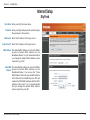
Internet Setup
Big Pond
User Name: Enter your Big Pond user name.
Password: Enter your Big Pond password and then retype
the password in the next box.
Auth Server: Enter the IP address of the login server.
Login Server IP: Enter the IP address of the login server.
MAC Address: The default MAC Address is set to the WAN’s
physical interface MAC address on the
Broadband Router. It is not recommended that
you change the default MAC address unless
required by your ISP.
Clone MAC The default MAC address is set to the WAN’s
Address: physical interface MAC address on the
Broadband Router. You can use the “Clone
MAC Address” button to copy the MAC address
of the Ethernet Card installed by your ISP and
replace the WAN MAC address with the MAC
address of the router. It is not recommended
that you change the default MAC address
unless required by your ISP.
D-Link DIR-301 User Manual
23
Section 3 - Configuration
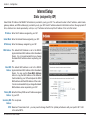
Internet Setup
Static (assigned by ISP)
Select Static IP Address if all WAN IP information is provided to you by your ISP. You will need to enter in the IP address, subnet mask,
gateway address, and DNS address(es) provided to you by your ISP. Each IP address entered in the fields must be in the appropriate IP
form, which are four octets separated by a dot (x.x.x.x). The Router will not accept the IP address if it is not in this format.
IP Address: Enter the IP address assigned by your ISP.
Subnet Mask: Enter the Subnet Mask assigned by your ISP.
ISP Gateway: Enter the Gateway assigned by your ISP.
MAC Address: The default MAC Address is set to the WAN’s
physical interface MAC address on the Broadband
Router. It is not recommended that you change
the default MAC address unless required by your
ISP.
Clone MAC The default MAC address is set to the WAN’s
Address: physical interface MAC address on the Broadband
Router. You can use the Clone MAC Address
button to copy the MAC address of the Ethernet
Card installed by your ISP and replace the WAN
MAC address with the MAC address of the router.
It is not recommended that you change the default
MAC address unless required by your ISP.
Primary DNS Enter the Primary DNS server IP address assigned
Address: by your ISP.
Secondary DNS This is optional.
Address:
MTU: Maximum Transmission Unit - you may need to change the MTU for optimal performance with your specific ISP. 1492
is the default MTU.
D-Link DIR-301 User Manual
24
Section 3 - Configuration
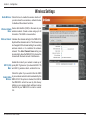
Wireless Settings
Enable Wireless: Check the box to enable the wireless function. If
you do not want to use wireless, uncheck the box
to disable all the wireless functions.
Wireless Network Service Set Identifier (SSID) is the name of your
Name: wireless network. Create a name using up to 32
characters. The SSID is case-sensitive.
Wireless Channel: Indicates the channel setting for the WBR-2310.
By default the channel is set to 6. The Channel can
be changed to fit the channel setting for an existing
wireless network or to customize the wireless
network. The Auto Channel Scan setting can
be selected to allow the WBR-2310 to choose the
channel with the least amount of interference.
Enable this mode if your network is made up of
802.11g Only purely 802.11g devices. If you have both 802.11b
Mode: and 802.11g wireless clients, uncheck the box.
Check this option if you would not like the SSID
Enable Hidden of your wireless network to be broadcasted by the
Wireless: WBR-2310. If this option is checked, the SSID of
the WBR-2310 will not be seen by Site Survey
utilities so your wireless clients will have to know
the SSID of your WBR-2310 in order to connect
to it.
D-Link DIR-301 User Manual
25
Section 3 - Configuration
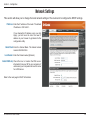
Network Settings
This section will allow you to change the local network settings of the router and to configure the DHCP settings.
IP Address: Enter the IP address of the router. The default
IP address is 192.168.0.1.
If you change the IP address, once you click
Apply, you will need to enter the new IP
address in your browser to get back into the
configuration utility.
Subnet Mask: Enter the Subnet Mask. The default subnet
mask is 255.255.255.0.
Local Domain: Enter the Domain name (Optional).
Enable DNS Relay: Check the box to transfer the DNS server
information from your ISP to your computers. If
unchecked, your computers will use the router
for a DNS server.
Refer to the next page for DHCP information.
D-Link DIR-301 User Manual
26
Section 3 - Configuration
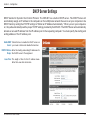
DHCP Server Settings
DHCP stands for Dynamic Host Control Protocol. The DIR-301 has a built-in DHCP server. The DHCP Server will
automatically assign an IP address to the computers on the LAN/private network. Be sure to set your computers to be
DHCP clients by setting their TCP/IP settings to “Obtain an IP Address Automatically.” When you turn your computers
on, they will automatically load the proper TCP/IP settings provided by the DIR-301. The DHCP Server will automatically
allocate an unused IP address from the IP address pool to the requesting computer. You must specify the starting and
ending address of the IP address pool.
Enable DHCP Check the box to enable the DHCP server on
Server: your router. Uncheck to disable this function.
DHCP IP Address Enter the starting and ending IP addresses for
Range: the DHCP server’s IP assignment.
Lease Time: The length of time for the IP address lease.
Enter the Lease time in minutes.
D-Link DIR-301 User Manual
27
Section 3 - Configuration
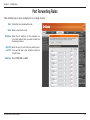
Port Forwarding Rules
This will allow you to open a single port or a range of ports.
Rule: Check the box to enabled the rule.
Name: Enter a name for the rule.
IP Address: Enter the IP address of the computer on
your local network that you want to allow the
incoming service to.
Start Port/ Enter the port or ports that you want to open.
End Port: If you want to open 1 port, enter the same port
in both boxes.
Traffic Type: Select TCP, UDP, or ANY.
D-Link DIR-301 User Manual
28
Section 3 - Configuration
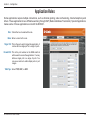
Application Rules
Some applications require multiple connections, such as Internet gaming, video conferencing, Internet telephony and
others. These applications have difficulties working through NAT (Network Address Translation). Special Applications
makes some of these applications work with the DIR-301.
Rule: Check the box to enabled the rule.
Name: Enter a name for the rule.
Trigger Port: This is the port used to trigger the application. It
can be either a single port or a range of ports.
Firewall Port: This is the port number on the WAN side that
will be used to access the application. You may
define a single port or a range of ports. You
can use a comma to add multiple ports or port
ranges.
Traffic Type: Select TCP, UDP, or ANY.
D-Link DIR-301 User Manual
29
Section 3 - Configuration
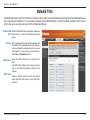
Network Filter
Use MAC (Media Access Control) Filters to allow or deny LAN (Local Area Network) computers by their MAC addresses
from accessing the Network. You can either manually add a MAC address or select the MAC address from the list of
clients that are currently connected to the Broadband Router.
Configure MAC Select Disable MAC filters, allow MAC addresses
Filter: listed below, or deny MAC addresses listed
below.
Schedule: The schedule of time when the network filter will
be enabled. The schedule may be set to Always,
which will allow the particular service to always
be enabled. You can create your own times in
the Tools > Schedules section.
MAC Address: Enter the MAC address you would like to
filter.
To find the MAC address on a computer, please
refer to the Networking Basics section in this
manual.
DHCP Client:
Select a DHCP client from the drop-down
menu and click the arrow to copy that MAC
Address.
D-Link DIR-301 User Manual
30
Section 3 - Configuration
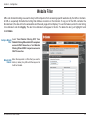
Website Filter
URL and domain blocking are used to deny LAN computers from accessing specific web sites by the URL or domain.
A URL is a specially formatted text string that defines a location on the Internet. If any part of the URL contains the
blocked word, the site will not be accessible and the web page will not display. To use this feature, enter the text string
to be blocked and click Apply. The text to be blocked will appear in the list. To delete the text, just highlight it and
click Delete.
Configure Website Select Turn Website Filtering OFF, Turn
Filter: Website Filtering ON and ALLOW computers
access to ONLY these sites, or Turn Website
Filtering ON and DENY computers access to
ONLY these sites.
Website URL/ Enter the keywords or URLs that you want to
Domain: block (or allow). Any URL with the keyword in
it will be blocked.
D-Link DIR-301 User Manual
31
Section 3 - Configuration
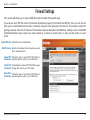
Firewall Settings
This section will allow you to setup a DMZ host and to enable VPN passthrough.
If you have a client PC that cannot run Internet applications properly from behind the DIR-301, then you can set the
client up for unrestricted Internet access. It allows a computer to be exposed to the Internet. This feature is useful for
gaming purposes. Enter the IP address of the internal computer that will be the DMZ host. Adding a client to the DMZ
(Demilitarized Zone) may expose your local network to a variety of security risks, so only use this option as a last
resort.
Enable DMZ Host: Check this box to enable DMZ.
DMZ IP Address: Enter the IP address of the computer you would
like to open all ports to.
Enable PPTP Check this box to allow PPTP VPN traffic to
Passthrough: pass through the router to your VPN client.
Enable L2TP Check this box to allow L2TP VPN traffic to pass
Passthrough: through the router to your VPN client.
Enable IPSec Check this box to allow IPSec VPN traffic to
Passthrough: pass through the router to your VPN client.
D-Link DIR-301 User Manual
32
Section 3 - Configuration
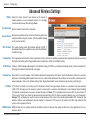
Advanced Wireless Settings
TX Rate: Select the basic transfer rates based on the speed of
wireless adapters on your wireless network. It is strongly
recommended to keep this setting to Auto.
Transmit Power: Set the transmit power of the antennas.
Beacon Interval: Beacons are packets sent by an Access Point to synchronize
a wireless network. Specify a value. 100 is the default setting
and is recommended.
RTS Threshold: This value should remain at its default setting of 2432. If
inconsistent data flow is a problem, only a minor modification
should be made.
Fragmentation: The fragmentation threshold, which is specified in bytes, determines whether packets will be fragmented. Packets exceeding
the 2346 byte setting will be fragmented before transmission. 2346 is the default setting.
DTIM Interval: (Delivery Traffic Indication Message) 3 is the default setting. A DTIM is a countdown informing clients of the next window for
listening to broadcast and multicast messages.
Preamble Type: Select Short or Long Preamble. The Preamble defines the length of the CRC block (Cyclic Redundancy Check is a common
technique for detecting data transmission errors) for communication between the wireless router and the roaming wireless
network adapters. Auto is the default setting. Note: High network traffic areas should use the shorter preamble type.
CTS Mode: CTS (Clear To Send) is a function used to minimize collisions among wireless devices on a wireless local area network
(LAN). CTS will make sure the wireless network is clear before a wireless client attempts to send wireless data. Enabling
CTS will add overhead and may lower wireless through put. None: CTS is typically used in a pure 802.11g environment. If
CTS is set to “None” in a mixed mode environment populated by 802.11b clients, wireless collisions may occur frequently.
Always: CTS will always be used to make sure the wireless LAN is clear before sending data. Auto: CTS will monitor the
wireless network and automatically decide whether to implement CTS based on the amount of traffic and collisions that
occurs on the wireless network.
WMM Function: WMM is QoS for your wireless network. Enable this option to improve the quality of video and voice applications for your
wireless clients.
D-Link DIR-301 User Manual
33
Section 3 - Configuration
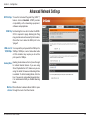
Advanced Network Settings
UPnP Settings: To use the Universal Plug and Play (UPnP™)
feature click on Enabled. UPNP provides
compatibility with networking equipment,
software and peripherals.
WAN Ping: Unchecking the box will not allow the WBR2310 to respond to pings. Blocking the Ping
may provide some extra security from hackers.
Check the box to allow the WAN port to be
“pinged”.
WAN select to You may set the port speed of the WAN port to
10/100 Mbps: 10Mbps, 100Mbps, or auto. Some older cable
or DSL modems may require you to set the
port speed to 10Mbps.
Gaming Mode: Gaming mode allows a form of pass-through
for certain Internet Games. If you are using
Xbox, Playstation2 or a PC, make sure you are
using the latest firmware and Gaming Mode
is enabled. To utilize Gaming Mode, click the
box. If you are not using a Gaming application,
it is recommended that you Disable Gaming
Mode.
Multicast Check the box to allow multicast traffic to pass
streams: through the router from the Internet.
D-Link DIR-301 User Manual
34
Section 3 - Configuration
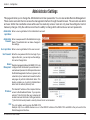
Administrator Settings
This page will allow you to change the Administrator and User passwords. You can also enable Remote Management.
There are two accounts that can access the management interface through the web browser. The accounts are admin
and user. Admin has read/write access while user has read-only access. User can only view the settings but cannot
make any changes. Only the admin account has the ability to change both admin and user account passwords.
Administrator Enter a new Login Name for the Administrator account.
Login Name:
Administrator Enter a new password for the Administrator Login
Password: Name. The administrator can make changes to
the settings.
User Login Name: Enter a new Login Name for the user account.
User Password: Enter the new password for the User login. If you
login as the User, you can only see the settings,
but cannot change them.
Remote Remote management allows the WBR-1310 to be
Management: configured from the Internet by a web browser. A
username and password is still required to access
the Web-Management interface. In general, only
a member of your network can browse the built-in
web pages to perform Administrator tasks. This
feature enables you to perform Administrator
tasks from the remote (Internet) host.
The Internet IP address of the computer that has
IP Address: access to the Broadband Router. If you input an
asterisk (*) into this field, then any computer will
be able to access the Router. Putting an asterisk
(*) into this field would present a security risk and is not recommended.
Port: The port number used to access the WBR-1310.
Example: http://x.x.x.x:8080 whereas x.x.x.x is the WAN IP address of the WBR-1310 and 8080 is the port used for the
Web-Management interface.
D-Link DIR-301 User Manual
35
Section 3 - Configuration
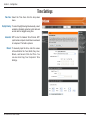
Time Settings
Time Zone: Select the Time Zone from the drop-down
menu.
Daylight Saving: To select Daylight Saving time manually, select
enabled or disabled, and enter a start date and
an end date for daylight saving time.
Automatic: NTP is short for Network Time Protocol. NTP
synchronizes computer clock times in a network
of computers. This field is optional.
Manual: To manually input the time, enter the values
in these fields for the Year, Month, Day, Hour,
Minute, and Second. Click Set Time. You
can also click Copy Your Computer’s Time
Settings.
D-Link DIR-301 User Manual
36
Section 3 - Configuration
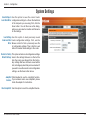
System Settings
Save Settings to Use this option to save the current router
Local Hard Drive: configuration settings to a file on the hard disk
of the computer you are using. First, click the
Save button. You will then see a file dialog,
where you can select a location and file name
for the settings.
Load Settings Use this option to load previously saved
from Local Hard router configuration settings. First, use the
Drive: Browse control to find a previously save file
of configuration settings. Then, click the Load
button to transfer those settings to the router.
Restore to Factory This option will restore all configuration settings
Default Settings: back to the settings that were in effect at the
time the router was shipped from the factory.
Any settings that have not been saved will be
lost, including any rules that you have created. If
you want to save the current router configuration
settings, use the Save button above.
JumpStart Click Enabled to use the JumpStart function.
function: If your wireless router uses JumpStart, please
check the adapter for instructions.
Reset JumpStart: Use this option to reset the JumpStart feature.
D-Link DIR-301 User Manual
37
Section 3 - Configuration
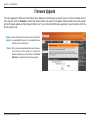
Firmware Upgrade
You can upgrade the firmware of the Router here. Make sure the firmware you want to use is on the local hard drive of
the computer. Click on Browse to locate the firmware file to be used for the update. Please check the D-Link support
site for firmware updates at http://support.dlink.com. You can download firmware upgrades to your hard drive from the
D-Link support site.
Firmware Click on the link in this screen to find out if there
Upgrade: is an updated firmware; if so, download the new
firmware to your hard drive.
Browse: After you have downloaded the new firmware,
click Browse in this window to locate the
firmware update on your hard drive. Click Save
Settings to complete the firmware upgrade.
D-Link DIR-301 User Manual
38
Section 3 - Configuration
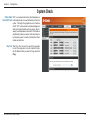
System Check
Virtual Cable VCT is an advanced feature that integrates a
Tester (VCT) Info: LAN cable tester on every Ethernet port on the
router. Through the graphical user interface
(GUI), VCT can be used to remotely diagnose
and report cable faults such as opens, shorts,
swaps, and impedance mismatch. This feature
significantly reduces service calls and returns
by allowing users to easily troubleshoot their
cable connections.
Ping Test: The Ping Test is used to send Ping packets
to test if a computer is on the Internet. Enter
the IP Address that you wish to Ping, and click
Ping.
D-Link DIR-301 User Manual
39
Section 3 - Configuration
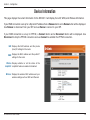
Device Information
This page displays the current information for the DIR-301. It will display the LAN, WAN, and Wireless information.
If your WAN connection is set up for a Dynamic IP address then a Release button and a Renew button will be displayed.
Use Release to disconnect from your ISP and use Renew to connect to your ISP.
If your WAN connection is set up for PPPoE, a Connect button and a Disconnect button will be displayed. Use
Disconnect to drop the PPPoE connection and use Connect to establish the PPPoE connection.
LAN: Displays the MAC address and the private
(local) IP settings for the router.
WAN: Displays the MAC address and the public IP
settings for the router.
Wireless Displays whether or not the status of the
JumpStart: JumpStart feature is enabled or disabled.
Wireless: Displays the wireless MAC address and your
wireless settings such as SSID and Channel.
D-Link DIR-301 User Manual
40
Section 3 - Configuration
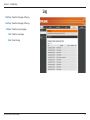
Log
First Page: View the first page of the log.
Last Page: View the last page of the log.
Previous: View the previous page.
Next: View the next page.
Clear: Clear the log.
D-Link DIR-301 User Manual
41
Section 3 - Configuration
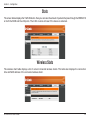
Stats
The screen below displays the Traffic Statistics. Here you can view the amount of packets that pass through the WBR-2310
on both the WAN and the LAN ports. The traffic counter will reset if the device is rebooted.
Wireless Stats
The wireless client table displays a list of current connected wireless clients. This table also displays the connection
time and MAC address of the connected wireless client.
D-Link DIR-301 User Manual
42
Section 3 - Configuration
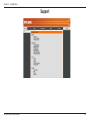
Support
D-Link DIR-301 User Manual
43
Section 4 - Security
Wireless Security
This section will show you the different levels of security you can use to protect your data from intruders. The
DIR-301 offers the following types of security:
• WPA2 (Wi-Fi Protected Access 2) • WPA (Wi-Fi Protected Access)
• WEP (Wired Equivalent Privacy)
• WPA2-PSK (Pre-Shared Key)
• WPA-PSK (Pre-Shared Key)
What is WEP?
WEP stands for Wired Equivalent Privacy. It is based on the IEEE 802.11 standard and uses the RC4 encryption
algorithm. WEP provides security by encrypting data over your wireless network so that it is protected as it is transmitted
from one wireless device to another.
To gain access to a WEP network, you must know the key. The key is a string of characters that you create. When
using WEP, you must determine the level of encryption. The type of encryption determines the key length. 128-bit
encryption requires a longer key than 64-bit encryption. Keys are defined by entering in a string in HEX (hexadecimal
- using characters 0-9, A-F) or ASCII (American Standard Code for Information Interchange – alphanumeric characters)
format. ASCII format is provided so you can enter a string that is easier to remember. The ASCII string is converted to
HEX for use over the network. Four keys can be defined so that you can change keys easily.
D-Link DIR-301 User Manual
44
Section 4 - Security
Configure WEP
It is recommended to enable encryption on your wireless router before your wireless network adapters. Please establish
wireless connectivity before enabling encryption. Your wireless signal may degrade when enabling encryption due to
the added overhead.
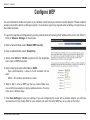
1.Log into the web-based configuration by opening a web browser and entering the IP address of the router (192.168.0.1).
Click on Wireless Settings on the left side.
2. Next to Security Mode, select Enable WEP Security.
3. Next to Authentication, select Shared Key.
4. Select either 64-bit or 128-bit encryption from the drop-down
menu next to WEP Encryption.
5. Next to Key Type, select either Hex or ASCII.
Hex (recommended) - Letters A-F and numbers 0-9 are
valid.
ASCII - All numbers and letters are valid.
6. Next to Key 1, enter a WEP key that you create. Make sure
you enter this key exactly on all your wireless devices. You may
enter up to 4 different keys.
7. Click Save Settings to save your settings. If you are configuring the router with a wireless adapter, you will lose
connectivity until you enable WEP on your adapter and enter the same WEP key as you did on the router.
D-Link DIR-301 User Manual
45
Section 4 - Security
What is WPA?
WPA, or Wi-Fi Protected Access, is a Wi-Fi standard that was designed to improve the security features of WEP (Wired
Equivalent Privacy).
The 2 major improvements over WEP:
• Improved data encryption through the Temporal Key Integrity Protocol (TKIP). TKIP scrambles the keys
using a hashing algorithm and, by adding an integrity-checking feature, ensures that the keys haven’t
been tampered with. WPA2 is based on 802.11i and uses Advanced Encryption Standard (AES) instead
of TKIP.
• User authentication, which is generally missing in WEP, through the extensible authentication protocol
(EAP). WEP regulates access to a wireless network based on a computer’s hardware-specific MAC
address, which is relatively simple to be sniffed out and stolen. EAP is built on a more secure public-key
encryption system to ensure that only authorized network users can access the network.
WPA-PSK/WPA2-PSK uses a passphrase or key to authenticate your wireless connection. The key is an alpha-numeric
password between 8 and 63 characters long. The password can include symbols (!?*&_) and spaces. This key must
be the exact same key entered on your wireless router or access point.
WPA/WPA2 incorporates user authentication through the Extensible Authentication Protocol (EAP). EAP is built on a
more secure public key encryption system to ensure that only authorized network users can access the network.
D-Link DIR-301 User Manual
46
Section 4 - Security
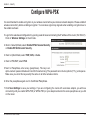
Configure WPA-PSK
It is recommended to enable encryption on your wireless router before your wireless network adapters. Please establish
wireless connectivity before enabling encryption. Your wireless signal may degrade when enabling encryption due to
the added overhead.
1.Log into the web-based configuration by opening a web browser and entering the IP address of the router (192.168.0.1).
Click on Wireless Settings on the left side.
2. Next to Security Mode, select Enable WPA-Personal Security
or Enable WPA2-Personal Security.
3. Next to Cipher Mode, select TKIP, AES, or Auto.
4. Next to PSK/EAP, select PSK.
5.Next to Passphrase, enter a key (passphrase). The key is an
alpha-numeric password between 8 and 63 characters long. The password can include symbols (!?*&_) and spaces.
Make sure you enter this key exactly the same on all other wireless clients.
6. Enter the passphrase again next to Confirmed Passphrase.
7.Click Save Settings to save your settings. If you are configuring the router with a wireless adapter, you will lose
connectivity until you enable WPA-PSK (or WPA2-PSK) on your adapter and enter the same passphrase as you did
on the router.
D-Link DIR-301 User Manual
47
Section 4 - Security
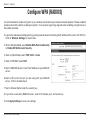
Configure WPA (RADIUS)
It is recommended to enable encryption on your wireless router before your wireless network adapters. Please establish
wireless connectivity before enabling encryption. Your wireless signal may degrade when enabling encryption due to
the added overhead.
1.Log into the web-based configuration by opening a web browser and entering the IP address of the router (192.168.0.1).
Click on Wireless Settings on the left side.
2. Next to Security Mode, select Enable WPA-Personal Security
or Enable WPA2-Personal Security.
3. Next to Cipher Mode, select TKIP, AES, or Auto.
4. Next to PSK/EAP, select EAP.
5.Next to RADIUS Server 1 enter the IP Address of your RADIUS
server.
6.Next to Port, enter the port you are using with your RADIUS
server. 1812 is the default port.
7.Next to Shared Secret, enter the security key.
8.If you have a secondary RADIUS server, enter its IP address, port, and secret key.
9.Click Apply Settings to save your settings.
D-Link DIR-301 User Manual
48
Section 5 - Connecting to a Wireless Network
Connect to a Wireless Network
Using Windows® XP
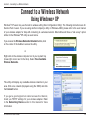
Windows® XP users may use the built-in wireless utility (Zero Configuration Utility). The following instructions are for
Service Pack 2 users. If you are using another company’s utility or Windows® 2000, please refer to the user manual
of your wireless adapter for help with connecting to a wireless network. Most utilities will have a “site survey” option
similar to the Windows® XP utility as seen below.
If you receive the Wireless Networks Detected bubble, click
on the center of the bubble to access the utility.
or
Right-click on the wireless computer icon in your system tray
(lower-right corner next to the time). Select View Available
Wireless Networks.
The utility will display any available wireless networks in your
area. Click on a network (displayed using the SSID) and click
the Connect button.
If you get a good signal but cannot access the Internet,
check you TCP/IP settings for your wireless adapter. Refer
to the Networking Basics section in this manual for more
information.
D-Link DIR-301 User Manual
49
Section 5 - Connecting to a Wireless Network
Configure WEP
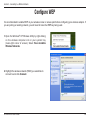
It is recommended to enable WEP on your wireless router or access point before configuring your wireless adapter. If
you are joining an existing network, you will need to know the WEP key being used.
1.Open the Windows® XP Wireless Utility by right-clicking
on the wireless computer icon in your system tray
(lower-right corner of screen). Select View Available
Wireless Networks.
2.Highlight the wireless network (SSID) you would like to
connect to and click Connect.
D-Link DIR-301 User Manual
50
Section 5 - Connecting to a Wireless Network
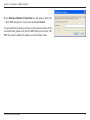
3.The Wireless Network Connection box will appear. Enter the
same WEP key that is on your router and click Connect.
It may take 20-30 seconds to connect to the wireless network. If the
connection fails, please verify that the WEP settings are correct. The
WEP key must be exactly the same as on the wireless router.
D-Link DIR-301 User Manual
51
Section 5 - Connecting to a Wireless Network
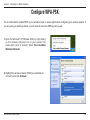
Configure WPA-PSK
It is recommended to enable WEP on your wireless router or access point before configuring your wireless adapter. If
you are joining an existing network, you will need to know the WEP key being used.
1.Open the Windows® XP Wireless Utility by right-clicking
on the wireless computer icon in your system tray
(lower-right corner of screen). Select View Available
Wireless Networks.
2.Highlight the wireless network (SSID) you would like to
connect to and click Connect.
D-Link DIR-301 User Manual
52
Section 5 - Connecting to a Wireless Network
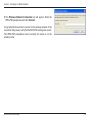
3.The Wireless Network Connection box will appear. Enter the
WPA-PSK passphrase and click Connect.
It may take 20-30 seconds to connect to the wireless network. If the
connection fails, please verify that the WPA-PSK settings are correct.
The WPA-PSK passphrase must be exactly the same as on the
wireless router.
D-Link DIR-301 User Manual
53
Section 6 - Troubleshooting
Troubleshooting
This chapter provides solutions to problems that can occur during the installation and operation of the WBR-1310.
Read the following descriptions if you are having problems. (The examples below are illustrated in Windows® XP. If
you have a different operating system, the screenshots on your computer will look similar to the following examples.)
1. Why can’t I access the web-based configuration utility?
When entering the IP address of the D-Link router (192.168.0.1 for example), you are not connecting to a website on
the Internet or have to be connected to the Internet. The device has the utility built-in to a ROM chip in the device itself.
Your computer must be on the same IP subnet to connect to the web-based utility.
• Make sure you have an updated Java-enabled web browser. We recommend the following:
• Internet Explorer 6.0 or higher
• Firefox 1.5 or higher
• Verify physical connectivity by checking for solid link lights on the device. If you do not get a solid link light, try using
a different cable or connect to a different port on the device if possible. If the computer is turned off, the link light may
not be on.
• Disable any internet security software running on the computer. Software firewalls such as Zone Alarm, Black Ice,
Sygate, Norton Personal Firewall, and Windows® XP firewall may block access to the configuration pages. Check the
help files included with your firewall software for more information on disabling or configuring it.
D-Link DIR-301 User Manual
54
Section 6 - Troubleshooting
• Configure your Internet settings:
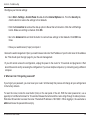
• Go to Start > Settings > Control Panel. Double-click the Internet Options Icon. From the Security tab,
click the button to restore the settings to their defaults.
• Click the Connection tab and set the dial-up option to Never Dial a Connection. Click the LAN Settings
button. Make sure nothing is checked. Click OK.
• Go to the Advanced tab and click the button to restore these settings to their defaults. Click OK three
times.
• Close your web browser (if open) and open it.
• Access the web management. Open your web browser and enter the IP address of your D-Link router in the address
bar. This should open the login page for your the web management.
• If you still cannot access the configuration, unplug the power to the router for 10 seconds and plug back in. Wait
about 30 seconds and try accessing the configuration. If you have multiple computers, try connecting using a different
computer.
2. What can I do if I forgot my password?
If you forgot your password, you must reset your router. Unfortunately this process will change all your settings back
to the factory defaults.
To reset the router, locate the reset button (hole) on the rear panel of the unit. With the router powered on, use a
paperclip to hold the button down for 10 seconds. Release the button and the router will go through its reboot process.
Wait about 30 seconds to access the router. The default IP address is 192.168.0.1. When logging in, the username is
admin and leave the password box empty.
D-Link DIR-301 User Manual
55
Section 6 - Troubleshooting
3. Why can’t I connect to certain sites or send and receive emails when connecting through my router?
If you are having a problem sending or receiving email, or connecting to secure sites such as eBay, banking sites, and
Hotmail, we suggest lowering the MTU in increments of ten (Ex. 1492, 1482, 1472, etc).
Note: AOL DSL+ users must use MTU of 1400.
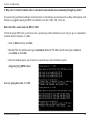
To find the proper MTU Size, you’ll have to do a special ping of the destination you’re trying to go to. A destination
could be another computer, or a URL.
• Click on Start and then click Run.
• Windows® 95, 98, and Me users type in command (Windows® NT, 2000, and XP users type in cmd) and
press Enter (or click OK).
• Once the window opens, you’ll need to do a special ping. Use the following syntax:
ping [url] [-f] [-l] [MTU value]
Example: ping yahoo.com -f -l 1472
D-Link DIR-301 User Manual
56
Section 6 - Troubleshooting
You should start at 1472 and work your way down by 10 each time. Once you get a reply, go up by 2 until you get a
fragmented packet. Take that value and add 28 to the value to account for the various TCP/IP headers. For example,
lets say that 1452 was the proper value, the actual MTU size would be 1480, which is the optimum for the network
we’re working with (1452+28=1480).
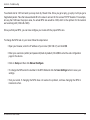
Once you find your MTU, you can now configure your router with the proper MTU size.
To change the MTU rate on your router follow the steps below:
• Open your browser, enter the IP address of your router (192.168.0.1) and click OK.
• Enter your username (admin) and password (blank by default). Click OK to enter the web configuration
page for the device.
• Click on Setup and then click Manual Configure.
• To change the MTU enter the number in the MTU field and click the Save Settings button to save your
settings.
•Test your email. If changing the MTU does not resolve the problem, continue changing the MTU in
increments of ten.
D-Link DIR-301 User Manual
57
Appendix A - Wireless Basics
Wireless Basics
D-Link wireless products are based on industry standards to provide easy-to-use and compatible high-speed wireless
connectivity within your home, business or public access wireless networks. Strictly adhering to the IEEE standard,
the D-Link wireless family of products will allow you to securely access the data you want, when and where you want
it. You will be able to enjoy the freedom that wireless networking delivers.
A wireless local area network (WLAN) is a cellular computer network that transmits and receives data with radio signals
instead of wires. Wireless LANs are used increasingly in both home and office environments, and public areas such
as airports, coffee shops and universities. Innovative ways to utilize WLAN technology are helping people to work and
communicate more efficiently. Increased mobility and the absence of cabling and other fixed infrastructure have proven
to be beneficial for many users.
Wireless users can use the same applications they use on a wired network. Wireless adapter cards used on laptop
and desktop systems support the same protocols as Ethernet adapter cards.
Under many circumstances, it may be desirable for mobile network devices to link to a conventional Ethernet LAN in
order to use servers, printers or an Internet connection supplied through the wired LAN. A Wireless Router is a device
used to provide this link.
D-Link DIR-301 User Manual
58
Appendix A - Wireless Basics
What is Wireless?
Wireless or Wi-Fi technology is another way of connecting your computer to the network without using wires. Wi-Fi
uses radio frequency to connect wirelessly, so you have the freedom to connect computers anywhere in your home
or office network.
Why D-Link Wireless?
D-Link is the worldwide leader and award winning designer, developer, and manufacturer of networking products. DLink delivers the performance you need at a price you can afford. D-Link has all the products you need to build your
network.
How does wireless work?
Wireless works similar to how cordless phone work, through radio signals to transmit data from one point A to point
B. But wireless technology has restrictions as to how you can access the network. You must be within the wireless
network range area to be able to connect your computer. There are two different types of wireless networks Wireless
Local Area Network (WLAN), and Wireless Personal Area Network (WPAN).
Wireless Local Area Network (WLAN)
In a wireless local area network, a device called an Access Point (AP) connects computers to the network. The access
point has a small antenna attached to it, which allows it to transmit data back and forth over radio signals. With an
indoor access point as seen in the picture, the signal can travel up to 300 feet. With an outdoor access point the signal
can reach out up to 30 miles to serve places like manufacturing plants, industrial locations, college and high school
campuses, airports, golf courses, and many other outdoor venues.
D-Link DIR-301 User Manual
59
Appendix A - Wireless Basics
Wireless Personal Area Network (WPAN)
Bluetooth is the industry standard wireless technology used for WPAN. Bluetooth devices in WPAN operate in a range
up to 30 feet away.
Compared to WLAN the speed and wireless operation range are both less than WLAN, but in return it doesn’t use
nearly as much power which makes it ideal for personal devices, such as mobile phones, PDAs, headphones, laptops,
speakers, and other devices that operate on batteries.
Who uses wireless?
Wireless technology as become so popular in recent years that almost everyone is using it, whether it’s for home,
office, business, D-Link has a wireless solution for it.
Home
• Gives everyone at home broadband access
• Surf the web, check email, instant message, and etc
• Gets rid of the cables around the house
• Simple and easy to use
Small Office and Home Office
• Stay on top of everything at home as you would at office
• Remotely access your office network from home
• Share Internet connection and printer with multiple computers
• No need to dedicate office space
D-Link DIR-301 User Manual
60
Appendix A - Wireless Basics
Where is wireless used?
Wireless technology is expanding everywhere not just at home or office. People like the freedom of mobility and it’s
becoming so popular that more and more public facilities now provide wireless access to attract people. The wireless
connection in public places is usually called “hotspots”.
Using a D-Link Cardbus Adapter with your laptop, you can access the hotspot to connect to Internet from remote
locations like Airports, Hotels, Coffee Shops, Libraries, Restaurants, and Convention Centers.
Wireless network is easy to setup, but if you’re installing it for the first time it could be quite a task not knowing where to
start. That’s why we’ve put together a few setup steps and tips to help you through the process of setting up a wireless
network.
Tips
Here are a few things to keep in mind, when you install a wireless network.
Centralize your router or Access Point
Make sure you place the router/access point in a centralized location within your network for the best performance. Try
to place the router/access point as high as possible in the room, so the signal gets dispersed throughout your home.
If you have a two-story home, you may need a repeater to boost the signal to extend the range.
Eliminate Interference
Place home appliances such as cordless telephones, microwaves, and televisions as far away as possible from the
router/access point. This would significantly reduce any interference that the appliances might cause since they operate
on same frequency.
D-Link DIR-301 User Manual
61
Appendix A - Wireless Basics
Security
Don’t let you next-door neighbors or intruders connect to your wireless network. Secure your wireless network by turning
on the WPA or WEP security feature on the router. Refer to product manual for detail information on how to set it up.
Wireless Modes
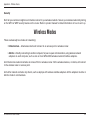
There are basically two modes of networking:
•Infrastructure – All wireless clients will connect to an access point or wireless router.
•Ad-Hoc – Directly connecting to another computer, for peer-to-peer communication, using wireless network
adapters on each computer, such as two or more WNA-2330 wireless network Cardbus adapters.
An Infrastructure network contains an Access Point or wireless router. All the wireless devices, or clients, will connect
to the wireless router or access point.
An Ad-Hoc network contains only clients, such as laptops with wireless cardbus adapters. All the adapters must be in
Ad-Hoc mode to communicate.
D-Link DIR-301 User Manual
62
Appendix B - Networking Basics
Networking Basics
Check your IP address
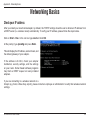
After you install your new D-Link adapter, by default, the TCP/IP settings should be set to obtain an IP address from
a DHCP server (i.e. wireless router) automatically. To verify your IP address, please follow the steps below.
Click on Start > Run. In the run box type cmd and click OK.
At the prompt, type ipconfig and press Enter.
This will display the IP address, subnet mask, and
the default gateway of your adapter.
If the address is 0.0.0.0, check your adapter
installation, security settings, and the settings
on your router. Some firewall software programs
may block a DHCP request on newly installed
adapters.
If you are connecting to a wireless network at a
hotspot (e.g. hotel, coffee shop, airport), please contact an employee or administrator to verify their wireless network
settings.
D-Link DIR-301 User Manual
63
Appendix B - Networking Basics
Statically Assign an IP address
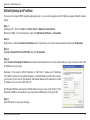
If you are not using a DHCP capable gateway/router, or you need to assign a static IP address, please follow the steps
below:
Step 1
Windows® XP - Click on Start > Control Panel > Network Connections.
Windows® 2000 - From the desktop, right-click My Network Places > Properties.
Step 2
Right-click on the Local Area Connection which represents your D-Link network adapter and select Properties.
Step 3
Highlight Internet Protocol (TCP/IP) and click Properties.
Step 4
Click Use the following IP address and enter an IP address that is on the same subnet as your network or the LAN
IP address on your router.
Example: If the router´s LAN IP address is 192.168.0.1, make your IP address
192.168.0.X where X is a number between 2 and 99. Make sure that the number
you choose is not in use on the network. Set Default Gateway the same as the LAN
IP address of your router (192.168.0.1).
Set Primary DNS the same as the LAN IP address of your router (192.168.0.1). The
Secondary DNS is not needed or you may enter a DNS server from your ISP.
Step 5
Click OK twice to save your settings.
D-Link DIR-301 User Manual
64
Appendix C - Technical Specifications
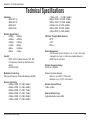
Technical Specifications
Standards
• IEEE 802.11g
• IEEE 802.11b
• IEEE 802.3
• IEEE 802.3u
Wireless Signal Rates*
• 54Mbps • 48Mbps
• 36Mbps
• 24Mbps
• 18Mbps • 12Mbps
• 11Mbps • 9Mbps
• 6Mbps • 5.5Mbps
• 2Mbps • 1Mbps
Security
• WPA - Wi-Fi Protected Access (TKIP, MIC,
IV Expansion, Shared Key Authentication)
• 802.1x
• 64/128-bit WEP
Modulation Technology
Orthogonal Frequency Division Multiplexing (OFDM)
Receiver Sensitivity
• 54Mbps OFDM, 10% PER,-68dBm)
• 48Mbps OFDM, 10% PER,-68dBm)
• 36Mbps OFDM, 10% PER,-75dBm)
• 24Mbps OFDM, 10% PER,-79dBm)
• 18Mbps OFDM, 10% PER,-82dBm)
• 12Mbps OFDM, 10% PER,-84dBm)
D-Link DIR-301 User Manual
• 11Mbps CCK,
8% PER,-82dBm)
• 9Mbps OFDM, 10% PER,-87dBm)
• 6Mbps OFDM, 10% PER,-88dBm)
• 5.5Mbps CCK, 8% PER,-85dBm)
• 2Mbps QPSK, 8% PER,-86dBm)
• 1Mbps BPSK, 8% PER,-89dBm)
VPN Pass Through/ Multi-Sessions
• PPTP
• L2TP
• IPSec
Device Management
• Web-based Internet Explorer v6 or later; Netscape
Navigator v6 or later; or other Java-enabled browsers
• DHCP Server and Client
Wireless Frequency Range
2.4GHz to 2.462GHz
Wireless Operating Range2
• Indoors - up to 328 ft. (100 meters)
• Outdoors- up to 1312 ft. (400 meters)
Wireless Transmit Power
15dBm ± 2dBm
External Antenna Type
Single detachable reverse SMA
65
Appendix C - Technical Specifications
Advanced Firewall Features
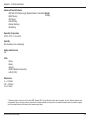
• NAT with VPN Pass-through (Network Address Translation) Weight
0.246kg
• MAC Filtering
• IP Filtering
• URL Filtering
• Domain Blocking
• Scheduling
Operating Temperature
32°F to 131°F ( 0°C to 55°C)
Humidity
95% maximum (non-condensing)
Safety and Emissions
CE
LEDs
• Power
• Status
• Internet
• WLAN (Wireless Connection)
• LAN (10/100)
Dimensions
• L = 112.6mm
• W = 147.5mm
• H = 31.8mm
* Maximum wireless signal rate derived from IEEE Standard 802.11g specifications. Actual data throughput will vary. Network conditions and
environmental factors, including volume of network traffic, building materials and construction, and network overhead, lower actual data throughput
rate. Environmental factors will adversely affect wireless signal range.
D-Link DIR-301 User Manual
66
Appendix C - Technical Specifications
Contacting Technical Support
You can find software updates and user documentation on the D-Link websites.
If you require product support, we encourage you to browse our FAQ section on the Web Site before contacting the Support line.
We have many FAQ’s which we hope will provide you a speedy resolution for your problem.
For Customers within The United Kingdom & Ireland:
D-Link UK & Ireland Technical Support over the Internet:
http://www.dlink.co.uk
ftp://ftp.dlink.co.uk
D-Link UK & Ireland Technical Support over the Telephone:
08456 12 0003 (United Kingdom)
+1890 886 899 (Ireland)
Lines Open
8.00am-10.00pm Mon-Fri
10.00am-7.00pm Sat & Sun
For Customers within Canada:
D-Link Canada Technical Support over the Telephone:
1-800-361-5265 (Canada)
Mon. to Fri. 7:30AM to 9:00PM EST
D-Link Canada Technical Support over the Internet:
http://support.dlink.ca
email: [email protected]
D-Link DIR-301 User Manual
67