1
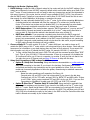
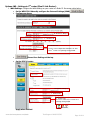
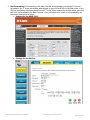
Router Configuration: 1. Turn off the DHCP server. We are letting router A become the boss on the network, and to do this we need to turn off the DHCP server in router B, which will prevent router B from handing out any IP addresses: we strictly can’t have two DHCP servers on the same network. This setting might be under LAN or network setup/settings, and will likely be under a heading labeled DHCP Server, or DHCP Settings. Additionally, if your router has a setting to turn NAT on or off, set this to OFF. Note that the NAT setting may be under advanced settings or may not be an accessible setting on all routers. 2. Disable the Firewall. If it is possible to turn off the firewall, you may wish to disable this as it will not be used—nothing will be connected to the WAN port. 3. Configure Wireless settings (optional). If this device has wireless functionality, you will want to configure the wireless security settings. Set these values as desired for your network. It also may be desirable to set AP’s to a different wireless channel than the main router to limit interference. Wireless SSID should be enabled, and each router should have a unique SSID so you can properly associate wireless tablets with the nearest AP. 4. Change the IP. As an AP, router B needs to have a static IP address on the correct network. If the A router in the install is from Elan, by default the Elan router will be set to 192.168.0.1, with a dynamic (DHCP) range of 150-250. Elan recommends setting AP’s to static IP’s starting at 192.168.0.10, and we can set the router being bridged following this convention. If you are not using an Elan router, or are using an Elan router that follows an atypical convention, you may set router B to any LAN IP that is unused and outside your DHCP range. Set router B’s LAN IP to a static IP that is available on the router A’s network. Refer to documentation for your third-party router for specifics, but this is typically set under Networking or LAN setup. Make sure the IP is not within the DHCP range of the router A (default: 150-250). Make sure no other devices already exist at this IP address. Suggested LAN IP for the router B: 192.168.0.10 www.elanhomesystems.com/dealer Tech Support: 800-622-3526 Page 5 of 11