1
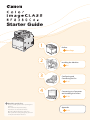
Starter Guide
1
Preface
Next Page
2
Installing the Machine
P. 6
3
Configuring and
Connecting the Fax
P. 16
4
Connecting to a Computer
and Installing the Drivers
P. 20
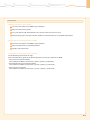
Read this guide first.
Please read this guide before operating this
product.
The remarks for important safety
instructions are described in “Basic
Operation Guide.” Read the guide also.
After you finish reading this guide, store it in
a safe place for future reference.
Appendix
P. A-1
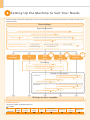
Setting Up the Machine to Suit Your Needs
Specify settings related to the Copy, Print, Fax, PC Fax, Scan, Remote UI and Media Printing functions. Follow the steps in the
flowchart below.
Start settings.
Required Operations
Carrying the Machine to the Installation Site and Removing the Packing Materials
Preparing to Use the Toner Cartridges
Loading Paper
P. 10
Copy
Media Print
P. 8
Settings for paper sizes and paper types are required after turning the power ON.
Connecting the Power Cord
Turning ON the Machine and
Specifying the Initial Settings
P. 6
P. 12
Language Settings
Country and Region Settings
Current Time Settings
Color Correction
Print
Scan
PC Fax
Fax
P. 15
USB
Connection
Time Zone Settings
Print
Scan
PC Fax
Network
Connection
P. 12
Settings from
a Computer
Remote
UI
Fax Settings
Registering the Sender Information
P. 16
Selecting the Receive Mode
P. 17
Connecting a Telephone Line
P. 18
Settings in a Computer
Connecting to Wired LAN/Wireless LAN
For Windows
Checking the IP Address
Installing the Software
Connecting a USB Cable
P. A-3
P. 22
P. 25
Connecting to Wired LAN/Wireless LAN
For Macintosh
Checking the IP Address
Installing the Software
Connecting a USB Cable
P. 20
P. 20
P. A-3
P. 27
P. 28
Settings are now complete.
Available Features
The machine offers the following features.
: available
Copy
(2-Sided)
MF8380Cdw
2
Print
(2-Sided)
Fax
(PC Fax)
Scan
Send to E-mail/
Store to Shared Folder
Remote UI
ADF
(2-Sided)
Wireless LAN
1
Preface
2
Installing the Machine
3
Configuring and Connecting the Fax
4
Connecting to a Computer and
Installing the Drivers
Appendix
Checking the Supplied Accessories
1. Confirm that all the supplied
accessories are contained in the box.
If an item is missing or damaged, please contact our Canon
Authorized Service Facilities or the Canon Customer Care
Center.
About the LAN cable
The machine does not come with a LAN cable,
router, or hub. Have them ready as needed.
The machine unit
The following parts are
already installed.
• Use a Category 5 or higher twisted pair cable.
• If you want to connect the machine to a 100BASE-TX
Ethernet network, all the devices to be connected to the
LAN must support 100BASE-TX.
• Paper cassette
• Toner cartridges
Toner cartridge
Power cord
About the USB cable
The machine does not come with a USB cable.
Have cables ready as needed.
Legal dust cover
Starter Guide
1
Preface
Next Page
2
Starter Guide (This manual)
Installing the Machine
P. 6
3
Configuring and
Connecting the Fax
P. 16
4
Connecting to a Computer
and Installing the Drivers
P. 20
Basic Operation Guide
Read this guide first.
Please read this guide before operating this
product.
The remarks for important safety
instructions are described in “Basic
Operation Guide.” Read the guide also.
After you finish reading this guide, store it in
a safe place for future reference.
Appendix
Quick View- Perform Useful Tasks
P. A-1
Basic Operation Guide
Next
Page
1 Before Using the Machine P.1-1
2 Document and Paper Handling P.2-1
P.3-1
3 Copying
4 Printing from a Computer P.4-1
P.5-1
5
6 Using the Fax Functions P.6-1
7 Using the Scan Functions P.7-1
P.8-1
8 Maintenance
9 Tr o u b l e s h o o t i n g P.9-1
P.10-1
10
P.11-1
11 A p p e n d i x
Registering Destinations
in the Address Book
Network Setting Procedure
Security Functions
Searching in Detail
See the e-Manual.
User Software CD-ROM
Searching the Installation and
Connection Procedure
See the Starter Guide.
Be sure to read the manual before using
the machine.
Keep the manual for future reference.
Registering/
Setting the Various Functions
Wireless LAN Setting Guide
XXXXXX
Setting
the
XXXXXXXXX
wireless LAN
Wireless LAN Setting Guide
P.1-1
Troubleshooting
?
P.2-1
Starter Guide
User Software CD-ROM
For procedures other
than printer installation
and wireless LAN setup,
please refer to the
[Starter Guide].
Read this guide before setting up the wireless LAN
This guide describes problems and countermeasures for troubles
of the wireless LAN setup procedure and problems encountered
during the configuration.
After you finish reading this guide, store it in a safe place for
future reference.
Telephone cable
Limited Warranty Notice
Shortcut key label
Registration Card
Supplied Toner Cartridges
The average yield of the toner cartridge that comes with the machine is as follows.
*1
Canon Cartridge 118 Black Starter
Average yield of K (Black) toner cartridge*1: 1,200 sheets
Canon Cartridge 118 Yellow Starter
Canon Cartridge 118 Magenta Starter
Canon Cartridge 118 Cyan Starter
Average yield of Composite Y (Yellow), M (Magenta), and C (Cyan)
toner cartridges*1: 1,400 sheets
The average yield is on the basis of “ISO/IEC 19798”*2 when printing A4 size paper with the default print density setting.
“ISO/IEC 19798” is the global standard related to “Method for the determination of toner cartridge yield for color printers and multi-function devices
that contain printer components” issued by ISO (International Organization for Standardization).
*2
The average yield of the replacement toner cartridge varies from that of the supplied toner cartridge.
To purchase replacement toner cartridges, see “About Replacement Toner Cartridges” in the e-Manual.
3
User Software CD-ROM
About the Drivers and Software
The drivers and software included in the CD-ROM supplied with this machine are as follows.
MF Drivers
Printer driver
You can print from an application to the machine once you have the printer driver
installed on your computer.
Printer Drivers:
UFRII LT/UFRII LT (XPS) Printer Driver
• UFRII LT (XPS) is for Windows only.
Fax driver
If you install the fax driver on your computer, you can select “Print” from an application,
select the Canon fax driver as a printer, and specify the output destination and options.
The fax driver converts the data into an image that conforms to standard fax protocols so
that the data can be printed or saved using the recipient’s fax machine.
Scanner driver
You can use the machine as a scanner once you have the scanner driver installed on your
computer.
Network Scan Utility
You need this utility software to use the machine as a network scanner. It is automatically
installed along with the scanner driver.
MF Toolbox
MF Toolbox*
The MF Toolbox provides a group of commands for you to open a scanned image in an
application, send it as an e-mail attachment file, store it on the hard disk, etc.
Others
Presto! PageManager
You can handle scanned images in many ways using this software.
* Some features of the MF Toolbox for Macintosh may differ from those of the MF Toolbox for Windows. For details, see the Mac Scanner Driver Guide.
Supported Operating Systems
: Supported
: Not supported
Windows 2000/XP
Windows Vista/7
Windows Server
2003
Windows Server
2008
*1
Printer driver (UFRII LT)
Printer driver (UFRII LT
(XPS))*2
Mac OS X
(version 10.4.9 or later)
*1
*1
*1
Fax driver
*1
Scanner driver
Network Scan Utility
*1
*1
MF Toolbox
Presto! PageManager
*1 Supported only over network connections.
*2 For 32-bit operating systems only. For Windows Vista/Server 2008, Service Pack 1 or later must be installed.
4
*1
1
Preface
2
Installing the Machine
3
Configuring and Connecting the Fax
4
Connecting to a Computer and
Installing the Drivers
Appendix
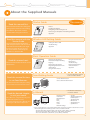
About the Supplied Manuals
Read this manual first.
Starter Guide
This manual describes the settings for
setting up the machine and installing
the software. Be sure to read this
manual before using the machine.
• Preface
• Installing the Machine
• Configuring and Connecting the Fax
• Connecting to a Computer and Installing the Drivers
• Appendix
Starter Guide
1
Preface
Next Page
2
Installing the Machine
P. 6
3
Configuring and
Connecting the Fax
P. 16
4
Connecting to a Computer
and Installing the Drivers
P. 20
Read this guide first.
Please read this guide before operating this
product.
The remarks for important safety
instructions are described in “Basic
Operation Guide.” Read the guide also.
After you finish reading this guide, store it in
a safe place for future reference.
Read this manual with the
Starter Guide.
This manual describes the wireless
LAN setup procedures and the causes
and solutions for troubles you might
face during setup. Be sure to read
this manual when connecting the
machine to a wireless LAN.
This manual
Appendix
P. A-1
Wireless LAN Setting Guide
• Setting the wireless LAN
• Troubleshooting
• Appendix
Wireless LAN Setting Guide
XXXXXX
Setting
the
XXXXXXXXX
wireless LAN
P.1-1
Troubleshooting
?
P.2-1
Starter Guide
For procedures other
than printer installation
and wireless LAN setup,
please refer to the
[Starter Guide].
Read this guide before setting up the wireless LAN
This guide describes problems and countermeasures for troubles
of the wireless LAN setup procedure and problems encountered
during the configuration.
After you finish reading this guide, store it in a safe place for
future reference.
Basic Operation Guide
Read this manual next.
Basic Operation Guide
This manual describes the basic use of
the machine.
Quick View- Perform Useful Tasks
Next
Page
1 Before Using the Machine P.1-1
2 Document and Paper Handling P.2-1
P.3-1
3 Copying
4 Printing from a Computer P.4-1
P.5-1
5
6 Using the Fax Functions P.6-1
7 Using the Scan Functions P.7-1
P.8-1
8 Maintenance
9 Tr o u b l e s h o o t i n g P.9-1
P.10-1
10
P.11-1
11 A p p e n d i x
Registering Destinations
in the Address Book
Network Setting Procedure
Security Functions
Searching in Detail
See the e-Manual.
User Software CD-ROM
Searching the Installation and
Connection Procedure
See the Starter Guide.
Be sure to read the manual before using
the machine.
Keep the manual for future reference.
Registering/
Setting the Various Functions
• Before Using the Machine
• Document and Paper Handling
• Copying
• Printing from a Computer
• Registering Destinations in the
Address Book
• Using the Fax Functions
Send Setting Guide
Read this manual for how
to set Send features.
• Using the Scan Functions
• Maintenance
• Troubleshooting
• Registering/Setting the
Various Functions
• Appendix
* The Send Setting Guide is included
in the User Software CD-ROM.
• Send to E-mail Function
• Store to Shared Folder Function
This manual describes setting for sending
scanned data to E-mail and/or file servers.
Read the desired chapter
to suit your needs.
The e-Manual is categorized by subject to
find desired information easily.
For details about using the e-Manual, refer
to “Using the e-Manual“ in “Appendix.”
e-Manual
* The e-Manual is included in the
User Software CD-ROM.
• Important Safety
Instructions
• Basic Operation
• Copy
• Fax*1
• Print*1
• Scan*1
• Network Settings
• Security
• Setting and Managing
from Computer
• Troubleshooting
• Maintenance
• Setting Menu List
• Specifications
*1 I f you are using Macintosh, see the following Driver Guides or Help for more details on these functions. You can
find the driver guides in the following locations on the User Software CD-ROM.
• Mac UFR II Printer Driver Installation Guide → [Documents] - [Print] - [Guide] - [index.html]
• Mac Fax Driver Installation Guide → [Documents] - [FAX] - [Guide] - [index.html]
• Mac Scanner Driver Guide → [Documents] - [Scan] - [Guide] - [index.html]
5
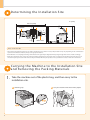
Determining the Installation Site
in. (mm)
4
(100)
Feeder
33 1/2 (851)
4
(100)
4
(100)
4
(100)
Feeder cover
26 1/2 (674)
Paper
cassette
4
(100)
52 1/4 (1327)
Rear cover
Notes on wireless LAN
• This product is designed for indoor use at a distance of 164’/50 m or less from an access point (the distance may vary depending on the communication
speed or environmental conditions). Keep it at an appropriate distance.
• Check whether or not anything is blocking communication. The signal may be degraded when passing through walls or floors. Install accordingly.
• Radio wave interference may occur if any radio wave emitting equipment (i.e. microwave oven) is located near the product and its radio waves are in
the same frequency band as the radio waves used by the wireless LAN. Keep the product as far as possible from sources of radio wave interference.
arr ying the Machine to the Installation Site
C
and Removing the Packing Materials
1. Take the machine out of the plastic bag, and then carry to the
installation site.
Hold the grips.
6
Carry the machine with two or more people.
1
Preface
2
Installing the Machine
3
Configuring and Connecting the Fax
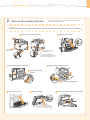
2. Remove the packing materials.
4
Connecting to a Computer and
Installing the Drivers
Appendix
* The packing materials may be changed in form or placement, or may be
added or removed without notice.
A loud noise occurs when you open the rear cover or remove the packing materials with tape. This is not a
malfunction.
Although a loud noise occurs when you remove the packing materials inside the machine, this is not a malfunction.
Remove the packing materials.
* Remove these packing
materials later.
(A)
Open the rear cover.
* Remove these packing
materials later.
* Do not remove the cap (A) on
the USB port at this stage. Uncap
when making a USB connection.
Remove the packing materials.
Remove the packing materials.
Remove by pulling
gently.
Remove by pulling gently.
Close the rear cover.
Open the feeder.
Remove the packing materials with tape.
7
Close the feeder.
Check!
Make sure that the following packing materials are all removed from the machine.
Packing materials with tape x 6
Tape x 11
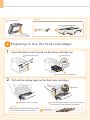
Preparing to Use the Toner Cartridges
1. Open the front cover and pull out the toner cartridge tray.
Open the front cover.
Press the lever.
Pull out the toner cartridge tray.
2. Pull out the sealing tapes on the four toner cartridges.
Remove.
Hold down the toner cartridge.
Pull the sealing tape completely out. The full length of
the sealing tape is approximately 20 in. (50 cm).
Check!
Make sure that the following packing materials
are all removed from the toner cartridges.
8
Sealing tape x4
1
Preface
2
Installing the Machine
3
Configuring and Connecting the Fax
4
Connecting to a Computer and
Installing the Drivers
Appendix
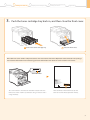
3. Push the toner cartridge tray back in, and then close the front cover.
Close the front cover.
Push in the toner cartridge tray.
Write down the serial number and purchase date on the back cover of the Basic Operation Guide enclosed in the package.
You need this information when contacting your local authorized Canon dealer or Canon Customer Care Center.
Serial No.
Serial Number
CANON INC.
30-2, Shimomaruko 3-chome, Ohta-ku, Tokyo 146-8501, Japan
CANON MARKETING JAPAN INC.
16-6, Konan 2-chome, Minato-ku, Tokyo 108-8011, Japan
CANON U.S.A., INC.
One Canon Plaza, Lake Success, NY 11042, U.S.A.
CANON EUROPA N.V.
Bovenkerkerweg, 59-61, 1185 XB Amstelveen, The Netherlands
CANON CHINA CO. LTD.
15F Jinbao Building No.89, Jinbao Street, Dongcheng District, Beijing 100005, PRC
CANON SINGAPORE PTE LTD
1 HarbourFront Avenue, #04-01 Keppel Bay Tower, Singapore 098632
CANON AUSTRALIA PTY LTD
1 Thomas Holt Drive, North Ryde, Sydney NSW 2113, Australia
CANON GLOBAL WORLDWIDE SITES
FT5-XXXX (XXX)
The serial number is indicated on the label located inside the
front cover of the machine (a character string of 3 letters and a
5-digit number).
Serial No.
Date of Purchase
http://www.canon.com/
XXXXXXXXXX
© CANON INC. 2011
PRINTED IN xxxxxx
Write down the information here (on the
back cover of the Basic Operation Guide).
9
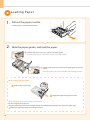
Loading Paper
1. Pull out the paper cassette.
Hold the paper cassette with both hands.
2. Slide the paper guides, and load the paper.
Hold the lock release lever and slide the side paper guides.
Spread the paper guides a little wider than the actual paper width.
Hold the lock release lever and slide the paper guide at the front
center.
Spread the paper guide a little wider than the actual paper width.
When loading Legal size paper
Hold the lock release lever.
Adjust the length of the paper cassette.
When changing the size of the paper to be loaded
Be sure to register the paper size.
At factory shipment, the machine’s default settings are configured for LTR paper size and Plain 2 paper type.
Proceed to “Setting the Paper Size and Type” on p. 15.
10
1
Preface
2
Installing the Machine
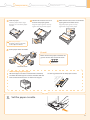
Load the paper.
Load the paper that it aligns
with the rear side of the paper
cassette.
3
Configuring and Connecting the Fax
4
Connecting to a Computer and
Installing the Drivers
Hold the lock release lever and
slide the side paper guides.
Align the paper guides securely
against the edges of the paper.
Appendix
Hold the lock release lever and slide the
paper guide at the front center.
Align the paper guide securely
against the edge of the paper.
When using envelopes
For details on how to load media,
see “Basic Operation Guide.”
Set the paper under the hooks.
Hooks
Hooks
Hooks
Check!
Make sure that the paper stack does not
go over the line of the load limit mark.
Up to here
Load limit mark.
When loading Legal size paper
When the paper cassette is inserted with it extended,
the front side of the paper cassette is not flush with the
front surface of the machine as shown in the figure.
Set the Legal dust cover on the paper cassette.
3. Set the paper cassette.
11
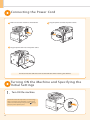
Connecting the Power Cord
Make sure that the machine is switched OFF.
Plug the power cord into the power socket.
Plug the power cord into an AC power outlet.
Do not connect the USB cable. Connect the USB cable when installing the software.
T urning ON the Machine and Specifying the
Initial Settings
1. Turn ON the machine.
The machine enters the Sleep mode to conserve energy
when no operations are performed for a certain period
of time. To cancel the Sleep mode, press the [ ] (Energy
Saver) key on the operation panel.
12
1
Preface
2
Installing the Machine
3
Configuring and Connecting the Fax
4
Connecting to a Computer and
Installing the Drivers
Appendix
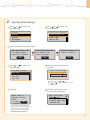
2. Specify initial settings.
Press [ ] or [ ] to select, and
then press [OK].
Press [ ] or [ ] to select, and
then press [OK].
Language
English
French
Spanish
Portuguese
Select Country/Region
United States (US)
Canada (CA)
Brazil (BR)
Mexico (MX)
Read the messages, and then press [OK].
Open back cover; see
if orange packing
material is removed.
Check that tabs/tape
are removed from
toner cartridge.
Next
Next
Press [ ] or [ ] to select, and
then press [OK].
Time Zone Settings
GMT-5:00
GMT-4:00
GMT-3:30
GMT-3:00
Check that paper is
loaded in Drawer 1.
Next
Enter the date and time, and then
press [OK].
Current Time Settings
01/01/2011 12:52 AM
• Move the cursor with [ ] or [ ].
• Press [ ] or [ ] to select the number or switch
to <AM> or <PM>.
Press [OK].
The initial screen appears when
the initial setup is complete.
Adjust image to
reproduce original
color?
Yes
No
Copy: Press Start
100% 1 LTR
Density: +
-0
Original Type: Text...
2-Sided: Off
1
• You can perform color correction by
selecting <Yes> to obtain optimum copy
results or printout results. For details
on the procedure, see the following
“Performing Color Correction.”
13
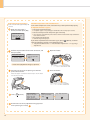
Performing Color Correction
Check the temperature of the installation site
Color correction takes approximately 165
seconds.
If the room temperature is low, correction may not be performed properly.
Make sure that paper is
loaded, and then press [OK].
If <Adjustment failed.> appears
• Is the paper loaded correctly?
→→ Load plain paper or recycled paper of A4/Letter size in the paper cassette.
• Is the test chart placed on the platen glass correctly?
Supported Paper:
Size: A4, LTR, 16K
Type: Plain, Rec
OK
→→ Place the test chart with the print side face down and the black stripe toward the
back of the machine.
• Has a paper jam occurred?
→→ Remove the jammed paper.
If you want to perform color correction again, press [
select the following settings in the following order.
] (Menu), and then
→→ <Adjustment/Maintenance> → <Auto Gradation Adjustment> → <Copy Image
Adjustment>
Confirm the procedure for the color correction, and
then press [OK].
Steps (Start:Press OK)
1. Print Adj. Image
2. Scan Adj. Image
Open the feeder.
Step 1
Printing adjustment
image...
A test chart (adjustment image) is printed.
Place the test chart on the platen glass with the
print side face down.
Place the paper so that the black stripe is at the back
side of the machine.
Press [
] (Start).
Place adjustment
image on the glass
with black side
toward the back.
Press Color to start.
Step 2
Scanning adjustment
image...
Remove the test chart (adjustment image) placed
on the platen glass in Step
.
14
Close the feeder.
Copy Image Adjustment
1
Preface
2
Installing the Machine
3
Configuring and Connecting the Fax
4
Connecting to a Computer and
Installing the Drivers
Appendix
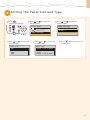
Setting the Paper Size and Type
Press [ ]
(Select Paper/Settings).
Press [ ] or [ ] to select, and
then press [OK].
Select Paper
MP Tray
1
LTR:Plain 2
Paper Settings
Press [ ] or [ ] to select, and
then press [OK].
Paper Size
LTR
LGL
STMT
EXEC
Press [ ] or [ ] to select, and
then press [OK].
Press [ ] or [ ] to select, and
then press [OK].
Paper Settings
Multi-Purpose Tray
Drawer 1
Register Custom Paper
Press [ ] (Reset) to return to the
standby mode.
Paper Type
Plain 2 (19 lb BondRecycled
Color
Heavy 1 (24 lb Bond...
15
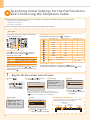
S pecifying Initial Settings for the Fax Functions
and Connecting the Telephone Cable
Operate the machine following the on-screen instructions and perform the following settings and connection.
• Registering the fax number and unit name
• Setting the fax receive mode
• Connecting a telephone line
If you are using pulse dialing, change the line type after specifying the settings.
Entering Text
Enter information (text, symbols, and numbers)
using the following keys.
Entering text, symbols, and numbers
Enter using the numeric keys or [ ] (SYMBOLS).
Key
Entry mode: <A>
Entry mode: <a>
Entry mode: <12>
ABC
abc
2
DEF
def
3
GHI
ghi
4
JKL
jkl
5
MNO
mno
6
PQRS
pqrs
7
TUV
tuv
8
WXYZ
wxyz
@.-_/
OK Numeric
keys
#
C
Changing the entry mode
Press [ ] to select <Entry Mode>, and then
press [OK]. You can also press [ ] (Tone) to
change the entry mode.
Entry mode
<A>
<a>
<12>
Text that can be entered
Alphabet (capital letters) and symbols
Alphabet (small letters) and symbols
Numbers
Moving the cursor (Entering a space)
Move the cursor by pressing [ ] or [ ]. To enter
a space, move the cursor to the end of the text,
and then press [ ].
1
0
(space) @ . / - _ ! ? & $ % # ( ) [ ]{ } < > * + = " , ;
:'^`|\˜
].
Press [ ] or [ ] to select,
and then press [OK].
Perform Fax Setup?
Set up Now
Set up Later
Press [OK].
Register Unit Tel No.
031234567
<Apply>
+
Register the unit
telephone number for
this machine.
*Next Screen: Press OK
Register unit name.
(Sender name,
company name, etc.)
*Next Screen: Press OK
Enter.
Register Unit Name
ABC
<Apply>
Entry Mode: A
Press [ ] or [ ] to
select <Apply>, and then
press [OK].
What happens with the unit name
Once the information has been registered, it is printed at
the top of each page that you are sending.
Fax/Telephone Number
(FAX No.) Sender Name
Sending Date/Time
01/01/2011 02:07 PM FAX
Press [ ] or [ ] to select
<Apply>, and then press [OK].
16
] (Clear).
Enter.
Display “Fax Setup Guide” with the following operations to
perform the settings or connections if selecting <Set up Later>.
[
] (Menu) → <Fax Settings> → <Fax Setup Guide>.
Press [OK].
(Not available)
Deleting text, symbols, or numbers
To delete text, numbers, or symbols, press [ ] (Clear).
To delete all text, numbers, or symbols, press and hold [
1. Register the fax number and unit name.
Press [
9
(Not available)
123XXXXXXX
Telephone Number
Mark
(Unit Name)
Page Number
CANON
P.0001
1
Preface
2
Installing the Machine
3
Configuring and Connecting the Fax
4
Connecting to a Computer and
Installing the Drivers
Appendix
2. Select the fax receive mode.
You can specify how the machine should operate for a fax call or telephone call.
By answering the prompts that appear on the display, the machine will be set to one of the following four operation modes.
<Auto><Fax/Tel Auto Switch><Answering Machine><Manual>
Do you want to use
this machine for fax
only (no telephone)?
Yes
No
The receive mode is set to <Auto>.
→ Proceed to Step 3.
Yes
* When the telephone is connected in the auto receive mode, the
telephone rings when receiving a fax or telephone call. You can
answer the telephone while it is ringing. To turn off the telephone
ringer, see “Incoming Ring” in the e-Manual.
No
Do you want to autoreceive faxes and
answer phone manually?
Yes
No
• Receive faxes automatically.
• Does not use the telephone.*
Yes
The receive mode is set to <Fax/Tel Auto Switch>.
→ Proceed to Step 3.
• Receive faxes automatically.*
• Responds to a telephone call by picking up
the handset.
No
Do you want to use
an answering machine
to answer the phone?
Yes
No
* The telephone rings on incoming calls. To turn off the telephone
ringer, see “Incoming Ring” in the e-Manual.
Yes
No
The receive mode is set to <Manual>.
→ Proceed to Step 3.
The receive mode is set to <Answering Machine>.
→ Proceed to Step 3.
• Receive faxes automatically.
• Respond to telephone calls using the
built-in answer function.
• Ring on incoming calls or faxes.
• Respond to incoming calls or faxes
by picking up the handset.
• Ring on incoming calls or faxes.
17
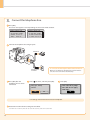
3. Connect the telephone line.
Press [OK].
The screen that appears varies depending on the receive mode selected.
Connect phone line.
Follow illustrations
on the next screen:
Connect line to A.
*Next : Press OK
Connect phone line.
Follow illustrations
on the next screen
to make connections:
1. Phone line to A
Connect the telephone line using the jack.
Telephone
(B)
(A)
To connect an external telephone that includes fax functions
Telephone line
connector
Press [OK] after the
telephone line has been
connected.
Press [
Make sure to disable its automatic fax reception feature
so it does not receive faxes automatically.
] to select, and then press [OK].
End Fax Setup
Guide?
Yes
Press [OK].
Turn the main power
OFF and ON to apply
settings.
No
Fax settings and connections have been completed.
Restart the machine for the settings to take effect.
Turn OFF the machine, wait for at least 10 seconds, and turn it back ON.
18
OK
1
Preface
2
Installing the Machine
3
Configuring and Connecting the Fax
4
Connecting to a Computer and
Installing the Drivers
Appendix
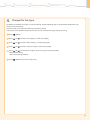
4. Change the line type.
By default, the telephone line type is set to tone dialing. Skip the following steps in the procedure below when you
choose to use tone dialing.
Follow the steps in the procedure below to select pulse dialing.
Contact your local telephone company when you are not sure of the line type that you are using.
Press [ ] (Menu).
Press [
] or [
] to select <Fax Settings>, and then press [OK].
Press [
] or [
] to select <Basic Settings>, and then press [OK].
Press [
] or [
] to select <Select Line Type>, and then press [OK].
Press [ ] or [ ] to select the line type that you are using, and then press [OK].
<Pulse>: Pulse dialing
<Tone>: Tone dialing (Default)
Press [ ] (Menu) to close the menu screen.
19
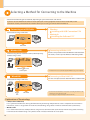
Selecting a Method for Connecting to the Machine
Select from the following three methods, depending on your environment and devices.
If you are not sure whether the router or access point you are using supports wireless LAN or wired LAN, see the
instruction manual provided with the network device you are using, or contact the manufacturer.
Connecting via a USB Cable
Connect them using a USB cable.
• Windows
Installing with USB Connection P. 24
• Macintosh
Installing the Software P. 27
You need this
USB cable
Wireless LAN
Connecting to Wireless LAN
Connect using wireless communication (radio frequency)
without using a cable.
Use the same procedure for both Windows and Macintosh.
For details, see the separate Wireless LAN Setting Guide.
You need this
Wireless LAN router
or
access point
Wired LAN
* A wireless LAN or access point that supports IEEE802.11 (b/g or n) is required.
Connecting to Wired LAN P. 21
Connect them using a LAN cable.
Use the same procedure for both Windows and Macintosh.
You need this
Router
or
hub
LAN cable
* Check to make sure that there is a free port for connecting the machine or the
computer you use to the router or hub.
* Use a Category 5 or higher twisted pair cable for the LAN.
Explanation of Terminology
• LAN (Local Area Network)
It is a system that enables the sharing of information by connecting multiple devices such as computers that are within a
limited area, such as a single room or inside the same building, using cables or wireless communication (radio waves).
• Wireless LAN
It is a network that connects multiple devices using wireless communication (radio waves) without using cables. Generally,
it connects to the network using a relay device called a wireless LAN router or access point.
20
1
2
Preface
Installing the Machine
3
Configuring and Connecting the Fax
4
Connecting to a Computer and
Installing the Drivers
Appendix
Connecting to Wired LAN
Before adding the machine to a wired LAN
The computer and router/hub need to be connected using LAN
cables and the network settings need to be complete.
• For more information, see the instruction manual for the network device you are
Router
or
hub
Internet
using, or contact the networking device manufacturer.
• If the network has not been set up properly, you will not be able to use the machine
LAN cable
on the wired LAN network even if you perform the procedure described below.
Precautions when connecting to a wired LAN
• The configuration of your computer or networked device, as well as the router functions, setting methods and security settings, vary depending on your
environment.
• You can connect the machine to either a wireless LAN or wired LAN, but you cannot use both at the same time.
• If using the machine in your office, consult with your network administrator.
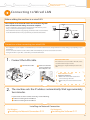
1. Connect the LAN cable.
About the LAN cable
••The machine does not come with a LAN cable, router,
or hub. Have them ready as needed.
Connect the cable.
Make sure that the
green indicator of
the LAN port is on.
••Use a Category 5 or higher twisted pair cable for the
LAN.
If the indicator is not on
Check the following.
••Whether the machine and router/hub are
connected using a LAN cable
••Whether the power of the machine is turned
ON
machine sets the IP address automatically. Wait approximately
2. The
two minutes.
If you want to set the IP address manually, see the following.
e-Manual “Setting the IPv4 Address”
e-Manual “Setting the IPv6 Address”
Installing via Network Connection
• For Windows
Installing via Network Connection P. 22
• For Macintosh
Installing the Software P. 27
21
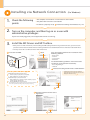
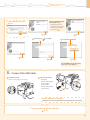
Installing via Network Connection 1. Check the following
points.
(For Windows)
•The computer and machine are connected via the network.
•The power of the machine is turned ON.
•IP address is properly set up.
P
roceed to “Checking the IP Address” on p. A-3.
2. Turn on the computer, and then log on as a user with
administrative privileges.
If you have already logged on, exit all applications which are running.
3. Install the MF Drivers and MF Toolbox.
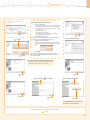
* When you are in an IPv6 environment, or when installing the UFRII LT (XPS) printer driver using network connection, you cannot use the
procedure below to install the software. Refer to “Installing the MF Drivers on the WSD Network” in the e-Manual to install the MF Drivers.
* You may not use the scan function in the IPv6 environment.
Click.
Insert the CD-ROM.
[Easy Installation] performs the installation of the
following software.
• Printer driver
• Fax driver
• Scanner driver
• MF Toolbox
To add the following software and manual to the
installation, select [Custom Installation].
• Presto! PageManager
• e-Manual
e-Manual “Installing the MF Drivers and MF Toolbox”
If the top screen does not appear
• Windows 2000, XP, and Server 2003
* In Windows Server 2003/Server 2008, the
[Select the Type of Connection] screen is not
displayed. Proceed to Step
.
1. From the [Start] or [start] menu, select [Run].
2. Enter "D:\Minst.exe", and then click [OK].
• Windows Vista, 7, and Server 2008
1. Enter "D:\Minst.exe" in [Search programs and files] or [Start
Search] under the [Start] menu.
2. Press the [ENTER] key on the keyboard.
* The CD-ROM drive name is indicated as "D:" in this manual. The CD-ROM
drive name may differ depending on the computer you are using.
Click.
Read the contents of the License
Agreement.
Click.
22
Click.
Click.
1
Preface
2
Installing the Machine
If the following dialog box
appears
3
Configuring and Connecting the Fax
4
Connecting to a Computer and
Installing the Drivers
Appendix
If no devices are displayed in [Device List]
Perform the following procedure.
1. Check the following.
• The computer and device are connected via the network.
• When the machine is connected to a wireless LAN, the
computer and the wireless LAN router or access point are
also connected.
• The device is turned on.
• The IP address is set correctly.
• The computer and device are on the same subnet.
• Security software has been exited.
Click.
2. Click [Update Device List].
If any devices are not displayed by performing the above
procedure, perform the following procedure.
1. Click [Search by IP Address].
2. Enter the IP address of the device to be installed.
Proceed to “Checking the IP Address” on p. A-3.
Select.
Click.
Click.
The installation starts.
3. Click [OK].
If no devices are displayed by performing the above
procedure, click [Display Guide] for information on how to
solve the problem.
Next, installation of the MF Toolbox starts.
* In Windows 2000 Server/Server 2003/Server 2008, the
MF Toolbox is not installed. Proceed to Step
.
Click.
Click.
Ensure that [
Click.
] is added.
Select the check box.
Click.
Click.
The CD-ROM may be removed
once this screen appears.
Checking the Installation Results
P. 26
23
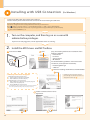
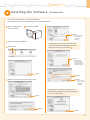
Installing with USB Connection (For Windows)
••Connect the USB cable after installing the software.
••Ensure that the power of the machine is turned on when connecting the USB cable.
To use the UFRII LT (XPS) printer driver through the USB connection
You need to change the machine setting beforehand. Follow the procedure below.
Press [ ] (Menu) → <System Settings> → <Select PDL (Plug-n-Play)> → <USB> → Select <UFRII LT (XPS)>
* The UFRII LT (XPS) printer driver can be used on operating systems that support XML Paper Specification (XPS).
“User Software CD-ROM” on p. 4.
1. Turn on the computer, and then log on as a user with
administrative privileges.
If you have already logged on, exit all applications which are running.
2. Install the MF Drivers and MF Toolbox.
Click.
Insert the CD-ROM.
[Easy Installation] performs the installation of the
following software.
•Printer driver
•Fax driver
•Scanner driver
•MF Toolbox
To add the following software and manual to the
installation, select [Custom Installation].
•Presto! PageManager
•e-Manual
e-Manual “Installing the MF Drivers and MF Toolbox”
Click.
If the top screen does not appear
• Windows 2000, XP, and Server 2003
* In Windows Server 2003/Server 2008, the
[Select the Type of Connection] screen is not
displayed. Proceed to Step
.
1. From the [Start] or [start] menu, select [Run].
2. Enter "D:\Minst.exe", and then click [OK].
• Windows Vista, 7, and Server 2008
1. Enter "D:\Minst.exe" in [Start Search] or [Search programs
and files] under the [Start] menu.
2. Press the [ENTER] key on the keyboard.
* The CD-ROM drive name is indicated as "D:" in this manual. The CD-ROM
drive name may differ depending on the computer you are using.
Read the contents of the License
Agreement.
Click.
24
Click.
Click.
1
Preface
2
Installing the Machine
3
Configuring and Connecting the Fax
4
Connecting to a Computer and
Installing the Drivers
Appendix
Next, installation of the
MF Toolbox starts.
If the following dialog box
appears
* In Windows 2000 Server/
Server 2003/Server 2008, the
MF Toolbox is not installed.
Proceed to Step
.
Click.
Click.
Ensure that [
Click.
] is added.
Select the check box.
Click.
Click.
Click.
The CD-ROM may be removed
once this screen appears.
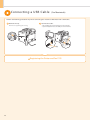
3. Connect the USB cable.
Remove the cap.
Remove it by pulling the string.
Connect the cable.
• Flat end (A):
Connect to the USB port
on the computer.
• Square end (B):
Connect to the USB port
on the machine.
(B)
(A)
When a dialog box is displayed
Follow the on-screen instructions and complete the installation.
Checking the Installation Results
P. 26
25
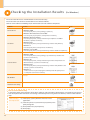
Checking the Installation Results (For Windows)
Ensure that the MF Drivers and MF Toolbox are installed correctly.
Ensure that the icons for the installed software are added as follows.
Refer to “User Software CD-ROM” (p. 4) for the functions of each software component.
Software
Printer driver
Location
Icon
Printer folder
••Windows 2000
From the [Start] menu, select [Settings] → [Printers].
••Windows XP Professional/Server 2003
From the [Start] or [start] menu, select [Printers and Faxes].
••Windows XP Home Edition
From the [start] menu, select [Control Panel], click [Printers and Other
Hardware] → [Printers and Faxes].
Fax driver
••Windows Vista
From the [Start] menu, select [Control Panel], and then click [Printers].
••Windows 7
From the [Start] menu, select [Devices and Printers].
••Windows Server 2008
From the [Start] menu, select [Control Panel], and then double-click [Printers].
[Scanners and Cameras] or [Scanners and Cameras Properties] folder
••Windows 2000
• For network connection
From the [Start] menu, select [Settings] → [Control Panel] → double-click
[Scanners and Cameras].
••Windows XP
Scanner driver
From the [start] menu, select [Control Panel], and then click [Printers and
Other Hardware] → [Scanners and Cameras].
••Windows Vista
• For USB connection
From the [Start] menu, select [Control Panel], and then click [Hardware and
Sound] → [Scanners and Cameras].
••Windows 7
1. Enter “scanner” in [Search programs and files] under the [Start] menu.
2. Click [View scanners and cameras].
Desktop
MF Toolbox
Network Scan Utility
Taskbar
How to Use the Online Help
In the Online Help, all the functions of the driver software and information about options are included. If you want to
view descriptions of the functions and settings immediately when using the driver software, make use of the Online
Help.
How to display
the Help screen
26
(1) Select [File] → [Print] from the menu bar in the
application.
(2) Select the printer in [Select Printer] or [Name] in the
[Print] dialog box.
(3) Click [Preferences] or [Properties].
(4) Click [Help].
1
Preface
2
Installing the Machine
3
4
Configuring and Connecting the Fax
Installing the Software Connecting to a Computer and
Installing the Drivers
Appendix
(For Macintosh)
••Connect the USB cable after installing the software.
••The installation screen varies depending on the version of MAC OS X.
Close all applications
that are running.
Insert the CD-ROM.
Click.
* You cannot change
the installation
location. Click
[Continue].
Double-click the CD-ROM icon.
Depending on the system environment, the
[Select a Destination] dialog box may not be
displayed. In this case, skip to Step
.
Double-click.
Click.
* [Change Install
Location] button
may appear, but you
cannot change the
installation location.
Click.
Enter.
Click.
Read the contents of the License Agreement.
* If you are using
Mac OS X 10.7.x,
click [Install
Software].
Depending on the system environment, the
[Authenticate] dialog box may not be displayed.
In this case, skip to Step
.
Click.
Click.
Click.
27
Connecting a USB Cable (For Macintosh)
Perform the following procedure only when connecting this machine to Macintosh with a USB cable.
Remove the cap.
Remove it by pulling the string.
Connect the cable.
• Flat end (A): Connect to the USB port on the computer.
• Square end (B): Connect to the USB port on the machine.
(B)
(A)
Registering the Printer and Fax P. 29
28
1
Preface
2
Installing the Machine
3
Configuring and Connecting the Fax
4
Connecting to a Computer and
Installing the Drivers
Registering the Printer and Fax Appendix
(For Macintosh)
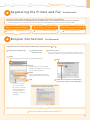
To print or send faxes from a Macintosh, you need to register this machine in the Macintosh.
The registration method varies depending on the connection type. Select a method according to your environment.
* To use the scanning function via a network connection, you need to register the scanner to the MF Toolbox. For details, see the Mac Scanner Driver Guide.
•When Using a TCP/IP Network
•When Using Auto IP (Bonjour)
Bonjour Connection P. 29
USB Connection P. 31
TCP/IP Connection P. 30
Bonjour Connection (For Macintosh)
Register the printer and fax respectively following the procedure from
Open [System Preferences].
•When Connecting with a USB Cable
Click [Print & Fax]
or [Print & Scan].
to
.
Click the [+] icon.
If you are using Mac OS X 10.4.x, click [Print] in the [Print & Fax]
dialog box to display the [Print] panel, and then click the [+] icon.
Select.
If you are using Mac OS X 10.4.x, select [Default Browser].
Click.
Select.
Select a printer name for which
[Bonjour] is displayed in the [Kind]
or [Connection] column.
Select.
If you are using Mac OS X 10.4.x,
select [Canon] from [Print Using].
Click.
Select.
If you are using Mac
OS X 10.6.x or Mac
OS X 10.7.x, select the
corresponding driver
from the separate
dialog box, and then
click [OK].
Check that this machine is added to the
[Print & Fax] or [Print & Scan] dialog box.
If the following screen appears, specify the optional
settings, and then click [Continue] or [OK].
Checking the Installation Results P. 31
29
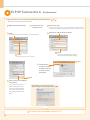
TCP/IP Connection (For Macintosh)
Register the printer and fax respectively following the procedure from
to
.
* The fax driver cannot be used in an IPv6 environment.
Open [System Preferences].
Click [Print & Fax]
or [Print & Scan].
Select.
If you are using Mac OS X 10.4.x, select [IP Printer].
Click the [+] icon.
If you are using Mac OS X 10.4.x, click [Print] in the [Print & Fax]
dialog box to display the [Print] panel, and then click the [+] icon.
Enter the IP address of this machine.
Select.
If you are using Mac OS X 10.4.x,
select [Canon] from [Print Using].
Select.
* [IPP (Internet Printing Protocol)] is not supported.
Click.
Check that this
machine is added
to the [Print & Fax]
or [Print & Scan]
dialog box.
Click.
Select a driver that supports
this machine.
If you are using Mac OS X
10.6.x or Mac OS X 10.7.x,
select the corresponding
driver from the separate
dialog box, and then click
[OK].
If the following screen appears, specify the
optional settings, and then click [Continue] or [OK].
Checking the Installation Results P. 31
30
1
Preface
2
Installing the Machine
3
4
Configuring and Connecting the Fax
USB Connection Connecting to a Computer and
Installing the Drivers
(For Macintosh)
Register the printer and fax respectively following the procedure from
Open [System Preferences].
Appendix
Click [Print & Fax]
or [Print & Scan].
to
.
Click the [+] icon.
If you are using Mac OS X 10.4.x, click [Print] in the [Print & Fax]
dialog box to display the [Print] panel, and then click the [+] icon.
Select.
If you are using Mac OS X 10.4.x, select [Default Browser].
Click.
Select.
Select a printer name for which [USB] is
displayed in the [Kind] or [Connection] column.
Select.
If you are using Mac OS X 10.4.x,
select [Canon] from [Print Using].
Click.
Select.
If you are using Mac OS X
10.6.x or Mac OS X 10.7.x,
select the corresponding
driver from the separate
dialog box, and then click
[OK].
If the following screen appears, specify the optional
settings, and then click [Continue] or [OK].
Check that this machine is
added to the [Print & Fax] or
[Print & Scan] dialog box.
Checking the Installation Results P. 31
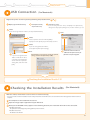
Checking the Installation Results (For Macintosh)
With this section, check that the scanner driver is installed correctly.
• You do not need to check the installation results of the printer driver and fax driver. You can use the drivers when the registration of this machine is
complete.
The computer is connected with the scanner.
Open the Image Capture application of your Mac OS X.
When [Canon MF8300C Series] appears in the following locations, the installation of the driver was successful.
•Mac OS X 10.4.x/10.5.x
The pull-down menu displayed by clicking [Devices] in the menu bar.
•Mac OS X 10.6.x/10.7.x
The left list in the window
31
Using the e -Manual
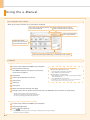
Page configuration of the e-Manual
When you start the e-Manual, the screen below is displayed.
Click to refer to the contents, glossary, and
how to use the e-Manual.
Enter a keyword which you want to
search, and then click the right button.
Click to view precautions
when using Macintosh.
Click a button for the
function which you want to
use or desired information.
Click when performing troubleshooting or maintenance of the machine.
For Windows
Installing the e-Manual on your computer
Insert the User Software CD-ROM in your computer.
Click [Custom Installation].
If CD-ROM Setup does not appear, see “If the top
screen does not appear.”
Click [Next].
Select only the [Manuals] check box.
Click [Install].
If the top screen does not appear
• Windows 2000, XP, and Server 2003
1. From the [Start] or [start] menu, select [Run].
2. Enter "D:\Minst.exe", and then click [OK].
• Windows Vista, 7, and Server 2008
1. Enter "D:\Minst.exe" in [Start Search] or [Search programs and files]
under the [Start] menu.
2. Press the [ENTER] key on the keyboard.
* The CD-ROM drive name is indicated as "D:" in this manual. The CD-ROM drive
name may differ depending on the computer you are using.
Click [Yes].
Click [Next].
When the installation finished, click [Exit].
To display the e-Manual, double-click the short cut icon [MF8300C Series e-Manual] on the desktop.
* ActiveX may block pop-ups in the background. If the
e-Manual is not displayed properly, look for an information
bar at the top of the page and click the information bar.
Displaying the e-Manual directly from the CD-ROM
Insert the User Software CD-ROM in your computer.
Click [Display Manuals].
Click [
] for [e-Manual].
* Depending on the operating system you are using, a security protection message is displayed.
Allow the contents to be displayed.
A-1
1
Preface
2
Installing the Machine
3
Configuring and Connecting the Fax
4
Connecting to a Computer and
Installing the Drivers
Appendix
For Macintosh
Installing the e-Manual on your computer
Insert the User Software CD-ROM in your computer.
Open the [Documents] folder.
Drag and drop the [MF Guide] folder into a location where you want to save it.
When displaying the installed e-Manual, double-click [index.html] in the saved [MF Guide] folder.
Displaying the e-Manual directly from the CD-ROM
Insert the User Software CD-ROM in your computer.
Open the [Documents] → [MF Guide] folders.
Double-click [index.html].
For more details on the fax, print, and scan functions
See the following Driver Guides or Help.
You can find the driver guides in the following locations on the User Software CD-ROM.
••Mac Fax Driver Installation Guide:
User Software CD-ROM → [Documents] → [FAX] → [Guide] → [index.html]
••Mac UFR II Printer Driver Installation Guide:
User Software CD-ROM → [Documents] → [Print] → [Guide] → [index.html]
••Mac Scanner Driver Guide:
User Software CD-ROM → [Documents] → [Scan] → [Guide] → [index.html]
A-2
A-2
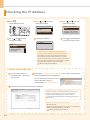
Checking the IP Address
Press [ ]
(Status Monitor/Cancel).
Press [ ] or [ ] to select,
and then press [OK].
IPv4
IP Address
Subnet Mask
Gateway Address
Host Name
Press [ ] or [ ] to select,
and then press [OK].
Press [ ] or [ ] to select,
and then press [OK].
Status Monitor/Cancel
TX Job
RX Job
Fax Forwarding Erro...
Network Information
Network Information
IPv4
IPv6
Wireless LAN Informa...
IEEE802.1X Error Inf...
Check the IP address.
Press [ ] (Status Monitor/
Cancel) to close the screen.
IP Address
192.168.0.225
If the IP address displayed on the screen is
between “169.254.1.0 and 169.254.254.255”
This IP address is the one assigned by the AutoIP function.
If an IP address other than link-local addresses is set for the
computer, set an IP address in the same subnet as the computer
(other than link-local addresses) also for this machine manually.
This enables the installer to search for this machine.
e-Manual “Setting the IPv4 Address”
Check the network operation.
Start the web browser of a
computer which is connected
to a network.
Enter “http://<IP address of the machine>/” in the address field, and then
press the [ENTER] key on your keyboard.
The <IP address of the machine> is the
address checked in Step .
Input Example: http://192.168.0.215/
Check that the screen of the Remote UI is displayed.
When the machine is connected to a switching hub
You may not be able to connect the machine to a network even
though your network settings are appropriate. Delaying the
machine's network startup time may solve the problem.
e-Manual “Specifying a Delay Before Establishing the Network
Connection”
When the Remote UI is not displayed
Check the following.
• Whether the computer and hub are connected using a LAN cable
• Whether <Remote UI On/Off> is set to <On>
e-Manual “Configuring the Remote UI”
A-3
1
Preface
2
Installing the Machine
3
Configuring and Connecting the Fax
4
Connecting to a Computer and
Installing the Drivers
Appendix
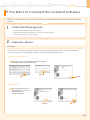
If You Want to Uninstall the Installed Software
If you do not need the printer driver, fax driver, scanner driver, or MF Toolbox, you can uninstall them with the following
procedure.
1. Confirm the following points.
• You must have administrative privileges on the computer
• You should have the installation software (in case you want to re-install the drivers)
• You have closed all applications on your computer
2. Delete the software.
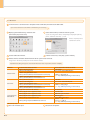
For Windows
* If your machine is connected to a computer via the WSD network, you may not uninstall the drivers or software following the
procedures below. Refer to “Uninstalling the Software” in the e-Manual to uninstall the MF Drivers.
For the printer/fax/scanner driver
From the [Start] menu, click [(All) Programs] → [Canon] →
[MF8300C Series] → [Uninstall Drivers].
Click.
Click.
Click.
For the MF Toolbox
From the [Start] menu, click
[(All) Programs] → [Canon] →
[MF Toolbox 4.9] →
[Toolbox Uninstall].
Click.
Click.
A-4
A-4
For Macintosh
If the machine is connected to a computer with a USB cable, disconnect the USB cable.
If you want to delete the Scanner Driver or MF Toolbox, proceed to Step
Open [System Preferences], and then click
[Print & Fax] or [Print & Scan].
.
Select the machine, and then click the [-] icon.
If you are using OS X 10.4.x, click [Print] to display the [Print]
panel, and then click the [—] icon.
Delete all print queues
set from this driver.
Start the Mac OS X Finder.
From the menu bar, click [Go] → [Go to Folder].
Delete the files or folders below from the driver you want to uninstall.
Drag a file or folder to [Trash] icon on the Dock to delete.
If [Authenticate] dialog box appears, enter the administrator’s name and password, and then click [OK].
Software
Printer Driver
Fax Driver
Scanner Driver /
MF Toolbox
Location of the folder to enter
/Library/Printers/Canon/
/Library/LaunchAgents/
• When using Mac OS X 10.4.x:
/Library/Printers/PPDs/Contents/Resources/en.lproj/
• When using Mac OS X 10.5 or later:
/Library/Printers/PPDs/Contents/Resources/
/Library/Printers/Canon/
/Library/LaunchAgents/
• When using Mac OS X 10.4.x:
/Library/Printers/PPDs/Contents/Resources/en.lproj/
• When using Mac OS X 10.5 or later:
/Library/Printers/PPDs/Contents/Resources/
/Applications/Canon MF Utilities/
/Library/Application Support/Canon/
/Library/Application Support/Canon/
/Library/Application Support/Canon/
/Library/Image Capture/Devices/*
/Library/Image Capture/TWAIN Data Sources/
Name of the file or folder to delete
CUPSCMFP
jp.co.canon.CUPSCMFP.BG.plist
CNMCXXXZUS.ppd.gz
(XXX may differ depending on the model.)
CUPSFAX
jp.co.canon.CUPSFAX.BG.plist
CNMCXXXFUS.ppd.gz
(XXX may differ depending on the model.)
MF Toolbox
ScanGear MF
WMCLibrary.framework
WMCReg.plist
Canon MFScanner.app*
Canon XXX.ds
Canon XXX USB.ds
(XXX may differ depending on the model.)
* Mac OS X 10.6 or later.
Close all windows open.
A-5
Restart the computer.
1
Preface
2
Installing the Machine
3
Configuring and Connecting the Fax
4
Connecting to a Computer and
Installing the Drivers
Appendix
Contacting the Service Center
When you have a problem with your machine and you cannot solve it even if you refer to the manuals or online help,
please contact our Canon Authorized Service Facilities or the Canon Customer Care Center at 1-800-OK-CANON
between the hours of 8:00 A.M. to 8:00 P.M. EST for U.S.A. and 9:00 A.M. to 8:00 P.M. EST for Canada Monday through
Friday. Canadian customer support is available on-line at www.canon.ca or by calling 1-800-OK-CANON Monday
through Friday from 9:00 A.M. to 8:00 P.M. EST
Disclaimers
The information in this document is subject to change without notice.
CANON INC. MAKES NO WARRANTY OF ANY KIND WITH REGARD TO THIS MATERIAL, EITHER EXPRESS OR IMPLIED,
EXCEPT AS PROVIDED HEREIN, INCLUDING WITHOUT LIMITATION, THEREOF, WARRANTIES AS TO MARKETABILITY,
MERCHANTABILITY, FITNESS FOR A PARTICULAR PURPOSE OF USE OR NON-INFRINGEMENT. CANON INC. SHALL NOT
BE LIABLE FOR ANY DIRECT, INCIDENTAL, OR CONSEQUENTIAL DAMAGES OF ANY NATURE, OR LOSSES OR EXPENSES
RESULTING FROM THE USE OF THIS MATERIAL.
Copyright
© 2011 by Canon Inc. All rights reserved.
No part of this publication may be reproduced, transmitted, transcribed, stored in a retrieval system, or translated into
any language or computer language in any form or by any means, electronic, mechanical, magnetic, optical, chemical,
manual, or otherwise, without the prior written permission of Canon Inc.
Trademarks
Canon, the Canon logo, and Color imageCLASS are registered trademarks of Canon Inc. in the United States and may
also be trademarks or registered trademarks in other countries.
Apple, Mac OS, and Macintosh are trademarks or registered trademarks of Apple Inc. in the U.S. and/or other countries.
Microsoft, Windows and Windows Vista are either trademarks or registered trademarks of Microsoft Corporation in the
United States and/or other countries.
All other product and brand names are registered trademarks, trademarks or service marks of their respective owners.
A-6
A-6
CANON INC.
30-2, Shimomaruko 3-chome, Ohta-ku, Tokyo 146-8501, Japan
CANON MARKETING JAPAN INC.
16-6, Konan 2-chome, Minato-ku, Tokyo 108-8011, Japan
CANON U.S.A., INC.
One Canon Plaza, Lake Success, NY 11042, U.S.A.
CANON EUROPA N.V.
Bovenkerkerweg, 59-61, 1185 XB Amstelveen, The Netherlands
CANON CHINA CO. LTD.
15F Jinbao Building No.89, Jinbao Street, Dongcheng District, Beijing 100005, PRC
CANON SINGAPORE PTE LTD
1 HarbourFront Avenue, #04-01 Keppel Bay Tower, Singapore 098632
CANON AUSTRALIA PTY LTD
1 Thomas Holt Drive, North Ryde, Sydney NSW 2113, Australia
CANON GLOBAL WORLDWIDE SITES
http://www.canon.com/
FT5-4465 (000)
XXXXXXXXXX
© CANON INC. 2011
PRINTED IN CHINA