1
Installation Guide
♦ Please read this manual before operating this scanner.
READ CAREFULLY BEFORE OPENING
THE SEALED DISK PACKAGE
CANON SOFTWARE LICENSE
AGREEMENT
IMPORTANT-READ THIS AGREEMENT BEFORE
OPENING THE SEALED DISK PACKAGE! BY
OPENING THE SEALED DISK PACKAGE, YOU ARE
DEEMED TO AGREE TO BE BOUND BY THIS
AGREEMENT.
This legal document is a license agreement between you
and CANON ELECTRONICS INC. (“Canon”). BY OPENING
THE SEALED DISK PACKAGE, YOU ARE DEEMED TO
AGREE TO BE BOUND BY THE TERMS OF THIS
AGREEMENT. IF YOU DO NOT AGREE TO THE TERMS OF
THIS AGREEMENT, DO NOT OPEN THE SEALED DISK
PACKAGE AND PROMPTLY RETURN THE CANON
SCANNER, THE DISK PACKAGE CONTAINING SCANNER
DRIVER SOFTWARE PROGRAMS AND/OR SCANNER
UTILITY SOFTWARE PROGRAM PROPRIETARY TO
CANON OR ITS LICENSOR (THE “SOFTWARE”) AND THE
ACCOMPANYING DOCUMENTATION AND OTHER ITEMS
TO THE PLACE WHERE YOU OBTAINED THEM FOR A
REFUND BEFORE THEY ARE USED OR OPENED OR
UNPACKED.
In consideration of the right to use the SOFTWARE, you
agree to abide by the terms and conditions of this
Agreement.
1. GRANT OF LICENSE: Canon grants you the personal,
non-exclusive right to use the SOFTWARE only on a single
computer. You may physically transfer the SOFTWARE
from one computer to another provided that the
SOFTWARE is used on only one computer at any time.
You shall not assign, sublicense, sell, rent, lease, loan,
convey or transfer to any third party, or send or bring the
SOFTWARE out of the country where you originally obtain
it to other countries without required authorization of
applicable governments, or copy, duplicate, translate or
convert to another programming language the SOFTWARE
or accompanying documentation, except as expressly
provided herein.
Except as expressly permitted under the applicable law, you
shall not alter, modify, disassemble, decompile or
otherwise reverse engineer the SOFTWARE or
accompanying documentation and you also shall not have
any third party do so.
2. BACK-UP COPY: You may make one copy of the
SOFTWARE solely for a back-up purpose or copy the
SOFTWARE onto the permanent storage device (e.g. a hard
disk) of your computer and retain the original for a back-up
purpose. Except as expressly permitted under the
applicable law, any other copying of the SOFTWARE is a
violation of this Agreement. You must reproduce and
include the copyright notice on the back-up copy.
3. SUPPORT AND UPDATE: Canon, Canon’s affiliate, their
distributor or dealer is not responsible for maintaining or
helping you to use the SOFTWARE. No updates, fixes or
support will be made available for the SOFTWARE.
4. LIMITED WARRANTY AND DISCLAIMER OF
INDEMNITY: Canon, Canon’s affiliate, their distributor or
dealer will not guarantee uninterrupted service, or absence
or correction of errors. Therefore, the SOFTWARE is
licensed on an “AS IS” basis without warranty of any kind.
The diskette on which the SOFTWARE is recorded is
warranted against defective material or workmanship
under normal use for a period of ninety (90) days from the
date you purchased the same as evidenced by a receipt or
otherwise. The limited warranty does not apply if the failure
of the diskette resulted from accident, abuse or
misapplication of the SOFTWARE and shall not extend to
anyone other than the original user of the SOFTWARE.
CANON, CANON’S AFFILIATE, THEIR DISTRIBUTOR OR
DEALER DISCLAIMS ALL IMPLIED WARRANTIES,
INCLUDING ANY WARRANTY OF MERCHANTABILITY OR
FITNESS FOR A PARTICULAR PURPOSE, WITH RESPECT
TO THE SOFTWARE OR ACCOMPANYING
DOCUMENTATION.
NEITHER CANON, CANON’S AFFILIATE, THEIR
DISTRIBUTOR NOR DEALER IS LIABLE FOR ANY LOSS OR
DAMAGE INCLUDING CONSEQUENTIAL OR INCIDENTAL
LOSS OR DAMAGE SUCH AS LOSS OF PROFITS, EXPENSE
OR INCONVENIENCE, WHATSOEVER CAUSED BY OR
ARISING OUT OF THE SOFTWARE, ACCOMPANYING
DOCUMENTATION OR THE USE THEREOF.
CANON, CANON’S AFFILIATE, THEIR DISTRIBUTOR OR
DEALER SHALL HAVE NO OBLIGATION TO INDEMNIFY
YOU AGAINST ANY CLAIM OR SUIT BROUGHT BY A
THIRD PARTY ALLEGING THAT THE SOFTWARE,
ACCOMPANYING DOCUMENTATION OR THE USE
THEREOF INFRINGES ANY INTELLECTUAL PROPERTY OF
SUCH THIRD PARTY.
2
THE ABOVE IS CANON’S ENTIRE LIABILITY AND YOUR
EXCLUSIVE REMEDY IN CONNECTION WITH THE
SOFTWARE AND ACCOMPANYING DOCUMENTATION.
5. TERM: This Agreement is effective upon opening the
sealed disk package and remains in effect until terminated.
You may terminate this Agreement by destroying the
SOFTWARE and any copy thereof. This Agreement will also
terminate if you fail to comply with any of the terms of this
Agreement. In addition to Canon enforcing its respective
legal rights, you must then promptly destroy the
SOFTWARE and any copy thereof.
6. U.S. GOVERNMENT RESTRICTED RIGHTS NOTICE: The
SOFTWARE is provided with RESTRICTED RIGHTS. Use,
duplication or disclosure is subject to restrictions as set
forth in either subparagraph (c) (1) (ii) of the Rights in
Technical Data and Computer Software clause at DFARs
252.227-7013 or subparagraph (c) (1) and (2) of the
Commercial Computer Software Restricted Rights Clause
at FAR 52.227-19, as applicable.
7. SEVERABILITY: In the event that provision of this
Agreement is declared or found to be illegal by any court or
tribunal of competent jurisdiction, such provision shall be
null and void with respect to the jurisdiction of that court or
tribunal and all the remaining provisions of this Agreement
shall remain in full force and effect.
8. ACKNOWLEDGEMENT: BY OPENING THE SEALED DISK
PACKAGE, YOU ACKNOWLEDGE THAT YOU HAVE READ
THIS AGREEMENT, UNDERSTOOD IT, AND AGREE TO BE
BOUND BY ITS TERMS AND CONDITIONS. YOU ALSO
AGREE THAT THIS AGREEMENT IS THE COMPLETE AND
EXCLUSIVE STATEMENT OF AGREEMENT BETWEEN YOU
AND CANON CONCERNING THE SUBJECT MATTER
HEREOF AND SUPERSEDES ALL PROPOSALS OR PRIOR
AGREEMENTS, VERBAL OR WRITTEN, AND ANY OTHER
COMMUNICATIONS BETWEEN YOU AND CANON
RELATING TO THE SUBJECT MATTER HEREOF. NO
AMENDMENT TO THIS AGREEMENT SHALL BE EFFECTIVE
UNLESS SIGNED BY A DULY AUTHORIZED
REPRESENTATIVE OF CANON.
Should you have any questions concerning this Agreement,
or if you desire to contact Canon for any reason, please
write to Canon’s local affiliate.
■ International ENERGY STAR® Office Equipment Program
■ FCC REGULATIONS (For 120V model)
As an ENERGY STAR® Partner, CANON ELECTRONICS INC. has
determined that this machine meets the ENERGY STAR® Program
guidelines for energy efficiency.
The International ENERGY STAR® Office Equipment Program is an
international program that promotes energy saving through the use
of computers and other office equipment.
The program backs the development and dissemination of products with functions
that effectively reduce energy consumption. It is an open system in which business
proprietors can participate voluntarily. The targeted products are office equipment,
such as computers, monitors, printers, fax, machine, copiers, and scanners. The
standards and logos are uniform among participating nations.
Check Reader, Model M111101/M111102
This device complies with Part 15 of the FCC Rules. Operation is subject to the
following two conditions:
(1) This device may not cause harmful interference, and (2) this device must accept
any interference received, including interference that may cause undesired operation.
Note: This equipment has been tested and found to comply with the limits for a Class
B digital device, pursuant to Part 15 of the FCC Rules. These limits are designed to
provide reasonable protection against harmful interference in a residential installation.
This equipment generates, uses, and can radiate radio frequency energy and, if not
installed and used in accordance with the instructions, may cause harmful
interference to radio communications. However, there is no guarantee that
interference will not occur in a particular installation. If this equipment does cause
harmful interference to radio or television reception, which can be determined by
turning the equipment off and on, the user is encouraged to try to correct the
interference by one or more of the following measures:
- Reorient or relocate the receiving antenna.
- Increase the separation between the equipment and receiver.
- Connect the equipment into an outlet on a circuit different from that to which the
receiver is connected.
- Consult the dealer or an experienced radio/TV technician for help.
Use of shielded cable is required to comply with class B limits in Subpart B of Part 15
of FCC Rules.
Do not make any changes or modifications to the equipment unless otherwise
specified in the manual. If such changes or modifications should be made, you could
be required to stop operation of the equipment.
Canon U.S.A. Inc.
One Canon Plaza, Lake Success NY 11042, U.S.A.
Tel. No. (516)328-5000
Important Notice for ENERGY STAR Office Equipment Program.
This model doesn't provide "setting options" for power management.
■ European Union (and EEA) only.
This symbol indicates that this product is not to be disposed of with your
household waste, according to the WEEE Directive (2002/96/EC) and
your national law. This product should be handed over to a designated
collection point, e.g., on an authorized one-for-one basis when you buy
a new similar product or to an authorized collection site for recycling
waste electrical and electronic equipment (EEE). Improper handling of
this type of waste could have a possible negative impact on the environment and
human health due to potentially hazardous substances that are generally associated
with EEE. At the same time, your cooperation in the correct disposal of this product
will contribute to the effective usage of natural resources. For more information about
where you can drop off your waste equipment for recycling, please contact your local
city office, waste authority, approved WEEE scheme or your household waste disposal
service. For more information regarding return and recycling of WEEE products,
please visit www.canon-europe.com/environment.
(EEA: Norway, Iceland and Liechtenstein)
■ RADIO INTERFERENCE REGULATIONS (For 120V models)
This digital apparatus does not exceed the Class B limits for radio noise emissions
from digital apparatus as set out in the interference-causing equipment standard
entitled “Digital Apparatus”, ICES-003 of the Industry Canada.
■ Für EMVG
Dieses Produkt ist zum Gebrauch im Wohnbereich, Geschäfts-und Gewerbebereich
sowie in Kleinbetrieben vorgesehen.
■ RÈGLEMENT SUR LE BROUILLAGE RADIOÉLECTRIQUE (For
120V models)
■ Model Names
Cet appareil numérique respecte les limites de bruits radioélectriques applicables aux
appareils numériques de Classe B prescrites dans la norme sur le materiel brouilleur:
“Appareils Numériques”, NMB-003 édictée par l’Industrie Canada.
The following names may be provided for the safety regulations in each sales region
of the Check Reader.
CR-50: Model M111101
CR-80: Model M111102
3
■ Trademarks
• Canon and the Canon logo are registered trademarks of Canon Inc. in the United
States and may also be trademarks or registered trademarks in other countries.
• imageFORMULA is a trademark of CANON ELECTRONICS INC.
• Microsoft, Windows, Windows XP, Windows Vista, and Windows 7 are registered
trademarks or trademarks of Microsoft Corporation in the United States and other
countries.
• Microsoft product screen shot(s) reprinted with permission from Microsoft
Corporation.
• Adobe and Adobe Reader are registered trademarks or trademarks of Adobe
Systems Incorporated in the United States and other countries.
• Other product and company names herein are, or may be, the trademarks of their
respective owners.
■ Copyright
Copyright 2011 by CANON ELECTRONICS INC. All rights reserved.
No part of this publication may be reproduced or transmitted in any form or by any
means, electronic or mechanical, including photocopying and recording, or by any
information storage or retrieval system without the prior written permission of
CANON ELECTRONICS INC.
■ Disclaimers
The information in this document is subject to change without notice.
CANON ELECTRONICS INC. MAKES NO WARRANTY OF ANY KIND WITH REGARD TO
THIS MATERIAL, EITHER EXPRESS OR IMPLIED, EXPECT AS PROVIDED HEREIN,
INCLUDING WITHOUT LIMITATION, THEREOF, WARRANTIES AS TO
MARKETABILITY, MERCHANTABILITY, FITNESS FOR A PARTICULAR PURPOSE OF
USE OR NON-INFRINGEMENT. CANON ELECTRONICS INC. SHALL NOT BE LIABLE
FOR ANY DIRECT, INCIDENTAL, OR CONSEQUENTIAL DAMAGES OF ANY NATURE,
OR LOSSES OR EXPENSES RESULTING FROM THE USE OF THIS MATERIAL.
CANON ELECTRONICS INC. IS NOT LIABLE FOR THE STORAGE AND HANDLING OF
DOCUMENTS SCANNED WITH THIS PRODUCT, OR THE STORAGE AND HANDLING
OF THE RESULTING SCANNED IMAGE DATA.
IF YOU INTEND TO DISCARD THE ORIGINALS OF THE SCANNED DOCUMENTS, YOU
ARE RESPONSIBLE FOR INSPECTING THE SCANNED IMAGES AND VERIFYING THAT
THE DATA IS INTACT.
THE MAXIMUM LIABILITY OF CANON ELECTRONICS INC. UNDER THIS WARRANTY
IS LIMITED TO THE PURCHASE PRICE OF THE PRODUCT COVERED BY THE
WARRANTY.
4
INTRODUCTION
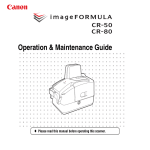
Thank you for purchasing the Canon Check Reader CR-50/80.
Please read this manual thoroughly before using the machine in order
to familiarize yourself with its capabilities, and to make the most of its
many functions.
Symbols Used in This Manual
The following symbols are used in this manual to explain procedures,
restrictions, handling precautions, and instructions that should be
observed for safety.
Manuals for the CR-50/80
WARNING
The following manuals are provided with the CR-50/80. Be sure to
read these manuals thoroughly before using the scanner. (The
Installation Guide and the Operation & Maintenance Guide are
extracted from the Instructions.) Electronic manual is stored as a PDF
file on the supplied Setup Disc and requires Adobe Reader to open.
(You can download Adobe Reader from the Adobe Web site.)
Indicates a warning concerning operations that may lead to death or
injury to persons if not performed correctly. To use the machine safely,
always pay attention to these warnings.
CAUTION
Indicates a caution concerning operations that may lead to injury to
persons, or damage to property if not performed correctly. To use the
machine safely, always pay attention to these cautions.
Installation Guide (Supplied with the scanner/Electronic Manual):
This Manual
Describes the procedure for setting up the CR-50/80 for scanning. Set
up the CR-50/80 in accordance with the Installation Guide. For details
on the CR-50/80, refer to the Instructions (electronic manual).
IMPORTANT
Indicates operational requirements and restrictions. Be sure to read
these items carefully to operate the machine correctly, and avoid
damaging the machine.
Operation & Maintenance Guide (Supplied with the scanner/
Electronic Manual)
Describes the basic operations for using the CR-50/80,
troubleshooting, and maintenance. For details on the settings of the
CR-50/80, refer to the Instructions (electronic manual).
NOTE
Indicates a clarification of an operation, or contains additional
explanations for a procedure. Reading these notes is highly
recommended.
Instructions (Electronic Manual)
Describes how to use the scanner, and includes instructions for
configuring the scanner settings, as well as handling, maintenance,
and troubleshooting information.
5
Table of Contents
INTRODUCTION ................................................................... 5
Manuals for the CR-50/80 ........................................................... 5
Symbols Used in This Manual..................................................... 5
Important Safety Instructions............................................. 7
Handling ......................................................................................
Disposal ......................................................................................
Installation Location ....................................................................
Power Supply ..............................................................................
Moving the Scanner ....................................................................
7
8
8
8
9
Packaging: What Is in the Box? ....................................... 10
Preparation Before Use..................................................... 11
Setting Up the Scanner .............................................................
Checking Your Operating Environment.....................................
Installing the Scanning Utility ....................................................
Connecting the Scanner to a Computer ....................................
USB Connections.................................................................
Connecting the Power Cord .................................................
Turning ON and OFF the Power ...............................................
Turning ON the Power .........................................................
Turning OFF the Power........................................................
Preparing the Ink Cartridge .......................................................
About the Ink Cartridge ........................................................
Setting the Ink Cartridge and Adjusting the Print Position ...
11
12
12
13
13
14
14
14
15
16
16
16
Document Feeding and Scanning.................................... 19
Index ................................................................................... 20
6
Important Safety Instructions
CAUTION
Handling
■ To avoid damage to the scanner, never place the scanner on an unstable
or vibrating surface. The scanner may tip or fall over, causing injury.
■ Keep all liquids, beverages, or any type of liquid, and clips, staples,
necklaces, or other metal objects away from the scanner. If you
accidentally spill liquid or drop a metal object into the scanner, turn
OFF the power immediately and disconnect the power cord from
the power outlet. Contact your local authorized Canon dealer or
service representative to have the scanner serviced.
■ Never install the scanner in humid or dusty locations. Doing so may
cause a fire or electrical shock.
■ Never place heavy objects on top of the scanner, as these objects
may tip or fall over, and cause injury.
■ When you remove the power cord, grip it by the power plug head.
Never attempt to disconnect the power cord from the power outlet
by pulling on the power cord. Doing so may damage or expose the
cord’s internal wiring, and cause a fire or electrical shock.
■ Keep the area around the power outlet clear of all obstacles so you
can disconnect the power cord easily at all times.
■ Never spill water or volatile solutions (alcohol, benzene, paint thinner)
into the scanner. Doing so may cause a fire or electrical shock.
■ When the scanner is not being used for a long period of time,
disconnect the power cord from the power outlet.
■ Avoid wearing loose fitting clothing, dangling jewelry, long ties, or
long hair that could become entangled with moving parts, especially
the rollers that feed paper into the scanner. If such objects become
entangled, immediately disconnect the power plug from the power
outlet to stop the scanner.
■ Be careful when you are loading a document or clearing a paper
jam. It is possible that the paper edges may cut your fingers.
■ Do not open the Maintenance Cover while the scanner is operating.
Doing so may result in a malfunction or injury.
■ Do not touch the pins and contacts on the scanner’s connector with
your hands. Doing so may result in a malfunction.
WARNING
■ Never install and operate the scanner near flammable substances,
such as alcohol, paint thinner, benzene, or any other type of volatile
solution.
■ Never damage or modify the power cord, and never place heavy
objects on the power cord.
■ Always make sure that your hands are dry when you are handling
the power cord or power plug. Never grasp the power plug when
your hands are wet.
■ Never plug the scanner into a multiplug power strip.
■ Never bundle, wrap, or tie the power cord around itself or another
object. Connect the power plug securely into the power outlet.
■ Use only the power cord and power plug provided with the scanner.
■ Never attempt to disassemble or modify the scanner.
■ Never use flammable aerosol products near the scanner.
■ Before you clean the scanner, turn the power OFF and disconnect
the power cord from the power outlet.
■ To clean the scanner’s exterior, use a firmly wrung cloth, moistened
slightly with water or mild detergent. Never use any type of volatile
solution, such as alcohol, benzene or paint thinner.
■ If you hear strange sounds, detect smoke or abnormal heat, sense
vibration, or smell odd odors around the scanner, turn OFF the
power switch immediately and disconnect the power cord from the
power outlet. Contact your local authorized Canon dealer or service
representative to have the scanner serviced.
■ Handle the scanner with care. Avoid shock and vibration to the
scanner caused by reckless handling. If you suspect the scanner
has been accidentally damaged, turn OFF the power switch
immediately and disconnect the power cord from the power outlet.
Contact your local authorized Canon dealer or service
representative to have the scanner serviced.
■ Before you move the scanner, always turn OFF the power and
disconnect the power cord from the power outlet.
■ This product emits low level magnetic flux. If you use a cardiac
pacemaker and feel abnormalities, please be away from this
product and consult your doctor.
7
Disposal
Power Supply
When disposing of this scanner, be sure to follow all local ordinances
and laws or consult with the retailer who sold you the scanner.
● Connect only to a power outlet of the rated voltage and power
supply frequency (either 120 V, 60 Hz or 220-240 V, 50/60 Hz,
depending on your region).
● Make sure that the scanner is connected to an independent power
outlet. Do not plug the scanner into an outlet shared with another
device. If you use an extension cord, make sure that the extension
cord is rated for the current requirements of the scanner.
● If you are unsure of anything relating to the power supply, contact
your local authorized Canon dealer or service representative for
further information.
● Never place an object on top of the power cord or step on the power
cord.
● Never bundle the power cord or wrap the cord around an object,
such as a table leg.
● Do not tug on the power cord. When you remove the power cord,
grip it by the power plug head.
● Keep the area around the power outlet free of obstacles.
● Connect only to a power outlet of the rated voltage and power
supply frequency (either 120 V, 60 Hz or 220-240 V, 50/60 Hz,
depending on your region).
● Do not connect to power outlets with other electrical devices. Also,
when using an extension cord, make sure that the extension cord is
rated for the current requirements of the scanner.
● Disassembling and/or reassembling the AC adapter is extremely
dangerous and should not be attempted under any circumstances.
● Do not place heavy objects on the AC adapter or power cord. Do
not place the adapter or cords in an area where they are likely to be
stepped on.
● Do not use the power cord while it is bundled.
● Never pull directly on the power cord. To remove the plug from the
outlet, grasp the plug directly and remove it from the outlet.
● Keep the area around the power plug clear of articles so that the
power plug can be disconnected in an emergency.
● Use only the AC adapter provided with the product. Do not use the
scanner’s AC adapter with any other product.
● If you have any questions about the AC adapter, contact your local
authorized Canon dealer or service representative for further
information.
Installation Location
For operation, maintenance, and ventilation, make sure that there is
enough space around the scanner.
Avoid placing the scanner in the following places. It may cause a
malfunction and adversely affect the scanner or your computer.
● Places exposed to direct sunlight
If installation in such places is unavoidable, provide a curtain or
similar object to shade the scanner.
● Places subject to dust and fumes
Dust and cigarette fumes adversely affect the components inside
the scanner.
● Near running water, a heat source, water vapor, or in an area, such
as a laboratory exposed to ammonia gas, paint thinner, or other
volatile chemicals
● Places subject to excessive vibration and shock
● Places subject to rapid changes in temperature or humidity
Condensation occurring inside the scanner may impair image
quality. Place the scanner in a room that is within the following
range:
Room temperature: 10°C to 32.5°C (50°F to 90.5°F)
Relative humidity: 20% to 80% RH
20% to 50% RH when using the imprinter
Use the recommended operating environment for the ink cartridge
when using the imprinter.
● Near electronic equipment or heavy equipment that generates a
strong magnetic field, such as a speaker, TV, and radio
8
Moving the Scanner
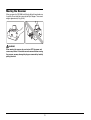
When you move the CR-50/80, hold it firmly with both hands and carry
it carefully. Do not hold the scanner by the Eject Stopper. The scanner
weighs approximately 2 kg (4.4 lb).
WARNING
When moving the scanner, be sure to turn OFF the power and
remove any cables. If the cables are not removed before moving
the scanner, you may damage the plugs or connector by forcibly
pulling them out.
9
Packaging: What Is in the Box?
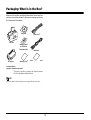
Make sure that you have everything shown below. Check every item
you have removed from the box. If any items are missing, contact your
local authorized Canon dealer.
Setup Disc
Power Cord*1
CR-50/80
Marking Labels
for Thickness
Adjustment Dial
AC Adapter
Warranty Card*2
USB Cable
User Registration Card*2
Installation Guide
Operation & Maintenance Guide
*1 The power cord varies, according to the country of purchase.
*2 For the United States and Canada only.
NOTE
Items included in this package may change without any notice.
10
Preparation Before Use
This chapter describes how to prepare the scanner to scan
documents.
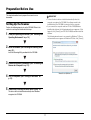
IMPORTANT
• To have the device drivers installed automatically when the
computer recognizes the CR-50/80, the software needs to be
installed before the CR-50/80 is connected to the computer.
• If you connect the computer and turn ON the CR-50/80 before
installing the software, the following wizard screen appears. If this
happens, click [Cancel], turn OFF the CR-50/80, and then install the
software.
The following wizard screen is an example in Windows 7. When a
similar wizard screen appears in Windows XP/Vista, click [Cancel].
Setting Up the Scanner
Perform the following steps to set up the CR-50/80. Refer to the
section for each step for details about that step.
1
2
Check your operating environment. (See “Checking Your
Operating Environment” on p. 12.)
Install the software. (See “Installing the Scanning Utility”
on p. 12.)
Install the Scanning Utility provided with the CR-50/80.
3
4
5
Connect the scanner to a computer. (See “Connecting the
Scanner to a Computer” on p. 13.)
Wizard Screen (Windows 7)
Turn ON the power. (See “Turning ON the Power” on
p. 14.)
Automatically installing the device driver. (See p. 15.)
The device driver is installed automatically when Windows
recognizes the CR-50/80.
11
Checking Your Operating Environment
Installing the Scanning Utility
The following computer system requirements are recommended for
using the CR-50/80.
Follow the instructions below to install the Scanning Utility and the
dedicated driver.
Operating Systems:
•
•
•
•
NOTE
Microsoft Windows XP (32bit) SP3 or later
Microsoft Windows XP (64bit) SP2 or later
Microsoft Windows Vista (32/64bit) SP2 or later
Microsoft Windows 7 (32/64bit) SP1 or later
The dedicated scanner driver is installed after the Scanning Utility
has been installed.
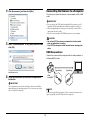
1
Specifications:
• CPU: Intel Core2 Duo 1.8 GHz or faster
• Memory: 1 GB or more
• USB 2.0 interface
Turn ON your computer, and log on to Windows.
IMPORTANT
Be sure to log on as the Administrator.
2
Interface Cable
Insert the setup disc into the disk drive.
This manual assumes that “D” is assigned to your disk drive.
• Use the cable provided or a Hi-Speed USB 2.0 interface cable to
connect to the computer’s USB port.
• Scanning speed may vary depending on the specifications of your
computer.
IMPORTANT
• If you use the USB interface that was provided as standard with
your computer:
• Use the most recently available USB 2.0 driver provided by
Microsoft. Contact your local authorized Canon dealer for more
detailed information.
• Not all USB interfaces provided as standard with personal
computers are guaranteed. Contact your local authorized Canon
dealer for more detailed information.
• Scanning speeds are slower if your computer’s standard USB
interface is USB 1.1.
• You should use the USB cable originally bundled with the scanner
or a Hi-Speed USB 2.0 compatible cable.
• If the CPU, memory, interface card, and other specifications do not
satisfy the installation requirements, the scanning speed may be
greatly reduced and transmission may take longer.
• Even if the computer satisfies the recommended specifications, the
scanning speed may vary, depending on the scan settings.
3
Click [Start], and then click [All Programs].
The procedure in Windows XP is different from the ones described
in this manual. Refer to the Windows XP “Help and Support
Center” to select [Run].
12
4
Connecting the Scanner to a Computer
Click [Accessories], and then click [Run].
The only way to connect the scanner to your computer is with a USB
cable.
IMPORTANT
• Be sure to use the USB cable bundled with the scanner or a HiSpeed USB 2.0 compatible cable with the length less than 5 m.
• When the application is running, do not turn the scanner OFF or
unplug the interface cable.
• Do not connect multiple CR-50/80 scanners to one computer.
CAUTION
5
• Do not turn OFF the scanner or remove the interface cable
when an application is running.
• Turn OFF the computer and the scanner before changing the
cable.
Enter “D:\SU80\setup.exe” in the [Open] fields, and then
click [OK].
USB Connections
Connect the scanner and the computer with the cable provided or a
Hi-Speed USB 2.0 cable.
Type A Plug
Installation starts.
6
Type B Plug
USB
Connector
Follow the instructions on the screen to complete the
installation.
IMPORTANT
The computer may need to be restarted, after the installation,
depending on the operating system. If this is necessary, make
sure to restart the computer.
NOTE
Connect the type B plug (square) to the scanner and connect the
type A plug (flat) to the USB port on the computer.
13
Connecting the Power Cord
Turning ON and OFF the Power
Connect the power cord.
Make sure to use only the power cord provided with the scanner.
Follow the procedures below to turn the scanner power ON and OFF.
Turning ON the Power
1
To turn ON the scanner, slide the Power Switch to the
right.
(ON)
IMPORTANT
• When you turn ON the power, the power LED lights and remains
lit.
• If the scanner does not work, there is a problem with the
scanner. Turn OFF the power, and contact your local authorized
Canon dealer or service representative to have the scanner
serviced.
WARNING
When connecting the power cord, follow these precautions.
Failure to do so may cause a fire or electrical shock.
• Never grasp the power plug when your hands are wet.
• Never plug the scanner into a multiplug power strip.
• Never bundle or tie the power cord around itself or another
object. Connect the power plug securely into the power outlet.
• Use only the power cord and power plug provided with the
scanner.
• Before you connect the power cord, make sure to turn OFF the
power switch.
• Connect only to a power outlet of the rated voltage and power
supply frequency (either 120 V, 60 Hz or 220-240 V, 50/60 Hz,
depending on your region).
• Do not plug the scanner into a power outlet shared with another
device. If you use an extension cord, make sure that the
extension cord is rated for the current requirements of the
scanner.
WARNING
If you hear strange sounds, detect smoke or abnormal heat,
sense a vibration, or smell odd odors around the scanner,
turn OFF the power immediately and disconnect the power
cord from the power outlet. Contact your local authorized
Canon dealer or service representative to have the scanner
serviced.
2
14
Turn ON your computer.
3
Turning OFF the Power
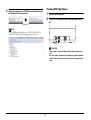
Windows recognizes the CR-50/80 as new hardware, and
installation starts automatically.
1
2
Turn OFF your computer.
To turn OFF the scanner, slide the Power Switch to the
left.
(Windows 7)
NOTE
The CR-50/80 will be registered as “CANON CR-50 USB” or
“CANON CR-80 USB” in the Imaging Device directory.
(OFF)
CAUTION
• Wait at least 10 seconds before turning the scanner back
ON.
• For your safety, disconnect the power plug from the power
outlet if you are not using the scanner for a long period of
time.
15
1
Preparing the Ink Cartridge
This section describes how to prepare the ink cartridge so that you can
use the imprinter to print text on scanned documents.
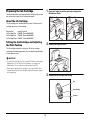
Hook your finger around the open lever and open the
Maintenance Cover.
About the Ink Cartridge
The ink cartridge is not included with the scanner. Purchase an ink
cartridge separately, as shown below.
Manufacturer
: Hewlett Packard
Ink Cartridge Blue : C6602B (Canon#3693A002)
Ink Cartridge Red : C6602R (Canon#3693A003)
Ink Cartridge Green : C6602G (Canon#3693A004)
Setting the Ink Cartridge and Adjusting
the Print Position
2
Remove the Imprinter Cover.
3
Remove the ink cartridge from its bag.
The ink cartridge needs to be set to print. Set the ink cartridge
according to the following procedure. You can adjust the print position
to three different levels.
IMPORTANT
• To set the ink cartridge, turn the scanner OFF before removing the
Maintenance Cover. After the ink cartridge is set, replace the
Maintenance Cover, and then turn the scanner back ON.
• Finish up the unpacked ink cartridge as soon as possible. More
frequent cleaning of the ink cartridge is required if long time elapses
after unpacking.
Tag
Ink Jet Nozzle
Contacts
16
5
IMPORTANT
Do not touch the ink cartridge contacts. This can cause a bad
electrical contact and reduced print quality.
4
Place the ink cartridge shown in the diagram below.
Grasp the tag and then peel off the tape covering the ink
jet nozzle.
CAUTION
Do not touch the electrical contact on the carriage. Doing so
may cause a malfunction.
NOTE
IMPORTANT
Do not use more than one cartridge by rotation. If you do so,
applications cannot check the ink level precisely.
Do not touch the ink jet nozzle or contacts after peeling off the tag
and tape.
6
17
Push down the ink cartridge until it clicks into place.
If the ink head drops back when installed, the two ink cartridge
pins will not fit into the holes on the carriage. Push back the ink
cartridge lock lever a in the direction of the arrow and reset the
cartridge in the correct position b.
IMPORTANT
Make sure that the ink cartridge lock lever locks the ink cartridge
into the correct position.
Ink Cartridge
Holes
If the cartridge does not
load properly, see step 7.
8
Ink Cartridge Lock Lever
7
Ink Cartridge
Pins
Carefully replace the Imprinter Cover.
Squeeze the Print Position Adjustment Lever and move it
to adjust the print position.
9
Top:
50.5 mm (1.99") from the bottom edge of the document
Middle:
47 mm (1.85") from the bottom edge of the document
Bottom:
43.5 mm (1.71") from the bottom edge of the document
18
Gently close the Maintenance Cover until it clicks into
place.
Document Feeding and Scanning
For details on the operations, refer to the Instructions (Electronic
Manual) on p. 33 or the Operation & Maintenance Guide (Manual) on
p. 6.
19
Index
A
Adjusting the Print Position.......................................................... 16
D
Disposal......................................................................................... 8
H
Handling ........................................................................................ 7
I
Ink Cartridge ................................................................................ 16
Installation Location....................................................................... 8
Installing the Scanning Utility....................................................... 12
M
Moving the Scanner....................................................................... 9
O
Operating Environment................................................................ 12
P
Power Cord............................................................................ 10, 14
Power Supply ................................................................................ 8
Print Position Adjustment Lever .................................................. 16
R
Recognizing the scanner ............................................................. 15
S
Scanning Utility............................................................................ 12
Setup Disc ................................................................................... 10
T
Turning OFF the Power ............................................................... 15
Turning ON the Power................................................................. 14
U
Unpackaging the scanner............................................................ 10
USB Connections ........................................................................ 13
USB Connector............................................................................ 13
20
CANON ELECTRONICS INC.
1248, SHIMOKAGEMORI, CHICHIBU-SHI, SAITAMA 369-1892, JAPAN
CANON U.S.A. INC.
ONE CANON PLAZA, LAKE SUCCESS, NY 11042, U.S.A.
CANON CANADA INC.
6390 DIXIE ROAD, MISSISSAUGA, ONTARIO L5T 1P7, CANADA
CANON EUROPA N.V.
BOVENKERKERWEG 59-61, P.O.BOX 2262, 1180 EG AMSTELVEEN, THE NETHERLANDS
CANON LATIN AMERICA, INC.
703 WATERFORD WAY, SUITE 400, MIAMI, FL 33126, U.S.A.
CANON SINGAPORE PTE. LTD.
1 HARBOUR FRONT AVENUE #04-01, KEPPEL BAY TOWER, SINGAPORE 098632
CANON HONGKONG COMPANY LTD.
19TH FLOOR, THE METROPOLIS TOWER, 10 METROPOLIS DRIVE, HUNGHOM, KOWLOON, HONG KONG.
PUB. CE-IE-832
© CANON ELECTRONICS INC. 2011