1
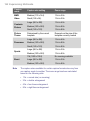
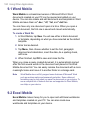
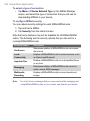
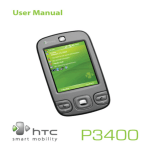
User Manual
��������������������������
Cingular® 8500/8525 Handheld with Windows Mobile®
C I N G U L A R
M A K E S
B U S I N E S S
R U N
B E T T E R
2
Please Read Before Proceeding
THE BATTERY IS NOT FULLY CHARGED WHEN YOU TAKE IT OUT
OF THE BOX.
DO NOT REMOVE THE BATTERY PACK WHEN THE DEVICE IS
CHARGING.
YOUR WARRANTY IS INVALIDATED IF YOU OPEN OR TAMPER
WITH THE DEVICE’S OUTER CASING.
PRIVACY RESTRICTIONS
Some countries require full disclosure of recorded telephone
conversations, and stipulate that you must inform the person with
whom you are speaking that the conversation is being recorded.
Always obey the relevant laws and regulations of your country when
using the recording feature of your Pocket PC Phone.
TRADEMARK INFORMATION
Microsoft, MS-DOS, Windows, Windows NT, Windows Server,
Windows Mobile, ActiveSync, Excel, Internet Explorer, MSN, Outlook,
PowerPoint, and Word are either registered trademarks or trademarks
of Microsoft Corporation in the United States and/or other countries.
Important Health Information and Safety
Precautions
When using this product, the safety precautions below must be taken
to avoid possible legal liabilities and damages.
Retain and follow all product safety and operating instructions. Observe
all warnings in the operating instructions on the product.
To reduce the risk of bodily injury, electric shock, fire, and damage to
the equipment, observe the following precautions.
3
ELECTRICAL SAFETY
This product is intended for use when supplied with power from
the designated battery or power supply unit. Other usage may be
dangerous and will invalidate any approval given to this product.
SAFETY PRECAUTIONS FOR PROPER GROUNDING AND
CONNECTION
CAUTION: Improper grounding when connecting the product to an
associated equipment can result in a risk of electric shock.
This product is equipped with a USB cable for connecting the product
to a desktop or notebook computer. Be sure your computer is properly
grounded (earthed) before connecting the product to the computer.
The power supply cord of a desktop or notebook computer has an
equipment-grounding conductor and a grounding plug. The plug must
be plugged into an appropriate outlet which is properly installed and
grounded in accordance with all local codes and ordinances.
SAFETY PRECAUTIONS FOR POWER SUPPLY UNIT
• Use the correct external power source
A product should be operated only from the type of power source
indicated on the electrical ratings label. If you are not sure of the
type of power source required, consult your authorized service
provider or local power company. For a product that operates
from battery power or other sources, refer to the operating
instructions that are included with the product.
•
Handle battery packs carefully
This product contains a Li-ion Polymer battery. There is a risk of
fire and burns if the battery pack is handled improperly. Do not
attempt to open or service the battery pack. Do not disassemble,
crush, puncture, short external contacts or circuits, dispose of
in fire or water, or expose a battery pack to temperatures higher
than 60˚C (140˚F).
WARNING: DANGER OF EXPLOSION IF BATTERY IS
INCORRECTLY REPLACED. TO REDUCE RISK OF FIRE
OR BURNS, DO NOT DISASSEMBLE, CRUSH, PUNCTURE,
SHORT EXTERNAL CONTACTS, EXPOSE TO TEMPERATURE
ABOVE 60˚C (140˚F), OR DISPOSE OF IN FIRE OR WATER.
4
REPLACE ONLY WITH SPECIFIED BATTERIES. RECYCLE OR
DISPOSE OF USED BATTERIES ACCORDING TO THE LOCAL
REGULATIONS OR REFERENCE GUIDE SUPPLIED WITH
YOUR PRODUCT.
SAFETY PRECAUTIONS FOR DIRECT SUNLIGHT
Keep this product away from excessive moisture and extreme
temperatures. Do not leave the product or its battery inside a vehicle
or in places where the temperature may exceed 60°C (140°F), such
as on a car dashboard, window sill, or behind a glass that is exposed
to direct sunlight or strong ultraviolet light for extended periods of time.
This may damage the product, overheat the battery, or pose a risk to
the vehicle.
SAFETY PRECAUTIONS FOR ACOUSTIC PRESSURE
CAUTION: Using earphones or headphones and
prolonged listening at high volume levels may cause
permanent hearing loss.
NOTE: For France, mobile headphones or earphones (manufactured
by Merry, model number EMC220) for this device have been tested to
comply with the Sound Pressure Level requirement laid down in NF EN
50332-1:2000 standard as required by French Article L. 5232-1.
SAFETY IN AIRCRAFTS
Due to the possible interference caused by this product to an aircraft’s
navigation system and its communications network, using this device’s
phone function on board an airplane is against the law in most
countries. If you want to use this device when on board an aircraft,
remember to turn off your phone by switching to Flight Mode.
5
ENVIRONMENT RESTRICTIONS
Do not use this product in gas stations, fuel depots, chemical plants or
where blasting operations are in progress, or in potentially explosive
atmospheres such as fuelling areas, fuel storehouses, below deck on
boats, fuel or chemical transfer or storage facilities, and areas where
the air contains chemicals or particles, such as grain, dust, or metal
powders. Please be aware that sparks in such areas could cause an
explosion or fire resulting in bodily injury or even death.
EXPLOSIVE ATMOSPHERES
When in any area with a potentially explosive atmosphere or where
flammable materials exist, the product should be turned off and the
user should obey all signs and instructions. Sparks in such areas
could cause an explosion or fire resulting in bodily injury or even death.
Users are advised not to use the equipment at refueling points such
as service or gas stations, and are reminded of the need to observe
restrictions on the use of radio equipment in fuel depots, chemical
plants, or where blasting operations are in progress. Areas with a
potentially explosive atmosphere are often, but not always, clearly
marked. These include fueling areas, below deck on boats, fuel or
chemical transfer or storage facilities, and areas where the air contains
chemicals or particles, such as grain, dust, or metal powders.
ROAD SAFETY
Vehicle drivers in motion are not permitted to use telephony services
with handheld devices, except in the case of emergency. In some
countries, using hands-free devices as an alternative is allowed.
INTERFERENCE WITH MEDICAL EQUIPMENT FUNCTIONS
This product may cause medical equipment to malfunction. The use of
this device is forbidden in most hospitals and medical clinics.
GENERAL PRECAUTIONS
• Heed service markings
Except as explained elsewhere in the Operating or Service
documentation, do not service any product yourself. Service
needed on components inside these compartments should be
done by an authorized service technician or provider.
6
•
Damage requiring service
Unplug the product from the electrical outlet and refer servicing to
an authorized service technician or provider under the following
conditions:
•
Liquid has been spilled or an object has fallen into the
product.
•
The product has been exposed to rain or water.
•
The product has been dropped or damaged.
•
There are noticeable signs of overheating.
•
The product does not operate normally when you follow the
operating instructions.
•
Avoid hot areas
The product should be placed away from heat sources such as
radiators, heat registers, stoves, or other products (including, but
limited to, amplifiers) that produce heat.
•
Avoid wet areas
Never use the product in a wet location.
•
Avoid pushing objects into product
Never push objects of any kind into cabinet slots or other
openings in the product. Slots and openings are provided for
ventilation. These openings must not be blocked or covered.
•
Mounting Accessories
Do not use the product on an unstable table, cart, stand,
tripod, or bracket. Any mounting of the product should follow
the manufacturer’s instructions, and should use a mounting
accessory recommended by the manufacturer.
•
Avoid unstable mounting
Do not place the product with an unstable base.
•
Use product with approved equipment
This product should be used only with personal computers and
options identified as suitable for use with your equipment.
7
•
Adjust the volume
Turn down the volume before using headphones or other audio
devices.
•
Cleaning
Unplug the product from the wall outlet before cleaning. Do not
use liquid cleaners or aerosol cleaners. Use a damp cloth for
cleaning, but NEVER use water to clean the LCD screen.
8
Contents
Chapter 1 Getting Started
13
1.1 Getting to Know Your Device and Its Accessories ..... 14
1.2 About the SIM Card and Battery................................... 20
1.3 Starting Up ..................................................................... 22
1.4 The Today Screen .......................................................... 24
1.5 Using the Programs....................................................... 26
1.6 Device Settings .............................................................. 29
Chapter 2 Entering and Searching for
Information
33
2.1 Using the Sliding Keyboard .......................................... 34
2.2 Input Methods ................................................................ 35
2.3 Using the On-screen Keyboard .................................... 36
2.4 Using Letter Recognizer ............................................... 36
2.5 Using Block Recognizer................................................ 37
2.6 Using Transcriber .......................................................... 37
2.7 Using Symbol Pad ......................................................... 39
2.8 Using Notes to Draw, Write, and Record Voice Notes 40
2.9 Searching for Information ............................................. 40
9
Chapter 3 Using Phone Features
41
3.1 Using the Phone ............................................................ 42
3.2 Making a Call .................................................................. 44
3.3 Receiving a Call ............................................................. 46
3.4 Smart Dialing.................................................................. 47
3.5 In-call Options ................................................................ 51
3.6 Additional Dialing Information ..................................... 52
3.7 Setting Up SIM Access Profile (SAP) ........................... 53
Chapter 4 Synchronizing Information and
Setting Up E-mail Security
55
4.1 Setting Up ActiveSync .................................................. 56
4.2 Synchronizing Information ........................................... 60
4.3 Synchronizing via Infrared and Bluetooth .................. 64
4.4 Synchronizing Music, Video, and Pictures ................. 65
4.5 Setting Up E-mail Security ............................................ 66
Chapter 5 Managing Your Pocket PC Phone
69
5.1 Personalizing Your Pocket PC Phone .......................... 70
5.2 Adding and Removing Programs ................................. 77
5.3 Managing Memory ......................................................... 79
5.4 Backing Up Files ............................................................ 80
5.5 Protecting Your Pocket PC Phone ............................... 82
5.6 Resetting Your Pocket PC Phone ................................. 84
10
Chapter 6 Getting Connected
87
6.1 Connecting to the Internet ............................................ 88
6.2 Internet Explorer Mobile................................................ 92
6.3 Using Comm Manager ................................................... 94
6.4 Using Bluetooth ............................................................. 96
6.5 Using Wi-Fi ................................................................... 105
6.6 Using Wireless Modem ............................................... 109
6.7 Using Terminal Services Client ...................................114
Chapter 7 Mail and Messaging
117
7.1 E-mail and Text Messages ...........................................118
7.2 Set up Xpress Mail ....................................................... 128
7.3 MMS Messages ............................................................ 134
7.4 Pocket MSN .................................................................. 140
7.5 Calendar ....................................................................... 141
7.6 Contacts ....................................................................... 143
7.7 Tasks ............................................................................. 148
7.8 Notes ............................................................................. 149
Chapter 8 Experiencing Multimedia
153
8.1 Using Camera (Cingular 8525 only) ........................... 154
8.2 Using Pictures & Videos ............................................. 168
8.3 Using Windows Media Player Mobile......................... 173
11
Chapter 9 Using Other Applications
179
9.1 Word Mobile ................................................................. 180
9.2 Excel Mobile ................................................................. 180
9.3 Viewing Slide Shows with PowerPoint Mobile .......... 181
9.4 Using ClearVue PDF .................................................... 182
9.5 Using MIDlet Manager ................................................. 183
9.6 Using ZIP ...................................................................... 187
9.7 Using Voice Speed Dial ............................................... 189
Appendix
193
A.1 Regulatory Notices ...................................................... 194
A.2 PC Requirement to Run ActiveSync 4.x .................... 200
A.3 Specifications .............................................................. 201
Index
205
12
Chapter 1
Getting Started
1.1 Getting to Know Your Device and Its
Accessories
1.2 About the SIM Card and Battery
1.3 Starting Up
1.4 The Today Screen
1.5 Using the Programs
1.6 Device Settings
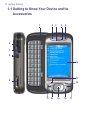
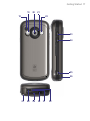
14 Getting Started
1.1 Getting to Know Your Device and Its
Accessories
1
2
3
4
5
6
7
8
10
11
9
12
13 14
15
16
17
Getting Started 15
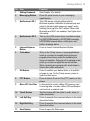
No. Item
1
Sliding Keyboard
Function
See Chapter 2 for details.
2
Messaging Button
Press for quick access to your messaging
application(s).
3
Notification LED 1
This LED shows a blinking Blue light for
Bluetooth system notification of powered-up and
ready to transmit radio frequency signal, and a
blinking Green light for Wi-Fi status. When both
Bluetooth and Wi-Fi are enabled, their lights blink
alternately.
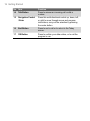
4
Notification LED 2
This bi-color LED shows Green and Amber lights
for UMTS/GSM standby, UMTS/GSM message,
UMTS/GSM network status, notification, and
battery charging status.
5
Internet Explorer
Button
Press to launch Internet Explorer Mobile.
6
Trackwheel
When in the Today screen or using applications,
scroll up or down to navigate through menus,
program instructions; press the trackwheel to
carry out selection. During a call or playing music,
scroll up or down to adjust the sound volume.
When receiving an incoming call, scroll down to
silence the audio notification.
7
OK Button
Press to confirm your data entries, or to exit the
program in use. On the Today screen, press to
open the Start menu.
8
PTT Button
Press to launch Push-to-Talk (PTT) feature of the
phone.
9
Micro SD Card Slot
In this card slot, insert a Micro SD memory card
for storing data, or insert a Micro SD input/output
card such as a network card.
10
Touch Screen
Tap the screen with the stylus to write, draw, or
make a selection.
11
Left Soft Key
Press to execute the command shown in the label
above the button.
12
Right Soft Key
Press to execute the command shown in the label
above the button.
13
Start Button
Press to open the Start menu.
16 Getting Started
No. Item
14 Talk Button
Function
Press to answer an incoming call or dial a
number.
15
Navigation Control
/ Enter
Press this multi-directional control up, down, left,
or right to move through menus and program
instructions; carry out the selection by pressing
the center button.
16
End Button
Press to end a call or to return to the Today
screen.
17
OK Button
Press to confirm your data entries, or to exit the
program in use.
Getting Started 17
19
20
21
18
22
23
24
25
26
27
28
29
30
31
32
18 Getting Started
No. Item
18 Car Antenna
Connector
Function
Connect your phone to an optional car antenna to
experience better reception quality.
19
Self-Portrait Mirror
Turn your device to face yourself to reflect your
image on the mirror when taking self-portrait
shots.
20
Camera (Cingular
8525 only)
The camera takes still photos and records video
clips. It provides two shooting modes: Normal
mode and Macro (close-up) mode.
21
Shooting Mode
Switch (Cingular
8525 only)
Push the switch up for Normal mode or down for
Macro mode.
22
Camera Flash Light
(Cingular 8525 only)
When turned on, it illuminates your subject and
allows you to capture clear photos or video even
in a dark environment.
23
Power Button
Press to turn off your device temporarily. This
switches your device to sleep mode. To turn it off
completely, press and hold (for about 5 seconds).
You can still receive calls and messages even
when your device is in sleep mode. When you
turn off the device completely, all functions
including the phone will be unavailable for use.
24
COMM MANAGER
button
Press to launch Comm Manager. Comm Manager
lets you manage phone features and data
connections (e.g. Wi-Fi and Bluetooth) on your
device.
25
Camera Button
(Cingular 8525 only)
Press to launch the camera; press again to take
a photo or video clip, depending on the specified
capture mode.
26
Stylus
Use the stylus to write, draw, or select items on
the touch screen.
27
Strap Attachment
Attach a strap for carrying your device.
28
Infrared Port
Exchange file(s) or data with other devices
wirelessly (maximum of 8 inches or 20 cm, at an
angle of 30 degrees or less).
29
Battery Cover Latch
Slide this latch to release the battery cover.
Getting Started 19
No. Item
30 Sync Connector/
Stereo Headset
Function
Use this connector to synchronize data by
connecting the provided USB Sync cable or to
recharge the battery via the provided AC adapter.
You can also connect the provided USB stereo
headset for hands-free conversation or for
listening to media.
31
Reset Button
With the stylus, press the RESET button to softreset your device.
32
Microphone
Speak into the microphone when receiving or
making a phone call or creating a voice recording.
Accessories
1
3
2
5
4
No. Accessory
1
AC adapter
Function
Recharge the battery.
2
USB Sync cable
Connects your device to a PC and synchronizes
data.
3
Stereo headset
Provides a volume control slider and a Send/End
button. Press the Send/End button to pick up a call
or put a call on hold; press and hold the button to
end the call.
4
Y cable
Lets you simultaneously use the headset and
charger.
5
Stylus
An extra Stylus in addition to the one that is
already in the device.
20 Getting Started
1.2 About the SIM Card and Battery
Always turn off your device before installing/replacing the battery and
SIM card. Follow the instructions in the Quick Start Guide to install
a 3G SIM (Subscriber Identity Module) card provided by Cingular
Wireless and to install the battery.
The SIM card contains your phone number, service details, and
phonebook/message memory. Legacy SIM cards will not function with
your device. You should consult with your Cingular representative for a
replacement SIM card. There may be fees for this service.
Your device contains a rechargeable Li-ion polymer battery. This
device is designed to use only manufacturer-specified original batteries
and accessories. Battery performance depends on many factors,
including your wireless service provider’s network configuration, signal
strength, the temperature of the environment in which you operate your
device, the features and/or settings you select and use, items attached
to connecting ports, and your voice, data, and other program usage
patterns.
Battery life estimates (approximations):
•
Standby time: up to 200 hours for GSM; 180 ~ 250 hours for
UMTS/HSDPA.
•
Talk time (Screen off): 4 ~ 5 hours for GSM; 2 ~ 4 hours for
UMTS/HSDPA.
Warning!
To reduce risk of fire or burns:
• Do not attempt to open, disassemble, or service the battery
pack.
• Do not crush, puncture, short external contacts, or dispose of in
fire or water.
• Do not expose to temperatures above 60oC (140oF).
• Replace only with the battery pack designated for this product.
• Recycle or dispose of used battery as stipulated by local
regulation.
Getting Started 21
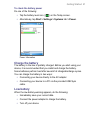
To check the battery power
Do one of the following:
•
Tap the battery level icon (
•
Alternatively, tap Start > Settings > Systems tab > Power.
) on the Today screen.
Power Information
Charge the battery
The battery in the box is partially charged. Before you start using your
device, it is recommended that you install and charge the battery.
Some batteries perform best after several full charge/discharge cycles.
You can charge the battery in two ways:
•
Connecting your device directly to the AC adapter.
•
Connecting your device to a PC via the provided USB Sync
cable.
Low battery
When the low-battery warning appears, do the following:
•
Immediately save your current data.
•
Connect the power adapter to charge the battery.
•
Turn off your device.
22 Getting Started
1.3 Starting Up
Turn your device on and off
To turn on your device, press the Power button. When you turn on
your device for the first time, you are asked to complete a calibration
process. For more information, see “Calibrate the device”.
To turn off your device, press and hold the Power button for a few
seconds. A message will then be displayed, prompting you whether or
not to turn off the device completely.
Note
Quickly pressing the power button turns off your device temporarily and
switches it to sleep mode. You will still be able to receive messages and
calls while your device is in sleep mode.
Calibrate the device
Calibrating the device screen involves tapping the center of a cross
with the stylus as the cross moves around the screen. This process
ensures that when you tap the screen with your stylus, the tapped item
is activated.
If your device does not accurately respond to screen taps, follow these
steps to re-calibrate it:
1. Tap Start > Settings > System tab > Screen.
2. On the General tab, tap Align Screen, then follow the on-screen
instructions to complete the calibration.
Calibrating the device
Getting Started 23
Manage screen settings
The device’s display has three orientation modes: Portrait, Landscape
(right-handed), and Landscape (left-handed). Portrait mode allows
you to get a better view or a better operation of certain programs, while
Landscape mode may be optimal for viewing lengthy files.
Portrait mode
Landscape mode
•
To change the orientation, tap Start > Settings > System tab >
Screen, and select the orientation you want.
•
To smooth the edges of screen fonts for many programs, on the
ClearType tab, select the Enable ClearType check box.
•
To increase the readability or to see more content on the screen,
on the Text Size tab, adjust the text size by moving the slider.
24 Getting Started
1.4 The Today Screen
The Today screen displays important information, such as upcoming
appointments and status indicators. You can tap a section on the
screen to open the associated program.
•
To access the Today screen, tap Start > Today.
•
To customize the Today screen display, including the background
image, tap Start > Settings > Personal tab > Today.
1
2 34 5
1
Tap to open the Start menu.
2
Tap to view connectivity status.
6
7
3
Indicates the radio signal strength. Tap
to configure the phone settings.
4
Tap to adjust device/ringer volume.
8
5
9
10
11
12
6
Displays the current time. Tap to
check the current date and upcoming
appointments.
Displays the current date and time. Tap
to set up date, time, alarm, and more.
13
14
7
Tap to set owner information.
8
Your day at a glance with reminders.
Tap to open the related program: tasks,
messages, and appointments.
9
Tap to lock or unlock device.
: locked;
: unlocked.
10 Tap to open the Pocket MSN Sign-in
screen
11 Tap to open Comm Manager.
12 Indicates the battery status. Tap to
open the Power Settings screen.
13 Tap to open Calendar.
14 Tap to open Contacts.
Getting Started 25
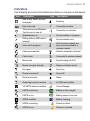
Indicators
The following are some of the status icons that you may see on the device.
Icon
Description
New e-mail, MMS, and text
messages.
Icon
Description
Roaming
New voice mail
Connection is active
There are more notifications.
Tap the icon to view all.
Connection is not active
Speakerphone on
Synchronization in progress
Dialing while no SIM card is
inserted
Synchronization error
Voice call in progress
Wi-Fi function enabled, but
device not connected to a
wireless network
Calls are forwarded
Wireless network(s) detected
Call on hold
Connected to wireless network
Missed call
Synchronizing via Wi-Fi
Maximum signal strength.
Ringer in vibration mode
No signal
Sound on
Phone is turned off
Sound off
No phone service
Alarm
Searching for phone service
No SIM card inserted
3G UMTS network available
Comm Manager
UMTS connecting
Battery is fully charged
UMTS in use
Battery power is very low
GPRS available
Battery charging
GPRS connecting
Device is locked
GPRS in use
Device is unlocked
26 Getting Started
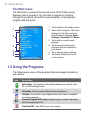
The Start menu
The Start menu, located at the top left corner of the Today screen,
displays a list of programs. You can start a program by scrolling
through the programs list and then pressing Enter, or by tapping a
program with the stylus.
1 Tap to switch to the Today screen.
1
2 Tap to start a program. The items
displayed in the Start menu can
be customized by tapping Start >
Settings > Personal tab > Menus.
3 Tap to start a recently-used
program.
4 Tap to view and select more
programs that are installed on
your device.
5 Tap to change device settings.
6 Tap to see a Help topic for the
current screen.
2
3
4
5
6
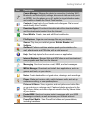
1.5 Using the Programs
The following are some of the programs that are already installed on
your device.
Icon
Description
ActiveSync Synchronizes information between your device and a
PC or the Exchange Server.
Calculator Perform basic arithmetic and calculations.
Calendar Keep track of your appointments and create or respond
to meeting requests.
Camera (Cingular 8525 only) Snaps photos or shoots video clips
with accompanying audio.
ClearVue PDF View PDF files on your device.
Getting Started 27
Icon
Description
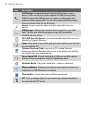
Comm Manager Manage the device’s connection (including Wi-Fi,
Bluetooth, and ActiveSync) settings, disconnect data services (such
as GPRS), turn the phone on or off, switch to ringer/vibration mode,
and enable or disable the Direct Push function.
Contacts Keep track of your friends and colleagues. Dial or send
email directly from Contacts.
Download Agent Provides information about the download status
and the downloaded content from the Internet.
Excel Mobile Create, view and edit Excel workbooks.
File Explorer Organize and manage files on your device.
Games Play two pre-installed games: Bubble Breaker and
Solitaire.
GetGood Perform real-time wireless push synchronization of email, attachments and PIM data, with a valid account.
Help See Help topics for the current screen or application.
Internet Explorer Browse Web and WAP sites as well as download
new programs and files from the Internet.
Messaging Send and receive e-mail, MMS, and text messages.
MIDlet Manager Download and install Java applications, such as
games and tools, on your device.
Notes Create handwritten or typed notes, drawings, and recordings.
Phone Make and receive calls, switch between calls, and set up
conference calling, or use speakerphone.
Pictures & Videos View, organize, and sort picture and video files
on your device or a storage card. Captured photos are stored in the
My Pictures folder, and video clips are saved in the My Videos folder
of your device.
Pocket MSN Send and receive instant messages with your MSN
Messenger contacts, as well as access your Hotmail account.
PowerPoint Mobile View PowerPoint slides and presentations,
including transitions.
28 Getting Started
Icon
Description
SAPSettings Enables Bluetooth Remote SIM access on your
device. Use a car kit phone that supports the SIM Access Profile
(SAP) to access the SIM card on your device via Bluetooth and
make or receive phone calls. You can also download SIM contacts
from your device onto the car kit phone.
Search Search contacts, data, and other information on your
device.
SIM Manager Manage the contacts that are stored on your SIM
card. You can also use this program to copy SIM contents to
Contacts on your device.
STK (SIM Tool Kit) Service Access information and other services
offered by Cingular Wireless.
Tasks Keep track of your tasks and sync them back to your Task list
on your desktop PC.
Terminal Services Client Log on to a PC running Terminal
Services or Remote Desktop, and use all of the programs available
on that PC from your mobile device.
Voice Speed Dial Record voice tags so that you can dial a phone
number or launch programs simply by speaking a word.
Windows Media Play back media files -- audio or video files.
Wireless Modem Enables your device as an external modem for a
computer via USB, Bluetooth, or infrared.
Word Mobile Create, view, and edit Word documents.
ZIP Free up storage space on your device by compressing files in
the conventional ZIP format.
Getting Started 29
1.6 Device Settings
You can adjust the device settings to suit the way you work. To see
all available settings, tap Start > Settings, then tap the Personal,
System, and Connections tabs located at the bottom of the screen.
Personal tab
Icon
Description
Buttons Assigns a program or function to a hardware button.
Input Sets options for each of the input methods.
Lock Sets a password for your device.
Menus Sets what programs will appear in the Start menu.
Owner Information Enter your personal information on your
device.
Phone Customize phone settings such as ring tone, set a PIN
number for your SIM card, and more.
Sounds and Notifications Enables sounds for events,
notifications, and more, and allows you to set the type of notification
for different events.
Today Customize the appearance and the information to be
displayed on the Today screen.
Voice Speed Dial Create voice tags for voice dialing contacts and
SIM contacts as well as for launching programs.
30 Getting Started
System tab
Icon
Description
About Specify a name for your device. Also shows the Windows
Mobile version and copyright information.
Backlight Sets the backlight timeout and brightness.
Certificates Shows information about certificates that are installed
on your device.
Clear Storage Removes all your data and files from the memory
and resets your device to factory default settings.
Clock & Alarms Switches the device clock to the date and time of
your locale or to a visiting time zone when you're traveling. Alarms
can also be set at specified days and times of a week.
Device Information Shows information about the firmware version,
hardware, identity, and the duration of calls made on your device.
Error Reporting Enables or disables the device's error reporting
function. When this function is enabled and a program error occurs,
technical data about the state of the program and your computer will
be logged in a text file and delivered to Microsoft's technical support
if you choose to send it.
Key Lock Locks the buttons on your device except for the Power
button when the device is in sleep mode. This ensures you will not
switch the device on by accident and consume unnecessary power.
Memory Shows the device memory allocation status and memory
card information. Also allows you to stop currently running programs.
Microphone AGC Adjusts the volume of your voice automatically
when you are recording.
Power Shows the current battery level. Set the timeout for turning
off the display (switching device to sleep mode) to conserve battery
power.
Regional Settings Sets the regional language to use and the format
for displaying numbers, currency, date, and time on your device.
Remove Programs Remove programs that you installed on your
device.
Screen Change the screen orientation, re-calibrate the screen, and
change the screen text size.
Getting Started 31
Connections tab
Icon
Description
Beam Enables your device to receive incoming infrared and
Bluetooth beams.
Bluetooth Turns Bluetooth on, sets your device to discoverable
mode, and allows you to scan for other Bluetooth devices.
Comm Manager Opens the Comm Manager screen to manage
phone features and data connections on your device.
Connections Sets up one or more types of modem connections
for your device, such as phone dial-up, GPRS, EDGE, UMTS,
Bluetooth, and more, so that your device can connect to the Internet
or a private local network.
CSD Line Type Sets the line type to use when making a circuit
switch data (CSD) connection. Normally, you do not need to change
the setting unless you encounter a problem on establishing a
connection.
GPRS Setting Sets the GPRS authentication method. Consult your
wireless service provider first before changing this setting.
Network Cards Allows your device to scan for available wireless
networks. Also allows you to set up a network card (if you have one
inserted on your device).
USB to PC Enhances the connection between the device and the
computer, in situations when ActiveSync on the computer is unable
to detect the device.
Wireless LAN Shows information about the active wireless
network, and allows you to customize Wi-Fi settings.
32 Getting Started
Chapter 2
Entering and Searching for
Information
2.1 Using the Sliding Keyboard
2.2 Input Methods
2.3 Using the On-screen Keyboard
2.4 Using Letter Recognizer
2.5 Using Block Recognizer
2.6 Using Transcriber
2.7 Using Symbol Pad
2.8 Using Notes to Draw, Write, and Record
Voice Notes
2.9 Searching for Information
34 Entering and Searching for Information
2.1 Using the Sliding Keyboard
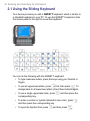
Your device provides you with a QWERTY keyboard, which is similar to
a standard keyboard on your PC. To use the QWERTY keyboard, slide
the screen panel to the right to reveal the keyboard.
You can do the following with the QWERTY keyboard:
•
To type lowercase letters, press the keys using your thumbs or
fingers.
•
To use all uppercase letters, press
first, then press
. To
change back to all lowercase letters, press these buttons again.
•
To use a single uppercase letter, press
corresponding key.
•
To enter a number or symbol (labeled in blue color), press
and then press the corresponding key.
•
To open the Symbol Pad, press
and then press the
and then press
.
Entering and Searching for Information 35
•
Press the Left/Right Soft Key
/
to perform the
command shown in the label above the key.
•
Press
to verify your data entries or exit the program in use.
•
Press
to open the Start menu.
•
Press the arrow keys
movement.
•
To type accented characters (like á, ã, ç, ê, í, ó, ü, etc), press the
letter key first and then, hold
and at the same time press the
space bar
character you need.
/
/
/
for directional
several times until you find the correct
2.2 Input Methods
When you start a program or select a field that requires text or
numbers, the Input Panel automatically becomes available. The Input
Panel provides access to the various input methods available on your
device, including Block Recognizer, Keyboard, Letter Recognizer,
Symbol Pad, and Transcriber. By default, the Input Panel icon
appears on the menu bar to indicate which input method is currently
selected. The Input Selector arrow (appearing at the right side of the
Input Panel icon) opens a list of available input methods.
To show or hide the Input Panel
• Tap the Input Panel icon on the menu bar.
Input Panel
(Keyboard)
Input Selector
arrow
Input Panel icon
36 Entering and Searching for Information
Icon
Input method
The on-screen keyboard.
Letter Recognizer or Block Recognizer.
Symbol Pad
Transcriber
Input Methods menu
2.3 Using the On-screen Keyboard
The on-screen Keyboard is available when text entry is possible. You
can enter text by tapping keys on the keyboard that are displayed on
the screen.
To enter text using the on-screen Keyboard
1. In a program, tap the Input Selector arrow, and tap Keyboard.
2. Enter text by tapping keys on the on-screen Keyboard.
To enlarge the on-screen Keyboard
1. Tap the Input Selector arrow, then tap Options.
2. In the Input method list, select Keyboard.
3. Tap Large keys.
2.4 Using Letter Recognizer
With Letter Recognizer, you can write individual letters, numbers, and
punctuation, which are then converted into typed text.
To use Letter Recognizer
1. From a program, tap the Input Selector arrow, and tap Letter
Recognizer.
2. Write characters, numbers, and symbols in the designated writing
area.
• Enter capital letters by writing in the ABC (left) area of the
box.
Entering and Searching for Information 37
•
Enter lower case letters by writing in the abc (middle) area of
the box.
•
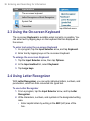
Enter numbers by writing in the 123 (right) area of the box.
•
Enter punctuation and symbols by tapping in either area of the
box and then writing the desired character.
Note
Letter Recognizer is available when text entry is possible.
Tip
For help with writing characters, tap the question mark near the writing
area.
2.5 Using Block Recognizer
With Block Recognizer, you use a single stroke to write letters,
numbers, symbols, and punctuation, which are then converted into
typed text.
To use Block Recognizer
1. From a program, tap the Input Selector arrow, and tap Block
Recognizer.
2. Write characters, numbers, and symbols in the designated writing
area.
•
Enter letters by writing in the abc (left) area of the box.
•
Enter numbers by writing in the 123 (right) area of the box.
•
Enter symbols and punctuation by tapping in either area of the
box and then writing the desired character.
Note
Block Recognizer is available when text entry is possible.
Tip
For help with writing characters with Block Recognizer, tap the
question mark near the writing area.
2.6 Using Transcriber
Transcriber is a handwriting recognition program that allows you to
write in cursive, print, or a combination of both. Transcriber works
transparently in the background of programs, recognizing words with
its integrated dictionary. When Transcriber is turned on, it interprets
38 Entering and Searching for Information
stylus movement anywhere on the screen as handwriting input. For
more information about using Transcriber, see Help on your device.
To start Transcriber
1. Start a program that accepts user input, such as Word Mobile.
2. Tap the Input Selector arrow, and tap Transcriber. The
Transcriber introductory screen appears.
To write using Transcriber
1. In a program, position the cursor where you want text to appear.
2. Use the stylus to write anywhere on the screen. The handwriting
will be converted to text shortly after you lift the stylus from the
screen.
To enter punctuation and symbols
Transcriber comes with an on-screen keyboard that provides an easy
way to add punctuation or a special symbol to existing text.
•
From a program, tap
on the Transcriber toolbar.
The keyboard remains visible until you tap the button again.
Tips
• To reposition the keyboard, tap and hold the title bar, then drag to the
desired location.
• When no text is selected, you can also open the keyboard by
doing the gesture. For more information about using Transcriber
gestures, see Help on your device.
To edit text
1. In a program, draw a line across the text you want to edit.
2. After you lift the stylus from the screen, the line will disappear and
the selected text will be highlighted.
3. Do either of the following:
•
Rewrite the text.
•
Use gestures to capitalize letters, insert a space, and so on.
For information about using Transcriber gestures, see Help on
your device.
Entering and Searching for Information 39
2.7 Using Symbol Pad
Symbol Pad provides a comprehensive list of common symbols
such as parentheses, brackets, currency signs, and more, as well as
punctuation marks and special characters.
Tap a symbol to select it.
When using the Navigation Control or the
sliding keyboard, press UP, DOWN, LEFT,
or RIGHT to navigate through the available
symbols on-screen, then press Enter to
select a symbol.
Tap to display the previous page of symbols.
Tap to display the next page of symbols.
Tap to close the Symbol Pad without
selecting any symbol.
This indicates the current page and the total
number of symbol pages.
Input Selector arrow
Symbol Pad icon
To open the Symbol Pad and select a symbol
1. Create or open a document, such as a Word document.
2. To open the Symbol Pad:
•
Tap the Input Selector arrow, then tap Symbol Pad; or
•
Using the sliding keyboard, press
and then press
3. To browse through the pages of symbols, tap
Symbol Pad screen.
/
.
on the
4. Tap a symbol to select it and close the Symbol Pad. The selected
symbol will then be inserted in your document.
40 Entering and Searching for Information
2.8 Using Notes to Draw, Write, and Record
Voice Notes
Using Notes, you can draw directly on the screen, or write on the
screen and save notes in your own handwriting. You can also create
a stand-alone recording (voice note) or you can add a recording to a
note.
For more information on what you can do with Notes, see “Notes” in
Chapter 7.
2.9 Searching for Information
You can search for files and other items stored in My Documents
folder or on an installed micro SD card. You can search by file name
or by words located in the item. For example, you can search in e-mail
messages, notes, appointments, contacts, and tasks, as well as in
online Help.
To search for a file or an item
1. Tap Start > Programs > Search.
2. In the Search for field, you can:
•
Enter the file name, word, or other information you want to
search for.
•
Tap the down arrow icon ( ), and from the list, select one
item that you have looked for before.
3. In the Type field, you can tap the down arrow icon ( ) and
select a data type from the list to help narrow your search.
4. Tap Search. The system starts searching the matched files in My
Documents folder and subfolders.
5. In the Results list, tap the item you want to open.
Note
The storage card symbol
saved on a storage card.
is displayed next to the names of files
Chapter 3
Using Phone Features
3.1 Using the Phone
3.2 Making a Call
3.3 Receiving a Call
3.4 Smart Dialing
3.5 In-call Options
3.6 Additional Dialing Information
3.7 Setting Up SIM Access Profile (SAP)
42 Using Phone Features
3.1 Using the Phone
Like a standard mobile phone, you can use your device to make,
receive, and keep track of calls and send text or MMS messages. You
can also dial directly from Contacts, and easily copy phonebook entries
from your SIM card to Contacts on your device.
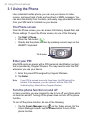
The Phone screen
From the Phone screen, you can access Call History, Speed Dial, and
Phone settings. To open the Phone screen, do one of the following:
•
•
•
Tap Start > Phone.
Press the Talk button (
).
Directly dial the phone number by pressing numeric keys on the
QWERTY keyboard.
TALK button
Enter your PIN
Most SIM cards are preset with a PIN (personal identification number)
that is provided by Cingular Wireless. You may need to enter the PIN
whenever you use your device.
1. Enter the preset PIN assigned by Cingular Wireless.
2. Tap Enter.
Note
If your PIN is entered incorrectly three times, the SIM card will be
blocked. If this happens, you can unblock it with the PUK (PIN
Unblocking Key) obtained from Cingular Wireless.
Turn the phone function on and off
In many countries, you are required by law to turn off your phone while
on board an aircraft. Turning off the power does not turn off the phone
function.
To turn off the phone function, do one of the following:
•
Tap the Comm Manager icon ( ) on the Today screen. On the
Comm Manager screen, tap the Phone button to turn off the
phone function.
Using Phone Features 43
•
To resume call function, turn on the phone function by tapping the
Phone button again on the Comm Manager screen.
Tap the Signal icon (
) at the top of the Today screen, then tap
Turn on flight mode. This disables all wireless radios on your
device, which include the phone function, Bluetooth, and Wi-Fi.
To resume call function, tap the Signal icon again then tap
Turn off flight mode. This also restores the previous state of
Bluetooth, but keeps Wi-Fi disabled.
Adjust the device volume
1. Tap the Speaker icon (
).
2. Under Volume, do the following:
• Adjust the phone volume (
) or device volume (
moving the slider to the desired volume level.
•
) by
Tap On, Vibrate, or Off to change both the system and ringer
volume settings.
Volume adjustment
Notes
• To adjust the conversation phone volume, you must do it during
a call. Adjusting the volume at another time will affect the ring,
notification, and MP3 sound levels.
• When you activate Vibrate mode, sound will automatically be muted
and your device will vibrate when an incoming call is received. The
Vibrate icon (
) will appear in the title bar to indicate that Vibrate
mode is activated.
44 Using Phone Features
3.2 Making a Call
With your device, you can make a call from Phone, Contacts, Speed
Dial, Call History, and SIM Manager.
Make a call from Phone
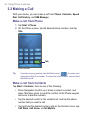
1. Tap Start > Phone.
2. On the Phone screen, tap the desired phone number, and tap
Talk.
Talk
Phone screen
Tip
If you tap a wrong number, tap the Back arrow (
) to erase each
subsequent digit of a number. To erase the entire number, tap and hold
the Back arrow.
Make a call from Contacts
Tap Start > Contacts, then do one of the following:
•
Press Navigation Control up or down to select a contact, and
press Talk twice (once to send the number to the Phone keypad,
and once to dial the number).
•
Tap the desired contact in the contacts list, and tap the phone
number that you want to call.
•
Tap and hold the desired contact, and on the shortcut menu, tap
Call Work, Call Home, or Call Mobile.
Using Phone Features 45
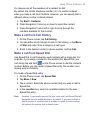
To choose one of the numbers of a contact to dial
By default, the mobile telephone number (m) of a contact is dialed
when you make a call from Contacts. However, you can specify that a
different phone number is dialed instead.
1. Tap Start > Contacts.
2. Press Navigation Control up or down to select the contact.
3. Press Navigation Control left or right to scroll through the
numbers available for that contact.
Make a call from Call History
1. On the Phone screen, tap Call History.
2. You can either scroll through all calls in Call History, or tap Menu
> Filter and select from a category of call types.
3. Scroll to the desired contact or phone number, and tap Call.
Make a call from Speed Dial
Use Speed Dial to call frequently-used numbers with a single tap. For
example, if you assign a contact to the location 2 in Speed Dial, you
can simply tap and hold
on the Phone screen to dial the contact’s
number. Before you can create a Speed Dial entry, the number must
already exist in Contacts.
To create a Speed Dial entry
1. On the Phone screen, tap Speed Dial.
2. Tap Menu > New.
3. Tap a contact. Select the phone number that you want to add to
Speed Dial.
4. In the Location box, select an available location for the new
Speed Dial entry.
Note
Location 1 is generally reserved for your voice mail, and Speed Dial will
designate the next available location by default. If you want to place a
phone number in a position that is already occupied, the new number
will replace the number that is already there.
46 Using Phone Features
Tips
• To create a Speed Dial entry from Contacts, tap and hold the contact
name, tap Add to Speed Dial, then select the phone number for
which to create a Speed Dial and an available location for the new
Speed Dial entry.
• To delete a Speed Dial entry, in the Speed Dial list, tap and hold the
desired entry, and tap Delete.
Make a call from SIM Manager
SIM Manager allows you to view the contents of your SIM card,
transfer SIM phonebook entries to Contacts on your device, and make
a call from your SIM card.
To call a SIM contact
1. Tap Start > Programs > SIM Manager. Wait for your SIM card
contents to load.
2. Tap and hold the name or phone number of the person you want
to call, and tap Call.
3.3 Receiving a Call
When you receive a phone call, a message will appear, giving you the
option to either answer or ignore the incoming call.
To answer or reject an incoming call
• To answer the call, tap Answer, or press Talk on the device.
•
To reject the call, tap Ignore, or press End on the device.
To end a call
Once an incoming or outgoing call is in progress, you can tap End or
press End on the device to hang up.
Using Phone Features 47
3.4 Smart Dialing
Smart Dialing is a program that makes it easy for you to dial a phone
number. When you start entering numbers or characters, Smart Dialing
will automatically search and sort the contact entries on the SIM
card, in Contacts, and the phone numbers in Call History (including
incoming, outgoing, and missed calls). You can then select the desired
number or contact from the filtered list to dial.
Start Smart Dialing
Open the Phone screen, then tap the keys on the Phone keypad
that correspond to the phone number or contact you want to call.
Alternatively, you can use the sliding keyboard to input.
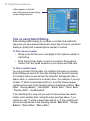
When you start entering a number or letter, the Smart Dialing panel will
appear automatically on the Phone screen. You can change the panel
size according to your need by tapping the arrow icon
.
Tap to minimize or expand the
Smart Dialing panel
Portrait view with minimized
Smart Dialing panel
Landscape view with expanded
Smart Dialing panel
When you use the sliding keyboard to dial a number, the digits entered
will be displayed on the right side of the entry box and the equivalent
letters will appear on the left side. Whereas tapping the Phone keypad
will display only the digits in the entry box.
48 Using Phone Features
Letters appear on the left
side of the entry box when typing
on the sliding keyboard
Tips on using Smart Dialing
Smart Dialing starts looking for numbers or contacts that match the
sequence you have entered. Below are some tips on how to use Smart
Dialing to quickly find a desired phone number or contact.
To find a phone number
• Simply enter the first one or two digits to find a phone number in
Call History.
•
Enter the first three digits or more if you want to find a phone
number from the saved contacts on your device and SIM card.
To find a contact name
You can just enter the first letter of a contact’s first name or surname.
Smart Dialing will search for the letter starting from the first character
of a contact name as well as from the character that appears after a
space, dash, or underscore in a contact name. For example, if you tap
number “2” which is associated with [a, b, c] on the Phone keypad,
contact names such as the following will be considered matches: “Ben
Miller”, “George Adams”, “John-Carter”, “Carter, Ellen”, “Dixon, Allan”,
“Thomas_Clark”, “JaneCampbell”.
If the matching list is long and you want to narrow down the search
further, enter another letter. Using the same example above, if you
continue to tap “3” which is associated with [d, e, f], the matching list
will be narrowed down to the following names: “Ben Miller”, “George
Adams”, “Carter, Ellen”, “Dixon, Allan”.
Using Phone Features 49
Make a call or send an SMS using Smart Dialing
1. Begin entering the first few numbers or characters.
2. In the Smart Dialing panel, browse the list by tapping the arrows (
/
) or pressing Navigation Control up or down to select the
desired contact or phone number. When a contact is selected, it
expands to also show the corresponding phone number.
3. The highlighted item will move one line when you press
Navigation Control up or down; the highlighted item will scroll one
page when you tap the arrows.
4. Do one of the following:
•
When the correct contact is selected, tap Talk or press the
Talk button (
) to make a call.
•
To call a different phone number associated with the selected
contact, tap and hold the selected contact, and tap the phone
number you want to call.
Tap and hold the contact to pop up the shortcut menu
•
Tip
To send an SMS or text message to the selected contact, tap
and hold the contact, and tap Send Text Message.
To view or edit information associated with the selected contact, tap the
contact’s name on the shortcut menu (applies only to entries stored in
Contacts on your device).
50 Using Phone Features
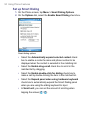
Set up Smart Dialing
1. On the Phone screen, tap Menu > Smart Dialing Options.
2. On the Options tab, select the Enable Smart Dialing check box.
Smart dialing options
•
Select the Automatically expand selected contact check
box to enable a contact’s name and phone number to be
displayed when the contact is selected in the matching list.
•
Select the Enable drag-scroll check box to scroll in the
matched list by dragging.
•
Select the Enable double-click for dialing check box to
make a call by double-clicking the item in the matched list.
•
Select the Expand panel when using hardware keyboard
check box to automatically expand the Smart Dialing panel
when you are using the sliding keyboard to input.
•
In Scroll unit, you can set the amount of scrolling when
tapping the arrows ( / ).
Using Phone Features 51
3.5 In-call Options
To put a call on hold
Your device notifies you when you have another incoming call, and
gives you the choice of rejecting or accepting the call. If you are
already on a call and accept the new call, you can choose to switch
between the two callers, or set up a conference call between all three
parties.
1. Tap Answer to take the second call, and put the first one on hold.
2. To end the second call and return to the first call, tap End or
press End on the device.
To switch between two calls
• Tap Swap.
To set up a conference call
1. Either put a call on hold, and dial a second number; or, accept a
second incoming call when you already have one in progress.
2. Tap Conference.
Note
Not all service providers support conference calling. Contact your
service provider for details.
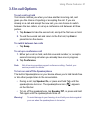
To turn on and off the Speakerphone
The built-in Speakerphone on your device allows you to talk hands-free
or lets other people listen to the conversation.
•
During a call, tap Speaker On, or press and hold Talk until the
speakerphone turns on. The speakerphone icon (
) appears
on the title bar.
•
To turn off the speakerphone, tap Speaker Off, or press and hold
Talk again until the speakerphone turns off.
Warning!
To avoid damage to your hearing, do not hold your device against
your ear when the speakerphone is turned on.
52 Using Phone Features
To mute a call
You can turn off the microphone during a call, so that you can hear the
caller but the caller cannot hear you.
•
During a call, tap Mute.
•
When the microphone is turned off, the mute icon (
) appears
on the screen. Tap Unmute to turn on the microphone again.
3.6 Additional Dialing Information
Make an emergency call
•
Tip
Enter the international emergency number for your locale, and
tap Talk.
Additional emergency numbers may be included in your SIM card.
Contact your service provider for details.
Make an international call
1. Tap and hold
on the Phone keypad until the + sign appears.
The + replaces the international prefix of the country that you are
calling.
2. Enter the full phone number you want to dial, and tap Talk. The
full phone number includes country code, area code (without the
leading zero, if any) and phone number.
Using Phone Features 53
3.7 Setting Up SIM Access Profile (SAP)
You can access your SIM card content, called SIM Access Profile
(SAP) using a car kit phone that supports Bluetooth connectivity. The
SAPSettings program on your device allows you to connect your car kit
phone with your device’s SIM card via Bluetooth. With an established
connection, you can download your contacts from your device’s SIM
card into your car kit phone and also use your car kit phone to answer
and make calls using your device’s SIM card.
1. In your device, make sure that Bluetooth is turned on and set to
Discoverable mode.
2. Tap Start > Programs > SAPSettings.
3. In the BT Remote SIM Access screen, select the Remote SIM
Access check box, and tap Done.
4. In the car kit phone, search for Bluetooth devices. Consult your
car kit phone’s manual to learn how to do this. Your device should
show up on the car kit phone screen.
5. If this is the first time you are connecting the car kit with the
device, you will be required to enter a passkey displayed on the
car kit LCD into your device. Enter the passkey in your device.
6. A pop-up message should appear saying that a connection has
been established between your device and car kit phone. Tap
OK.
7. In the BT Remote SIM Access screen, tap Done.
Note
You will be unable to make/receive calls, send/receive messages, or
perform related activities on your device when the SAP connection is
active. However, you will be able to do all of this from the car kit phone
during this time. After the connection is disconnected, you will be able to
use the device as before. For more information about how to establish a
Bluetooth connection, see “Using Bluetooth” in Chapter 6.
54 Using Phone Features
Chapter 4
Synchronizing Information and
Setting Up E-mail Security
4.1 Setting Up ActiveSync
4.2 Synchronizing Information
4.3 Synchronizing via Infrared and Bluetooth
4.4 Synchronizing Music, Video, and Pictures
4.5 Setting Up E-mail Security
56 Synchronizing Information and Setting Up E-mail Security
4.1 Setting Up ActiveSync
Microsoft ActiveSync synchronizes information on your device with
information on your PC, such as Microsoft Outlook content. ActiveSync
can also synchronize over a wireless or cellular network with Microsoft
Exchange Server, if your company or service provider is running
Microsoft Exchange Server with Exchange ActiveSync.
Specifically, you can use ActiveSync to:
•
Synchronize information, such as Outlook E-mail, Contacts,
Calendar, or Tasks information, as well as media files, such as
pictures, video, and music between your device and your PC.
•
Synchronize Outlook E-mail, Contacts, Calendar appointments,
and Tasks on your device directly with Exchange Server so that
you can stay up-to-date even when your PC is turned off.
•
Copy files between your device and your PC without
synchronizing.
•
Select which types of information are synchronized and specify
how much information is synchronized. For example, you can
choose how many weeks of past Calendar appointments to
synchronize.
•
Add and remove programs on your device. For details, see
Chapter 5, “Adding and Removing Programs.”
To install and set up ActiveSync on the computer
1. Install ActiveSync on your PC, as described in the Getting Started
CD.
2. After ActiveSync is installed, the Synchronization Setup Wizard
automatically starts when you connect your device to the PC via
a USB cable provided with your device, an infrared connection
or Bluetooth connection. The wizard will guide you to create a
synchronization relationship between your computer and device.
Click Next.
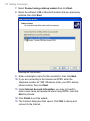
3. Do not select the Synchronize directly with a server
running Microsoft Exchange Server check box if you want to
synchronize your device with a computer. Just click Next, then
skip to step 8.
Synchronizing Information and Setting Up E-mail Security 57
4. If you want to synchronize your device with Exchange Server,
select the Synchronize directly with a server running
Microsoft Exchange Server check box, then click Next.
5. On the Exchange server credentials screen, enter the Exchange
server address, your user name and password, and the domain
name.
If you do not know the Exchange server address and the domain
name, check with your network administrator, or do the following
to find them in your computer:
•
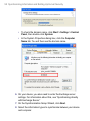
In Outlook, click Tools > E-mail Accounts.
•
Select View or change existing e-mail accounts.
•
Double-click Microsoft Exchange Server.
•
On the Exchange Server Settings screen, you will see the
Exchange Server name.
58 Synchronizing Information and Setting Up E-mail Security
•
To check the domain name, click Start > Settings > Control
Panel, then double-click System.
•
In the System Properties dialog box, click the Computer
Name tab. You will then see the domain name.
6. On your device, you also need to enter the Exchange server
settings. For information about this, see “Synchronizing directly
with Exchange Server.”
7. On the Synchronization Setup Wizard, click Next.
8. Select the information types to synchronize between your device
and computer.
Synchronizing Information and Setting Up E-mail Security 59
If you want to synchronize your device with both your computer
and Exchange Server, do the following:
•
For the Contacts, Calendar, E-mail, and Tasks items, choose
whether to synchronize them with the computer or with the
Exchange Server. These items cannot be synchronized to
both.
•
Select the check boxes of the other information types if you
want to synchronize them with your computer.
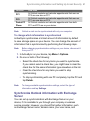
Information types on the PC and Exchange Server
9. Click Next.
10.Click Finish.
When you finish the wizard, ActiveSync synchronizes your device
automatically. Once synchronization completes, you can disconnect
your device from your PC.
60 Synchronizing Information and Setting Up E-mail Security
4.2 Synchronizing Information
When you connect your device to the PC using a USB cable, an
infrared connection, or a Bluetooth connection, ActiveSync will
immediately synchronize. While your device is connected, ActiveSync
synchronizes every time you make a change on either the PC or your
device.
To manually start and stop synchronization
1. Connect your device to the PC:
•
To synchronize Outlook information and other local information
on the PC, including media files, connect your device to the
PC using Bluetooth, infrared (IR) or a USB cable.
•
If you are synchronizing directly with Exchange Server, you
can use this connection to the PC to "pass through" to the
network, or you can synchronize without connecting to the PC
over a cellular network.
2. In ActiveSync, tap Sync. To end synchronization before it
completes, tap Stop.
Synchronize Outlook information with the computer
If you have set up a synchronization relationship between your device
and the PC, synchronization keeps Outlook information up-to-date on
both your device and PC.
You can also set up your device to synchronize with more than one PC
or with a combination of one or more PCs and Exchange Server. When
synchronizing with multiple computers, the items that you synchronize
will appear on all of the computers with which they are synchronized.
For example, if you have set up synchronization with two PCs (PC1
and PC2), which have different items, and you synchronize Contacts
and Calendar on your device with both computers, the result is as
follows:
Synchronizing Information and Setting Up E-mail Security 61
Location
PC1
PC2
Pocket PC
Phone
Note
New state
All Outlook contacts and calendar appointments that were on
PC2 are now also on PC1.
All Outlook contacts and calendar appointments that were on
PC1 are now also on PC2.
All Outlook contacts and calendar appointments from both
PC1 and PC2 are on your device.
Outlook e-mail can be synchronized with only one computer.
To change which information is synchronized
ActiveSync synchronizes a limited amount of information by default
to save storage space on your device. You can change the amount of
information that is synchronized by performing the following steps.
Note
Before changing synchronization settings on your device, disconnect it
from your PC.
1. In ActiveSync on your device, tap Menu > Options.
2. Do one or both of the following:
Note
•
Select the check box for any items you want to synchronize.
If you cannot select a check box, you might have to clear the
check box for the same information type elsewhere in the list.
•
Clear the check box for any items you want to stop
synchronizing.
•
To stop synchronizing with one PC completely, tap the PC and
tap Delete.
To change available synchronization settings, select the type of
information and tap Settings.
Synchronize Outlook information with Exchange
Server
You can set up synchronization with Exchange Server on your
device, if it is available to you through your company or wireless
service provider. However, you should first gather information, such
as Exchange Server name, domain name, your user name, and
62 Synchronizing Information and Setting Up E-mail Security
password, and then carry on with the steps. (For information about how
to check the Exchange server name and domain on your PC, see “To
install and set up ActiveSync on the computer.”)
Note
Before changing synchronization settings on your device, disconnect it
from your PC.
To synchronize directly with Exchange Server
1. In ActiveSync on your device, tap Menu > Configure Server. If
you have not yet set up synchronization with Exchange Server, this
appears as Add Server Source.
2. In Server address, enter the name of the server running
Exchange Server, and tap Next.
3. Enter your user name, password, and domain, and tap Next.
To change the rules for resolving synchronization conflicts, tap
Advanced.
4. Select the check boxes for the types of information items that you
want to synchronize with Exchange Server.
5. To change available synchronization settings, select the type of
information, and tap Settings.
6. Tap Finish.
Schedule synchronization with Exchange Server
You can schedule information to be synchronized automatically
between your device and the Exchange Server, or schedule
synchronization at regular time intervals. Choose between these two
methods, depending on your e-mail volume and which method you
think is more cost-effective.
To receive e-mail and synchronize other information instantly
Direct Push technology (push e-mail feature) enables you to receive
new e-mails on your device as soon as they arrive in your Inbox on the
Exchange Server. With this feature, items such as contacts, calendar
and tasks are also immediately updated onto your device when these
items have been changed or new entries have been added on the
Exchange Server. To make Direct Push work, you need to have a
GPRS, EDGE or UMTS/HSDPA connection on your device.
Synchronizing Information and Setting Up E-mail Security 63
The Direct Push feature works for your device only if it is connected to
a private network (corporate network) that is using Microsoft Exchange
Server with Service Pack 2 (SP2) with Exchange ActiveSync. You
need to perform a full synchronization between your device and the
Exchange Server first before Direct Push can be enabled.
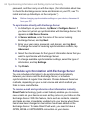
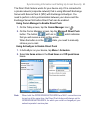
Using Comm Manager to Enable Direct Push
1. On the Today screen, tap the Comm Manager icon (
).
2. On the Comm Manager screen, tap the Microsoft Direct Push
button. The button
will turn to
, which indicates
that you will receive e-mail as they arrive.
When the button is in the
state, you need to manually
retrieve your e-mail.
Using ActiveSync to Enable Direct Push
1. In ActiveSync on your device, tap Menu > Schedule.
2. Select As items arrive in the Peak times and Off-peak times
boxes.
Note
When both the GPRS/EDGE/UMTS/HSDPA and Wi-Fi connections are
turned on at the same time, the Direct Push feature will always opt for
GPRS/EDGE/UMTS/HSDPA, for which you could be charged per your
network operator’s service plan.
64 Synchronizing Information and Setting Up E-mail Security
To schedule synchronization at regular time intervals
You can set how often to synchronize during Peak times (which
usually refer to your working hours) when e-mail volume is high, as
well as Off-peak times when e-mail volume is low.
1. In ActiveSync on your device, tap Menu > Schedule.
2. Select a shorter time interval in the Peak times box for you to be
able to receive e-mails more frequently.
3. Select a longer interval in the Off-peak times box.
Tip
To set the days and hours that make up your peak and off-peak times,
tap Adjust peak times to fit your schedule.
4.3 Synchronizing via Infrared and Bluetooth
You can connect your device to the PC to synchronize using the local
wireless technologies, such as infrared (IR) and Bluetooth. These
technologies have almost similar but slightly different requirements.
To synchronize with a computer via infrared
1. Follow the instructions in ActiveSync Help on the computer for
setting up your computer to receive infrared beams.
2. Line up the infrared (IR) ports of your device and your computer
so that they are unobstructed and within close range.
3. On your device, tap Start > Programs > ActiveSync.
4. Tap Menu > Connect via IR.
To synchronize with a computer via Bluetooth
1. Follow the instructions in ActiveSync Help on the computer for
configuring Bluetooth on your computer to support ActiveSync.
2. On your device, tap Start > Programs > ActiveSync.
3. Tap Menu > Connect via Bluetooth. Make sure the Bluetooth
function of both your device and the computer are turned on, and
they are within close range.
4. If this is the first time you have connected to this computer via
Bluetooth, you must first complete the Bluetooth wizard on
your device and set up a Bluetooth partnership between your
Synchronizing Information and Setting Up E-mail Security 65
device and the computer. For more information about creating a
Bluetooth partnership, see “Bluetooth partnerships” in Chapter 6.
Notes
• To preserve battery power, turn off Bluetooth when not in use.
• To connect and synchronize your device with a computer via
Bluetooth, your computer must have a Bluetooth adapter or dongle.
4.4 Synchronizing Music, Video, and Pictures
If you want to carry your music or other digital media along with you
while you travel, ActiveSync works with Windows Media Player to
synchronize music, video, and pictures with your device.
Other than selecting the Media information type in ActiveSync to
be synchronized, all media synchronization settings must be set in
Windows Media Player. Before media can be synchronized, you must
do the following:
•
Install Windows Media Player Version 10 on the PC. (Windows
Media Player 10 works only in Windows XP or later versions).
•
Connect your device to the PC with a USB cable. If your device
is currently connected using Bluetooth or infrared, you must end
that connection before media can be synchronized.
•
Insert a Micro SD card into your device (32MB or larger is
recommended).
•
Set up a sync partnership between the Micro SD card and
Windows Media Player.
Change Media synchronization settings
Once you select the Media information type in ActiveSync to be
synchronized, any of your favorite music, video, and picture files in
Windows Media Player playlists can be synchronized. All you have to
do is set up synchronization in Windows Media Player for those media
files.
66 Synchronizing Information and Setting Up E-mail Security
To set up a sync relationship with a storage card
1. On the computer, open Windows Media
Player.
2. Click the Sync tab.
3. Select the storage card.
4. Click Set up Sync.
5. Choose whether to synchronize
automatically or manually.
For more information about Windows Media Player on your device, see
“Using Windows Media Player” in Chapter 8.
4.5 Setting Up E-mail Security
Windows Mobile on your device protects your Outlook e-mail through
Secure/Multipurpose Internet Mail Extension (S/MIME), which allows
you to digitally sign your messages as well as encrypt them.
Using authorization keys and certificates, S/MIME allows you to
digitally sign your e-mail messages to prove your identity to the
recipients. Authorization keys are also used when encrypting
Synchronizing Information and Setting Up E-mail Security 67
messages to improve privacy and prevent undue tampering or hacking
of your messages. You can encrypt a message with or without a
certificate. However, to read an encrypted message, you need a valid
certificate to decrypt it.
Note
S/MIME encryption and digital signatures for Windows Mobile-based
devices are available only with Exchange Server 2003 Service Pack
2 or a later version that supports S/MIME. If you are not using one
of these products, or have not yet synchronized, these options are
unavailable.
Digitally sign and encrypt all messages
ActiveSync allows you to set up S/MIME e-mail encryption and signing.
You must obtain a valid certificate to sign and encrypt e-mail messages
successfully.
1. Tap Start > Programs > ActiveSync.
2. Tap Menu > Options.
3. Select the E-mail information type, and tap Settings. On the Email Sync Options screen, tap Advanced.
4. Do one or both of the following:
•
To sign all your outgoing e-mail messages so that recipients
can be certain that the messages were sent by you and have
not been altered in any way, select the Sign all outgoing email messages check box.
68 Synchronizing Information and Setting Up E-mail Security
•
To encrypt all your outgoing e-mail messages so that the
contents of your messages are protected from being viewed
by anyone other than the intended recipients, select the
Encrypt all outgoing e-mail messages check box.
5. Tap Choose Certificate to select a certificate for signing or
encrypting outgoing e-mail messages.
You can select certificates to sign or encrypt e-mail messages
individually if you do not choose to sign or encrypt all outgoing
e-mail. For information about signing and encrypting individual
messages, see “Individually sign and encrypt a message” in
Chapter 7.
Chapter 5
Managing Your Pocket PC
Phone
5.1 Personalizing Your Pocket PC Phone
5.2 Adding and Removing Programs
5.3 Managing Memory
5.4 Backing Up Files
5.5 Protecting Your Pocket PC Phone
5.6 Resetting Your Pocket PC Phone
70 Managing Your Pocket PC Phone
5.1 Personalizing Your Pocket PC Phone
Customize the Today screen
The Today screen shows your upcoming appointments, active tasks,
and information about incoming messages. You can customize the
Today screen on your device.
To customize the Today screen
1. Tap Start > Settings > Personal tab > Today.
2. On the Appearance tab, select the desired theme for the
background of the Today screen.
3. On the Items tab, select the items you want to appear on the
Today screen.
Tip
To change the order of items displayed on the Today screen, tap the
item, and tap Move Up or Move Down.
To add a custom background image
You can use one of your own pictures as the background image on the
Today screen. Be aware that pictures can affect the readability of text
on the Today screen.
1. Tap Start > Settings > Personal tab > Today.
2. Select the Use this picture as the background check box, and
tap Browse to view a list of your picture files.
3. Tap the file name of the picture you want to use.
4. Tap OK.
To set options for displaying appointments on the Today screen
If you have a large number of appointments, you may want to specify
the kind of appointments that are displayed on the Today screen.
1. Tap Start > Settings > Personal tab > Today.
2. Tap the Items tab.
3. Select Calendar and tap Options.
4. Do any of the following:
Managing Your Pocket PC Phone 71
•
•
Select Next appointment to show only the next appointment
in your schedule, or Upcoming appointments to show
multiple appointments.
Clear the Display all day events check box if you do not want
to display all-day events.
To set options for displaying tasks on the Today screen
If you have a large number of tasks, you may want to specify the kind
of tasks that are displayed on the Today screen.
1. Tap Start > Settings > Personal tab > Today.
2. Tap the Items tab.
3. Select Tasks and tap Options.
4. Do any of the following:
•
•
Under Display number of, select the type of tasks you want
to appear on the Today screen.
In the Category list, select whether to display only tasks
assigned to a specific category or to display all tasks.
Customize the Start menu
You can choose which items appear in the Start menu.
1. Tap Start > Settings > Personal tab > Menus.
2. Select the check boxes of the items you want to appear in the
Start menu. You can select up to seven items.
Tip
You can also create folders and shortcuts to appear on the Start menu.
In ActiveSync on your PC, click Explore. In the Mobile Device window,
double-click My Windows Mobile-Based Device > Windows > Start
Menu, then create the folders and shortcuts that you want. You will see
the added items after you synchronize.
Why is the device name important?
The device name is used to identify the device in the following
situations:
•
Synchronizing with a PC
•
Connecting to a network
•
Restoring information from a backup
72 Managing Your Pocket PC Phone
Note
If you synchronize multiple devices with the same PC, each device must
have a unique name.
To change the device name
1. Tap Start > Settings > System tab > About.
2. Tap the Device ID tab.
3. Enter a name.
Note
The device name must begin with a letter, consist of letters from A to Z,
numbers from 0 to 9, and cannot contain spaces. Use the underscore
character to separate words.
Set Date / Time / Language / Regional Options
You can set up the correct date, time, language, and regional settings
according to your use.
To set the time and date
1. Tap Start > Settings > System tab > Clock & Alarms > Time
tab.
2. Select the correct time zone and change the date or time.
Note
During synchronization, the time on your device is updated with the time
on your PC.
To set an alarm
1. Tap Start > Settings > System tab > Clock & Alarms > Alarms
tab.
2. Tap <Description> and enter a name for the alarm.
3. Tap the day of the week for the alarm. You can select multiple
days by tapping each desired day.
4. Tap the time to open a clock and set the time for the alarm.
5. Tap the alarm icon (
) to specify the type of alarm you want.
You can choose a flashing light, a single sound, a repeating
sound, or vibration.
6. If you choose to play a sound, tap the list next to the Play sound
check box and tap the sound you want.
Managing Your Pocket PC Phone 73
To set the time and date for a different location
If you visit or communicate with someone in a particular time zone
often, you can select it as your visiting time zone.
1. Tap Start > Settings > System tab > Clock & Alarms > Time
tab.
2. Tap Visiting.
3. Select the correct time zone and change the time or date.
To change language and regional settings
The style in which numbers, currency, dates, and times are displayed
is specified in regional settings.
1. Tap Start > Settings > System tab > Regional Settings.
2. On the Region tab, select your region and language.
3. The region you select determines which options will be available
on the other tabs.
4. To customize settings further, tap the appropriate tabs and select
the desired options.
Personal and system settings
To reassign programs or shortcuts to program buttons
Your device may come with programs already assigned to hardware
buttons. You can customize these buttons to open the programs you
use most, or to perform certain shortcuts such as changing the screen
orientation, opening the Today screen, or opening Input Panel.
1. Tap Start > Settings > Personal tab > Buttons.
2. A list of buttons and their current assignments are displayed on
the Program Buttons tab.
3. Tap the button you want to reassign. To help you identify the
buttons, there are numbers and icons representing the original
function of the button.
4. In the Assign a program box, tap the program or shortcut you
want to assign.
5. Tap OK.
74 Managing Your Pocket PC Phone
To increase or decrease the size of text on the screen
1. Tap Start > Settings > System tab > Screen > Text Size tab.
2. Move the slider to increase or decrease the text size.
To choose how to be notified about events or actions
1. Tap Start > Settings > Personal tab > Sounds & Notifications.
2. On the Sounds tab, choose how you want to be notified by
selecting the appropriate check boxes.
3. On the Notifications tab, in Event, tap an event name and
choose how you want to be notified by selecting the appropriate
check boxes. You can choose from several options, such as a
special sound, a message, or a flashing light.
Tip
Turning off sounds and the flashing light helps conserve battery power.
To adjust the speed for scrolling
Pressing and holding Navigation Control up or down scrolls through the
items in a list. Follow these steps to set the scrolling speed.
1. Tap Start > Settings > Personal tab > Buttons > Up/Down
Control tab.
2. Do one of the following:
•
Under Delay before first repeat, move the slider to shorten
or lengthen the time that elapses before scrolling begins.
•
To change the time it takes to scroll from one item to the next,
under Repeat rate, move the slider to adjust the speed.
To find the operating system version number
• Tap Start > Settings > System tab > About.
The version of the operating system on your device is shown near the
top of the About screen.
To get detailed device information
• Tap Start > Settings > System tab > About.
The Version tab displays important device information, including the
type of processor and the amount of memory that is installed.
Managing Your Pocket PC Phone 75
To make the battery last longer
• Tap
in the title bar of the Today screen. On the Advanced tab
of the Power settings screen, you can specify when your device
turns off to conserve battery power. For optimum conservation,
specify 3 minutes or less.
•
Use the AC adapter to plug your device into external power
whenever possible, especially when using a Mini SD card or
when using a modem or other peripherals.
•
Adjust the backlight settings.
To adjust the brightness of the backlight
1. Tap
in the title bar of the Today screen.
2. On the Power settings screen, tap the Menu > Backlight.
3. On the Brightness tab, move the slider right to increase the
brightness, or left to decrease the brightness.
To set the backlight to dim after a time delay
1. Tap
in the title bar of the Today screen.
2. On the Power settings screen, tap the Menu > Backlight.
3. Tap the Battery power tab, or the External power tab.
4. Select the Turn off backlight if device is not used for check
box, and specify the time delay.
Phone settings
You can customize phone settings, such as the ring type and ring tone
to be used for incoming calls, and the keypad tone to be used when
entering phone numbers. Open the Phone program to customize these
settings.
To change the ring tone
1. On the Phone screen, tap Menu > Options > Phone tab.
2. In the Ring tone list, tap the sound you want to use.
Tip
To use custom *.wav, *.mid, *.mp3, or *.wma files as ring tones, use
ActiveSync on your PC to copy the files to the /Windows/Rings folder
on your device. Next, select the sound from the Ring tone list. For more
76 Managing Your Pocket PC Phone
information about copying files to your device, see ActiveSync Help on
your PC.
To change the ring type
You can change the way that you are notified of incoming calls. For
example, you can choose to be notified by a ring, a vibration, or a
combination of both.
1. On the Phone screen, tap Menu > Options > Phone tab.
2. In the Ring type list, tap the desired option.
To change the keypad tone
You can change the tone you hear when entering a phone number on
the keypad. If set to Long tones, the tone is heard continuously for as
long as the number on the keypad is pressed. Use this setting if you
are having trouble accomplishing tasks that rely on tones from your
phone such as accessing messages from an answering machine. If set
to Short tones, the tone is heard only for one or two seconds. If set to
Off, no tone will be heard.
1. From the Phone keypad, tap Menu > Options > Phone tab.
2. In the Keypad list, tap the option you want.
Phone services
Phone Services, such as Call Waiting, enable you to choose how to
handle all incoming calls on your device.
To choose the services
1. Tap Start > Settings > Personal tab > Phone > Services tab.
2. Select the service you want to use, then tap Get Settings.
Networks
You can view available mobile phone networks, determine the order
in which your device accesses another network if the current one
is unavailable, and specify whether you want to change networks
manually or automatically. For more information about network
settings, see Help on your device.
Managing Your Pocket PC Phone 77
To change phone network settings
1. Tap Start > Settings > Personal tab > Phone > Network tab.
2. By default, your device displays the current network as offered
by your service provider. You can customize to set your preferred
network.
To set preferred networks
1. Tap Start > Settings > Phone > Network tab. By default, the
Network selection field is set to Automatic. However, you can
set it to Manual to choose your own network at any point of time.
2. Tap Set Networks.
3. Select the networks on the Phone: Preferred networks screen
and sort them according to your preference.
4. Tap OK.
5.2 Adding and Removing Programs
Before you purchase additional programs for your device, you should
note the model name of your device, the version of Windows Mobile
software running on it, and the type of processor. This information will
help you select a program that is compatible with your device. For
more information, see “To get detailed device information” and “To find
the operating system version number” in this chapter.
Programs available for purchase usually include a Setup program
(commonly named "setup.exe") that you must first install on your PC.
You can then use ActiveSync to add programs to your device, or add a
program directly from the Internet.
To add programs
1. Download the program to your PC (or insert the CD or disk that
contains the program into your PC). You may see a single *.exe
file, a *.zip file, a Setup.exe file, or several versions of files
for different device types and processors. Be sure to select a
program designed for your device and processor type.
2. Read any installation instructions or documentation that comes
78 Managing Your Pocket PC Phone
with the program. Many programs provide special installation
instructions.
3. Connect your device to the PC.
4. Double-click the *.exe file.
•
If the executable file is an installation wizard, follow the
instructions on the screen. Once the program has been
installed on your PC, the wizard will automatically transfer the
program to your device.
•
If an installation wizard does not start, you will see an
error message stating that the program is valid but that it
is designed for a different type of computer. You will need
to copy this program to your device. If you cannot find any
installation instructions for the program, use ActiveSync to
copy the program file to the Program Files folder on your
device.
To remove programs
You can only remove programs that you installed. Programs that come
with your device cannot be removed.
1. Tap Start > Settings > System tab > Remove Programs.
2. In the Programs in storage memory list, select the program you
want to remove, and tap Remove.
3. Tap Yes. If another confirmation message appears, tap Yes
again.
Managing Your Pocket PC Phone 79
5.3 Managing Memory
You may need to stop a program if it becomes unstable or the program
memory is low.
To see how much memory is available
• Tap Start > Settings > System tab > Memory.
•
On the Main tab, the amount of memory allocated to file and
data storage versus program storage is displayed, as well as the
amount of memory in use versus the available memory.
To see available storage card memory
You can see how much memory is available on a storage card that is
inserted in your device.
1. Tap Start > Settings > System tab > Memory.
2. Tap the Storage Card tab.
Tip
If you have previously inserted more than one storage card, tap the list
box and then the storage card whose information you want to see.
To free up program memory
Try the following to free memory on your device:
•
Close programs you are not currently using.
•
Move e-mail attachments to a storage card.
•
Move files to a storage card. Tap Start > Programs > File
Explorer. Tap and hold the file, and tap Cut. Browse to the
storage card folder and tap Menu > Edit > Paste.
•
Delete unnecessary files. Tap Start > Programs > File Explorer.
Tap and hold the file, and tap Delete.
•
Delete large files. To find your largest files, tap Start > Programs
> Search. In the Type list, tap Larger than 64 KB, and tap
Search.
•
In Internet Explorer Mobile, delete temporary Internet files and
clear history information. For more information, see “Internet
Explorer Mobile” in Chapter 6.
80 Managing Your Pocket PC Phone
•
Remove programs you no longer use.
•
Reset your device.
To close a program
In most cases, programs automatically close to free needed memory,
however, you can close programs manually, if you prefer.
1. Tap Start > Settings > System tab > Memory > Running
Programs tab.
2. In the Running Programs list, tap the program you want to
close, and tap Stop.
Tip
In most programs, you can also use the keyboard shortcut CTRL+Q to
close the program.
5.4 Backing Up Files
You can back up files to your PC using ActiveSync, or copy files to a
storage card you insert into your device. Your device has an expansion
slot for inserting a Mini SD card.
Using ActiveSync, you can copy or move information from the PC
to your device and vice versa. Copying a file results in separate
versions of a file on your device and PC. Because the files are not
synchronized, changes made to one file will not affect the other.
Note
If you want to automatically update information on both your device and
PC, synchronize the information instead. For more information about
copying and synchronizing files, see ActiveSync Help on your PC.
To copy files to a storage card
1. Push the storage card into the storage card slot until it clicks into
place. The card is secure when it does not protrude from the
base.
2. Tap Start > Programs > File Explorer and navigate to the
appropriate folder.
3. Tap and hold the file you want to copy, and tap Copy.
Managing Your Pocket PC Phone 81
4. Tap the folder list (labeled My Documents by default) and tap
Storage Card.
5. Tap Menu > Edit > Paste.
To copy a file between your device and the PC
1. Connect your device to the PC.
2. In ActiveSync, click Explore, which opens the Mobile Device
folder of your device.
3. To copy a file from your device to your PC:
•
In the Mobile Device folder, go to the file that you want to
copy.
•
Right-click the file, then click Copy.
•
Locate the destination folder on your PC. Right-click the
folder, then click Paste.
4. To copy a file from your PC to your device:
•
On your PC, navigate to the folder that contains the file you
want to copy.
•
Right-click the file, then click Copy.
•
Right-click the destination folder under Mobile Device, then
click Paste.
To automatically save files on a storage card
In the Word Mobile, Excel Mobile, and Notes programs, you may find it
helpful to save all new documents, notes, and workbooks directly on a
storage card.
1. From the program file list, tap Menu > Options.
2. With a storage card inserted in your device, in the Save to box,
select the appropriate storage card to automatically save new
items on the storage card.
3. Tap OK.
Note
In the file or note list, a storage card symbol is displayed next to the
names of files saved on a storage card.
82 Managing Your Pocket PC Phone
5.5 Protecting Your Pocket PC Phone
There are two kinds of protection that you can set for your device:
•
You can protect your SIM card from unauthorized use by
assigning a PIN (personal identification number). Your first PIN
will be given to you by your wireless service provider; you can
change the PIN later.
•
Additionally, you can prevent unauthorized access to any part of
the device by using password protection. You can help keep your
data more secure by requiring a password every time the device
is turned on. You create your own password when you begin
using your device.
To protect your SIM card with a PIN
1. On the Phone screen, tap Menu > Options > Phone tab.
2. Tap Require PIN when phone is used.
3. To change the PIN at any time, tap Change PIN.
Tip
Emergency calls can be placed at any time, without requiring a PIN.
To protect your device with a password
1. Tap Start > Settings > Personal tab > Lock.
2. Select the Prompt if device unused for check box, and in the
box to the right, select how long your device must be turned off
before a password is required. In the Password type box, select
the type of password you would like to use. Enter the password
and, if necessary, confirm the password.
If your device is configured to connect to a network, use an
alphanumeric password for increased security for your device.
3. On the Hint tab, enter a phrase that will help you remember your
password, but does not allow others to guess your password.
The hint will be displayed after the wrong password is entered
four times.
4. Tap OK. The next time the device is turned on, you will be
prompted to enter your password.
Managing Your Pocket PC Phone 83
Notes
• Each time a wrong password is entered, the device response time
gets longer until the device appears to be not responding.
• If you forget your password, you must follow the instructions in this
user manual to clear the memory before you can access your device.
To change your password
1. Tap Start > Settings > Personal tab > Lock. You will be
prompted to enter your current password.
2. In the Password box, enter your new password.
3. On the Hint tab, enter a phrase that will help you remember
your new password, but does not allow others to guess your
password.
The hint will be displayed after the wrong password is entered
four times.
4. Tap OK.
To display owner information on the ‘my info’ screen
Having your contact information displayed on the ‘my info’ screen on
startup allows for easy identification of the device in case it is lost.
1. Tap Start > Settings > Personal tab > Owner Information.
2. On the Options tab, select the Identification information check
box.
3. If you want additional text displayed, tap the Notes tab and enter
the text (for instance: Reward if found).
4. On the Options tab, select the Notes check box.
5. Tap OK.
Tip
To display owner information on the Today screen, tap Start > Settings >
Personal tab > Today. On the Items tab, select the Owner Info check
box.
84 Managing Your Pocket PC Phone
5.6 Resetting Your Pocket PC Phone
Occasionally, you may need to reset your device. A normal (or soft)
reset of your device clears all active program memory and shuts down
all active programs. This can be useful when your device is running
slower than normal, or a program is not performing properly. A soft
reset is also necessary after the installation of some programs. If a soft
reset is performed when programs are running, unsaved work will be
lost.
You can also perform a hard reset (also known as a full reset). A hard
reset should be performed only if a normal reset does not solve a
system problem. After a hard reset, the device is restored to its default
settings — the way it was when you first purchased it and turned it
on. Any programs you installed, data you entered, and settings you
customized on your device will be lost. Only Windows Mobile software
and other pre-installed programs will remain.
To perform a soft reset
• Use the stylus to lightly press and hold the Reset button on the
bottom of your device. Your device restarts and displays the
Today screen.
RESET
button
Managing Your Pocket PC Phone 85
To perform a hard reset
Press and hold the Left Soft Key and the Right Soft Key, and at the
same time, use the stylus to press the Reset button at the bottom of
your device.
Left Soft Key
Right Soft Key
Warning! Your device will be set back to factory default settings. Please ensure
any additional installed programs and/or user data have been backed
up before a hard reset is performed.
86 Managing Your Pocket PC Phone
Chapter 6
Getting Connected
6.1 Connecting to the Internet
6.2 Internet Explorer Mobile
6.3 Using Comm Manager
6.4 Using Bluetooth
6.5 Using Wi-Fi
6.6 Using Wireless Modem
6.7 Using Terminal Services Client
88 Getting Connected
6.1 Connecting to the Internet
Your device is equipped with powerful networking functions that enable
you to connect to the Internet through Wi-Fi or GPRS/EDGE/UMTS/
HSDPA.
Connecting your device to the Internet through a private or free
wireless network is your best choice since this will not incur any cost.
Take note, however, that using Wi-Fi on your device will drain battery
power faster. For more information about setting up a Wi-Fi connection,
see “Using Wi-Fi” later in this chapter.
In times when you are not within the coverage of a wireless network,
you can either use GPRS or phone dial-up to connect your device to
the Internet or your corporate network. Your device has two groups of
connection settings: My ISP (Internet Service Provider) and My Work
Network. The My ISP settings are used to connect to the Internet,
while My Work Network settings can be used to connect to any private,
corporate network.
To set up a data connection to the Internet
GPRS/EDGE/UMTS/HSDPA is a data service that allows information to
be sent and received across the wireless network. You can use GPRS/
EDGE/UMTS/HSDPA to connect to the Internet or to send and receive
MMS messages on your device. You will be billed per KB (Kilobyte)
by your wireless service provider when you are sending or receiving
information via GPRS/EDGE/UMTS/HSDPA.
If GPRS/EDGE/UMTS/HSDPA settings are not preset on your device,
obtain the Access point name from your wireless service provider.
Also, check with your wireless service provider if a user name and
password are required.
1. Tap Start > Settings > Connections tab > Connections.
2. Under My ISP, tap Add a new modem connection.
Getting Connected 89
3. On the Make New Connection screen, enter a name for the
connection.
4. In the Select a modem list, select Cellular Line (GPRS, 3G),
then tap Next.
5. Enter the Access point name, then tap Next.
6. Enter the user name and password, only if required.
7. Tap Finish.
Notes
• To view help information for any screen, tap the help icon (
).
90 Getting Connected
• To modify your connection settings, tap Manage existing
connections on the Connections screen, and complete the
connection wizard.
To set up a dial-up connection to your ISP
When you use your device to dial up to your ISP and connect to the
Internet, you will be billed by the number of minutes that you use.
To establish a dial-up connection on your device, you need the same
settings that you normally use when you dial up from your computer.
This includes the ISP server phone number, your user name and
password.
1. Tap Start > Settings > Connections tab > Connections.
2. Under My ISP, tap Add a new modem connection.
3. On the Make New Connection screen, enter a name for the
connection.
4. In the Select a modem list, select Cellular Line, then tap Next.
5. Enter the ISP server phone number, then tap Next.
6. Enter your user name, password, and any other information
required by your ISP.
7. Tap Finish.
To connect to a private network
1. Obtain the following information from your network administrator:
•
Server phone number
•
User name
•
Password
•
Domain (and other required settings, such as IP address)
2. Tap Start > Settings > Connections tab > Connections.
3. In My Work Network, follow the instructions for each type of
connection.
4. Complete the connection wizard, then tap Finish.
Note
To start browsing the Internet or private network, tap Start > Programs >
Internet Explorer.
Getting Connected 91
To set up a network card
You can insert and use a network card on your device to connect
directly to a local area network (LAN) at your home or workplace. Once
connected, you can view the Internet or intranet, or download e-mail on
your device. Ensure you purchase and configure a network card that is
compatible with your device.
1. Insert the network card into your device.
2. The first time you insert the card, Network Settings will appear
automatically so that you can configure the network card. If it
does not appear, or to change settings later, tap Start > Settings >
Connections tab > Network Cards.
3. To enter specific server information, tap the appropriate network
adapter in the Tap an adapter to modify settings list, and
then tap Name Servers. Most networks use DHCP dynamic IP
addressing, so you should not have to change these settings
unless you have been instructed to do so.
4. If necessary, connect the network card to the network by using a
network cable. For information, see the documentation that came
with your network card.
5. To start a connection, insert the network card, and begin using a
desired program, such as Internet Explorer Mobile, to browse the
Internet. Your device will connect automatically.
Note
If you use your network card with two networks, such as a private
network at work and one at home for the Internet, you will need to
change the network to which the network card connects. Tap Start >
Settings > Connections tab > Network Cards, then in the My network
card connects to list, select The Internet or Work, depending on
which network to connect the network card.
92 Getting Connected
6.2 Internet Explorer Mobile
Internet Explorer Mobile is a full-featured Internet browser, optimized
for use on your device.
To start Internet Explorer
• Tap Start > Internet Explorer.
To set a Home page
1. In the address bar on top of the Internet Explorer screen, enter
the desired Web page address. Tap to open the Web page.
2. Tap Menu > Tools > Options > General tab.
3. Do one of the following:
Tip
•
To use the displayed page as the Home page, tap Use Current.
•
To use the default Home page, tap Use Default.
To go to your Home page, tap Menu > Home.
To use MEdia Net from Cingular
MEdia Net, offered by Cingular, brings your favorite web pages,
downloads and more to your device. To access and use MEdia Net, do
the following:
1. Tap Start > Settings > Connections tab > Connections.
2. On the Advanced tab, tap Select Networks.
3. Fromt the list displaying My ISP, select MEdia Net and tap OK.
4. Tap Start > Internet Explorer.
5. Tap Favorites > MEdia Net or Menu > Favorites > MEdia Net.
6. Personalize your home page exactly the way you want it.
To transfer favorites from your PC
You can transfer the favorites you have stored on your PC to your
device by synchronizing the Internet Explorer favorites on your PC with
your device.
1. In ActiveSync on your PC, on the Tools menu, click Options, and
select Favorites.
Getting Connected 93
2. In Internet Explorer on your PC, click Favorites > Add to
Favorites and save or move favorite links to the Mobile Favorites
subfolder in the Favorites list.
3. Connect your device to your PC. If synchronization does not start
automatically, click Sync.
To add a favorite
1. In Internet Explorer Mobile, go to the page you want to add.
2. Tap and hold the page, and tap Add to Favorites.
3. Confirm or change the name, and select a folder for storing the
favorite.
To delete a favorite or folder
1. In Internet Explorer Mobile, tap Menu > Favorites > Add/Delete tab.
2. Select the item you want to delete, and tap Delete.
To change the size of text on Web pages
• In Internet Explorer Mobile, tap Menu > Zoom, and tap the size
you want.
To change how Web pages fill the screen
1. In Internet Explorer Mobile, tap Menu > View.
2. Tap one of the following:
•
One Column. Arranges the content into one column that is
as wide as the screen. This means that you will rarely have to
scroll horizontally.
•
Default. Maintains a layout similar to what you see on a
desktop computer, but it makes items smaller and arranges
the content so that you can see most of it without having to
scroll horizontally.
•
Desktop. Keeps the same layout and size as on a desktop
computer, which will require both horizontal and vertical scrolling.
To clear the History list
1. In Internet Explorer Mobile, tap Menu > Tools > Options >
Memory tab.
2. Tap Clear History.
94 Getting Connected
To save a picture from a Web page
1. In Internet Explorer Mobile, tap and hold the picture, and tap
Save Image.
2. Do one of the following:
•
To save the picture in My Pictures on your device, tap Yes.
•
To save the picture in another location, such as a storage
card, tap Save As.
To delete temporary Internet files
Your device temporarily stores Web pages that you frequently visit or
have visited recently to speed up the display of these Web pages when
you access them. You may want to delete these files to free storage
space.
1. In Internet Explorer Mobile, tap Menu > Tools > Options >
Memory tab.
2. Tap Delete Files. All pages stored on your device, including
offline favorites content, will be deleted.
To set up Internet security settings
Cookies are small files containing information about your identity and
preferences so that a page can tailor information to your needs. The
page sends the file, and it is stored on your device.
1. In Internet Explorer Mobile, tap Menu > Tools > Options >
Security tab.
2. To prevent Internet Explorer Mobile from accepting any cookies,
clear the Allow cookies check box.
3. Select the check boxes for the other security options you want,
and tap OK.
6.3 Using Comm Manager
Comm Manager acts like a central switch that lets you enable or
disable phone features as well as manage your data connections
easily.
Getting Connected 95
To open Comm Manager
• Tap the Comm Manager icon (
) on the Today screen.
•
Press the Comm Manager button on your device.
•
Tap Start > Settings > Connections tab > Comm Manager (
).
Simply tap the corresponding button to enable or disable a feature.
1
5
2
6
3
7
1
Tap to toggle between enabling
or disabling the phone.
2
Tap to toggle between turning
on or off Wi-Fi. Tap Settings >
Wi-Fi Settings to configure WiFi on your device. See "Using
Wi-Fi" for details.
3
Tap to disconnect active data
services (e.g. UMTS/HSDPA).
You cannot reconnect data
services in Comm Manager.
4
Tap to open ActiveSync so you
can synchronize the device and
computer. For more information
about the configuration settings
for ActiveSync, see Chapter 4.
5
Tap to toggle between turning on
or off Bluetooth. Tap Settings >
Bluetooth Settings to configure
Bluetooth on your device. See
"Using Bluetooth" for details.
6
Tap to toggle between
automatically receiving (as items
arrive) or manually retrieving
Outlook e-mails. For more
information, see "Schedule
synchronization with Exchange
Server" in Chapter 4.
7
Tap to toggle between turning on
the phone's ringer or setting the
phone to vibration/mute mode.
4
Comm Manager screen
96 Getting Connected
6.4 Using Bluetooth
Bluetooth is a short-range wireless communications technology.
Devices with Bluetooth capabilities can exchange information over a
distance of about 10 meters without requiring a physical connection.
You can even beam information to a device in a different room, as long
as it is within the Bluetooth signal coverage range.
Bluetooth can be used in the following ways:
•
Beam information, such as files, appointments, tasks, and contact
cards, between devices that have Bluetooth capabilities.
•
Synchronize information between your device and computer via
Bluetooth.
•
Use a Bluetooth-enabled headset (or other Bluetooth-enabled
hands-free device such as a car kit) with your device for handsfree phone conversations.
•
Use a Bluetooth service. Once you connect to another device
or computer using Bluetooth, you can locate and use any of the
services available on that device.
•
Create a connection between your device and another Bluetoothenabled phone to use that phone as a modem.
Note
Normally, you will need another phone as a modem only if your Pocket
PC device has no integrated phone capability.
Bluetooth modes
Bluetooth on your device operates in three different modes:
•
On. Bluetooth is turned on. Your device can detect other
Bluetooth-enabled devices, but not vice versa.
•
Off. Bluetooth is turned off. In this mode, you can neither send
nor receive information using Bluetooth. You might want to turn
the radio off at times in order to conserve battery power, or in
situations where radio use is prohibited, such as on board an
aircraft and in hospitals.
•
Discoverable. Bluetooth is turned on, and all other Bluetoothenabled devices within a range of 10 meters can detect your device.
Getting Connected 97
Note
By default, Bluetooth is turned off. If you turn it on, then turn off your
device, Bluetooth also turns off. When you turn on your device again,
Bluetooth automatically turns on.
To turn Bluetooth on and make your device discoverable
1. On your device, tap Start > Settings > Connections tab >
Bluetooth.
2. Select the Turn on Bluetooth and Make this device
discoverable to other devices check boxes.
3. Tap OK.
Bluetooth partnerships
A Bluetooth partnership is a relationship that you create between your
device and another Bluetooth-enabled device in order to exchange
information in a secure manner. Creating a partnership between two
devices involves entering the same passkey on both devices.
Creating a partnership between two devices is a one-time process.
Once a partnership is created, the devices can recognize the
partnership and exchange information without entering a passkey
again. Make sure the two devices are within a range of 10 meters from
one another, and Bluetooth is turned on and in discoverable mode.
To create a Bluetooth partnership
1. On your device, tap Start > Settings > Connections tab >
Bluetooth.
2. On the Devices tab, tap New Partnership. Your device
searches for other Bluetooth devices and displays them in the
box.
3. Tap the desired device name in the box.
4. Tap Next.
5. Specify a passkey to establish a secure connection. The
passkey can be 1 up to 16 characters.
6. Tap Next.
7. Wait for the paired device to accept the partnership. The
receiving party needs to enter the same passkey that you specified.
98 Getting Connected
8. The name of the paired device is then displayed. You may edit
and enter a new name for that device.
9. Select the check boxes of services that you want to use from the
paired device.
10. Tap Finish.
To accept a Bluetooth partnership
1. Ensure that Bluetooth is turned on and in discoverable mode.
2. Tap Yes when prompted to establish a partnership with the other
device.
3. Enter a passkey (the same passkey that is entered on the device
requesting the partnership) to establish a secure connection. The
passkey must be between 1 and 16 characters.
4. Tap Next.
5. Tap Finish. You can now exchange information with the paired
device.
To rename a Bluetooth partnership
1. Tap Start > Settings > Connections tab > Bluetooth.
2. Tap and hold the partnership on the Devices tab.
3. On the shortcut menu, tap Edit.
4. Enter a new name for the partnership.
5. Tap Save.
To delete a Bluetooth partnership
1. Tap Start > Settings > Connections tab > Bluetooth.
2. Tap and hold the partnership on the Devices tab.
3. Tap Delete.
Connect a Bluetooth hands-free headset
For hands-free phone conversations, you can use a Bluetooth handsfree headset such as a car kit with your device.
Just like when connecting to any Bluetooth device, you also need to
enter a passkey when connecting to a Bluetooth hands-free headset.
Getting Connected 99
The passkey is fixed and cannot be changed on a Bluetooth headset.
Before you connect it to your device, check for the proper passkey in
the manufacturer’s documentation.
To connect a Bluetooth hands-free headset
1. Make sure that both your device and the Bluetooth headset
are turned on and within close range, and that the headset is
discoverable. Refer to the manufacturer’s documentation to find
out how to set the headset in discoverable mode.
2. Tap Start > Settings > Connections tab.
3. Tap Bluetooth > Devices tab > New Partnership. Your device
searches for other Bluetooth-enabled devices and displays them
in the list.
4. Tap the name of the Bluetooth headset, then tap Next.
5. Enter the passkey of the Bluetooth headset, then tap Next.
6. Select the check box for the Hands Free service, then tap
Finish.
100 Getting Connected
Beam information using Bluetooth
You can beam information, such as contacts, calendar items, and
tasks, as well as files from your device to your computer or to another
Bluetooth-enabled device.
Note
If your computer does not have built-in Bluetooth capability, you need to
connect and use a Bluetooth adapter or dongle on your computer.
To beam information from your device to a computer
1. Turn on Bluetooth on your device, and make your device
discoverable. For information about this, see “To turn Bluetooth
on and make your device discoverable”.
2. You also need to set Bluetooth on your computer to discoverable
mode. Do one of the following:
•
If your computer has Windows XP SP2 and your computer’s
built-in or external Bluetooth adapter is supported by Windows
XP SP2, open Bluetooth Devices from the Control Panel.
Click the Options tab, then select the Turn discovery on and
the Allow Bluetooth devices to connect to this computer
options.
•
If the Bluetooth adapter on your computer was installed
using a third-party provided driver, open the Bluetooth
software that came with the Bluetooth adapter. This software
varies by manufacturer, but in most cases, you will find a
Getting Connected 101
Bluetooth Configuration utility which you can open from the
Control Panel. After Bluetooth Configuration opens, click the
Accessibility tab, then select Let other Bluetooth devices
to discover this computer. Refer to the Bluetooth adapter’s
documentation for more information.
3. Create a Bluetooth partnership between the two devices.
For information about creating a partnership, see “Bluetooth
partnerships”.
After a partnership has been created successfully, your computer
is ready to receive Bluetooth beams.
4. On your device, tap and hold an item to beam. The item can be
an appointment in your calendar, a task, a contact card, or a file.
5. Tap Beam [type of item].
6. Tap the device name to which you want to send the beam.
7. If you beamed an Outlook item and it is not automatically added
to Outlook, select File > Import and Export in Outlook to import
it.
To beam information to a Bluetooth-enabled device such as another
Pocket PC, follow steps 3 and onwards in the above procedure.
Notes
• If the computer or device you want to beam to cannot be detected
by your device, make sure that its Bluetooth is turned on, set to
discoverable mode, and it is within close range (10 meters) of your
device.
• If you beamed an Outlook item to the computer and it is not
automatically added to Outlook, select File > Import and Export on
your computer to import it into Outlook.
Use the device as a Bluetooth modem
You can connect your device to a notebook or desktop computer
through Bluetooth and use the device as a modem for the computer.
To connect your device to the computer through Bluetooth, you need a
Bluetooth radio adapter (or USB Bluetooth dongle) for your computer.
102 Getting Connected
To set up a Bluetooth connection between the device and the
computer (in Windows XP SP2)
1. On your device, turn on Bluetooth and set it to discoverable
mode.
2. Connect a Bluetooth radio adapter on your computer. (Refer to
the manufacturer’s documentation for details on how to install).
After a Bluetooth radio adapter is installed on your computer, the
Control Panel and System Tray will have the Bluetooth Devices
icon. Double-click this icon.
3. In the Bluetooth Devices window, click Add.
4. The Add Bluetooth Device Wizard opens. Select the My device
is set up and ready to be found check box, then click Next.
5. The wizard then detects your device and displays its name in the
dialog box. Select the device name, then click Next.
6. Select Let me choose my own passkey, then enter a passkey
(1 up to 16 digits) that will serve as an identification number for
establishing a secure connection between your device and the
computer. Click Next.
7. A confirmation message then appears on your device. Tap Yes to
accept the connection, enter the same passkey, then tap Next.
8. On the computer, click Finish to exit the wizard.
9. On your device’s Partnership Settings screen, you can change
the display name for the computer, then tap Finish.
10. Now, open the Wireless Modem program on your device. Tap
Start > Programs > Wireless Modem.
11. Select Bluetooth as the Connection Type.
12. To use your phone as a data modem, set the Access point
name (APN). To set, tap Menu > APN Setting, enter the access
point name, then tap Done.
13. Tap Menu > Start on your device.
After successfully connecting your phone to the computer via
Bluetooth, the next thing to do is to add your device as a Bluetooth
modem to your computer.
Getting Connected 103
To add the device as a Bluetooth modem
1. On the computer, tap Start > Control Panel > Phone and
Modem Options.
2. Click the Modems tab. Check if there is a Bluetooth modem,
“Generic Bluetooth Modem” or “Standard Modem over Bluetooth
Link”, listed. If there is, skip to step 6.
3. If there is no Bluetooth modem listed in the Modems tab, click
Add.
4. In the Add Hardware Wizard, click Next.
5. In the Select Bluetooth Device screen, select the device name
then click OK.
6. In the Modems tab, select the Bluetooth modem listed then click
Properties.
7. Click the Advanced tab, then in the Extra initialization
commands text box, enter:
AT+CGDCONT=1,”IP”,”APN”
where APN is the access point name provided by your mobile
network operator to give you access to the Internet. Then click
OK.
8. Click OK to exit the Phone and Modem Options.
Your device is now set up as a Bluetooth modem. For details about
how to connect to the Internet, see “To dial-up and connect to the
Internet” in this chapter.
Use another Bluetooth phone as a modem
You can use another phone that has Bluetooth as a modem for your
device to browse the Internet or to transfer other information.
To do this, create a Bluetooth modem connection on your device and
then send information to the phone by using Bluetooth. The phone
relays the information over the mobile phone network and then sends
back to your device any information that you had requested over the
connection.
104 Getting Connected
Once you create a modem connection to the Bluetooth phone, you can
reuse it whenever you want to use the phone as a modem. Make sure
that Bluetooth is turned on and discoverable on both your device and
the phone, and that the two are within close range.
Note
Normally, you will need another phone as a modem only if your Pocket
PC device has no integrated phone capability.
To configure and use a Bluetooth phone as a modem for your
device
1. On your device, tap Start > Settings > Connections tab >
Connections.
2. Tap Add a new modem connection.
3. Enter a name for the connection.
4. In the Select a modem list, tap Bluetooth.
5. Tap Next.
6. If the phone appears in the My Connections list, skip to step 11.
7. If the phone does not appear in the My Connections list, tap
New Partnership, and follow the remaining steps.
8. Select the phone from the list and tap Next.
9. Enter a passkey and tap Next.
10. Enter the same passkey on the phone and tap Finish.
11. In the My Connections list on your device, select the phone and
tap Next.
12. Enter the phone number to dial for this connection and tap Next.
13. Enter the required logon information for this connection and tap
Finish.
Getting Connected 105
6.5 Using Wi-Fi
Wi-Fi provides wireless Internet access over distances of up to 100
meters. To use Wi-Fi on your device, you need access to a wireless
access point of your service provider. When you are in public places
such as in a coffee shop or restaurant, you will need access to their
public wireless access points (also referred to as “hotspots”).
Note
The availability and range of your device’s Wi-Fi signal depends on
the number, infrastructure, and other objects through which the signal
passes.
To connect to a Wi-Fi network
1. Open Comm Manager.
2. Tap the Wi-Fi button to turn on/off the wireless function. The WiFi icon indicates the wireless status.
: Wi-Fi is turned on.
: Wi-Fi is turned off.
3. After Wi-Fi has been turned on, your device then scans for
available wireless networks in your area. The network names
of the detected wireless networks will be displayed on a pop-up
message window. Tap the desired wireless LAN, then tap OK.
4. On the next pop-up message window, tap The Internet if the
wireless LAN connects your device to the Internet. Otherwise,
tap Work if the wireless LAN connects your device to a private
network.
106 Getting Connected
5. If the wireless LAN is secured by a network key, enter this key,
then tap Connect.
Next time you use your device to detect wireless networks, you
will not see the pop-up message windows again, and you will not
be prompted to enter the network key of the previously accessed
wireless network (unless you perform a hard reset which will
erase custom settings on your device).
Note
Wi-Fi networks are self-discoverable, which means no additional steps
are required for your device to connect to a Wi-Fi network. It may be
necessary to provide a username and password for certain closed
wireless networks, however.
To save battery power while connected to a Wi-Fi network
1. Tap Start > Settings > Connections tab > Wireless LAN to
open the Wireless LAN Settings screen.
2. On the Power Mode tab of the Wireless LAN Settings screen,
move the Power Save Mode slider to a position that optimizes
performance with the least power consumption.
Getting Connected 107
For example, move the slider to the left (Best Performance) to
have the optimal WLAN performance; move to the right (Best
Battery) to obtain the maximum battery usage.
To check the Wireless LAN status
You can check the current wireless connection status from the
following three screens of your device:
•
Title bar. When you enable Wi-Fi on your device, the Wi-Fi ON
icon ( ) will appear on the title bar.
After Wi-Fi is turned on, your device scans for available wireless
networks and the wireless signal icon (
) appears on the title
bar. The arrows in this icon will move back and forth while your
device is scanning for a wireless LAN signal. Once your device
successfully connects to a wireless LAN, the arrows stop moving.
•
Wireless LAN screen - Main tab. Here, it shows the name of the
wireless network that your device is currently connected to. The
configuration and signal quality of the wireless network are also
shown.
108 Getting Connected
•
Configure Wireless Networks screen. Tap Start > Settings >
Connections tab > Network Cards > Wireless tab. This screen
displays the wireless networks currently available.
•
To connect to a wireless network in the list, tap and hold on
the desired network, then tap Connect.
•
Tap a wireless network in the list to view or change its
connection settings.
•
You can also add new wireless networks, if available, by
tapping Add New.
Getting Connected 109
6.6 Using Wireless Modem
Wireless Modem allows you to use your device as an infrared, USB,
or Bluetooth modem for another device, such as your notebook
computer.
Follow the procedures in this section to set up your device as an infrared
or USB modem. To learn how to set up your device as a Bluetooth
modem, see “Use the device as a Bluetooth modem” in this chapter.
Notes
• Before activating Wireless Modem, make sure your device has a SIM
card installed, and you have set up a data or phone dial-up modem
connection on your device. For more information about setting up a
data connection, see "To set up a data connection to the Internet".
For more information about setting up a phone dial-up connection,
see "To set up a dial-up connection to your ISP".
Also make sure you have connected your device to a computer (via
infrared, USB or Bluetooth).
•
When you activate Wireless Modem, ActiveSync will be disabled
automatically.
To set up your device as an infrared or USB modem
1. On your device, tap Start > Programs > Wireless Modem.
2. In the Connection Type list, select how your device is connected
to the computer: IrDA if via infrared, or USB if through USB cable
connection.
110 Getting Connected
3. To use your device as a data modem, set the data Access point
name. To do so, tap Menu > APN Setting and enter the access
point name.
4. Point your device at the infrared port of your notebook, or plug in
the USB cable adapter between your device and the notebook.
5. Tap Menu > Start.
6. The next thing to do is to add your device as an infrared or USB
modem onto your notebook.
To add your device as an infrared modem to your notebook
1. After you tap Menu > Start on the Wireless Modem screen
of your device, the Found New Hardware dialog box will then
appear on your notebook and will show that your device has been
detected as an infrared modem. In this dialog box, make sure that
Install the software automatically (Recommended) is selected
then click Next.
2. Wait for Windows to finish installing the infrared modem, then
click Finish.
3. You can now connect your computer to the Internet. Follow the
steps in “To dial up and connect to the Internet.”
To add your device as a USB modem to your computer
1. After you tap Menu > Start on the Wireless Modem screen of
your device, your computer will automatically detect that your
device has been connected. The Found New Hardware dialog
box will then appear on your computer.
2. In the Found New Hardware dialog box, select Install from a list
or specific location (Advanced) and click Next.
3. Select Search for the best drivers in these locations.
4. Insert the Getting Started Disc into your CD drive. Select the
Include this location in the search check box. Click Browse
and choose the CD drive and root folder where the modem driver
is located, then click Next.
5. Wait for the installation to complete, then click Finish.
6. Click Start > Settings > Control Panel.
Getting Connected 111
7. Double-click Phone and Modem Options.
8. Click the Modems tab. Select the new modem from the Modem
list, then click OK.
9. You can now connect your computer to the Internet. Follow the
steps in “To dial up and connect to the Internet.”
To dial up and connect to the Internet
Once the computer recognizes your device as a modem, you can now
use the computer to dial up and connect to the Internet.
1. On your computer, click Start > Settings > Control Panel.
2. Double-click Network Connections.
3. Click File > New Connection.
4. In the New Connection Wizard, click Next.
5. Click Connect to the Internet then click Next.
6. Select Set up my connection manually then click Next.
112 Getting Connected
7. Select Connect using a dial-up modem then click Next.
8. Select the infrared, USB or Bluetooth modem that you previously
installed, then click Next.
Selecting the USB modem
9. Enter a descriptive name for this connection, then click Next.
10. If you are connecting to the Internet via GPRS, enter the
telephone number as *99#. Otherwise, enter your ISP‘s dial-up
phone number, then click Next.
11. Under Internet Account Information, you may not need to
enter a user name and password when using GPRS. Just click
Next to proceed.
12. Click Finish to exit the wizard.
13. The Connect dialog box then opens. Click Dial to dial up and
connect to the Internet.
Getting Connected 113
Next time you want to dial up again from your computer, click
Start > Settings > Control Panel, double-click Network
Connections, then double-click the modem connection.
114 Getting Connected
Note
To dial up to the Internet, you can also use the dialer program,
USBModem_Dialer.exe, that is included in the Getting Started Disc.
You will find it in the \OEM\APPS\Drivers\GSM USB Modem directory of
the CD.
To end the modem session
• On the Wireless Modem screen, tap Done or tap Menu > Stop.
6.7 Using Terminal Services Client
The Terminal Services Client allows you to log on to a PC running
Terminal Services or Remote Desktop, and use all the resources
available on that PC. For example, instead of running Word Mobile on
your device, you can run the PC version of Word and access the .doc
files available on that PC.
To connect to a Terminal Server
1. On your device, tap Start > Programs > Terminal Services
Client.
2. Enter the server name.
3. You can also select a server name in Recent servers if you have
recently connected to a server.
4. Select the Limit size of server desktop to fit on this screen
check box if you want to use programs that have been specifically
sized for use with your device.
5. Tap Connect.
To navigate within Terminal Services Client
When connected to a remote server, you may notice that the screen is
displaying more than one horizontal and vertical scroll bar. Use these
scroll bars to either scroll the contents on the PC, or to scroll the PC
display through the Terminal Services Client window.
To make sure you are scrolling the PC display through Terminal
Services Client, use the five directional buttons at the bottom of the
Terminal Services Client window. To better fit information on the
screen, select the Limit size of server desktop to fit on this screen
Getting Connected 115
check box. For best results, the programs on your desktop PC should
be maximized.
To disconnect without ending a session
1. From the Terminal Services Client screen on your device, tap
Start > Shutdown.
2. Tap Disconnect.
Notes
•
Do not use the Start menu on your device.
•
If a network administrator has configured Terminal Services Client
on your device to reconnect to disconnected sessions, and you
previously disconnected from a Terminal Server without ending the
session, the Terminal Services Client reconnects to that session.
To disconnect after ending a session
1. From the Terminal Services Client screen on your device, tap
Start > Shutdown.
2. Tap Log Off.
116 Getting Connected
Chapter 7
Mail and Messaging
7.1 E-mail and Text Messages
7.2 Set up Xpress Mail
7.3 MMS Messages
7.4 Pocket MSN
7.5 Calendar
7.6 Contacts
7.7 Tasks
7.8 Notes
118 Mail and Messaging
7.1 E-mail and Text Messages
Messaging is where all of your e-mail accounts and your text message
account are located. You can send and receive Outlook e-mail, Internet
e-mail through an Internet service provider (ISP), as well as text (SMS)
messages using your mobile phone network. You can also access
e-mail from work using a VPN connection. For more information about
e-mail and text messages, see Help on the device.
Set up Outlook e-mail
When starting ActiveSync on your computer for the first time, the
Synchronization Setup Wizard prompts you to set up a synchronization
relationship. This allows you to synchronize Outlook e-mail and other
information between your device and your computer or the Exchange
Server. If you have already set up synchronization through the wizard,
then your device is ready to send and receive Outlook e-mail. For
information about the Synchronization Setup Wizard, see “To install
and set up ActiveSync on the computer” in Chapter 4.
If you have not set up a synchronization relationship yet, do the
following to set up your device to synchronize Outlook e-mail:
1. To synchronize remotely, you need to set up and connect to an
over-the-air connection (GPRS/EDGE/UMTS/HSDPA or ISP dialup). For more details, see the procedures in “Connecting to the
Internet” in Chapter 6.
2. Disconnect your device from your computer or LAN. (If you have
an over-the-air connection, there is no need to disconnect).
3. Tap Start > Programs > ActiveSync.
4. If you want to synchronize e-mails directly with the Exchange
Server on a private network such as your corporate network,
follow the steps in “Synchronizing directly with Exchange Server”
in Chapter 4.
5. Choose which information types to synchronize. Make sure Email is selected. For details, follow the steps in “To change which
information is synchronized” in Chapter 4.
Mail and Messaging 119
Everytime you want to manually send or receive Outlook e-mail on
your device, just connect your device to your computer, LAN, or overthe-air connection, then tap Sync on the ActiveSync screen or tap
Menu > Send/Receive in Outlook on your device.
You can also use the GetGood program offered by Cingular for realtime push synchronization of your e-mail, attachments, and PIM data.
However, you must have a valid Good Mobile Messaging account
from Cingular to avail these privileges. To set up a new Good Mobile
Messaging account, tap Start > Programs > GetGood. For more
information or assistance, contact Cingular customer care.
For details about scheduling automatic synchronization or setting
a synchronization time with the Exchange Server, see “Schedule
synchronization with Exchange Server” in Chapter 4.
Set up a POP3/IMAP4 e-mail account
You need to set up an e-mail account that you have with an Internet
service provider (ISP) or an account that you access using a VPN
server connection (typically a work account) before you can send and
receive mail.
1. Tap Start > Messaging.
2. Tap Menu > Tools > New Account.
3. Enter your e-mail address, then tap Next. Auto configuration
attempts to download necessary e-mail server settings so that
you do not need to enter them manually.
4. Once Auto configuration has finished, tap Next.
5. Enter your name (the name you want displayed when you send
e-mail), user name, and password; tap Next.
Select the Save Password check box if you want to save your
password so that you do not need to enter it again.
If Auto configuration was successful, the Your name and User name
fields automatically get populated. Tap Next, then Finish to complete
setting up your account, or tap Options under Server information to
access additional settings. For example:
•
Change the time intervals for downloading new messages.
120 Mail and Messaging
•
Limit the amount of messages that are downloaded and
authentication method for outgoing mails.
•
Download full messages or parts of messages.
If Auto configuration is unsuccessful or you have an account you
access using a VPN server connection, contact your ISP or network
administrator for the following information and enter it manually:
Setting
User name
Password
Domain
Account type
Account name
Incoming mail
server
Outgoing mail
server
Require SSL
connection
Outgoing
mail requires
authentication
Use separate
settings
Description
Enter the user name assigned to you by your ISP or
network administrator. This is often the first part of your
e-mail address, which appears before the at sign (@).
Choose a strong password. You have the option to save
your password so you do not need to enter it each time
you connect to your e-mail server.
Not required for an account with an ISP. May be required
for a work account.
Select POP3 or IMAP4.
Enter a unique name for the account, such as Work or
Home. This name cannot be changed later.
Enter the name of your e-mail server (POP3 or IMAP4).
Enter the name of your outgoing e-mail server (SMTP).
Select this to ensure you always receive e-mail for this
account using an SSL connection. This enables you to
receive personal information more securely. Please note
that if you select this and your ISP does not support an SSL
connection, you will not be able to connect to receive e-mail.
Select this if your outgoing e-mail server (SMTP) requires
authentication. Your user name and password from above
will be used.
Select this if your outgoing e-mail server requires a different
user name and password than the ones you entered before.
Mail and Messaging 121
Outgoing server settings:
User name
Enter your user name for the outgoing e-mail server.
Password
Enter your password for the outgoing e-mail server.
Domain
Enter the domain of the outgoing e-mail server.
Require SSL
Select this to ensure you always send e-mail from this
for outgoing
account using an SSL connection. This enables you to
mail
send personal information more securely. Note that if
you select this and your ISP does not support an SSL
connection, you will not be able to send e-mail.
Note
Some personal e-mail services require a premium subscription to
access e-mail from a mobile device. So even after you complete this
setup process, if your e-mails do not start arriving on your device, check
with your e-mail service provider to validate your eligibility.
Tip
You can set up several e-mail accounts in addition to your Outlook email
account.
Send and receive messages
To compose and send a message
1. In the message list, tap Menu > Go To and select an account.
2. Tap New.
3. Enter the e-mail address or text message address of one or
more recipients, separating them with a semicolon. To access
addresses and phone numbers from Contacts, tap To.
4. Enter your message. To quickly add common messages, tap
Menu > My Text and tap a desired message.
5. To check the spelling, tap Menu > Spell Check.
6. Tap Send.
Tips
• To enter symbols, tap Shift using the on-screen keyboard.
• To set the priority, tap Menu > Message Options.
• If you are working offline, e-mail messages are moved to the Outbox
folder and will be sent the next time you connect.
122 Mail and Messaging
• If you are sending a text message and want to know if it was
received, before sending the message, tap Menu > Tools > Options.
Tap Text and select the Request delivery notification check box.
To reply to or forward a message
1. Open the message and tap Reply, or Menu > Reply All, or
Menu > Forward.
2. Enter your response. To quickly add common messages, tap
Menu > My Text and tap a desired message.
3. To check the spelling, tap Menu > Spell Check.
4. Tap Send.
Tips
• To see more header information, scroll up.
• To always include the original message, from the list view, tap Menu >
Tools > Options > Message tab, and select the When replying to
e-mail, include body check box.
• In the Outlook E-mail account, you will send less data if you do not
edit the original message. This may reduce data transfer costs based
on your rate plan.
To exclude your e-mail address when replying to all
When you reply to all the recipients of an e-mail, your own e-mail
address will also be added to the recipient list. You can customize
ActiveSync so that your e-mail address will be excluded from the
recipient list.
1. In ActiveSync on your device, tap Menu > Options.
2. Select the E-mail information type and tap Settings.
3. Tap Advanced.
4. In the Primary e-mail address text box, enter your e-mail
address.
Mail and Messaging 123
5. Tap OK.
To add an attachment to a message
1. In a new message, tap Menu > Insert and tap the item you want
to attach: Picture, Voice Note, or File.
2. Select the file you want to attach, or record a voice note.
To receive attachments
An attachment sent with an e-mail message or downloaded from
the server appears below the subject of the message. Tapping the
attachment opens the attachment if it has been fully downloaded, or
marks it for download the next time you send and receive e-mail. You
can also download attachments automatically with your messages if
you have an Exchange Server mail account.
If you have an Outlook e-mail account, do the following:
1. Tap Start > Programs > ActiveSync.
2. Tap Menu > Options.
3. Tap E-mail > Settings, then select Include file attachments.
If you have an IMAP4 e-mail account with an Internet service provider
(ISP) or an account that you access using a VPN server connection
(typically a work account), do the following:
1. Tap Start > Messaging.
2. Tap Menu > Tools > Options.
124 Mail and Messaging
3. Tap the name of the IMAP4 account.
4. Tap Next until you reach Server information, and tap Options.
5. Tap Next twice, and select Get full copy of messages and
When getting full copy, get attachments.
Tip
To store attachments on a storage card rather than on the device,
tap Menu > Tools > Options > Storage tab, and select the Store
attachments on storage card check box.
Download messages
The manner in which you download messages depends on the type of
account you have:
•
To send and receive e-mail for an Outlook e-mail account, begin
synchronization through ActiveSync. For more information, see
“Set up Outlook e-mail” in this chapter.
•
To send and receive e-mail messages for an e-mail account that
you have with an ISP or that you access using a VPN server
connection (typically a work account), download messages
through a remote e-mail server. For more information, see “To
download messages from the server” later in this chapter.
•
Text messages are automatically received when phone is turned
on. When your phone is turned off (in flight mode), messages are
held by your service provider until the next time your phone is
turned on.
To download messages from the server
To send and receive e-mail messages for an e-mail account that you
have with an ISP or that you access using a VPN server connection
(typically a work account), you first need to connect to the Internet or
your corporate network, depending on the account.
1. Tap Menu > Go To and tap the account you want to use.
2. Tap Menu > Send/Receive. The messages on your device and
e-mail server are synchronized: new messages are downloaded
to the device Inbox folder, messages in the device Outbox folder
are sent, and messages that have been deleted from the server
are removed from the device Inbox folder.
Mail and Messaging 125
Tip
If you want to read the entire message, tap Menu > Download
Message while in the message window. If you are in the message list,
tap and hold the message, and tap Download Message. The message
will download the next time you send and receive e-mail. This will also
download message attachments if you selected those options when you
set up the e-mail account.
Individually sign and encrypt a message
Encrypting an Outlook e-mail message protects the privacy of
the message by converting it from plain, readable text into cipher
(scrambled) text. Only the recipient who has the authorization key can
decipher the message.
Digitally signing a message applies your certificate with the
authorization key to the message. This proves to the recipient that the
message is from you and not from an imposter or a hacker, and that
the message has not been altered.
To digitally sign and encrypt a new message
1. In the message list, tap Menu > Go To > Outlook E-mail.
2. Tap New.
3. Tap Menu > Message Options.
4. Select the Encrypt message and Sign message check boxes,
and tap OK.
126 Mail and Messaging
Verify the digital signature on a signed message you
receive
To verify a digital signature in the message that you receive, do
the following:
1. Open the Outlook e-mail message that has been digitally signed.
2. At the top of the message, tap View Signature Status.
3. Tap Menu > Check Certificate.
To view the details of the certificate in the message, tap Menu > View
Certificate.
Note
There can be several reasons why a digital signature is not valid.
For example, the sender’s certificate may have expired, it may have
been revoked by the certificate authority, or the server that verifies the
certificate is unavailable. Contact the sender to report the problem.
Manage folders
Each Messaging account has its own folder hierarchy with five default
Messaging folders: Inbox, Outbox, Deleted Items, Drafts, and Sent
Items. The messages you receive and send through the account are
stored in these folders. You can also create additional folders within
each hierarchy. The Deleted Items folder contains messages that
have been deleted on the device. The behavior of the Deleted Items
and Sent Items folders depends on the Messaging options you have
chosen.
Mail and Messaging 127
If you use an Outlook e-mail account, e-mail messages in the Inbox
folder in Outlook will be synchronized automatically with your device.
You can select to synchronize additional folders by designating them
for synchronization. The folders you create and the messages you
move will then be mirrored on the e-mail server. For example, if you
move two messages from the Inbox folder to a folder named Family,
and you have designated Family for synchronization, the server
creates a copy of the Family folder and copies the messages to that
folder. You can then read the messages while you are away from your
PC.
If you use a text message account, messages are stored in the Inbox
folder.
If you use a POP3 account and you move e-mail messages to a folder
you created, the link is broken between the messages on the device
and their copies on the e-mail server. The next time you connect, the
e-mail server will detect that the messages are missing from the Inbox
folder on the device and will delete them from the e-mail server. This
prevents having duplicate copies of a message, but it also means that
you will no longer have access to messages that you move to folders
created from anywhere except the device.
If you use an IMAP4 account, the folders you create and the e-mail
messages you move are mirrored on the e-mail server. Therefore,
messages are available to you anytime you connect to your e-mail
server, whether it is from your device or PC. This synchronization of
folders occurs whenever you connect to your e-mail server, create new
folders, or rename/delete folders when connected. You can also set
different download options for each folder.
128 Mail and Messaging
7.2 Set up Xpress Mail
Xpress Mail allows users to gain access to both their personal and
work email on a single device allowing users to best manage multiple
email accounts and keep up to date with their most current messages.
Xpress Mail has a quick and simple setup model that delivers 5-click
on-device registration of personal email accounts and a streamlined
corporate email set-up process. Xpress Mail Personal Edition allows
PDA and Smartphone users to easily setup and access their personal
and/or corporate email as well as to have it pushed automatically to
their device.
Personal Email Setup in 5 Clicks
With Xpress Mail, personal email is just 5 clicks away. Just enter your
mobile number, choose your personal email provider, provide your
user name and password, and go. It’s just that simple. Xpress Mail’s 5
click personal email setup supports 13 popular ISP’s, including Yahoo!,
AOL, MSN Hotmail, Comcast, Earthlink, BellSouth, covering over 90%
of all personal email accounts in the U.S. Xpress Mail also includes a
custom set up process for other POP3 email providers.
Self Service Corporate Email Setup
In additional to easy access to personal email, Xpress Mail continues
to provide self-service access to corporate email (through use
of desktop software). The setup process for corporate email is
streamlined into just three simple steps:
1. Activate your account at http://xpressmailpe.cingular.com
2. Download and install the Xpress Mail desktop software
3. Register your device through the same on-device wizard used for
personal email setup
With Xpress Mail, users have access to their corporate email, calendar,
company address book, attachments, and can also gain access
to documents located on their PC. Xpress Mail supports Microsoft
Exchange, Lotus Notes, and IMAP.
Tap Get Xpress Mail on the Today screen of your Cingular 8525 to
download the program, and follow the instructions to complete the
Mail and Messaging 129
setup and registration process. For more information or assistance,
contact Cingular customer service.
To download Xpress Mail
1. Tap Get Xpress Mail on
your Today screen.
2. Tap Install Now to launch
the Xpress Mail download
site.
3. Tap Download Now on the
download page.
4. Tap Yes. (‘Open file after
download’ should be
checked)
5. Tap OK to accept the
license agreement.
6. Enter your 10 digit mobile
(cell) number (numbers
only) and tap Next.
7. Select Portal or ISP and tap
Next.
8. Choose your provider and
tap Next (If your email
provider is not listed, tap
More to view an additional
list of personal email
providers.)
9. Enter your User Name and
Password and Tap Next to
continue.
10.Tap Register and wait for
the registration process to
complete.
130 Mail and Messaging
11. When the process is
complete, tap OK when the
message appears telling
you the device has been
successfully registered.
Click on OK to go to your
settings.
12.After successfully
registering, your 8525
will automatically display
the Xpress Mail Settings
screen.
No setting changes are
required; just click Xpress
Mail at the bottom right
hand corner.
Note
If your email provider is not listed on the two screens described here, go
to www.cingular.com/tutorials/cingular8525
Send and Receive Personal Email
1. Tap Start, then tap Messaging.
2. Tap the Inbox and select your email provider.
3. Tap Menu and tap Send/Receive to synchronize your email.
Mail and Messaging 131
4. To compose a new email, tap New.
5. When you are finished composing your message, tap Send.
Corporate Email Setup
A Corporate email account (like Microsoft Exchange or Lotus Notes) is
an account managed by a company’s IT organization.
There are two ways to access your corporate email on your 8525:
1. Self Service – Xpress Mail is a self service option for accessing
your corporate email from your 8525 without support from IT.
2. IT Managed – Good Mobile Messaging and Microsoft Direct
Push require that your IT organization install software centrally and
provide you access.
Self-Service (Xpress Mail)
Xpress Mail can provide wireless access to your corporate email from
your 8525 without support from IT.
To set up Xpress Mail, you will need:
• Work email address.
•
The type of mail server your company runs (Microsoft Exchange,
Lotus Notes or IMAP).
•
The computer you use to access your corporate email (must be
connected to the Internet).
Start On Your Desktop Or Laptop Computer
1. Open Internet Explorer to the following page: http://xpressmailpe.
cingular.com
2. Click Register Now and fill in required form fields.
132 Mail and Messaging
Note
You will create an Xpress Mail User Name and Password in this step.
You will need to remember and use this user name and password later
in the set up.
3. On the download page, click Download.
4. Click the Open or Run button and the desktop software will begin
to download.
5. Click Yes when asked whether or not you want to install the
desktop software.
6. Click Next to begin setup and follow the onscreen instructions.
When prompted for a user name and password, use those
created in step 2.
7. When Xpress Mail has successfully connected to your corporate
email account, you will receive a message confirming that your
software is installed and you are now connected to Xpress Mail.
Now all you need to do is access your corporate email from your
8525
Mail and Messaging 133
Complete the Setup Process on your 8525
1. Tap Get Xpress Mail on your
Today screen.
2. Tap Install Now to launch the
Xpress Mail download site.
3. Tap Download Now on the
download page.
4. Tap Yes (Open file after download
should be checked).
5. Tap OK to accept the license
agreement.
6. Enter your 10 digit mobile (cell)
number (numbers only) and tap
Next.
7. Select Work and tap Next.
8. Select Personal Edition and tap
Next.
9. Select Register Device and tap
Next.
10.Enter the Xpress Mail User Name
and Password you created online
earlier and tap Next.
11. Tap Register.
12.After successfully registering,
your 8525 will automatically
display the Xpress Mail Settings
screen. No setting changes are
required; just click exit at the top
right hand corner.
13.Click OK to close the download
screen.
134 Mail and Messaging
Send and Receive Corporate Email
1. Tap Start, then Messaging.
2. When you are in Messaging, tap on the Inbox drop down menu
and select the Xpress Mail section.
3. In the Xpress Mail section tap on the Inbox view.
4. To compose a new email, tap New.
5. In the new email, type in the email address that you want to send
the message to, type in the Subject and body of the message
and tap Send.
7.3 MMS Messages
Creating and sharing multimedia messages (MMS) with your friends
and family are easy with your device. You can attach pictures or video,
and an audio clip in an MMS. You can even use the device camera
(optional) to capture photos and video clips while composing a new
MMS message, and send them along with your message.
Notes
• Please note that MMS is a charged service. In order to use MMS
successfully, this has to be provisioned on your mobile account.
Please contact the wireless service provider to have this provisioned
as part of your calling plan.
Mail and Messaging 135
• Please ensure the size of the MMS is within the limits of the wireless
service provider if sending to another mobile phone user or sending
to an e-mail address.
To access MMS
1. Tap Start > Messaging.
2. Tap Menu > Go To > MMS.
MMS message folders
Change MMS settings
When you send an MMS message, an SMS notification message
will first be sent to the recipient, while your MMS message will be
temporarily stored on an MMS server of your wireless service provider.
When others send you an MMS message, similarly, the MMS message
will be stored on the MMS server until you retrieve it. Hence, your
device must be configured with the location of the MMS server for you
to be able to send and receive MMS messages on your device.
When you purchase your device, it is already preset with your wireless
service provider’s MMS server settings. If you accidentally lost the
preset settings or you changed to another wireless service provider,
follow the steps below to configure MMS settings.
136 Mail and Messaging
To configure MMS settings
1. Tap Start > Messaging.
2. Tap Menu > Tools > Options.
3. Tap MMS in the accounts list to configure settings. The MMS
Configuration screen appears.
4 In the Preferences tab, select or clear the provided check boxes
according to your needs. You can choose to keep track of your
MMS messages, retrieve messages immediately, accept or reject
messages, and request a delivery or read receipt. You can also
specify a resolution for images you send and message delivery
attempts.
5. Tap the Servers tab and check if your device is preset with MMS
server settings.
If there are no preset settings, tap New and enter the following
information, which you can get from your wireless service
provider:
•
Server name. A descriptive name, such as your wireless
service provider name.
•
Gateway. Location of the MMS server, which is usually in the
form of an IP address.
•
Port number. HTTP port number used for connecting to the
MMS server and for file transfer.
Mail and Messaging 137
•
Server address. URL address of the MMS server.
•
Connect via. Select The Internet from the list.
•
Sending size limitations. Select the maximum MMS
message size allowed by your wireless service provider.
•
WAP version. Select either WAP 1.2 or WAP 2.0, depending
on which one is being used by your wireless service provider.
6. Tap OK.
The MMS server settings will then be added as an entry on the
MMS Configuration screen.
Note
If you add several MMS service providers to the MMS Configuration
screen, you can choose one as your default MMS provider. Select the
MMS provider's name in the list then tap Set As Default.
Create and send MMS messages
After configuring the required settings, you can start to compose and
send MMS messages.
To compose an MMS message
You can compose MMS messages in a combination of various slides,
where each slide can consist of a photo, audio or video clip, and/or
text.
1. On the MMS screen, tap New.
2. On the Choose a Media Message screen, tap a preset template,
or tap Custom to open a blank MMS message.
Note
If you prefer to always use a blank MMS message, select the Always
choose custom check box.
3. In To, enter the recipient’s phone number or e-mail address
directly, or tap To, Cc, or Bcc to choose a phone number or an
e-mail address from Contacts.
4. Enter a subject for your message.
5. Tap the Insert icon (
clip.
) to select and insert a photo or video
When selecting a photo or video clip, you can:
138 Mail and Messaging
•
Tap
•
Tap Select to use the selected photo or video clip and insert it
into the MMS message you are composing.
•
Tap Exit to quit selection and return to the MMS message.
to view it first.
6. Enter text and insert audio clips by tapping the respective areas.
See “To add predefined text strings to an MMS message” and “To
add an audio clip to an MMS message” for details.
7. To add more slides, tap Menu > Insert Slide. Repeat steps 5 and
6 to insert a photo/video, text, and audio into each slide that you
added.
While on a slide, you can:
•
Tap
to preview the slide.
•
Tap
to go to the previous slide.
•
Tap
to go to the next slide.
8. While composing an MMS message, you can also do the
following:
•
Tap Menu > Message Options > Background to choose a
background color from the list.
•
Tap Menu > Message Options > Text Above or Message
Options > Text Below to make the included text appear
above or below the photo/video.
•
Tap Menu > Message Options > Send Options to specify
the sending time, validity, priority, class, and other settings for
a message.
9. Tap Send to send the MMS message.
Notes
You can also send an MMS message directly from the Pictures & Videos
or Camera (optional) program. Do one of the following:
• In Pictures & Videos, select a picture from My Pictures, and tap
Menu > Send. In Select an account, tap MMS.
• Capture a photo or an MMS video clip using the camera (optional), and
tap the Send icon. In the Send File dialog box, tap Send via MMS.
Mail and Messaging 139
To create an MMS message from a template
• Tap Menu > New from Template to compose a message using a
predefined template.
Note
To save a message as a template, open the message and tap Menu >
Save as Template.
To add predefined text strings to an MMS message
You can instantly add text to any slide from a list of predefined words or
phrases, called Canned Text.
•
Tap
•
To edit or delete a phrase on the Canned Text list, tap and hold a
string, then tap Edit or Delete from the shortcut menu. To create
and add a new phrase to the list, tap New.
to add a text string from the Canned Text list.
To add an audio clip to an MMS message
You can add audio clips to your MMS message. However, you can add
only one audio clip per slide.
1. Tap Insert an audio clip.
By default, it will open My Sounds folder. To navigate to any other
folder containing audio files, tap the Down arrow ( ) next to the
My Sounds folder.
2. Select an audio file. When selected, you can:
•
Tap
to play the audio clip.
•
Tap
to pause, or tap
•
Tap Select to insert it into your MMS message.
•
Tap Exit to quit selection and return to your MMS message.
•
To record a new audio clip and add it to your MMS message,
tap . This activates the recording control mode. Tap
to
start recording, and
to stop recording. The new audio clip
is automatically inserted into your MMS message.
to stop playback.
140 Mail and Messaging
View and Reply to MMS messages
To view an MMS message
• Use the playback controls
,
, and
.
•
Tap Objects to see a list of files included in the message. To
save a file, select it, and tap Menu > Save.
•
View the slides manually by scrolling through the message using
the Navigation Control.
To reply to an MMS message
• Tap Menu > Reply to reply to the sender of the message, or tap
Menu > Reply All to reply to all persons listed in To, Cc, and Bcc
of the message.
7.4 Pocket MSN
Pocket MSN delivers the features of Hotmail and MSN Messenger to
your device. With MSN Messenger you can do the following:
•
Send and receive instant messages.
•
See which contacts are online or offline.
•
Subscribe to status updates for selected contacts so you know
when they come online.
•
Block contacts from seeing your status or sending you messages.
Before you can use MSN Messenger, your device must be connected
to the Internet. For information about setting up an Internet connection,
see “Connecting to the Internet” in Chapter 6.
Note
You must have either a Microsoft .NET Passport or Hotmail account to
use MSN Messenger. If you have a Hotmail.com or MSN.com e-mail
address, you already have a Passport. To get a Passport account, go to
http://www.passport.com. To get a Hotmail account, go to http://www.
hotmail.com.
To start MSN Messenger
1. Tap Start > Programs > Pocket MSN.
2. Tap MSN Messenger.
Mail and Messaging 141
To sign in or out
• To sign in, tap anywhere on the MSN Messenger screen. Enter
the e-mail address and password for your Passport or Hotmail
account, and tap Sign In. Signing in may take several minutes,
depending on your connection speed.
•
To sign out, tap Menu > Sign Out. Your status changes to
Offline.
To add or delete contacts
• To add a contact, tap Menu > Add a Contact, and follow the
instructions on the screen.
•
To delete a contact, tap and hold the contact's name, and tap
Delete Contact.
To send an instant message
1. Tap the contact to whom you want to send a message.
2. Enter your message in the text entry area at the bottom of the
screen, and tap Send.
Tip
To quickly add common phrases, tap Menu > My Text and select a
phrase in the list.
7.5 Calendar
Use Calendar to schedule appointments, including meetings and
other events. Your appointments for the day can be displayed on the
Today screen. If you use Outlook on your PC, you can synchronize
appointments between your device and PC. You can also set Calendar
to remind you of appointments with a sound or flashing light, for
example.
You can look at your appointments in several different views (Day,
Week, Month, Year, and Agenda). To see detailed appointment
information in any view, tap the appointment.
To schedule an appointment
1. Tap Start > Calendar.
142 Mail and Messaging
2. Tap Menu > New Appointment.
3. Enter a name for the appointment, and enter information such as
start and end times.
4. To schedule an all-day event, in the All Day box, tap Yes.
5. When finished, tap OK to return to the calendar.
Notes
• All-day events do not occupy blocks of time in Calendar; instead, they
appear in banners at the top of the calendar.
• To cancel an appointment, tap the appointment and tap Menu >
Delete Appointment.
Tip
To have the time entered automatically in Day view, tap the time slot for
the new appointment, and tap Menu > New Appointment.
To send a meeting request
Use Calendar to schedule meetings via e-mail with contacts who use
Outlook or Outlook Mobile.
1. Tap Start > Calendar.
2. Schedule a new appointment, or open an existing one and tap
Edit.
3. Tap Attendees.
4. Tap the name of the contact you want to invite.
5. To invite each additional attendee, tap Add and tap the name.
6. Tap OK.
7. The meeting request will be sent to the attendees the next time
you synchronize your device with your PC.
Note
When attendees accept your meeting request, the meeting is
automatically added to their schedules. When their response is sent
back to you, your calendar is updated as well.
To set a default reminder for all new appointments
You can have a reminder automatically turned on for all new
appointments you schedule.
1. Tap Start > Calendar.
2. Tap Menu > Options > Appointments tab.
Mail and Messaging 143
3. Select the Set reminders for new items check box.
4. Set the time when you want the reminder to alert you.
5. Tap OK to return to the calendar.
7.6 Contacts
Contacts is your address book and information storage for the people
and businesses you communicate with. Store phone numbers, e-mail
addresses, home addresses, and any other information that relates to
a contact, such as a birthday or an anniversary date. You can also add
a picture or assign a ring tone to a contact.
From the contact list, you can quickly communicate with people. Tap
a contact in the list for a summary of contact information. From there,
you can call or send a message.
If you use Outlook on your PC, you can synchronize contacts between
your device and PC.
To create a contact on your device
1. Tap Start > Contacts.
2. Tap New and enter the contact information.
3. When finished, tap OK.
Tips
•
If someone who is not in your list of contacts calls you or sends you
a message, you can create a contact from Call History, or from the
message by holding a phone number and tapping Save to Contacts
from the shortcut menu.
•
In the list of contact information, you’ll see where you can add a
picture or assign a ring tone to a contact.
To create a contact on your SIM card
1. Tap Start > Programs > SIM Manager. This opens the SIM
Manager program.
2. Tap New and enter a contact name and phone number.
3. Tap Save to save the information on your SIM card.
144 Mail and Messaging
To change contact information
1. Tap Start > Contacts.
2. Tap the contact.
3. Tap Menu > Edit and enter the changes.
4. When finished, tap OK.
Tip:
To change contact information on your SIM card, tap Start > Programs
> SIM Manager, then tap a SIM contact and edit it. After modifying, tap
Save.
To work with the contact list
There are several ways to use and customize the contact list. Here are
a few tips:
1. Tap Start > Contacts.
2. In the contact list, do any of the following:
•
•
•
•
In Name view, you can search for a contact by entering a
name or number, or by using the alphabetical index. To switch
to Name view, tap Menu > View By > Name.
To see a summary of information about a contact, tap the
contact. From there you can also make a call or send a
message.
To see a list of available actions for a contact, tap and hold the
contact.
To see a list of contacts employed by a specific company, tap
Menu > View By > Company, then tap the company name.
To copy SIM contacts to your device
If you have saved contacts on your SIM card, you can copy them into
Contacts on your device.
1. Tap Start > Programs > SIM Manager.
2. Select the desired item, or select all SIM contacts by tapping
Menu > Select All.
3. Tap Menu > Save To Contacts.
Mail and Messaging 145
To copy contacts to the SIM card
Only one phone number per contact name can be stored on a SIM
card. When you copy a contact that has several phone numbers to
your SIM card, SIM Manager saves each number under a separate
name. To save each number with a different contact name, SIM
Manager appends an indicator at the end of each name, for instance,
/M to indicate a mobile phone number. You can edit this indicator first
before you start copying contacts to your SIM card.
1. Tap Start > Programs > SIM Manager, then tap Menu > Tools >
Options.
2. On the Options screen, select the check boxes of the types of
phone numbers that you want to be added to the SIM card.
3. Under the Mark column, you can change the indicator that will
be appended to the SIM contact names for each phone number
type.
4. After modifying, tap OK.
5. Tap Menu > Contacts to SIM.
6. Select the check boxes of the contacts that you want to copy to
your SIM card, then tap Save.
To find a contact on your device
There are several ways to find a contact when your contact list is long.
1. Tap Start > Contacts.
2. If you are not in Name view, tap Menu > View By > Name.
3. Do one of the following:
•
Begin entering a name or phone number in the provided
text box until the contact you want is displayed. To show all
contacts again, tap the text box and clear the text, or tap the
arrow to the right of the text box.
•
Use the alphabetical index displayed at the top of the contact
list.
•
Filter the list by categories. In the contact list, tap Menu >
Filter, then tap a category you’ve assigned to a contact. To
show all contacts again, select All Contacts.
146 Mail and Messaging
To find a contact online
In addition to having contacts on your device, you can also access
contact information from your organization’s Global Address List (GAL).
GAL is the address book that contains all user, group, and distribution
list e-mail addresses of your organization, and it is stored on the
Exchange Server. By having direct online access to it from your device,
it is quick and easy for you to plan a meeting and e-mail a meeting
request immediately to anyone in your organization.
Access to the GAL is available if your organization is running Microsoft
Exchange Server 2003 with SP2 and you have completed your first
synchronization with the Exchange Server.
1. Synchronize with Exchange Server if you have never done so.
2. Tap Start > Contacts > Menu > View By > Name.
3. Do any of the following:
•
In Contacts, tap Menu > Find Online.
•
In a new message, tap the To box. Tap Menu > Add
Recipient > Menu > Find Online.
•
In a new meeting request using Calendar, tap Attendees and
then tap Menu > Find Online.
4. Enter the part or full contact name and tap Find. Tap Select to
choose the desired contact(s) from the list.
Mail and Messaging 147
Notes
• Your device must be set up with a data connection.
• You can search on the following information as long as that
information is included in your organization’s GAL: First name,
Last name, E-mail name, Display name, E-mail address, or Office
location.
148 Mail and Messaging
7.7 Tasks
Use Tasks to keep track of things you need to do. A task can occur
once or repeatedly (recurring). You can set reminders for your tasks
and you can organize them using categories.
Your tasks are displayed in a task list. Overdue tasks are displayed in
red.
To create a task
1. Tap Start > Programs > Tasks.
2. Tap Menu > New Task, enter a subject for the task, and fill in
information such as start and due dates, priority, and so on.
3. When finished, tap OK.
Tip
You can easily create a short, to-do type task. Simply tap the Tap here
to add a new task box, enter a subject, and press Enter. If the task
entry box is not available, tap Menu > Options and select the Show
Tasks entry bar check box.
To change the priority of a task
Before you can sort tasks by priority, you need to specify a priority level
for each task.
1. Tap Start > Programs > Tasks.
2. Tap the task you want to change the priority for.
3. Tap Edit and in the Priority box, tap a priority level.
4. Tap OK to return to the task list.
Note
All new tasks are assigned a Normal priority by default.
To set a default reminder for all new tasks
You can have a reminder automatically turned on for all new tasks you
create.
1. Tap Start > Programs > Tasks.
2. Tap Menu > Options.
3. Select the Set reminders for new items check box.
4. Tap OK to return to the task list.
Mail and Messaging 149
Note
The new tasks must have due dates set in order for the reminder to take
effect.
To show start and due dates in the task list
1. Tap Start > Programs > Tasks.
2. Tap Menu > Options.
3. Select the Show start and due dates check box.
4. Tap OK.
To locate a task
When your list of tasks is long, you can display a subset of the tasks or
sort the list to quickly find a specific task.
1. Tap Start > Programs > Tasks.
2. In the task list, do one of the following:
Tip
•
Sort the list. Tap Menu > Sort By, and tap a sort option.
•
Filter the list by category. Tap Menu > Filter, and tap the
category you want displayed.
To filter your tasks further, tap Menu > Filter > Active Tasks or
Completed Tasks.
7.8 Notes
Notes help you to quickly capture thoughts, questions, reminders,
to-do lists, and meeting notes. You can create handwritten and typed
notes, record voice notes, convert handwritten notes to text for easy
reading, and send notes to others.
Enter information in Notes
There are several ways to enter information in a note. You can enter
typed text by using the on-screen keyboard or handwriting recognition
software. You can use the stylus to write or draw directly on the screen.
150 Mail and Messaging
To set the default input mode for Notes
If you frequently add drawings to your notes, you may find it helpful to
set Writing as the default input mode. If you prefer typed text, select
Typing.
1. Tap Start > Programs > Notes.
2. In the note list, tap Menu > Options.
3. In the Default mode box, tap one of the following:
•
Writing if you want to draw or enter handwritten text in a note.
•
Typing if you want to create a typed note.
4. Tap OK.
To create a note
1. Tap Start > Programs > Notes. In the note list, tap New.
2. Tap the Input Selector arrow next to the Input Method icon on
the menu bar, tap the input method you want, and enter your text.
3. If the Input Selector arrow is not displayed, tap the Input
Method icon.
4. When finished, tap OK to return to the note list.
Notes
To select handwritten text, tap and hold next to the writing. As soon as
dots appear, and before they form a complete circle, quickly drag across
the writing.
If a letter crosses three ruled lines, it is treated as a drawing rather than
text.
To draw in a note
1. Tap Start > Programs > Notes.
2. In the note list, tap New.
3. To draw on the screen, use the stylus like a pen.
Mail and Messaging 151
Drawing on the screen
4. A selection box appears around your drawing.
5. When finished, tap OK to return to the note list.
Note
To select a drawing (for example, to copy or delete it), tap and hold the
drawing briefly. When you lift the stylus, the drawing is selected.
Record a voice note
You can create a stand-alone recording (voice note) or you can add a
recording to a note.
To create a voice note
1. Tap Start > Programs > Notes.
2. Do one of the following:
• To create a stand-alone recording, record from the note list.
•
To add a recording to a note, create or open a note.
3. If you do not see the Recording toolbar, tap Menu > View
Recording Toolbar.
4. Tap the Record icon (
) to begin recording.
5. Hold your device’s microphone near your mouth or other source
of sound.
6. Tap the Stop icon (
) when finished recording.
152 Mail and Messaging
7. If you are adding a recording to a note, tap OK to return to the
note list when finished.
8. If you are recording in an open note, an icon will appear in the
note.
9. If you are creating a stand-alone recording, the recording will
appear in the note list.
To change recording formats
1. Tap Start > Settings > Personal tab > Input.
2. Tap the Options tab, and select the desired format you want in
the Voice recording format list.
3. Tap OK.
Note
You can also change recording formats from within Notes. In the note
list, tap Menu > Options > Global Input Options link (at the bottom of
the page).
Chapter 8
Experiencing Multimedia
8.1
Using Camera (Cingular 8525 only)
8.2
8.3
Using Pictures & Videos
Using Windows Media Player Mobile
154 Experiencing Multimedia
8.1 Using Camera (Cingular 8525 only)
Taking photos and recording video clips along with audio are easy with
your device’s built-in camera.
Before capturing a photo or video clip, adjust the lens found at the back
of the device to one of the following modes:
Normal mode - to take shots at normal range
Switch between modes by
sliding the selector up or down
Macro mode - to take shots at close-up range
To open the Camera screen
• Tap Start > Programs > Camera; or
•
Tap Start > Programs > Pictures & Videos > Camera icon; or
•
Press the Camera button on your device.
Camera button
To exit the Camera
• Tap the exit icon (
Capture modes
).
The camera on your device allows you to capture pictures and video
clips by using various built-in modes with flexibility. The Camera mode
is set to the Photo capture mode by default. The upper left corner of
Experiencing Multimedia 155
the screen displays the active capture mode. To switch to other capture
modes, do any of the following:
•
Tap
•
Press Navigation Control left or right.
or
on the screen.
Current capture mode
The available capture modes of the camera are as follows:
•
Photo: Captures standard still images.
•
Video: Captures video clips, with or without accompanying audio.
•
MMS Video: Captures video clips suitable for sending via MMS.
•
Contacts Picture: Captures a still image and gives you the
option to immediately assign it as a Photo ID for a contact.
•
Picture Theme: Captures still images and places them within
frames.
•
Panorama: Captures a sequence of still images continuously in
one direction, and allows stitching of all the images to create a
panoramic view of a scenery.
•
Sports: Captures a sequence of still images (3, 5, 7, or 10)
automatically.
•
Burst: Captures a sequence of still images (maximum 30) as
long as the Camera button on the device or the Enter button on
the Navigation Control is kept pressed.
156 Experiencing Multimedia
File formats supported
Using the above capture modes, the camera in your device captures
files in the following formats:
Capture type
Still image
Video
MMS Video
Panorama /
Sports / Burst
Format
JPEG
MPEG-4 (.mp4)
H.263 baseline (.3gp), MPEG-4 (.mp4)
JPEG
Camera controls
Use the following device buttons and on-screen controls to take photos
or video clips and to modify settings.
The Camera and Enter buttons
Press the Camera button on the device to open the Camera screen. If
already on the Camera screen, you can use either the Camera button
or the Enter button as the shutter release.
•
Press the Camera button or the Enter button to take a photo or
contacts picture.
•
Press the Camera button or the Enter button to start recording
video; press it again to stop recording.
•
Press the Camera button or the Enter button each time when
taking photos for a picture theme or panorama.
•
To take consecutive shots in Sports mode, press the Camera
button or the Enter button shortly, then move your device to follow
the movement of your subject.
•
Press and hold the Camera button or the Enter button when
taking consecutive shots in Burst mode.
The Navigation Control
• Press Navigation Control up or down to increase or decrease the
zoom level.
•
Press Navigation Control left or right to go to the previous or next
sequential capture mode.
Experiencing Multimedia 157
On-screen controls and indicators
1
2 3
13
4
5
6 7
8
Video mode
9 10 11 12
Photo mode
14
16
15
Picture Theme mode
1 Mode Switching control. Tapping the left/right arrow (
the screen allows you to switch the capture mode.
/
) on
2 Resolution. The resolution icon (
/
/
/
/
)
indicates the current resolution. Tap to toggle among the different
resolutions.
3 Storage. Tap to toggle between saving captured photos or video
clips on the device memory (
) or on the memory card (
).
158 Experiencing Multimedia
4 Remaining information indicator. In Photo, Contacts Picture,
Picture Theme, Panorama, Sports, and Burst modes, this shows
the remaining, available shots of pictures based on current
settings. In Video and MMS Video modes, this shows the
remaining duration that can be recorded. While recording video,
this shows the recorded duration.
5 Zoom control. Tapping the up/down arrow (
/
) or tapping
/
on the screen allows you to zoom in or zoom out.
6 Camera Settings. Tap the Tool icon (
Settings screen.
) to open the Camera
7 Picture Viewer. Tap the Viewer icon (
video in Pictures & Videos.
) to view the picture or
8 Brightness. Tapping the minus/plus icon (
increases the brightness level.
/
) decreases or
9 Metering Mode. Tap the Metering icon (
) or (
) to toggle
the metering mode between Center Area and Average.
10 Flash Light. Tap to turn on or off the flash light that is located at
the back of your device. When the flash light is on, the camera
gives off a flash when taking photos.
11 White Balance. Tap to toggle among the different white balance
settings: Auto (
), Daylight (
), Night (
), Incandescent (
), and Fluorescent (
).
12 Self-timer. Tap to set the Self-timer to 2 seconds, 10 seconds, or
off when in the Photo, Contacts Picture, or Sports mode. When
you press the Enter button or the Camera button to capture a still
image, it starts to count down, and then captures a still image
after the assigned time (2 seconds or 10 seconds).
13 Recording indicator. This shows a red, blinking indicator while
video recording is in progress.
14 Progress indicator. In Picture Theme, Panorama, Sports, and
Burst modes, this shows the total number of consecutive shots.
15 Template Selector icon. In Picture Theme mode, tap
toggle among the different templates.
16 Exit. Tap the Exit icon (
) to exit the Camera program.
to
Experiencing Multimedia 159
Still image capture modes
While using Still Image capture modes, such as Photo, Contacts
Picture, Picture Theme, Panorama, Sports, and Burst, you can
capture still image(s) by pressing the Camera button on the device or
the Enter button on the Navigation Control. Still images will be saved in
JPEG format.
While capturing an image in the Picture Theme capture mode, you can
select a preset template. To view and select from different templates,
tap
on the Camera screen. Depending on the chosen template,
one or more photos may need to be taken for the template.
Video capture mode
While using the Video capture mode, you can press the Camera button
or the Enter button to start recording a video clip (with audio if desired).
To stop recording, press the Camera button or the Enter button again.
Your device displays the first frame of the captured video clip by default
on the Review screen.
Before you capture a video clip, you can specify the desired length of
recording in terms of time or file size on the Camera Settings screen.
Video clips will be saved in MPEG-4 format.
MMS Video capture mode
The MMS Video capture mode makes it convenient for you to capture
a video file and then send it via MMS. Press the Enter button or the
Camera button to start recording a video clip (with audio if desired). To
stop recording, press the Enter button or the Camera button again.
The recording length of MMS video is fixed. Recording automatically
stops when the preset length is reached. However, you can manually
stop recording the video anytime. The time indicator at the upper right
side of the Camera screen indicates the time limit.
You can specify the capture format to be either H.263 or MPEG-4 on
the Camera Settings screen; however, the ideal format for MMS is
H.263 (3GPP). After you capture the video file, tap
on the Review
screen to send the file through MMS.
160 Experiencing Multimedia
The Review screen
After taking a still image or recording a video clip, you can view the
image or video clip on the Review screen. In addition, you can tap the
icons at the bottom of the Review screen to delete a captured image or
video, send it via e-mail or MMS, and more.
Review screen icons
1
2
3
4
5
Photo, Video, MMS Video,
Panorama, and Picture Theme
modes
Contacts Picture mode
6
Sports and Burst modes
1 Back. Tap
2 Delete. Tap
3 Send. Tap
to go back to Camera screen.
to remove the captured image or video.
to send via e-mail or MMS.
4 View. Tap
to view the image in the Pictures & Videos
program, or play the captured video in Windows Media Player.
5 Assign to Contacts. Tap
contact.
to associate the photo to a selected
Experiencing Multimedia 161
6 Browse. After you have taken photos in Sports or Burst mode,
the total number of consecutive shots is shown in the lower right
corner of the Review screen. Tap the up/down arrow (
) to
browse through the sequence of photos.
To change the display duration of the Review screen
1. Tap
to open the Camera Settings screen.
2. On the Camera Settings screen, tap
then appears.
. The Advanced menu
3. Tap Review Duration, then tap the desired time length for
displaying captures on the Review screen.
Zooming
While capturing a still image or a video clip by using the camera, you
can zoom in to make the object in focus move closer, and you can
zoom out to make the object move farther away. In all capture modes,
use Navigation Control on your device, or tap the triangular Up arrow
above the Zoom Ratio indicator, to zoom in your subject. When the
zooming limit is reached, you will hear a beep. To zoom out, press
Navigation Control down, or tap the Down arrow. The camera zoom
range for a picture or a video clip depends on the capture mode and
capture size. The following is a summary.
Capture
mode
Photo
Video
Capture size setting
Zoom range
2M (1600 x 1200)
No zooming available
1M (1280 x 1024)
No zooming available
Large (640 x 480)
1.0x to 4.0x
Medium (320 x 240)
1.0x to 8.0x
Small (160 x 120)
1.0x to 8.0x
CIF (352 x 288)
No zooming available
Large (320 x 240)
No zooming available
Medium (176 x 144)
1.0x to 2.0x
Small (128 x 96)
1.0x to 2.0x
162 Experiencing Multimedia
Capture
mode
MMS
Video
Contacts
Picture
Picture
Theme
Panorama
Sports
Burst
Note
Capture size setting
Zoom range
Medium (176 x 144)
1.0x to 2.0x
Small (128 x 96)
1.0x to 2.0x
Large (640 x 480)
1.0x to 4.0x
Medium (320 x 240)
1.0x to 8.0x
Small (160 x 120)
1.0x to 8.0x
Determined by the current
template
Depends on the size of the
template currently loaded
Large (640 x 480)
1.0x to 4.0x
Medium (320 x 240)
1.0x to 8.0x
Small (160 x 120)
1.0x to 8.0x
Large (640 x 480)
1.0x to 2.0x
Medium (320 x 240)
1.0x to 8.0x
1M (1280 x 1024)
No zooming available
Large (640 x 480)
1.0x to 2.0x
Medium (320 x 240)
1.0x to 8.0x
The capture sizes available for certain capture formats also vary from
one capture mode to another. The zoom range has been calculated
based on the following ratio:
• 1.0x = normal size (no zooming)
• 2.0x = double enlargement
• 4.0x = four times enlargement
• 8.0x = eight times enlargement
Experiencing Multimedia 163
The Camera Settings screen
While capturing a still image
or video clip using any capture
modes, tap the Tool icon (
)
to access the Camera Settings
screen. The Camera Settings
screen allows you to configure the
capture settings.
Camera Settings screen in Photo mode
When you tap the icons at the bottom of the Camera Settings screen,
different menus will appear. Some menus and options may be available
only in certain capture modes.
To navigate the Camera Settings screen
You can either tap on-screen or press the Navigation Control buttons to
navigate the Camera Settings screen.
1
2
1
2
Tap an icon to display the desired
menu.
Alternatively, when using the
Navigation Control, press
Navigation Control down first.
The background of the icon bar at
the bottom then becomes black.
Now, press Navigation Control
left/right or tap the left/right arrow
( / ) to navigate to the icon
of the desired menu. Once the
desired menu is displayed, press
Navigation Control up.
Tap an option on the menu to open
a submenu of available settings.
Alternatively, press Navigation
Control up/down to select an
option, then press Navigation
Control right to open its submenu.
164 Experiencing Multimedia
3
3
Tap or press the Enter button
to select a setting and close
the submenu.
Alternatively, press Navigation
Control up/down to select a
setting, then press Navigation
Control left to close the
submenu.
For more information about the different menus and settings, see the
succeeding sections.
•
•
•
Self-timer menu
Self-timer. Select the Self-timer option for capturing images: Off,
2 seconds, or 10 seconds. Selecting 2 seconds or 10 seconds
delays the capturing by the specified time after you press the
Camera button or the Enter button.
Template menu
Template. Select a template (in Picture Theme mode only).
Panorama Settings menu
Direction. Choose in what direction images will be stitched in a
panorama.
•
Stitch Count. Select the desired number of snapshots to be
taken and stitched into a panorama.
•
Auto Stitch. When the Auto Stitch is On, the camera
automatically stitches snapshots into one single file. If Auto Stitch
is Off, the snapshots are saved as separate files.
•
Sports Settings menu
Snapshots. Select the number of consecutive shots to capture.
Experiencing Multimedia 165
•
•
•
Flash Light menu
Flash Light. Set this option to On to turn on the flash light
(located at the back of your device) so that you can shoot photos
or video clips in a dark-lit environment. This also allows the
camera to give off a flash when taking photos. The flash flight is
available for use in all capture modes except in Sports and Burst
modes.
Ambience menu
White Balance. Select a white balance setting type such as
Fluorescent, Night, etc. to suit your lighting environment.
Effect. Choose a special effect, such as Grayscale, Sepia, etc.,
to apply to your photos or video clips.
Capture Settings menu
• Resolution. Select the desired image or video size.
•
Quality. Select the JPEG image quality level for all captured
still images. You can choose from Basic, Normal, Fine, and
Super Fine.
•
Storage. Select where you want to save your files. You can
either save the files to the main memory or to a storage card.
•
Metering Mode. Select a metering mode to allow the camera
to measure the amount of light in the centre and around
the image and calculate the best-fit exposure value before
capturing. Choose either Center Area to measure light using
the centre area of the image or Average to measure light
using the area all around the image.
Capture Mode menu
• Mode. Switch between different capture modes such
as Photo, Video, Contacts Picture, and more. For more
information about these modes, see “Capture modes” earlier
in this chapter.
166 Experiencing Multimedia
Advanced menu
Tap the left/right icon in this bar to switch
between the menu pages in the Advanced
menu.
Alternatively, when using the Navigation
Control buttons, keep pressing down until
this bar is selected (bar becomes black in
color). Press left/right to switch between
the menu pages.
•
Capture Format. Select the desired file format.
•
Shutter Sound. Choose whether or not you want the camera to
make a shutter sound when you press the Enter button or the
Camera button to take photos or record video clips.
•
Grid. Choose whether or not to show a grid on the Camera
screen. Showing a grid helps you frame and center your subject
more easily and accurately.
Grid
•
Keep Backlight. Choose whether to turn the backlight on or off
while using the camera. This overrides your device backlight
settings while you are using the camera.
Experiencing Multimedia 167
•
Review Duration. Set a time length for displaying the captured
image/video on the Review screen before automatically saving
it and returning to the live Camera screen. Select No Limit if
you do not want to impose a time limit. Select No Review to
immediately return to the live Camera screen after capturing.
•
Flicker Adjustment. When taking indoor shots, flicker on the
camera screen may be caused by inconsistencies between the
vertical scan rate of the camera display and the flicker frequency
of fluorescent lighting. To reduce flicker, you can change the
flicker adjustment setting to Auto or to the proper frequency
(50Hz or 60Hz) of the country where your device is being used.
•
Record with Audio. Select On to record audio with the captured
video clips. This is selected by default. If you select Off and then
capture a video clip, it will have no audio.
•
Prefix. Specify how to name captured images and video clips.
When Default is selected, the file name of each new captured file
is set to “IMAGE” or “VIDEO” followed by a sequential number,
for example: IMAGE_001.jpg. You may also choose to name files
using either the current Date or Date & Time as the prefix.
•
Counter. By default, the newly captured image or video files are
named with a prefix and some sequential numbers, such as 001,
002, and so on. To reset the numbering to “001” for your captured
files, tap Reset.
•
Recording Limit. Specify the maximum time or file size for
recording.
•
Template Folder (in Picture Theme mode only). By default,
templates are stored in the \My Documents\Templates folder on
the device’s Main Memory. If you transferred some templates to
a storage card (via File Explorer), set this option to Main + Card
to specify that templates are located in both the main memory
and the storage card.
•
Adjust. This option allows you to adjust the camera display
properties, such as Contrast, Saturation, Hue, and Sharpness.
168 Experiencing Multimedia
1
3
4
5
2
1
In the submenu, tap one of the properties to adjust.
Alternatively, press Navigation Control up/down to select a property.
2
To increase/decrease the value, tap the plus/minus icon or press
Navigation Control left/right. The live Camera screen on the background
immediately displays the effect of changes.
3
Tap to save the settings and close the submenu.
4
Tap to reset all properties to their default.
5
Tap to close the submenu without applying and saving the changes.
8.2 Using Pictures & Videos
The Pictures & Videos program collects, organizes, and sorts images
and video clips in the following formats on your device.
File Type
Image
GIF animation
Video
File Extensions
*.bmp, *.jpg
*.gif
*.avi, *.wmv, *.mp4, *.3gp
You can view the pictures as a slide show, beam them, send them via
e-mail, edit them, or set them as the background on the Today screen.
To copy pictures, GIF animation files, and video clips to your
device
You can copy pictures, GIF animation files, and video files from your
PC and view them on your device.
•
Copy the pictures, GIF animation files, and video files from your
Experiencing Multimedia 169
PC or a storage card to the My Pictures folder on your device.
(You can also copy video files to the My Videos folder.)
For more information about copying files from your PC to your device,
see ActiveSync Help on your PC.
Note
You can also copy pictures, GIF animation files, and video files from
your PC to your device using a memory card. Insert the memory card
into the memory card slot on your device, then copy the files from your
PC to the folder you created on the memory card.
To view pictures
1. Tap Start > Programs > Pictures & Videos. The images in the
My Pictures folder appear as thumbnails by default.
2. Select a picture and tap View. If you cannot find a picture in the
default My Pictures folder, go to another folder by tapping the
Down arrow ( ).
To play GIF animation files
1. Tap Start > Programs > Pictures & Videos.
2. Select a picture and tap View. The GIF Animation program then
opens and plays the animation.
The down arrow
The media icon
Tap to view the
selected image
To play videos with audio
1. Tap Start > Programs > Pictures & Videos. By default, the
contents of the My Pictures folder will be shown.
170 Experiencing Multimedia
2. To find the video clips that you captured, tap the down arrow (
) next to the My Pictures folder and tap My Documents. Next, tap
My Videos. Video clips are displayed as thumbnails by default,
which appear with a media icon (
).
3. Tap to select a video and play it in Windows Media Player.
To view slide shows
You can view your pictures as a slide show on your device. Pictures
are shown in full-screen view with 5-second intervals between slides.
1. Tap Start > Programs > Pictures & Videos.
2. Tap Menu > Play Slide Show.
Note
You can specify how pictures are scaled to optimize their display in
a slide show. Tap Menu > Options, then tap Portrait Pictures or
Landscape Pictures on the Slide Show tab.
Tap anywhere on the screen to display the Slide Show toolbar, which
you can use to stop or pause the slide show, rotate the view, and more.
Press Navigation Control right or left to move forward or backward
through the slides.
To sort pictures and video clips
If you store a large number of pictures or video clips on your device,
you may find it helpful to sort them to quickly find a specific picture or
clip. You can sort by name, date, and size.
1. Tap Start > Programs > Pictures & Videos.
2. Tap the sort list (labeled Date by default), and select the item you
want to sort by (Name, Date, or Size).
To start Camera (optional) from Pictures & Videos
• On the My Pictures folder screen, tap Camera (optional).
Experiencing Multimedia 171
To delete a picture or video clip
Do any of the following to remove a picture or a video clip:
•
Select a picture or video clip on the Pictures & Videos screen,
and tap Menu > Delete.
•
Tap and hold the thumbnail of the picture you want to delete, then
tap Delete.
Tap Yes to confirm the deletion.
To edit a picture
You can rotate, crop, and adjust the brightness and color contrast of
your pictures.
1. Tap Start > Programs > Pictures & Videos.
2. Tap the picture you want to edit.
3. Tap Menu > Edit, and do any of the following:
Note
•
To rotate a picture 90 degrees counterclockwise, tap Rotate.
•
To crop a picture, tap Menu > Crop. Next, tap and drag to
select the area to crop. Tap inside the box to crop, or tap
outside the box to cancel cropping.
•
To adjust the brightness and contrast levels of a picture, tap
Menu > AutoCorrect.
To undo an edit, tap Menu > Undo. To cancel all unsaved edits you
made to the picture, tap Revert to Saved.
To set a picture as the Today screen background
You can use a picture as the background on the Today screen.
1. Tap Start > Programs > Pictures & Videos.
2. Select the picture you want to set as the background.
3. Tap Menu > Set as Today Background.
4. In Transparency level, select a higher percentage for a more
transparent picture, or a lower percentage for a more opaque
picture.
5. Tap OK.
172 Experiencing Multimedia
To send pictures and video clips via e-mail
You can send pictures and video clips to other devices via e-mail.
1. First, set up Messaging to send and receive messages.
2. From the program, select the item you want to send.
3. Tap Menu > Send, and select one account (such as Outlook
E-mail or MMS) to send the attached item.
4. A new message is created with the item attached.
5. Enter the recipient name and subject, and tap Send. The
message will be sent the next time you synchronize your device.
Note
Pictures and video clips are saved automatically before they are sent.
To beam a picture or video clip
You can beam a picture or video file to another mobile device using
Infrared.
1. Tap Start > Programs > Pictures & Videos.
2. Select the picture or video file you want to beam.
3. Tap Menu > Beam.
4. Select a device to beam the file to.
5. Tap OK.
To assign pictures to contacts
You can assign a picture to a contact so that you can easily identify the
contact at any point of time.
1. Tap Start > Programs > Pictures & Videos.
2. Select the picture you want to assign to a contact.
3. Tap Menu > Save to Contact.
4. Tap the contact, or navigate and tap Select to choose the contact
from your Contacts list.
Experiencing Multimedia 173
To customize more image settings
1. Tap Start > Programs > Pictures & Videos.
2. Select the picture for which you want to configure further settings.
3. Tap Menu > Options. The Options screen appears, allowing you
to:
•
Resize a picture so that it can be sent faster through e-mail.
•
Set the direction of rotation for the Rotate function.
•
Configure the view settings during slide shows and activate
screensaver options.
8.3 Using Windows Media Player Mobile
You can use Microsoft Windows Media Player 10 Mobile for Pocket PC
to play digital audio and video files that are stored on your device or on
a network, such as on a Web site.
Using Windows Media Player, you can play both audio and video files.
These are the following file formats that are supported by this version
of Windows Media Player.
Video File Formats Supported
•
•
•
•
•
Windows Media Video
MPEG4 Simple Profile
H.263
Motion JPEG
3GPP2
Audio File Formats Supported
•
•
•
•
•
•
•
Windows Media Audio
MP3
MIDI
AMR Narrow Band
AMR Wide Band
AAC
3GPP2
File Extensions
.wmv, .asf
.mp4
.3gp
.avi
.3g2
File Extensions
.wma
.mp3
.mid, .midi, .rmi
.amr
.awb
.m4a
.gcp
174 Experiencing Multimedia
Open Windows Media Player
To open Windows Media Player, do the following:
•
Tap Start > Programs > Windows Media.
About the controls
The following are available controls on the Windows Media Player.
This control
Does this
1
Plays/Pauses a file.
2
3
4
5
2 3 45
1
6
7 8
9
6
7
8
9
Note
Displays the video in
full screen.
Displays a Web site
where you can find
music and videos
to play.
Adjusts the playback
progress of a
selected file.
Skips to the
beginning of the
current file or to the
previous file.
Skips to the next file.
Decreases the
volume level.
Increases the volume
level.
Turns the sound on
or off.
You can rewind and fast-forward files by pressing and holding the Left/
Right controls.
Experiencing Multimedia 175
About the screens and menus
Windows Media Player has three primary screens:
•
Playback screen. The default screen that displays the playback
controls (such as Play, Pause, Next, Previous, and Volume) and
the video window. You can change the appearance of this screen
by choosing a different skin.
•
Now Playing screen. The screen that displays the Now Playing
playlist. This special playlist indicates the current file being played
and any files that are “queued up” to play next.
•
Library screen. The screen that lets you quickly find your audio
files, video files, and playlists. It contains categories such as My
Music, My Videos, My TV, and My Playlists.
At the bottom of each screen, you can open a Menu. The commands
on this menu vary, depending upon which screen you are viewing. For
more information about the commands in these menus, see Help on
your device.
About licenses and protected files
Some content (such as digital media files downloaded from the
Internet, CD tracks, and videos) have associated licenses that protect
them from being unlawfully distributed or shared. Licenses are created
and managed by using digital rights management (DRM), which is the
technology for securing content and managing its access rights. Some
licenses may prevent you from playing files that have been copied to
your device. Files that have licenses associated with them are called
“protected files.”
If you want to copy a protected file from your PC to your device, use
the desktop Player to synchronize the file to your device (instead of
dragging the file from a folder on your PC to a folder on your device,
for example). This will ensure that the license is copied along with the
protected file. For more information about synchronizing files to your
device and other mobile devices, see desktop Player Help.
Note
You can view the protection status for a file by checking its file
properties (tapping Menu > Properties).
176 Experiencing Multimedia
Copy files to your device
Use the latest version of the desktop Player (Windows Media Player
10 or later) to synchronize digital media files to your device (instead of
dragging a file from a folder on your PC to a folder on your device, for
example). Using the desktop Player ensures that licenses are copied
with protected files.
Always synchronize the files to a storage card that is inserted into
your device. Do not synchronize to a storage card that is inserted into
a storage card reader. In addition, do not synchronize to the internal
storage location (RAM) in your device.
To synchronize content to your device automatically
1. On your PC, start Windows Media Player.
2. Insert a 32 MB or larger storage card into your device, and then
connect your device to your PC.
3. If you have not set up synchronization between your device and
PC, the Device Setup Wizard opens on your PC.
4. In the wizard, click Automatic, select the Customize the
playlists that will be synchronized check box, and then select
the playlists that you want to synchronize.
5. Click Finish.
6. The files begin synchronizing to your device. The next time
you connect your device to your PC while the desktop version
of Windows Media Player is running, synchronization will start
automatically.
To synchronize and copy content manually to your device
1. If you have not set up synchronization between your device
and PC, follow steps 1 to 5 in “To synchronize content to your
device automatically”, except that you should click Manual
synchronization.
2. To choose files to synchronize and copy to your device, do the
following:
•
Click the Library tab.
Experiencing Multimedia 177
•
In the rightmost pane, click the drop-down list and select Sync
List.
•
In the Playlist which is the leftmost pane, select a desired
playlist.
•
In the File List which is the middle pane, multi-select desired
files then drag them to the Sync List.
•
Click the Start Sync button found at the bottom of the Sync
List.
Playlist
File List
Note
Sync List
Audio files copy faster if the desktop Player is configured to
automatically set the quality level for audio files copied to your device.
For more information, see desktop Player Help on the PC.
Play media
To play items on your device
Use the library on Windows Media Player Mobile to find and play
songs, videos, and playlists that are stored on your device or
removable storage card.
1. If you are not on the Library screen, tap Menu > Library.
2. On the Library screen, tap the Library arrow (near the top of
178 Experiencing Multimedia
the screen), then tap the media storage that you want use, for
example, Storage Card.
3. In most cases, Windows Media Player Mobile automatically
updates the library. However, you can manually update the library
to ensure that it contains new files that you recently copied to
your device or storage card. Tap Menu > Update Library to
manually update the library list.
4. Select a category (for example, My Music or My Playlists).
5. Tap and hold the item that you want to play (such as a song,
album, or artist name), then tap Play.
Note
To play a file that is stored on your device but is not in a library, on the
Library screen, tap Menu > Open File. Tap and hold the item that you
want to play (such as a file or a folder), then tap Play.
To play an item on a network
Use the Open URL command to play a song or video that is stored on
the Internet or on a network server.
1. If you are not on the Library screen, tap Menu > Library.
2. Tap Menu > Open URL.
3. Do one of the following:
•
•
Note
In the URL box, enter a network address.
In the History box, tap a URL that you have previously used.
To play an item on a network, you must be connected to a network. For
more information about creating a remote connection between your
device and a network, see Connections Help on your device.
Troubleshooting
If you encounter a problem while using the Windows Media Player, a
number of resources are available to help you troubleshoot the issue.
For more information, see the Troubleshooting Windows Media Player
Mobile page at the Microsoft Web site (http://www.microsoft.com/
windows/windowsmedia/player/windowsmobile/troubleshooting.aspx).
Chapter 9
Using Other Applications
9.1 Word Mobile
9.2 Excel Mobile
9.3 Viewing Slide Shows with PowerPoint
Mobile
9.4 Using ClearVue PDF
9.5 Using MIDlet Manager
9.6 Using ZIP
9.7 Using Voice Speed Dial
180 Using Other Applications
9.1 Word Mobile
Word Mobile is a streamlined version of Microsoft Word. Word
documents created on your PC can be opened and edited on your
device. You can also create and edit documents and templates in Word
Mobile and save them as *.doc, *.rtf, *.txt, and *.dot files.
You can have only one document open at a time. When you open a
second document, the first one is saved and closed automatically.
To create a Word file
1. In Word Mobile, tap New. You will see either a blank document
or template, depending on what you have selected as the default
template.
2. Enter text as desired.
3. Tap Menu, then choose whether to set the font, paragraph
alignment and indentation, insert the date, do a spelling check,
and more.
4. When finished, tap OK to save and close the file.
When you close a newly created document, it is automatically named
after the first several words in the document and placed in the Word
Mobile document list. You can easily rename the document with a more
meaningful name and move it to another folder or a storage card.
Note
Word Mobile does not fully support some features of Microsoft Word
such as revision marks and password protection. Some data and
formatting may be lost when you save the document on your device. To
see a complete list of features that are not supported in Word Mobile,
see Help on your device.
9.2 Excel Mobile
Excel Mobile makes it easy for you to open and edit Excel workbooks
and templates created on your PC. You can also create new
workbooks and templates on your device.
Using Other Applications 181
To create an Excel file
1. In Excel Mobile, tap New. You’ll see either a blank worksheet
or template, depending on what you’ve selected as the default
template.
2. Tap a cell to select it. Using the on-screen keyboard, enter your
data then tap the Enter key.
3. Tap Menu, then choose whether to insert cells, charts, symbols
or functions, format rows and columns, and more.
4. When finished, tap OK to save and close the file.
Tips
• Work in full-screen mode to see as much of your workbook as
possible.
• Tap View > Zoom and select a percentage so that you can easily
read the worksheet.
Note
Excel Mobile does not fully support some features such as formulas and
cell comments. Some data and formatting may be lost when you save
the workbook on your device. To see a complete list of features that are
not supported in Word Excel, see Help on your device.
9.3 Viewing Slide Shows with PowerPoint
Mobile
With PowerPoint Mobile, you can open and view slide show
presentations created on your PC. Slide shows in *.ppt and *.pps
format created using PowerPoint '97 and later can be viewed in
PowerPoint Mobile.
Many presentation elements built into the slide shows such as
slide transitions and animations will play back on the device. If the
presentation is set up as a timed slide show, one slide will advance to
the next automatically. Links to URLs are also supported.
Features not supported in PowerPoint Mobile include:
•
Notes. Notes written for slides will not be visible.
•
Rearranging or editing slides. PowerPoint Mobile is a viewer
only.
182 Using Other Applications
•
Some file formats. Files created in *.ppt format earlier than
PowerPoint '97 and HTML files in *.htm and *.mht formats are
not supported.
To start a slide show presentation
1. Tap Start > Programs > PowerPoint Mobile.
2. In the presentation list, tap the slide show you want to view.
3. Tap the current slide to advance to the next slide.
4. To navigate between slides, tap
> Next or Previous, or tap
Go to Slide and tap the slide you want to view.
If the presentation is set up as a timed slide show, slides will advance
automatically.
Notes
• If you have zoomed in to see a slide in more detail, you cannot
navigate to another slide until you zoom out.
• Tapping Next or Previous may play an animation on a slide rather
than navigate to another slide.
To stop a slide show
• In a PowerPoint Mobile presentation, tap
> End Show.
9.4 Using ClearVue PDF
ClearVue PDF allows you to open and view Portable Document
Format (PDF) files. These files usually have a *.pdf file extension.
To open a PDF file on your device
1. Tap Start > Programs > ClearVue PDF.
2. Tap File > Open to view a list of PDF files on your device.
3. Tap the file you want to view.
To navigate through a PDF document
You can do any of the following:
•
Tap the Up, Down, Right, and Left arrow keys on the horizontal
and vertical scrollbars to move to the desired direction of the page.
Using Other Applications 183
•
Press Navigation Control up, down, right, and left to move up or
down a page or scroll through the pages.
•
Tap the space between the arrow keys and the scrollbar with your
stylus to move one screen towards the desired position.
•
Tap anywhere on the screen with your stylus and drag it to move
around the page so that you can view all the areas.
To enlarge or reduce the display size
1. Open a pdf file you want to view.
2. Tap Zoom.
3. Select a predefined zoom ratio, or Page Width or Whole Page.
4. Tap Custom to set an arbitrary zoom ratio.
9.5 Using MIDlet Manager
MIDlets are Java applications that can run on mobile devices. Your
device supports Java 2 Micro Edition, J2ME. The MIDlet Manager
allows you to download Java applications, such as games and tools
that are specifically designed for mobile devices. Although some Java
applications and games have already been installed on your device,
the Java MIDlet Manager gives you the flexibility of installing and
managing additional J2ME applications from the Internet.
To install MIDlets from the Internet
1. Locate the MIDlet/MIDlet suite while connected to the Internet.
2. Select the MIDlet/MIDlet suite to download.
3. Confirm to start downloading.
4. Run the file(s) to install.
To install MIDlets from a PC
You can install the MIDlets/MIDlet suites on your device from a PC
using the USB sync cable, infrared, or Bluetooth. MIDlets copied to
your device are automatically saved in the My Documents folder.
However, you can copy the MIDlet file(s) from a PC to any of the
following temporary folders on your device from where MIDlet Manager
can install them.
184 Using Other Applications
•
Device memory: ../My Device/My Documents/My MIDlets
•
Storage card: ../My Device/Storage Card
Note
If the My MIDlets folder does not exist in My Documents, you can create
one with the same folder name. However, a folder named Storage Card
automatically appears after you insert a storage card into your device.
To install a MIDlet/MIDlet suite
1. Tap Start > Programs > MIDlet Manager > Menu > Install >
Local.
2. From the list, tap the MIDlet/MIDlet suite that you want to install.
3. Confirm to complete the installation.
Note
To remove a MIDlet file from the temporary folder, tap and hold the file
then tap Delete from the shortcut menu.
To run MIDlets on your device
1. Tap Start > Programs > MIDlet Manager.
2. Tap a MIDlet to run.
To view the MIDlets currently running
• Tap the down arrow on the top left of the MIDlet Manager screen,
then tap Running.
Note
To view the most recently used MIDlets, tap Show > Recent.
To stop running a MIDlet
1. Tap the down arrow on the top left of the MIDlet Manager screen,
then tap Running.
2. Tap and hold a MIDlet on the Running MIDlets screen, and tap
Stop.
Note
To stop all MIDlets currently running on your device, tap Menu > Stop All.
Using Other Applications 185
Manage MIDlets/MIDlet suites
You can organize the MIDlets into groups and define custom groups.
You can also change the default settings for a MIDlet.
To associate a MIDlet/MIDlet suite to a group
If you installed several MIDlets/MIDlet suites to your device, you can
categorize them into groups.
1. Tap and hold on a MIDlet/MIDlet suite, then tap Group.
2. Choose a preset group, or tap New if you want to create a
custom group, then tap OK.
After you have assigned MIDlets/MIDlet suites to respective groups,
the group names will appear in the Show menu and you can display
them by group.
To select a sorting order
1. Tap the down arrow on the top right of the MIDlet Manager
screen to open the Sort By menu.
2. Choose to sort by Name or by Size.
To change the display name of a MIDlet
1. Tap and hold a MIDlet, and tap Rename.
2. Enter a new name for the MIDlet, then tap OK.
Note
You cannot change the name of a MIDlet suite.
To uninstall a MIDlet/MIDlet suite
Before you uninstall a MIDlet/MIDlet suite, make sure that it is not running.
1. Tap and hold the MIDlet/MIDlet suite, and tap Uninstall.
2. Tap OK to confirm.
Note
You cannot uninstall a single MIDlet from a MIDlet suite; you can
uninstall only the complete MIDlet suite.
To check storage space
• Tap Menu > System Info on the MIDlet Manager screen to see
how much device storage space is used by MIDlets.
186 Using Other Applications
To select a type of connection
• Tap Menu > Choose Network Type on the MIDlet Manager
screen, and select the type of connection that you will use for
downloading MIDlets to your device.
To configure MIDlet security
You can adjust security settings for each MIDlet/MIDlet suite.
1. Tap and hold a MIDlet.
2. Tap Security from the shortcut menu.
Note that some features may not be available for all MIDlets/MIDlet
suites. The following are the security options that you can set for a
running MIDlet/MIDlet suite.
Security Option
Description
Net Access
Determines whether a MIDlet/MIDlet suite can access
the Internet.
Local
Connectivity
Enables a MIDlet/MIDlet suite to access services, such
as infrared and Bluetooth.
App Auto Run
Enables a MIDlet/MIDlet suite to run at specified times,
or any time.
Messaging
Determines whether a MIDlet/MIDlet suite can send
and/or receive SMS messages.
Multimedia
Recording
Enables a MIDlet/MIDlet suite to record sounds and
images.
Note
For a list of error messages that you may receive while managing and
using MIDlets/MIDlet suites on your device, see Help on your device.
Using Other Applications 187
9.6 Using ZIP
This feature allows you to save memory and increase the storage
capacity of your device by compressing files in the conventional ZIP
format. You can view and extract archive files received from various
sources. You can also create new *.zip files on your device.
Start ZIP and Open .zip files
You can use ZIP to either archive files or open an existing archive file
on your device. Each time you start ZIP on your device, it searches for
files that have the .zip file extension, and displays these files on the
Archive List screen.
To start ZIP on your device
• Tap Start > Programs > ZIP.
To open a ZIP file and extract files
1. Open a file using any of the following:
•
Select a file and tap File > Open Archive.
•
Tap and hold a file and tap Open Archive.
•
Double-tap a file.
Note
You cannot select multiple ZIP files.
2. The files contained in the zip file are then displayed. Select files
by doing one of the following:
188 Using Other Applications
•
Tap to select a file.
•
To select several files, tap Action and make sure MultiSelect Mode selected. Select files by tapping each file. (Tap a
selected file to deselect it).
•
To select all files, tap Action > Select All.
3. Tap Action > Extract.
4. Choose a folder in which files will be extracted to, then tap
Extract.
To create a zip archive
1. Tap File > New Archive.
2. On the Save As screen, enter a zip file name and choose a folder
in which to save the zip file. You can also choose whether the zip
file will be saved on the device’s main memory or a storage card.
3. Tap Save.
4. Tap Action > Add.
5. Double-tap the folder that contains the files you want to archive.
6. Select files by doing one of the following:
•
Tap to select a file.
Using Other Applications 189
•
To select several files, hold and tap on the screen, then select
Multi-Select Mode. Select files by tapping each file. (Tap a
selected file to deselect it).
•
To select all files, hold and tap on the screen, then tap Select
All.
7. Tap Add.
8. Tap File > Close Archive.
9. After closing the zip file, you can tap File > Find Archive to
search for all zip files and display them on the Archive List
screen.
9.7 Using Voice Speed Dial
You can record voice tags so that you can dial a phone number or
launch programs simply by speaking a word.
Create a voice tag for a phone number
1. Tap Start > Contacts to open the Contacts list.
2. Do one of the following:
•
Tap and hold the desired contact, then tap Add Voice Tag.
•
Select the desired contact, then tap Menu > Add Voice Tag.
•
Tap the desired contact to open the contact’s detailed screen,
then tap Menu > Add Voice Tag.
3. Select the phone number that you want to create a voice tag,
then tap the Record button (
).
4. When completed, a Voice Tag icon (
right of the item.
) will be displayed on the
190 Using Other Applications
Select the desired
phone number.
Tap the Record button
to start recording.
5. When you create a voice tag for the item, you can do one of the
following:
•
•
•
Tip
Tap the Record button (
) to rebuild the voice tag.
Tap the Play button (
) to play the voice tag.
Tap the Delete button (
) to delete the voice tag.
To ensure voice recognition accuracy, please record your voice in a
quiet place.
Using Other Applications 191
Create a voice tag for a program
1. Tap Start > Settings > Personal tab > Voice Speed Dial.
2. The Application tab displays a list of all installed programs on
your device. The procedure for creating a voice tag for a program
is the same as the procedure for creating a voice tag for a phone
number.
3. After you have created a voice tag for a program, you can then
launch the program by saying the recorded voice tag after
tapping Start > Programs > Voice Speed Dial.
Make a call or launch programs using a voice tag
1. Tap Start > Programs > Voice Speed Dial.
2. After a “beep” sound, say the recorded voice tag that you have
assigned to the phone number you want to call or the program
you want to launch. The system will repeat the voice tag and then
dial out or launch the program automatically.
Note
If the system cannot recognize your voice tag, please speak clearly and
reduce the surrounding noise, then try again.
To view and test the voice tags you have created
1. Tap Start > Settings > Personal tab > Voice Speed Dial.
2. The Voice Tag tab displays a list that contains all the voice tags
you have created. Select an item in the list, and you can do one
of the following:
•
Tap the Record button (
•
Tap the Play button (
•
Tap the Delete button (
) to rebuild the voice tag.
) to play the voice tag.
) to delete the voice tag.
192 Using Other Applications
Appendix
A.1 Regulatory Notices
A.2 PC Requirement to Run ActiveSync 4.x
A.3 Specifications
194 Appendix
A.1 Regulatory Notices
Regulatory Agency IDs
For regulatory identification purposes, your product is assigned a
model number of HERM100.
To ensure continued reliable and safe operation of your device, use
only the accessories listed below with your HERM100.
The Battery Pack has been assigned a model number of PA16A,
HERM160 or HERM161.
This product is intended for use with a certified Class 2 Limited Power
Source, rated 5 Volts DC, maximum 1 Amp power supply unit.
European Union Notice
Products with CE marking comply with the R&TTE Directive (99/5/
EC), the EMC Directive (89/336/EEC), and the Low Voltage Directive
(73/23/EEC) issued by the Commission of the European Community.
Compliance with these directives implies conformity to the following
European Norms (in parentheses are the equivalent international
standards).
•
EN 60950-1 (IEC 60950-1)
Safety of Information Technology Equipment.
•
ETSI EN 301 511
Global system for mobile communications (GSM); Harmonized
EN for mobile stations in the GSM 900 and GSM 1800 bands,
covering essential requirements of article 3.2 of the R&TTE
directive (1995/5/EC).
•
ETSI EN 301 489-1
Electromagnetic compatibility and Radio spectrum Matters
(ERM); ElectroMagnetic Compatibility (EMC) standard for radio
equipment and services; Part 1: Common technical requirements.
•
ETSI EN 301 489-7
Electromagnetic compatibility and Radio spectrum Matters
(ERM); ElectroMagnetic Compatibility (EMC) standard for radio
equipment and services; Part 7: Specific conditions for mobile
Appendix 195
and portable radio and ancillary equipment of digital cellular radio
telecommunications systems (GSM and DCS).
•
ETSI EN 301 489-17
Electromagnetic compatibility and Radio spectrum Matters
(ERM); ElectroMagnetic Compatibility (EMC) standard for radio
equipment and services; Part 17: Specific conditions for 2.4 GHz
wideband transmission systems and 5 GHz high performance
RLAN equipment.
•
EN 301 489-24
Electromagnetic compatibility and radio spectrum matters
(ERM); Electromagnetic compatibility (EMC) standard for radio
equipment and services; Part 24: Specific conditions for IMT2000 CDMA direct spread (UTRA) for mobile and portable (UE)
radio and ancillary equipment.
•
EN 301 908
Electromagnetic compatibility and radio spectrum matters (ERM);
Base stations (BS) and user equipment (UE) for IMT-2000 third
generation cellular networks.
•
ETSI EN 300 328
Electromagnetic compatibility and Radio spectrum Matters
(ERM); Wideband Transmission systems; data transmission
equipment operating in the 2.4 GHz ISM band and using spread
spectrum modulation techniques.
•
EN 50360:2001
Product standard to demonstrate the compliance of mobile
phones with the basic restrictions related to human exposure to
electromagnetic fields (300 MHz - 3 GHz).
•
EN 50392:2002
Generic standard to demonstrate the compliance of low power
electronic and electrical apparatus with the basic restrictions
related to human exposure to electromagnetic fields (10 MHz
- 300 GHz) - General public.
196 Appendix
This equipment may be operated in:
AT
BE
BG
CH
CY
CZ
DE
DK
EE
ES
FI
FR
GB
GR
HU
IE
IT
IS
LI
LT
LU
LV
MT
NL
NO
PL
PT
RO
SE
SI
SK
TR
Federal Communications Commission Notice
This device complies with part 15 of the FCC Rules. Operation is
subject to the following two conditions: (1) This device may not cause
harmful interference, and (2) this device must accept any interference
received, including interference that may cause undesired operation.
This equipment has been tested and found to comply with the limits for
a Class B digital device, pursuant to Part 15 of the FCC Rules. These
limits are designed to provide reasonable protection against harmful
interference in a residential installation. This equipment generates,
uses, and can radiate radio frequency energy and, if not installed
and used in accordance with the instructions, may cause harmful
interference to radio communications. However, there is no guarantee
that interference will not occur in a particular installation. If this
equipment does cause harmful interference to radio or TV reception,
which can be determined by turning the equipment on and off, the user
is encouraged to try to correct the interference by one or more of the
following measures:
•
Reorient or relocate the receiving antenna.
•
Increase the separation between the equipment and receiver.
•
Connect the equipment into an outlet on a circuit different from
that to which the receiver is connected.
•
Consult the dealer or an experienced radio or television
technician for help.
Appendix 197
Modifications
The FCC requires the user to be notified that any changes or
modifications made to the device that are not expressly approved by
High Tech Computer Corp. may void the user’s authority to operate the
equipment.
Safety Precautions for RF Exposure
Tests for SAR are conducted using standard operating positions
specified by the FCC with the phone transmitting at its highest certified
power level in all tested frequency bands. Although the SAR is
determined at the highest certified power level, the actual SAR level
of the phone while operation can be well below the maximum value.
This is because the phone is designed to operate at multiple power
levels so as to use only the power required to reach the network. In
general, the closer you are to a wireless base station antenna, the
lower the power output. Before a phone model is available for sale to
the public, it must be tested and certified to the FCC that it does not
exceed the limit established by the government-adopted requirement
for safe exposure. The tests are performed in positions and locations
(for example, at the ear and worn on the body) as required by the
FCC for each model. (Body-worn measurements may differ among
phone models, depending upon available accessories and FCC
requirements). For body-worn operation, to maintain compliance with
FCC RF exposure guidelines, use only High Tech Computer Corp.
approved accessories. When carrying the phone while it is on, use the
specific High Tech Computer Corp. supplied or approved carrying case,
holster, or other body-worn accessory.
Use of non High Tech Computer Corp. approved accessories may
violate FCC RF exposure guidelines and should be avoided.
SAR Information
•
0.572 W/kg @ 10g (CE)
•
1.160 W/kg @ 1g (FCC)
198 Appendix
Telecommunications & Internet Association (TIA)
safety information
Pacemakers
The Health Industry Manufacturers Association recommends that a
minimum separation of six inches be maintained between a handheld
wireless phone and a pacemaker to avoid potential interference
with the pacemaker. These recommendations are consistent with
the independent research by and recommendations of Wireless
Technology Research. Persons with pacemakers:
•
Should ALWAYS keep the phone more than six inches from their
pacemaker when the phone is turned ON.
•
Should not carry the phone in a breast pocket.
•
Should use the ear opposite the pacemaker to minimize the
potential for interference. If you have any reason to suspect that
interference is taking place, turn your phone OFF immediately.
Hearing Aids
Some digital wireless phones may interfere with some hearing aids. In
the event of such interference, you may want to consult your service
provider, or call the customer service line to discuss alternatives.
Other Medical Devices
If you use any other personal medical device, consult the manufacturer
of your device to determine if they are adequately shielded from
external RF energy. Your physician may be able to assist you in
obtaining this information.
Turn your phone OFF in health care facilities when any regulations posted
in these areas instruct you to do so. Hospitals or health care facilities may
be using equipment that could be sensitive to external RF energy.
Other tips and cautions
• Avoid using your phone near metal structures (for example, the
steel frame of a building).
• Avoid using your phone near strong electromagnetic sources,
such as microwave ovens, sound speakers, TV and radio.
• Avoid using your phone after a dramatic change in temperature.
Appendix 199
WEEE Notice
The Directive on Waste Electrical and Electronic Equipment (WEEE),
which entered into force as European law on 13th February 2003,
resulted in a major change in the treatment of electrical equipment at
end-of-life.
The purpose of this Directive is, as a first priority, the prevention of
WEEE, and in addition, to promote the reuse, recycling and other
forms of recovery of such wastes so as to reduce disposal.
The WEEE logo (shown at the left) on the product or on its
box indicates that this product must not be disposed of or
dumped with your other household waste. You are liable to
dispose of all your electronic or electrical waste equipment by
relocating over to the specified collection point for recycling
of such hazardous waste. Isolated collection and proper
recovery of your electronic and electrical waste equipment at
the time of disposal will allow us to help conserving natural
resources. Moreover, proper recycling of the electronic and
electrical waste equipment will ensure safety of human health
and environment. For more information about electronic and
electrical waste equipment disposal, recovery, and collection
points, please contact your local city centre, household
waste disposal service, shop from where you purchased the
equipment, or manufacturer of the equipment.
RoHS Compliance
This product is in compliance with Directive 2002/95/EC of the
European Parliament and of the Council of 27 January 2003, on the
restriction of the use of certain hazardous substances in electrical and
electronic equipment (RoHS) and its amendments.
200 Appendix
A.2 PC Requirement to Run ActiveSync 4.x
To connect your device to the PC, you must have Microsoft®
ActiveSync® program installed on your PC. ActiveSync 4.x is included
in the Getting Started CD, which is compatible with the following
operating systems and applications:
•
Microsoft® Windows® 2000 Service Pack 4
•
Microsoft® Windows Server® 2003 Service Pack 1
•
Microsoft® Windows Server® 2003 IA64 Edition Service Pack 1
•
Microsoft® Windows Server® 2003 x64 Edition Service Pack 1
•
Microsoft® Windows® XP Professional Service Packs 1 and 2
•
Microsoft® Windows® XP Home Service Packs 1 and 2
•
Microsoft® Windows® XP Tablet PC Edition 2005
•
Microsoft® Windows® XP Media Center Edition 2005
•
Microsoft® Windows® XP Professional x64 Edition
•
Microsoft® Outlook® 98, Microsoft® Outlook® 2000 and
Microsoft® Outlook® XP, and Microsoft® Outlook® 2003
messaging and collaboration clients
•
Microsoft® Office 97, excluding Outlook
•
Microsoft® Office 2000
•
Microsoft® Office XP
•
Microsoft® Office 2003
•
Microsoft® Internet Explorer® 4.01 or later (required)
•
Microsoft® Systems Management Server 2.0
Appendix 201
A.3 Specifications
System Information
Processor
400MHz Samsung stacked CPU
Memory
- ROM : 128 MB
- RAM : 64 MB SDRAM
Operating
System
Windows MobileTM Version 5.0
Power
Battery
Rechargeable Lithium-ion polymer battery, 1350 mAh
Charging Time
3 hours
Battery Life
(estimates)
Standby time: up to 200 hours for GSM; 180 ~ 250
hours for UMTS/HSDPA.
Talk time (Screen off): 4 ~ 5 hours for GSM; 2 ~ 4
hours for UMTS.
Media playback: 8 hours (WMV); 12 hours (WMA)
AC Adapter
AC input: 100 ~ 240V AC, 50/60 Hz
DC output: 5V and 1A
Display
LCD Type
2.8” transflective TFT-LCD with backlight LEDs, touchsensitive screen
Resolution
240 x 320 with 65,536 colors
Alignment
Portrait and Landscape
WCDMA / GSM / EDGE Module
Functionality
UMTS/HSDPA (2100 for Europe, 850/1900 for USA)
GSM/GPRS/EDGE (850, 900, 1800, and 1900)
Mode
Dual (GSM)
Internal Antenna
Yes
202 Appendix
Physical
Dimensions
112.5 mm (L) x 58 mm (W) x 21.95 mm (T)
Weight
176g (with battery)
Camera Module (optional)
Type
2 Megapixel color CMOS camera with adjustable lens
for normal and macro shooting, and with flash light
Resolution
Photo: 1600x1200, 1280x1024 (SXGA), 640x480
(VGA), 320x240 (QVGA), 160x120 (QQVGA)
Video: 352x288 (CIF), 320x240 (QVGA), 176x144
(QCIF), 128x96
Digital Zoom
Up to 8x
Controls and Lights
Navigation
Buttons
• 5-way Navigation Control
• Five program buttons : Messaging, Internet Explorer,
Camera (Cingular 8525 only), Comm Manager, PTT
(Push-To-Talk)
• Two phone functions : Talk and End
• Start Menu button
• Two OK buttons
• Two soft keys
• Trackwheel
• Power button
• Reset button
Sliding keyboard
QWERTY keyboard with two additional soft keys,
and an ambient sensor that detects low light and
automatically illuminates the keyboard.
Appendix 203
LEDs
The left LED shows a blinking Blue light for Bluetooth
system notification of powered-up and ready to
transmit radio frequency signal, and a blinking Green
light for Wi-Fi status. When both Bluetooth and Wi-Fi
are enabled, their lights blink alternately.
The right (bi-color) LED shows Green and Amber
lights for UMTS/GSM standby, UMTS/GSM message,
UMTS/GSM network status, notification, and battery
charging status.
Audio
Audio Controller
AGC
Microphone/
Speaker
Built-in/Dual, Hands-free
Headphone
AMR/AAC/WAV/WMA/MP3 codec
Connections
Infrared
IrDA SIR
I/O Port
mini-USB (for USB, serial, audio, and power connections)
Car Antenna
Connector
External connector for WCDMA, GSM and EDGE
Wireless
Connection
Bluetooth, Wi-Fi
Expansion Slots
Card Slot
Micro SD
204 Appendix
Index
206 Index
A
About licenses and protected media
175
ActiveSync
- Comm Manager 95
- install and set up 56
- overview 26
- synchronize 60
Add and remove programs 77
Add attachment to message 123
Alarm 72
Answer/end a call 46
Appointment search 40
Assign pictures to contacts 172
Assign programs or shortcuts to
hardware buttons 73
Attachments 123
B
Backlight 75
Back up files 80
Battery
- battery information 20
- charge battery 21
- check battery power 21
- save battery power 75, 106
Beam
- via Bluetooth 100
- via Infrared 172
Block Recognizer 37
Bluetooth
- Bluetooth modem 103
- discoverable 96, 97
- hands-free headset 98
- modes 96
- overview 96
- partnership (pairing) 97
- synchronize 64
- turn on and off 95
Burst capture mode 155
Button controls and LEDs 202
C
Calculator 26
Calendar 26, 141
Calendar search 40
Calibration 22
Camera (8525 only)
- capture modes 154, 155
- controls 156
- file formats 156
- icons 156
- macro mode 154
- normal mode 154
- overview 26
- settings 163
- specifications 202
Change
- device name 71
- screen text size 74
ClearVue PDF 26, 182
Clock & Alarms 30, 72
Close program 80
Comm Manager 27, 94
Compose messages 121
Conference call 51
Connect device to Internet
- dial-up to ISP 90
Connect notebook to Internet using
device as modem 111
Connect to private network 90
Index 207
Contacts 27, 143
Contacts Picture capture mode 155
Contacts search 40
Cookies 94
Copy
- contacts to SIM card 145
- files between device and PC 81
- files to storage card 80
- media files from PC to device
176
- pictures and video clips from PC
to device 169
- SIM contacts to device 144
Customize
- Start menu 71
- Today screen 70
D
Date 72
Delete pictures and videos 171
Dial-up to ISP 90
Digitally sign messages 67, 125
Digital Rights Management (DRM)
175
Digital signature
- verify 126
Dimensions and weight 202
Direct Push 62, 95
Disconnect data services 95
Download Agent 27
Download messages 124
Draw 150
E
E-mail
- IMAP4 119
- Outlook 118
- POP3 119
- search 40
- security 66
- settings (POP3/IMAP4) 120
Edit picture 171
Emergency call 52
Encrypt messages 67, 125
Excel Mobile 27, 180
Exchange Server
- schedule synchronization 62
- synchronize 61
Exclude e-mail address when
replying to all 122
F
Favorites
- Add 93
- Delete 93
- MEdia Net 92
- Synchronize 92
File Explorer 27
Find
- device information 74
- operating system version number
74
Find contact
- online 146
- on device 145
Flight mode 43
Forward message 122
208 Index
G
L
Games 27
GetGood 27, 119
GIF animation 169
Language 72
Letter Recognizer 36
Library screen (Windows Media
Player Mobile) 175
H
Hard reset 85
Help 27
Help search 40
Home page (Internet Explorer) 92
I
IMAP4 119
Infrared (IR)
- beam picture or video 172
- infrared modem 109, 110
- synchronize 64
Input methods
- Block Recognizer 37
- Keyboard 36
- Letter Recognizer 36
- Symbol Pad 39
- Transcriber 37
Input Panel 35
Install and set up ActiveSync 56
International call 52
Internet Explorer Mobile 27, 92
Internet security settings 94
K
Keyboard
- on-screen 36
- QWERTY 34
Keypad tone 76
M
Mail search 40
Make call
- from Call History 45
- from Contacts 44
- from Phone program 44
- from SIM Manager 46
- from Speed Dial 45
MEdia Net 92
Media synchronization settings 65
Memory 79, 201
Message folders 126
Messaging
- IMAP4 119
- MMS 134
- Outlook e-mail 118
- overview 27
- POP3 119
- SMS 121
- Xpress Mail 128
MIDlet Manager
- configure MIDlet security 186
- install MIDlets from Internet 183
- install MIDlets from PC 183
- manage MIDlets/MIDlet suites
185
- overview 27, 183
- uninstall MIDlets/MIDlet suites
185
Index 209
MMS
- add canned text 139
- create and send 137
- MMS settings 135
- view and reply 140
MMS messages 134
MMS Video capture mode 155, 159
N
Network card 91
Notes 27, 40, 149
Notes search 40
Now Playing screen (Windows
Media Player Mobile) 175
O
Open PDF file 182
Outlook e-mail 118
Owner information 83
P
Panorama capture mode 155
Password 82
PDF 182
Personal and system settings 73
Phone 27, 42, 44
Phone network settings 76
Phone services 76
Phone settings 75
Pictures & Videos
- assign pictures to contacts 172
- delete 171
- edit picture 171
- file formats 168
- overview 27
- play GIF animation 169
- play videos 170
- sort 170
- view pictures 169
- view slideshows 170
Picture Theme capture mode 155
PIN 42, 82
Playback screen (Windows Media
Player Mobile) 175
Play GIF animation 169
Play media 177
Play videos 170
Pocket MSN 27, 140
POP3 119
PowerPoint Mobile 27, 181
Programs
- ActiveSync 26
- Calculator 26
- Calendar 26, 141
- Camera (8525 only) 26, 154
- ClearVue PDF 26, 182
- Comm Manager 27, 94
- Contacts 27, 143
- Download Agent 27
- Excel Mobile 27, 180
- File Explorer 27
- Games 27
- GetGood 27
- Help 27
- Internet Explorer Mobile 27, 92
- Messaging 27, 118
- MIDlet Manager 27, 183
- Notes 27, 149
- Phone 27, 44
- Pictures & Videos 27, 168
- Pocket MSN 27, 140
- PowerPoint Mobile 27, 181
210 Index
- SAPSettings 28, 53
- Search 28, 40
- SIM Manager 28, 46, 143
- STK (SIM Tool Kit) Service 28
- Tasks 28, 148
- Terminal Services Client 28, 114
- Voice Speed Dial 28, 189
- Windows Media Player Mobile
28, 173
- Wireless Modem 28, 109
- Word Mobile 28, 180
- ZIP 28, 187
PTT button 15
Put call on hold 51
R
Receive call 46
Receive messages 121
Record voice note 151
Regional options 72
Regulatory notices 194
Reply message 122
Reply MMS 140
Reset
- hard reset 84
- soft reset 84
Review screen (Camera) 160
Ringer 95
Ring tone 75
Ring type 76
S
SAPSettings
- overview 28
- set up SAP 53
Save picture from Web page 94
Search 28, 40
Secure/Multipurpose Internet Mail
Extension (S/MIME) 66
Security settings (Internet Explorer)
94
Send messages 121
Send pictures and videos via e-mail
172
Settings (Connections tab)
- Beam 31
- Bluetooth 31
- Comm Manager 31
- Connections 31
- CSD Line Type 31
- GPRS Setting 31
- Network Cards 31
- Wireless LAN 31
Settings (Personal tab)
- Buttons 29
- Input 29
- Lock 29
- Menus 29
- Owner Information 29
- Phone 29
- Sounds and Notifications 29
- Today 29
- Voice Speed Dial 29
Settings (System tab)
- About 30
- Backlight 30
- Certificates 30
- Clear Storage 30
- Clock & Alarms 30
- Device Information 30
- Error Reporting 30
Index 211
- Key Lock 30
- Memory 30
- Microphone AGC 30
- Power 30
- Regional Settings 30
- Remove Programs 30
- Screen 30
Set picture as Today screen
background 171
SIM card 20
SIM Manager
- copy contacts to SIM card 145
- copy SIM contacts to device 144
- create SIM contact 143
- make call 46
- overview 28
Sliding Keyboard 34
Smart Dialing 47
SMS 121
Soft reset 84
Sounds & Notifications 74
Speakerphone 51
Specifications 201
Speed Dial 45
Sports capture mode 155
Start menu 71
Still image capture modes 159
STK (SIM Tool Kit) Service 28
Storage card
- check available space 79
- copy files 80
- synchronize 66
Swap/switch calls 51
Symbol Pad 39
Synchronize
- ActiveSync 60
- change information types 61
- music, video, and pictures 65
- Outlook information with computer 60
- Outlook information with Exchange Server 61
- schedule synchronization with
Exchange Server 62
- via Bluetooth 64
- via Infrared 64
- Windows Media Player 65, 176
Sync Setup Wizard 56
System information 201
T
Tasks 28, 148
Tasks search 40
Temporary Internet files (Internet
Explorer)
- delete 94
Terminal Services Client 114
Text size
- screen 74
- Web pages 93
Time 72
Today Screen 24
Today screen customization 70
Transcriber 37
Troubleshoot Windows Media Player
178
Turn device on and off 22
Turn flight mode on and off 43
Turn phone function on and off 42,
95
212 Index
U
X
USB modem 109, 110
Xpress Mail 128
V
Z
Verify digital signature 126
Vibrate 43, 95
Video capture mode 159
View
- MMS 140
- photo slideshows 170
- pictures 169
Voice call 44
Voice note 151
Voice Speed Dial
- create voice tags 189
- overview 28, 189
Voice tags
- create for phone numbers 189
- create for programs 191
- use 191
Volume 43
ZIP
- create archive 188
- open zip file and extract files
187
- overview 28, 187
Zoom (Camera) 161
W
Web pages
- layout 93
- text size 93
Wi-Fi 95, 105
Windows Media Player Mobile
- file formats 173
- menus 175
- overview 28
- troubleshoot 178
Wireless Modem 28, 109
Word Mobile 28, 180