1
TROUBLESHOOTING GUIDE
The following guide is for reference purposes only. Contact a Metrologic
representative at 1-800-ID-Metro or 1-800-436-3876 to preserve the limited
warranty terms.
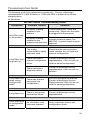
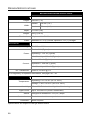
All Interfaces
MS1690 Series Troubleshooting Guide
Symptoms
Possible Causes
Solution
No power is being
supplied to the
scanner.
Check transformer, outlet and
power strip. Make sure the cable
is plugged into the scanner.
No power is being
supplied to the
scanner from the host.
Some host systems cannot supply
enough current to power The
MS1690. A power supply may be
required.
The wrong
communication cable
has been used.
Check that the communication
cable matches the unit type and
scanner configuration.
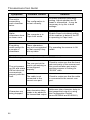
There has been a
scanner configuration
failure.
Contact a Metrologic service
representative, if the unit will not
hold the saved configuration.
There has been a
diagnostic failure.
Contact a Metrologic service
representative, if the unit will not
function.
Long Razz tone
when exiting
configuration
mode
There was a failure
saving the new
configuration.
Re-try to configure the scanner.
Contact a Metrologic Service
Representative if the unit will not
hold the saved configuration.
Long Razz tone
There is a scanning
mechanism failure.
Contact a Metrologic service
representative.
Short Razz tone
in configuration
mode
An invalid bar code
has been scanned.
Scan a valid bar code or quit
configuration mode.
No LEDs, beep
or illumination
Long Razz tone
on power up
23