1
Table of Contents
1. Welcome...............................................................................................................3
2. Introduction..........................................................................................................4
3. Features.................................................................................................................4
4. System components...............................................................................................4
5. Compatibility.........................................................................................................4
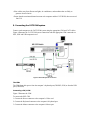
6. The CAT5 KVM system configuration..................................................................5
7. The CAT5 KVM models........................................................................................5
8. Pre-installation guidelines.......................................................................................6
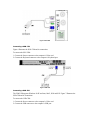
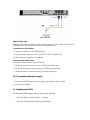
9. Connecting the CAT5 KVM system.......................................................................6
10. Connecting the power supply................................................................................9
11. Updating the LEDs.................................................................................................9
12. Resetting the Switch..............................................................................................9
13. Rack mounting the CAT5 KVM.........................................................................10
14. Rack mounting the CIMs....................................................................................10
15. Operating the CAT5 KVM system......................................................................11
16. The keyboard hotkeys.........................................................................................11
17. The OSD..............................................................................................................11
18. Navigating the OSD............................................................................................12
19. Selecting a computer..........................................................................................12
20. The OSD settings (F2)........................................................................................12
21. The General settings...........................................................................................12
22. F7 Defaults.........................................................................................................15
23. The Ports settings...............................................................................................15
24. The Time settings...............................................................................................16
25. Users ..................................................................................................................17
26. Security...............................................................................................................18
27. The OSD HELP window – F1............................................................................19
28. Scanning computers– F4.....................................................................................19
29. Tuning – F5.........................................................................................................20
30. Moving the label – F6.........................................................................................20
31. Using the Control software.................................................................................20