1
Reference
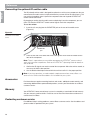
Connecting other playback equipment
English
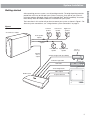
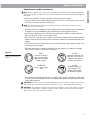
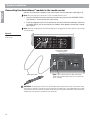
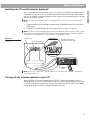
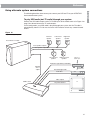
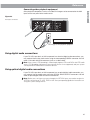
Other playback components such as an audio CD changer can be connected to the AUX
inputs on the rear panel of the media center.
Figure 23
AUX input connections
TV
SENSOR
RECORD
33V
DC POWER
1.1A
AUX
TAPE
VCR
TV
VIDEO INPUTS
AM
FM
IR
EMITTER
L
L
L
L
L
R
R
R
R
R
COMPOSITE
S-VIDEO
75
ANTENNA
1
OPTICAL
OPTICAL
INPUT
OUTPUT
SERIAL
DATA
2
SPEAKER
ZONES
DIGITAL
DIGITAL
DIGITAL
AUDIO OUTPUTS
DIGITAL
AUDIO INPUTS
DIGITAL
COMPOSITE
S-VIDEO
VIDEO OUTPUTS
AUDIO
OUT
R
L
CD changer or other playback equipment
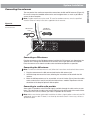
Using digital audio connections
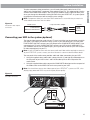
If your TV, VCR, tape deck, or AUX component has electrical digital audio connections, you
may connect them to the media center using the corresponding DIGITAL connector. You will
need a 75Ω cable with RCA connectors (such as a video cable).
Note: Your system’s DTS decoding is limited to playing back CDs and DVDs with DTS audio
tracks. DTS decoding of bitstreams from external sources is not supported, and your system
cannot provide DTS bitstreams to external devices.
Using optical digital audio connections
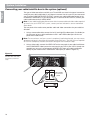
If your TV, VCR, tape deck, or AUX component has an optical digital audio connection, you
may connect it to the media center using the OPTICAL INPUT/OUTPUT connectors. You will
need an optical digital cable to make this connection.
Note: Before you can listen to a source through the OPTICAL input, you need to assign the
OPTICAL connection to TV, VCR, TAPE or AUX. See your operating guide for instructions on
using the system settings menus.
25