1
APPENDIX E
Modem Diagnostic Lights
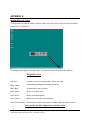
To help identify a problem with the modem connection please look at the icon on located in the
system tray as seen below.
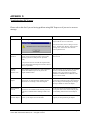
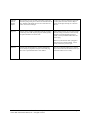
By comparing the lights to the table below you should be able to determine the problem.
Diagnostic Icon
Red, Red
No ADSL connection or handshaking. Check your cable.
Black, Yellow
Handshaking (flashing yellow alternating position).
Black, Black
No data traffic or idle connection.
Black, Green
Modem is receiving data.
Green, Black
Modem is transmitting data.
Green, Green
Modem is receiving and transmitting data
Red Circle With Slash
ADSL modem is either disconnected or a driver installation problem exists
This concludes the DSL Equipment Installation Guide
Installation Guide for Customer Self-Install: Alcatel Speed Touch PC®, Windows NT
©2001 SBC Advanced Solutions, Inc. All rights reserved
Page 31