1
V320/340/360M
5/8/03 1:19 AM
Page 10
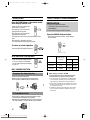
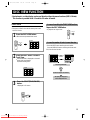
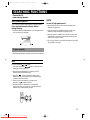
MP3-DISC PLAYBACK
This is a player that enables the playback of VCD, audio CD, CD-R and CD-RW and MP3-CD and does not possess the function that saves MP3 files.
HOW TO PLAYBACK MP3 DISC directly
1
After inserting MP3
Disc in the Set, Press
the select button or
Number button after
Reading.
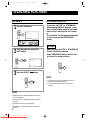
HOW TO PLAYBACK MP3 DISC on MENU MODE
1
2
After inserting MP3
Disc in the Set, Press
the “DISC VIEW”
button.
2
MP3
TOTAL: 150
PAGE 003/030
TR : 017
0 : 02 : 39
016 PBAY
I
017 DON’T FOR
I
:
ZOOM
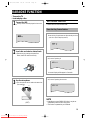
You can see the following
information of Disc on the TV.
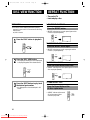
MP3
You can see the information of Disc
on the TV.
DISC VIEW
TR : 000
1
2
3
4
Directory No
TOTAL: 150
PAGE 001/003
0 : 00 : 00
DIRECTORY NAME
ABC
KBG
CDEG123
Directory name
Select the Number of Directory.
:
You can see the following Display.
Track No
I
Song name
: MP3 File display
Select the Number button for Track No. and Press the
“Select” button.
7 tracks are displayed on the PAL TV screen every time;
5 tracks are displayed on the NTSC TV screen every time.
NOTE
MP3
TOTAL: 150
PAGE 001 / 004
TR : 000
0 : 00 : 00
DIRECTORY NAME
1 DIRECTORY NAME
I
2 ABC
I
3 KBG
I
4 CDEG123
I
Select the No of song and you can enjoy the Music.
• Song names are marked by only English and digits. But
unsupported Data are marked by “_”.
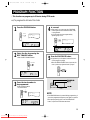
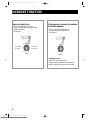
TO RETURN TO THE PREVIOUS MENU
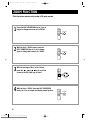
WHAT IS MP3?
MP3 stands for MPEG 1 layer 3. It is an efficient way to store
high-quality music or other audio content on your computer.
MP3 files can be 1/4 to 1/20 the size of a commercial CD
audio file-yet retain a high sound quality. MP3 files usually
have the extension .mp3, and can be downloaded from the
Internet, or can be legally made for personal use from your
favorite CDs that you purchased.
10
Downloaded From Disc-Player.com Samsung Manuals
Press the RETURN button.
• When a wrong menu is selected or
other menu is about to be selected,
hold down the RETURN button more
than one second.
STOP
When the RETURN button is pressed shortly,the disc may
be stopped.
• When you want to stop playing , press the RETURN
button short.