1
9. Press 9 to confirm. Now you will hear a long beep.
10. If you not wish to register any other sensors, press 8 5 times to leave the
programming menu.
11. The DS831 is now registered and is default set with an entrance delay of 30 sec.
12. Do not close the housing yet, hereafter in this manual you can learn how to place
the sensor.
Registering of a Door/Window sensor without entrance delay
1
1.
2.
3.
Zones 3 to 9 inclusive are factory set for the use of a DS831 without entrance
delay.
Follow the same routine as when reporting a Door/Window sensor WITH entrance
delay till you reached step four (the display now shows: 1.ZONES ZONE #1).
Choose with till the display says: 1.ZONES ZONE #3.
Now continue with step five (above).
Registering a movement detector
Opening MS845
1.
2.
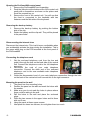
Open the housing of the Motion sensor(MS845) by
removing the front. This is done easiest by sticking a
screwdriver in the unlock slot (at the bottom of the
detector, between front- and backside of the
sensor). Now move the screwdriver upward.
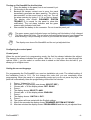
Supply the Motion sensor with power by removing the red plate which separates
the battery from the battery contacts.
1
Due to possible voltage delay in lithium batteries that have been stored, the
batteries might seem empty at first. When this happens, leave the sensor for
a few minutes till the voltage level is stabilised.
Programming
1
Zones 11 to 19 inclusive are factory set for using a MS845
If the ProGuard800 is still in programming mode after registering the door/window sensor,
then push 8 once (the display now shows: 1.ZONES ZONE #x). Follow the instructions from
step five (below).
If the ProGuard800 is not in programming mode, act as follows:
1.
2.
3.
4.
5.
6.
Log in to the programming menu by pressing 9, followed by 1111 (the display now
shows: MAIN MENU 1.STOP COMM.).
Press 9 (the display now shows: 9.PROGRAMMING 1.DEVICES).
Press 9 (the display now shows: 1.DEVICES 1.ZONES).
Press 9 (the display now shows: 1.ZONES ZONE #1).
Choose with till the display shows: 1.ZONES ZONE #11.
Press 9 (the display now shows: 1.Z11 REGISTER TRANSMIT 1).
ProGuard800™
-6-