1
CHAPTER 5
(CONTINUED)
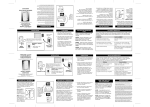
Direct Audio Output
The AUDIO OUTPUT socket allows
you to connect the DIALOGUE JB20 to a hearing aid, cochlear
implant or other assistive listening
devices.
AUDIO
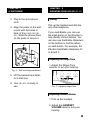
Connecting the speech processor:
Plug the mono end of the plug into
the speech processor.
Plug the stereo end of the plug into
the Audio Output socket on the
phone.
Speak into the handset when using
the Cochlear Implant Adapter Cord.
OUTPUT
POWER
LED
Figure 19 - Audio Output
Socket and Cochlear
Cord Hook-up
RELAY
M1
REL MGS
M2
M3
M4
M5
SELECT
SHIFT
DIALOGUE VCO
A
B
C
Q
SIGNAL
LED
AUTO ANS BACKSPACE SPACE
TM
D
E
F
Z
G
H
I
J
K
L
M
N
O
P
R
S
T
U
V
W
X
Y
, . ? : ;
" / ' + -
! $ () =
HOLD
PROG
FLASH
REDIAL
AMPLIFY
VOL
TONE
LO
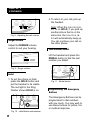
To use this port, plug in a compatible
auxiliary cable and connect it to your
assistive listening device. Speak into
the handset when you use the Audio
Output connection.
HI
Figure 20 - Connecting the
Speech Processor
Cochlear Implant Adapter Cord:
A cochlear adapter cord is available
from Ameriphone that can be used to
plug the JB-20 directly into a
speech processor.
WARNING! During thunderstorms, avoid
using telephones as electric shock from
lightning can occur. Before plugging any
cord into your speech processor, you must
consult your implant manufacturer.
9