1
one of two people, someone with perfect
pitch, “golden ears” (these are very rare) or a
person with a great deal of tuning experience.
A Real Time Analyzer (RTA) is a great tool to
have at this point as well. An RTA reads the
audio response in your car and displays it visually so your AudioControl dealer can quickly
and accurately tune your LCQ-1 to give you
AudioControl Real Time Analyzer
the best possible sound in your car.
A Guided Tour of LCQ-1
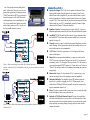
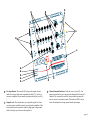
➊ Speaker-level Inputs: The LCQ-1 has six speaker-level inputs. These
inputs get their signals from the speaker-level outputs of your factoryinstalled source unit or amplifier. If your source unit has front, rear, and
subwoofer speaker-level outputs, connect them to the three sets of inputs
on your LCQ-1. If the source unit only has front and rear outputs, the Auto
Mode circuitry in your LCQ-1 automatically routes the Channel 2 input
channels to the (Channel 3) subwoofer channels.
➋ Equalizer Controls: To custom tune your system, the LCQ-1 gives you
dedicated equalization controls for the Front, Rear, and Subwoofer outputs.
➌ AccuBASS™: The Threshold and level controls let you determine when
the AccuBASS™ circuit starts bass correction and the level of correction
applied. (See page 8.)
➍ Ground: Connect to a good, verified chassis ground (the battery comes to
mind.) Warning: Factory ground wires already have multiple devices connected to them and are not recommended.
➎ +12V Power: Connect to a good source of 12-volt power (the battery
comes to mind again).
➏ Remote In: In some unusual installations, you may not want to use the
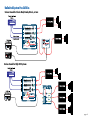
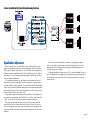
Figure 1. Basic system using Factory Radio. (If the factory stereo does
not have a sub out, the LCQ-1’s AutoMode circuit will give you one) front rear need to be
full range.
GTO™ to turn on your system. For these cases the LCQ-1 can be turned
on remotely with a +12-volt trigger. When you use the +12-volt remote in,
you can set the internal GTO™ jumper (see “Under the Covers” below) to
“Defeat”. This will prevent the car’s computer from turning the system on
unexpectedly.
➐ Remote Out: Outputs 12 volts when the LCQ-1 is powered up, so you
can turn on external devices like signal processors and amplifiers.
➑ Maximized Indicator: This brightly colored LED indicates when the
signal level is just below clipping your LCQ-1. When properly level
matched, this LED should flicker occasionally when your system is playing at its maximum volume level.
➒ Power: If you have connected all of your power wires correctly, this light
should be bright red when your system turns on.
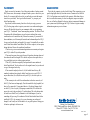
➓ Optional (ACR-2) Dash Mounted Control: You can add a multi-funcFigure 2: Factory Radio with remote mounted factory amplifier. Signals are summed
inside the LCQ-1.
tion dash control that allows you to set the level of the subwoofer. It also
has an in/out switch for the equalizer function so you can hear the system
before and after your tuning changes. Simply tap in the remote knob to
compare the sounds.
page