1
Insertion of the batteries
The remote control uses two AAA (LR03) batteries,
which are included in the package. Whenever you insert
batteries, always make sure both of them are new.
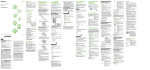
To insert the batteries:
1. On the back of the remote control remove the
battery compartment cover by pressing on the catch
and pulling the cover down.
2. Insert the batteries, making sure that they are properly
oriented with the positive (+) and negative (-) ends
as specified on the battery compartment labels.
3.Assemble the battery compartment cover.
CAUTION:
There is a risk of explosion if a battery is damaged
or replaced by an incorrect type. Dispose of used
batteries properly (see “information for the consumers
on batteries end of life” in chapter 6 - Product notes).
Do not disassemble, crush, puncture or incinerate the battery. Only discharged batteries should be disposed of. Do not short-circuit.
To navigate through the Cytavision menus the STB mode must be selected (see separate Service User Guide).
When in TV mode this Remote Control can manage the following TV functions:
• Power ON/OFF • Number keys (0- 9)
• Program (up/down)
• Volume (up/down) • Mute • AV key • OK and arrow keys
• Special function keys (red, green, yellow, blue)
4.2 Programming procedures for Remote Control to control the TV set
There are programming procedures that make it
possible to control the TV set with the STB remote
control as described in the following sections 4.2.1 and
4.2.2.
The programmed code is retained during batteries
change.
4.1 How it works
This Remote control is designed to control both the Set
Top Box and the TV and therefore works in two modes:
• Set-Top Box (STB): STB key pressed and blinks upon a
key entry when in this mode
• TV mode: TV key pressed and blinks upon a key entry
when in this mode
40
Cytavision installation guide • chapter 4 - remote control