1
Remote Control
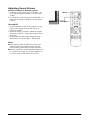
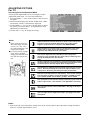
Standby Power On/Off
Push this button to turn on the display
from Standby mode. Push it again to turn
off to Standby mode.
Sound Mute On/Off
Volume +/Turns volume up or down.
Channel UP/DOWN
These keys are not
applicable to this display.
Number Keypad
These keys are not applicable to
this display.
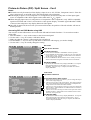
SWAP
This key swaps the main and
sub picture windows under
PIP or POP modes.
(See page 14)
QuickView
This key is not applicable to this
display.
PIP (Picture-in-Picture
Button)
Turns on PIP (Picture-in-Picture)
mode and POP (Side-by-Side)
PIP Position
This key changes the PIP subwindow to 4 different corner
locations.
(See Page 14)
PIP/POP Source
Changes the input source of the
PIP or POP sub-window. (See
Page 14)
Favorite Channel
This key is not applicable to this
display.
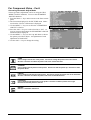
Input Select
Press to select input signal
modes sequentially.
(See Page 10)
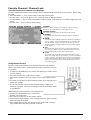
MENU Adjustment
1 Show OSD menu by pressing
Ï or Ð key or MENU key.
2 Scroll thru the major OSD
category using Í or Î key.
3 Press the Ï and Ð keys
again to select sub-options
within the category.
4 Press ÍorÎ keys to change
the actual sub-option setting.
Closed Captioning
This key is not applicable to this
display.
V-Chip
These keys are not applicable to
this display.
MTS Stereo
This key is not applicable to this
display.
Recall
Recalls default picture
settings. (See Page 21)
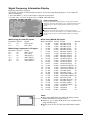
Display
Press to show the status of
the display.
Channel Lock / Fav. Set
These keys are not applicable to
this display.
Sleep Timer
Engages Sleep Timer Settings.
(See Page 18)
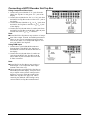
AV Mode (PIP/POP On)
AV1
Discrete Power ON/OFF
Press OFF to send display into
Standby mode. Press ON to
power on from standby mode.
(See Page 10)
Main Source
AV2
PIP/POP Source
Component Mode
Component 1
1080i
Main Source
Incoming Signal
PIP
RGB Mode
Direct Input Selection Keys
Directly change input signal
selection by pressing the
appropriate key.(Note: TV key is
not applicable to this display.)
WIDE
Toggles between various
aspect ratio settings. (See
Page 16)
RGB
M:06
ViewSonic VPW505
Main Source
Display Mode
(See Page 20)
5