1
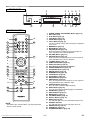
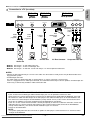
FUNCTIONAL OVERVIEW
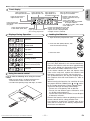
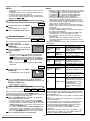
FRONT PANEL
1
2
3 4
B PLAY
SUPER AUDIO CD/DVD PLAYER DV6500
5
C STOP
F PAUSE
j/ h
g/ i
6
7
STANDBY
AUDIO
EX.
ENTER
POWER ON/STANDBY
A
AUDIO EX.
32
31
15
14
OPEN/CLOSE
13
MENU
11/12
9/10 8
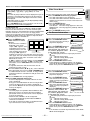
REMOTE CONTROL
OPEN/
CLOSE
POWER
1
A
13
30
SEARCH
MODE
16
1
2
3
4
5
6
7
8
9
0
+10
1.
2.
3.
4.
5.
6.
A-B
17
18
19
CLEAR
RANDOM
20
SETUP
s
23
24
B
L
RETURN
MENU
ANGLE
SUBTITLE
AUDIO
ZOOM
DISPLAY
MODE
26
11
4
j
SKIP
STOP
E
i
PLAY
C
REV
12
29
ENTER
6
22
TOP MENU
K
21
8
7.
8.
9.
REPEAT
B
PAUSE
F
GROUP
7
25
27
28
9
3
FWD
D
10.
11.
12.
13.
14.
15.
16.
17.
18.
19.
20.
21.
22.
23.
10
5
24.
34
25.
PAGE
33
SOUND MODE
35
REMOTE CONTROLLER
RC6500DV
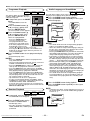
NOTE:
• The buttons with circled numbers can only be operated
with the remote control.
Downloaded From Disc-Player.com Marantz Manuals
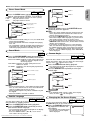
26.
27.
28.
29.
30.
31.
32.
33.
34.
35.
–8–
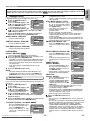
POWER (POWER ON/STANDBY) Button [page 16]
Disc loading tray
PLAY Button [page 16]
STOP Button [page 16]
PAUSE Button [page 16]
Cursor Buttons [page 16]
Use when making settings while watching the display on
a TV screen.
MENU Button [page 16]
ENTER Button [page 16]
G (SKIP) Button [page 18]
Plays back from the beginning of the next chapter or
track. Hold down to fast forward playback.
g (FWD) Button [page 17]
H (SKIP) Button [page 18]
Plays back from the beginning of the current chapter or
track. Hold down to fast reverse playback.
h (REV) Button [page 17]
OPEN/CLOSE Button [page 16]
AUDIO EX. Button [page 24]
Panel Display, Remote Sensor Window
SEARCH MODE Button [page 18]
A-B REPEAT Button [page 19]
REPEAT Button [page 19]
RANDOM Button [page 20]
CLEAR Button [page 19]
SETUP Button [page 25]
RETURN Button [page 16]
ANGLE Button [page 23]
Press to change the camera angle to see the sequence
being played back from a different angle.
SUBTITLE Button [page 23]
Press to select a desired subtitle language.
AUDIO Button [page 22]
Press to select a desired audio language or sound mode.
ZOOM Button [page 17]
DISPLAY Button [page 21]
MODE Button [page 18]
TOP MENU Button [page 16]
Numeric Buttons [page 16]
AUDIO EX. Indicator
This indicator lights when the AUDIO EX. button is ON.
STANDBY Indicator
This indicator lights when the DVD player turns off.
GROUP Button [page 18]
PAGE Button [page 18]
SOUND MODE Button [page 23]
EN