1
®
9. Now increase the volume on your source unit to your
normal listening level. For some of you, this may be louder
than others!
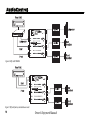
10. At this point you may find yourself going back and
adjusting the “Output Level” controls on your EQS to
balance the front, rear, and subwoofer sections of your
system to accommodate for the speaker placement and
efficiency. Speakers on the rear deck of your car will probably sound louder that the ones in your doors!
E. Equalization Adjustment
makes a really good one. If you cannot locate an RTA, you
probably want to have your authorized AudioControl dealer
perform the equalization adjustments as they will have one.
You can certainly adjust your EQS using your ears, however
an RTA will give you the best results.
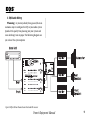
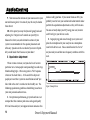
2. Begin playing pink noise through your system and
place the microphone for your analyzer on a microphone
stand in the drivers seat. Take a careful look at the “curve”
on your analyzer and how one frequency combines with the
next.
When it comes to music, everyone has his or her own
particular taste. Some people want pounding bass and crisp,
blood curdling highs. Others may prefer a “flat” response
(whatever the heck that is). At the end of the day, most
people just want their system to sound balanced and “just
like it did in the store” or similar to their buddy’s car. The
following equalization guidelines should help you achieve
Figure 8: Sample Curve
your own personal audio nirvana.
1. For optimum performance, get your hands on a test
compact disc that contains pink noise and a good quality
RTA (real time analyzer); we happen to know someone who
12
Owner’s Enjoyment Manual