1
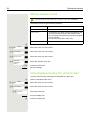
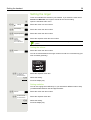
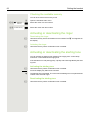
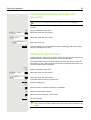
OpenStage M3/M3 Plus
OpenStage M3 Ex/M3Ex Plus
on HiPath Cordless IP
User Guide
A31003-H1012-C111-2-7619
Our Quality and Environmental Management Systems are
implemented according to the requirements of the ISO9001 and
ISO14001 standards and are certified by an external certification
company.
Copyright © Unify GmbH & Co. KG <06/2014>
Hofmannstr. 51, 81379 Munich/Germany
All rights reserved.
Reference No.: A31003-H1012-C111-2-7619
The information provided in this document contains merely general descriptions or
characteristics of performance which in case of actual use do not always apply as
described or which may change as a result of further development of the products.
An obligation to provide the respective characteristics shall only exist if expressly agreed in
the terms of contract.
Availability and technical specifications are subject to change without notice.
Unify, OpenScape, OpenStage and HiPath are registered trademarks of Unify GmbH & Co. KG.
All other company, brand, product and service names are trademarks or registered trademarks
of their respective holders.
unify.com
2
Safety notes
Safety notes
Using the OpenStage M3 Ex and
OpenStage M3 Ex Plus handsets in potentially
explosive working environments
This handset fulfils the requirements of the ATEX Directive and meets the required EN and IEC
standards (see the appendix in the operating manual). See also the notes in the declaration of conformity.
OpenStage M3 Ex and OpenStage M3 Ex Plus were designed for use in potentially explosive
working environments (Ex zones) and in compliance with fire prevention regulations. Local and
operational factors may lead to an explosive atmosphere in an Ex zone. Therefore, please observe
the following Ex safety notes:
Handset:
• The handset may only be operated in Ex zones where it is certified. Refer to the appendix
in the operating manual, the device identification and the EC type examination certificate.
A copy of the prototype verification certificate ZELM 08 ATEX 0379 X can be found in the
appendix of this operating manual.
• Users must check the handset for damage and verify that it is operating correctly before
using it in the Ex zone. A damaged handset or a handset that is not fully functional may
not be brought into or used in the Ex zone.
• The following requirements must be met to satisfy the Ex protection and IP rating IP 65
(casing protection) in an Ex zone:
– The battery compartment seal must not be damaged.
– The cover of the battery compartment must be tightly screwed on.
• Deactivate the handset immediately and remove it from the Ex zone if the following situations occur:
– You notice damage to the handset.
– If liquids have seeped into the handset.
• Repair a damaged handset immediately.
• Only service employees with Ex zone training and authorisation should repair and service
the handset.
• When swapping out a malfunctioning device/battery, the technician must return the malfunctioning device/battery to the manufacturer while specifying the customer data.
• Inappropriate use of the handset will result in revocation of its certification for use in Ex
zones.
Battery pack:
• Only use the approved battery pack (see Page 82). Ex authorisation is only valid and
the handset can only be operated if this battery pack is installed. Other battery packs are
strictly prohibited. If they are used, Ex protection is no longer valid.
• Never open the handset battery compartment in an Ex zone. Battery pack removal, charging or transportation is not permitted in these zones.
Charging the battery pack:
• The battery pack may only be charged:
– Outside the Ex zone
– While inside the handset
– Using the supplied charging unit
• The charging unit should only be used outside the Ex zone.
Safety notes
3
Headset:
• A corded headset may not be used in the Ex zone. Only Ex authorised Bluetooth headsets
may be used. For more information, consult your system administrator.
USB cable connection:
• Data may not be transferred via USB cable in the Ex zone.
Using OpenStage M3, OpenStage M3 Plus,
OpenStage M3 Ex and OpenStage M3 Ex Plus
Attention:
• Do not use OpenStage M3 and OpenStage M3 Plus handsets in potentially explosive environments!
• Please observe local safety regulations when using the handset.
• The ringer, signal tones and handsfree talking (speakerphone mode) are played over the
loudspeaker. Do not hold the handset to your ear when it rings, when a signal tone is emitted or if speakerphone mode is switched on. Otherwise you may seriously and permanently impair your hearing.
• A transmitter signal is emitted by your handset. Please observe local safety regulations.
• Handsets can interfere with the operation of medical equipment. Please observe the technical requirements of the relevant environment (hospital, for instance).
• The handset can cause unpleasant humming in hearing aids.
Caution:
• To avoid mutual interference, do not operate the handset in the vicinity of electronic equipment.
• Only use the charging shell provided to charge the handset.
• If you give your handset to someone else, remember to include the operating manual with
it.
Using the battery pack for OpenStage M3 and
OpenStage M3 Plus
Attention:
• Only use the original battery pack from the manufacturer of the OpenStage M3/
OpenStage M3 Plus!
• Do not use a standard rechargeable battery pack. This can result in serious injury and material damage (risk of explosion, degradation of battery pack cladding, functional interference and handset damage).
• Avoid contact with fire and water.
4
Safety notes
Compliance with BGR 139 (personal alarm
functionality)
Only for OpenStage M3 Plus and OpenStage M3 Ex Plus!
Notes:
• For BGR-compliant operation as a personal alarm signal device with a voice communication capability (PNG-S), the handset must operate in conjunction with an alarm server.
Handset operation without an alarm server is not BGR-compliant.
• The alarm functionality cannot be deactivated by the user. Deactivation is only possible via
a control call from the alarm server.
• For compliance with BGR 139, the handset may only be configured by specially qualified
technicians. The PNG configuration menu is PIN-protected to prevent unauthorised configuration changes. The PIN should be kept secret.
Attention:
• The pre-alarm volume starts low and gradually rises until it becomes very loud. Users
should be aware of this.
• The battery pack must always be sufficiently charged for the anticipated period of operation. The battery pack's charging capacity diminishes over its life. It should therefore be
replaced by specially qualified technicians when capacity levels become insufficient (discharging accelerates over time). If necessary, consult your safety officer.
WEEE mark
Notes:
• All electrical and electronic products should be disposed of separately from
the municipal waste stream via designated collection facilities appointed by
the government or the local authorities.
• The correct disposal and separate collection of your old appliance will help
prevent potential negative consequences for the environment and human
health. It is a precondition for reuse and recycling of used electrical and electronic equipment.
• For more detailed information about disposal of your old appliance, please contact your
city office, waste disposal service, the shop where you purchased the product or your sales
representative.
The statements quoted above are only fully valid for equipment which is installed and sold
in the countries of the European Union and is covered by the European Directive 2002/96/
EC. Countries outside the European Union may have other regulations regarding the disposal of electrical and electronic equipment.
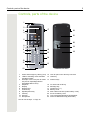
Controls, parts of the device
5
Controls, parts of the device
1
2
3
4
17
22
21
5
20
6
7
8
9
19
16
15
18
14
10
11
13
12
1
2
Alarm and emergency call key (red)
LED for indicating mode activation
and alarm status
3
Example of a 2.5 mm jack for headset (not for OpenStage M3 Ex/
OpenStage M3 Ex Plus)
4
Earpiece
5
Display
6
Display keys
7
Control key
8
Speakerphone key
9
Talk key
10 Star key
11 Microphone
How to use the keys: Page 18
12 Jack for pull cord or dummy connector
13 Hash key
14 Number keys
15
16
17
18
19
20
21
22
On-hook and on/off key
Message key
Volume key (+/-)
Battery cover
Mini USB connection (under battery cover)
Screw for battery cover
Tone ringing/speakerphone loudspeaker
Notch for attachment clip (both sides)
6
Contents
Contents
Safety notes . . . . . . . . . . . . . . . . . . . . . . . . . . . . . . . . . . . . . . . . 2
Using the OpenStage M3 Ex and OpenStage M3 Ex Plus handsets in potentially explosive working environments. . . . . . . . . . . . . . . . . . . . . . . . . . . . . . . . . . . . . . . . . . . . . . . . . . . . . . . . . . . . . 2
Using OpenStage M3, OpenStage M3 Plus, OpenStage M3 Ex and OpenStage M3 Ex Plus. . 3
Using the battery pack for OpenStage M3 and OpenStage M3 Plus . . . . . . . . . . . . . . . . . . . . . 3
Compliance with BGR 139 (personal alarm functionality). . . . . . . . . . . . . . . . . . . . . . . . . . . . . . . 4
WEEE mark. . . . . . . . . . . . . . . . . . . . . . . . . . . . . . . . . . . . . . . . . . . . . . . . . . . . . . . . . . . . . . . . . 4
Controls, parts of the device . . . . . . . . . . . . . . . . . . . . . . . . . . . 5
Operating instructions . . . . . . . . . . . . . . . . . . . . . . . . . . . . . . . . 9
Alarm functionality . . . . . . . . . . . . . . . . . . . . . . . . . . . . . . . . . . . 9
Putting the handset into service. . . . . . . . . . . . . . . . . . . . . . . . 10
Checking the package contents . . . . . . . . . . . . . . . . . . . . . . . . . . . . . . . . . . . . . . . . . . . . . . . . 10
Removing the protective cover . . . . . . . . . . . . . . . . . . . . . . . . . . . . . . . . . . . . . . . . . . . . . . . . . 10
Installing the charger. . . . . . . . . . . . . . . . . . . . . . . . . . . . . . . . . . . . . . . . . . . . . . . . . . . . . . . . . . 10
Fitting the attachment clip . . . . . . . . . . . . . . . . . . . . . . . . . . . . . . . . . . . . . . . . . . . . . . . . . . . . . . 11
Inserting the battery . . . . . . . . . . . . . . . . . . . . . . . . . . . . . . . . . . . . . . . . . . . . . . . . . . . . . . . . . . 12
Charging and using the battery . . . . . . . . . . . . . . . . . . . . . . . . . . . . . . . . . . . . . . . . . . . . . . . . . . 14
Inserting the dummy plug or connector. . . . . . . . . . . . . . . . . . . . . . . . . . . . . . . . . . . . . . . . . . . 14
Connecting a corded headset . . . . . . . . . . . . . . . . . . . . . . . . . . . . . . . . . . . . . . . . . . . . . . . . . . . 15
Connecting a USB data cable . . . . . . . . . . . . . . . . . . . . . . . . . . . . . . . . . . . . . . . . . . . . . . . . . . . 15
Setting the handset display language . . . . . . . . . . . . . . . . . . . . . . . . . . . . . . . . . . . . . . . . . . . . . 16
Setting the system display language. . . . . . . . . . . . . . . . . . . . . . . . . . . . . . . . . . . . . . . . . . . . . . 17
Description of controls . . . . . . . . . . . . . . . . . . . . . . . . . . . . . . . 18
Function keys . . . . . . . . . . . . . . . . . . . . . . . . . . . . . . . . . . . . . . . . . . . . . . . . . . . . . . . . . . . . . . 18
Control key . . . . . . . . . . . . . . . . . . . . . . . . . . . . . . . . . . . . . . . . . . . . . . . . . . . . . . . . . . . . . . . . . 19
Display keys . . . . . . . . . . . . . . . . . . . . . . . . . . . . . . . . . . . . . . . . . . . . . . . . . . . . . . . . . . . . . . . . 19
Menu icons in the main menu . . . . . . . . . . . . . . . . . . . . . . . . . . . . . . . . . . . . . . . . . . . . . . . . . . . 20
Conducting calls – the basic functions. . . . . . . . . . . . . . . . . . . 22
Activating/deactivating the handset. . . . . . . . . . . . . . . . . . . . . . . . . . . . . . . . . . . . . . . . . . . . . . . 22
Dialling . . . . . . . . . . . . . . . . . . . . . . . . . . . . . . . . . . . . . . . . . . . . . . . . . . . . . . . . . . . . . . . . . . . 23
Manual redial. . . . . . . . . . . . . . . . . . . . . . . . . . . . . . . . . . . . . . . . . . . . . . . . . . . . . . . . . . . . . . . 23
Consultation . . . . . . . . . . . . . . . . . . . . . . . . . . . . . . . . . . . . . . . . . . . . . . . . . . . . . . . . . . . . . . . . 24
Answering or rejecting a call . . . . . . . . . . . . . . . . . . . . . . . . . . . . . . . . . . . . . . . . . . . . . . . . . . . . 24
Ending a call . . . . . . . . . . . . . . . . . . . . . . . . . . . . . . . . . . . . . . . . . . . . . . . . . . . . . . . . . . . . . . . . 25
Activating or deactivating the keypad lock . . . . . . . . . . . . . . . . . . . . . . . . . . . . . . . . . . . . . . . . . 25
After leaving the radio network . . . . . . . . . . . . . . . . . . . . . . . . . . . . . . . . . . . . . . . . . . . . . . . . . . 25
Conducting calls – enhanced functions . . . . . . . . . . . . . . . . . . 26
Speakerphone mode. . . . . . . . . . . . . . . . . . . . . . . . . . . . . . . . . . . . . . . . . . . . . . . . . . . . . . . . . 26
Conducting calls with the headset. . . . . . . . . . . . . . . . . . . . . . . . . . . . . . . . . . . . . . . . . . . . . . . . 27
Corded headset . . . . . . . . . . . . . . . . . . . . . . . . . . . . . . . . . . . . . . . . . . . . . . . . . . . . . . . . . . . 27
Contents
7
Cordless headset . . . . . . . . . . . . . . . . . . . . . . . . . . . . . . . . . . . . . . . . . . . . . . . . . . . . . . . . . . 27
Number redial . . . . . . . . . . . . . . . . . . . . . . . . . . . . . . . . . . . . . . . . . . . . . . . . . . . . . . . . . . . . . . . 29
Automatic redial . . . . . . . . . . . . . . . . . . . . . . . . . . . . . . . . . . . . . . . . . . . . . . . . . . . . . . . . . . . 29
Deleting a redial entry or list . . . . . . . . . . . . . . . . . . . . . . . . . . . . . . . . . . . . . . . . . . . . . . . . . 29
Adding a telephone number to the redial list . . . . . . . . . . . . . . . . . . . . . . . . . . . . . . . . . . . . . 30
Phonebook of communications platform . . . . . . . . . . . . . . . . . . . . . . . . . . . . . . . . . . . . . . . . . 30
Finding and dialling an entry . . . . . . . . . . . . . . . . . . . . . . . . . . . . . . . . . . . . . . . . . . . . . . . . . 31
LDAP phonebook . . . . . . . . . . . . . . . . . . . . . . . . . . . . . . . . . . . . . . . . . . . . . . . . . . . . . . . . . . . . 32
Finding and dialling an entry . . . . . . . . . . . . . . . . . . . . . . . . . . . . . . . . . . . . . . . . . . . . . . . . . 32
The handset's phonebook . . . . . . . . . . . . . . . . . . . . . . . . . . . . . . . . . . . . . . . . . . . . . . . . . . . . . . 33
Saving an entry . . . . . . . . . . . . . . . . . . . . . . . . . . . . . . . . . . . . . . . . . . . . . . . . . . . . . . . . . . . 34
Finding and dialling an entry . . . . . . . . . . . . . . . . . . . . . . . . . . . . . . . . . . . . . . . . . . . . . . . . . 34
Dialling an entry with the speed dialling digit . . . . . . . . . . . . . . . . . . . . . . . . . . . . . . . . . . . . . 35
Viewing an entry . . . . . . . . . . . . . . . . . . . . . . . . . . . . . . . . . . . . . . . . . . . . . . . . . . . . . . . . . . 35
Changing an entry . . . . . . . . . . . . . . . . . . . . . . . . . . . . . . . . . . . . . . . . . . . . . . . . . . . . . . . . . 35
Marking a VIP (Very Important Person) entry . . . . . . . . . . . . . . . . . . . . . . . . . . . . . . . . . . . . 36
Deleting an entry or phonebook . . . . . . . . . . . . . . . . . . . . . . . . . . . . . . . . . . . . . . . . . . . . . . . 36
Displaying available memory . . . . . . . . . . . . . . . . . . . . . . . . . . . . . . . . . . . . . . . . . . . . . . . . . 37
Sending an entry or phonebook to the handset or system . . . . . . . . . . . . . . . . . . . . . . . . . . 37
VoiceMail . . . . . . . . . . . . . . . . . . . . . . . . . . . . . . . . . . . . . . . . . . . . . . . . . . . . . . . . . . . . . . . . . . 39
Using dual-tone multifrequency signalling. . . . . . . . . . . . . . . . . . . . . . . . . . . . . . . . . . . . . . . . . . 39
Conducting calls – with multiple users . . . . . . . . . . . . . . . . . . . 40
Transferring a call . . . . . . . . . . . . . . . . . . . . . . . . . . . . . . . . . . . . . . . . . . . . . . . . . . . . . . . . . . . 40
Toggling (switching between calls) . . . . . . . . . . . . . . . . . . . . . . . . . . . . . . . . . . . . . . . . . . . . . . . 40
Conducting a conference . . . . . . . . . . . . . . . . . . . . . . . . . . . . . . . . . . . . . . . . . . . . . . . . . . . . . . 41
Second call (call waiting). . . . . . . . . . . . . . . . . . . . . . . . . . . . . . . . . . . . . . . . . . . . . . . . . . . . . . . 42
Caller lists . . . . . . . . . . . . . . . . . . . . . . . . . . . . . . . . . . . . . . . . 44
Working with list entries . . . . . . . . . . . . . . . . . . . . . . . . . . . . . . . . . . . . . . . . . . . . . . . . . . . . . . 44
Deleting all lists . . . . . . . . . . . . . . . . . . . . . . . . . . . . . . . . . . . . . . . . . . . . . . . . . . . . . . . . . . . . . 45
Additional functions . . . . . . . . . . . . . . . . . . . . . . . . . . . . . . . . . 46
Handset alarm clock function . . . . . . . . . . . . . . . . . . . . . . . . . . . . . . . . . . . . . . . . . . . . . . . . . . . 46
Appointment reminder function . . . . . . . . . . . . . . . . . . . . . . . . . . . . . . . . . . . . . . . . . . . . . . . . . 47
Selecting a base . . . . . . . . . . . . . . . . . . . . . . . . . . . . . . . . . . . . . . . . . . . . . . . . . . . . . . . . . . . . . 49
Setting the base . . . . . . . . . . . . . . . . . . . . . . . . . . . . . . . . . . . . . . . . . . . . . . . . . . . . . . . . . . . . . 50
Speed dialling . . . . . . . . . . . . . . . . . . . . . . . . . . . . . . . . . . . . . . . . . . . . . . . . . . . . . . . . . . . . . . 50
Changing display key assignments. . . . . . . . . . . . . . . . . . . . . . . . . . . . . . . . . . . . . . . . . . . . . . . 51
Call control from the PC . . . . . . . . . . . . . . . . . . . . . . . . . . . . . . . . . . . . . . . . . . . . . . . . . . . . . . 51
Initiating calls from the PC . . . . . . . . . . . . . . . . . . . . . . . . . . . . . . . . . . . . . . . . . . . . . . . . . . . 51
Data communication with the PC . . . . . . . . . . . . . . . . . . . . . . . . . . . . . . . . . . . . . . . . . . . . . . . . 52
Bluetooth interface . . . . . . . . . . . . . . . . . . . . . . . . . . . . . . . . . . . . . . . . . . . . . . . . . . . . . . . . . . 52
Activating/deactivating Bluetooth mode . . . . . . . . . . . . . . . . . . . . . . . . . . . . . . . . . . . . . . . . . 52
Registering Bluetooth devices . . . . . . . . . . . . . . . . . . . . . . . . . . . . . . . . . . . . . . . . . . . . . . . . 53
Editing the list of known (trusted) devices . . . . . . . . . . . . . . . . . . . . . . . . . . . . . . . . . . . . . . . 54
Phonebook transfer . . . . . . . . . . . . . . . . . . . . . . . . . . . . . . . . . . . . . . . . . . . . . . . . . . . . . . . . 56
Setting the handset . . . . . . . . . . . . . . . . . . . . . . . . . . . . . . . . . 57
Setting the speaker volume. . . . . . . . . . . . . . . . . . . . . . . . . . . . . . . . . . . . . . . . . . . . . . . . . . . . . 57
During a call . . . . . . . . . . . . . . . . . . . . . . . . . . . . . . . . . . . . . . . . . . . . . . . . . . . . . . . . . . . . . . 57
In idle status. . . . . . . . . . . . . . . . . . . . . . . . . . . . . . . . . . . . . . . . . . . . . . . . . . . . . . . . . . . . . . 57
Setting advisory tones. . . . . . . . . . . . . . . . . . . . . . . . . . . . . . . . . . . . . . . . . . . . . . . . . . . . . . . . . 58
8
Contents
Activating/deactivating the vibration alert . . . . . . . . . . . . . . . . . . . . . . . . . . . . . . . . . . . . . . . . . 58
Setting the ringer. . . . . . . . . . . . . . . . . . . . . . . . . . . . . . . . . . . . . . . . . . . . . . . . . . . . . . . . . . . . . 59
Setting ringing tones and pictures with resource directory . . . . . . . . . . . . . . . . . . . . . . . . . . . . 60
Viewing screensavers and caller pictures / Playing sounds . . . . . . . . . . . . . . . . . . . . . . . . . 60
Renaming and deleting screensavers/caller pictures/sounds . . . . . . . . . . . . . . . . . . . . . . . . 61
Checking the available memory . . . . . . . . . . . . . . . . . . . . . . . . . . . . . . . . . . . . . . . . . . . . . . . 62
Activating or deactivating the ringer . . . . . . . . . . . . . . . . . . . . . . . . . . . . . . . . . . . . . . . . . . . . . 62
Activating or deactivating the alerting tone . . . . . . . . . . . . . . . . . . . . . . . . . . . . . . . . . . . . . . . . . 62
Activating/deactivating automatic call answering . . . . . . . . . . . . . . . . . . . . . . . . . . . . . . . . . . . . 63
Setting the date and time . . . . . . . . . . . . . . . . . . . . . . . . . . . . . . . . . . . . . . . . . . . . . . . . . . . . . . 63
Setting the display. . . . . . . . . . . . . . . . . . . . . . . . . . . . . . . . . . . . . . . . . . . . . . . . . . . . . . . . . . . . 64
Setting the conversion list for vCard transfer . . . . . . . . . . . . . . . . . . . . . . . . . . . . . . . . . . . . . . . 67
Setting the menu view. . . . . . . . . . . . . . . . . . . . . . . . . . . . . . . . . . . . . . . . . . . . . . . . . . . . . . . . 67
Resetting the defaults . . . . . . . . . . . . . . . . . . . . . . . . . . . . . . . . . . . . . . . . . . . . . . . . . . . . . . . . . 68
Telephone blocking . . . . . . . . . . . . . . . . . . . . . . . . . . . . . . . . . 70
Handset telephone lock. . . . . . . . . . . . . . . . . . . . . . . . . . . . . . . . . . . . . . . . . . . . . . . . . . . . . . . 70
Personal alarm functionality. . . . . . . . . . . . . . . . . . . . . . . . . . . 71
Alarm statuses . . . . . . . . . . . . . . . . . . . . . . . . . . . . . . . . . . . . . . . . . . . . . . . . . . . . . . . . . . . . . 71
Terms . . . . . . . . . . . . . . . . . . . . . . . . . . . . . . . . . . . . . . . . . . . . . . . . . . . . . . . . . . . . . . . . . . . . 71
Alarm types (overview) . . . . . . . . . . . . . . . . . . . . . . . . . . . . . . . . . . . . . . . . . . . . . . . . . . . . . . . . 74
Activating monitoring. . . . . . . . . . . . . . . . . . . . . . . . . . . . . . . . . . . . . . . . . . . . . . . . . . . . . . . . . . 75
Prealarm . . . . . . . . . . . . . . . . . . . . . . . . . . . . . . . . . . . . . . . . . . . . . . . . . . . . . . . . . . . . . . . . 76
Technical warning on the handset . . . . . . . . . . . . . . . . . . . . . . . . . . . . . . . . . . . . . . . . . . . . . 76
Sending an emergency alarm signal/calling for assistance . . . . . . . . . . . . . . . . . . . . . . . . . . 77
Deactivating monitoring. . . . . . . . . . . . . . . . . . . . . . . . . . . . . . . . . . . . . . . . . . . . . . . . . . . . . . . . 78
Function test when activating Alarm Mode and PNG Mode . . . . . . . . . . . . . . . . . . . . . . . . . . . . 79
Appendix . . . . . . . . . . . . . . . . . . . . . . . . . . . . . . . . . . . . . . . . . 80
Troubleshooting . . . . . . . . . . . . . . . . . . . . . . . . . . . . . . . . . . . . . . . . . . . . . . . . . . . . . . . . . . . . 80
Cleaning the handset . . . . . . . . . . . . . . . . . . . . . . . . . . . . . . . . . . . . . . . . . . . . . . . . . . . . . . . . . 81
General specifications. . . . . . . . . . . . . . . . . . . . . . . . . . . . . . . . . . . . . . . . . . . . . . . . . . . . . . . . . 82
Handset . . . . . . . . . . . . . . . . . . . . . . . . . . . . . . . . . . . . . . . . . . . . . . . . . . . . . . . . . . . . . . . . . 82
DECT . . . . . . . . . . . . . . . . . . . . . . . . . . . . . . . . . . . . . . . . . . . . . . . . . . . . . . . . . . . . . . . . . . . 82
Bluetooth . . . . . . . . . . . . . . . . . . . . . . . . . . . . . . . . . . . . . . . . . . . . . . . . . . . . . . . . . . . . . . . . 82
Battery . . . . . . . . . . . . . . . . . . . . . . . . . . . . . . . . . . . . . . . . . . . . . . . . . . . . . . . . . . . . . . . . . . 82
Handset operating times/charging times . . . . . . . . . . . . . . . . . . . . . . . . . . . . . . . . . . . . . . . . 83
Charging shells . . . . . . . . . . . . . . . . . . . . . . . . . . . . . . . . . . . . . . . . . . . . . . . . . . . . . . . . . . . 83
Accessories. . . . . . . . . . . . . . . . . . . . . . . . . . . . . . . . . . . . . . . . . . . . . . . . . . . . . . . . . . . . . . . . 83
EU directive. . . . . . . . . . . . . . . . . . . . . . . . . . . . . . . . . . . . . . . . . . . . . . . . . . . . . . . . . . . . . . . . . 83
Writing and editing text . . . . . . . . . . . . . . . . . . . . . . . . . . . . . . . . . . . . . . . . . . . . . . . . . . . . . . . . 84
Setting upper/lower case or digits . . . . . . . . . . . . . . . . . . . . . . . . . . . . . . . . . . . . . . . . . . . . . 84
Writing names . . . . . . . . . . . . . . . . . . . . . . . . . . . . . . . . . . . . . . . . . . . . . . . . . . . . . . . . . . . . 84
Accessing additional functions via the PC interface . . . . . . . . . . . . . . . . . . . . . . . . . . . . . . . . . . 85
Declaration of conformity . . . . . . . . . . . . . . . . . . . . . . . . . . . . . . . . . . . . . . . . . . . . . . . . . . . . . . 85
Index . . . . . . . . . . . . . . . . . . . . . . . . . . . . . . . . . . . . . . . . . . . . 86
Operating instructions
9
Operating instructions
These operating instructions describe your handset and its functions on your communications system.
All functions that can be performed via your handset are described here. If some of the required
functions are not available on your handset, it may be due to one of the following:
• The function is not configured for you or your handset - please contact your system administrator.
• Your communications platform does not feature this function - please contact your contract partner for the communications system.
Alarm functionality
Only for OpenStage M3 Plus and OpenStage M3 Ex Plus!
OpenStage M3 Plus and OpenStage M3 Ex Plus offer personal alarm functionality with voice
communication capability. A device with this functionality is also described in abbreviated form as
PNG (personal alarm device) or as PNG-S (personal alarm device with voice communication capability).
A manual alarm can be triggered via an alarm key. Sensors detect non movement, man down and
escape states, which can be signalled as automatic alarms.
An integrated time alarm function is used to determine whether the person being monitored is still
responsive. A pull cord is used to check whether the OpenStage M3 Plus is still on the monitored
person.
OpenStage M3 Plus and OpenStage M3 Ex Plus optionally monitor the following operating functions:
• Battery charging
• Synchronicity with DECT base
• Communication with an alarm server
A technical warning is reported on the handset in the event of a malfunction.
For more information on the alarm functionality please refer to Page 71.
10
Putting the handset into service
Putting the handset into service
Checking the package contents
• Handset
• Battery pack
• Accessory pack containing the following:
– Battery cover
– Screw for battery cover
– Allen key
– Attachment clip
– Holder for attachment clip
– Dummy plug (OpenStage M3 and OpenStage M3 Ex only)
– Connector with cord for man down alarm (OpenStage M3 Plus and
OpenStage M3 Ex Plus only)
• Document "Information on Handset"
• Document "Safety Notes"
Removing the protective cover
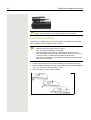
Remove the protective cover from the display before putting
the handset into service.
Installing the charger
The charger is designed for operation in closed, dry rooms within a temperature
range of +5 °C to +45 °C.
Position the charger on a level, non-slip surface.
The phone's feet do not usually leave any marks on surfaces. However, due to
the multitude of different varnishes and polishes used on today's furnishings, the
occurrence of marks on the surfaces cannot be completely ruled out.
Please note:
• Never expose the telephone to the influence of heat sources, direct
sunlight or other electrical devices.
• Protect your handset from moisture, dust, corrosive liquids and fumes.
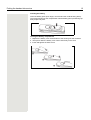
1. Connect the flat plug from the power adapter to the charger.
2. Plug the power adapter into the plug socket.
2
1
Putting the handset into service
11
To disconnect the flat plug from the charger, press the release button and disconnect the flat plug.
Fitting the attachment clip
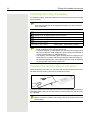
1. Press the attachment clip pin on the back of the handset until the tabs on the
sides engage audibly in the recesses on the phone.
2. Slide the attachment clip onto the pin as it clicks audibly into place.
3. Secure the handset with the attachment clip to the belt. To do this, open the
brackets by squeezing the free end and attach it to the belt.
To remove the handset, press the opener on the attachment clip and slide the
handset from the pin.
12
Putting the handset into service
While you are wearing the handset on the belt you will be able to read the
display without having to remove the handset, see Page 66.
Inserting the battery
The handset is supplied with an approved battery. The battery is not charged
when supplied. It is first charged in the handset.
•
•
•
•
•
Do not remove the battery in Ex zones.
Please observe the safety notes Page 2.
Only use approved batteries Page 82.
Open the battery compartment in a dust-free environment only.
Your phonebook entries and all settings remain stored even if you remove the battery. The date and time settings will be reset.
• Only remove the battery if it is defective. The battery's life diminishes
each time it is removed.
Opening the battery compartment
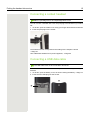
1. Loosen and remove the screw from the battery cover with the Allen key.
2. Insert a suitable screwdriver into the recess between the housing and battery
cover, turn it and then raise the battery cover.
3. Lift up the battery cover from the housing.
1
2
3
Putting the handset into service
13
Inserting the battery
Insert the battery pack (at an angle, nose first and the contacts facing down).
Then press it down into the compartment until the battery pack's positioning clip
firmly snaps into place.
Closing the battery compartment
1. Replace the battery cover at the bottom of the housing into the recesses.
2. Then press down the battery cover until it rests firmly on the seal.
3. Insert and tighten the Allen screw.
1
2
3
14
Putting the handset into service
Charging and using the battery
To charge the battery, insert the handset into the charging shell with the keypad
facing forwards.
Attention:
Only place the handset in the designated charger. (For order numbers
see Page 83).
The charging status is indicated by the charge status LED.
{ lighting white: charged over 66%
{ lighting white: charged between 34 % and 66 %
y lighting white: charged between 11% and 33%
y lighting red: charged below 11%
y flashing red: battery almost empty (less than 10 minutes talktime)
xy xy x{ x{
lighting white: battery being charged
• Initial charging: Charge the battery for at least 10 hours without a
break, regardless of the charging status icon.
• For future charging: you can replace your handset in the charging shell
each time it has been used. Charging is electronically controlled which
ensures that the battery is charged optimally.
• The capacity of the Ex battery pack can diminish due to ageing to the
extent that it is no longer sufficient (increasingly faster discharge) for
the intended operating life. The Ex battery pack must then be replaced
by appropriately trained service personnel.
Inserting the dummy plug or connector
Insert the dummy connector (1) / connector with cord (2) into the recess provided. Make sure the dummy connector is positioned correctly.
1
2
If you do not require the man down alarm function on the OpenStage M3 Plus or
OpenStage M3 Ex Plus you can also use the connector without a cord as a dummy connector.
Regardless of whether or not a cord is used, the handset can be placed
with the connector inserted in the charger. Run the cord out from the front
of the charger.
Putting the handset into service
15
Connecting a corded headset
Not for OpenStage M3 Ex and OpenStage M3 Ex Plus!
You can connect a headset with a 2.5 mm jack plug to the left side of your handset.
1. To do this, open the rubber cover using your finger nail and bend it outward.
2. Insert the jack plug into the socket.
1
2
The headset volume corresponds to the setting for the earpiece volume
Page 57.
Use a Bluetooth headset for Ex-proof equipment, Page 52.
Connecting a USB data cable
The USB cable must not be connected in Ex zones!
You can connect a USB data cable into the port under the battery cover of your
handset.
1. To do this, open the battery cover, as when inserting the battery Page 12.
2. Insert the mini-USB plug into the socket.
1
2
16
Putting the handset into service
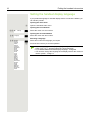
Setting the handset display language
If your preferred language for handset display texts is not set as the default, you
can set this yourself.
v
Opening the main menu
Open the handset's main menu.
Opening the first submenu
uvÏ
st
Settings
Language
[
Select the menu icon and confirm.
Opening the second submenu
[
Select the menu item and confirm.
Selecting a language
st
Deutsch
English
Francais
Italiano
Espanol
Portugues
Nederlands
Dansk
Norsk
Svenska
Suomi
Cesky
Polski
Turkce
Ellinika
Magyar
Russkij
Hrvatski
Slovenscina
Romana
Srpski
Catala
Bulgarski
Bosanski
Ukrayinska
Arabic
[
a
Select and confirm the language you require.
Press the On-hook key to end the operation.
• If you inadvertently set a display language that you do not understand,
press "v O 5" and then select the correct language.
• If you want to reset the default display language: Page 68.
• You can also change the language of the display texts for the communications system: Page 17.
Putting the handset into service
17
Setting the system display language
c or d
Menu
If you wish to change the language of the display texts, then you must also
change the system language on the handset. A different language can be set for
every handset on the system.
Press and hold the Talk or Speakerphone key.
Open the system menu.
><
Service?
[
Select the menu item and confirm.
><
More features?
[
Select the menu item and confirm.
><
* 48=
Select language?
[
Select the menu item and confirm.
><
11=German
...
[
Select and confirm the language you require.
a
Press the On-hook key to end the operation.
A description of further settings can be found from Page 57.
18
Description of controls
Description of controls
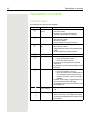
Function keys
The following function keys are available:
Key
a
c
Name
Usage
On-hook and on/ • End a call
off key
• Cancel functions
• Go back to the next menu level up
• Activate or deactivate the handset
Talk key
•
•
•
•
Speakerphone
key
• Answer a call
• Dial a phone number
• Toggle between handset and speakerphone
mode
• Access telephone system functions
Message list
• Access message lists
*
Star key
#
• When entering the phone number:
– Press and release: Insert "*"
– Press and hold: Insert "R"
• In editor mode (string): Show all special
characters
• In idle status: Press and hold to switch on/off
the ringer
Hash key
• When entering the phone number:
– Press and release: Insert "#"
– Press and hold: Insert a dialling pause
(for example between the prefix and
the phone number or when checking a
mailbox)
• In editor mode (string): Toggle between uppercase and lowercase and digits
• In idle status: Press and hold to switch on/off
the keypad lock
d
f
Answer a call
Dial a phone number
Open the redial list
Access telephone system functions
Alarm and emer- • For triggering a manual alarm or emergency
gency call key
call
Volume key (+/-) • Adjust the volume for ringtones
• When conducting a call: Adjust the volume
in handset and speakerphone mode and for
the headset
Description of controls
19
Control key
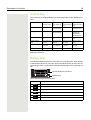
The control key is assigned different functions depending on the operating situation:
t
s
u
v
In idle status
Call volume
Open the handset's phonebook
–
Open the handset's main menu
During a call
Call volume
Open the handset's phonebook
–
Select "Loudspeaker Vol",
"GAP DTMF",
"Base Settings"
In the main menu
Select a menu
icon
Select a menu
icon
Select a menu
icon
Select a menu
icon
In lists and menus
Next-higher item
in the list
Next-lower item
in the list
Next menu level
up, cancel
Select an entry
(OK)
In the input field
Move the cursor
up one line
Move the cursor
down one line
Move the cursor
to the left
Move the cursor to
the right
Change values
–
–
Reduce value
Increase value
Situation
Press top of key
Press bottom of
key
Press left side of
key
Press right side of
key
The centre key (central key of control key) has an OK function for confirming/
adopting a selection.
Display keys
The handset has two display keys, each with one or two functions. When the key
is allocated two functions, press the right or left side of the key to select the corresponding function. The display key assignment depends on the operating status.
Back
Save
Current display key functions
Display keys
Some important display keys include:
Icon
Usage
Options
Open a context-specific menu
OK
Confirm your selection
Û
Delete character by character/word by word from right to left
Back
Go back one menu level/cancel operation
Save
Save input
Þ
Open redial list
20
Description of controls
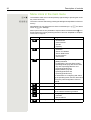
Menu icons in the main menu
v or w
uvts
The handset's main menu can be opened by right-clicking or pressing the centre
key of the control key.
The menu icons are selected by pressing the left/right and top/bottom of the control key.
Alternatively, you can also press one of the numerical keys, e. g. 4 for "Alarm
Clock" or O for "Settings".
Menu options that are only available in expert mode are marked with the • icon.
Expert mode can be set by switching the menu view from simplified to complete.
To set, see Page 67.
Icon
Name
Usage
·
Resource Directory
Manage images and tones:
ò
Bluetooth
Configure Bluetooth interface:
É
Additional Features Alarm and emergency call configuration:
•
•
•
•
•
•
•
•
•
Screensavers
Caller Pictures
Sounds
Capacity
Activation
Search for Headset
Search Data Device
Known Devices
Own Device
• [Mode] Activation
• Configuration (only with Service PIN)
• Operating Mode (only with Service PIN,
only with OpenStage M3 Plus and
OpenStage M3 Ex Plus)
• Display Rotate (only with
OpenStage M3 Plus and
OpenStage M3 Ex Plus)
For information on configuring and selecting the operating mode, see the "Alarm and
Emergency Call Configuration" Service
Manual.
ì
Alarm Clock
Configure alarm call function.
Ê
Call Lists
Open call list if calls are available.
Ì
Voice Mail
Call mailbox if voicemail calls are available
on the network answering machine.
á
Organizer
Manage appointments:
• Calendar
• Missed Alarms
Â
Directory
Manage phonebook.
Description of controls
21
Icon
Ï
Name
Usage
Settings
Configure handset:
• Date/Time
• Audio Settings
– Handset Volume
– Advisory Tones
– Silent Alert
– Ringtones(Handset)
• Display + Keypad
– Screensaver
– Large Font
– Colour Schemes
– Display Backlight
– Keypad Illumination
– Auto Keylock
• Language
• Registration
– Register Handset
– Select Base (only if registered on
several systems)
• Telephony
– Auto Answer
– Area Codes
• System
– Handset PIN
– Handset Reset
– Base Reset
• Menu View
– Simplified
– Complete
22
Conducting calls – the basic functions
Conducting calls – the basic functions
You can use your handset to make both internal and external calls.
Internal calls are calls that
• you make within the range of a communications system, for example, within
your company,
• you make between networked communications systems, for example, to different company locations.
External calls are calls that you conduct with users of the public telephone network.
Activating/deactivating the handset
a
Press the On-hook key until the activation or deactivation is confirmed by a signal.
PIN
If the default PIN has not been changed (0000), the handset is ready for operation as soon as it is switched on. If a PIN was set, it must be entered before the
handset can be operated.
Please enter
PIN:
o
[
Enter the PIN.
Confirm your entry. The handset is ready to use.
Displaying the connection quality
The strength of the incoming signal is displayed by the "receive field strength"
icon in idle status:
|
Ò
Ñ
i
Ð
Flashing, no reception
Low receive field strength
50% receive field strength
75% receive field strength
100% receive field strength
The radio range is different indoors and outdoors Page 82. Please consult
your system administrator in the event of range problems.
Charging the battery
You may only use the charging shell provided for the handset.
The handset charges when sitting in the charging shell, even when deactivated.
If the handset deactivates because the battery is flat, it automatically reactivates
and is ready for operation as soon as you place it in the charging shell. The
charging operation starts. If a PIN was set, it must be entered first to allow charging to start.
Conducting calls – the basic functions
23
Language
If your preferred language for the display texts is not set, you can set this yourself Page 16.
Dialling
Dialling preparation
o and possibly X
possibly #
Enter the required phone number and correct individual characters as necessary using the "Delete" display key.
Insert a dial pause. A "P" appears between the digits entered. You may have to
insert a pause, for example, between the prefix and the phone number or when
checking a mailbox.
The dialling preparation function is also available with number redial and
when dialling from the handset's phonebook ( Ó ).
Dialling
c or d
Press the Talk or Speakerphone key. The user is called.
Either:
p
The user answers. You are conducting the call.
Or:
Call rejected
Please replace
handset.
a
The user is busy or rejects the call. You are connected to the mailbox (if configured).
Press the On-hook key to end the operation.
Manual redial
c
st
if nec.
Show
The last 20 phone numbers dialled are saved in the redial list. A phone number
that was dialled several times is only saved once.
When the handset is in idle status: Press the Talk or Speakerphone key briefly.
The redial list is displayed.
Select the required telephone number.
If you want to see details of the selected phone number: Press the display key.
Either:
c or d
Press the Talk or Speakerphone key briefly. The connection is set up.
Or:
Options
st
Open the redial menu. The menu contains the following functions Page 29:
•
•
•
•
•
Display Number
[
o
c or d
Copy to Directory
Automatic Redial
Display Number
Delete Entry
Delete all
Select the menu item and confirm.
Change or complete the phone number, for example, with DDIA.
Press the Talk or Speakerphone key briefly. The connection is set up.
24
Conducting calls – the basic functions
Consultation
You interrupt your call to consult with a user (including external users) and then
resume the original call.
p
You are conducting a call.
Activating and conducting an enquiry/consultation call
Enquiry
o
p
Activate enquiry. The current call is placed "on hold", so that the first user waits.
Enter the phone number for the consultation call.
The number is dialled. The user answers. The consultation starts.
The second user is busy or does not answer
Press the display key to cancel the consultation. You are reconnected with the
first partner.
During the consultation you can
• activate call waiting Page 42 or
• press the menu key to send a callback or message to the second partner.
The consultation is ended and you return to the waiting call
Either:
The second user hangs up. You are reconnected with the first partner.
Or:
Menu
><
Quit and return?
[
Open the system menu.
Select the menu item and confirm.
You will be connected to the first party again. The second partner hears the busy
tone and hangs up; an OpenStage handset hangs up automatically.
However, you can also
• toggle between the partners Page 40,
• set up a conference Page 41 or
• transfer the waiting partner to the second partner Page 40.
Answering or rejecting a call
Accepting a call
Your handset rings Page 63. The caller information appears on the display.
The name and/or telephone number of the caller can be displayed. You have the
following options for answering a call:
k
c or d
The handset is in the charging shell: Remove the handset from the charging
shell (only works if "Auto Answer" is active) Page 63.
The handset is not in the charging shell. Press the Talk key or Speakerphone
key.
When you have accepted the call you can:
• transfer the call Page 40,
• place the call on hold and consult with someone else in the room Page 24,
• place the call on hold and call a second partner Page 24 in order to forward
Page 40 or toggle the call Page 40 or to set up a conference Page 41.
Conducting calls – the basic functions
25
Rejecting a call
If you do not wish to be disturbed, you can reject the call.
Reject call
Confirm the message displayed with one of the two display keys. The call is rejected and the caller hears the busy tone. The caller is then connected to the
mailbox (if configured).
Rejected calls are logged in the missed calls caller list Page 44.
Ending a call
a or k
Press the On-hook key briefly or place the handset in the charging shell.
The call charges are displayed, depending on the communications system.
Activating or deactivating the keypad lock
#
This feature protects against accidentally pressing buttons when the handset is
in a pocket, for example. The keypad lock turns off automatically when a call
comes in and turns back on when the call has ended.
Press the hash key until the activation or deactivation is confirmed by a signal.
A key icon on the display indicates that the keypad lock is active.
After leaving the radio network
The message "No base" flashes on the display. The handset repeatedly attempts to synchronise with a base. The intervals between synchronisation attempts increase on account of the integrated power saving function.
You can switch off your handset to save the battery.
26
Conducting calls – enhanced functions
Conducting calls – enhanced
functions
Speakerphone mode
Features
Speakerphone mode offers you the following advantages:
• Other persons can listen to and participate in the call.
• Your hands are free.
• When dialling, you can hear the ring tone, for example, without having to lift
the handset to your ear.
Speakerphone mode can be used effectively up to a background noise level of
50 dB (A).
Activating speakerphone mode
d
Speakerphone mode can be activated during a call, when dialling or when answering a call:
Press the speakerphone key. Inform the other party when you want to activate
the speakerphone to let others listen in.
Make sure you switch back to handset mode before you return the telephone directly to your ear. In this way you can avoid causing damage to
your hearing.
Switching between speakerphone and handset mode
d
Press the speakerphone key. The handset switches from speakerphone to
handset mode or vice versa.
If you wish to replace the handset in the charging shell during a call,
for example, because the battery is flat, hold down the Speakerphone key
to prevent the call from being disconnected.
Setting the speakerphone volume
The volume can be set during the call Page 57.
Conducting calls – enhanced functions
27
Conducting calls with the headset
The handset can be used with a corded and cordless headset.
Corded headset
Not for OpenStage M3 Ex and OpenStage M3 Ex Plus!
You can connect a corded headset via the jack on the side of the handset, see
Page 15. The headset must have a (2.5 mm) jack plug.
The earpiece and microphone functions are activated on the headset once it is
connected.
Cordless headset
You can use a cordless Bluetooth headset with your handset. This means your
hands are free while making calls and there are no annoying cables, for
example, when you are working at your computer or when you are on the road.
Your Bluetooth headset must be registered on your handset before you can use
it for the first time. After this, you can continue to use your Bluetooth headset until you decide to deregister it.
• If you register a headset, any headset that is already registered will be
overwritten.
• If you would like to use a headset with your handset that is already registered at another device (e.g. a handset), please deactivate this connection before you start the registration process.
• Theoretically, third parties can tap Bluetooth connections.
• To improve protection against unauthorised tapping, deregister any devices you no longer require.
During a call, a second caller is not signalled at the Bluetooth headset.
ò
uvò
st
st
v
Bluetooth
Search for Headset
Open the handset's main menu.
Select the menu icon and confirm.
[
Select the menu item and confirm. The handset searches for a Bluetooth headset and sets up a wireless connection. The names of the devices found are displayed.
Select the required headset.
Found Devices
S55 Headset
Trust Device
Set the headset to login mode (see the user manual supplied with your headset).
[
Options
st
Registering a Bluetooth headset at the handset
[
Press the display key.
Select the menu item and confirm.
28
Conducting calls – enhanced functions
st
[
agreed PIN:
Activation ³
If necessary, enter and confirm the Bluetooth PIN for your headset (see the user
manual supplied with your headset). The device is saved in the list of known
devices.
The Bluetooth interface is automatically activated on your handset. The active
Bluetooth function is ticked.
ò
ò
ò
Conducting calls via the Bluetooth headset
If a Bluetooth headset is registered at the handset, the Bluetooth headset is activated immediately upon dialling.
Accepting a call on the Bluetooth headset
The headset uses a call tone to signal an incoming call. Press the Talk key on
the Bluetooth headset (see the user manual supplied with your headset).
Number redial
To redial a number, double-click the Talk key on the headset.
Switching from the Bluetooth headset to the earpiece or speakerphone during a
call
c or d
You are conducting a call via the Bluetooth headset.
Press the Talk key or Speakerphone key on the handset. The Bluetooth headset
is disconnected. You can continue the call directly on the handset.
Deregistering the Bluetooth headset at the handset
uvò
st
v
Open the handset's main menu.
Bluetooth
[
Select the menu icon and confirm.
Known Devices
S55 Headset
[
Select the menu item and confirm. The name of the registered or detected Bluetooth headset is displayed.
Options
st
To improve protection against unauthorised tapping, deregister the Bluetooth
headset at the handset if you no longer wish to use it.
Delete Entry
[
Press the display key.
Select the menu item and confirm. The Bluetooth headset is deregistered and
can no longer be detected by the handset.
Conducting calls – enhanced functions
29
Number redial
The last 20 phone numbers dialled are saved in the redial list. A phone number
that was dialled several times is only saved once.
If you tried to call a party from the handset's telephone directory, the name of the
party is displayed in case of number redial. For information on manual number
redial, see Page 23.
Automatic redial
c
st
Options
st
Automatic Redial
[
The phone number is automatically redialled ten times at 20-second intervals.
Speakerphone mode is automatically activated, the Talk key flashes. The function is deactivated after ten unsuccessful attempts and when a call is made in
the interim.
Press the Talk key. The redial list is displayed.
Select the required telephone number.
Press the display key.
Select the menu item and confirm. Automatic redial is activated.
Either:
c
The user answers. Press the Talk key and conduct the call.
Or:
OFF
If you wish to cancel the function: press the Display key or any key.
Deleting a redial entry or list
c
st
Options
st
st
Press the Talk key. The redial list is displayed.
Select the required telephone number.
Press the display key.
Either:
Delete Entry
[
Select the menu item and confirm. The telephone number is deleted.
Or:
Delete All
[
a
Select the menu item and confirm. The redial list is deleted.
Press the On-hook key to end the operation.
30
Conducting calls – enhanced functions
Adding a telephone number to the redial list
c
st
Options
st
st
During dial preparation, you can add a number from your handset's redial list to
your phonebook.
Press the Talk key briefly. The redial list is displayed.
Select the required telephone number.
Press the display key.
Copy to Directory
[
Select the menu item and confirm. The phonebook is displayed.
<New Entry>
[
Select the menu item and confirm. The following selection mask appears:
New Entry
08912345678
1 Phone (Mobile)
Copy number to:
äkl
Back
uv
[
sto
1
OK
2 Phone (Office)
2
3
3 Phone (Home)
Select the icon for the required phone number type under which the phone number is to be added.
Confirm your entry.
Enter the remaining contact information, such as the first name and surname.
For further information, see Page 33 and Page 34.
Phonebook of communications platform
If configured, phone numbers can be searched for and dialled based on the
names in the system phonebook.
If the caller's phone number is saved in the system phonebook for an incoming
call, the associated name is shown on the display while the handset is ringing.
Additional phonebooks: Handset's local phonebook Page 33 and LDAP
phonebook Page 32.
Conducting calls – enhanced functions
31
Finding and dialling an entry
u
Press the INT key.
><
Phonebook
[
Select the menu item and confirm.
><
System Phonebook
[
If an LDAP phonebook is available: Select the menu item and confirm. The first
three entries are displayed.
> < or o
Scroll to the required entry or enter the first letter of the relevant entry.
If necessary, press a key several times in succession to enter the required letter.
Either:
c
Press the Talk key. The assigned phone number is dialled.
Or:
[Name]
[Extension]
[
Confirm your selection.
[
Confirm the option shown. The phone number shown is dialled.
32
Conducting calls – enhanced functions
LDAP phonebook
If an LDAP directory service is available to you, phone numbers can be
searched for and dialled based on the names in this phonebook.
Additional phonebooks: Handset's local phonebook Page 33 and system
phonebook Page 30.
Finding and dialling an entry
u
Press the INT key.
><
Phonebook
[
Select the menu item and confirm.
><
LDAP Phonebook
[
If a system phonebook is available: Select the menu item and confirm.
Search Dialog
[Name]
[
Enter the first letter of the entry in the search dialog and confirm.
If necessary, press a key several times in succession to enter the required letter.
o
Either:
o
No Entry
[
˜
Or:
><
[Name]
[
No entry is found.
If no entry corresponds to the search pattern, "No Entry" is output.
Delete individual letters or change the input and confirm again.
One or more entries are found.
Select the name and confirm.
Either:
c
Press the Talk key. The assigned phone number is dialled.
Or:
[Name]
[Extension]
[
Confirm your selection.
[
Confirm the option shown. The phone number shown is dialled.
Conducting calls – enhanced functions
33
The handset's phonebook
You can save contact information for frequent call partners in the phonebook.
Once a phone number has been saved in this way you no longer have to enter
it in full when you want to call someone. All you have to do is select the required
phonebook entry.
You can save a total of 500 entries at most in the phonebook.
Gigaset QuickSync Page 52 is a software application for transferring data
between your cordless OpenStage phone and your PC. You can use it at your
phone to load data from your PC to your OpenStage over a USB data cable or
Bluetooth and synchronise contacts with Microsoft Outlook, Microsoft Outlook
Express and contacts in Microsoft Windows.
You can save the following contact information for every entry in the phonebook:
Information
Explanation
First Name*,
Surname
A name must be entered in at least one of the fields. Each name
can contain up to 16 characters.
Phone (Home),
Phone (Mobile)*,
Phone (Office)*
A number must be entered in at least one of the fields. Each
number can contain up to 32 digits.
E-mail*
E-mail address with up to 60 characters. The special character
"@" can be inserted after pressing the asterisk key.
Anniversary
You can select either "On" or "Off". If "On" is selected:
Caller Melody (VIP)
Mark an address book entry as a VIP (Very Important Person) by
assigning a specific ringtone to it.
Caller Picture*
Display a picture for an incoming call when CLIP is active.
Caution: This function is not supported by the system and should
therefore not be used.
• Anniversary (Date): Day/month/year, 8 digits*
• Anniversary (Time): Hour/minute, 4 digits, for reminder
call
• Anniversary (Signal): Type of signalling, acoustic or visual (time need not be specified)
* = new for vCard format
34
Conducting calls – enhanced functions
Saving an entry
st
s
[
New Entry
o
st
...
Open the phonebook.
Select the menu item and confirm. The input mask is displayed.
Enter the relevant information, see above.
Jump to the next line.
etc.
Functions for text input:
#
X
*
Save
a
Switches mode from abc to Abc, from Abc to 123 and from 123 to abc
If predictive text is off:
press the key briefly.
If predictive text is on:
press and hold down the key.
Deletes the letter to the left of the cursor.
Opens the table of special characters.
Save the settings.
Press the On-hook key to end the operation.
Changing the sequence of entries:
The phonebook entries are generally sorted in alphabetical order by surname.
Spaces and digits have first priority here. If the phonebook only contains a subscriber's first name, this is listed instead of the surname in the sequence.
The sort sequence is as follows:
1. Space
2. Digits (0 - 9)
3. Letters (alphabetical)
4. Other characters
If you want to change the sequence of entries in the alphabetical list, you could
insert a space or a digit before the first letter of the surname. These entries then
move to the top of the phonebook. Names preceded by an asterisk are listed at
the end of the phonebook.
Finding and dialling an entry
s
s t or o
Open the phonebook.
You can scroll to the required entry or enter the first letter of the relevant entry.
If necessary, press a key several times in succession to enter the required letter
(e. g. press 7 three times for r).
Either:
c
Press the Talk key. The assigned phone number is dialled.
Or:
st
Options
Display Number
Open the menu.
[
Select the menu item and confirm. The number is displayed.
o
Change or complete the phone number, for example, with DDIA.
Conducting calls – enhanced functions
c
35
Press and hold down the Talk key.
Dialling an entry with the speed dialling digit
You can call up and dial the phone number associated with an entry to which you
assigned a speed dialling digit by simply pressing this speed dialling digit
Page 50.
o
Press and hold down the required speed dialling digit. The assigned phone number is dialled.
Viewing an entry
s
s t or o
Open the phonebook.
You can scroll to the required entry or enter the first letter of the relevant entry.
If necessary, press a key several times in succession to enter the required letter.
Press the display key. The entry's data is displayed.
Show
Changing to the list
or
Edit
Options
Select
or
a
Press the On-hook key to return to the list.
Changing an entry
s
s t or o
Open the phonebook.
You can scroll to the required entry or enter the first letter of the relevant entry.
If necessary, press a key several times in succession to enter the required letter.
Either:
Show
Edit
Press the display keys one after the other. The entry's data is displayed.
Or:
st
Options
Edit Entry
[
Press the display key.
Select the menu item and confirm. The entry's data is displayed.
then:
o
Save
a
Enter changes.
Press the display key.
Press the On-hook key to return to the list.
36
Conducting calls – enhanced functions
Marking a VIP (Very Important Person) entry
s
st
st
Options
VIP Entry
[
VIP: u Ein v
s
Melodies: u Circles v
a
An incoming call for a VIP-marked entry is signalled with a VIP ringtone.
When the handset is idle: Open the phonebook.
Select the entry you want.
Open the menu.
Select the menu item and confirm. The input mask for marking a VIP entry is displayed.
Activate the VIP marking.
Move the cursor down one line.
Select a melody, for example "Circles".
Press the On-hook key to end the operation.
Deleting an entry or phonebook
s
st
Options
st
st
Open the phonebook.
Select the entry you want.
Press the display key.
Either:
Delete Entry
[
Select the menu item and confirm. The telephone number is deleted.
Or:
Delete List
[
Yes
a
Select the menu item and confirm. A security check question appears.
Confirm the security check question. The phonebook is deleted.
Press the On-hook key to end the operation.
Conducting calls – enhanced functions
37
Displaying available memory
s
st
st
Options
Available Memory
[
a
Open the phonebook.
Select any entry.
Press the display key.
Select the menu item and confirm. The amount of memory used and available
is displayed.
Press the On-hook key to end the operation.
Sending an entry or phonebook to the handset or
system
You can send individual entries or the entire phonebook to other handsets or to
the communications system.
For phonebook transfer in vCard format via Bluetooth see Page 52.
If your handset and the recipient's handset have phone numbers between 1 and
99, you can send or receive a list or entry directly from one handset to the other.
If the handsets' phone numbers start at 100, you must first send the list or entry
to the communications system. The recipient can then use his or her handset to
download the list or entry from the communications system.
Restrictions when copying over the communications system
The entries in the handset's phonebook are stored in vCard format Page 33.
The communications system, however, uses another format. This can cause
loss of phonebook entry information. The features that are new for the vCard format are indicated in the table Page 33 by "new for vCard format". The phone
numbers are not affected.
Sending a list/entry
s
st
Options
st
st
Open the phonebook.
Select the entry you want.
Press the display key.
Either:
Copy All
[
Select the menu item and confirm.
Or:
Copy Entry
[
Select the menu item and confirm.
then:
o
Enter the station number. The following phone numbers are possible:
[
Confirm your entry. The list or entry is sent.
• 1... 98 – the list or entry is sent directly to the recipient's handset.
• 00 – the list or entry is sent to the communications system and can then be
downloaded by any handset.
• 99 – The list or entry is sent to the communications system and can then only
be downloaded by your handset.
38
Conducting calls – enhanced functions
If a phone number from 1 to 98 was dialled, the list or the entry is automatically
received by the recipient's handset.
Loading a list or entry from the communications system
c or d
Menu
Prerequisite: You sent an entry or list to the communications system by dialling
the phone number 00 or 99.
Press and hold the Talk or Speakerphone key.
Open the system menu.
><
Service?
[
Select the menu item and confirm.
><
Load list buffer?
[
Select the menu item and confirm.
a
Press the On-hook key once. You will receive a call from the system and the
transfer starts once you answer this call.
Deleting a list or entry in the communications system
c or d
Menu
Prerequisite: A currently unused list or entry is saved on the communications
system.
Press and hold the Talk or Speakerphone key.
Open the system menu.
><
Service?
[
Select the menu item and confirm.
><
Erase list buffer?
[
Select the menu item and confirm. The handset starts to delete the list/entry.
a
Press the On-hook key to end the operation.
Conducting calls – enhanced functions
39
VoiceMail
Depending on the communications platform, a voicemail function (answering
machine) may be available to you (if set up, please consult your service technician).
VoiceMail is the default destination for call forwarding Page 39.
Checking VoiceMail
oc
Dial the VoiceMail number and press the Talk key. VoiceMail is called.
Or:
u
Press the INT key.
><
Caller Lists
[
Select the menu item and confirm.
><
VoiceMail
[
Select the menu item and confirm.
c
Press the Talk key. VoiceMail is called.
Or:
If new VoiceMail messages are available (message key flashes).
f
><
VoiceMail
[
c
Press the flashing message key.
Select the menu item and confirm.
Press the Talk key. VoiceMail is called.
Using dual-tone multifrequency signalling
Your handset operates on the basis of digital information transmission. However,
certain applications, for example answering machines, can only be operated using analogue technology. For this you have to send signals using the dual-tone
multifrequency signalling (DTMF) process.
Depending on how your system is configured (automatic tone dialling on or off to be configured by the service engineer) you must first switch to DTMF dialling.
This means, for example, that you can communicate with a variety of voice storage systems.
You will find further details in the operating instructions for the relevant applications.
40
Conducting calls – with multiple users
Conducting calls – with multiple users
Transferring a call
Transferring a call means that you wish to hand over a call you are conducting
on your handset to another user.
Transferring (without announcing the call transfer)
p
Enquiry
o
p
a
You can use this function to forward a call you answered to another user.
Press the display key.
Enter the phone number of the user to whom the call is to be transferred. The
current call is placed "on hold", so that the first user waits.
The number is dialled.
Press the On-hook key. The target user's phone rings. He picks up the call by
lifting the handset.
You receive a recall:
If the required user does not answer for some time after the transfer.
Transfer (announcing the transfer)
p
Enquiry
o
p
a
You can use this function to forward a call you answered to another user.
Press the display key. The current call is placed "on hold", so that the first user
waits.
Enter the phone number of the user to whom the call is to be transferred.
The number is dialled. The user answers. You announce the call presently on
hold.
Press the On-hook key. The user takes the call.
Toggling (switching between calls)
The Toggle function allows you to switch between two users without allowing
them to speak to each other directly. The two users can be either external or internal users. You can also withdraw from the calls and connect the two users
with each other. You can also start a conference.
p
Enquiry
o
p
Toggle
You are conducting a call.
Press the display key. The current call is placed "on hold", the user waits.
Enter the phone number of the second user.
The second user answers.
Press the display key to switch between the two calls.
When you terminate the call, both parties are connected to one another.
Conducting calls – with multiple users
41
Conducting a conference
You can connect up to 3 internal or external partners with each other in a telephone conference.
Setting up a conference
You decide to set up a conference while talking to a user.
p
Enquiry
o
p
Conference
Press the display key. The caller is placed on hold.
Enter the phone number of the new user.
The user is free and answers the phone. You announce the conference.
Open the system menu.
Menu
><
You are on a call and wish to start a conference.
[
Select the menu item and confirm.
You and your two partners are connected in a conference call.
Ending a conference
p
Open the system menu.
Menu
><
Sub. 1 hang up?
You are connected with two partners in a conference call.
[
Select the menu item and confirm. Station 1 (last party called) is removed from
the conference.
or
><
Sub. 2 hang up?
[
a
Select the menu item and confirm. Station 2 (first party called) is removed from
the conference.
Press the On-hook key. The conference is ended.
Leaving a conference
If one of the two users leaves the conference, you remain connected to the other
two users.
42
Conducting calls – with multiple users
Second call (call waiting)
If the call waiting function is set up, you can accept second calls on your handset.
When a second call is incoming (call waiting), you will be informed of the second
call during a call by a call waiting tone and a message on the display. The caller
hears a ringing tone. You can decide whether to accept or reject the second call.
You can activate and deactivate second calls. If the function is deactivated, the
second caller hears a busy tone or is forwarded to another number.
Activating call waiting
u
Press the INT key.
><
Telephony
[
Select the menu item and confirm.
><
call waiting
[
Select the menu item and confirm.
><
deactivated
[
Select the menu item and confirm. The display shows "activated".
a
Press the On-hook key to end the operation.
To deactivate, repeat the procedure.
Placing the call on hold, accepting the second call
p
Menu
><
answer a call
[
You are on a call and hear the call waiting tone.
Open the system menu.
Select the menu item and confirm. You are connected to the second caller. The
first call is now on hold.
You can now:
• Transfer the call Page 40
• Toggle between calls Page 40
• Initiate a conference Page 41
Conducting calls – with multiple users
Placing the call on hold, accepting the second call
p
You are on a call and hear the call waiting tone.
Either:
a
c
Press the On-hook key. Your handset rings.
Press the Talk key. You are connected to the second caller.
Or:
Menu
><
disconnect the call
[
Open the system menu.
Select the menu item and confirm. You are connected to the second caller.
Rejecting a second call
p
reject
You are on a call and hear the call waiting tone.
Press the display key. The caller hears the busy tone or is forwarded.
43
44
Caller lists
Caller lists
All calls are logged in caller lists. There is a separate list for the following call
types:
•
•
•
•
Calls for VoiceMail Page 39 (if set up).
Missed calls.
Forwarded calls.
Answered calls.
Up to ten calls per list are stored in chronological order. Each call is assigned a
time stamp. The display starts with the latest call request still not called. When
several calls are received from one caller, the number of calls is shown.
Entries in the caller lists can be transferred to the redial list.
Working with list entries
Selecting an entry
Either:
f
Press the message key.
Or:
u
><
Caller lists
[
Press the INT key.
Select the menu item and confirm.
>< [
Select "VoiceMail", "missed", "forwarded" or "answered" and confirm.
>< [
Select the call and confirm.
Caller lists
45
Calling back a caller
>< c
Select an entry (see above).
Select the caller and press the Talk key. The connection is set up.
Copying an entry to the redial buffer
Select an entry (see above).
><
>< [
saved in the redial list
[
Select the call party and confirm.
Select the menu item and confirm. The entry is saved in the redial list
Page 29.
Removing an entry from the caller list
Select an entry (see above).
><
>< [
Delete the entry
[
a
Select the call party and confirm.
Select the menu item and confirm. The entry is deleted.
Press the On-hook key to end the operation.
Deleting all lists
Either:
f
Press the message key.
Or:
u
Press the INT key.
><
Caller lists
[
Select the menu item and confirm.
><
Deleting all lists
[
Select the menu item and confirm. The lists are deleted.
a
Press the On-hook key to end the operation.
46
Additional functions
Additional functions
Handset alarm clock function
When the alarm clock is activated, it rings every day or every day from Monday
to Friday at the set time. The alarm clock is deactivated during automatic number redial.
The alarm will only sound with the set melody if the handset is in idle status. During a call, the alarm is only signalled by a short tone.
Prerequisite: The date and time must be set.
Setting the alarm clock
uvì
v
Alarm Clock
[
The handset is in idle status.
Open the handset's main menu.
Select the menu icon and confirm. The input mask for setting the alarm is displayed.
1
2
3
4
5
uv
s
o
s
...
Alarm Clock
Activation
On g
Time:
[HH:MM]
How often:
f
Daily
Volume:
f
f
Melody:
Circles
Back
g
1
Alarm activation: On/off
2
Time in the format [HH:MM], for example 19:05 = 1905
3
Alarm rings every day or only Monday - Friday
4
Volume can be set to five different levels + crescendo ring
5
Adjustable melodies
Save
Define the setting.
Move the cursor down one line.
Enter the time.
Move the cursor down one line.
etc.
Save the settings.
Save
¼
a
The alarm clock is activated.
Press the On-hook key to end the operation.
Deactivating an alarm/repeating after a pause
The alarm rings for 60 seconds. The ì symbol appears on the display. If you do
not press anything, the alarm repeats after five minutes and then deactivates.
During the alarm:
Either:
Press the display key. The wake-up call is deactivated.
Off
Or:
Snooze
Press the display key or any key. The alarm deactivates and is repeated after
five minutes. The alarm is repeated twice and then permanently deactivated.
Additional functions
47
Appointment reminder function
You can use your handset to remind yourself of up to 30 appointments. The
handset must be in idle status at the time of the appointment reminder. The appointment reminder function is deactivated during automatic number redial. The
date and time must be set.
Saving an appointment
uvá
st
v
Organizer
Calendar
<New Entry>
uv
Activation < On >
Select the menu icon and confirm.
[
Select the menu item and confirm. The current month's calendar is displayed
with the current day marked.
[
s
Date
o
s
Time
o
s
Text
o
˜
uv
Open the handset's main menu.
[
uv[
st
The handset is in idle status.
s
Select and confirm the required day for the new appointment reminder. The input
mask for entering a new appointment reminder appears.
Select and confirm the menu item or select an existing appointment entry. The
"New Entry" option only appears if an appointment entry already exists.
Define the setting.
Move the cursor down one line.
Enter the date, for example 11 November = 1111.
Move the cursor down one line.
Enter the time, for example 19:05 = 1905.
Move the cursor down one line.
Enter the name for the appointment reminder.
If applicable, delete the old text.
Move the cursor down one line.
Define a melody to signal appointments.
Signal
Save
a
Save the settings.
The appointment reminder function is activated. The check mark after the appointment indicates that the appointment is active.
Press the On-hook key to end the operation.
Confirming an appointment reminder call
An appointment reminder call is signalled in the same way as an incoming call.
Off
Press the display key during the appointment reminder call.
If you do not confirm the appointment reminder call, it will be stored in a missed
dates list.
48
Additional functions
Deactivating an appointment reminder
uvá
st
v
Organizer
Calendar
Select the menu icon and confirm.
[
Select the menu item and confirm. The calendar for the current month is displayed.
[
Deactivate
Select and confirm the required day with at least one available appointment. The
list of appointments is displayed.
Select the appointment reminder that you want to deactivate.
<New Entry>
09:15 Meeting
18:00 Date
Options
st
Open the handset's main menu.
[
uv[
st
The handset is in idle status.
a
Open the additional menu.
Select the menu item and confirm. The selected appointment reminder is deactivated (check mark removed).
Press the On-hook key to end the operation.
Deleting an appointment
uvá
st
v
Organizer
Calendar
st
Select the menu icon and confirm.
[
Select the menu item and confirm. The calendar for the current month is displayed.
uv[
Select and confirm the date you want. The list of appointments is displayed.
Select the appointment reminder that you want to delete.
<New Entry>
09:15 Meeting
18:00 Date
Delete Entry
Open the handset's main menu.
[
Options
st
The handset is in idle status.
[
a
Open the additional menu.
Select the menu item and confirm. The appointment is deleted.
Press the On-hook key to end the operation.
Displaying an unconfirmed appointment
uvá
st
v
Organizer
Missed Alarms
If you have not confirmed an appointment reminder call, the icon and the number of new entries are shown on the display. This unconfirmed appointment
must also be saved in a missed dates list.
Open the handset's main menu.
[
Select the menu icon and confirm.
[
Select the menu item and confirm. The date and time of the unconfirmed appointment are displayed. If 10 entries are already stored in the list, the next appointment reminder will delete the oldest entry.
Delete
Delete entry manually from the list.
Additional functions
49
Selecting a base
If your handset is registered at multiple bases (cordless systems), then you can
set a specific base or the base with the best reception as the base to be used.
The handset then switches automatically to this base.
uvÏ
v
Settings
You can change the base name that is displayed on the handset at any time.
Open the handset's main menu.
[
Select the menu icon and confirm.
st
Registration
[
Select the menu item and confirm.
st
Select Base
[
Select the menu item and confirm.
st
Select the required base.
Base 1
...
Best Base
Selection
Select base. The selected base is ticked:
• Base 1 - 4: Selecting base n defines one specific HiPath cordless system
where the handset is registered.
• Best Base: If the handset is registered at multiple cordless systems, it automatically switches to one of these systems when it enters the relevant range.
Example: The handset is registered at the Gigaset home base as well as at
the cordless system in the company.
Changing the base station name
You can change the name of the base station.
Name
X
o and possibly X
Save
a
Press the display key.
Delete text.
Enter the required text and correct individual characters as necessary using the
"Delete" display key.
Save the settings.
Press the On-hook key to end the operation.
The new base station name is now displayed in idle status.
The cordless system overwrites the display information "Name base station"
with the own phone number as soon as an incoming or outgoing call is initiated.
In this case, the name of the base station only reappears after the handset has
been switched off and back on again.
50
Additional functions
Setting the base
Cannot be set on HiPath 3000.
uvÏ
v
Settings
You can configure individual settings on your system with your handset depending on how your system is configured.
Open the handset's main menu.
[
Select the menu icon and confirm.
st
System
[
Select the menu item and confirm.
st
Base Reset
[
Select the menu item and confirm.
> <[
Select the required menu item and confirm.
Speed dialling
You can program the number keys Q and 2 to O with a phone number.
You then dial the number by pressing the key.
Q, 2 to O
QuickDial
or
Edit
st [
Configuring speed dialling
Press the required number key briefly.
If this key is not already programmed with a function, the number key can be assigned a new phone number.
Press the display key.
If the key is already programmed with a function, it appears on the left display
key.
Press the display key.
Select the required phone number from the phonebook and confirm.
or
Clear Key
Q, 2 to O
Press the display key to delete the assignment.
Dial a phone number
Press and hold the number key programmed with the required phone number.
The phone number is dialled.
If the number key has not been assigned a phone number, the list appears for
you to select a phone number.
Additional functions
51
Changing display key assignments
You can assign functions to display keys and/or change the current assignment.
The function is then started by pressing the key.
Changing the assignment
?
Press and hold the required display key.
A list of the functions that can be programmed on the key is displayed. The following functions are available for selection:
•
•
•
•
•
st [
INT
Alarm Clock
Calendar
Bluetooth
Redial
Select and confirm an entry.
Calling the function
?
Press the required display key briefly.
The function is selected.
Call control from the PC
You can initiate calls using a CTI program (CTI = Computer Telephony Integration). The call is conducted as usual on your handset.
The CTI program depends on your communications platform:
• OpenScape Office LX/MX: myPortal
• OpenScape Voice: WebClient
Initiating calls from the PC
Call a subscriber using a CTI program (see operating instructions for software).
c
CTI Call In
[Extension]
Your handset rings and the message "CTI Call In" and the phone number/name
of the subscriber is displayed.
CTI Call Out
[Extension]
Accept the call. As soon as you lift the handset, the subscriber is called.
52
Additional functions
Data communication with the PC
To enable your handset to communicate with the PC, the Gigaset QuickSync
program must be installed on your PC (free to download at http://wiki.unify.com/
wiki/DECT_Handset_accessory)
After installing "Gigaset QuickSync", connect the handset to your computer using Bluetooth Page 52 or via a USB data cable Page 15.
Transferring data
Start the "Gigaset QuickSync" program. You can now:
• Synchronise your handset's address book with Outlook
• Download caller pictures (BMP, JPG, GIF) from the computer to the handset
• Download pictures (BMP, JPG, GIF) as screensavers from the PC to the handset
• Download sounds (ringer melodies) from the PC to the handset
"Data Transfer" is shown on the display during data transfer between the handset and PC. During this time, the keypad is disabled and incoming calls are ignored.
Bluetooth interface
Before you can use your Bluetooth device, activate Bluetooth, ensure the devices are visible and then register the handset.
You can register one Bluetooth headset at the handset. You can also register up
to five data devices (PCs, PDAs and handsets) to send and receive address
book entries as vCards or exchange data with the computer ( Page 56).
To use the phone numbers, dialling codes (country and area code) must be
stored in the directory ( Page 67).
You will find a description of how to operate your Bluetooth devices in the user
guides for these devices.
Attention:
The mobile phone will not be accessible when activating or deactivating
Bluetooth.
Third parties can tap Bluetooth connections.
Activating/deactivating Bluetooth mode
uvò
st
v
Bluetooth
Activation ³
You can deactivate the Bluetooth interface if you do not need it for extended periods of time. This increases your handset's standby time.
Open the handset's main menu.
[
Select the menu icon and confirm.
[
Select the menu item and confirm.
The active Bluetooth function is ticked.
Confirm again to activate.
Additional functions
53
Registering Bluetooth devices
The distance between the handset in Bluetooth mode and the activated Bluetooth device (headset or data device) should be no more than 10 m.
To connect a Bluetooth headset, see Page 27.
If the Bluetooth connection is not yet established between the handsets, perform
the following steps:
uvò
st
v
Bluetooth
Search Data Device
Searching on your handset
Open the handset's main menu.
[
Select the menu icon and confirm.
[
Select the menu item and confirm. The handset searches for Bluetooth-enabled
devices. This may take a few minutes. If devices are found, these will be shown
in a list.
st
Select the required device, for example, the other handset.
Trusting the device
Options
Press the display key.
st
Trust Device
[
Select the menu item and confirm.
st
agreed PIN:
[
Enter the Bluetooth PIN and confirm (default: 0000). The device is saved in the
list of known devices.
Cancelling/repeating current search
Cancel
Press the display key to cancel the search.
or
Options
st
Repeat Search
[
Press the display key.
Select and confirm the menu item in order to repeat the search.
54
Additional functions
Confirming the connection on the other device
st
st
agreed PIN:
[
Enter and confirm identical Bluetooth PINs within a few seconds (default: 0000).
If you were not fast enough, repeat the previous steps.
Add to
Known Device
list?
[
Confirm the prompt.
The Bluetooth connection is established. The two devices can now exchange
data in vCard format.
Editing the list of known (trusted) devices
uvò
st
v
Opening the list
Open the handset's main menu.
Bluetooth
[
Select the menu icon and confirm.
Known Devices
[
Select the menu item and confirm.
A corresponding icon appears next to each device name in the list displayed:
Icon
ô
õ
Explanation
Bluetooth headset
Bluetooth data device
Viewing entries
s
Select the entry.
View
Press the display key. Device name and address are displayed.
[
Press to switch back to the overview.
Deregistering Bluetooth devices
s
Options
st
Delete Entry
[
Select the entry.
Press the display key.
Select the menu item and confirm.
Changing the name of a Bluetooth device
s
Options
st
Edit Name
Select the entry.
Press the display key.
[
Select the menu item and confirm.
o
Rename.
Save
Press the display key.
Additional functions
55
Rejecting/accepting an unregistered Bluetooth device
If a Bluetooth device that is not registered in the list of known devices tries to
connect with the handset, you will be prompted on the display to enter the PIN
for the Bluetooth device (bonding).
a
Rejecting
Press the On-hook key briefly.
Accepting
o[
Enter the PIN for the Bluetooth device you want to accept and confirm.
If you have accepted the device, you can use it temporarily (i.e. as long as it is
within receiving range or until you deactivate the handset) or save it to the list of
known devices.
Following PIN confirmation
Press the display key to add the device to the list of known devices.
Yes
or
No
Press the display key to use the device temporarily.
Changing the Bluetooth name of own handset
uvò
st
You can change the handset name used to identify it on the display of another
Bluetooth device.
Bluetooth
Own Device
[
Select the menu icon and confirm.
[
Select the menu item and confirm.
Change
Press the display key.
o
Rename.
Save
Press the display key.
56
Additional functions
Phonebook transfer
To transfer the phonebook data between handsets or with the system without using Bluetooth, see Page 37.
s
st
Options
Prerequisite: The Bluetooth connection between the devices is established
Page 53.
Open the phonebook.
Select the entry.
Press the display key.
st
Copy Entry
[
st
Copy All
[
Select the menu item and confirm.
st
vCard via Bluetooth:
[
Select the menu item and confirm.
Trusted Devices
...
[
Select and confirm the target device or the other handset. The vCard data is sent
to the target device.
st
Select the menu item and confirm.
or
Now follow the instructions on your handset display.
Setting the handset
57
Setting the handset
You can change the standard settings of the handset if you are not happy with
them.
Setting the speaker volume
During a call
You can adjust the speaker volume during a call via the earpiece or speakerphone using a menu function. The relevant volumes are adjustable depending
on whether you are conducting the call via the earpiece or speakerphone.
p
t
r
Save
or
You are conducting a call.
Press the control key to open the Handset Volume menu.
Adjust the earpiece or speakerphone volume.
Save the settings.
The setting will be saved automatically after approx. 3 seconds.
In idle status
You can change the speaker volume via the menu or using the t key in idle
mode.
uvÏ
v
Changing the volume via the menu:
Open the handset's main menu.
Settings
[
Select the menu icon and confirm.
st
Audio Settings
[
Select the menu item and confirm.
st
Handset Volume
[
Select the menu item and confirm.
Handset Volume
Earpiece:
Speaker:
Back
st
Earpiece
Speaker
[
Save
Select the required menu item.
uv
Define the setting.
Save
Press the display key.
58
Setting the handset
Setting advisory tones
Can only be set if this menu item is visible. To set, see Page 67.
The advisory tones have the following meaning:
uvÏ
v
Advisory
Explanation
Key Tones
Every key press is confirmed.
Confirmation
• Confirmation tone when saving inputs/settings and
when placing the handset in the charging shell
• Error beep (decrescendo tone sequence) to signal
incorrect inputs
• End-of-menu beep at the menu end
Battery
The batteries must be charged.
Open the handset's main menu.
Settings
[
Select the menu icon and confirm.
st
Audio Settings
[
Select the menu item and confirm.
st
Advisory Tones
[
Select the menu item and confirm.
Key Tones
Confirmation
Battery
[
Select the required menu item.
st
uv
Save
Activate or deactivate.
Save the settings.
Activating/deactivating the vibration alert
Incoming calls and other messages are indicated by a silent alert.
uvÏ
st
v
Open the handset's main menu.
Settings
[
Select the menu icon and confirm.
Audio Settings
[
Select the menu item and confirm.
st
Select the menu item.
Silent Alert
Edit
v
Press the display key.
Activate or deactivate.
Setting the handset
59
Setting the ringer
uvÏ
v
Tones and melodies are saved on your handset. If you select the menu items
Volume and Melodies, the ringtone sounds at the current setting.
Open the handset's main menu.
Settings
[
Select the menu icon and confirm.
st
Audio Settings
[
Select the menu item and confirm.
st
Ringtones(Handset)
[
Select the menu item and confirm.
Volume
Melodies
Time Control
Anon. Calls Silent
[
Select the required menu item and confirm.
st
The "Anon. Calls Silent" function is not available on your communications
system.
Setting the volume
st
Volume
[
Select the menu item and confirm.
You can choose between three ringer volumes as well as a crescendo ring (volume increases gradually).
Volume
For internal calls
and appointments:
For external calls:
Back
st
For internal calls and
appointments
For external calls
Save
Select the required menu item.
uv
Define the setting.
Save
Press the display key.
Setting melodies
You can set ringing tones differently on your handset for different calls to help
you differentiate between calls and appointments:
st
Melodies
st
[
For internal calls
For external calls
Select the menu item and confirm.
Select the required menu item.
uv
Define the setting.
Save
Press the display key.
60
Setting the handset
Setting time control for external calls
Specify a time period when you do not want the telephone to ring, for
example during the night.
st
Time Control
[
uv
Select the menu item and confirm.
Specify On or Off.
If active:
st
Suspend ring. from
Suspend ring. until
o
Save
Select the required menu item.
Enter the time.
Save the settings.
Setting ringing tones and pictures with
resource directory
Your handset's resource directory is used to manage sounds that you can use
as ringing tones and pictures that you can use as screensavers. The resource
directory can manage the following media types:
Type
Format
Sounds:
Ringtones
Monophonic
Polyphonic
Imported sounds
Internal
Internal
Internal
WMA, MP3, WAV
Pictures:
Caller picture
Screensaver
BMP, JPG, GIF
128 x 86 pixels
128 x 160 pixels
Your handset comes with a number of mono- and polyphonic sounds and pictures pre-installed. You can listen to the available sounds and display the pictures.
You can download pictures and sounds from a PC Page 52. If there is not
enough memory available, you must first delete one or more pictures or sounds.
Viewing screensavers and caller pictures / Playing
sounds
uv·
st
v
Resource
Directory
Screensavers
Caller Pictures
Sounds
Memory
Open the handset's main menu.
[
Select the menu icon and confirm.
[
Select the required menu item and confirm.
st
Select the entry.
Setting the handset
61
Screensavers/caller pictures
Show
st
a
Press the display key.
Toggle between the pictures.
If you have saved a picture in an invalid file format, you will see an error message after selecting the entry.
Press to exit the menu level.
Sounds
st
The selected sound is played immediately.
Toggle between the sounds.
You can set the volume during playback.
Options
st
Loudspeaker Vol
[
uv
Save
Press the display key.
Select the menu item and confirm.
Adjust the volume.
Save setting.
Renaming and deleting screensavers/caller pictures/
sounds
You selected an entry.
uv·
st
v
Resource
Directory
Screensavers
Caller Pictures
Sounds
Memory
[
Select the menu icon and confirm.
[
Select the required menu item and confirm.
st
Options
st
st
Rename
Open the handset's main menu.
[
Select the entry.
Press the display key. If a picture/sound is blocked (è), the options are not available.
Select the menu item and confirm. The name of the entry can be modified.
Length: up to 16 characters. Then confirm your entry.
or
Delete Entry
[
a
Select the menu item and confirm. The entry is deleted.
Press to exit the menu level.
62
Setting the handset
Checking the available memory
You can show how much memory is left.
uv·
st
v
Resource
Directory
Available Memory
Open the handset's main menu.
[
Select the menu icon and confirm.
[
Select the menu item and confirm.
Activating or deactivating the ringer
*
*
Deactivating the ringer
Hold down the key until a confirmation tone is emitted. The ó icon appears on
the display.
Activating the ringer
Hold down the key until a confirmation tone is emitted.
Activating or deactivating the alerting tone
You can activate an alerting tone instead of the ringing tone. A short beep
sounds for a call instead of the ringing tone.
If the handset is in a call pickup group, a pickup call is also signalled by the alerting tone.
*
Beep on
ñ
*
Activating the alerting tone
Hold down the key until a confirmation tone is emitted.
Press the display key within three seconds.
The alerting tone is activated. The volume of the alerting tone is coupled with the
volume of the external ringer.
Deactivating the alerting tone
Hold down the key until a confirmation tone is emitted.
Setting the handset
63
Activating/deactivating automatic call
answering
Can only be set if this menu item is visible. To set, see Page 67.
uvÏ
st
v
Settings
Telephony
st
This function allows you to accept calls by removing the handset from the charging shell.
Open the handset's main menu.
[
Select the menu icon and confirm.
[
Select the menu item and confirm.
Select the menu item.
Auto Answer
Press the display key. The activated function is ticked (³) and can be deactivated by selecting it once more.
Edit
Setting the date and time
The date and time setting can be used to ensure that the date and time are assigned correctly to incoming calls and in order to use the alarm.
The handset date and time are automatically set when you set up a call to another station. If your communications system does not support this function, you
can set the date and time manually.
Either:
uvÏ
st
v
Settings
Date/Time
Open the handset's main menu.
[
Select the menu icon and confirm.
[
Select the menu item and confirm.
Or:
If the date and time have not yet been set:
Press the display key.
Time
then:
o
s
o
Save
Enter the date, for example 22.09.2007 = 22092007.
Move the cursor down one line.
Enter the time, for example 19:05 = 1905.
Save the settings.
If your communications system does not automatically set the date and
time, you must check the setting from time to time and if necessary, correct it.
64
Setting the handset
Setting the display
A number of options are available for setting the display. You can set the screensaver (screen picture), the colour scheme, the font size and the display lighting.
Screensaver/slide show
A picture or slide show (all the pictures are displayed one after the other) from
the resource directory Page 60 or the time can be displayed as a screensaver
when the handset is idle. This will replace the idle status display. The calendar,
date, time and name are covered as a result.
uvÏ
st
v
Settings
Display + Keypad
st
The screensaver is not displayed in certain situations, for example during a call
or if the handset is signed off.
Open the handset's main menu.
[
Select the menu icon and confirm.
[
Select the menu item and confirm.
Select the menu item.
Screensaver
Press the display key.
Edit
uv
s
uv
View
Activation:
Activate or deactivate.
Selection:
Move the cursor down one line.
Select the required entry. Digital Clock and Analog Clock show the current
time as a screensaver in large digits on the display.
The selected screensaver is displayed.
or
Save
Save the settings.
Setting large font
uvÏ
st
v
Settings
Display + Keypad
st
You can increase the font size of print and symbols in call lists and the directory
to improve readability.
Open the handset's main menu.
[
Select the menu icon and confirm.
[
Select the menu item and confirm.
Select the menu item.
Large Font
Edit
Press the display key.
(³= on).
Setting the handset
65
Colour scheme
Five colour schemes are saved on your handset. By selecting a colour scheme
you define the colours to be used for the font, menu items and background.
uvÏ
v
Settings
If you change to a different colour scheme during a setting, it is immediately previewed to show how it will appear later for all menus.
Open the handset's main menu.
[
Select the menu icon and confirm.
st
Display + Keypad
[
Select the menu item and confirm.
st
Colour Schemes
[
Select the menu item and confirm.
st
Selection
Select the entry.
Press the display key.
Illumination
Can only be set if this menu item is visible. To set, see Page 67.
You can set whether the display should light up when the handset is in or out of
the base/charging shell. If it is activated, the display stays dimmed. When the
display backlight is disabled, the display lights up again the next time any key is
pressed, without any other keystroke action.
This setting impacts the battery life.
uvÏ
v
Settings
Open the handset's main menu.
[
Select the menu icon and confirm.
st
Display + Keypad
[
Select the menu item and confirm.
st
Backlight
[
Select the menu item and confirm.
uv
s
uv
Save
In Charger:
Activate or deactivate.
Out of Charger:
Move the cursor down one line.
Activate or deactivate.
Save setting.
66
Setting the handset
Setting keypad illumination
uvÏ
st
v
Settings
Display + Keypad
st
You can activate and deactivate keypad illumination.
Open the handset's main menu.
[
Select the menu icon and confirm.
[
Select the menu item and confirm.
Keypad Illumination
Edit
Select the menu item.
Press the display key.
(³= on).
Rotating the display automatically
Only OpenStage M3 Plus and OpenStage M3 Ex Plus!
You can activate and deactivate the automatic position-dependent rotation of the
information on the display.
When activated, the display is rotated by 180° (upside down) in non movement
and call statuses when you move the handset from a vertical to a horizontal position.
uvÉ
st
v
Additional
Features
[
This setting is useful if you are wearing the handset on a belt and you would like
to see the display in the event of an alarm or call without having to remove the
handset from the belt. You can then read the information on the display by simply
tilting the handset outwards.
Open the handset's main menu.
Select the menu icon and confirm.
Select the menu item.
Display Rotate
Edit
Press the display key.
(³= on).
Setting the handset
67
Setting the conversion list for vCard transfer
Can only be set if this menu item is visible. To set, see Page 67.
See also Gigaset QuickSync Page 52,
Phone numbers are usually specified as follows in e-mail programs, such as Microsoft Outlook for example: +49 (30) 11111111. The handset is unable to use
this format, however, to dial the phone number. If the phone number above is a
local fixed network number, it is converted to 011111111, for instance, when dialled. The conversion pairs are defined in the conversion table and can be modified if they deviate from the default values.
uvÏ
v
Settings
Consult your system administrator about the conversion rules that apply to your
handset.
Open the handset's main menu.
[
Select the menu icon and confirm.
st
Telephony
[
Select the menu item and confirm.
st
Area Codes
[
Select the menu item and confirm. The conversion table is displayed.
o
Change entry
Press the up/down control key to navigate to another input field; Press the left/
right control key to move the cursor within an input field.
Save
a
Save setting.
Press the On-hook key to end the operation.
Setting the menu view
uvÏ
st
v
Settings
Menu View
st
You can decide whether only a selection of the most important menu items or all
menu items are to be shown in the menus.
Open the handset's main menu.
[
Select the menu icon and confirm.
[
Select the menu item and confirm.
Selection
a
Select and set Simplified or Complete.
Press the On-hook key to end the operation.
68
Setting the handset
Resetting the defaults
Can only be set if this menu item is visible. To set, see Page 67.
This function allows you to reset your mobile phone to the defaults, for example,
if you want to pass it on to someone else or reset it.
The handset features are handled as follows:
Feature
Action
Sound settings
are reset
Language
set to English
System registration
is retained
Phonebook
is retained
Redial list
is retained
Date/Time
is retained
Entries in the calendar
are retained
Content of resource directory
is retained
Resetting
uvÏ
v
Settings
Open the handset's main menu.
[
Select the menu icon and confirm.
st
System
[
Select the menu item and confirm.
st
Handset Reset
[
Select the menu item and confirm. A security check question appears.
Yes
Confirm the security check question. The handset is returned to the default.
For information about deleting the phonebook see: Page 36.
Setting the handset
69
Default settings
Setting
Tones and
signals
Explanation/notes
Ringer volume
Levels Default state
5
5
Ringer melody, external
20
01
Ringer melody, internal
20
03
Alerting tone
-
off
Earpiece volume
5
3
Volume in speakerphone mode
5
3
Melody
20
Sonic
Volume
5
Cannot be set
Key tones, audible each time a
key is pressed
Warning tone, audible approximately five minutes before the
battery expires
Confirmation tone, indicates
whether actions were successful
or unsuccessful
Auto. answer Call is automatically accepted by
removing the handset from the
charging shell
Select base
Select the base
–
on
–
on
–
on
–
on
4
retained
Lighting
–
Timed reminder
Display lighting
Screen
Display in idle status
picture
Character set Available character set
–
in charging shell:
on/out of charging
shell: off
None
–
Standard
Select and
confirm the
language
Bluetooth
Select different languages:
26
English
Bluetooth activation
–
off
70
Telephone blocking
Telephone blocking
Handset telephone lock
Can only be set if this menu item is visible. To set, see Page 67.
You can protect your handset against theft by entering a 4-digit numerical code
(PIN) to lock it.
The PIN is preset to "0000" (default). The handset does not prompt for a PIN in
this setting. As soon as you have changed the PIN you will need to enter it when
you turn on the handset.
Enter the value "0000" again to deactivate the PIN.
If you have forgotten your PIN, please contact our Service. It will be reset
at your own expense. The handset is returned to the default state (see
Page 68).
Attention:
The registration and phonebook are also lost however in the process! The
delivery status is restored.
uvÏ
v
Settings
Entering a new PIN
Open the handset's main menu.
[
Select the menu icon and confirm.
st
System
[
Select the menu item and confirm.
st
Handset PIN
[
Select the menu item and confirm.
o[
Enter and confirm the old PIN. If a PIN has not yet been set, then enter "0000".
o[
Enter and confirm the new PIN.
a
Press the On-hook key to end the operation.
Battery charging when PIN lock active
If the handset deactivates because the battery is flat, it automatically reactivates
as soon as you place it in the charging shell. The charging operation starts. If
you have already set a PIN, you must enter it so that the handset can receive
calls.
Personal alarm functionality
71
Personal alarm functionality
The OpenStage M3 Plus and OpenStage M3 Ex Plus handsets are equipped
with a sensor that allows them to be operated as a PNG-S.
These handsets are referred to below as personal alarm devices with voice communication capability, or by the abbreviation PNG-S.
Alarm statuses
Integrated sensors detect alarm statuses such as:
• Non movement
• Position detection (deviation from the upright position, e.g. the person has
fallen)
• Intense motion (escape)
• Cyclical response monitoring (timed)
• Loss of PNG-S (via pull-away contact with cord)
Terms
Operating modes
The OpenStage M3 Plus and OpenStage M3 Ex Plus handsets can be used as
personal alarm devices with voice communication capability (PNG-S) in Alarm
Mode and PNG Mode. Various settings are performed on the handset for this
purpose, which enable automatic or manual alerting.
The configuration may only be performed by appropriately trained service personnel for professional use (e.g. in accordance with BGR 139).
A service PIN is used to protect mode activation from unwanted changes by third
parties.
The configuration of the operating modes is described in a separate service
manual.
Alarm sensors
The alarm sensors detect operating states from which alarm situations can develop. The handset can detect and signal automatic alarms. These include non
movement, man down, time, escape and pull cord alarms.
In addition to automatic alarms, there are also manual alarms, which are triggered by means of an alarm key.
72
Personal alarm functionality
Alarm key
The alarm key initiates a manual alarm. The alarm destination (default: phone
number 112) can be configured. The alarm key also works even if monitoring
mode is not activated.
When the alarm key is pressed, the current function is first interrupted or ended
and the configured alarm function is then executed.
The alarm key and the keys for resetting the prealarms can be operated if a key
lock is activated.
Attention:
If the alarm key is pressed while one of the following functions is active,
the alarm signalling can be executed with a delay:
•
•
•
•
•
•
•
•
•
•
Phonebook/Record Pattern
Phonebook/Copy Entry
Phonebook/Delete All
Phonebook/Copy All
"Data Transfer" menu
"Alarm Clock" menu
"Media-Pool" menu
Settings/ Date/Time
Settings/Handset/Area Codes
Data exchange via MPM Manager
Example: If the entire handset phonebook is deleted, this can mean that the
alarming signal is delayed by approx. 2 minutes! This operating mode is not
compliant with BGR 139.
Prealarms
The handset signals a prealarm in monitoring mode if an alarm is pending. The
pending alarm can be prevented by resetting the reason for the alarm or pressing a prealarm reset button (any display key or "+/-" key).
Technical warning
The handset monitors operating states while in monitoring mode (e.g. battery
charging, DECT ready to receive). If faults are detected, the user receives a
warning.
Prealarm/technical warning signal
Prealarms and technical warnings can be signalled acoustically via the loudspeaker (signal, volume configurable) or silently via the vibration alarm.
Personal alarm functionality
73
Alarming signal
If an alarming signal is triggered, the handset automatically generates alarm
calls to the configured alarm destination. The alerted party recognises the alerting party from the caller's phone number for example.
The alarm subscriber's phone number has to be transmitted for this purpose.
The communications system used must support the caller ID function.
In order to ensure if at all possible that an alarm call reaches the configured
alarm destination, the alarm calls are repeated cyclically. The duration and number of alarm calls can be predefined.
Note:
In the case of alarm calls, call charges may be incurred for each alarm call.
The call duration and ringing interval are identical. The call duration and ringing
interval are incremented by one second after each alarm call.
Communication with the alarm destination is only possible for the duration of the
connection because of the automatic alarm call retry.
An alarm callback by the alarm server is possible for example if an alarm server
is being used. This server ends the alarm retries and establishes a voice connection to the alerting PNG. The alarm callback is answered automatically by the
PNG. Handsfree mode and handset mode are possible here.
Attention!
Please note the legal requirements with respect to using this functionality.
(Potential listening in option in the alarm status of the PNG).
Alarm signal
An alarm signal/positioning tone can be issued by the handset in order to locate
the alerting party. Depending on the alarm type, it can be established whether or
not a positioning tone is to be issued in the event of an alarm.
The manual alarm can also be triggered with/without a positioning tone depending on the situation:
• Longpress – no positioning tone
• Shortpress – positioning tone
Communication with the alarm destination is only possible when the alarm signal/positioning tone is active if the alarm signal/positioning tone is disabled manually with the "+" or "-" key. Manual suppression of the alarm signal can be configured. The alarm signal suppression is only effective for the duration of the
connection.
Monitoring LED
The monitoring LED visually indicates the following PNG operating states:
Monitoring Off:
Monitoring On:
Prealarm Active:
Alarm:
Technical Warning:
Automatic Alarm Off:
continuously off
flashing, 50 ms on/1000 ms off
flashing, 500 ms on/500 ms off
continuously on
continuously on
flashing, 500 ms on/2000 ms off
74
Personal alarm functionality
Language support in Additional Features menu
The Additional Features menu is only available in German and English.
If you choose a language other than German when setting the language, the display output in the Additional Features menu will be in English.
Alarm types (overview)
Alarm Type
Explanation
Manual personal alarm
Triggered by pressing the red alarm key on the handset.
Automatic personal alarm
Triggered independently by the handset after a
specific time if a defined event occurs and the prealarm (see below) was not confirmed by the person in question:
• Person no longer moving (Non Movement)
• Person falls (Man Down Alarm)
• Person does not respond to the prealarm which
is signalled if there is no input on the handset for
a configurable period (Time Alarm)
• Person loses the handset (Pull Cord Alarm; with
pull cord)
• Person is moving frantically (Escape Alarm)
The particular alarms that are activated on your
handset depend on your handset's PNG configuration. Response times, prealarm times and
acoustic alarm signals can likewise be set on the
handset.
The settings must be performed before the handset is commissioned initially.
Technical warning
If a technical fault occurs on the handset, for example low battery charge, you will hear an error
tone.
Prealarm
The prealarm sounds before an automatic personal alarm. If the prealarm is confirmed within a certain time by the user, the automatic personal alarm
is not triggered.
Personal alarm functionality
75
Activating monitoring
Note:
The alarm functionality must be configured prior to initial use.
3x w
Press the centre key three times.
or
uvÉ
st
v
Extras
[Mode] Activation
Open the handset's main menu.
[
Select the menu icon and confirm.
[
Select the menu item and confirm. The procedure for activating the alarm functionality is started.
The handset immediately activates monitoring mode.
Shown on the display when the handset is in monitoring mode.
The monitoring LED on the handset flashes!
(flashing rhythm: 50 ms on/1000 ms off)
Monitoring mode
uv
[Mode] Activation
[
This menu option is now activated.
Note:
In monitoring mode: Do not remove the battery pack to ensure that monitoring is not interrupted.
Unavailable functions
The following functions are not available in monitoring mode because they
would delay the alarming signal:
•
•
•
•
Phonebook/Record Pattern
Phonebook/Copy Entry
Phonebook/Delete All
Phonebook/Copy All
• "Data Transfer" menu
• "Alarm Clock" menu
• "Resource Directory" menu
• Settings/ Date/Time
• Settings/Handset/Area Codes
• Data exchange via MPM Manager
76
Personal alarm functionality
Prealarm
The prealarm signals a pending alarm. If you do not confirm this prealarm, the
handset sends emergency alarm signals to the configured location.
Note:
If a prealarm is signalled during a call, you have to first confirm the
prealarm in order to prevent the pending alarm. You can then continue the
call.
A prealarm is indicated with Prealarm and the relevant alarm type on the display.
The handset signals the prealarm by means of the configured warning tone.
Prealarm
Non Movement
Either:
[
Or:
Press any display key
Immediately press any display key or the volume key (+/-) in order to confirm the
prealarm. The prealarm is reset and the pending alarm is prevented. This avoids
a false alarm being issued.
Confirm triggering event
The prealarm can also be confirmed by resolving the triggering event, i.e.:
•
•
•
•
•
Move handset (Non Movement)
Move handset less (Escape Alarm)
Position handset upright (Man Down Alarm)
Reinsert inadvertently removed pull cord contact (cord)
Confirm Time Alarm by pressing any key
Attention:
The prealarm only persists for a short time. This duration can be exceeded
and therefore a false alarm induced. It is more reliable to confirm the prealarm using a display key.
Technical warning on the handset
The handset can be configured so as to allow the following operating functions
to be monitored:
• Synchronicity with DECT base station
• Charge status of battery pack
If a technical fault is detected, the handset issues a warning signal, which can
be reset like a prealarm. The reason for the fault is shown on the display.
If the fault persists, the warning signal is repeated after a configurable time.
Danger:
An alarming signal is no longer guaranteed. Exit the danger zone and resolve the cause of the fault!
Personal alarm functionality
77
Sending an emergency alarm signal/calling for
assistance
In monitoring mode
The handset is in monitoring mode.
Automatic alarming signal
The alarm sensors in the handset recognise operating statuses that trigger an
alarming signal.
Certain alarm types initially generate a prealarm (configurable). If you do not acknowledge this alarm, the handset sends emergency alarm signals to the configured alarm destination.
Manual alerting
Alarm key
Press the red alarm key on the handset. The handset sends emergency alarm
signals to the configured alarm destination.
An existing call is automatically terminated. The handset repeatedly sends
emergency alarm signals (maximum number of retries is configurable).
The necessary assistance measures are initiated by the location that received
the emergency call following the alarming signal.
In alarm status
The handset has sent an emergency alarm signal and is consequently in alarm
status.
In alarm status: Reset the alarm functionality
The handset is in alarm status.
PNG Off
Press the display key. The handset disables the alarm status/alarming signal
and monitoring.
"PNG Off" is displayed again after every alarm call.
"PNG Off" is only displayed after five alarm calls. If "PNG Off" is not pressed, the
handset repeats the alarm calls according to the configuration. The call duration
and ringing interval are each extended by one second.
Remark:
If you do not want the alarm to be disabled on the handset, a configuration
with an alarm server must be used.
Attention:
Pressing the "PNG Off" display key or pressing and holding (longpress)
the On-hook key either cancels an alarm prematurely or ends it after it has
already been triggered.
The monitoring LED on the handset is now extinguished!
78
Personal alarm functionality
Deactivating monitoring
3x w
Press the centre key three times.
or
uvÉ
st
v
Extras
[Mode] Activation
Open the handset's main menu.
[
Select the menu icon and confirm.
[
Select the menu item and confirm. The procedure for disabling the alarm functionality is started.
The handset disables the alarm functionality automatically.
The handset is now no longer in monitoring mode.
The monitoring LED on the handset is now extinguished!
uv
[Mode] Activation
[
This menu option is now no longer activated.
The check box is not marked if the function is disabled. By selecting the function
again you can activate it again ( Page 75).
Personal alarm functionality
79
Function test when activating Alarm Mode
and PNG Mode
A function test has to be performed before the Alarm Mode or PNG Mode is
used. This test is performed automatically by the handset.
Please follow the instructions on the display.
1. Test: Charge status of battery pack
If the battery pack is adequately charged, no reference is made to the battery
test.
If the battery charge is too low, the message "Battery low!" appears, the entire
function test is cancelled and "Test Failed!" is displayed. Make sure the battery
pack is adequately charged and start the startup procedure again!
Function Test
Shake Sensor
2. Test: Alarm sensors (movement test)
Please shake
handset
Move the handset vigorously for a few seconds. An acknowledgement tone signals that the test has ended.
Test Passed!
Shown on display if the test was successful. If not, the entire function test is cancelled and "Test Failed!" is displayed. Start the startup procedure again.
Function Test
Position Sensor
Please hold handset
in vertical position
Test Passed!
3. Test: Alarm sensors (non movement and man down test)
Hold the handset still for a few seconds or put it down. An acknowledgement
tone signals that the test has ended.
Shown on display if the test was successful. If not, the entire function test is cancelled and "Test Failed!" is displayed. Start the startup procedure again.
Function Test
Emergency Key
4. Test: Alarm key
Please press
emergency key
Press the red alarm key. An acknowledgement tone signals that the test has
ended.
Test Passed!
Function Test
Pull Cord Alarm
Shown on display if the test was successful. If not, the entire function test is cancelled and "Test Failed!" is displayed. Start the startup procedure again.
5. Test: Pull Cord Alarm
This test is only performed if the Pull Cord Alarm is activated on the handset.
Please detach and
attach cord to handset
Test Passed!
Remove the cord and re-insert it. An acknowledgement tone sounds both when
the cord is removed and when it is replaced.
Shown on display if the test was successful. If not, the entire function test is cancelled and "Test Failed!" is displayed. Start the startup procedure again.
Note:
If the function test fails repeatedly, shut down the handset immediately and
send it to the manufacturer.
When the function test has ended, the handset automatically calls the alarm server and passes on the test result.
Look out for display and voice output from the alarm server.
80
Appendix
Appendix
Troubleshooting
Some malfunctions can be resolved without outside intervention. The following
table provides a list of such malfunctions. All other malfunctions should be reported to the relevant service personnel.
Error
No display.
Possible cause
The handset is not
switched on.
Batteries are empty.
You cannot dial an external number.
No reaction to keystroke.
The handset is locked.
Remedy
Press the On-hook key until confirmation is received.
Charge or replace the batteries.
Unlock the handset.
Press the hash key until
confirmation is received.
The key is stuck.
Release the key.
De-crescendo tone se- An incorrect entry was
Repeat key sequence
made.
while watching the display;
quence during input.
where applicable, consult
the operating instructions.
The line "Base n" flash- The handset is outside
Come closer to the base
the base radio range; ra- radio range, change your
es (n= 1 - 4).
position.
dio signals too weak.
Handset not registered. Register the handset.
Intervals between synSwitch off the handset and
chronisation attempts are switch it back on again.
too long.
No ringer on the
The ringtone is deactivat- Activate ringer.
handset.
ed.
"Do Not Disturb" is acti- Deactivate "Do Not Disvated.
turb".
The following, for exam- Handset is blocked.
Remove the batteries from
the handset and then re-inple, appears:
sert them. Proceed as
Base 1
when loading batteries for
Outgoing and incoming
first time Page 14.
calls and activation/deactivation are not possible.
The following appears: Maximum input time was Avoid long pauses beexceeded.
tween keystrokes.
incomplete!
The following appears:
incomplete!
Keypad lock activated.
The On-hook key was not Press the On-hook key.
pressed.
The communication sys- Wait and try again later.
tem is overloaded.
The following appears: Function is currently not
Currently not accessible available.
Wait and try again later.
Appendix
81
Error
The following appears:
Not possible
or:
Incorrect input
or:
Nothing stored
The following appears:
Not authorized
The following appears:
PIN incorrect
The following appears:
Not available
The following appears:
Do not disturb
Possible cause
No connection available
for the phone number dialled.
Speed-dial number not
available, appointment
entered incorrectly, entry
blocked or not allowed,
prerequisite not fulfilled
(for example if there is no
second partner for toggling), number dialled was
incomplete.
Blocked function was
called.
Incorrect PIN was entered.
Phone number was not
fully entered, the star or
hash key was not
pressed.
Data transfer is active.
Remedy
Enter the phone number
correctly or call the attendant console.
Correct your input, select a
permitted option, enter the
phone number in full.
Apply to the relevant service personnel for the COS
for the blocked function.
Enter the correct PIN.
Enter the phone number
correctly or as prescribed.
Wait and try again later.
Cleaning the handset
Removing everyday dirt
To clean the handset and the charging shell, simply wipe them with a damp or
anti-static cloth. Never use a dry cloth.
Do not use abrasive cleaning agents.
After contact with liquids
1. Deactivate the handset immediately. Do NOT activate it!
2. Remove the batteries immediately. Leave the battery compartment open.
3. Allow the liquid to drain off:
– Hold the handset in a horizontal position with the open battery compartment facing down.
– Hold the handset in a vertical position with the open battery compartment
facing down. Shake the handset gently, slightly tilting it back and forth.
– Dab all components dry and then leave the handset in a warm spot (other
than a microwave, oven, etc...) for at least 72 hours with open battery
compartment and keypad facing down.
When it has fully dried out, you will usually be able to use it again.
Storage
To avoid damage, the handset should not be stored with sharp objects, such as
knives or tools, etc. We recommend using a protective pouch Page 83.
82
Appendix
General specifications
Handset
Maximum sound pressure level ac- less than 118 dB (A)
cording to TBR10, Annex D
Weight incl. battery
approx. 100 g
Dimensions (W x H X D)
approx. 48 x 127 x 19 mm
DECT
DECT standard
Supported
GAP standard
Supported
No. of channels
60 duplex channels
Radio frequency range
1880-1,900 MHz
Duplex method
Time multiplex, 10 ms frame length
Pulse repetition rate
100 Hz
Pulse transmission length
370 µs
Channel grid
1,728 kHz
Bit rate
1152 kbit/s
Modulation
GFSK
Language code
32 kbit/s
Transmission power
10 mW, average power per channel
250 mW pulse power
Range
Up to 300 m outdoors, up to 50 m indoors
Environmental conditions in
operation
+5 °C to +45 °C, 20 % to 75 % relative
humidity
Bluetooth
Radio frequency range
Transmission power
2402-2,480 MHz
4 mW pulse power
Battery
Technology
Voltage
Capacity
Type for OpenStage M3 and
OpenStage M3 Plus
Type for OpenStage M3 Ex and
OpenStage M3 Ex Plus
Lithium ion (Li-Ion)
3.7 V
750 mAh
V30145-K1310-X363
V30145-K1310-X453
The handset is supplied with the recommended battery. Only an original battery
may be used. Replacement batteries can be ordered if necessary from Unify
Service.
Appendix
83
Handset operating times/charging times
The operating time of your handset depends on the capacity and age of the battery and the way it is used. (All times are maximum possible times).
Stand-by mode (hours)a
200/160
Talktime (hours)
17
Charging time in charger (hours)
4
a
without/with display backlight
Charging shells
European Union
United Kingdom
US (110V)
Australia
S30852-H2486-R101
S30852-H2486-L101
S30852-H2486-U101
S30852-H2486-C401
Accessories
Use only original accessories. This will avoid possible health risks and personal
injury and also ensure that all the relevant regulations are complied with.
Source
For information on accessories (such as headsets, protective pouches), contact
us at the following address:
http://wiki.unify.com/wiki/DECT_Handset_accessory)
EU directive
The handset and accessories listed conform to the following EU directive:
99/05/EC "Radio and Telecommunication Terminal Equipment"
84
Appendix
Writing and editing text
• Each key between Q und O is assigned several letters and characters.
• Control the cursor with u v t s. Press and hold u or v to move the cursor word by word.
• Characters are inserted at the cursor position.
• Press the star key * to display the table of special characters. Select the
required character and press the display key §Insert§ to insert the character at the
cursor position.
• Press and hold Q to O to enter digits.
• Press display key Ñ to delete the character to the left of the cursor. Press and
hold to delete the word to the left of the cursor.
• The first letter of the name of address book entries is automatically capitalised,
followed by lower case letters.
Setting upper/lower case or digits
Repeatedly press the hash key # to change the text input mode.
a
123
Writing digits
Abc
Upper casea
abc
Lower case
First letter in capitals, all others in lower case
The active mode is indicated at the bottom right of the screen.
Writing names
• Enter the individual letters/characters by pressing the corresponding key.
The characters assigned to the key are shown in a selection line at the bottom
left of the screen. The selected character is highlighted.
• Briefly press the key several times in succession to select the required letter/
character.
Standard characters
2
3
4
5
L
M
N
O
a
b
Q
Space
Line feed
1x
1
a
d
g
j
m
p
t
w
a
2x
3x
4x
5x
6x
7x
8x
9x
10x
b
e
h
k
n
q
u
x
.
c
f
i
l
o
r
v
y
,
2
3
4
5
6
s
8
z
?
ä
ë
ï
á
é
í
à
è
ì
â
ê
î
ã
ç
ö
7
ü
9
!
ñ
ß
ú
ÿ
ó
ò
ô
õ
ù
ý
0
û
æ
ø
å
b
Appendix
85
Accessing additional functions via the PC
interface
To enable your handset to communicate with the PC, the Gigaset QuickSync
program must be installed on your PC (free to download at http://wiki.unify.com/
wiki/DECT_Handset_accessory)
Transferring data
After installing Gigaset QuickSync, connect the handset to your computer
Page 15 using Bluetooth Page 52 or USB data cable.
Start the Gigaset QuickSync program. You can now synchronise your handset
directory with Outlook; download caller pictures (.bmp) and images (.bmp) as a
screensaver and sounds (ringtones) from the computer to the handset (and vice
versa) (see also Page 52).
Declaration of conformity
Your handset is supplied for use within a specific country, which is displayed on
the underside of the device. Country-specific requirements have been taken into
consideration.
The device complies with the basic requirements of the R&TTE Directive and
therefore displays the CE symbol.
Extract from original declaration
"We, Unify GmbH & Co KG Hofmannstr. 51, D-80200 Munich/Germany declare
that the product OpenStage SL4 professional S30852-H2352-R*-* to which this
declaration relates, conforms to the following European Directives and European standards:
Directive 99/5/EC: Radio and Telecommunication Terminal Equipment."
The Declaration of Conformity (DoC) has been signed. In case of need, a copy
of the original DoC can be made available via the company hotline.
0682
86
Index
Numerics
2.5 mm jack ................................................................ 5
A
Accessories .............................................................. 83
Activating .................................................................. 22
Advisory tones .......................................................... 58
Alarm clock ............................................................... 46
Alarm functionality .................................................... 71
Alarm functionality (compliant with BGR 139)
Alarm key ................................................................ 5
Alarm functionality (not compliant with BGR 139)
Alarm key .............................................................. 77
Prealarm ................................................................ 76
Sending an emergency alarm signal ..................... 77
Alarm key ........................................................ 5, 18, 72
Alarm sensors .......................................................... 71
Alarm statuses ......................................................... 71
Alarming signal ......................................................... 73
Alerting tone ............................................................. 62
Allocating .................................................................. 40
Appointments
~ on handset ......................................................... 47
Activating ............................................................... 47
Confirming ............................................................. 47
Deactivating .......................................................... 48
Attachment clip ........................................................... 5
Audio functions ......................................................... 57
Auto. call answering ................................................. 63
Auto. Number redial ................................................. 29
Available memory ..................................................... 37
B
Base
Changing the name displayed ............................... 49
Selecting ............................................................... 49
Setting ................................................................... 50
Batteries
Inserting ................................................................ 12
Warning tone ......................................................... 69
Battery cover .............................................................. 5
Battery tone
Function ................................................................ 69
Setting ................................................................... 58
Bluetooth .................................................................. 27
Registering devices ............................................... 53
Bluetooth interface ................................................... 52
Index
C
Caller list .................................................................. 44
Calling for assistance ............................................... 77
Calls
Accepting .............................................................. 24
Making .................................................................. 23
Rejecting ............................................................... 25
Changing a phone number ...................................... 35
Changing display key assignments .......................... 51
Charging status ........................................................ 14
Cleaning ................................................................... 81
Clip ............................................................................. 5
Colour scheme, setting ............................................ 65
Conducting calls with the headset ............................ 27
Conference
Ending ................................................................... 41
Leaving ................................................................. 41
Setting up .............................................................. 41
Confirmation tone
Function ................................................................ 69
Setting ................................................................... 58
Connection quality ................................................... 22
Consultation (second connection) ............................ 24
Control key ............................................................5, 19
Converting prefixes .................................................. 67
Copy All .................................................................... 37
Copy Entry ............................................................... 37
Copying the phonebook ........................................... 37
Cord ........................................................................... 5
Corporate phonebook .............................................. 30
D
Deactivating ............................................................. 22
Declaration of conformity ......................................... 85
Default state ............................................................. 68
Deleting
Entry .................................................................29, 36
Phonebook ............................................................ 36
Redial list .............................................................. 29
Dialling ..................................................................... 23
A phonebook entry ................................................ 34
Dialling a number ..................................................... 34
Dialling preparation .................................................. 23
Dimensions .............................................................. 82
Directives ................................................................. 83
Display ....................................................................... 5
Colour scheme ...................................................... 65
Lighting ................................................................. 65
Screensaver (screen picture) ................................ 64
Setting ................................................................... 64
Display keys ..........................................................5, 19
Display lighting ......................................................... 65
DTMF dialling ........................................................... 39
Index
87
E
L
Earpiece ..................................................................... 5
EMC ........................................................................... 3
Emergency call key .................................................. 18
Entry
Changing ............................................................... 35
Deleting ............................................................29, 36
Dialling ....................................................... 23, 29, 34
Dialling from the system phonebook ................31, 32
Marking as VIP ...................................................... 36
Saving ................................................................... 34
Searching for ......................................................... 35
Viewing .................................................................. 35
Escape Alarm ........................................................... 74
EU directives ............................................................ 83
Everyday dirt ............................................................ 81
Languages ............................................................... 74
LDAP phonebook ..................................................... 32
Leaving the radio network/re-registering .................. 25
LED .......................................................................5, 73
Liquids ...................................................................... 81
Loudspeaker .............................................................. 5
F
Function keys ........................................................... 18
Function Test ........................................................... 79
H
Hash key ...............................................................5, 18
Headset .................................................................... 27
I
Interface ................................................................... 52
Interference with electronic equipment ...................... 3
J
Jack for headset ......................................................... 5
K
Key tone
Function ................................................................ 69
Setting ................................................................... 58
Keypad lock .............................................................. 25
Keys
Control key ............................................................ 19
Display keys .......................................................... 19
Function keys ........................................................ 18
M
Making calls ............................................................. 23
Man Down Alarm ...................................................... 74
Manual redial ........................................................... 23
Memory .................................................................... 37
Message key .............................................................. 5
Message list ............................................................. 18
Microphone ................................................................ 5
Mini USB connection .................................................. 5
Monitoring
Activating .............................................................. 75
Deactivating .......................................................... 78
Monitoring LED ........................................................ 73
N
Non Movement Alarm .............................................. 74
Number
Changing ............................................................... 35
Dialling from the phonebook ................................. 34
Dialling from the system phonebook ................31, 32
Saving ................................................................... 34
Number keys .............................................................. 5
Number redial
Adding a phone number ........................................ 30
Automatic .............................................................. 29
Deleting an entry/list ............................................. 29
List ...................................................................23, 29
Manual .................................................................. 23
Number, applying ..................................................... 34
O
On/off key ..............................................................5, 18
On-hook key ..........................................................5, 18
Opening/closing battery compartment ..................... 12
Operating modes ..................................................... 71
88
Index
P
Setting the time ........................................................ 63
Sorting phonebook entries ....................................... 34
Sound pressure level, maximum .............................. 82
Speaker volume ....................................................... 57
Speakerphone key ................................................5, 18
Speakerphone loudspeaker ....................................... 5
Speakerphone mode ................................................ 26
Speed dialling .......................................................... 50
Dialling .................................................................. 35
Star key .................................................................5, 18
Status LED ................................................................. 5
Storage .................................................................... 81
Switching between calling partners .......................... 40
System phonebook .................................................. 30
Parts of the device ..................................................... 5
Personal alarm
Automatic .............................................................. 74
Manual .................................................................. 74
Phonebook
~ on handset ......................................................... 33
Company-wide ...................................................... 30
LDAP ..................................................................... 32
Phonebook entries, sorting ...................................... 34
Phonebook, copying ................................................. 37
PIN ......................................................................22, 70
PNG functionality ..................................................... 71
Prealarm ..............................................................74, 76
Prealarm signal ........................................................ 72
Prealarms ................................................................. 72
Programming keys
Changing the assignment ..................................... 51
Speed dialling ........................................................ 50
Protective cover ....................................................... 10
Protective pouch ...................................................... 81
Pull cord ..................................................................... 5
Pull Cord Alarm ........................................................ 74
R
Radio range .............................................................. 22
Range problems ....................................................... 22
Recall ....................................................................... 40
Registering devices (Bluetooth) ............................... 53
Rejecting a call ......................................................... 25
Resetting .................................................................. 68
Resource Directory .................................................. 60
Ringing ..................................................................... 59
S
Safety notes ............................................................... 2
Saving a phone number ........................................... 34
Screw for battery cover .............................................. 5
Second call
Accepting .........................................................42, 43
Second connection (enquiry) ................................... 24
Send
Entry ...................................................................... 37
List ......................................................................... 37
Setting the date ........................................................ 63
Setting the language
Handset ................................................................. 16
System .................................................................. 17
Setting the menu view .............................................. 67
Setting the ringer ...................................................... 59
Setting the screen picture ........................................ 64
Setting the screensaver ........................................... 64
T
Talk key .................................................................5, 18
Technical data .......................................................... 82
Technical warning ......................................... 72, 74, 76
Technical warning signal .......................................... 72
Telephone volume ................................................... 57
Toggling ................................................................... 40
Tone ringing loudspeaker ........................................... 5
Tones ..................................................................58, 59
Transfer .................................................................... 40
Transferring .............................................................. 40
Transferring a call .................................................... 40
Troubleshooting ....................................................... 80
U
USB ............................................................................ 5
V
vCard ..................................................................33, 37
Converting prefixes ............................................... 67
VIP ........................................................................... 36
Voice Mail ................................................................ 39
VoiceMail ................................................................. 39
Volume ..................................................................... 57
Volume key ...........................................................5, 18