1
network troubleshooting
Are you using MAC or PC?
If you use Macbook Pro or Mac Mini, there can be conflicts with the internal wifi
network cards in the computer. This is because the USB sockets are too close to the
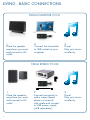
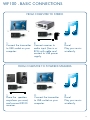
internal network card. Try connecting the TX100 by cable to the headphone jack
(and to USB power supply) and place the TX100 away from your computer, does this
help?
Is your computer connected to the internet via cable or wifi?
The Audio Pro network can weaken a local wifi network (but not weaken itself).
If possible, you should change channel on your wireless router, the Audio Pro network transmitts on channel 1, 6, or 11. Choose a new channel on your router, for
example 3, 8 or 13. (in total there are 13 channels on the 2.4GHz band.)
There are useful apps for iPhone/iPad/iPod touch and Android to detect local wifi
networks, and see which channel might be crowded.
If you cannot change the channel on your wireless router, try connecting computer
via Ethernet cable instead. Does this help?
Are there Bluetooth units active in the area?
Shut down all active Bluetooth devices. Does this help?
Is the LED light on the transmitter blue?
If the light is red, try moving the transmitter and receiver closer together.
Does this turn the LED blue?
Windows 7 and Mac OS, sound output
When connecting the TX100 transmitter to a computer using Windows 7 or Mac
OS, you need to select the sound output. Go to: system settings, find sound settings,
and select USB HEADSET as your sound output. (In older Windows OS there is no
need for this, TX100 will take over automatically as the sound output device.)
22