1
Z4II & Z8II: Installation and User Guide
6
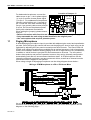
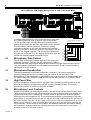
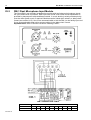
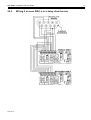
Wiring Multiple CPM Paging Microphones to a Z4 or Z8 Venue Mixer
In certain circumstances the Z4 and Z8 can power more than
one CPM microphone, refer to section 19 for more details.
The Z4 and Z8 mixers are compatible with general purpose
paging microphones that are fitted with close-contact switches
or open-collector switching devices. To open the paging
microphone channel on any zone the relevant zone access
switching terminal for that zone should be connected to 0V as
shown in the diagram opposite. If all access terminations are
permanently connected to 0V the paging microphone input will
function as general purpose microphone input.
12
Microphone Gain Control
PAGING MICROPHONE
ZONE ACCESS SWITCHING
0V 8
7
6
5
4
3
2
1 +V
Z8
Z7
Z6
Z5
Z4
Z3
Z2
Z1
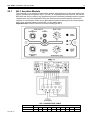
Pre-set gain controls are provided adjacent to the respective
XLR input connector. The gain can be adjusted from 10dB to
50dB and this wide range of gain allows direct connection of high output devices such as
radio microphones without the need for additional attenuation. A high overload margin is
maintained at all gain settings.
LINK TO 0V TO OPEN RESPECTIVE ZONE
13
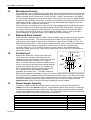
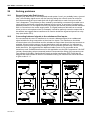
Microphone Equalisation
Two-band equalisation is provided for both Mic 1 and Mic 2; the pre-set controls are
positioned alongside the input connector and gain control on the rear panel. The
characteristics of the equalisation is optimised for the tonal correction of speech signals and
the treble control (HF) provides ±10dB at 5kHz with the bass control (LF) ±10dB at 100Hz.
14
High Pass Filter
All three microphone channels feature high pass filters operating at 100Hz which provides
effective attenuation of breath blasts and low frequency handling noises. The circuitry
providing this feature is fixed and cannot be defeated.
15
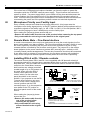
Microphone Level Controls
Separate front panel mounted controls for Mic 1 and Mic 2 level are provided for each zone.
These controls provide the user with a convenient means to operate either microphone at a
suitable level in any zone; rotating any mic level control to the fully anti-clockwise position
effectively turns the microphone off. The microphone signals are routed directly to the main
output stage of the respective zone and mic signals are totally unaffected by the operation of
the music controls. The Mic 1 & Mic 2 gain controls on the rear panel should be set at a level
where it is not possible to have excessive gain even when the front panel level controls are
fully clockwise. For the benefit of the operator, self adhesive labels are provided to identify
the microphone channels and these can be fixed on the mixer front panel in the space
provided to the left of the level controls.
22/10/04 V9