1
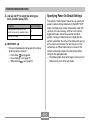
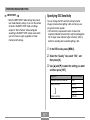
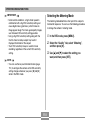
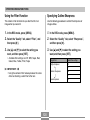
E
Digital Camera
EX-Z70
User’s Guide
Thank you for purchasing this CASIO
product.
• Before using it, be sure to read the
precautions contained in this User’s Guide.
• Keep the User’s Guide in a safe place for
future reference.
• For the most up-to-date information about
this product, visit the official EXILIM
Website at http://www.exilim.com/.
K817PCM2DKX
INTRODUCTION
INTRODUCTION
Unpacking
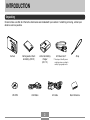
Check to make sure that all of the items shown below are included with your camera. If something is missing, contact your
dealer as soon as possible.
Camera
CD-ROM
Rechargeable Lithium
Ion Battery (NP-20)
Lithium Ion Battery
Charger
(BC-11L)
USB Cable
AC Power Cord *
AV Cable
2
Strap
* The shape of the AC power
cord plug varies according to
country or geographic area.
Basic Reference
INTRODUCTION
21
Contents
GETTING READY
About This Manual ..................................................... 21
2
INTRODUCTION
General Guide ............................................................ 22
Camera
Lithium Ion Battery Charger
Unpacking .................................................................... 2
Monitor Screen Contents ........................................... 25
Features ....................................................................... 9
REC Mode
PLAY Mode
Changing the Contents of the Monitor Screen
Precautions ................................................................ 12
17
22
24
25
27
29
Attaching the Strap .................................................... 30
QUICK START GUIDE
Power Requirements .................................................. 31
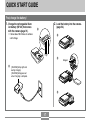
First, charge the battery! ............................................ 17
To charge the battery
To load the battery
Low Battery Indicator
To replace the battery
Power Supply Precautions
Turning the Camera On and Off
Configuring Power Saving Settings
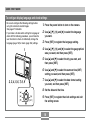
To configure display language and clock settings ..... 18
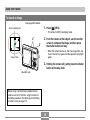
To record an image .................................................... 19
To view a recorded image .......................................... 20
To delete an image ..................................................... 20
31
34
36
37
38
41
42
Using the On-screen Menus ...................................... 44
Configuring Display Language and Clock Settings ... 46
To configure display language and clock settings
3
47
INTRODUCTION
50
BASIC IMAGE RECORDING
74
Recording an Image ................................................... 50
Aiming the Camera
Recording an Image
Using the easy Mode
Recording Precautions
Selecting the Focus Mode ......................................... 74
50
51
55
57
Using
Using
Using
Using
Using
Using
Using Zoom ................................................................ 59
Optical Zoom
Digital Zoom
OTHER RECORDING FUNCTIONS
Auto Focus
the Macro Mode
Pan Focus
the Infinity Mode
Manual Focus
Focus Lock
75
78
79
79
80
81
59
61
Exposure Compensation (EV Shift) ........................... 82
Using the Flash .......................................................... 63
Adjusting White Balance ............................................ 84
Flash Unit Status
Changing the Flash Intensity Setting
Using Flash Assist
65
66
66
Configuring the White Balance Setting Manually
85
Using Continuous Shutter .......................................... 87
Normal-speed continuous shutter
High-speed continuous shutter
Flash continuous shutter
Using the Self-timer ................................................... 68
Specifying Image Size ............................................... 71
88
88
88
Using the BEST SHOT Mode .................................... 89
Specifying Image Quality ........................................... 72
Displaying Sample Scenes Individually
Creating Your Own BEST SHOT Setup
To delete a BEST SHOT user setup
91
92
94
Reducing the Effects of
Hand or Subject Movement ....................................... 94
Shooting with High Sensitivity ................................... 96
Recording Images of Business Cards
and Documents (Business Shot) ............................... 97
Before recording with Business Shot
To use Business Shot
4
98
98
INTRODUCTION
Restoring an Old Photograph .................................... 99
Before trying to restore an old photograph
To restore an old photograph
Zooming the Display Image ..................................... 126
99
100
Resizing an Image ................................................... 127
Recording a Movie ................................................... 102
Cropping an Image ................................................... 128
Specifying Movie Image Quality
Recording a Movie
Keystone Correction ................................................. 130
103
104
Using Color Restoration to
Correct the Color of an Old Photograph .................. 131
Recording Audio ....................................................... 106
Adding Audio to a Snapshot
Recording Your Voice
106
107
Playing and Editing a Movie ..................................... 133
Playing a Movie
Editing a Movie
Capturing a Still Image from a Movie
(MOTION PRINT)
Using the Histogram ................................................. 109
REC Mode Camera Settings .................................... 112
Assigning Functions to the [왗] and [왘] Keys
Turning the On-screen Grid On and Off
Turning Image Review On and Off
Using Icon Help
Specifying Power On Default Settings
Specifying ISO Sensitivity
Selecting the Metering Mode
Using the Filter Function
Specifying Outline Sharpness
Specifying Color Saturation
Specifying Contrast
Date Stamping Snapshots
Resetting the Camera
124
112
113
114
114
115
117
118
120
120
121
121
122
123
138
Displaying the 9-image View .................................... 139
Displaying the Calendar Screen .............................. 140
Playing a Slideshow ................................................. 141
Rotating the Display Image ...................................... 144
Adding Audio to a Snapshot .................................... 145
To re-record audio
146
Playing Back a Voice Recording File ....................... 147
Displaying Camera Images on a TV Screen ........... 148
Selecting the Video Output System
PLAYBACK
152
Basic Playback Operation ........................................ 124
Playing an Audio Snapshot
133
134
150
DELETING FILES
Deleting a Single File ............................................... 152
125
Deleting All Files ...................................................... 153
5
INTRODUCTION
154
Using World Time ..................................................... 165
FILE MANAGEMENT
To display the World Time screen
To configure World Time settings
Folders ...................................................................... 154
165
165
154
Editing the Date and Time of an Image ................... 166
Protecting Files ........................................................ 155
Changing the Display Language .............................. 167
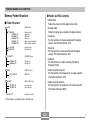
Memory Folders and Files
To protect a single file
To protect all files in memory
155
156
Changing the USB Port Protocol ............................. 168
Using the FAVORITE Folder .................................... 156
Configuring [
] (REC) and [
] (PLAY)
Power On/Off Functions ........................................... 169
To
To
To
To
copy a file to the FAVORITE folder
display a file in the FAVORITE folder
delete a file from the FAVORITE folder
delete all files from the FAVORITE folder
156
158
159
159
Formatting Built-in Memory ...................................... 170
171
160
OTHER SETTINGS
Using a Memory Card .............................................. 172
To insert a memory card into the camera
To replace the memory card
Formatting a Memory Card
Configuring Sound Settings ..................................... 160
To configure sound settings
To set the confirmation tone volume level
To set the audio volume level for movie and audio
snapshot playback
160
160
172
173
174
Copying Files ............................................................ 175
To copy all the files in built-in memory
to a memory card
To copy a specific file
from a memory card to built-in memory
161
Specifying an Image for the Startup Screen ........... 161
Specifying the File Name
Serial Number Generation Method .......................... 162
Setting the Clock ...................................................... 163
To select your Home Time zone
To set the current time and date
Changing the Date Format
USING A MEMORY CARD
163
164
164
6
176
177
INTRODUCTION
178
PRINTING IMAGES
205
DPOF ........................................................................ 179
To configure print settings for a single image
To configure print settings for all images
Using the Camera with a Windows Computer ......... 205
180
181
Selecting the Software You Need
Computer System Requirements
Managing Images on a PC
Retouching, Reorienting, and Printing a Snapshot
Playing a Movie
Viewing User Documentation (PDF Files)
User Registration
Exiting the Menu Application
Using PictBridge or USB DIRECT-PRINT ............... 183
Date Printing
187
PRINT Image Matching III ........................................... 188
Exif Print ................................................................... 188
189
205
207
208
211
213
214
214
214
Using the Camera with a Macintosh Computer ....... 215
VIEWING IMAGES ON A COMPUTER
Selecting the Software You Need
Computer System Requirements
Managing Images on a Macintosh
Playing a Movie
Viewing User Documentation (PDF Files)
To register as a camera user
Using the Camera with a Windows Computer ......... 189
Using the Camera with a Macintosh Computer ....... 196
Using a Memory Card to
Transfer Images to a Computer ............................... 200
Memory Data ............................................................ 201
DCF Protocol
Memory Folder Structure
Image Files Supported by the Camera
USING THE CAMERA WITH A COMPUTER
220
201
202
203
215
216
217
218
218
219
APPENDIX
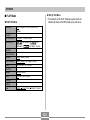
Menu Reference ....................................................... 220
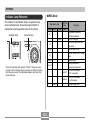
Indicator Lamp Reference ........................................ 223
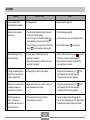
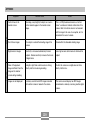
Troubleshooting Guide ............................................. 226
If you have problems installing the USB driver...
Display Messages
231
232
Specifications ........................................................... 234
7
INTRODUCTION
• Macintosh and QuickTime are trademarks of Apple
Computer, Inc.
• MultiMediaCard is a trademark of Infineon
Technologies AG of Germany, and licensed to the
MultiMediaCard Association (MMCA).
• Adobe and Reader are either registered trademarks
or trademarks of Adobe Systems Incorporated in the
United States and/or other countries.
• Other company, product and service names used
herein may also be trademarks or service marks of
others.
• Photo Loader and Photohands are the property of
CASIO COMPUTER CO., LTD. Except as stipulated
above, all copyrights and other related rights to these
applications revert to CASIO COMPUTER CO., LTD.
IMPORTANT!
• The contents of this manual are subject to change
without notice.
• CASIO COMPUTER CO., LTD. assumes no
responsibility for any damage or loss resulting from
the use of this manual.
• CASIO COMPUTER CO., LTD. assumes no
responsibility for any loss or claims by third parties
which may arise due to the use or malfunction of the
EX-Z70.
• CASIO COMPUTER CO., LTD. shall not be held
liable for any damages or losses suffered by you or
any third party due to the use of Photo Loader and/or
Photohands.
• CASIO COMPUTER CO., LTD. assumes no
responsibility for any damage or loss caused by
deletion of data as a result of malfunction, repairs, or
battery replacement. Be sure to back up all important
data on other media to protect against its loss.
• Note that the example screens and product
illustrations shown in this User’s Guide may differ
somewhat by the screens and configuration of the
actual camera.
• The SD logo is a registered trademark.
• Windows, Internet Explorer, Windows Media, and
DirectX are registered trademarks of Microsoft
Corporation.
8
INTRODUCTION
■ LCD Panel
The LCD panel is a product of the latest LCD
manufacturing technology that provides a pixel yield of
99.99%. This means that less than 0.01% of the total pixels
are defective (they do not turn on or always remain turned
on).
Features
• 7.2 million effective pixels
The CCD provides 7.41 million total pixels for images of
outstanding resolution and detail.
• 2.5-inch TFT color LCD monitor screen
• 8.3MB built-in memory
Images can be recorded without using a memory card.
■ Copyright Restrictions
Except for the purposes of your own personal enjoyment,
unauthorized copying of snapshot files, movie files, and
audio files violates copyright laws and international
contracts.
Distribution to third parties of such files over the Internet
without permission of the copyright holder, whether for
profit or for free, violates copyright laws and international
contracts.
• REC mode or PLAY mode power up (page 41)
Press [
] (REC) or [
] (PLAY) to turn on the camera
and enter the mode you want to use.
• easy mode (page 55)
This feature eliminates troublesome setups.
• 12X zoom (page 59)
3X optical zoom, 4X digital zoom
• Flash Assist (page 66)
This feature compensates when flash intensity is not
strong enough, so images are better illuminated.
• Triple Self-timer (page 68)
The self-timer can be set up to repeat three times,
automatically.
9
INTRODUCTION
• Auto Macro (pages 76, 78)
Auto Macro automatically switches to the macro mode
when the distance between the camera and subject it
shorter than the Auto Focus range.
• Business Shot (page 97)
Business Shot automatically corrects rectangular shapes
when recording the image of a business card, document,
whiteboard, or similar subjects from an angle.
• Quick Shutter (page 76)
When you press the shutter button all the way down
without pausing, the camera immediately records the
image without waiting for Auto Focus to be performed.
This helps to avoid missing a special moment while you
wait for the camera to Auto Focus.
• Restoring an Old Photograph (page 99)
You can use the procedure in this section to restore an
old, faded photograph with the color provided by modern
digital camera technology.
• Movie recording with audio (page 102)
VGA size, 30 fps, Motion JPEG format
• Auto Focus Area Selection (page 77)
When “
Multi” is selected for the Auto Focus area, the
camera takes simultaneous meter readings at nine
different points and automatically selects the best one.
• Audio Snapshot mode (page 106)
Use this mode to record snapshots that also include
audio.
• Voice Recording (page 107)
Quick and easy recording of voice input.
• Three continuous shutter modes (page 87)
In addition to normal-speed continuous shutter, you can
also select high-speed continuous shutter or flash
continuous shutter.
• Real-time RGB histogram (page 109)
An on-screen histogram lets you adjust exposure as you
view the effect on overall image brightness, which makes
shooting under difficult lighting conditions easier than
ever before.
• BEST SHOT (page 89)
Simply select one of a collection of built-in sample scenes
and the camera sets up for the scene you selected. It’s
the simple way to set up for beautiful snapshots quickly
and easily. New BEST SHOT sample scenes include
setups for High Sensitivity and Anti Shake. A [BS] (BEST
SHOT) button provides direct access to BEST SHOT
sample scenes.
• Keystone Correction (page 130)
A simple operation corrects for keystoning, which occurs
when you record the image of a blackboard or poster from
an angle.
10
INTRODUCTION
• Digital Print Order Format (DPOF) (page 179)
Images can be printed easily in the sequence you want
using a DPOF compatible printer. DPOF can also be used
when specifying images and quantities for printing by
professional print services.
• Color Correction (page 131)
Simply record the image of an old photograph to restore
its colors.
• MOTION PRINT (page 138)
Capture frames from a movie and create still images that
are suitable for printing.
• PictBridge and USB DIRECT-PRINT support
(page 183)
Connect directly to a PictBridge or USB DIRECT-PRINT
compatible printer and you can print images without going
through a computer.
• Calendar screen (page 140)
A simple operation displays a full-month calendar on the
camera’s monitor screen. Each day of the full-month
calendar shows a thumbnail of the first file recorded for
that date, which helps to make searching for a particular
file quicker and easier.
• PRINT Image Matching III Compatible (page 188)
Images include PRINT Image Matching III data (mode
setting and other camera setup information). A printer that
supports PRINT Image Matching III reads this data and
adjusts the printed image accordingly, so your images
come out just the way you intended when you recorded
them.
• Connect the camera to a TV and use the TV screen for
image recording and viewing (page 148)
• World Time (page 165)
A simple operation sets the current time for your current
location. You can select from among 162 cities in 32 time
zones.
• Transfer images to a computer simply by connecting
the camera (pages 189, 196)
• Support for SD memory cards and MMC (MultiMedia
Cards) for memory expansion (page 171)
• DCF Data Storage (page 201)
DCF (Design rule for Camera File system) data storage
protocol provides image compatibility between the digital
camera and printers.
11
INTRODUCTION
• Bundled with Photo Loader and Photohands
(pages 208, 211, 217)
Your camera comes bundled with Photo Loader, the
popular application that automatically loads images from
your camera to your PC. It also comes with Photohands,
and application that makes image retouching quick and
easy.
Precautions
■ General Precautions
Be sure to observe the following important precautions
whenever using the EX-Z70.
All references in this manual to “camera” refer to the
CASIO EX-Z70 Digital Camera.
• Never try to take pictures or use the built-in display while
operating a motor vehicle or while walking. Doing so
creates the risk of serious accident.
• Never try to open the case of the camera or attempt your
own repairs. High-voltage internal components create the
risk of electric shock when exposed. Always leave
maintenance and repair work up to a CASIO authorized
service center.
• Keep the small parts and accessories of this camera out
of the reach of small children. If swallowed accidentally,
contact your physician immediately.
• Never fire the flash in the direction of a person operating
a motor vehicle. Doing so can interfere with the driver’s
vision and create the risk of accident.
12
INTRODUCTION
• At least once a year, unplug the AC power cord from the
power outlet and clean the area around the prongs of the
plug. Dust build up around the prongs can create the risk
of fire.
• If the camera’s case should ever become cracked due to
dropping it or otherwise subjecting it to rough treatment,
immediately turn it off. Next, remove the camera’s battery
and/or unplug the AC power cord from the power outlet,
and contact your dealer or nearest CASIO authorized
service center.
• Never use the camera inside of an aircraft or in any other
area where its use is prohibited. Doing so creates the risk
of accident.
• Physical damage and malfunction of this camera can
cause the data stored in its memory to be deleted. Always
keep backup copies of data by transferring them to
personal computer memory.
• Never open the battery cover while an image is being
recorded. Doing so will not only make storage of the
current image impossible, it can also corrupt other image
data already stored in file memory.
• Never fire the flash while it is too close to the subject’s
eyes. Intense light from the flash can cause eye damage
if it is fired too close to the eyes. This is especially true
with young children. When using the flash, the camera
should be at least one meter (3.3´) from the eyes of the
subject.
• Keep the camera away from water and other liquids, and
never let it get wet. Moisture creates the risk of fire and
electric shock. Never use the camera outdoors in the rain
or snow, at the seashore or beach, in the bathroom, etc.
• Should foreign matter or water ever get into the camera,
immediately turn it off. Next, remove the camera’s battery
and/or unplug the AC power cord from the power outlet,
and contact your dealer or nearest CASIO authorized
service center. Using the camera under these conditions
creates the risk of fire and electric shock.
• Should you ever notice smoke or a strange odor coming
out of the camera, immediately turn it off. Next, taking
care you do not burn your fingers, remove the camera’s
battery and/or unplug the AC power cord from the power
outlet, and contact your dealer or nearest CASIO
authorized service center. Using the camera under these
conditions creates the risk of fire and electric shock. After
making sure there is no more smoke coming from the
camera, take it to your nearest CASIO authorized service
center for repair. Never attempt your own maintenance.
13
INTRODUCTION
■ Test for proper operation before using the
camera!
■ Data Error Precautions
• Your digital camera is manufactured using precision
digital components. Any of the following creates the risk
of corruption of data in file memory.
Before using the camera to record important images, make
sure you first record a number of test images and check the
results to ensure that the camera is configured correctly
and operating properly.
— Removing the battery or memory card while the
camera is performing a record or memory access
operation
— Removing the battery, removing the memory card
while the operation lamp is still flashing green after
you turn off the camera
— Disconnecting the USB cable while a data
communication operation is being performed
— Low battery power
— Other abnormal operations
Any of the above conditions can cause an error message to
appear on the monitor screen (page 232). Follow the
instructions provided by the message to eliminate the
cause of the error.
14
INTRODUCTION
■ Operating conditions
■ Power Supply
• This camera is designed for use in temperatures ranging
from 0°C to 40°C (32°F to 104°F).
• Do not use or keep the camera in the following areas.
• Use only the special NP-20 rechargeable lithium ion
battery to power this camera. Use of any other type of
battery is not supported.
• This camera does not have a separate battery for the
clock. The date and time will reset whenever the camera
is not supplied power by the battery for about 30 hours.
Be sure to reconfigure these settings after power is
interrupted (page 163).
• Never remove the battery from the camera while the
camera is turned on. Doing so can damage the camera. If
you mistakenly remove the battery, immediately reinsert it
into the camera and press the power button to turn power
back on.
— In areas subject to direct sunlight
— In areas subject to high humidity or dust
— Near air conditioners, heaters, or other areas subject
to temperature extremes
— Inside of a closed vehicle, especially one parked in the
sun
— In areas subject to strong vibration
■ Condensation
• When you bring the camera indoors on a cold day or
otherwise expose it to a sudden change of temperature,
there is the possibility that condensation can form on the
exterior or on interior components. Condensation can
cause malfunction of the camera, so you should avoid
exposing it to conditions that might cause condensation.
• To keep condensation from forming, place the camera
into a plastic bag before moving it into a location that is
much warmer or colder than your current location. Leave
it in the plastic bag until the air inside the bag has a
chance to reach the same temperature as the new
location. If condensation does form, remove the battery
from the camera and leave the battery cover open for a
few hours.
■ Lens
• Never apply too much force when cleaning the surface of
the lens. Doing so can scratch the lens surface and cause
malfunction.
• You may sometimes notice some distortion in certain
types of images, such as a slight bend in lines that should
be straight. This is due to the characteristics of lens, and
does not indicate malfunction of the camera.
15
B
INTRODUCTION
■ Caring for your camera
■ Other
• Fingerprints, dust, or any other soiling of the lens can
interfere with proper image recording. Never touch the
lens with your fingers. You can remove dust particles
from the lens surface by using a lens blower to blow them
off. Next, wipe the surface of the lens with a soft lens
cloth.
• Fingerprints, dirt, and other foreign matter on the flash
can interfere with proper operation of the camera. Avoid
touching the flash. If the flash becomes dirty, wipe it clean
with a soft, dry cloth.
• If the exterior of the camera needs cleaning, wipe it with a
soft, dry cloth.
• The camera may become slightly warm during use. This
does not indicate malfunction.
■ Monitor Screen Images
• The images that normally appear on the monitor screen
during image playback are smaller than normal, and so
you cannot see all of the detail of the actual image. Your
camera has an image zoom feature (page 126) which you
can use to enlarge the monitor screen image. You can
use this feature for on-the-spot checks of important
images.
16
B
QUICK START GUIDE
QUICK START GUIDE
First, charge the battery!
1. Charge the rechargeable litium
ion battery (NP-20) that comes
with the camera (page 31).
2. Load the battery into the camera.
(page 34).
1
• It takes about 90 minutes to achieve
a full charge.
1
-
T
+
2
Stopper
2 [CHARGE] lamp lights red
during charging.
[CHARGE] lamp goes out
when charging is complete.
3
17
QUICK START GUIDE
To configure display language and clock settings
• Be sure to configure the following settings before
using the camera to record images.
See page 47 for details.
• If you make a mistake when setting the language or
clock with the following procedure, you will need to
use the camera’s menu to individually change the
language (page 167) or clock (page 163) settings.
1. Press the power button to turn on the camera.
2. Use [왖], [왔], [왗], and [왘] to select the language
you want.
3. Press [SET] to register the language setting.
4. Use [왖], [왔], [왗], and [왘] to select the geographical
1
area you want, and then press [SET].
5. Use [왖] and [왔] to select the city you want, and
then press [SET].
6. Use [왖] and [왔] to select the summer time (DST)
setting you want, and then press [SET].
7. Use [왖] and [왔] to select the date format setting
2, 3, 4, 5, 6, 7, 8, 9
you want, and then press [SET].
8. Set the date and the time.
[왖]
[왗]
[왘]
[왔]
[SET]
9. Press [SET] to register the clock settings and exit
the setting screen.
18
QUICK START GUIDE
To record an image
See page 50 for details.
1. Press [
Auto recording icon
] (REC).
• This enters the REC (recording) mode.
2
3
7
N
06/12
06
12/24
24
12:38
12
38
Focus frame
2. Point the camera at the subject, use the monitor
3
screen to compose the image, and then press
the shutter button half way.
1
• When the camera finishes its Auto Focus operation, the
focus frame will turn green and the operation lamp lights
green.
3. Holding the camera still, gently press the shutter
button all the way down.
Operation lamp
Before using a commercially available memory
card, be sure to first format it using the camera’s
formatting procedure. For details about formatting
a memory card, see page 174.
19
QUICK START GUIDE
To view a recorded image
To delete an image
See page 124 for details.
See page 152 for details.
1
1
2, 3, 4, 5
2
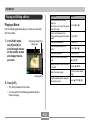
1. Press [
] (PLAY).
• This enters the PLAY (playback) mode.
2. Use [왗] and [왘] to scroll through the
images.
1. Press [
] (PLAY).
2. Press [왔] (
).
3. Use [왗] and [왘] to display the image you want to
delete.
4. Use [왖] and [왔] to select “Delete”.
• To exit the image delete operation without deleting anything,
select “Cancel”.
5. Press [SET] to delete the image.
20
GETTING READY
GETTING READY
■ Button Operations
This section contains information about things you need to
know about and do before trying to use the camera.
Button operations are indicated by the button name inside
of brackets ([ ]).
About This Manual
■ On-screen Text
This section contains information about the conventions
used in this manual.
On-screen text is always enclosed by double quotation
marks (“ ”).
■ Terminology
■ Supplementary Information
The following table defines the terminology used in this
manual.
This term as used
in this manual:
Means this:
“camera”
The CASIO EX-Z70 Digital Camera
“file memory”
The location where the camera is
currently storing images you record
(page 51)
“battery”
The NP-20 Rechargeable Lithium
Ion Battery
“digital noise”
Tiny flecks or “snow” in a recorded
image or on the monitor screen,
which makes the image look grainy.
•
IMPORTANT!
indicates very important
information you need to know in order to use the camera
correctly.
•
NOTE
indicates information that is useful when
operating the camera.
21
GETTING READY
■ File Memory
General Guide
The term “file memory” in this manual is a general term that
refers to the location where your camera is currently storing
the images you record. File memory can be any one of the
following three locations.
The following illustrations show the names of each
component, button, and switch on the camera.
Camera
• The camera’s built-in memory
• An SD memory card loaded in the camera
• A MultiMediaCard loaded in the camera
■ Front
1 Shutter button
2 Power button
3 Self-timer lamp
4 Microphone
5 Lens
6 Flash
For more information about how the camera stores images,
see page 201.
12
34
6
5
22
GETTING READY
■ Back
■ Bottom
7
G Memory card slot
H Stopper
I Battery cover
J Battery compartment
K USB/AV connector
L Tripod screw hole
8
9
:
A
* Use this hole when attaching to a tripod.
M Speaker
[왖]
F
B
E D
C
[왗]
[왘]
[왔]
[SET]
G
7 Operation lamp
8 Zoom button
9 Strap ring
0 [ ] (PLAY mode) button
A [ ] (REC mode) button
B [왖][왔][왗][왘]
C [SET] button
D [BS] (BEST SHOT) button
E [MENU] button
F Monitor Screen
ML K J I
23
H
GETTING READY
Lithium Ion Battery Charger
1
2
1 [CHARGE] lamp
2 Contacts
3 AC jack
3
24
GETTING READY
Monitor Screen Contents
The monitor screen uses various indicators and icons to keep you informed of the camera’s status.
• Note that the example screens in this chapter are for illustrative purposes only. They do not exactly match the screen
contents actually produced on the camera.
REC Mode
■ Screen Indicators
1 2 3 4 567
1 Flash mode indicator
(page 63)
89
Auto Flash
Flash Off
0
J
I
Flash On
A
B
C
D
G
F E
4 Continuous Shutter
mode (page 87)
None
Red-eye reduction
•
appears momentarily
when you select Auto Flash
as the flash mode, and then
disappears.
• If the camera detects that
flash is required while auto
flash is selected, the flash on
indicator will appear when the
shutter button is pressed half
way.
2 Focus mode indicator
Auto
Daylight
Overcast
Macro
Pan Focus
Infinity
None
1-Image
Self-timer 10 sec
10s
Day White Fluorescent
2s
Self-timer 2 sec
Daylight Fluorescent
x3
Triple self-timer
Tungsten
• When you select Auto with
Key Customize (page 112),
AWB appears only briefly,
and then disappears from the
display.
Auto Focus
5 Self-timer (page 68)
Shade
Manual
(page 74)
Flash Continuous
Shutter
(page 84)
AWB
Single shot
Normal-speed
Continuous Shutter
High-speed
Continuous Shutter
3 White balance indicator
Soft Flash
H
Manual Focus
• When you select Auto Focus
with Key Customize (page
112),
appears only
briefly, and then disappears
from the display.
6 Recording types
Auto recording
BEST SHOT
easy
Movie
Voice Recording
25
B
GETTING READY
7 Metering mode indicator
(page 118)
None
Multi
Center Weighted
Spot
8 • Snapshots: Image size
(page 71)
9 • Snapshots: Memory capacity
(pages 53, 234)
• Movies:
Remaining recording time
(page 104)
0 • Snapshots: Image quality
(page 72)
F : Fine
N : Normal
E : Economy
• Movies: Image quality
(page 103)
HQ
: High Quality
NORMAL : Normal
LP
: Long Play
A ISO sensitivity
NOTE
(page 117)
• An out of range aperture, shutter speed, or ISO
sensitivity setting causes the corresponding monitor
screen value to turn amber.
• Changing the setting of any one of the following
functions will cause Icon Help (page 114) text to
appear on the monitor screen. You can turn off Icon
Help if you want.
Flash mode, Focus mode, White balance, Self-timer,
Recording type, EV shift
B Aperture value (page 53)
C Shutter speed value
(page 53)
D Date and time
(page 166)
E Timestamp indicator
(page 122)
F EV value (page 82)
G Battery capacity
(page 36)
H Histogram (page 109)
I Anti Shake indicator
(page 94)
J Focus frame
(page 52)
• Focusing complete: Green
• Focusing failed: Red
26
GETTING READY
PLAY Mode
K
12
3
4
5
6
7
8
9
F
E
L
D
K Digital zoom indicator (page 61)
CB A 0
1 PLAY mode file type
L Zoom indicator (page 61)
• Left side indicates optical zoom.
• Right side indicates digital zoom.
3 Folder name/File name
Snapshot
(page 154)
Movie
Example : When a file named
CIMG0023.JPG is stored in a folder
named 100CASIO
Audio Snapshot
Voice Recording
2 Image protection
indicator (page 155)
100-0023
Folder name
File name
4 • Snapshots: Image quality
(page 72)
F : Fine
N : Normal
E : Economy
• Movies: Recording time (page 104)
27
GETTING READY
5 • Snapshots: Image Size
(page 71)
• Movies: Image quality
(page 103)
HQ
: High Quality
NORMAL : Normal
LP
: Long Play
6 ISO sensitivity (page 117)
7 Aperture value
(page 53)
8 Shutter speed value
(page 53)
9 Date and time
(page 166)
0 Metering mode indicator
(page 118)
Multi
A White balance indicator
IMPORTANT!
(page 84)
AWB
• Some information may not display properly if you
display an image that was recorded using a different
digital camera model.
Auto
Daylight
Overcast
Shade
Day White Fluorescent
Daylight Fluorescent
Tungsten
Manual
B Flash mode indicator
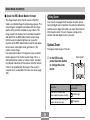
(page 63)
Flash On
Flash Off
Soft Flash
Red-eye reduction
Center Weighted
Spot
C Recording types
Auto recording, easy
BEST SHOT
D Battery capacity
(page 36)
E Histogram (page 109)
F EV value (page 82)
28
B
GETTING READY
■ PLAY Mode
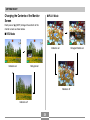
Changing the Contents of the Monitor
Screen
Each press of [왖] (DISP) changes the contents of the
monitor screen as shown below.
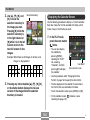
■ REC Mode
Indicators on
Indicators on
Histogram/Details on
Histogram on
Indicators off
Indicators off
29
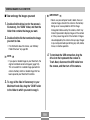
GETTING READY
IMPORTANT!
Attaching the Strap
• Pressing [왖] (DISP) will not change monitor screen
contents during standby or recording of an audio
snapshot.
• You can use [왖] (DISP) to turn off the monitor screen
only when voice recording in the REC mode. You
cannot turn off the monitor screen for any other
recording function.
• Pressing [왖] (DISP) in the Voice Recording REC
mode toggles the monitor screen on (“indicators on”)
and off. While a Voice Recording file is displayed in
the PLAY mode, pressing [왖] (DISP) toggles
between “indicators on” and “indicators off”.
• When playing back the content of a Voice Recording
file while “indicators off” is selected (Voice Recording
file icon only on the monitor screen), the monitor
screen will go black about two seconds after you
press [SET] to start playback. The Voice Recording
file icon (indicators off) will reappear after playback is
complete.
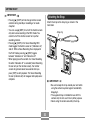
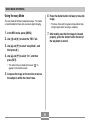
Attach the strap to the strap ring as shown in the
illustration.
Strap ring
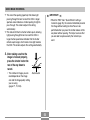
IMPORTANT!
• Be sure to keep the strap around your wrist when
using the camera to protect against accidentally
dropping it.
• The supplied strap is intended for use with this
camera only. Do not use it for any other purpose.
• Never swing the camera around by the strap.
30
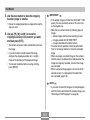
GETTING READY
To charge the battery
Power Requirements
Your camera is powered by a rechargeable lithium ion
battery (NP-20).
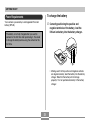
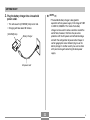
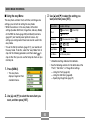
1. Correctly positioning the positive and
negative terminals of the battery, load the
lithium ion battery into the battery charger.
The battery is not fully charged when you use the
camera for the first time after purchasing it. You need
to charge the battery before using the camera for the
first time.
-
T
+
• Making sure that the positive and negative contacts
are aligned correctly, load the battery into the battery
charger. Note that the battery will not charge
properly if it is not positioned correctly in the battery
charger.
31
GETTING READY
2. Plug the battery charger into a household
NOTE
power outlet.
• The bundled battery charger is designed for
operation with any power supply in the range of 100V
to 240V AC, 50/60Hz. This means the battery
charger can be used in various countries around the
world. Note, however, that there may be some
problems with the AC power cord withstand voltage
and with the configuration of power outlet shapes in
certain geographic areas. Before trying to use the
battery charger in another country, be sure to check
with your travel agent concerning the local power
supply.
• This will cause the [CHARGE] lamp to turn red.
• Charging will take about 90 minutes.
[CHARGE] lamp
Battery Charger
AC power cord
32
B
GETTING READY
3. The [CHARGE] lamp goes out when charging
IMPORTANT!
is complete.
• If the battery or battery charger is very hot or cold
when you start charging or if it becomes hot during
charging, the battery charger will enter a standby
state, which is indicated when its [CHARGE] lamp
goes out. Charging will resume when the temperature
returns to the allowable charging temperature range,
which is indicated when the [CHARGE] lamp turns red.
• Charging the battery while it is still warm immediately
after removing it from the camera can result in only
partial charging. Give the battery time to cool before
charging it.
• Battery discharges slightly even when it is left
without loading it into the camera. Because of this, it
is recommended that you charge the battery
immediately before you need to use it.
• Charging the battery may cause interference with TV
and radio reception. If this happens, plug the charger
into an outlet that is further away from the TV or
radio.
• Dirty charger contacts and/or battery terminals can
make proper charging impossible. Be sure to wipe
contacts and terminals occasionally with a dry cloth
to keep them clean.
4. After charging is complete, unplug the battery
charger from the power outlet, and remove
the battery from it.
• Always unplug the battery charger from the power
outlet and remove the battery whenever you are not
charging.
33
GETTING READY
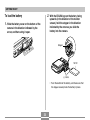
2. With the EXILIM logo on the battery facing
To load the battery
upwards (in the direction of the monitor
screen), hold the stopper in the direction
indicated by the arrow as you slide the
battery into the camera.
1. Slide the battery cover on the bottom of the
camera in the direction indicated by the
arrow, and then swing it open.
Stopper
NP-20
(–) marks
• Push the bottom of the battery, and make sure that
the stopper securely locks the battery in place.
34
GETTING READY
■ If the camera does not work normally
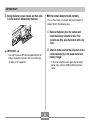
3. Swing the battery cover closed, and then slide
it in the direction indicated by the arrow.
This can mean there is a problem with how the battery is
loaded. Perform the following steps.
1. Remove the battery from the camera and
check the battery contacts for dirt. If the
contacts are dirty, wipe them clean with a dry
cloth.
2. Check to make sure that the AC power cord is
IMPORTANT!
connected securely to the power outlet and
battery charger.
• Use only the special NP-20 rechargeable lithium ion
battery to power this camera. Use of any other type
of battery is not supported.
• If the same symptoms occur again after taking the
above steps, contact a CASIO authorized service
center.
35
GETTING READY
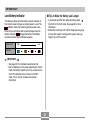
Low Battery Indicator
■ Tips to Make the Battery Last Longer
The following shows how the battery capacity indicator on
the monitor screen changes as battery power is used. The
indicator means that remaining battery power is low.
Note that you will not be able to record images while the
battery indicator is
. Charge the battery immediately
whenever either of these indicators appears.
• If you do not need the flash while recording, select
(flash off) for the flash mode. See page 63 for more
information.
• Enable the Auto Power Off and the Sleep features (page
42) to protect against wasting battery power when you
forget to turn off the camera.
Battery Level
High
Low
Indicator
IMPORTANT!
• See page 237 for information about battery life.
• Due to differences in the power requirements of each
mode, the battery indicator may show a lower level in
the PLAY mode than what it shows in the REC
mode. This is normal, and does not indicate
malfunction.
36
GETTING READY
3. Release the stopper and pull the battery from
To replace the battery
the camera.
1. Open the battery cover.
• Take care so you do not drop the battery.
4. Load a new battery into the camera (page 34).
2. Pull the stopper in the direction indicated by
the arrow.
• This will cause the battery to come part way out of
the slot.
Stopper
37
GETTING READY
• Failure to observe any of the following precautions
while using the battery creates the risk of overheating,
fire, and explosion.
— Never try to use the battery to power any device
other than this camera.
— Never use or leave the battery near open flame.
— Never place the battery in a microwave oven, throw
it into fire, or otherwise expose it to intense heat.
— Make sure the battery is oriented correctly when you
load it into the camera or attach it to the charger.
— Never carry or store the battery together with items
that can conduct electricity (necklaces, pencil lead,
etc.)
— Never try to take the battery apart, modify it in any
way, or expose it to strong impact.
— Do not immerse the battery in fresh water or salt
water.
— Do not use or leave the battery under direct
sunlight, in an automobile parked in the sun, or in
any other area subject to high temperatures.
Power Supply Precautions
Note the following precautions when handling or using the
battery and the charger.
■ Battery Handling Precautions
● SAFETY PRECAUTIONS
Be sure to read the following Safety Precautions before
using the battery for the first time.
NOTE
• The term “battery” in this manual refers to the CASIO
NP-20 Rechargeable Lithium Ion Battery.
• Use only the battery charger (BC-11L) that comes
with the camera or the optionally available USB
cradle (CA-32) to charge the special NP-20
rechargeable lithium ion battery.
Never use any other charging device.
38
GETTING READY
● PRECAUTIONS DURING USE
• Should you ever notice any of the following conditions
while using, charging, or storing a battery, immediately
remove it from the camera or charger, and keep it away
from open flame:
— Fluid leaking
— Emission of a strange odor
— Heat emission
— Battery discoloration
— Battery deformation
— Any other battery abnormality
• If the battery does not achieve full charge after the
normal charging time has passed, stop charging.
Continued charging creates the risk of overheating, fire,
and explosion.
• Battery fluid can damage your eyes. Should battery
fluid get into your eyes accidentally, immediately rinse
them with clean tap water and then consult a physician.
• If the battery is to be used by young children, make
sure that a responsible adult makes them aware of the
precautions and proper handling instructions and make
sure that they handle the battery correctly.
• Should fluid from the battery accidentally get onto
clothing or your skin, immediately rinse it off with clean
tap water. Prolonged contact with battery fluid can
cause skin irritation.
• This lithium ion battery is intended for use with a
CASIO Digital Camera only. For details about the
camera models that this battery can be wed with, see
the user documentation that comes with your camera.
• Use of a battery in cold environments shortens the
operating time you can expect on a full charge. Charge
the battery in a location where the temperature is in the
range of 10°C to 35°C (50°F to 95°F). Charging outside
this temperature range can cause charging to take
longer than normal or even cause charging to fail.
• Though the actual service life of the battery depends
on the environment under which it is used, you can
expect to be able to recharge it about 500 times before
it needs replacement.
• Very limited operation following a full charge indicates
that the battery has reached the end of its service life.
Replace the battery with a new one.
• Never wipe the battery with thinner, benzene, alcohol,
or other volatile agents or chemically treated rags.
Doing so can cause deformation of the battery and lead
to malfunction.
39
GETTING READY
■ Battery Charger Precautions
● BATTERY STORAGE PRECAUTIONS
• Make sure you remove the battery from the camera
when you do not plan to use it for a long time. A battery
left in the camera discharges very small amounts of
power even when power is turned off, which can lead to
a dead battery or the need for longer charging before
the next use.
• Store the battery in a cool, dry place (20°C (68°F) or
lower).
• Never plug the battery charger into an outlet whose
voltage rating is different from that marked on the
battery charger. Doing so creates the risk of fire,
malfunction, and electric shock.
• Never plug in or unplug the battery charger while your
hands are wet. Doing so creates the risk of electric
shock.
• Do not plug the battery charger into an outlet or
extension cord that is shared by other devices. Doing
so creates the risk of fire, malfunction, and electric
shock.
• The battery charger becomes slightly warm during
charging. This is normal and does not indicate
malfunction.
• Unplug the battery charger from the power outlet
whenever you are not using it.
• Always make sure that the battery charger is on a level
surface when using it for charging.
● USING THE BATTERY
• When transporting a battery, keep it either loaded in
the camera or stored in its case.
40
GETTING READY
NOTE
Turning the Camera On and Off
• Pressing [
] (REC) to turn on the camera enters
the REC mode, while pressing [
] (PLAY) enters
the PLAY mode.
• Pressing [
] (PLAY) while in the REC mode
switches to the PLAY mode. The lens retracts about
10 seconds after switching modes.
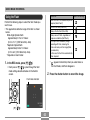
■ To turn on the camera
Press the power button, [
] (REC) or [
] (PLAY). The
operation lamp will light green momentarily, and then
power will turn on. The mode the camera enters depends
on which button you pressed to turn it on.
IMPORTANT!
To enter this mode at
startup:
Press this button to turn on the camera:
REC
Power button or [
PLAY
[
Power button
• If camera power is turned off by the Auto Power Off
feature, press the power button, [
] (REC) or [
]
(PLAY) to turn it back on again.
• Pressing the power button or [
] (REC) to turn on
the camera also causes the lens to extend. Take
care to avoid any interference with the lens operation
or allowing anything to strike the lens when it is
extended.
] (REC)
] (PLAY)
Operation lamp
[
] (PLAY)
[
] (REC)
41
GETTING READY
■ To turn off the camera
Configuring Power Saving Settings
Press the power button to turn off the camera.
You can configure the settings described below to
conserve battery power.
NOTE
Sleep
: Automatically turns off the monitor
screen if no operation is performed for a
specified amount of time in the REC
mode. Performing any button operation
causes the monitor screen to turn back
on.
Auto Power Off : Turns off power if you do not perform
any operation for a specified amount of
time.
• You can setup the camera so it does not turn on
when you press [
] (REC) or [
] (PLAY), or to
turn off when you press [
] (REC) or [
] (PLAY).
For details, see “Configuring [
] (REC) and [
]
(PLAY) Power On/Off Functions” on page 169.
1. Turn on the camera.
2. Press [MENU].
3. Use [왗] and [왘] to select the “Set Up” tab.
4. Use [왖] and [왔] to select the feature whose
setting you want to configure, and then press
[왘].
42
GETTING READY
● See “Using the On-screen Menus” (page 44) for
information about how to use menus.
To configure this feature:
Select this setting:
Sleep
Sleep
Auto Power Off
Auto Power Off
• The Auto Power Off and Sleep features are disabled
in the following cases.
— When the camera is connected to a computer or
some other device
— While playing back a voice recording file
— While a movie is being recorded
— While playing back a movie
5. Use [왖] and [왔] to change the currently
selected setting, and then press [SET].
• Available Sleep settings are: “30 sec”, “1 min”, “2 min”,
and “Off”.
• Available Auto Power Off settings are: “2 min” and
“5 min”.
• Note that the Sleep feature does not operate in the
PLAY mode.
• Pressing any button while the camera is in the Sleep
state immediately turns the monitor screen back on.
43
GETTING READY
2. Press [MENU].
Using the On-screen Menus
[MENU]
Pressing [MENU] displays menus on the monitor screen
that you can use to perform various operations. The menu
that appears depends on whether you are in the REC
mode or the PLAY mode. The following shows an example
menu procedure in the REC mode.
Tab
[왖]
[왘]
[왗]
1. Press the power
button or [
Selection cursor (indicates
the currently selected item)
[왔]
Power button
] (REC).
• If you want to enter the
PLAY mode instead,
press [
] (PLAY).
[SET ]
[
][
]
44
Settings
GETTING READY
● Menu Screen Operations
3. Press [왗] or [왘] to select the tab you want,
When you want to do this:
Do this:
Move between tabs
Press [왗] and [왘].
Move from the tab to the
settings
Press [왔].
Move from the settings to
the tab
Press [왖].
Move between the settings
Press [왖] and [왔].
Display the options
available for a setting
Press [왘] or press [SET].
Select an option
Press [왖] and [왔].
Apply the setting and exit
the menu screen
Press [SET].
Apply the setting and
return to tab selection
Press [왗].
Exit the menu screen
Press [MENU].
and then press [SET] to move the selection
cursor from the tab to the settings.
4. Use [왖] and [왔] to
select the feature
whose setting you
want to configure,
and then press [왘].
• Instead of pressing [왘],
you could also press
[SET].
Example: To select the
“Focus” item.
5. Use [왖] and [왔] to change the currently
selected setting.
45
GETTING READY
6. Perform one of the following operations to
Configuring Display Language and Clock
Settings
apply the setting you configured.
To do this:
Perform this key operation:
Apply the setting and exit
the menu screen.
Press [SET].
Apply the setting and
return to feature selection
in step 4*.
Press [왗].
Apply the setting and
return to tab selection in
step 3.
1. Press [왗].
2. Use [왖] to move back up to
tab selection.
Be sure to configure the following settings before using the
camera to record images.
•
•
•
•
Display language
Home city
Date Style
Date and time
Note that the current date and time settings are used by
the camera to generate the date and time that are stored
along with image data, etc.
* In the case of easy Mode (page 55), pressing [왗] will
apply the setting and exit the setting screen without
returning to feature selection in step 4.
IMPORTANT!
IMPORTANT!
• Recording images without configuring the clock
settings causes incorrect time information to be
registered. Be sure to configure the clock settings
before using the camera.
• See “Menu Reference” on page 220 for more
information about menus.
• Entering the easy mode (page 55) changes display
contents to four menu items each, using larger size
characters. The easy mode also displays simple onscreen help.
46
GETTING READY
• A built-in backup battery retains the date and time
settings of the camera for about 30 hours if the
camera is not supplied with power. Date and time
settings will be cleared when the backup battery
goes dead. The following are the conditions when
power is not being supplied to the camera.
— When the rechargeable battery is dead or
removed from the camera
• The date and time setting screen will appear on the
monitor screen the next time you turn on the camera
after the date and time settings have been cleared. If
this happens, reconfigure the date and time settings.
• If you make a mistake when setting the language or
clock with the following procedure, you will need to
use the camera’s menu to individually change the
language (page 167) or clock (page 163) settings.
• The time and date setting is used by the Time Stamp
feature and the DPOF date stamp (pages 122, 179).
To configure display language and clock
settings
1. Press the power button, [
[
] (REC) or
] (PLAY) to turn on the camera.
2. Use [왖], [왔], [왗], and
[왘] to select the
language you want,
and then press [SET].
: Japanese
English
: English
Français : French
Deutsch
: German
Español
: Spanish
Italiano
: Italian
Português : Portuguese
: Chinese (Complex)
: Chinese (Simplified)
: Korean
47
GETTING READY
3. Use [왖], [왔], [왗], and
6. Use [왖] and [왔] to
[왘] to select the
geographical area
where you live, and
then press [SET].
select the date format
setting you want, and
then press [SET].
Example: December 24, 2006
4. Use [왖] and [왔] to
select the name of the
city where you live,
and then press [SET].
5. Use [왖] and [왔] to select the summer time
(DST) setting you want, and then press [SET].
When you want to do this:
Select this setting:
Keep time using summer time
(Daylight Saving Time)
On
Keep time using standard time
Off
48
To display the date like this:
Select this format:
06/12/24
YY/MM/DD
24/12/06
DD/MM/YY
12/24/06
MM/DD/YY
GETTING READY
7. Set the current date
and the time.
To do this:
Do this:
Change the setting at the current
cursor location
Press [왖] and [왔].
Move the cursor between settings
Press [왗] and [왘].
Toggle between 12-hour and 24hour timekeeping
Press [BS].
8. Press [SET] to register the settings and exit
the setting screen.
49
BASIC IMAGE RECORDING
BASIC IMAGE RECORDING
This section describes the basic procedure for recording an
image.
IMPORTANT!
• Make sure your fingers and the strap do not block
the flash, microphone, self-timer lamp or lens.
Recording an Image
Flash
Self-timer lamp
Aiming the Camera
Use both hands to hold the camera still when shooting an
image. Holding the camera with one hand increases the
chance of movement, which can blur your images.
• Horizontal
• Vertical
Microphone
Hold the camera
still in both
hands, with your
arms firmly
against your
sides.
Lens
When holding
the camera
vertically, make
sure that the
flash is above
the lens. Hold
the camera still
with both hands.
50
BASIC IMAGE RECORDING
• There is a speaker on the bottom of the camera. The
operation sound and other sounds can become
difficult to hear if you cover the speaker with your
hand while holding it.
Recording an Image
Your camera automatically adjusts shutter speed in
accordance with the brightness of the subject. Images you
record are stored in the camera’s built-in memory, or to a
memory card if you have one loaded in the camera.
• When an optionally available SD memory card or
MultiMediaCard (MMC) is loaded in the camera, images
are stored on the card (page 171).
After purchasing a memory card, be sure to load it into
the camera and format it before trying to use it (page
174).
Speaker
NOTE
• Moving the camera as you press the shutter button
or while the Auto Focus operation is being performed
(when you press the shutter button half way) can
cause blurring of the image. Press the shutter button
carefully, taking care to avoid camera movement.
This is especially important when available lighting is
low, which slows down the shutter speed.
51
BASIC IMAGE RECORDING
1. Press the power button or [
2. Compose the image
] (REC) to turn
on the camera.
Auto recording icon
on the monitor screen
so the main subject is
within the focus
frame.
Power button
[
• The focusing range of
the camera depends on
focus mode you are
using (page 74).
]
• This causes the image and the auto recording icon
(
) to appear on the monitor screen, and then
enters the currently selected recording mode. If the
auto recording icon (
) is not displayed, use the
procedure on page 89 to select the “Auto” scene.
This should cause the auto recording icon to appear.
• If the camera is in the PLAY mode when it turns on,
the message “There are no files.” will appear if you
do not have any images stored in memory yet. In
icon will be visible at the top of the
addition, the
display. If this happens, press [
] (REC) to enter
the currently selected recording mode.
52
7
3
N
06/12
06
12/24
24
12:38
12
38
Focus frame
BASIC IMAGE RECORDING
● Operation Lamp and Focus Frame Operation
3. Press the shutter button half
way to focus the image.
• When you press the shutter
button half way, the camera’s
Auto Focus feature automatically
focuses the image, and displays
the shutter speed value, the
aperture value, and the ISO
sensitivity.
• You can tell whether
the image is focused
by observing the
focus frame and the
operation lamp.
Shutter button
When you see this:
It means this:
Green focus frame
Green operation lamp
The image is in focus.
Red focus frame
Flashing green operation lamp
The image is not in focus.
• The monitor screen uses various indicators and
icons to keep you informed of the camera’s status.
Operation lamp
Continuous
Shutter mode
White balance
Self-timer
Recording types
Metering mode indicator
Focus mode
Memory capacity
(Snapshots)
Flash
mode
Image quality
(Snapshots)
Image size
(Snapshots)
Date and time
EV shift
ISO sensitivity
Aperture value*1
Shutter speed value*2
53
BASIC IMAGE RECORDING
*1 The size of the opening (aperture) that allows light
passing through the lens to reach the CCD. A larger
aperture value indicates a smaller opening for light to
pass through. The camera adjusts this setting
automatically.
*2 The amount of time the shutter remains open, allowing
light passing through the lens to reach the CCD. A
larger shutter speed value indicates that the shutter
remains open longer, which means more light reaches
the CCD. The camera adjusts this setting automatically.
IMPORTANT!
• When the “REC” tab’s “Quick Shutter” setting is
turned on (page 76), the camera immediately records
the image without waiting for Auto Focus to be
performed when you press the shutter release all the
way down without pausing. This helps to ensure that
you are able to capture exactly the moment you
want.
4. After making sure that the
image is focused properly,
press the shutter button the
rest of the way down to
record.
• The number of images you can
record depends on the image
size and the image quality setting
you are using
(pages 71, 72, 234).
Shutter button
54
BASIC IMAGE RECORDING
6. Press the shutter button half way to focus the
Using the easy Mode
image.
The easy mode eliminates troublesome setups. This mode
is recommended for those who are new to digital imaging.
• The focus frame will turn green and operation lamp
will light green when focusing is complete.
1. In the REC mode, press [MENU] .
7. After making sure that the image is focused
properly, press the shutter button the rest of
the way down to record.
2. Use [왗] and [왘] to select the “REC” tab.
3. Use [왖] and [왔] to select “easy Mode”, and
then press [왘].
4. Use [왖] and [왔] to select “On”, and then
press [SET].
• This enters the easy mode and causes “
appear on the monitor screen.
” to
5. Compose the image on the monitor screen so
the subject is within the focus frame.
55
BASIC IMAGE RECORDING
■ Using the easy Menu
3. Use [왖] and [왔] to select the setting you
want, and then press [SET].
The easy menu contains flash, self-timer, and image size
settings, plus an item for exiting the easy mode.
• While the camera is in the easy mode, all the other
settings (besides Self-timer, Image Size, and easy Mode)
on the REC tab menu (page 220) and Quality tab menu
(page 221) are fixed at preset optimum values. Any
settings you configured on these tabs are not used in the
easy mode.
• To use the Set Up tab menu (page 221), you need to exit
the easy mode. To do this, select the “easy Mode” item in
step 2 of the following procedure, and then select
in
step 3. After that, you can use the Setup tab menu as you
normally do.
Menu Item:
Flash
Available Settings:
(Auto Flash) /
(Flash On) /
(Flash Off)
Self-timer
(10-second self-timer) /
Image Size
/
easy Mode
/
Exit Menu
/
Exit the easy menu
* Underlined settings indicate initial defaults.
• See the following sections for full details about the
“Flash”, “Self-timer”, or “Image Size” settings.
— Using the Flash (page 63)
— Using the Self-timer (page 68)
— Specifying Image Size (page 71)
1. Press [MENU].
• The easy menu
displays larger text than
standard menus.
2. Use [왖] and [왔] to select the menu item you
want, and then press [SET].
56
BASIC IMAGE RECORDING
• The following are the settings you can select for
“easy Mode”.
To do this:
Recording Precautions
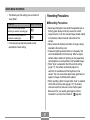
■ Recording Precautions
Select this setting:
• Never open the battery cover while the operation lamp is
flashing green. Doing so not only causes the current
image to be lost, it can also corrupt images already stored
in file memory and even lead to malfunction of the
camera.
• Never remove the memory card while an image is being
recorded to the memory card.
• Fluorescent lighting actually flickers at a frequency that
cannot be detected by the human eye. When using the
camera indoors under such lighting, you may experience
some brightness or color problems with recorded images.
• When “Auto” is selected for the ISO sensitivity setting
(page 117), the camera automatically adjusts its
sensitivity in accordance with the brightness of the
subject. This can cause some digital noise (graininess) to
appear in images of relatively dark subjects.
• When recording a dimly lit subject while “Auto” is selected
for the ISO sensitivity setting (page 117), the camera
increases sensitivity and uses a faster shutter speed.
Because of this, you need to guard against camera
movement if you have flash turned off
(page 63).
Stay in the easy mode, without
switching to another recording type
Switch from the easy mode to a
standard recording type
• On-screen pop-up help text provides a brief
explanation of each setting.
57
BASIC IMAGE RECORDING
■ About Auto Focus
• Bright light shining on the lens can cause images to
appear “washed out”. This tends to happen when
recording images outdoors in bright sunlight. To protect
against this, use your free hand to shade the lens from
the light.
• Proper focus may be difficult or even impossible when
shooting the following types of subjects.
— Solid color walls or subjects with little contrast
— Strongly backlit subjects
— Very shiny objects
— Venetian blinds or other horizontally repeating patterns
— Multiple subjects that are varying distances from the
camera
— Subjects in poorly lit areas
— Moving subjects
— Subjects outside the shooting range of the camera
• Proper focus may also be difficult or impossible if the
camera is moving.
• Note that a green operation lamp and focus frame do not
necessarily guarantee that the resulting image will be in
focus.
• If Auto Focus does not produce the results you want for
some reason, try using focus lock (page 81) or manual
focus (page 80).
58
BASIC IMAGE RECORDING
■ About the REC Mode Monitor Screen
Using Zoom
• The image shown on the monitor screen in the REC
mode is a simplified image for composing purposes. The
actual image is recorded in accordance with the image
quality setting currently selected on your camera. The
image saved in file memory has much better resolution
and detail than the REC mode monitor screen image.
• Certain levels of subject brightness can cause the
response of the REC mode monitor screen to slow down,
which causes some digital noise (graininess) in the
monitor screen image.
• Very bright light inside of an image can cause a vertical
band to appear in the monitor screen image. This is a
CCD phenomenon known as “vertical smear”, and does
not indicate malfunction of the camera. Note that vertical
smear is not recorded with the image in the case of a
snapshot, but it is recorded in the case of a movie (page
102).
Your camera is equipped with two types of zoom: optical
zoom and digital zoom. Normally, the camera automatically
switches over to digital zoom after you reach the maximum
limit for optical zoom. You can, however, configure the
camera to disable digital zoom, if you want.
Optical Zoom
The optical zoom range is 1X to 3X.
1. In the REC mode,
Zoom button
press the zoom button
to change the zoom
factor.
To do this:
59
Press this side of the
zoom button:
Zoom out for a wider view
(main subject becomes smaller)
(Wide Angle)
Zoom in for a closer view (main
subject becomes larger)
(Telephoto)
BASIC IMAGE RECORDING
NOTE
Zoom out
• The optical zoom factor also affects the lens
aperture.
• Use of a tripod is recommended to protect against
hand movement when using the telephoto setting
(zoom in).
• Whenever you perform an optical zoom operation
while recording with the Auto Focus mode, Macro
mode or manual focus, a value will appear on the
monitor screen to tell you the focusing range (pages
75, 78, 80).
• Optical zoom is disabled during movie recording.
Digital zoom only is available. Make sure you select
the optical zoom setting you want to use before you
press the shutter button to start movie recording
(page 102).
Zoom in
2. Compose the image, and then press the
shutter button.
60
BASIC IMAGE RECORDING
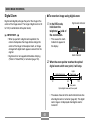
Digital Zoom
■ To record an image using digital zoom
Digital zoom digitally enlarges the part of the image at the
center of the image screen. The range of digital zoom is 3X
to 12X (in combination with optical zoom).
1. In the REC mode,
Digital zoom indicator
hold down the
telephoto ( ) side of
the zoom button.
IMPORTANT!
• This causes the zoom
indicator to appear on
the display.
• When you perform a digital zoom operation, the
camera manipulates the image data to enlarge the
center of the image. Unlike optical zoom, an image
enlarged with digital zoom appears coarser than the
original.
• Digital zoom is not supported while date stamping
(“Date” or “Date&Time”) is turned on (page 122).
Zoom indicator
2. When the zoom pointer reaches the optical/
digital zoom switch over point, it will stop.
Digital
Zoom range
Optical Zoom range
1X
3X
12X
Zoom pointer
Optical/digital zoom switch over point
• The above shows what the zoom indicator looks like
when digital zoom is turned on (page 62). The digital
zoom range is not displayed when digital zoom is
turned off.
61
BASIC IMAGE RECORDING
■ To turn digital zoom on and off
3. Release the zoom button momentarily, and
then hold down its telephoto ( ) side again
to move the zoom pointer into the digital
zoom range.
1. In the REC mode, press [MENU].
• The zoom pointer will also stop when you move the
pointer back to the switch over point to re-enter the
digital zoom range. Release the zoom button and
) side again to
then hold down its wide angle (
move into the digital zoom range.
3. Use [왖] and [왔] to select “Digital Zoom”, and
2. Use [왗] and [왘] to select the “REC” tab.
then press [왘].
4. Use [왖] and [왔] to select the setting you
4. Compose the image, and then press the
want, and then press [SET].
shutter button.
To do this:
Select this setting:
Turn on digital zoom
On
Turn off digital zoom
Off
• Only the optical zoom range is displayed in the zoom
indicator when digital zoom is turned off.
62
BASIC IMAGE RECORDING
To do this:
Using the Flash
Perform the following steps to select the flash mode you
want to use.
• The approximate effective range of the flash is shown
below.
Wide Angle Optical Zoom:
Approximately 0.1 to 3.7 meters
(0.3´ to 12.1´) (ISO Sensitivity: Auto)
Telephoto Optical Zoom:
Approximately 0.6 to 1.9 meters
(2.0´ to 6.2´) (ISO Sensitivity: Auto)
* Depends on zoom factor.
1. In the REC mode, press [왔] (
Turn off the flash (Flash Off)
Always fire the flash (Flash On)
Always use soft flash, regardless of
exposure conditions (Soft Flash)
Fire a pre-flash followed by image
recording with flash, reducing the
chance of red-eye in the image (Redeye reduction)
In this case, the flash fires automatically
when required
*
).
• Each press of [왔] (
) cycles through the flash
mode settings described below on the monitor
screen.
appears momentarily when you select Auto as
the flash mode, and then disappears.
2. Press the shutter button to record the image.
Flash mode indicator
[ 왔] (
Select this setting:
Have the flash fire automatically when
required (Auto Flash)*
)
63
BASIC IMAGE RECORDING
■ Flash On
IMPORTANT!
• The flash unit of this camera fires a number of times
when you record an image. The initial flashes are
pre-flashes, which the camera uses to obtain
information that it uses for exposure settings. The
final flash is for recording. Make sure that you keep
the camera still until the shutter releases.
• Using the flash while “Auto” is selected for the ISO
Sensitivity setting increases sensitivity, which can
cause large amounts of digital noise to appear in the
image. You can reduce digital noise by using a lower
ISO Sensitivity setting. Note, however, that this also
has the effect of shortening the flash range (the
range that is covered by the light from the flash)
(page 117).
Select
(Flash On) as the flash mode when backlighting
causes your subject to appear dark, even though there is
enough light to keep the flash from firing automatically.
This will cause the flash to fire and illuminate your subject
whenever you press the shutter button (daylight synchro
flash).
■ Soft Flash
Select
(Soft Flash) as the flash mode to suppress flash
intensity and shoot with a soft feel.
■ About Red-eye Reduction
Using the flash to record at night or in a dimly lit room can
cause red spots inside the eyes of people who are in the
image. This happens because the light from the flash
reflects off of the retina of the eye.
64
BASIC IMAGE RECORDING
IMPORTANT!
Flash Unit Status
Note the following important points when using redeye reduction.
• Red-eye reduction does not work unless the people
in the image are looking directly at the camera during
the pre-flash. Before pressing the shutter button, call
out to the subjects so they all look at the camera
while the pre-flash operation is performed.
• Red-eye reduction may not work very well if the
subjects are located far away from the camera.
You can find out the current flash unit status by pressing
the shutter button half way and checking the monitor
screen and operation lamp.
Operation lamp*
The
indicator is also shown on
the monitor screen when the flash
unit is ready to fire.
* Operation lamp
When the operation
lamp is this:
It means this:
Flashing amber
Flash unit is charging
Lit or flashing green *1
Flash unit is ready to fire
*1 Flashes green when the image is not focused while
using the Auto Focus mode or Macro mode.
65
BASIC IMAGE RECORDING
Changing the Flash Intensity Setting
Using Flash Assist
Perform the following steps to change the flash intensity
setting.
Recording a subject that is outside the flash range can
cause the subject to appear dark in the resulting image,
because not enough of the flash reaches the subject. When
this happens, you can use flash assist to correct the
brightness of the recorded subject, so it appears as if the
flash illumination was sufficient.
1. In the REC mode, press [MENU].
2. Use [왗] and [왘] to select the “Quality” tab.
3. Use [왖] and [왔] to select “Flash Intensity”,
and then press [왘].
4. Use [왖] and [왔] to select the setting you
want, and then press [SET].
To make flash intensity:
Select this setting:
Stronger
+2
Flash assist used
+1
Normal
1. In the REC mode, press [MENU].
0
–1
Weaker
Flash assist not used
2. Use [왗] and [왘] to select the “Quality” tab.
–2
3. Use [왖] and [왔] to select “Flash Assist”, and
IMPORTANT!
then press [왘].
• Flash intensity may not change if the subject is too
far or too close to the camera.
66
BASIC IMAGE RECORDING
■ Flash Precautions
4. Use [왖] and [왔] to select the setting you
want, and then press [SET].
To do this:
Select this setting:
Turn on flash assist
Auto
Turn off flash assist
Off
Flash
• Take care that your fingers
do not block the flash when
you hold the camera.
Covering the flash with your
finger can greatly reduce its
effectiveness.
IMPORTANT!
• Flash assist may not produce the desired result for
some types of subjects.
• Flash assist may have little effect on your image if
you changed any of the following settings when you
recorded it.
— Flash intensity (page 66)
— Exposure compensation (EV shift) (page 82)
— ISO sensitivity (page 117)
— Contrast (page 121)
• Using flash assist can cause an increase of digital
noise in recorded images.
• You may not be able to achieve the desired results using
the flash if the subject is too close or too far away.
• The flash takes anywhere from a few seconds to as long
as 7 seconds to attain full charge after being fired. The
actual time required depends on the battery level,
temperature, and other conditions.
• The flash unit may not be able to charge when camera
battery power is low. If this happens, the flash will not fire
properly and you will not be able to obtain the desired
exposure. Be sure to charge the camera’s battery as soon
as possible when power goes low.
67
BASIC IMAGE RECORDING
• When the flash is turned off (
), mount the camera on a
tripod to record images in an area where available lighting
is dim. Recording images under dim lighting without the
flash can cause digital noise, which makes images
appear coarse.
• When red-eye reduction (
) is selected, flash intensity
is adjusted automatically in accordance with the
exposure. The flash may not fire at all when the subject is
brightly lit.
• Using flash in combination with another light source
(daylight, fluorescent light, etc.) can result in abnormal
image colors.
Using the Self-timer
The self-timer lets you select either a 2-second or 10second delay of the shutter release after you press the
shutter button. A Triple Self-timer feature lets you perform
three consecutive self-timer operations to record three
images.
1. In the REC mode, press [MENU].
2. Use [왗] and [왘] to select the “REC” tab.
3. Use [왖] and [왔] to select “Self-timer”, and
then press [왘].
4. Use [왖] and [왔] to select the self-timer type
you want to use, and then press [SET].
• Selecting “Off” in step 4 disables the self-timer.
68
BASIC IMAGE RECORDING
To do this:
Specify a 10-second self-timer
10s
10 sec
Specify a 2-second self-timer
2s
2 sec
Specify Triple Self-timer
x3
X3
Disable the self-timer
1. The camera performs a 10-second countdown
and then records the first image.
Select this setting:
2. The camera prepares to record the next image.
The amount of time required for preparation
depends on the camera’s current “Size” and
“Quality” settings, the type of memory (built-in or
card) you are using for image storage, and
whether or not the flash is charging.
Off
3. After preparation is complete, the indicator “1sec”
appears on the monitor screen, and another
image is recorded one second later.
• This causes an
indicator identifying the
selected self-timer type
to appear on the
monitor screen.
4. Steps 2 and 3 are repeated once more to record
the third image.
• With the Triple Self-timer,
the camera records a
series of three images in
the sequence described
below.
69
BASIC IMAGE RECORDING
5. Press the shutter
Self-timer lamp
NOTE
button to record the
image.
• The “2 sec” self-timer setting is best when shooting
with a slow shutter speed, because it helps to avoid
blurring of images due to hand movement.
• The following functions are not available for use in
combination with the Triple Self-timer.
BEST SHOT recording (“Business Cards and
Documents”, “Whiteboard, etc.”, “Old Photo”,
“Movie”)
• When you press the
shutter button, the selftimer lamp flashes and
the shutter releases after
the self-timer reaches
the end of its countdown
(about 10 seconds or two
seconds).
• You can interrupt an ongoing self-timer countdown
by pressing the shutter button while the self-timer
lamp is flashing.
70
B
BASIC IMAGE RECORDING
4. Use [왖] and [왔] to select the setting you
Specifying Image Size
want, and then press [SET].
“Image size” is the size of the image, expressed as the
number of vertical and horizontal pixels. A “pixel” is one of
the many tiny dots that make up the image. More pixels
provide finer detail when an image is printed, but a higher
pixel count also causes the image’s file size to be larger.
You can select an image size to suit your needs for greater
detail or smaller file size.
• Note that this setting is valid for snapshots only. For
information about movie image size, see page 103.
• When selecting the image size, the image size value
(pixels) will alternate on the display with a
corresponding print size. The print size indicates the
optimum paper size when you print an image that is
the image size you select.
Image Size
1. In the REC mode, press [MENU].
3072 × 2304
A3 Print
7M
(3:2)
3072 × 2048
(3:2)
2560 × 1920
A3 Print (3:2 horizontal-tovertical ratio)
2M
2048 × 1536
1600 × 1200
A4 Print
3.5˝ × 5˝ Print
VGA
640 × 480
E-mail (optimum size when
attaching image to e-mail)
5M
3M
2. Use [왗] and [왘] to select the “Quality” tab.
3. Use [왖] and [왔] to select “Size”, and then
press [왘].
Print Size
7M*
A3 Print
* “M” stands for “Mega.”
71
Larger
Smaller
BASIC IMAGE RECORDING
• The above print sizes are all approximate values when
printing at a resolution of 200 dpi (dots per inch). Use a
larger setting when you want to print at a higher
resolution or when you plan to produce a larger size print.
• In order to obtain the level of resolution for which your
camera is designed, recording at a maximum image size
(7M) is recommended. Use a smaller image size when
you want to conserve memory capacity.
• Selecting the “7M (3:2) (3072 × 2048 (3:2))” image size
records images with a 3:2 (horizontal:vertical) aspect
ratio, which is optimal for printing on photographic paper
with an aspect ratio of 3:2.
Specifying Image Quality
Compressing an image before storage can cause a
deterioration of its quality. The more an image is
compressed, the greater the loss of quality. The image
quality setting specifies the compression ratio to be used
when an image is stored in memory. You can select an
image quality setting to suit your needs for higher quality or
smaller file size.
• Note that this setting is valid for snapshots only. For
information about movie image quality, see page 103.
1. In the REC mode, press [MENU].
2. Use [왗] and [왘] to select the “Quality” tab.
3. Use [왖] and [왔] to select “
Quality”, and
then press [왘].
4. Use [왖] and [왔] to select the setting you
want, and then press [SET].
72
BASIC IMAGE RECORDING
To get this:
Select this setting:
High image quality, large file
size
Fine
Normal image quality and
normal file size
Normal
Low image quality, small file
size
Economy
Higher
Quality
Lower
Quality
IMPORTANT!
• Actual file size depends on the type of image you
record. This means that the remaining image
capacity noted on the monitor screen may not be
exactly accurate (pages 26, 234).
73
OTHER RECORDING FUNCTIONS
OTHER RECORDING FUNCTIONS
• This causes the focus mode
indicator to appear on the
display.
Selecting the Focus Mode
You can select one of five different focus modes: Auto
Focus, Macro, Pan Focus, Infinity, and Manual Focus.
Focus mode indicator
1. In the REC mode, press [MENU].
2. Select the “REC” tab, select “Focus”, and
then press [왘].
3. Use [왖] and [왔] to select the setting you
IMPORTANT!
want, and then press [SET].
To do this:
• You can use the key customization feature (page
112) to switch the focus mode whenever you press
[왗] or [왘] while recording a snapshot or movie.
Select this setting:
Adjusts focus automatically
• Auto Focus cannot be selected
during movie recording.
(Auto Focus)
Close-up recording
• During movie recording, Macro
mode uses fixed focus that is
optimized for macro recording.
Macro (Close-up)
Focus adjusted on a certain
subject distance
(Pan Focus)
Infinity recording
(Infinity)
Manual focus recording
(Manual Focus)
74
OTHER RECORDING FUNCTIONS
Operation lamp
Using Auto Focus
As its name suggests, Auto Focus focuses the image
automatically. The automatic focus operation starts when
you press the shutter button down half way. The following
is the Auto Focus range.
ISO50
F3.1
1/1000
1000
Range: 40cm to ∞ (1.3´ to ∞)
• Using optical zoom causes the above range to change.
Focus frame
1. In the REC mode, press [MENU].
When you see this:
It means this:
2. Select the “REC” tab, select “Focus”, and
Green focus frame
Green operation lamp
The image is focused.
Red focus frame
Flashing green operation lamp
The image is not
focused.
then press [왘].
3. Use [왖] and [왔] to select “
”, and then
press [SET].
5. Press the shutter button the rest of the way to
record the image.
4. Compose the image so the main subject is
within the focus frame, and then press the
shutter button half way.
• You can tell whether the image is focused by
observing the focus frame and the operation lamp.
75
OTHER RECORDING FUNCTIONS
■ Quick Shutter
NOTE
• When proper focusing is not possible because the
subject is closer than the Auto Focus range, the
camera automatically switches to the Macro mode
range (page 78).
• Whenever you perform an optical zoom operation
(page 59) while recording with Auto Focus, a value
will appear on the monitor screen as shown below to
tell you the focusing range.
Example: AF 앪앪cm - ∞
When Quick Shutter is turned on, the camera immediately
records the image without waiting for Auto Focus to be
performed when you press the shutter release all the way
down. This helps to avoid missing a special moment while
you wait for the camera to Auto Focus.
1. In the REC mode, press [MENU].
2. Select the “REC” tab, select “Quick Shutter”,
* 앪앪 will be replaced by the actual focusing range value.
and then press [왘].
IMPORTANT!
3. Use [왖] and [왔] to select the setting you
• Auto Focus cannot be selected during movie
recording.
want, and then press [SET].
76
To do this:
Select this setting:
Turn on Quick Shutter
On
Turn off Quick Shutter
Off
OTHER RECORDING FUNCTIONS
■ Specifying the Auto Focus Area
For this type of Auto Focus area:
You can use the following procedure to change the Auto
Focus area used in the Auto Focus mode and the Macro
mode. Note that the configuration of the focus frame
changes in accordance with the Auto Focus area you
select.
1. In the REC mode, press [MENU].
2. On the “REC” tab, select “AF Area”, and then
press [왘].
3. Use [왖] and [왔] to select the Auto Focus area
you want, and then press [SET].
•
Spot
Automatic selection of the focus area where
the subject closest to the camera is located
• With this setting, a wide focus frame,
which contains nine focus points, appears
on the monitor screen first. When you
press the shutter button half way, all of the
focus frames that are in focus among the
nine focus points become green.
• This setting works well for group photos.
Multi
Spot
Focus frame
77
Select this:
Very limited range in the center of the
screen
• This setting works well with focus lock
(page 81).
•
Multi
Focus frame
OTHER RECORDING FUNCTIONS
NOTE
Using the Macro Mode
• When the Macro mode cannot focus properly
because the subject is too far away, the camera
automatically switches to the Auto Focus range
(page 76).
• Whenever you perform an optical zoom operation
(page 59) while recording with the Macro mode, a
value will appear on the monitor screen as shown
below to tell you the focusing range.
Example: 앪앪cm - 앪앪cm
Use the Macro mode when you need to focus on close up
subjects. The following shows the approximate focus range
in the Macro mode.
Range: 10cm to 50cm (3.9˝ to 19.7˝)
• Using optical zoom causes the above range to change.
1. In the REC mode, press [MENU].
* 앪앪 will be replaced by the actual focusing range value.
2. Select the “REC” tab, select “Focus”, and
then press [왘].
3. Use [왖] and [왔] to select “
IMPORTANT!
• Use of the flash along with the Macro mode can
cause the light of the flash to become blocked, which
can produce unwanted lens shadows in your image.
• During movie recording, Macro mode uses fixed
focus that is optimized for macro recording.
Macro”, and
then press [SET].
4. Press the shutter button to record the image.
• The focus and image recording operations are
identical to those in the Auto Focus mode.
78
OTHER RECORDING FUNCTIONS
Using Pan Focus
Using the Infinity Mode
Pan Focus comes in handy when recording under
conditions where Auto Focus is difficult for some reason, or
in cases where Auto Focus operation noise is too
noticeable in the movie audio.
The Infinity mode fixes focus at infinity (∞). Use this mode
when recording scenery and other faraway images.
1. In the REC mode, press [MENU].
2. Select the “REC” tab, select “Focus”, and
1. In the REC mode, press [MENU].
then press [왘].
2. Select the “REC” tab, select “Focus”, and
3. Use [왖] and [왔] to select “
then press [왘].
3. Use [왖] and [왔] to select “
”, and then
press [SET].
”, and then
4. Press the shutter button to record the image.
press [SET].
4. Press the shutter button to record the image.
NOTE
• If you press the shutter button half way, the focus
distance will appear on the monitor screen.
Example: 앪앪m - 앪앪m
* 앪앪 will be replaced by the actual focusing range value.
79
OTHER RECORDING FUNCTIONS
Using Manual Focus
4. Press [SET].
With the Manual Focus mode, you can adjust the focus of
an image manually. The following shows focus range in the
Manual Focus mode.
5. While watching the
Optical Zoom Factor
image on the monitor
screen, use [왗] and
[왘] to focus.
Approximate Focus Range
1X
10cm (3.9˝) to infinity (∞)
3X
60cm (23.6˝) to infinity (∞)
• Using optical zoom causes the above range to change.
Manual focus position
1. In the REC mode, press [MENU].
To do this:
2. Select the “REC” tab, select “Focus”, and
then press [왘].
Press [왗].
Focus out on the subject
Press [왘].
• Pressing [왗] or [왘] causes the area inside of the
boundary displayed in step 1 to fill the monitor
screen momentarily to aid in focus. The normal
image will reappear a short while later.
3. Use [왖] and [왔] to
select “ ”, and then
press [SET].
• At this point, a
boundary also appears
on the display,
indicating the part of the
image that will be used
for manual focus.
Do this:
Focus in on the subject
• If you do not adjust the focus of the enlarged image,
it will return automatically to step 3. If this happens
and you still want to adjust the focus, press [SET] to
display the enlarged image again.
Boundary
80
OTHER RECORDING FUNCTIONS
6. Press the shutter button to record the image.
Using Focus Lock
Focus lock is a technique you can use to focus on a subject
that is not located within the focus frame when you record
an image. You can use focus lock in the Auto Focus mode
).
and the Macro mode (
NOTE
• Whenever you perform an optical zoom operation
(page 59) while recording with manual focus, a value
will appear on the monitor screen as shown below to
tell you the focusing range.
Example: MF 앪앪cm - ∞
1. Using the monitor
Main subject
screen, compose the
image so the main
subject is within the
focus frame, and then
press the shutter
button half way.
* 앪앪 will be replaced by the actual focusing range value.
• This locks the focus on
the subject that is
currently within the
focus frame.
81
ISO50
F3.1
1/1000
1000
Focus frame
OTHER RECORDING FUNCTIONS
2. Keeping the shutter
Exposure Compensation (EV Shift)
button pressed half
way down, recompose the image
as you like.
Exposure compensation lets you change the exposure
setting (EV value) manually to adjust for the lighting of your
subject. This feature helps to achieve better results when
recording a backlit subject, a strongly lit subject indoors, or
a subject that is against a dark background.
ISO50
F3.1
1/1000
1000
EV Shift Range: –2.0EV to +2.0EV
Steps: 1/3EV
Main subject
3. When the image is composed the way you
want, press the shutter button the rest of the
way to record it.
1. In the REC mode, press [MENU].
• The focus and image recording operations are
identical to those in the Auto Focus mode.
2. Select the “Quality”
tab, select “EV Shift”,
and then press [왘].
NOTE
• Locking the focus also locks the exposure.
Exposure compensation
value
82
OTHER RECORDING FUNCTIONS
3. Use [왖] and [왔] to
• To cancel EV Shift, adjust the value until it becomes
0.0.
change the exposure
compensation value,
and then press [SET].
4. Press the shutter button to record the image.
• Pressing [SET] registers
the displayed value.
IMPORTANT!
• When shooting under very dark or very bright
conditions, you may not be able to obtain satisfactory
results even after performing exposure
compensation.
EV value
[왖] : Increases the EV value. A higher EV value is best
used for light-colored subjects and backlight
subjects.
NOTE
• Performing an EV shift operation while using multipattern metering (page 118) will cause the metering
mode to switch automatically to center weighted
metering. Returning the EV shift value to 0.0 causes
the metering mode to change back to multi-pattern
metering.
• You can use key customization (page 112) to
configure the camera to perform exposure
compensation whenever you press [왗] or [왘] while in
the REC mode. This comes in handy when adjusting
exposure compensation while viewing the on-screen
histogram (page 109).
[왔] : Decreases the EV value. A lower EV value is best
for dark-color subjects and for shooting outdoors
on a clear day.
83
OTHER RECORDING FUNCTIONS
3. Use [왖] and [왔] to select the setting you
Adjusting White Balance
want, and then press [SET].
The wavelengths of the light produced by various light
sources (daylight, light bulb, etc.) can affect the color of a
subject when it is recorded. White balance lets you make
adjustments to compensate for different lighting types, so
the colors of an image appear more natural.
When shooting under these conditions:
Normal conditions
Select this setting:
Auto
Outdoor daylight on a clear day
Outdoor daylight on an overcast or
rainy day, in the shade of a tree, etc.
1. In the REC mode, press [MENU].
In the shade of a building or any other
area where the color temperature is
high
2. Select the “Quality”
tab, select “White
Balance”, and then
press [왘].
Under white or daylight white
fluorescent light
(suppresses color fogging)
N
Under daylight fluorescent light
(suppresses color fogging)
D
Under incandescent lighting
Difficult lighting that requires manual
control (See “Configuring the White
Balance Setting Manually” (page 85).)
84
Manual
OTHER RECORDING FUNCTIONS
NOTE
Configuring the White Balance Setting
Manually
• When “Auto” is selected for the white balance
setting, the camera automatically determines the
white point of the subject. Certain subject colors and
light source conditions can cause problems when the
camera tries to determine the white point, which
makes proper white balance adjustment impossible.
When this happens, use daylight, overcast, or one of
the other fixed white balance settings to specify the
type of lighting available.
• You can use the key customization feature (page
112) to configure the camera so the white balance
setting changes whenever you press [왗] or [왘] while
in the REC mode.
• If you have key customization configured to control
white balance and you have Icon Help turned on
(page 114), select “AWB Auto WB” to change the
white balance mode to auto.
Certain complex light sources or other environmental
conditions can make it impossible to obtain good results
when “Auto” or one of the fixed light source settings is
selected for white balance. Manual white balance lets you
configure the camera for a particular light source and other
conditions.
Note that you must perform manual white balance under
the same conditions you will be shooting under. Have a
sheet of white paper on hand before starting the following
procedure.
1. In the REC mode, press [MENU].
2. Select a “Quality” tab, select “White
Balance”, and then press [왘].
85
B
OTHER RECORDING FUNCTIONS
3. Use [왖] and [왔] to
• This starts the white balance adjustment procedure.
The message “Complete” appears on the monitor
screen after white balance adjustment is complete.
select “Manual”.
• This causes the object
you last used to adjust
manual white balance to
appear on the monitor
screen. If you want to use
the same settings you
configured during a
previous manual white
balance setting
operation, skip step 4
and perform step 5.
5. Press [SET].
• This registers the white balance settings and returns
to the currently selected recording mode.
NOTE
• After you adjust white balance manually, the setting
remains in effect until you change it or until you turn
off the camera.
4. Point the camera at a white paper or similar
object under the lighting conditions for which
you want to set the white balance, and then
press the shutter button.
White paper
86
OTHER RECORDING FUNCTIONS
3. Use [왖] and [왔] to
Using Continuous Shutter
select “Normal
Speed”, “High
Speed”, or “Flash
Cont. ”, and then
press [SET].
You can configure the camera to record only a single
snapshot each time the shutter button is pressed, or to
keep recording as long as the shutter button remains
depressed. You can select from among the following three
continuous shutter modes.
• This causes the
applicable icon to
appear on the monitor
screen.
• Normal-speed continuous shutter
You can continually record images until memory becomes
full.
• High-speed continuous shutter
Record up to three consecutive images at high speed.
• Flash continuous shutter
Use this mode to record up to three consecutive images,
firing the flash for each one.
: Normal-speed continuous shutter
: High-speed continuous shutter
: Flash continuous shutter
• With “Off”, snapshots are recorded one at a time.
1. In the REC mode, press [MENU].
IMPORTANT!
• Turning off the camera automatically turns off the
continuous shutter mode.
2. Select the “REC” tab, select “Continuous”,
and then press [왘].
87
OTHER RECORDING FUNCTIONS
Normal-speed continuous shutter
Flash continuous shutter
Holding down the shutter button continuously records
images, as long as there is memory available to store
them. Release the shutter button to stop recording.
• You can select the flash mode you want with normalspeed continuous shutter (page 63).
• The speed of continuous shutter recording depends on
the type of memory card loaded in the camera. When
recording to built-in memory, continuous shutter recording
is relatively slow.
Holding down the shutter button while flash continuous
shutter is selected records up to three images, firing the
flash for each one. Shooting stops if you release the
shutter button before three images are recorded.
• Flash is turned on automatically.
• Note that the resolution of images recorded with flash
continuous shutter is somewhat lower resolution and
more prone to digital noise than images recorded with
normal-speed continuous shutter.
• “Auto” ISO sensitivity always is used for flash continuous
shutter, regardless of the current ISO sensitivity setting.
• With flash continuous shutter, the flash distance (range)
is shorter than normal.
High-speed continuous shutter
Holding down the shutter button while high-speed
continuous shutter is selected records up to three images
at high speed. Shooting stops if you release the shutter
button before three images are recorded.
• Flash is turned off automatically.
• Note that the resolution of images recorded with highspeed continuous shutter is somewhat lower resolution
and more prone to digital noise than images recorded
with normal-speed continuous shutter.
• “Auto” ISO sensitivity always is used for high-speed
continuous shutter, regardless of the current ISO
sensitivity setting.
88
B
OTHER RECORDING FUNCTIONS
1. In the REC mode,
Using the BEST SHOT Mode
press [BS] (BEST
SHOT).
Simply select one of a collection of built-in sample scenes
and the camera sets up for the scene you selected for
beautiful snapshots every time.
• This enters the BEST
SHOT mode and
displays all 12 of the
BEST SHOT scenes.
■ Example Sample Scene
• Portrait
• In addition to the snapshot scenes, there is one
movie scene and one voice record scene.
• Scenery
• Sample scenes are arranged in sequence, starting
from the upper left corner.
• The currently selected sample scene is the one with
the selection boundary around it.
• Night Scene
• Night Scene Portrait
89
OTHER RECORDING FUNCTIONS
2. Use [왖], [왔], [왗], and [왘] to select the sample
IMPORTANT!
scene you want, and then press [SET].
• BEST SHOT scenes were not recorded using this
camera. They are provided as samples only.
• Due to shooting conditions and other factors, an
image recorded using the setup of a BEST SHOT
scene may not produce exactly the results you
expect.
• You can change the camera settings that are
configured when you select a BEST SHOT scene.
The settings you can change are the same as those
that are saved when you save a BEST SHOT user
setup (page 93). Note, however, that some BEST
SHOT scenes do not allow you to change certain
settings. BEST SHOT scene settings revert to their
default presets whenever you select another BEST
SHOT scene or turn off the camera. If you want to
save your settings for later use, save them as a
BEST SHOT user setup (page 93).
• Digital noise reduction processing is performed
automatically when you are recording a night scene,
fireworks, or other image that requires slow shutter
speeds. Because of this, it takes longer to record
images at lower shutter speeds. Make sure that you
do not perform any camera button operations until
the image recording operation is complete.
• Pressing [MENU] causes the selection boundary to
jump to the first sample scene (“Auto”).
• Use [왖], [왔], [왗], and [왘] to move the selection
boundary around the display. Scrolling left while the
selection boundary is in the upper left or scrolling
right while it is in the lower right corner will scroll to
another screen of 12-sample scenes.
• If you want to check which sample scene is currently
selected or if you want to change to a different
scene, press [BS].
• Selecting the “Auto” scene changes the recording
type to snapshot auto recording (“
” displayed)
(page 52).
3. Press the shutter button to record the image.
• While the “Movie” scene is recorded, pressing the
shutter button starts and stops movie recording
(page 104).
90
B
OTHER RECORDING FUNCTIONS
• When recording the image of a night scene,
fireworks, or some other image using a slow shutter
speed, use of a tripod is recommended to prevent
hand movement.
Displaying Sample Scenes Individually
You can use the following procedure to display BEST
SHOT sample scenes individually, so you can view the
explanation about each scene’s settings.
NOTE
1. In the REC mode, press [BS] (BEST SHOT).
• Operation guidance and the currently selected BEST
SHOT scene appear on the display for about two
seconds if the camera is in the BEST SHOT mode
when you turn it on.
2. Press the zoom button.
• This displays the
sample scene that was
selected on the 12scene screen.
• To return to the 12scene screen, press the
zoom button again.
91
OTHER RECORDING FUNCTIONS
3. Use [왗] and [왘] to select the sample scene
Creating Your Own BEST SHOT Setup
you want, and then press [SET].
You can use the procedure below to save the setup of an
snapshot you recorded as a BEST SHOT scene. After that,
you can recall the setup whenever you want to use it.
• Pressing [MENU] jumps to the first sample scene
(“Auto”).
4. Press the shutter button to record the image.
1. In the REC mode, press [BS] (BEST SHOT).
2. Use [왖], [왔], [왗], and [왘] to select “Register
User Scene”, and then press [SET].
3. Use [왗] and [왘] to
display the snapshots
whose setup you
want to register as a
BEST SHOT scene.
4. Use [왖] and [왔] to select “Save”, and then
press [SET].
• This registers the setup. Now you can use the
procedure on page 89 to select your user setup for
recording.
92
OTHER RECORDING FUNCTIONS
IMPORTANT!
NOTE
• BEST SHOT user setups are located in the camera’s
built-in memory following the built-in sample scenes.
• Selecting a user snapshot setup displays the
indicator “U” in the upper right corner of the monitor
screen, followed by a number (that indicates the
setup number).
• Note that formatting built-in memory (page 170)
deletes all BEST SHOT user setups.
• The following are the settings that are included in a
snapshot setup: focus mode, EV shift value, white
balance mode, flash mode, ISO sensitivity, AF Area,
Metering, Flash Intensity, Flash Assist, Filter,
Sharpness, Saturation, and Contrast.
• Note that snapshots recorded with this camera only
can be used to create a BEST SHOT user setup.
• You can have up to 999 BEST SHOT user setups in
the camera’s built-in memory at one time.
• You can check the current setup of a scene by
displaying the various setting menus.
• BEST SHOT snapshot user setups are stored in
camera built-in memory in the folder named
“SCENE”. File names are assigned automatically
using the format “UEZ70nnn.JPE”, where “nnn” is a
value from 000 through 999.
93
OTHER RECORDING FUNCTIONS
To delete a BEST SHOT user setup
Reducing the Effects of Hand or Subject
Movement
1. In the REC mode, press [BS] (BEST SHOT).
You can reduce the effects of subject movement, and for
hand movement that tends to occur when shooting a faraway subject using telephoto, a fast-moving subject, or
under dim lighting conditions.
2. Press the zoom button to switch from the 12scene screen to the sample scene.
3. Use [왗] and [왘] to display the user setup you
1. Perform one of the procedures below to
want to delete.
4. Press [왔] (
enable Anti Shake.
) to delete the user setup.
Using the BEST SHOT mode
1. In the REC mode, press [BS] (BEST SHOT).
5. Use [왖] and [왔] to select “Delete”.
2. Use [왖], [왔], [왗], and [왘] to select the “Anti Shake”
scene, and then press [SET].
6. Press [SET] to delete the file.
7. Select another scene, and then press [SET].
• This returns to the recording state.
94
OTHER RECORDING FUNCTIONS
Using the Menu Screen
IMPORTANT!
1. In the REC mode, press [MENU].
• Anti Shake is disabled automatically when any
setting other than “Auto” is selected for ISO
sensitivity. If you want Anti Shake to be operational
after turning it on, be sure to change the ISO
sensitivity setting to “Auto” (page 117).
• Recording with Anti Shake can cause an image to
appear somewhat coarser than normal and can
cause slight deterioration of image resolution.
• The Anti Shake feature may not be able to eliminate
the effects of hand or subject movement when
shaking is severe.
• Anti Shake is disabled during movie recording.
• The Anti Shake feature may not work when using a
very low shutter speed. If this happens, use a tripod
to stabilize the camera.
• Though “
” (Anti Shake) is displayed on the
monitor screen while the flash setting is “Auto Flash”,
“Fash On”, or “Soft Flash”, Anti Shake is disabled.
2. Select the “REC” tab, select “Anti Shake”, and then
press [왘].
3. Use [왖] and [왔] to select “Auto”, and then press
[SET].
•
(Anti Shake indicator) is displayed on the
monitor screen while Anti Shake is turned on (page
26).
2. Press the shutter button to record the image.
95
OTHER RECORDING FUNCTIONS
IMPORTANT!
Shooting with High Sensitivity
• High Sensitivity is disabled automatically when any
setting other than “Auto” is selected for ISO
sensitivity. If you want High Sensitivity to be
operational after turning it on, be sure to change the
ISO sensitivity setting to “Auto” (page 117).
• Recording with high sensitivity can cause an image
to appear somewhat coarser than normal and can
cause slight deterioration of image resolution.
• A desirable level of image brightness may not be
possible under very dark conditions.
• When shooting with slow shutter speeds, use a
tripod to protect against the effects of hand
movement.
• High Sensitivity is disabled while the flash setting is
“Auto Flash”, “Flash On”, or “Soft Flash”.
Higher sensitivity makes it possible to record brighter
images, without using flash, even when there is not enough
lighting available to obtain normal exposure.
1. In the REC mode, press [BS] (BEST SHOT).
2. Use [왖], [왔], [왗], and [왘] to select the “High
Sensitivity” scene, and then press [SET].
3. Press the shutter button to record the image.
96
OTHER RECORDING FUNCTIONS
■ Setup Sample Images
Recording Images of Business Cards and
Documents (Business Shot)
• Business cards and
documents
Recording a business card, document, whiteboard, or
similarly shaped object from an angle can cause the
subject to appear misshaped in the resulting image.
Business Shot automatically corrects the shape of
rectangular objects to make them appear like the camera
was positioned directly in front of them.
Before keystone
correction
After keystone
correction
97
• White board, etc.
OTHER RECORDING FUNCTIONS
Before recording with Business Shot
To use Business Shot
• Before recording, compose the image so outline of the
item you want to record fits entirely within the monitor
screen.
• Make sure the object is against a background that allows
its outline to stand out, and that it fills the monitor screen
to the maximum extent possible.
1. In the REC mode, press [BS] (BEST SHOT).
2. Use [왖], [왔], [왗] and [왘] to select the
Business Shot image you want, and then
press [SET].
3. Press the shutter
NOTE
button to record the
image.
• When the camera is at an angle to a business card
or document it is recording, the shape of the
business card or document may appear distorted in
the image. Auto keystone correction corrects for this
distortion, which means that subjects appear normal
even if you record at an angle.
• This displays a screen
that shows all of the
objects in the image that
qualify as candidates for
keystone correction. An
error message will
appear (page 232) if the
camera is unable to find
any suitable keystone
correction candidate in
the image. After a short
while, the original image
will be stored in memory,
as-is.
98
OTHER RECORDING FUNCTIONS
4. Use [왗] and [왘] to select the candidate you
Restoring an Old Photograph
want to correct.
You can use the procedure in this section to restore an old,
faded photograph with the color provided by modern digital
camera technology.
5. Use [왖] and [왔] to
select “Correct”, and
then press [SET].
Before trying to restore an old
photograph
• Selecting “Cancel” in
place of “Correct” stores
the original image as-is,
without correcting it.
• Make sure the entire photograph you are trying to restore
is enclosed within the monitor screen.
• Make sure the object is against a background that allows
its outline to stand out, and that it fills the monitor screen
to the maximum extent possible.
• Make sure that light is not reflecting off the surface of the
original photograph.
• If the old photograph is portrait orientation, be sure to
compose the image with the camera in landscape
(horizontal) orientation.
IMPORTANT!
• Digital zoom is disabled while recording with
Business Shot. However, you can use optical zoom.
• The camera will not be able to recognize the subject
in the following cases.
— When part of the subject extends outside of the
monitor screen
— When the subject is the same color as the
background it is placed upon
• The maximum Business Shot image size is 2M (1600
× 1200 pixels), even if the camera is configured for a
larger image size. An image size setting smaller than
2M (1600 × 1200 pixels) records images at the
specified size.
99
OTHER RECORDING FUNCTIONS
NOTE
To restore an old photograph
• When the camera is at an angle to the old
photograph, one side of the recorded image may
appear longer than the side opposite from it. This is
called “keystoning,” which is caused by the
difference in distance from the camera lens to each
side of the photograph. The side of the photograph
that is closer to the camera looks longer and the side
further from the camera looks shorter. Auto keystone
correction corrects for this distortion, which means
that a photograph appears normal even if you record
it at an angle.
1. In the REC mode, press [BS] (BEST SHOT).
2. Use [왖], [왔], [왗], and [왘] to select “Old
Photo”, and then press [SET].
3. Press the shutter
button to record the
image.
• This displays a
photograph contour
confirmation screen,
and then saves the
original recorded image.
An error message will
appear (page 232),
without displaying the
photograph contour
confirmation screen, if
the camera is unable to
find the contour of the
photograph.
100
OTHER RECORDING FUNCTIONS
4. Use [왗] and [왘] to select the contour
7. Use [왖], [왔], [왗], and [왘] to move the
candidate you want to correct.
cropping boundary to the location you want,
and then press [SET].
5. Use [왖] and [왔] to
• The camera will restore color automatically and save
the image.
select “Trim”, and
then press [SET].
• If you do not want a border around the image,
configure the cropping boundary so it is slightly
inside of the boundary of the displayed image.
• This displays a cropping
boundary on the
monitor screen.
• To cancel the cropping operation at any point and
save the image as-is, press [MENU].
• If you do not want to
crop the image, select
“Cancel” to store the
image.
6. Use the zoom button to make the cropping
boundary larger or smaller.
101
OTHER RECORDING FUNCTIONS
IMPORTANT!
Recording a Movie
• Digital zoom is disabled while recording an old
photograph. However, you can use optical zoom.
• The camera will not be able to recognize an old
photograph in the following cases.
— When part of the photograph extends outside of
the monitor screen
— When the old photograph is the same color as the
background it is placed upon
• The maximum size when recording an old
photograph is 2M (1600 × 1200 pixels), even if the
camera is configured for a larger image size. When
the camera is configured to record images smaller
than 2M (1600 × 1200 pixels), images will be in
accordance with the currently specified image size.
• Under certain conditions, restored colors may not
produce the desired results.
You can record movies with audio. Movie length is limited
only by the amount of memory available for storage. You
can select a resolution setting to suit your needs.
• File Format: Motion JPEG AVI format
• Maximum Movie Length:
The length of a movie is limited only by the amount of
memory available to store it.
• Approximate Movie File Size (1-minute movie):
72.8MB (Quality Setting: HQ)
43.6MB (Quality Setting: Normal)
17.5MB (Quality Setting: LP)
102
OTHER RECORDING FUNCTIONS
Specifying Movie Image Quality
The image quality setting determines how much the
camera compresses movie images before storing them.
Image quality is expressed as image size in pixels. A
“pixel” is one of the many tiny dots that make up an image.
More pixels (a larger image size) provide finer detail and
higher image quality when a movie is played back.
Before recording a movie, select the image quality setting
that suits your needs.
Higher
Quality
Lower
Quality
1. In the REC mode, press [MENU].
2. Use [왗] and [왘] to select the “Quality” tab.
3. Use [왖] and [왔] to select “
Approximate
Data Rate
Frame Rate
HQ
(640 × 480 pixels)
10.2 megabits
per second
30 frames/
second
Normal
(512 × 384 pixels)
6.1 megabits
per second
30 frames/
second
LP
(320 × 240 pixels)
2.45 megabits
per second
15 frames/
second
Setting
Quality” , and
then press [왘].
4. Use [왖] and [왔] to select the setting you
want, and then press [SET].
103
OTHER RECORDING FUNCTIONS
Recording a Movie
• Movie recording continues as long as remaining
memory capacity allows.
1. In the REC mode, press [BS] (BEST SHOT).
• Pan Focus (page 79) is selected automatically as the
focus mode in the Movie Mode regardless of the
Mode Memory “Focus” setting (page 115) and the
snapshot focus mode setting. You can switch to
another focus mode before you start recording, but
remember that you cannot select the Auto Focus
mode for movie recording.
2. Use [왗] and [왘] to select the “
” (movie)
scene, and then press [SET].
• Selecting the “
” (movie) scene causes “
appear on the monitor screen.
3. Point the camera at
” to
Remaining recording time
4. To stop movie recording, press the shutter
the subject and then
press the shutter
button.
button again.
• When movie recording is complete, the movie file is
stored in file memory.
• This starts movie
recording.
• This starts movie
recording, which is
indicated by “ REC ” on
the monitor screen.
Recording time
104
OTHER RECORDING FUNCTIONS
■ Movie Recording Precautions
• The movie recording capacity of built-in memory is very
small. Use of a memory card (page 171) is recommended
when recording movies.
• Certain types of memory cards take longer to record data,
which can cause movie frames to be dropped.
and
REC flash on the monitor screen during recording to let
you know when a frame has been dropped. Use of an SD
memory card with a maximum transfer speed of at least
10MB per second is recommended.
• Optical zoom is disabled during movie recording. Digital
zoom only is available. Make sure you select the optical
zoom setting you want to use before you press the
shutter button to start movie recording (page 102).
• The effects of camera movement in an image become
more pronounced when you record close ups or recording
with a large zoom factor. Because of this, use of a tripod
is recommended when recording close ups or recording
with a large zoom factor.
• Images may be out of focus if the subject is outside the
shooting range of the camera.
• Macro uses fixed focus that is optimized for macro
recording.
• This camera also records audio. Note the following points
when recording a movie.
— Take care that you do not
block the microphone with
your fingers.
— Good recording results are
not possible when the
camera is too far from the
subject.
Microphone
— Operating camera buttons
during recording can cause
button noise to be included
in the audio.
— Movie audio is recorded in
monaural.
• Very bright light inside of an image can cause a vertical
band to appear in the monitor screen image. This is a
CCD phenomenon known as “vertical smear”, and does
not indicate malfunction of the camera. Note that vertical
smear is not recorded with the image in the case of a
snapshot, but it is recorded in the case of a movie.
105
OTHER RECORDING FUNCTIONS
1. In the REC mode, press [MENU].
Recording Audio
2. Select the “REC” tab, select “Audio Snap”,
Adding Audio to a Snapshot
and then press [왘].
You can add audio to a snapshot after you record it.
3. Use [왖] and [왔] to select “On” and then press
• Image Format: JPEG
JPEG is an image format that provides efficient data
compression.
The file extension of a JPEG file is “.JPG”.
[SET].
• This enters the Audio Snapshot mode.
• Selecting “Off” enters the Normal Snapshot mode
(no audio).
• Audio Format: WAVE/ADPCM recording format
This is the Windows standard format for audio recording.
The file extension of a WAVE/ADPCM file is “.WAV”.
4. Press the shutter
button to record the
image.
• Recording Time:
Up to about 30 seconds per image
• After the image is
recorded, the camera
enters audio recording
standby, with the image
you just recorded on the
monitor screen and
indicator.
displays a
• Audio File Size:
Approximately 165KB (30-second recording of
approximately 5.5KB per second)
NOTE
• You can play back an audio file recorded in the
Audio Snapshot mode on your computer using
Windows Media Player.
106
Remaining recording time
OTHER RECORDING FUNCTIONS
5. Press the shutter button to start audio
Recording Your Voice
recording.
Voice Recording provides quick and easy recording of your
voice.
• The operation lamp will flash green while recording is
in progress.
when you press the shutter button.
• Audio Format: WAVE/ADPCM recording format
This is the Windows standard format for audio recording.
The file extension of a WAVE/ADPCM file is “.WAV”.
IMPORTANT!
• Recording Time:
Approximately 25 minutes with built-in memory
6. Recording stops after about 30 seconds or
• Audio snapshot recording is not supported (audio
cannot be recorded) for the following types of
recording: “X3” self-timer recording (Triple Selftimer), normal-speed continuous shutter recording,
high-speed continuous shutter recording, flash
continuous shutter recording.
• Audio File Size:
Approximately 165KB (30-second recording of
approximately 5.5KB per second)
NOTE
• You can play back files recorded with Voice
Recording on your computer using Windows Media
Player.
107
OTHER RECORDING FUNCTIONS
1. In the REC mode, press [BS] (BEST SHOT).
2. Use [왖], [왔], [왗] and
4. Recording stops when you press the shutter
button, when memory becomes full, or when
the battery goes dead.
Recording time
[왘] to select the “Voice
Recording” scene, and
then press [SET].
• Selecting the “Voice
Recording” scene causes
“
” to appear on the
monitor screen.
Remaining recording time
3. Press the shutter button to start voice
recording.
• The remaining recording time value counts down on
the monitor screen and the operation lamp flashes
green as recording is performed.
• Pressing [왖] (DISP) during voice recording turns off
the monitor screen.
• You can insert index marks while recording by
pressing [SET]. See page 148 for information about
jumping to an index mark during playback.
108
OTHER RECORDING FUNCTIONS
■ Audio Recording Precautions
Using the Histogram
• Take care that you do not
block the microphone with
your fingers.
You can use [왖] (DISP) to display a histogram on the
monitor screen (page 29). The histogram lets you check
exposure conditions as you record images. You can also
display the histogram of a recorded image in the PLAY
mode.
Microphone
• Good recording results are not possible when the camera
is too far from the subject.
• Pressing the power button or pressing [
] (PLAY) stops
recording and stores any audio recorded up to that point.
• You can also perform “after-recording” to add audio to a
snapshot after recording it, and also change the audio
recorded for an image. See page 145 for more
information.
Histogram
• A histogram is a graph that represents the lightness of an
image in terms of the number of pixels. The vertical axis
indicates the number of pixels, while the horizontal axis
indicates lightness. You can use the histogram to
determine whether an image includes the shadowing (left
side), mid tones (center), and highlighting (right) required
to bring out sufficient image detail. If the histogram
appears too lopsided for some reason, you can use EV
shift (exposure compensation) to move it left or right in
order to achieve better balance. Optimum exposure can
be achieved by correcting exposure so the graph is as
close to the center as possible.
109
OTHER RECORDING FUNCTIONS
• An RGB histogram that shows the distribution of R (red),
G (green), and B (blue) components is also displayed.
This histogram can be used to determine whether there is
too much or too little of each of the color components in
an image.
• When the histogram is too far
to the left, it means that there
are too many dark pixels.
This type of histogram results
when the overall image is
dark. A histogram that is too
far to the left may result in
“black out” of the dark areas
of an image.
NOTE
• You can use key customization (page 112) to
configure the camera to perform exposure
compensation whenever you press [왗] or [왘] while in
the REC mode. If you do this, you can adjust
exposure compensation while viewing the on-screen
histogram (page 82).
• When the histogram is too far
to the right, it means that
there are too many light
pixels.
This type of histogram results
when the overall image is
light. A histogram that is too
far to the right may result in
“white out” of the light areas of
an image.
110
OTHER RECORDING FUNCTIONS
• A centered histogram
indicates that there is good
distribution of light pixels and
dark pixels. This type of
histogram results when the
overall image is at optimal
lightness.
IMPORTANT!
• Note that the above histograms are shown for
illustrative purposes only. You may not be able to
achieve exactly the same shapes for particular
subjects.
• A centered histogram does not necessarily
guarantee optimum exposure. The recorded image
may be over-exposed or under-exposed, even
though its histogram is centered.
• You may not be able to achieve an optimum
histogram configuration due to the limitations of EV
shift.
• Use of the flash as well as certain shooting
conditions can cause the histogram to indicate
exposure that is different from the actual exposure of
the image when it was recorded.
• The RGB (color component) histogram is displayed
for snapshots only.
111
OTHER RECORDING FUNCTIONS
Assigning Functions to the [왗] and [왘]
Keys
REC Mode Camera Settings
The following are the settings you can configure before
recording an image using the REC mode.
•
•
•
•
•
•
•
•
•
•
•
•
•
A “key customization” feature lets you configure the [왗]
and [왘] keys so they change camera settings whenever
they are pressed in the REC mode. After you configure the
[왗] and [왘] keys, you can change the setting assigned to
them without going through the menu screen.
L/R key setting (key customization)
Grid on/off
Image Review on/off
Icon Help on/off
Power on default settings
ISO sensitivity
Metering
Filter
Sharpness
Saturation
Contrast
Timestamp
Resetting the camera
1. In the REC mode, press [MENU].
2. Select the “REC” tab, select “L/R Key”, and
then press [왘].
3. Use [왖] and [왔] to select the setting you
want, and then press [SET].
• After you assign a function, you can change its
setting simply by pressing the [왗] and [왘] keys.
—
—
—
—
—
—
112
Focus (page 74)
EV Shift (page 82)
White Balance (page 84)
ISO (page 117)
Self-timer (page 68)
Off: No function assigned
OTHER RECORDING FUNCTIONS
IMPORTANT!
Turning the On-screen Grid On and Off
• While recording a snapshot or movie, you can use
[왗] and [왘] to set the functions assigned to them.
However, you cannot change the ISO sensitivity
setting during movie recording. The only setting you
can change while movie recording is in progress is
EV shift.
You can display gridlines on the monitor screen to help you
compose images and ensure that the camera is straight
when recording.
1. In the REC mode, press [MENU].
2. Select the “REC” tab, select “Grid”, and then
press [왘].
3. Use [왖] and [왔] to select the setting you
want, and then press [SET].
113
To do this:
Select this setting:
Display the grid
On
Hide the grid
Off
OTHER RECORDING FUNCTIONS
Turning Image Review On and Off
Using Icon Help
Image review displays the images you record on the
monitor screen as soon as you record them. Use the
following procedure to turn image review on and off.
Icon Help displays guidance text about an icon when you
select it on the monitor screen while in the REC mode
(page 26).
• Icon Help text is displayed for the following functions:
Flash mode, focus mode, white balance, self-timer,
recording type, EV shift.
Note, however, that focus mode, EV shift, self-timer and
white balance icon help text appears only when “Focus”,
“EV shift”, “Self-timer” or “White Balance” is assigned to
the [왗] and [왘] keys with the key customization feature
(page 112).
1. In the REC mode, press [MENU].
2. Select the “REC” tab, select “Review”, and
then press [왘].
3. Use [왖] and [왔] to select the setting you
want, and then press [SET].
To do this:
Select this setting:
1. In the REC mode, press [MENU].
Display images on the monitor
screen for about one second
immediately after they are recorded
On
2. Select the “REC” tab, select “Icon Help”, and
Do not display images immediately
after they are recorded
Off
then press [왘].
114
OTHER RECORDING FUNCTIONS
3. Use [왖] and [왔] to select the setting you
Specifying Power On Default Settings
want, and then press [SET].
To do this:
Select this setting:
Display guidance text when you
select an icon on the monitor screen.
On
Turn off Icon Help
Off
The camera’s “mode memory” feature lets you specify the
power on default settings individually for the BEST SHOT
mode, flash mode, focus mode, white balance mode, ISO
sensitivity, AF Area, metering, self-timer, flash intensity,
digital zoom mode, manual focus position and zoom
position. Turning on mode memory for a mode tells the
camera to remember the status of that mode when you turn
off the camera, and restore it the next time you turn the
camera back on. When mode memory is turned off, the
camera automatically restores the initial factory default
setting for the applicable mode.
— The following table shows what happens when you turn
mode memory on or off for each mode.
IMPORTANT!
• The icons listed below do not appear on the display
while Icon Help is turned off.
— Flash mode
icon (page 63)
— Focus mode
icon (page 74)
— White balance AWB icon (page 84)
115
OTHER RECORDING FUNCTIONS
Function
On
BEST SHOT status
cancel
Flash
Auto
Focus
Auto
White Balance
Auto
ISO
Auto
AF Area
Metering
Self-timer
Flash Intensity
Digital Zoom
MF Position
Zoom Position*2
Setting when
camera is
turned off
1. In the REC mode, press [MENU].
Off
BEST
SHOT*1
2. Select the “REC” tab, select “Memory”, and
then press [왘].
3. Use [왖] and [왔] to select the item you want to
change, and then press [왘].
4. Use [왖] and [왔] to select the setting you
Spot
want, and then press [SET].
Multi
Off
0
On
Last Auto Focus
position that was in
effect before you
switched to manual
focus
Wide
*1 Specifies whether startup is performed with BEST
SHOT scene selection as-is. When on, starts up
with the last used BEST SHOT scene but turning off
starts up with auto status.
*2 Only the optical zoom position is remembered.
116
To do this:
Select this setting:
Turn on mode memory so settings
are restored at power on
On
Turn off mode memory so settings
are initialized at power on
Off
OTHER RECORDING FUNCTIONS
IMPORTANT!
Specifying ISO Sensitivity
• Note that BEST SHOT mode settings take priority
over mode memory settings. If you turn the camera
off while in the BEST SHOT mode, all settings
except for “Zoom Position” will be configured
according to the BEST SHOT sample scene when
you turn it back on again, regardless of mode
memory on/off settings.
You can change the ISO sensitivity setting for better
images in places where lighting is dim or when you are
using faster shutter speeds.
• ISO sensitivity is expressed in terms of values that
originally indicated the sensitivity to light for photographic
film. A larger value indicates higher sensitivity, which is
better for recording when available lighting is dim.
1. In the REC mode, press [MENU].
2. Select the “Quality” tab, select “ISO”, and
then press [왘].
3. Use [왖] and [왔] to select the setting you want
and then press [SET].
To get this:
Select this setting:
Automatic sensitivity selection
Auto
Lower sensitivity
ISO 50
ISO 100
ISO 200
Higher sensitivity
117
ISO 400
OTHER RECORDING FUNCTIONS
IMPORTANT!
Selecting the Metering Mode
• Under certain conditions, a high shutter speed in
combination with a high ISO sensitivity setting can
cause digital noise (graininess), which makes an
image appear rough. For clean, good-quality images,
use the lowest ISO sensitivity setting possible.
• Using a high ISO sensitivity setting along with the
flash to shoot a nearby subject may result in
improper illumination of the subject.
• “Auto” ISO sensitivity always is used for movie
recording, regardless of the current ISO sensitivity
setting.
The metering mode determines what part of the subject is
metered for exposure. You can use the following procedure
to change the camera’s metering mode.
1. In the REC mode, press [MENU].
2. Select the “Quality” tab, select “Metering”,
and then press [왘].
3. Use [왖] and [왔] to select the setting you
want, and then press [SET].
NOTE
• You can use the key customization feature (page
112) to configure the camera so the ISO sensitivity
setting changes whenever you press [왗] and [왘]
while in the REC mode.
118
OTHER RECORDING FUNCTIONS
Multi (Multi pattern)
Multi (Multi pattern) metering divides the
image into sections and measures the
light in each section for a balanced
exposure reading. The camera
automatically determines shooting
conditions according to the measured
lighting pattern, and makes exposure
settings accordingly. This type of
metering provides error-free exposure
settings for a wide range of shooting
conditions.
IMPORTANT!
• When “Multi” is selected as the metering mode,
certain procedures cause the metering mode setting
to change automatically as described below.
• Changing the exposure compensation setting (page
82) to a value other than 0.0 changes the metering
mode setting to “Center Weighted.” The metering
mode changes back to “Multi” when you return the
exposure compensation setting to 0.0.
• When “Multi” is selected, the icon is not displayed
when you return to the REC mode information
display (page 26).
Center Weighted
Center weighted metering measures
light concentrating on the center of the
focus area. Use this metering method
when you want to exert some control
over exposure, without leaving settings
totally up to the camera.
Spot
Spot metering takes readings at a very
small area. Use this metering method
when you want exposure to be set
according to the brightness of a
particular subject, without it being
affected by surrounding conditions.
119
OTHER RECORDING FUNCTIONS
Using the Filter Function
Specifying Outline Sharpness
The camera’s filter function lets you alter the tint of an
image when you record it.
Use the following procedure to control the sharpness of
image outlines.
1. In the REC mode, press [MENU].
1. In the REC mode, press [MENU].
2. Select the “Quality” tab, select “Filter”, and
2. Select the “Quality” tab, select “Sharpness”,
then press [왘].
and then press [왘].
3. Use [왖] and [왔] to select the setting you
3. Use [왖] and [왔] to select the setting you
want, and then press [SET].
want, and then press [SET].
• Available filter settings are: Off, B/W, Sepia, Red,
Green, Blue, Yellow, Pink, Purple
To get this:
Select this setting:
High sharpness
+2
+1
IMPORTANT!
Normal sharpness
• Using the camera’s filter feature produces the same
effect as attaching a color filter to the lens.
0
–1
Low sharpness
120
–2
OTHER RECORDING FUNCTIONS
Specifying Color Saturation
Specifying Contrast
Use the following procedure to control the intensity of the
image you are recording.
Use this procedure to adjust the relative difference
between the light areas and dark areas of the image you
are recording.
1. In the REC mode, press [MENU].
1. In the REC mode, press [MENU].
2. Select the “Quality” tab, select “Saturation”,
2. Select the “Quality” tab, select “Contrast”,
and then press [왘].
and then press [왘].
3. Use [왖] and [왔] to select the setting you
3. Use [왖] and [왔] to select the setting you
want, and then press [SET].
want, and then press [SET].
To get this:
Select this setting:
High color saturation (intensity)
+2
To get this:
Select this setting:
+1
High contrast
+2
Normal color saturation (intensity)
+1
0
Normal contrast
–1
Low color saturation (intensity)
0
–1
–2
Low contrast
121
–2
OTHER RECORDING FUNCTIONS
IMPORTANT!
Date Stamping Snapshots
• Once date information is stamped in a print, it cannot
be deleted.
• Use the “Date Style” setting (page 164) to specify the
format of the date.
• The recording date and time are determined in
accordance with the camera’s clock settings (pages
47, 163) when the snapshot is recorded.
• Digital zoom is not supported while date stamping
(“Date” or “Date&Time”) is turned on (page 61).
• Date stamping is not supported for the following
types of images.
Images recorded with certain BEST SHOT scenes
(“Business Cards and Documents”, “Whiteboard,
etc.”, “Old Photo”)
You can have the snapshot’s recording date only, or date
and time stamped in the lower right corner of the image.
1. In the REC mode, press [MENU].
2. Select the “Set Up” tab, select “Timestamp”,
and then press [왘].
3. Use [왖] and [왔] to select the setting you
want, and then press [SET].
Example: December 24, 2006, 1:25 p.m.
To include this date stamp information:
Select this setting:
Recording date (2006/12/24)
Date
Recording date and time
(2006/12/24 1:25pm)
Date&Time
Nothing
Off
• Turning on time stamping causes the applicable
timestamp icon to appear on the monitor screen
(page 26).
: Date
: Date&Time
122
OTHER RECORDING FUNCTIONS
Resetting the Camera
Use the following procedure to reset all of the camera’s
settings to their initial defaults as shown under “Menu
Reference” on page 220.
1. Press [MENU].
2. Select the “Set Up” tab, select “Reset”, and
then press [왘].
3. Use [왖] and [왔] to select “Reset”, and then
press [SET].
• To cancel the procedure without resetting, select
“Cancel” and press [SET].
IMPORTANT!
• The following are not initialized when you reset the
camera (page 221).
— Home Time setup
— World Time setup
— Time setting
— Date Style
— Language
— Video Out
123
PLAYBACK
PLAYBACK
2. Use [왘] (forward) or [왗] (back) to scroll
You can use the camera’s built-in monitor screen to view
images after you record them.
through files on the monitor screen.
Basic Playback Operation
Use the following procedure to scroll through files stored in
the camera’s memory.
NOTE
1. Press [
] (PLAY) to turn
on the camera.
• Holding down [왗] or [왘] scrolls images at high
speed.
• In order to allow for faster playback image scrolling,
the image that initially appears on the monitor screen
is a preview image, which is of somewhat lower
quality than the actual display image. The actual
display image appears a short while after the preview
image. This does not apply to images copied from
another digital camera.
• This enters the PLAY mode
and causes an image or a
message to appear on the
monitor screen.
[
PLAY mode file type
]
Folder name/ File name
Image quality
Image size
Date and time
124
PLAYBACK
IMPORTANT!
Playing an Audio Snapshot
• Audio volume can be adjusted only when playback is
being performed or is paused.
Perform the steps below to display an audio snapshot
) and play its audio.
(indicated by
1. In the PLAY mode, use [왗] and [왘] until the
image you want is displayed.
2. Press [SET].
• This plays back the
audio that accompanies
the displayed image.
• You can perform the
following operations
while audio is playing.
To do this:
Do this:
Fast forward or fast reverse
the audio
Hold down [왗] or [왘].
Pause and unpause audio
playback
Press [SET].
Adjust audio volume
Press [왔] and then use [왖]
and [왔].
Changing display contents
Press [왖] (DISP).
Cancel playback
Press [MENU].
125
PLAYBACK
3. Use [왖], [왔], [왗], and [왘] to shift the image
Zooming the Display Image
up, down, left, or right.
Perform the following procedure to zoom the image
currently on the monitor screen up to eight times its normal
size.
4. Press [MENU] to return the image to its
original size.
1. In the PLAY mode, use [왗] and [왘] to display
IMPORTANT!
the image you want.
2. Press the zoom
button ( ) to enlarge
the image.
• Depending on the original size of the recorded
image, you may not be able to zoom a display image
the full eight times normal size.
Current zoom factor
Original image
• This zooms the image.
• An indicator appears in
the lower right corner,
that shows what part of
the original image is
currently displayed on
the monitor screen.
Displayed part
126
PLAYBACK
4. Use [왖] and [왔] to select the setting you
Resizing an Image
want, and then press [SET].
You can resize a recorded image to one of three sizes.
• When selecting the image size, the image size value
(pixels) will alternate on the display with a
corresponding print size. The print size indicates the
optimum paper size when you print an image that is
the image size you select.
1. In the PLAY mode, press [MENU].
2. Select the “PLAY”
tab, select “Resize”,
and then press [왘].
Image Size
• Note that this operation is
possible only when a
snapshot image is on the
monitor screen.
Print Size
5M
2560 × 1920
A3 Print
3M
2048 × 1536
A4 Print
VGA
640 × 480
E-mail (optimum size when
attaching image to e-mail)
Larger
Smaller
* “M” stands for “Mega.”
3. Use [왗] and [왘] to scroll through images and
• To cancel the resize operation, select “Cancel”.
display the one you want to resize.
127
PLAYBACK
IMPORTANT!
Cropping an Image
• Resizing an image creates a new file that contains
the image in the size you select. The file with the
original image also remains in memory.
• Note that you cannot resize the following types of
images.
— VGA (640 × 480 pixels) and smaller images
— Movie images and the voice recording file icon
— Images created with MOTION PRINT
— Images recorded with another camera
• The resize operation cannot be performed when
there is not enough memory to store the resized
image.
• When you display a resized image on the camera’s
monitor screen, the date and time that appear when
the image is displayed indicate when the image was
originally recorded, not when the image was resized.
• When a resized image is displayed on the calendar
screen (page 140), it will appear on the date it was
resized.
You can use the following procedure to crop a portion of an
enlarged image.
1. In the PLAY mode, use [왗] and [왘] to scroll
through images and display the one you want
to crop.
2. Press [MENU].
3. Select the “PLAY”
tab, select
“Trimming”, and then
press [왘].
Current zoom factor
Original image
• An indicator appears in
the lower right corner,
that shows what part of
the original image is
currently displayed on
the monitor screen.
Displayed part
128
PLAYBACK
4. Use the zoom button to zoom the image.
IMPORTANT!
• Trimming an image causes the original (pre-trimmed)
image and the new (trimmed) version to be stored as
separate files.
• Note that you cannot crop the following types of
images.
— Movie images and the voice recording file icon
— Images created with MOTION PRINT
— Images recorded with another camera
• The cropping operation cannot be performed when
there is not enough memory to store the cropped
image.
• When you display a cropped image on the camera’s
monitor screen, the date and time that appear when
the image is displayed indicate when the image was
originally recorded, not when the image was
cropped.
• When a cropped image is displayed on the calendar
screen (page 140), it will appear on the date it was
cropped.
• The part of the image displayed on the monitor
screen is the cropped part.
5. Use [왖], [왔], [왗], and [왘] to to scroll the part
to be cropped up, down, left, and right.
6. Press [SET] to extract the part of the image
enclosed in the cropping boundary.
• If you want to cancel the procedure at any point,
press [MENU].
129
PLAYBACK
3. Use [왗] and [왘] to
Keystone Correction
select the candidate
you want to correct.
Use the following procedure to correct the snapshot of a
blackboard, document, poster, photograph, or other
rectangular object that is out of square because it was
recorded at an angle.
• Performing keystone correction on an image causes a
new (corrected) version (2M (1600 × 1200 pixels)) to be
stored as a separate file.
4. Use [왖] and [왔] to select “Correct”, and then
1. In the PLAY mode, use [왗] and [왘] to scroll
press [SET].
through images on the monitor screen and
display the one you want to correct.
• Select “Cancel” to exit the procedure without
performing keystone correction.
2. Select the “PLAY” tab, select “Keystone”, and
then press [왘].
• This causes a screen that shows all of the objects in
the image that qualify as candidates for keystone
correction to appear.
• Note that the above step is possible only when there
is a snapshot displayed on the monitor screen.
130
PLAYBACK
IMPORTANT!
Using Color Restoration to Correct the
Color of an Old Photograph
• If the original image is smaller than 2M (1600 × 1200
pixels), the new (corrected) version is the same size
as the original one.
• Keystone correction cannot be performed on the
following types of images.
— Movie images and the voice recording file icon
— Images created with MOTION PRINT
— Images recorded with another camera
• The keystone correction operation cannot be
performed if there is not enough memory to store the
corrected image.
• When you display a corrected image on the camera’s
monitor screen, the date and time indicate when the
image was originally recorded, not when the image
was corrected.
• When a keystone corrected image appears on the
full-month calendar screen, it is displayed on the
date that it was corrected (page 140).
Color restoration let you correct the old color of a
photograph shot with a digital camera. This function is
useful for correcting existing old photographs, posters, etc.
• Performing color restoration on an image causes a new
(restored) version (2M (1600 × 1200 pixels)) to be stored
as a separate file.
1. In the PLAY mode, use [왗] and [왘] to scroll
through images on the monitor screen and
display the one you want to correct.
2. Select the “PLAY” tab, select “Color
Correction”, and then press [왘].
3. Use [왗] and [왘] to select the photograph
candidate you want.
4. Use [왖] and [왔] to select “Trim”, and then
press [SET].
• This displays a cropping boundary on the monitor
screen.
• To exit color restoration without storing anything,
select “Cancel”.
131
B
PLAYBACK
5. Use the zoom button to make the cropping
IMPORTANT!
• If the original image is smaller than 2M (1600 × 1200
pixels), the new (restored) version is the same size
as the original one.
• Note that you cannot correct the following types of
images.
— Movie images and the voice recording file icon
— Images created with MOTION PRINT
— Images recorded with another camera
• The color correct operation cannot be performed if
there is not enough memory to store the corrected
image.
• When you display a restored image on the camera’s
monitor screen, the date and time indicate when the
image was originally recorded, not when the image
was corrected.
• When a corrected image appears on the full-month
calendar screen, it is displayed on the date that it
was corrected (page 140).
boundary larger or smaller.
• Resize the cropping boundary as required to crop the
area you want.
6. Use [왖], [왔], [왗], and [왘] to move the
cropping boundary to the location you want,
and then press [SET].
• The camera will correct color automatically and save
the image.
• If you do not want a border around the image,
configure the cropping boundary so it is slightly
inside of the boundary of the displayed image.
• To exit color restoration without saving anything,
press [MENU].
NOTE
• If you want to record the image of an old photograph
with this camera and restore the resulting image, see
“Restoring an Old Photograph” on page 99.
132
PLAYBACK
Playing and Editing a Movie
Playing a Movie
Use the following procedure to play a movie you recorded
with this camera.
1. In the PLAY mode,
use [왗] and [왘] to
scroll through movies
on the monitor screen
and display the one
you want.
Elapsed recording time
Movie icon
Image quality
2. Press [SET].
• This starts playback of the movie.
• You can perform the following operations while a
movie is playing.
133
To do this:
Do this:
Fast forward or fast reverse
playback
• Each press increases the speed
one more step.
Press [왗] or [왘].
Return fast forward or fast
reverse movie playback to normal
speed
Press [SET].
Pause movie playback
Press [SET].
Scroll paused playback one
frame
Press [왗] or [왘].
Stop movie playback
Press [MENU].
Adjust the movie audio volume
level
Press [왔] and then use
[왖] and [왔].
Toggle monitor screen indicators
on and off
Press [왖] (DISP).
Zoom the movie image
Press the zoom button
(
).
Scroll a zoomed movie image on
the monitor screen
Use [왖], [왔], [왗], [왘].
PLAYBACK
IMPORTANT!
Editing a Movie
• You can adjust the volume level of movie audio
during movie playback only.
• You can zoom a movie up to 3.5 times normal size.
• Playback may not be possible for movies not
recorded with this camera.
Use the procedure in this section to edit and delete movies.
Editing operations let you cut everything before or after a
specific frame, or to cut everything between two frames.
IMPORTANT!
• Cut operations cannot be undone. Make sure you
really want to cut the part of the movie you are
specifying before executing the cut operation.
• Movie editing is not possible for movies not recorded
with this camera.
• A movie that is shorter than five seconds cannot be
edited.
• Certain types of memory cards can cause the movie
cut operation to take considerable time. This is
normal and does not indicate malfunction.
• You will not be able to perform the cut operation if
the amount of memory available is less than the size
of the movie file you are cutting. If this happens,
delete any files you no longer need to free up more
memory.
• Splicing of two different movies into a single movie or
cutting one movie into multiple parts are not
supported by camera operations.
134
PLAYBACK
■ To cut everything before or after a specific
frame
4. Display the frame where you want the cut to
be located.
1. While the movie you
are editing is playing,
press [SET].
• This will pause movie
playback.
To do this:
Do this:
Fast forward or fast reverse
playback
Press [왗] or [왘].
Pause or unpause movie
playback
Press [SET].
Scroll paused playback one
frame
Press [왗] or [왘].
Cancel the cut operation
Press [MENU].
2. Press [왔].
• The red portion of the
indicator bar shows
what part will be cut.
• You can also display the same screen while in the
PLAY mode, by pressing [MENU], selecting the
“PLAY” tab, selecting “Movie Editing”, and then
pressing [왘].
3. Use [왖] and [왔] to select the operation you
want to perform.
To do this:
Select this setting:
Cut everything before a
specific frame
Cut
Cut everything after a specific
frame
Exit the cut mode
Cut
Cancel
135
PLAYBACK
■ To cut everything between two specific
frames
5. When the frame you
want is displayed,
press [왔].
1. While the movie is
playing, press [SET].
• This will pause movie
playback.
6. Use [왖] and [왔] to select “Yes,” and then
press [SET].
2. Press [왔].
• The message “Busy.... Please wait...” will remain on
the display as the cut operation is performed. Cutting
is complete when the message disappears.
• You can also display the same screen while in the
PLAY mode, by pressing [MENU], selecting the
“PLAY” tab, selecting “Movie Editing”, and then
pressing [왘].
• Select “No” to exit the cut mode.
3. Use [왖] and [왔] to select “
then press [SET].
• Select “Cancel” to exit the cut mode.
136
Cut”, and
PLAYBACK
4. Display the starting frame where you want the
6. Referring to step 4,
first cut to be located.
To do this:
Do this:
Fast forward or fast reverse
playback
Press [왗] or [왘].
Pause or unpause movie
playback
Press [SET].
Scroll paused playback one
frame
Press [왗] or [왘].
Cancel the cut operation
Press [MENU].
search for the cut end
screen. When the cut
end screen is
displayed, press [왔].
• The red portion of the
indicator bar shows what
part will be cut.
7. Use [왖] and [왔] to select “Yes”, and then
press [SET].
• The message “Busy.... Please wait...” will remain on
the display as the cut operation is performed. Cutting
is complete when the message disappears.
5. When the frame you
want is displayed,
press [왔].
• Select “No” to exit the cut mode.
137
PLAYBACK
■ To capture a still image from a movie
Capturing a Still Image from a Movie
(MOTION PRINT)
1. In the PLAY mode, use [왗] and [왘] to scroll
The MOTION PRINT feature lets you capture a frame from
an existing movie and create a still image that is suitable
for printing. There are two layouts you can use when
capturing an image, and the layout you select determines
the final image size.
through movies on the monitor screen and
display the one that contains the frames you
want.
2. Press [MENU].
• 9 frames (1600 × 1200-pixel
final image size)
3. Select the “PLAY” tab, select “MOTION
PRINT”, and then press [왘].
4. Use [왖] and [왔] to
select the layout (“1
frame” or “9 frames”)
you want to use.
Background images
Selected main image
• Select “Cancel” to exit
the MOTION PRINT
mode.
• 1 frame (640 × 480-pixel final
data size)
Selected main image
138
PLAYBACK
5. Use [왗] and [왘] to display the frame that you
Displaying the 9-image View
want to use as the main image.
The following procedure displays nine images on the
monitor screen at the same time.
• Holding down either button scrolls at high speed.
6. After selecting the
1. In the PLAY mode, press the zoom button
frame you want, press
[SET].
(
).
• This displays the 9-image screen. The image that
was last on the display will have a selection
boundary around it.
• This displays the
resulting still image.
• If you selected “9
frames” for the layout,
the frame you selected
in step 4 will be the
main image, and the
frames on either side of
it will be used as the
background frames.
• If there are fewer than nine images in memory, they
are displayed starting from the upper left corner. The
selection boundary is located at the image that was
on the display before you switched to the 9-image
view.
• For a movie file (page 133), “
” is displayed at
the top and bottom of the screen.
• If you selected “1 frame” in step 4, an image of the
frame you selected in step 6 appears here.
• On the 9-image screen,
recording file (page 147).
•
IMPORTANT!
• MOTION PRINT is not possible for movies not
recorded with this camera.
139
indicates a voice
appears in place of the image when the date
contains data that cannot be displayed by this
camera.
PLAYBACK
2. Use [왖], [왔], [왗], and
Selection boundary
Displaying the Calendar Screen
[왘] to move the
selection boundary to
the image you want.
Pressing [왘] while the
selection boundary is
in the right column or
[왗] while it is in the left
column scrolls to the
next full screen of nine
images.
Use the following procedure to display a 1-month calendar.
Each day shows the first file recorded on that day, which
makes it easy to find the file you want.
1. In the PLAY mode,
press the zoom button
( ) twice.
• You can also display
the calendar by
pressing [MENU],
selecting the “PLAY”
tab, selecting
“Calendar”, and then
pressing [왘] to display
the calendar.
Example: When there are 20 images in memory, and
Image 1 is displayed first
1
2
3
10
11
12
4
5
6
13
14
15
7
8
9
16
17
18
19
20
Year/Month
Date selection cursor
• Use the procedure under “Changing the Date
Format” on page 164 to specify the date format.
3. Pressing any button besides [왖], [왔], [왗], [왘],
• The file displayed on the calendar for each date is
the first file that was recorded on that date.
or the shutter button displays the full-size
version of the image where the selection
boundary is located.
• To exit the calendar screen, press [MENU] or [BS].
• On the calendar screen,
recording file (page 147).
140
indicates a voice
B
PLAYBACK
•
appears in place of the image when the date
contains data that cannot be displayed by this
camera.
Playing a Slideshow
A slideshow automatically plays back images in sequence
at a fixed interval.
2. Use [왖], [왔], [왗], and [왘] to move the
selection boundary to the date you want, and
then press [SET].
• This displays an image of the first file that was
recorded on the selected date.
1. In the PLAY mode, press [MENU].
IMPORTANT!
2. Select the “PLAY” tab, select “Slideshow”,
• Note following points about how certain editing
functions of the camera affect the date with which
the image is associated on the calendar screen.
Performing this type of editing
operation:
Will associate the resulting
image with this date:
Keystone, Color Correction,
Resize, Trimming, Copy
The date that the editing
operation was performed
Editing the date and time of
an image
The date that the original
image was recorded
and then press [왘].
141
B
PLAYBACK
3. Use the screen that appears to configure the
image, time, interval, and effect settings.
Images
• All Images
Displays all images in camera memory.
•
OnIy
This icon appears only in the case of
snapshots and audio snapshots.
•
OnIy
This icon appears only in the case of movies.
• One Image
Displays a particular image.
• Favorites
Displays all images in the FAVORITE folder.
Time
Use [왗] and [왘] to specify the playback time you
want (1 to 5 minutes, or 10, 15, 30, or 60
minutes).
Interval
Use [왗] and [왘] to specify the interval you want
(MAX, or 1 to 30 seconds).
• When playback reaches a movie file while
“MAX” is selected as the interval, only the first
frame of the movie is displayed.
Effect
• Pattern 1, 2, 3, 4
Applies a preset effect when transitioning from
one image to another.
• Random
Randomly applies the preset patterns (1, 2, 3,
and 4).
• OFF
Effects turned off.
4. Use [왖] and [왔] to select “Start”, and then
press [SET].
• This starts the slideshow.
5. To stop the slideshow, press [SET].
• The slideshow will also stop automatically after the
amount of time you specified for “Time” elapses.
142
PLAYBACK
IMPORTANT!
• Note that effect settings are disabled when the
slideshow “Images” setting is “Favorites” or “
Only”, or when the slideshow “Interval” setting is
“MAX”, “1 sec”, or “2 sec”.
• Images copied from another digital camera or a
computer may take longer time to appear than the
slideshow interval time you specify.
• If there are indicators on the display, you can clear
them by pressing [왖] (DISP) (page 29).
• When the slideshow reaches a movie while “One
Image” is selected for “Images”, the movie will repeat
playback for the time specified by for “Time”.
• Note that all buttons are disabled while an image
change is in progress. Wait until an image is stopped
on the monitor screen before performing a button
operation, or hold down the button until the image
stops.
• Pressing [왗] during a slideshow will scroll to the
previous image, while [왘] scrolls to the next image.
• When the slideshow comes to a movie file, it plays
the movie and its audio once.
• When the slideshow comes to a voice recording file
or an audio snapshot, it plays the audio once.
• The audio of movies, audio snapshots, and voice
recording files is not played when “MAX” is specified
for the slideshow “Interval” setting. With all other
“Interval” settings, movies and all audio (movies,
audio snapshots, voice recording files) are played
back, regardless of their length.
• During audio playback, you can adjust volume by
pressing [왔] and then using [왖] and [왔].
143
PLAYBACK
4. Use [왖] and [왔] to
Rotating the Display Image
select “Rotate”, and
then press [SET].
Use the following procedure to rotate the image 90 degrees
and register the rotation information along with the image.
After you do this, the image is always displayed in its
rotated orientation.
• Each press of [SET]
rotates the image 90
degrees.
1. In the PLAY mode, press [MENU].
5. After you are finished configuring settings,
press [MENU] to exit the setting screen.
2. Select the “PLAY” tab, select “Rotation”, and
then press [왘].
• Note that this operation is possible only when a
snapshot image is on the monitor screen.
3. Use [왗] and [왘] to scroll through images until
the one you want to rotate is on the monitor
screen.
144
PLAYBACK
IMPORTANT!
Adding Audio to a Snapshot
• You cannot rotate an image that is protected. To
rotate such an image, first unprotect it.
• You may not be able to rotate a digital image that
was recorded with another type of digital camera.
• You cannot rotate the following types of images.
— Movie images and the voice recording file icon
— Images created with MOTION PRINT
• Image rotation is supported for single image only.
You cannot rotate a 9-image screen, an image on
the calendar screen, or a zoomed image.
The “after-recording” feature lets you add audio to
snapshots after they are recorded. You can also re-record
the audio of an audio snapshot (one with a
icon on it).
• Audio Format: WAVE/ADPCM recording format
This is the Windows standard format for audio recording.
The file extension of a WAVE/ADPCM file is “.WAV”.
• Recording Time:
Up to about 30 seconds per image
• Audio File Size:
Approximately 165KB (30-second recording of
approximately 5.5KB per second)
145
PLAYBACK
1. In the PLAY mode, use [왗] and [왘] to scroll
To re-record audio
through snapshots until the one to which you
want to add audio is displayed.
1. In the PLAY mode, use [왗] and [왘] to scroll
through snapshots until the one whose audio
you want to re-record is displayed.
2. Press [MENU].
3. Select the “PLAY”
2. Press [MENU].
tab, select “Dubbing”,
and then press [왘].
3. Select the “PLAY” tab, select “Dubbing”, and
then press [왘].
4. Use [왖] and [왔] to select “Delete”, and then
press [SET].
4. Press the shutter button to start audio
• If you merely want to delete the audio without rerecording, press [MENU] here to complete the
procedure.
recording.
5. Recording stops after about 30 seconds or
5. Press the shutter button to start audio
when you press the shutter button.
recording.
6. Recording stops after about 30 seconds or
when you press the shutter button.
• This deletes the existing audio and replaces it with
the new one.
146
PLAYBACK
IMPORTANT!
Playing Back a Voice Recording File
• Take care that you do
not block the
microphone with your
fingers.
• Good recording results
are not possible when
Microphone
the camera is too far
from the subject.
• The
(Audio) icon appears on the monitor screen
after audio recording is complete.
• You will not be able to record audio when remaining
memory capacity is low.
• You cannot add audio to the following types of
images.
— Movie images
— Images created with MOTION PRINT
— Protected snapshot (page 155)
• Audio that is re-recorded or deleted cannot be
recovered. Make sure you no longer need audio
before re-recording or deleting it.
Perform the following steps to play back a voice recording
file.
1. In the PLAY mode, use [왗] and [왘] to display
the voice recording file (a file with
you want to play.
2. Press [SET].
• This starts playback of
the voice recording file
through the camera’s
speaker.
• You can perform the
following operations
while audio is playing.
147
on it)
PLAYBACK
To do this:
Do this:
Fast forward or fast reverse
the audio
Hold down [왗] or [왘].
Pause and unpause audio
playback
Press [SET].
Adjust audio volume
Press [왔] and then use [왖]
and [왔].
Toggle monitor screen
indicators on and off
Press [왖] (DISP).
Cancel playback
Press [MENU].
Displaying Camera Images on a TV Screen
You can display recorded images on a TV screen and even
use a TV screen to compose images before you record
them. To display camera images on a TV, you need a
television equipped with a video input terminal.
1. Connect one end of the AV cable that comes
with the camera to the camera’s USB/AV
connector, and the other end to the video
input terminal of the TV.
IMPORTANT!
• Audio volume can be adjusted only when playback is
being performed or is paused.
• If your recording has index marks (page 108) inside
it, you can jump to the index mark before or after the
current playback location by pausing playback and
then pressing [왗] or [왘]. Next, press [SET] to
resume playback from the index mark position (page
108).
AV cable
Yellow White
(Video) (Audio)
Video input
terminal
TV
USB/AV connector
Make sure that the side of the connector that is marked
with an arrow (왖) is facing in the same direction as the
front (lens side) of the camera.
148
PLAYBACK
• Connect the yellow plug of the AV cable to the video
input (yellow) terminal of the TV, and the white plug
to the TV’s audio input (white) terminal.
IMPORTANT!
• Make sure that “Power On” or “Power On/Off” is
selected for the camera’s power on/off functions
(page 169) when you connect to a TV to view
images.
• All icons and indicators that appear on the monitor
screen also appear on the TV screen.
• Note that the audio output is monaural.
• Depending on the size of the TV screen, recorded
images and images during recording may not fill the
entire screen.
• For video output, the audio volume level is initially
set to maximum. Perform volume level adjustment
using TV controls.
2. Turn on the TV and select its video input
mode.
3. Press [
] or [ ] to turn on the camera, and
then perform the required operation for
playback or recording.
149
PLAYBACK
NOTE
Selecting the Video Output System
• You can connect the camera to a DVD recorder or
video deck to record images from the camera.
Simply connect the AV cable that comes with the
camera to the video input and audio input jacks of
your DVD recorder or video deck instead of to your
TV.
— After connecting, you can play a slideshow of
snapshots and movies on the camera and record
them onto a DVD or video tape. You can record
movies by selecting “
Only” for the slideshow
“Images” setting (page 141).
— When recording images to an external device,
use [왖] (DISP) to clear all indicators from the
monitor screen (page 29).
You can select either NTSC or PAL for the video system to
match the system of the TV you are using.
1. In the REC mode or the PLAY mode, press
[MENU].
2. Select the “Set Up” tab, select “Video Out”,
and then press [왘].
3. Use [왖] and [왔] to select the setting you
want, and then press [SET].
150
If you are using a TV designed
for use in this area:
Select this setting:
U.S., Japan, and other areas
that use the NTSC system
NTSC
Europe and other areas that
use the PAL system
PAL
PLAYBACK
IMPORTANT!
• Images will not display properly if you select the
wrong video system.
• This camera supports the NTSC and PAL video
systems only. Images will not display properly if you
use a TV (monitor) that is designed for a different
video system.
151
DELETING FILES
DELETING FILES
You can delete a single file, or you can delete all files
currently in memory.
Deleting a Single File
1. In the PLAY mode,
IMPORTANT!
press [왔] (
• Note that file deletion cannot be undone. Once you
delete a file, it is gone. Make sure you really do not
need a file anymore before you delete it. Especially
when deleting all files, make sure you check all the
files you have stored before proceeding.
• A protected file cannot be deleted. To delete a
protected file, unprotect it first (page 155).
• Delete cannot be performed when all files in memory
are protected (page 156).
• Deleting an audio snapshot deletes both the image
file and the audio file attached to it.
• You cannot use the procedures in this section to
delete images from the FAVORITE folder. See the
procedures on page 159 for details about deleting
FAVORITE folder contents.
).
2. Use [왗] and [왘] to scroll through files and
display the one you want to delete.
3. Use [왖] and [왔] to select “Delete”.
• To exit the file delete operation without deleting
anything, select “Cancel”.
4. Press [SET] to delete the file.
• Repeat steps 2 through 4 to delete other files, if you
want.
5. Press [MENU] to exit the menu screen.
152
DELETING FILES
Deleting All Files
1. In the PLAY mode, press [왔] (
).
2. Use [왖] and [왔] to select “All Files Delete”,
and then press [SET].
3. Use [왖] and [왔] to select “Yes”.
• To exit the file delete operation without deleting
anything, select “No”.
4. Press [SET] to delete all the files.
• The message “There are no files.” appears on the
screen after all of the files are deleted.
153
FILE MANAGEMENT
FILE MANAGEMENT
The file management capabilities of the camera make it
easy to keep track of images. You can protect files against
deletion and store the files you want in the camera’s built-in
memory.
Each folder can hold files numbered up to 9,999.
Trying to store the 10,000th file in a folder causes the next
serially numbered folder to be created. File names are
generated as shown below.
Example: Name of the 26th file
Folders
CIMG0026.JPG
Your camera automatically creates folders in its built-in
memory or on the memory card.
Extension
Serial number (4 digits)
Memory Folders and Files
• The folder and file names described here appear when
you view folders and files on a computer. See page 27 for
information about how the camera displays folder and file
names.
• The actual number of files you will be able to store on a
memory card depends on image size and quality, card
capacity, etc.
• For details about the folder structure, see “Memory Folder
Structure” on page 202.
An image you record is automatically stored in a folder,
whose name is a serial number. You can have up to 900
folders in memory at the same time. Folder names are
generated as shown below.
Example: Name of the 100th folder.
100CASIO
Serial number (3 digits)
154
FILE MANAGEMENT
4. Use [왖] and [왔] to
Protecting Files
select “On”, and then
press [SET].
Once you protect a file it cannot be deleted (page 152).
You can protect files individually or you can protect all files
in memory with a single operation.
• A file that is protected is
indicated by the
mark.
IMPORTANT!
• To unprotect a file, select
“Off” in step 4, and then
press [SET].
• Even if a file is protected, it still will be deleted by a
memory card format operation (page 174) or a builtin memory format operation (page 170).
5. Press [MENU] to exit the menu screen.
To protect a single file
1. In the PLAY mode, press [MENU].
2. Select the “PLAY” tab,
select “Protect”, and
then press [왘].
3. Use [왗] and [왘] to scroll through files and
display the one you want to protect.
155
FILE MANAGEMENT
To protect all files in memory
Using the FAVORITE Folder
You can copy photos of family members or other special
shots from the file storage folder (page 202) to the
FAVORITE folder in built-in memory. Images copied to the
FAVORITE folder are automatically reduced to 320 × 240
pixels. Images in the FAVORITE folder are not displayed
during normal playback, so it helps to keep your personal
images private as you carry them around. FAVORITE
folder images are not deleted when you change memory
cards, so you can always keep them on hand.
1. In the PLAY mode, press [MENU].
2. Select the “PLAY” tab, select “Protect”, and
then press [왘].
3. Use [왖] and [왔] to select “All Files : On”, and
then press [SET].
• To unprotect all files, press [SET] in step 3 so the
setting shows “All Files : Off”.
To copy a file to the FAVORITE folder
4. Press [MENU] to exit the menu screen.
1. In the PLAY mode, press [MENU].
2. Select the “PLAY” tab,
select “Favorites”, and
then press [왘].
156
FILE MANAGEMENT
3. Use [왖] and [왔] to
NOTE
select “Save”, and
then press [SET].
• Copying an image file with the above procedure
creates a 320 × 240-pixel QVGA-size image in the
FAVORITE folder.
• A file copied into the FAVORITE folder is
automatically assigned a file name that is a serial
number. Though the serial number starts from 0001
and can go as high as 9999, the actual upper end of
the range depends on built-in memory capacity.
Remember that the maximum number of images that
can be stored in built-in memory depends on the size
of each image and other factors.
• This displays the names
of the files in built-in
memory or on the loaded
memory card.
4. Use [왗] and [왘] to select the file you want to
copy to the FAVORITE folder.
5. Use [왖] and [왔] to select “Save”, and then
press [SET].
IMPORTANT!
• This copies the displayed file to the FAVORITE
folder.
• Note that an image that has been copied to the
FAVORITE folder and then resized cannot be
returned to its original size.
• Files in the FAVORITE folder cannot be copied to a
memory card.
6. After copying all of the files you want, use [왖]
and [왔] to select “Cancel”, and then press
[SET] to exit.
157
FILE MANAGEMENT
IMPORTANT!
To display a file in the FAVORITE folder
• Note that a FAVORITE folder is created in the
camera’s built-in memory only. No FAVORITE folder
is created on a memory card when you use one. If
you want to view the contents of the FAVORITE
folder on your computer screen, you need to remove
the memory card from the camera (if you are using
one) before starting data communication (pages 173,
189).
1. In the PLAY mode, press [MENU].
2. Select the “PLAY” tab, select “Favorites”, and
then press [왘].
3. Use [왖] and [왔] to select “Show”, and then
press [SET].
• If the FAVORITE folder is empty, the message “No
Favorites file!” appears.
4. Use [왘] (forward) and
File Name
[왗] (back) to scroll
through the files in the
FAVORITE folder.
FAVORITE folder icon
5. After you are finished viewing files, press
[MENU] twice to exit.
158
FILE MANAGEMENT
To delete a file from the FAVORITE
folder
To delete all files from the FAVORITE
folder
1. In the PLAY mode, press [MENU].
1. In the PLAY mode, press [MENU].
2. Select the “PLAY” tab, select “Favorites”, and
2. Select the “PLAY” tab, select “Favorites”, and
then press [왘].
then press [왘].
3. Use [왖] and [왔] to select “Show”, and then
3. Use [왖] and [왔] to select “Show”, and then
press [SET].
4. Press [왔] (
press [SET].
4. Press [왔] (
).
5. Use [왗] and [왘] to select the file you want to
).
5. Use [왖] and [왔] to select “All Files Delete”,
delete from the FAVORITE folder.
and then press [SET].
6. Use [왖] and [왔] to select “Delete”, and then
IMPORTANT!
press [SET].
• You cannot use the delete operations on page 152 to
delete images from the FAVORITE folder.
Performing the memory format operation (page 170),
however, does delete FAVORITE folder files.
• To exit the file delete operation without deleting
anything, select “Cancel”.
7. After deleting all of the files you want, use [왖]
and [왔] to select “Cancel”, and then press
[SET] to exit.
159
OTHER SETTINGS
OTHER SETTINGS
To set the confirmation tone volume
level
Configuring Sound Settings
You can configure different sounds to play whenever you
turn on the camera, press the shutter button half-way or all
the way, or perform a key operation.
1. Press [MENU].
2. Select the “Set Up” tab, select “Sounds”, and
To configure sound settings
then press [왘].
1. Press [MENU].
3. Use [왖] and [왔] to select “
2. Select the “Set Up” tab, select “Sounds”, and
4. Use [왗] and [왘] to specify the volume setting
Operation”.
you want, and then press [SET].
then press [왘].
• You can set the volume in the range of 0 (no sound)
to 7 (loudest).
3. Use [왖] and [왔] to select the sound whose
setting you want to configure, and then press
[왘].
IMPORTANT!
• The volume setting you make here also affects the
video output volume level (page 148).
4. Use [왖] and [왔] to change the setting, and
then press [SET].
To do this:
Select this setting:
Select a built-in sound
Sound 1 through Sound 5
Turn off the sound
Off
160
OTHER SETTINGS
To set the audio volume level for movie
and audio snapshot playback
Specifying an Image for the Startup Screen
You can specify an image you recorded as the startup
screen image, which causes it to appear on the monitor
screen whenever you press the power button or [
]
(REC) to turn on the camera. The startup screen image
does not appear if you press [
] (PLAY) to turn on the
camera.
1. Press [MENU].
2. Select the “Set Up” tab, select “Sounds”, and
then press [왘].
3. Use [왖] and [왔] to select “
Play”.
1. Press [MENU].
4. Use [왗] and [왘] to specify the playback
2. Select the “Set Up” tab, select “Startup”, and
volume setting you want, and then press
[SET].
then press [왘].
• You can set the playback volume in the range of 0
(no sound) to 7 (loudest).
3. Use [왗] and [왘] to display the image you want
IMPORTANT!
4. Use [왖] and [왔] to change the setting, and
to use as the startup image.
then press [SET].
• The volume setting you make here does not affect
the video output volume level (page 148).
161
To do this:
Select this setting:
Use the currently displayed image
as the startup screen image
On
Disable the startup screen
Off
OTHER SETTINGS
IMPORTANT!
Specifying the File Name Serial Number
Generation Method
• You can select any one of the following types of
image as the startup image.
— The camera’s built-in image
— A snapshot
— The image only of an audio snapshot
• Only one image can be stored in startup image
memory at one time. Selecting a new startup image
overwrites anything that is already stored in startup
image memory. Because of this, if you want to return
to a previous startup image, you need to have a
separate copy of that image in the camera’s standard
image memory.
• The startup image is deleted if you format built-in
memory (page 164).
Use the following procedure to specify the method for
generating the serial number used for file names (page 154).
1. Press [MENU].
2. Select the “Set Up” tab, select “File No.”, and
then press [왘].
3. Use [왖] and [왔] to change the setting, and
then press [SET].
162
To do this for a newly saved file:
Select this setting:
Store the last file number used and
increment it, regardless of whether
files are deleted or whether the
memory card is replaced with a new
one.
Continue
Restart the serial number from 0001
whenever all files are deleted or the
memory card is replaced.
Reset
OTHER SETTINGS
To select your Home Time zone
Setting the Clock
Use the procedures in this section to select a Home Time
Zone, and to change its date and time settings. If you want
to change the time and date setting only without changing
the Home Time Zone, perform the procedure under “To set
the current time and date” (page 164) only.
1. Press [MENU].
2. Select the “Set Up” tab, select “World Time”,
and then press [왘].
• This displays the current World Time zone.
IMPORTANT!
3. Use [왖] and [왔] to select “Home”, and then
• Make sure you select your Home Time zone (the
zone where you are currently located) before
changing the time and date settings. Otherwise, the
time and date setting will change automatically when
you select another time zone.
press [왘].
4. Use [왖] and [왔] to select “City”, and then
press [왘].
5. Use [왖], [왔], [왗], and [왘] to select the
geographical area that contains location you
want to select as your Home Time zone, and
then press [SET].
6. Use [왖] and [왔] to select the city you want,
and then press [SET].
7. After selecting the city you want, press [SET]
to register its zone as your Home Time zone.
163
OTHER SETTINGS
To set the current time and date
Changing the Date Format
1. Press [MENU].
You can select from among three different formats for
display of the date.
2. Select the “Set Up” tab, select “Adjust”, and
1. Press [MENU].
then press [왘].
2. Select the “Set Up” tab, select “Date Style”,
3. Set the current date and the time.
and then press [왘].
To do this:
Do this:
Change the setting at the current
cursor location
Press [왖] or [왔].
then press [SET].
Move the cursor between settings
Press [왗] or [왘].
Example: December 24, 2006
Toggle between 12-hour and 24hour timekeeping
Press [BS].
3. Use [왖] and [왔] to change the setting, and
4. When all the settings are the way you want,
press [SET] to register them and exit the
setting screen.
164
To display the date like this:
Select this format:
06/12/24
YY/MM/DD
24/12/06
DD/MM/YY
12/24/06
MM/DD/YY
OTHER SETTINGS
To configure World Time settings
Using World Time
You can use the World Time screen to select a time zone
and instantly change the time setting of the camera’s clock
when you go on a trip, etc. World Time lets you select one
of 162 cities in 32 time zones.
1. Press [MENU].
2. Select the “Set Up” tab, select “World Time”,
and then press [왘].
3. Use [왖] and [왔] to select “World”, and then
To display the World Time screen
press [왘].
1. Press [MENU].
4. Use [왖] and [왔] to
2. Select the “Set Up” tab, select “World Time”,
select “City”, and then
press [왘].
and then press [왘].
• To configure the summer
time setting, select
“DST”, and then select
either “On” or “Off”.
3. Use [왖] and [왔] to select “World”.
To do this:
Select this:
Display the time in your home time zone
Home
Display the time in the zone currently
selected on the World Time screen
World
• Summer time is used in some geographical areas to
advance the current time setting by one hour during
the summer months.
• Use of summer time depends on the local customs
and laws.
4. Press [SET] to exit the setting screen.
165
OTHER SETTINGS
5. Use [왖], [왔], [왗], and
Editing the Date and Time of an Image
[왘] to select the
geographical area you
want, and then press
[SET].
Use the procedure in this section to change the date and
time of a previously recorded image. This capability comes
in handy when the current date and time are wrong due to
the following reasons.
• Because the camera’s clock settings were not configured
correctly when the image was recorded (page 46)
• Because the image was recorded using the wrong World
Time zone (page 165)
6. Use [왖] and [왔] to select the city you want,
and then press [SET].
1. In the PLAY mode, use [왗] and [왘] to display
7. When the setting is the way you want, press
the image whose date and time you want to
edit.
[SET] to apply it and exit the setting screen.
2. Press [MENU].
3. Select the “PLAY” tab, select “Date/Time”,
and then press [왘].
4. Set the date and the time you want.
166
OTHER SETTINGS
To do this:
Do this:
Change the value at the cursor
location
Press [왖] or [왔].
Move the cursor between settings
Press [왗] or [왘].
Toggle between 12-hour and 24hour timekeeping
Press [BS].
Changing the Display Language
You can use the following procedure to select one of ten
languages as the display language.
1. Press [MENU].
2. Select the “Set Up” tab, select “Language”,
5. When all the settings are the way you want,
and then press [왘].
press [SET] to apply them.
3. Use [왖], [왔], [왗], and [왘] to change the
• After editing the time and date, display the image to
confirm that the date and time are correct.
setting, and then press [SET].
IMPORTANT!
• You cannot change the date of the following types of
files.
— Movies, Voice recordings
— Images created with MOTION PRINT
• The date and time stamped into an image using the
Time Stamp feature cannot be edited (page 122).
• You cannot edit the date and time of a image that is
protected. Unprotect the image and then edit the
date and time.
• You can specify any date in the range of January 1,
1980 to December 31, 2049.
167
OTHER SETTINGS
• Mass Storage (USB DIRECT-PRINT) causes the camera
to see the computer as an external storage device. Use
this setting for normal transfer of images from the camera
to a computer (using the bundled Photo Loader
application).
• PTP (PictBridge) simplifies the transfer of image data to
the connected device.
Changing the USB Port Protocol
You can use the procedure below to change the
communication protocol of the camera’s USB port when
connecting to a computer, printer, or other external device.
Select the protocol that suits the device to which you are
connecting.
1. Press [MENU].
2. Select the “Set Up” tab, select “USB”, and
then press [왘].
3. Use [왖] and [왔] to select the setting you
want, and then press [SET].
When connecting to this type of
device:
Select this setting:
Computer or USB DIRECTPRINT-compatible printer (page
183)
Mass Storage (USB
DIRECT-PRINT)
PictBridge-compatible printer
(page 183)
PTP (PictBridge)*
* “PTP” stands for “Picture Transfer Protocol”.
168
OTHER SETTINGS
Configuring [ ] (REC) and [
Power On/Off Functions
] (PLAY)
You can use the following procedures to configure [
]
(REC) and [
] (PLAY) so power turns on and/or off
whenever they are pressed.
1. Press [MENU].
To configure this operation:
Select this setting:
Power turns on when [
] (REC) or
[
] (PLAY) is pressed (but does not
turn off)
Power On
Power turns on or off when [
]
(REC) or [
] (PLAY) is pressed
Power On/Off
Power does not turn on or off when
[
] (REC) or [
] (PLAY) is
pressed
Disable
2. Select the “Set Up” tab, select “REC/PLAY”,
and then press [왘].
IMPORTANT!
• When “Power On/Off” is selected, pressing [
]
(REC) in the REC mode or [
] (PLAY) in the PLAY
mode turns off the camera.
• Pressing [
] (REC) in the PLAY mode switches to
the currently selected recording mode, and pressing
[
] (PLAY) in the REC mode switches to the PLAY
mode.
• When connecting the camera to a TV for viewing
camera images, “Power On” or “Power On/Off” must
be selected for the power on/off function.
3. Use [왖] and [왔] to select the setting you
want, and then press [SET].
NOTE
• The initial default setting is “Power On”.
169
OTHER SETTINGS
1. Check to make sure there is no memory card
Formatting Built-in Memory
loaded in the camera.
Formatting built-in memory deletes any data stored in it.
• If there is a memory card loaded in the camera,
remove it (page 173).
IMPORTANT!
2. Press [MENU].
• Note that data deleted by a format operation cannot
be recovered. Check to make sure you do not need
any of the data in memory before you format it.
• Formatting built-in memory deletes the following.
— Protected images
— FAVORITE folder images
— BEST SHOT mode user setups
— Startup screen image
• Before starting the format operation, check to make
sure that the camera’s battery is not low. Battery
power going low during formatting can cause
improper formatting and creates the risk of camera
malfunction.
• Never open the battery cover while the format
operation is being performed. Doing so creates the
risk of camera malfunction.
3. Select the “Set Up” tab, select “Format”, and
then press [왘].
4. Use [왖] and [왔] to select “Format”, and then
press [SET]. Entering the PLAY mode after
formatting built-in memory will cause the
message “There are no files.” to appear.
• To exit the format operation without formatting,
select “Cancel”.
170
USING A MEMORY CARD
USING A MEMORY CARD
You can expand the storage
capabilities of your camera by using
a commercially available memory
card (SD memory card or
MultiMediaCard). You can also
copy files from built-in memory to a
memory card and from a built-in
memory card to built-in memory.
• Certain types of cards can slow down processing
speeds. If you are using a slow memory card, you
may not be able to record a movie using the “HQ”
image quality setting. Because of this, use of an SD
memory card with a maximum transfer speed of at
least 10MB per second is recommended.
• Certain types of memory cards take longer to record
data, which can cause movie frames to be dropped.
and REC flash on the monitor screen during
recording to let you know when a frame has been
dropped. Use of an SD memory card with a
maximum transfer speed of at least 10MB per
second is recommended.
• SD memory cards have a write protect switch, which
you can use to protect against accidental deletion of
image data. Note, however, if you write protect an
SD memory card, you must remove write protection
whenever you want to record to it, format it, or delete
any of its files.
• Electrostatic charge, digital noise, and other
phenomena can cause data to become corrupted or
even lost. Always maintain backup copies of
important data on other media (CD-R, CD-RW, MO
disc, computer hard disk, etc.)
• Normally, files are stored in built-in memory. When you
insert a memory card, however, the camera automatically
stores files to the card.
• Note that you cannot save files to built-in memory while a
memory card is installed in the camera.
IMPORTANT!
• Use only an SD memory card or a MultiMediaCard
with this camera. Proper operation is not guaranteed
when any other type of card is used.
• See the instructions that come with the memory card
for information about how to use it.
171
USING A MEMORY CARD
2. Positioning the
Using a Memory Card
memory card so its
front is facing in
the same direction
as the camera’s
monitor screen,
carefully slide it
into the card slot.
Slide the card all
the way in until you
hear it click
securely into place.
IMPORTANT!
• Make sure you turn off the camera before inserting or
removing a memory card.
• Be sure to orient the card correctly when inserting it.
Never try to force a memory card into the slot when
you feel resistance.
To insert a memory card into the camera
1. Slide the battery cover
in the direction
indicated by the arrow,
and then swing it open.
3. Swing the battery cover
closed, and then slide it
in the direction
indicated by the arrow.
172
Front
Back
USING A MEMORY CARD
IMPORTANT!
To replace the memory card
• Never try to insert anything that is not an SD memory
card or MMC (MultiMediaCard) into the camera’s
memory card slot. Doing so can cause malfunction of
the camera.
• Should water or any foreign object ever get into the
card slot, immediately turn off the camera, remove
the battery, and contact your dealer or nearest
CASIO authorized service center.
• Never remove a card from the camera while the
operation lamp is flashing green. Doing so can cause
the file save operation to fail, and even damage the
memory card.
• Certain types of memory cards or camera conditions
can cause the format operation to take considerable
time.
1. Press the memory
card into the
camera and then
release it. This will
cause the card to
come part way out
of the camera.
2. Pull the memory card out of the slot.
3. Load another memory card.
173
USING A MEMORY CARD
Formatting a Memory Card
■ To format a memory card
Formatting a memory card deletes any data already stored
on it.
1. Load the memory card into the camera.
2. Turn on the camera, and press [MENU].
IMPORTANT!
• Be sure to use the camera to format a memory card.
Formatting a memory card on a computer and then
using it in the camera can slow down data
processing by the camera. In the case of an SD card,
formatting on a computer can result in nonconformity with the SD format, causing problems with
compatibility, operation, etc.
• Note that data deleted by a memory card format
operation cannot be recovered. Check to make sure
you do not need any of the data on the memory card
before you format it.
• Formatting a memory card that contains files deletes
all the files, even those that are protected (page
155).
3. Select the “Set Up” tab, select “Format”, and
then press [왘].
4. Use [왖] and [왔] to select “Format”, and then
press [SET]. Entering the PLAY mode after
formatting the memory card will cause the
message “There are no files.” to appear.
• To exit the format operation without formatting,
select “Cancel”.
174
USING A MEMORY CARD
■ Memory Card Precautions
Copying Files
• If a memory card starts to behave abnormally, you can
restore normal operation by reformatting it. However, we
recommend that you always take along more than one
memory card whenever using the camera far away from
the home or office.
• We recommend that you format a memory card before
using it for the first time after purchasing it, or whenever
the card you are using seems to be the cause of
abnormal images.
• As you record data to and delete data from an SD
memory card a number of times, it loses its ability to
retain data. Because of this, periodic re-formatting of an
SD memory card is recommended.
• Before starting the format operation, check to make sure
that the camera’s battery is not low. Battery power going
low during formatting can cause improper formatting and
creates the risk of memory card malfunction.
• Never open the battery cover while the format operation
is being performed. Doing so creates the risk of memory
card malfunction.
Use the procedures below to copy files between built-in
memory and a memory card.
IMPORTANT!
• Only snapshot, movie, audio snapshot, and voice
recording files recorded with this camera can be
copied. Other files cannot be copied.
• Files in the FAVORITE folder cannot be copied.
• Copying an audio snapshot copies both its image file
and the audio file.
175
USING A MEMORY CARD
IMPORTANT!
To copy all the files in built-in memory to
a memory card
• Copy is not possible if there is not enough memory
capacity to hold all of the images you are trying to
copy.
1. Load the memory card into the camera.
2. Turn on the camera. Next, enter the PLAY
mode and press [MENU].
3. Select the “PLAY” tab,
select “Copy”, and
then press [왘].
4. Use [왖] and [왔] to select “Built-in
Card”,
and then press [SET].
• This starts the copy operation and displays the
message “Busy.... Please wait...”.
• After the copy operation is complete, the monitor
screen shows the last file in the folder.
176
USING A MEMORY CARD
NOTE
To copy a specific file from a memory
card to built-in memory
• Files are copied to the folder in built-in memory
whose name has the largest number.
1. Perform steps 1 through 3 of the procedure
under “To copy all the files in built-in memory
to a memory card”.
2. Use [왖] and [왔] to select “Card
Built-in”,
and then press [SET].
3. Use [왗] and [왘] to select the file you want to
copy.
4. Use [왖] and [왔] to select “Copy”, and then
press [SET].
• This starts the copy operation and displays the
message “Busy.... Please wait...”.
• The file reappears on the monitor screen after the
copy operation is complete.
• Repeat steps 3 through 4 to copy other images, if
you want.
5. Press [MENU] to exit the copy operation.
177
PRINTING IMAGES
PRINTING IMAGES
■ Printing Directly on a Printer Equipped with
a Card Slot, or a Printer that Supports USB
DIRECT-PRINT or PictBridge
A digital camera provides you with a variety of different
ways to print the images it records. The three main printing
methods are described below. Use the method that best
suits your needs.
After using the camera’s DPOF feature to specify the
images you want to print and how many copies of each
should be printed, you can plug the memory card into a
printer equipped with a card slot, or connect the camera to
a PictBridge or USB DIRECT-PRINT printer for printing.
For more information, see “DPOF” (page 179) and “Using
PictBridge or USB DIRECT-PRINT” (page 183).
■ Professional Print Service
The camera’s DPOF feature lets you specify which images
you want to print and how many copies of each you want.
For more information, see “DPOF” (page 179).
NOTE
• Certain print service providers may not support
DPOF or may support different printing protocols. In
this case, use the protocol supported by your print
service to specify the images you want to have
printed.
178
PRINTING IMAGES
■ Printing with a Computer
DPOF
Windows Users
The camera comes bundled with Photo Loader and
Photohands applications, which can be installed on a
Windows computer for image transfer, management, and
printing. For more information, see “Using the Camera with
a Windows Computer” (pages 189, 205).
The letters “DPOF” stand for “Digital Print
Order Format”, which is a format for
recording on a memory card or other medium
which digital camera images should be
printed and how many copies of the image
should be printed. Then you can print on a
DPOF-compatible printer or at a professional
print service in accordance with the file name
and number of copies settings recorded on
the card.
With this camera, you can select images by viewing them
on the monitor screen without needing to remember file
names, their locations in memory, etc.
Macintosh Users
The camera comes bundled with Photo Loader for the
Macintosh, which can be installed for image transfer and
management, but not for printing. Use commercially
available software for printing with a Macintosh. For more
information, see “Using the Camera with a Macintosh
Computer” (pages 196, 215).
■ DPOF Settings
File Name,
number of copies,
date
179
PRINTING IMAGES
5. Use [왖] and [왔] to specify the number of
To configure print settings for a single
image
copies.
• You can specify up to 99 for the number of copies.
Specify 00 if you do not want to have the image
printed.
1. In the PLAY mode, press [MENU].
2. Select the “PLAY” tab,
6. To turn on date
select “DPOF
Printing”, and then
press [왘].
stamping for the
prints, press [BS] so
“On” is displayed.
• “On” indicates that date
stamping is turned on.
• Turning on date stamping
while “00” is specified for
the number of copies will
cause the number of copies to change to “01”. Any
other number of copies setting will remain the same
when you turn on date stamping.
3. Use [왖] and [왔] to select “Select images”,
and then press [왘].
4. Use [왗] and [왘] to
display the image you
want.
• To turn off date stamping for the prints, press [BS] so
“Off” is displayed.
• Repeat steps 4 through 6 if you want to configure
other images for printing.
7. After all the settings are the way you want,
press [SET] to apply them.
180
PRINTING IMAGES
5. To turn on date stamping for the prints, press
To configure print settings for all images
[BS] so “On” is displayed.
1. In the PLAY mode, press [MENU].
• “On” indicates that date stamping is turned on.
• Turning on date stamping while “00” is specified for
the number of copies will cause the number of copies
to change to “01”. Any other number of copies setting
will remain the same when you turn on date
stamping.
2. Select the “PLAY” tab, select “DPOF
Printing”, and then press [왘].
3. Use [왖] and [왔] to select “All images”, and
then press [왘].
• To turn off date stamping for the prints, press [BS] so
“Off” is displayed.
4. Use [왖] and [왔] to
6. After all the settings are the way you want,
specify the number of
copies.
press [SET] to apply them.
• You can specify up to 99
for the number of copies.
Specify 00 if you do not
want to have the image
printed.
181
PRINTING IMAGES
• If you use the DPOF setting to turn on date stamping
for printing on an image that already has date/time
stamp data embedded in it (page 122), the two
stamps will be superimposed. Because of this, do not
turn on DPOF date stamping if an image already has
a date/time stamp embedded on it.
IMPORTANT!
• DPOF settings are not cleared automatically after
printing is complete. This means that if you perform
another printing operation without clearing DPOF
settings, printing will be performed in accordance
with the last settings you configured. If you want to
prevent this from happening, perform the procedure
under “To configure print settings for all images”
(page 181) and change the number of copies to “00”.
After that, you can configure new DPOF settings as
required.
• If you take a memory card to a professional print
service, be sure to tell them that it includes DPOF
settings for the images to be printed and the number
of copies. If you don’t, the printing service may print
all images without regard to your DPOF settings, or
date printing may not be performed.
• Note that some professional print services do not
support DPOF printing. Check with your service
before ordering prints.
• Some printers may have settings that disable date
stamp and/or DPOF printing. See the user
documentation that comes with your printer for
details about how to enable these features.
182
PRINTING IMAGES
■ Setting the USB Port Protocol
Using PictBridge or USB DIRECT-PRINT
1. Press [MENU].
You can connect the camera
directly to a printer that supports
PictBridge or USB DIRECT-PRINT,
and perform image selection and
printing using the camera monitor
screen and controls. DPOF support
(page 179) also lets you specify
which images you want to print and
how many copies of each should be
printed.
• PictBridge is a standard
established by the Camera and
Imaging Products Association
(CIPA).
• USB DIRECT-PRINT is a
standard proposed by Seiko
Epson Corporation.
2. Select the “Set Up” tab, select “USB”, and
then press [왘].
3. Use [왖] and [왔] to select the setting you
want, and then press [SET].
When connecting to this type of
device:
Select this setting:
Computer or USB DIRECTPRINT-compatible printer
Mass Storage (USB
DIRECT-PRINT)
PictBridge-compatible printer
PTP (PictBridge)
• Mass Storage (USB DIRECT-PRINT) causes the
camera to see the computer as an external storage
device. Use this setting for normal transfer of images
from the camera to a computer (using the bundled
Photo Loader application).
• PTP (PictBridge) simplifies the transfer of image data
to the connected device.
183
PRINTING IMAGES
■ Connecting the Camera to Your Printer
2. Use the USB cable that comes with the
camera to connect the camera to a printer.
1. Check the battery level indicator to make sure
that the battery is fully charged, and then
press the power button to turn off the camera.
USB cable
• If battery power is low, replace the battery.
USB port
USB
• The camera does not draw power over the USB
cable.
USB/AV connector
Make sure that the side of the connector that is marked
with an arrow (왖) is facing in the same direction as the
front (lens side) of the camera.
• Take care when connecting the USB cable to the
camera or your printer. USB ports and cable plugs
are shaped for proper positioning.
184
PRINTING IMAGES
■ Printing Images
4. Use [왖] and [왔] to select “Paper Size”, and
then press [왘].
1. Turn on the printer.
5. Use [왖] and [왔] to select the paper size you
2. Load paper for printing the images into the
want to use for printing, and then press [SET].
printer.
• The following are the print sizes that are available.
3.5˝ × 5˝
5˝ × 7˝
4˝ × 6˝
A4
8.5˝ × 11˝
By Printer
3. Turn on the camera.
• This displays the print
menu on the camera’s
monitor screen.
• Selecting “By Printer” prints using the paper size
selected on the printer.
• Available paper size settings depend on the
connected printer. For full details, see the
instructions that come with your printer.
185
B
PRINTING IMAGES
6. Use [왖] and [왔] to
7. On the camera’s monitor screen, use [왖] and
specify the print
option you want.
[왔] to select “Print”, and then press [SET].
• This starts printing and displays the message
“Busy.... Please wait...” on the monitor screen. The
message will disappear after a short while, even
though printing is still being performed. Pressing any
of the camera’s buttons while printing is in progress
will cause the message to reappear.
• To print a single image:
Select “1 Image” and
then press [SET]. Next,
use [왗] and [왘] to select
the image you want to
print.
• The print menu will appear when printing is
complete.
• To print multiple images or all images: Select “DPOF
Printing”, and then press [SET]. Selecting this option
will print the images selected with the DPOF settings.
See page 180 for more information.
• If you selected “1 Image” in step 6, you can select
another image for printing and then repeat this step
to print.
• You can toggle date stamping of the image on and
off by pressing [BS]. The date stamp will be printed
when “On” is indicated on the monitor screen.
“On” indicates that date stamping is turned on.
8. After printing is complete, turn off the camera
and then disconnect the USB cable from the
camera.
186
PRINTING IMAGES
• Specifying date printing when having printing done by a
print service
— Some print services do not support date printing.
Check with your service for more information.
Date Printing
Any one of the procedures described below can be used to
include the recording date in image prints. Correct date
printing requires that the current date be set on the camera
before the image is recorded.
• Before recording the image, turn on date stamping
(“Date” or “Date&Time”) (page 122).
• Specifying date printing with DPOF settings (page 180)
— If you use the DPOF setting to turn on date stamping
for printing on an image that already has date/time
stamp data embedded in it (page 122), the two stamps
will be superimposed. Because of this, do not turn on
DPOF date stamping if an image already has a date/
time stamp embedded on it.
— Some printers may have settings that disable time
stamp and/or DPOF printing. See the user
documentation that comes with your printer for details
about how to enable these features.
— Note that some professional print services do not
support DPOF printing. Check with your service before
ordering prints.
• Specifying date printing with the Photohands software
that comes with the camera
— See page 23 of the Photohands User’s Guide for
details. The Photohands User’s Guide is provided as a
PDF file on the CD-ROM that comes bundled with your
camera.
■ Printing Precautions
• See the documentation that comes with your printer for
information about print quality and paper settings.
• Contact your printer manufacturer for information about
models that support PictBridge and USB DIRECT-PRINT,
upgrades, etc.
• Never disconnect the USB cable or perform any camera
operation while printing is in progress. Doing so causes a
printer error.
187
PRINTING IMAGES
PRINT Image Matching III
Exif Print
Images include PRINT Image Matching
III data (mode setting and other camera
setup information). A printer that
supports PRINT Image Matching III
reads this data and adjusts the printed
image accordingly, so your images
come out just the way you intended
when you recorded them.
Exif Print is an
internationally supported,
open standard file format
that makes it possible to
capture and display vibrant
digital images with accurate
colors. With Exif 2.2, files
include a wide range of
shooting condition
information that can be
interpreted by an Exif Print
printer to produce betterlooking prints.
* Seiko Epson Corporation holds the
copyright for PRINT Image Matching and
PRINT Image Matching III.
IMPORTANT!
• Information about the availability of Exif Print
compatible printer models can be obtained from each
printer manufacturer.
188
VIEWING IMAGES ON A COMPUTER
VIEWING IMAGES ON A COMPUTER
After establishing a USB connection between the camera
and your computer, you can use your computer to view
images in file memory and copy images to your computer’s
hard disk or other storage media. In order to do this, you
first need to install the USB driver located on the CD-ROM
that comes bundled with the camera onto your computer.
Note that the procedure you need to perform depends on
whether you are using computer running under Windows
(see below) or a Macintosh (see page 196).
Using the Camera with a Windows
Computer
The following are the general steps for viewing and copying
files from a computer running under Windows. You can find
details about each operation in the procedures that follow
below. Note that you should also refer to the
documentation that comes with your computer for other
information about USB connections, etc.
1. If you are running Windows 98SE or 98, install the
USB driver onto your computer.
• You need to perform this step only once, the first
time you connect to your computer.
• If you are running Windows XP, 2000, or Me, you do
not need to install the USB driver.
2. Establish a connection between the camera and
computer.
3. View and copy the images you want.
189
VIEWING IMAGES ON A COMPUTER
■ Install the USB driver onto your computer
IMPORTANT!
• If battery goes low during printing, printing may stop
and the camera may shut down.
• If you plan to transfer file data from the camera’s
built-in memory to your computer, make sure there is
no memory card loaded in the camera. If there is,
remove the memory card from the camera before
you connect to your computer.
Do not try to establish a connection between the
camera and computer before installing the USB
driver onto the computer. If you do, the computer will
not be able to recognize the camera.
• USB driver installation is required in the case of
Windows 98SE and 98. Do not connect the camera to
a computer running one of the above operating
systems without installing the USB driver first.
• USB driver installation is not required in the case of
Windows XP, 2000, and Me.
190
VIEWING IMAGES ON A COMPUTER
1. What you should do first depends on whether
4. Click [USB driver B] and then [Install].
your computer is running under Windows XP,
2000, Me, 98SE, or 98.
• This starts installation.
• Follow the instructions that appear on your computer
screen to complete the installation.
Windows 98SE/98 Users
• The following steps show installation under the
English version of Windows.
• Start from step 2 to install the USB driver.
• Note that the example installation presented here
uses Windows 98.
5. When the final setup screen appears, click the
[Exit] button on the CD-ROM menu to exit the
menu, and then remove the CD-ROM from
your computer.
Windows XP/2000/Me Users
• Installation of the USB driver is not required.
2. Set the bundled CD-ROM into the CD-ROM
• With some computer operating systems, a message
prompting you to restart your computer may appear.
If this happens, restart your computer. The CD-ROM
menu will appear again after your computer restarts.
Click the [Exit] button on the CD-ROM menu to exit
the menu, and then remove the CD-ROM from your
computer.
drive of your computer.
• Use the CD-ROM whose contents label shows “USB
driver”.
3. On the menu screen that appears, click
“English”.
191
B
VIEWING IMAGES ON A COMPUTER
■ Establish a connection between the camera
and computer
5. Turn off the camera, and connect the USB
cable that comes bundled with the camera to
the camera’s USB/AV connector and your
computer’s USB port.
1. Make sure the camera’s battery is fully
charged.
USB port
2. Turn on the camera, and then press [MENU].
• It makes no difference whether the camera is in a
REC mode or the PLAY mode.
USB cable
Connector A
3. Select the “Set Up” tab, select “USB”, and
then press [왘].
4. Use [왖] and [왔] to select “Mass Storage”, and
then press [SET].
Make sure that the side of the connector
that is marked with an arrow (왖) is facing
in the same direction as the front (lens
side) of the camera.
USB/AV
connector
• Take care when connecting the USB cable to the
camera or your computer. USB ports and cable plugs
are shaped for proper positioning.
192
VIEWING IMAGES ON A COMPUTER
■ View and copy the images you want
6. Turn on the camera.
• This will cause your computer to create a hardware
profile for camera’s built-in memory or the memory
card loaded in the camera. You do not need to install
the USB driver every time. After you install it once,
your computer will recognize the camera’s built-in
memory or its memory card when you establish a
USB connection between the camera and your
computer.
• This will cause the
camera’s operation lamp to
light green.
1. On your computer, double-click “My
Computer”.
• If you are running Windows XP, click [Start] and then
[My Computer].
2. Double-click “Removable Disk”.
• Your computer sees the camera’s file memory as a
removable disk.
Operation lamp
3. Double-click the “DCIM” folder.
• At this point, some
operating systems will
display a “Removable Disk”
dialog box. If your operating
system does, close the
dialog box.
4. Double-click the folder that contains the
image you want.
5. Double-click the file that contains the image
you want to view.
• For information about file names, see “Memory
Folder Structure” on page 202.
193
VIEWING IMAGES ON A COMPUTER
6. Depending on your operating system, perform
NOTE
one of the following procedures to save the
files, if you want.
• If you open a rotated image on your computer, the
original unrotated version will appear (page 144).
This is true both for a rotated image opened from
camera memory and for a rotated image that has
been copied to your computer’s hard disk.
Windows 2000, Me, 98SE, 98
1. In the camera’s file memory (Removable Disk), rightclick the “DCIM” folder.
2. On the shortcut menu that appears, click [Copy].
3. Double click [My Documents] to open it.
4. On the My Documents [Edit] menu, click [Paste].
• This copies the “DCIM” folder (which contains the
image files) to your “My Documents” folder.
Windows XP
1. In the camera’s file memory (Removable Disk), rightclick the “DCIM” folder.
2. On the shortcut menu that appears, click [Copy].
3. Click [Start] and then [My Documents].
4. On the My Documents [Edit] menu, click [Paste].
• This copies the “DCIM” folder (which contains the
image files) to your “My Documents” folder.
194
VIEWING IMAGES ON A COMPUTER
7. Depending on the version of Windows you are
NOTE
running, use one of the following procedures
to terminate the USB connection.
• If you already have a folder named “DCIM” in your
computer’s “My Documents” folder, performing the
procedures under step 6 above will overwrite the
existing “DCIM” folder with the newly saved folder. If
you want to save the contents of the existing “DCIM”
folder, change its name or move it to another location
before saving a new “DCIM” folder.
Windows XP/98SE/98 Users
Press the camera’s power button. After making sure
that the camera’s operation lamp is not lit green,
disconnect the camera from the computer.
Windows 2000/Me Users
IMPORTANT!
Click card services in the task tray on your computer
screen, and disable the drive number assigned to the
camera. Next, disconnect the USB cable from the
camera, and then turn off the camera.
• Never use your computer to edit, delete, move, or
rename images stored in the camera’s file memory.
Doing so can cause problems with the image
management data used by the camera, which may
make it impossible to display images on the camera
or it may cause large error in the number of images
value displayed by the camera. Always copy images
to your computer before performing any edit, delete,
move, or rename operation.
195
VIEWING IMAGES ON A COMPUTER
■ USB Connection Precautions
Using the Camera with a Macintosh
Computer
• Do not leave the same image displayed on your computer
screen for a long time. Doing so can cause the image to
“burn in” on the screen.
• Never disconnect the USB cable or perform any camera
operation while data communication is in progress. Doing
so can cause data to become corrupted.
The following are the general steps for viewing and copying
files from a Macintosh.
You can find details about each operation in the
procedures that follow below. Note that you should also
refer to the documentation that comes with your Macintosh
for other information about USB connections, etc.
IMPORTANT!
• This camera does not support operation on a
computer running Mac OS 8.6 or lower, or Mac OS X
10.0. If you have a Macintosh running Mac OS 9 or
OS X (10.1, 10.2, 10.3 or 10.4), use the standard
USB driver that comes with your OS.
1. Establish a connection between the camera and your
Macintosh.
2. View and copy the images you want.
196
VIEWING IMAGES ON A COMPUTER
■ Establish a connection between the camera
and your Macintosh
IMPORTANT!
• If you plan to transfer file data from the camera’s
built-in memory to your Macintosh, make sure there
is no memory card loaded in the camera. If there is,
remove the memory card from the camera before
you connect to your Macintosh.
1. Make sure the camera’s battery is fully
charged.
2. Turn on the camera, and then press [MENU].
• It makes no difference whether the camera is in a
REC mode or the PLAY mode.
3. Select the “Set Up” tab, select “USB”, and
then press [왘].
4. Use [왖] and [왔] to select “Mass Storage”, and
then press [SET].
197
VIEWING IMAGES ON A COMPUTER
5. Turn off the camera, and connect the USB
6. Turn on the camera.
cable that comes bundled with the camera to
the camera’s USB/AV connector and your
computer’s USB port.
• Your Macintosh will see the camera’s file memory as
a drive.
• The appearance of the drive icon depends on the
Mac OS version you are using.
USB port
• Your Macintosh will see the camera’s file memory as
a drive whenever you establish a USB connection
between the camera and your Macintosh.
USB cable
Connector A
Make sure that the side of the connector
that is marked with an arrow (왖) is facing
in the same direction as the front (lens
side) of the camera.
USB/AV
connector
• Take care when connecting the USB cable to the
camera or your computer. USB ports and cable plugs
are shaped for proper positioning.
198
VIEWING IMAGES ON A COMPUTER
■ View and copy the images you want
IMPORTANT!
• Never use your computer to edit, delete, move, or
rename images stored in the camera’s file memory.
Doing so can cause problems with the image
management data used by the camera, which may
make it impossible to display images on the camera
or it may cause large error in the number of images
value displayed by the camera. Always copy images
to your computer before performing any edit, delete,
move, or rename operation.
1. Double-click the drive icon for the camera’s
file memory, the “DCIM” folder, and then the
folder that contains the image you want.
2. Double-click the file that contains the image
you want to view.
• For information about file names, see “Memory
Folder Structure” on page 202.
4. To terminate the USB connection, drag the
NOTE
drive icon that represents the camera to
Trash. Next, disconnect the USB cable from
the camera, and then turn off the camera.
• If you open a rotated image on your Macintosh, the
original unrotated version will appear (page 144).
This is true both for a rotated image opened from
camera memory and for a rotated image that has
been copied to your Macintosh hard disk.
3. To copy all the files in file memory to your
Macintosh hard disk, drag the “DCIM” folder
to the folder to which you want to copy it.
199
VIEWING IMAGES ON A COMPUTER
■ USB Connection Precautions
Using a Memory Card to Transfer Images
to a Computer
• Do not leave the same image displayed on your computer
screen for a long time. Doing so can cause the image to
“burn in” on the screen.
• Never disconnect the USB cable or perform any camera
operation while data communication is in progress. Doing
so can cause data to become corrupted.
The procedures in this section describe how to transfer
images from the camera to your computer using a memory
card.
Using a Computer with a Built-in SD Memory Card Slot
Insert the SD memory card directly into the slot.
Using a Computer with a Built-in PC Card Slot
Use a commercially available PC card adaptor (for an SD
memory card or MMC). For full details, see the user
documentation that comes with the PC card adaptor and
your computer.
200
VIEWING IMAGES ON A COMPUTER
Using a Commercially Available SD Memory Card
Reader/Writer
See the user documentation that comes with the SD
memory card reader/writer for details about how to use it.
Memory Data
Images recorded with this camera and other data are
stored in memory using DCF (Design rule for Camera File
system) protocol. DCF protocol is designed to make it
easier to exchange image and other data between digital
cameras and other devices.
DCF Protocol
DCF devices (digital cameras, printers, etc.) can exchange
images with each other. DCF protocol defines a format for
image file data and the folder structure for file memory, so
images can be viewed using another manufacturer’s DCF
camera or printed on a DCF printer.
Using a Commercially Available PC Card Reader/Writer
and PC Card Adaptor (for an SD memory card or MMC)
See the user documentation that comes with the PC card
reader/writer and PC card adaptor for details about how to
use them.
201
VIEWING IMAGES ON A COMPUTER
Memory Folder Structure
■ Folder and File Contents
■ Folder Structure
• DCIM folder
Folder that stores all of the digital camera files
DCIM
(DCIM Folder)
(Storage folder)
(Image file)
(Movie file)
(Audio file)
(Audio snapshot image file)
(Audio snapshot audio file)
101CASIO
102CASIO
(Storage folder)
(Storage folder)
...
100CASIO
CIMG0001.JPG
CIMG0002.AVI
CIMG0003.WAV
CIMG0004.JPG
CIMG0004.WAV
...
FAVORITE*
...
CIMG0001.JPG
CIMG0002.JPG
MISC
• Storage folder
Folder for storing files created by the digital camera
• Image file
File that contains an image recorded with the digital
camera (File Name Extension: JPG)
• Movie file
File that contains a movie recorded with the digital
camera (File Name Extension: AVI)
(FAVORITE folder)
• Audio file
File that contains an audio recording (File Name
Extension: WAV)
(Storage file)
(Storage file)
(DPOF file folder)
AUTPRINT.MRK
SCENE*
• Audio snapshot image file
File that contains the image part of an audio snapshot
(File Name Extension: JPG)
(DPOF file)
(BEST SHOT folder)
...
UEZ70001.JPE
UEZ70002.JPE
STARTING.JPG*
• Audio snapshot audio file
File that contains the audio part of an audio snapshot
(File Name Extension: WAV)
(User setup file)
(User setup file)
(Startup Screen File)
* These folders are created in built-in memory only.
202
B
VIEWING IMAGES ON A COMPUTER
• FAVORITE folder (Built-in memory only)
Folder that contains Favorites image files
(Image Size: 320 × 240 pixels)
Image Files Supported by the Camera
• Image files recorded with this camera
• DCF protocol image files
• DPOF file folder
Folder that contains DPOF files
Certain DCF functions may not be supported. When
displaying an image recorded on another camera model, it
may take a long time for the image to appear on the
display.
• BEST SHOT folder (Built-in memory only)
Folder that contains BEST SHOT user setup files
• User setup file (Built-in memory only)
Files that contain BEST SHOT user setups
• Startup Screen File (Built-in memory only)
File for storing the startup screen image. This file is
created when you specify an image for use as the startup
screen image.
203
B
VIEWING IMAGES ON A COMPUTER
■ Built-in Memory and Memory Card
Precautions
• Note that the folder named “DCIM” is the parent (top)
folder of all the files in memory. When transferring
memory contents to a hard disk, CD-R, MO disk, or other
external storage, treat all the contents inside a DCIM
folder as a set and always keep them together. You can
change the name of the DCIM folder on your computer.
Changing the name to a date is a good way to keep track
of multiple DCIM folders. However, if you even want to
copy the folders back to the camera’s file memory, be
sure you change the name of the DCIM folder back to
“DCIM” first. The camera does not recognize any folder
name other than DCIM.
• Memory Folders and files must be stored in accordance
with the “Memory Folder Structure” shown on page 202 in
order for the camera to be able to recognize them
correctly.
204
USING THE CAMERA WITH A COMPUTER
USING THE CAMERA WITH A COMPUTER
This section explains the software and applications on the CD-ROM that comes bundled with the camera, and provides an
overview of what you can do with them.
Note that the procedure you need to perform depends on whether you are using computer running under Windows (see below)
or a Macintosh (see page 215).
Using the Camera with a Windows Computer
Your digital camera comes bundled with useful applications for using it in combination with a computer. Install the applications
you need on your computer.
Selecting the Software You Need
Install the software on your computer that allows you to perform the type of operations you want.
Purpose
USB connection to a
computer for image transfer
Management of images
transferred to a computer
Software Name
Supported Windows Versions
Required Operation
–
XP/2000/Me
Establish a connection between the camera and
computer. Installation of the USB driver is not
required (page 189).
USB driver Type B
98SE/98
Establish a connection between the camera
and computer. Install the USB driver Type B
(page 189).
Photo Loader 3.0
* DirectX 9.0c
XP/2000/Me/98SE/98
Install Photo Loader 3.0 (page 208).
* If the computer does not have DirectX 9.0 or
higher installed, install DirectX 9.0c (page
210).
205
USING THE CAMERA WITH A COMPUTER
Purpose
Software Name
Supported Windows Versions
Required Operation
Snapshot retouching,
reorientation, printing
Photohands 1.0
XP/2000/Me/98SE/98
Install Photohands 1.0 (page 211).
Movie playback
* DirectX 9.0c
XP/2000/Me/98SE/98
Windows Media Player is not included on the
CD-ROM that comes bundled with the camera,
but it is included with Windows. Use the
Windows Media Player application that is
installed with Windows for playback.
* If you are running Windows 2000, 98SE or 98
with a DirectX version that is lower than 9.0,
install DirectX 9.0c (page 210).
Viewing of user
documentation (PDF) files
Adobe Reader 6.0
XP/2000/Me/98SE
If your computer does not already have Adobe
Reader or Adobe Acrobat Reader installed,
install Adobe Reader 6.0 (page 218).
–
98
If your computer does not already have Adobe
Reader or Adobe Acrobat Reader installed, go
to the Adobe Systems Incorporated website
and install Acrobat Reader 5.0.5.
206
USING THE CAMERA WITH A COMPUTER
DirectX 9.0c
OS: XP/2000/Me/98SE/98
HD: At least 65MB free space during installation, 18MB
after installation is complete.
Computer System Requirements
Computer system requirements are different for each of the
applications. Be sure to check the requirements for the
particular application you are trying to use. Note that the
values provided here are minimum requirements for
running each application. Actual requirements are greater,
depending on the number of images and the sizes of the
images being handled.
Adobe Reader 6.0
OS: XP/2000/Me/98SE
CPU: Pentium
Memory: 32MB
HD: 60MB
Other: Internet Explorer 5.01 or higher
USB driver Type B
OS: 98SE/98
• In the case of Windows XP, 2000, or Me, connect the
camera to the computer. You do not need to install the
USB driver from the bundled CD-ROM.
• Correct operation is not guaranteed on a computer that
has been upgraded from Windows 95 or 3.1.
IMPORTANT!
• For details about Windows minimum system
requirements, see the “Read me” file on the CDROM that comes bundled with the camera.
Photo Loader 3.0
OS: XP/2000/Me/98SE/98
HD: At least 40MB
Other: Internet Explorer 5.5 or higher; DirectX 9.0 or higher
Photohands 1.0
OS: XP/2000/Me/98SE/98
Memory: At least 64MB
HD: At least 10MB
207
B
USING THE CAMERA WITH A COMPUTER
Managing Images on a PC
■ Getting Started
To manage images on a PC, you need to install the Photo
Loader application from the CD-ROM that comes with the
camera.
• Use the CD-ROM whose contents label shows “Photo
Loader”.
Start up your computer and insert the CD-ROM into its CDROM drive. This will automatically launch the menu
application, which displays a menu screen on your
computer.
• The menu application may not start up automatically on
some computers. If this happens, navigate to the CDROM and double-click “menu.exe” to launch the menu
application.
NOTE
• If you already have Photo Loader installed on your
computer, check its version. If the bundled version is
newer than the one you have, uninstall the old
version of Photo Loader and then install the newer
version.
■ Selecting a Language
First select a language. Note that some software is not
available in all languages.
The CD-ROM includes the software and user
documentation for various languages. Check the CD-ROM
menu screen to see if applications and user documentation
are available for a particular language.
1. On the menu screen, click the tab for the
language you want.
208
B
USING THE CAMERA WITH A COMPUTER
■ Viewing the Contents of the “Read me” File
■ Installing Photo Loader
You should always read the “Read me” file for “Photo
Loader” before installing it. The “Read me” file contains
information you need to know when installing the
application.
1. Click the “Install” button for “Photo Loader”.
2. Follow the instructions that appear on your
computer screen.
1. Click the “Read me” button for “Photo
• Windows 98SE/98
If the Jet40SP8_9xNT.exe and MDAC (Microsoft
Data Access Components) 2.8 installation dialog box
appears after installation of Photo Loader is
complete, follow the instructions on the screen to
perform the installation. The installation dialog box
will not appear if Jet40SP8_9xNT.exe and MDAC 2.8
or higher are already installed on your computer.
Loader”.
IMPORTANT!
• Before upgrading or reinstalling Photo Loader, or
before installing it onto another computer, be sure to
read the “Read me” file for information about
retaining existing libraries.
• Windows XP (including SP1), 2000, or Me
(Excluding Windows XP SP2)
If the MDAC (Microsoft Data Access Components)
2.8 installation dialog box appears after installation of
Photo Loader is complete, follow the instructions on
the screen to perform the installation. The installation
dialog box will not appear if MDAC 2.8 or higher
installed is already installed on your computer.
209
B
USING THE CAMERA WITH A COMPUTER
■ Checking for the Proper Version of DirectX
IMPORTANT!
• Be sure to follow the instructions carefully and
completely. If you make a mistake when installing
Photo Loader, you may not be able to browse your
existing library information and HTML files that are
created automatically by Photo Loader. In some
cases, image files may be lost.
In order to manage images using Photo Loader, your
computer also needs to have DirectX 9.0 or higher
installed. You can check the installed version of DirectX
using your PC’s DirectX Diagnostic Tool.
1. On your PC, click [Start], [All Programs],
[Accessories], [System Tools], and then
[System Information].
2. On the [Tools] menu of the window that
appears, select [DirectX Diagnostic Tool].
3. On the [System] tab, check to make sure that
the version shown for the “DirectX Version”
item is 9.0 or higher.
210
B
USING THE CAMERA WITH A COMPUTER
4. Click [Exit] to exit DirectX Diagnostic Tool.
Retouching, Reorienting, and Printing a
Snapshot
• If your PC already has DirectX 9.0 or higher
installed, you do not need to install DirectX 9.0c from
the bundled CD-ROM.
In order to retouch, reorient, or print snapshots on your PC,
you need to install Photohands from the CD-ROM that
comes bundled with the camera.
• Use the CD-ROM whose contents label shows
“Photohands”.
• If your PC does not have DirectX 9.0 or higher
installed, install DirectX 9.0c from the bundled CDROM.
NOTE
• If you already have Photohands installed on your
computer, check its version. If the bundled version is
newer than the one you have, uninstall the old
version of Photohands and then install the newer
version.
The CD-ROM includes the software and user
documentation for various languages. Check the CD-ROM
menu screen to see if applications and user documentation
are available for a particular language.
211
USING THE CAMERA WITH A COMPUTER
■ Getting Started
■ Viewing the Contents of the “Read me” File
Start up your computer and insert the CD-ROM into its CDROM drive. This will automatically launch the menu
application, which displays a menu screen on your
computer.
• The menu application may not start up automatically on
some computers. If this happens, navigate to the CDROM and double-click “menu.exe” to launch the menu
application.
You should always read the “Read me” file for
“Photohands” before installing it. The “Read me” file
contains information you need to know when installing the
application.
1. Click the “Read me” button for “Photohands”.
■ Installing Photohands
■ Selecting a Language
1. Click the “Install” button for “Photohands”.
First select a language. Note that some software is not
available in all languages.
2. Follow the instructions that appear on your
computer screen.
1. On the menu screen, click the tab for the
language you want.
212
USING THE CAMERA WITH A COMPUTER
IMPORTANT!
Playing a Movie
• The above is the recommended environment.
Configuring this environment does not guarantee
proper operation.
• Even if your computer meets the recommended
requirements described above, certain settings and
other installed software may interfere with proper
playback of movies.
Windows Media Player, which is already installed on most
computers, can be used for movie playback.
■ Movie Playback Precautions
• Be sure to move the movie data to the hard disk of your
PC before trying to play it. Proper movie playback may
not be possible for data accessed over a network, from a
memory card, etc.
• Proper movie playback may not be possible on some
computers. If you experience problems, try the following.
— Try recording movies with a quality setting of “Normal”
or “LP”.
— Try upgrading Windows Media Player to the latest
version.
— Quit any other applications you have running, and stop
resident applications.
Even if proper playback is not possible on the computer,
you can use the AV cable that comes bundled with the
camera to connect to the video input terminal a TV or
computer and play back movies that way.
213
USING THE CAMERA WITH A COMPUTER
Viewing User Documentation (PDF Files)
User Registration
1. In the “Manual” area, click the name of the
manual you want to read.
You can perform user registration over the Internet. To do
so, of course, you need to be able to connect to the
Internet with your computer.
IMPORTANT!
1. Click the “Register” button.
• You must have Adobe Reader or Adobe Acrobat
Reader installed on your computer in order to view
the contents of a PDF file. If you do not already have
Adobe Reader installed, you can install it from the
bundled CD-ROM.
• This starts up your Web browser and accesses the
user registration website. Follow the instructions that
appear on your computer screen to register.
Exiting the Menu Application
1. On the menu screen, click “Exit” to exit the
menu.
214
USING THE CAMERA WITH A COMPUTER
Using the Camera with a Macintosh Computer
Your digital camera comes bundled with useful applications for using it in combination with a computer. Install the applications
you need on your computer.
Selecting the Software You Need
Install the software on your Macintosh that allows you to perform the type of operations you want.
Purpose
Software Name
Mac OS Versions
Required Operation
USB connection to a Macintosh for
image transfer
–
OS 9/OS X
Establish a connection between the camera and
your Macintosh. USB driver is not required
(page 196).
Managing of Images on a Macintosh
Photo Loader 1.1
OS 9
Install Photo Loader 1.1 (page 217).
–
OS X
Use iPhoto, which comes bundled with your
operating system (page 217).
Movie playback
–
OS 9/OS X
QuickTime is not included on the CD-ROM that
comes bundled with the camera, but it is
included with your Macintosh operating system.
Use the QuickTime application that is installed
with your operating system for playback (page
218).
Viewing of user documentation
(PDF) files
–
OS 9/OS X
Use Adobe Reader or Adobe Acrobat Reader,
which comes bundled with your operating
system (page 218).
215
USING THE CAMERA WITH A COMPUTER
Photo Loader 1.1
OS: OS 9
Memory: 32MB
HD: At least 3MB
Computer System Requirements
Computer system requirements are different for each of the
applications. Be sure to check the requirements for the
particular application you are trying to use. Note that the
values provided here are minimum requirements for
running each application. Actual requirements are greater,
depending on the number of images and the sizes of the
images being handled.
• USB connection is supported on a Macintosh running OS
9 or X. Operation is supported using the standard USB
driver that comes with the operating system, so all you
need to do is connect the camera to your Macintosh using
the USB cable.
IMPORTANT!
• For details about Macintosh minimum system
requirements, see the “Readme” file on the CD-ROM
that comes bundled with the camera.
• The software on the CD-ROM that comes bundled
with the camera does not support operation under
Mac OS X.
216
USING THE CAMERA WITH A COMPUTER
IMPORTANT!
Managing Images on a Macintosh
• If you are upgrading to the new version of Photo
Loader from a previous version and you want to use
library management data and HTML files created
using the old version of Photo Loader, be sure to
read the “Important” file in the “Photo Loader” folder.
Follow the instructions in the file to use your existing
library management files. Failure to follow this
procedure correctly can result in loss or corruption of
your existing files.
■ To manage images on a Macintosh running
OS 9
Install the Photo Loader application from the CD-ROM that
comes with the camera.
• Use the CD-ROM whose contents label shows “Photo
Loader”.
■ To manage images on a Macintosh running
OS X
● To install Photo Loader
1. Open the folder named “Photo Loader”.
Use iPhoto, which comes bundled with the operating
system. iPhoto enables management of snapshots.
2. Open the folder named “English”, and then
open the file named “Important”.
3. Open the folder named “Installer”, and then
open the file named “readme”.
4. Follow the instructions in the “readme” file to
install Photo Loader.
217
USING THE CAMERA WITH A COMPUTER
Playing a Movie
Viewing User Documentation (PDF Files)
You can use QuickTime, which comes bundled with your
operating system, to play back movies.
You must have Adobe Reader or Adobe Acrobat Reader
installed on your computer in order to view the contents of
a PDF file.
If you don’t, go to the Adobe Systems Incorporated website
and install Acrobat Reader.
■ Movie Playback Precautions
• Even if your computer meets the minimum requirements
described above, certain settings and other installed
software may interfere with proper playback of movies.
• Proper movie playback may not be possible on some
Macintosh models. If you experience problems, try the
following.
— Try recording movies with a quality setting of “Normal”
or “LP”.
— Try upgrading to the latest version of QuickTime.
— Quit any other applications that are running.
■ To view the camera user’s guide
1. On the CD-ROM, open the “Manual” folder.
2. Open the “Digital Camera” folder, and then
open the folder for the language whose user’s
guide you want to view.
3. Open the file named “camera_xx.pdf”.
Even if proper playback is not possible on your Macintosh,
you can use the AV cable that comes bundled with the
camera to connect to the video input terminal a TV or
Macintosh and play back movies that way.
• “xx” is the language code (Example: camera_e.pdf is
for English.)
218
USING THE CAMERA WITH A COMPUTER
■ To view the Photo Loader user’s guide
1. On the CD-ROM, open the “Manual” folder.
2. Open the “Photo Loader” folder and then
open the “English” folder.
3. Open “PhotoLoader_english”.
To register as a camera user
Internet registration only is supported. Visit the following
CASIO website to register:
http://world.casio.com/qv/register/
219
APPENDIX
APPENDIX
Menu Reference
The following shows lists of menus that appear in the REC
mode and the PLAY mode, and their settings.
• The settings that are underlined in the following table are
initial defaults.
Review
On / Off
Icon Help
On / Off
Memory
BEST SHOT: On / Off
Flash: On / Off
Focus: On / Off
White Balance: On / Off
ISO: On / Off
■ REC Mode
AF Area: On / Off
● REC Tab Menu
Metering: On / Off
Focus
(Auto Focus) /
Macro /
(Pan Focus) /
(Infinity) /
Self-timer: On / Off
Flash Intensity: On / Off
Digital Zoom: On / Off
(Manual Focus)
Continuous
MF Position: On / Off
Normal Speed / High Speed / Flash Cont. /
Zoom Position: On / Off
Off
Self-timer
10 sec / 2 sec / X3 / Off
Anti Shake
Auto / Off
AF Area
Spot /
Multi
easy Mode
On / Off
L/R Key
Focus / EV Shift / White Balance / ISO /
Self-timer / Off
Quick Shutter
On / Off
Audio Snap
On / Off
Grid
On / Off
Digital Zoom
On / Off
220
APPENDIX
● Quality Tab Menu
Size
Quality
● Set Up Tab Menu
7M (3072 × 2304) /
7M (3:2) (3072 × 2048 (3:2)) /
5M (2560 × 1920) / 3M (2048 × 1536) /
2M (1600 × 1200) / VGA (640 × 480)
Sounds
Startup / Half Shutter /Shutter / Operation /
Startup
On (Selectable image) / Off
File No.
Continue / Reset
Fine / Normal / Economy
World Time
Home / World
Operation /
(Snapshots)
Quality
Home Time setup (city, DST, etc.)
HQ / Normal / LP
World Time setup (city, DST, etc.)
(Movies)
EV Shift
White Balance
Timestamp
Date / Date&Time / Off
–2.0 / –1.7 / –1.3 / –1.0 / –0.7 / –0.3 / 0.0 /
Adjust
Time setting
+0.3 / +0.7 / +1.0 / +1.3 / +1.7 / +2.0
Date Style
YY/MM/DD / DD/MM/YY / MM/DD/YY
Auto /
Language
(Daylight) /
(Shade) /
Fluorescent) /
(Overcast) /
N (Day White
Metering
D (Daylight Fluorescent) /
Filter
Center weighted /
/
/
Auto / ISO 50 / ISO 100 / ISO 200 / ISO 400
Multi /
/ English / Français / Deutsch /
Español / Italiano / Português /
(Tungsten) / Manual
ISO
Play
Spot
Off / B/W / Sepia / Red / Green / Blue /
Sleep
30 sec / 1 min / 2 min / Off
Auto Power Off
2 min / 5 min
REC / PLAY
Power On / Power On/Off / Disable
USB
Mass Storage (USB DIRECT- PRINT) /
PTP (PictBridge)
Yellow / Pink / Purple
Sharpness
+2 / +1 / 0 / –1 / –2
Video Out
Saturation
+2 / +1 / 0 / –1 / –2
Format
Format / Cancel
Contrast
+2 / +1 / 0 / –1 / –2
Reset
Reset / Cancel
Flash Intensity
+2 / +1 / 0 / –1 / –2
Flash Assist
Auto / Off
221
NTSC / PAL
B
APPENDIX
■ PLAY Mode
● Set Up Tab Menu
• The contents of the PLAY mode set up tab menu are
identical to those of the REC mode set up tab menu.
● PLAY Tab Menu
Slideshow
Start / Images / Time / Interval / Effect /
Cancel
Calendar
–
MOTION PRINT
9 frames / 1 frame / Cancel
Movie Editing
Cut (Before) /
(Between) /
Cut
Cut (After) / Cancel
Keystone
–
Color Correction
–
Favorites
Show / Save / Cancel
DPOF Printing
Select images / All images / Cancel
Protect
On / All Files : On / Cancel
Date/Time
–
Rotation
Rotate / Cancel
Resize
5M / 3M / VGA / Cancel
Trimming
–
Dubbing
–
Copy
Built-in
Card / Card
Built-in / Cancel
222
APPENDIX
■ REC Mode
Indicator Lamp Reference
The camera has two indicator lamps: an operation lamp
and an self-timer lamp. These lamps light and flash to
indicate the current operational status of the camera.
Operation lamp
Self-timer
lamp
Amber
Red
Operation Lamp
Green
Red
Meaning
Operational (Power on,
recording enabled)
Pattern 3
Flash is charging.
Auto Focus operation was
Lit
successful.
Pattern 3
Cannot Auto Focus.
Monitor screen is off. / Sleep
Lit
state
Pattern 2
Storing image
Storing movie data /
Pattern 1
processing image data
Self-timer countdown
Pattern 1
(10 to 3 seconds)
Self-timer countdown
Pattern 2
(3 to 0 seconds)
Pattern 1
Cannot charge flash.
Lit
Self-timer lamp
* There are three lamp flash patterns. Pattern 1 flashes once per
second, Pattern 2 flashes twice per second, and Pattern 3 flashes
four times per second. The table below explains what each flash
pattern indicates.
223
APPENDIX
Self-timer
lamp
Amber
Red
Operation Lamp
Green
Red
Pattern 2
Lit
Pattern 3
Pattern 3
Pattern 3
IMPORTANT!
Meaning
• When you are using a memory card, never remove
the card from the camera while the operation lamp is
flashing green. Doing so will cause recorded images
to be lost.
Memory card problem /
Memory card is unformatted. /
BEST SHOT setup cannot be
registered.
Memory card is locked. /
Cannot create folder. /
Memory is full. / Write error
Low battery alert
Formatting card
Powering down
224
APPENDIX
■ PLAY Mode
Operation Lamp
Green
Red
■ Battery Charger Lamp Reference
Selftimer
lamp
Red
The lithium ion battery charger has a [CHARGE] lamp that
lights or flashes in accordance with the battery charger
operation that is being performed.
Meaning
[CHARGE] lamp
Operational (Power on, recording
enabled)
Lit
One of the following operations is
being performed: delete, DPOF,
image protect, copy, format, power
down, image resizing, image
Pattern 3
trimming, after recording, keystone
correction, color correction,
Pattern 2
Lit
Pattern 3
MOTION PRINT, movie editing
Memory card problem / Memory
[CHARGE] lamp
card is unformatted.
Memory card is locked. / Cannot
Lit Red
Flashing Red
create folder. / Memory is full.
Low battery alert
Off
225
Meaning
Charging
Battery charger or battery abnormality
Charging complete or charge standby state
(Ambient temperature is too high or too low.)
APPENDIX
Troubleshooting Guide
Symptom
Possible Cause
Power does not turn on.
1) The battery is not oriented correctly.
2) The battery is dead.
1) Orient the battery correctly (page 34).
2) Charge the battery (page 31). If the battery
goes dead soon after being charged, it means
the battery has reached the end of its life and
needs to be replaced. Purchase a separately
available NP-20 rechargeable lithium ion
battery.
Camera suddenly powers
down.
1) Auto Power Off activated (page 42).
2) The battery is dead.
1) Turn power back on.
2) Charge the battery (page 31).
Image is not recorded
when the shutter button is
pressed.
1) The camera is in the PLAY mode.
2) Flash unit is being charged.
3) Memory is full.
1) Press [
] (REC) to enter the REC mode.
2) Wait until the flash unit finishes charging.
3) Transfer files you want to keep to your
computer and then delete files from image
memory, or use a different memory card.
Power Supply
Image Recording
Action
226
Image Recording
APPENDIX
Symptom
Possible Cause
Auto Focus does not focus
properly.
1) The lens is dirty.
2) The subject is not located in the center of the
focus frame when you compose the image.
3) The subject you are shooting is a type that is
not compatible with Auto Focus operation (page
58).
4) You are moving the camera.
1) Clean the lens.
2) Make sure the subject is centered in the focus
frame when composing the image.
3) Use manual focus (page 80).
The subject is out of focus
in the recorded image.
The image is not focused properly.
When composing the image, make sure the
subject on which you want to focus is located
inside the focus frame (page 52).
Scenery shots are out of
focus.
1) The image is not focused properly.
1) When composing the image, make sure the
subject on which you want to focus is located
inside the focus frame (page 52).
2) Change the focus mode to “
” (Auto Focus,
page 75) or “
” (infinity, page 79).
3) Change the BEST SHOT scene to “Scenery”
(page 89).
2) The wrong focus mode is selected.
3) The wrong BEST SHOT scene is selected.
The flash does not fire.
1) “
” (flash off) is selected as the flash mode.
2) The battery is dead.
3) A scene that selects “
” (flash off) as the
flash mode is selected in the BEST SHOT
mode.
227
Action
4) Turn on Anti Shake or mount the camera on a
tripod (page 94).
1) Select a different flash mode (page 63).
2) Charge the battery (page 31).
3) Select a different flash mode (page 63) or
BEST SHOT scene (page 89).
APPENDIX
Image Recording
Symptom
Possible Cause
Action
Camera powers down
during self-timer countdown.
The battery is dead.
Charge the battery (page 31).
Monitor screen image is
out of focus.
1) You are using the Manual Focus mode and
have not focused the image.
)
2) You are trying to use the Macro mode (
when shooting a scenery or portrait shot.
3) You are trying to use Auto Focus or the Infinity
) when shooting a close-up shot.
mode (
1) Focus the image (page 80).
Recorded images are not
saved in memory.
1) Camera powers down before the save
operation is complete.
2) Removing the memory card before the save
operation is complete.
1) When the battery indicator shows “
”, charge
the battery as soon as possible (page 31).
2) Do not remove the memory card before the
save operation is complete.
Though available lighting is
bright, the faces of human
subjects appear dark.
Not enough light is reaching the subjects.
•
Subjects are too dark when
recording images on a
seashore or at a ski area.
Sunlight reflected by water, sand, or snow, can
cause underexposure of images.
Digital zoom does not
work. The zoom bar
indicates zoom only up to a
zoom factor of 3.0.
1) The digital zoom setting is turned off.
2) Date stamping is turned on.
2) Use Auto Focus for scenery and portrait shots.
3) Use the Macro mode (
•
•
•
228
) for close-ups.
” (flash
Change the flash mode setting to “
on) for daylight synchro flash (page 64).
Increase the EV shift value (page 82).
” (flash
Change the flash mode setting to “
on) for daylight synchro flash (page 64).
Increase the EV shift value (page 82).
1) Turn on the digital zoom setting (page 62).
2) Turn off date stamping (page 122). Digital zoom
is disabled while date stamping is turned on.
B
APPENDIX
Playback
Movies
Symptom
Possible Cause
Action
Vertical lines on the
monitor screen.
Recording a very brightly lit subject can cause a
vertical band to appear in the monitor screen
image.
This is a CCD phenomenon known as “vertical
smear”, and does not indicate malfunction of the
camera. Note that vertical smear is not recorded
with the image in the case of a snapshot, but it is
recorded in the case of a movie.
Out of focus images.
The subject is outside the shooting range of the
camera.
Record within the allowable shooting range.
Digital noise in images.
Sensitivity is increased automatically for dark
subjects. Greater sensitivity increases the chance
of digital noise.
Use a light or some other means to illuminate the
subject.
Color of the playback
image is different from the
image on the monitor
screen during recording.
Sunlight or light from another source is shining
directly into the lens during recording.
Position the camera so sunlight does not shine
directly into the lens.
Images are not displayed.
A memory card with non-DCF images recorded
with another camera is loaded in the camera.
This camera cannot display non-DCF images
recorded onto a memory card using another digital
camera.
229
APPENDIX
Other
Symptom
Possible Cause
Action
All buttons and switches
are disabled.
Circuit problem caused by electrostatic charge,
impact, etc. while the camera was connected to
another device.
Remove the battery from the camera, reinsert it,
and then try again.
Monitor screen is off.
USB communication is in progress.
After confirming that the computer is not
accessing camera memory, disconnect the USB
cable.
Cannot transfer files over a
USB connection.
1) USB cable is not connected securely.
2) USB driver is not installed.
1) Check all connections.
2) Install the USB driver on your computer (page
189).
3) Turn on the camera.
3) Camera is turned off.
Display language setting
screen appears when the
camera is turned on.
1) Camera’s display language, Home city, date
style, date and time, and other settings have
not been configured.
2) A problem with the camera’s built-in memory
management area.
230
1) Check the settings (page 46).
2) Perform the reset operation to initialize the
camera’s setup (page 123). After that, configure
each setting. If the language selection screen
does not re-appear when you turn the camera
on, it means that the camera’s built-in memory
management area has been restored. If the
same message appears after you turn power
back on, contact your retailer or a CASIO
service center.
APPENDIX
If you have problems installing the USB driver...
You may not be able to install the USB driver properly if you use the USB cable to connect the camera to a computer running
Windows 98SE/98 before installing the USB driver from the bundled CD-ROM, or if you have another type of driver installed.
This will make it impossible for the computer to recognize the digital camera when it is connected. If this happens, you will
need to re-install the camera’s USB driver. For information about how to re-install the USB driver, see the USB driver’s “Read
me” file on the CD-ROM that comes bundled with the camera.
231
APPENDIX
Display Messages
Battery is low.
The battery is dead.
Cannot correct
image!
Keystone correction cannot be performed for some
reason. The image will be stored as-is, without
correction (pages 98, 100).
Can not find the file. The camera cannot find a image specified by the
slideshow “Images” setting. Specify another image
(page 141).
Cannot register any
more files.
• You are attempting to save a BEST SHOT scene
when there are already 999 scenes in the
“SCENE” folder (page 93).
• You are attempting to copy a FAVORITE file
when the “FAVORITE” folder already contains
9999 files (page 157).
Card ERROR
Some problem occurred with the memory card.
Turn off the camera, and remove and then reinsert
the memory card. If the same message appears,
format the memory card (page 174).
IMPORTANT!
Formatting the memory card deletes all files on
the memory card. Before formatting, try
transferring recoverable files to a computer or
some other storage device.
Check connections!
• You are attempting to connect the camera to a
printer while the camera’s USB settings are not
compatible with the USB system of the printer
(page 168).
• You are attempting to connect to a computer that
does not have a USB driver installed (page 189).
File could not be
saved because
battery is low.
The battery is dead, so the recorded image could
not be saved.
Folder cannot be
created.
This message appears when you try to record an
image while there are 9,999 files stored in the
999th folder. If you want to record more files,
delete files you no longer need (page 152).
LENS ERROR
This message appears and the camera turns off
whenever lens performs some unexpected
operation. If the same message appears after you
turn power back on, contact your retailer or a
CASIO service center.
Load paper!
The camera is in the Printer mode, and the printer
is out of paper.
Memory Full
Memory is full. If you want to record more files,
delete files you no longer need (page 152).
No Favorites file!
There is no FAVORITE file.
232
APPENDIX
Printing Error
One of the following problems occurred during
printing.
• Printer power off
• Printer internal error
Record Error
Image compression could not be performed during
image data storage for some reason. Record the
image again.
Replenish ink!
RETRY POWER ON
There are no printing There are no DPOF settings specifying images
images.
and the number of copies of each for printing.
Set up DPOF.
Configure the required DPOF settings (page 179).
There is no image to The image or movie whose setup you are trying to
register.
save is not supported by BEST SHOT.
The camera is in the Printer mode, and the printer
is running low on ink or is out of ink.
If the lens comes into contact with some obstacle,
this message appears and the camera turns off. Take
action to remove the obstacle, and try turning on
power again.
SYSTEM ERROR
Your camera system is corrupted. Contact your
retailer or a CASIO service center.
The card is locked.
The LOCK switch of the SD memory card is locked.
You cannot store images to or delete images from
a memory card that is locked.
There are no files.
• There are no files in built-in memory or on the
memory card.
• This message will appear if you rename the files
or folders in camera memory or if you move them
to different locations. If this happens, move the
files or folders back to their original locations in
camera memory and return them to their original
preset names (pages 201, 203).
This card is not
formatted.
The memory card loaded in the camera is not
formatted. Format the memory card (page 174).
This file cannot be
played.
The image file or audio file is corrupted, or is a
type that cannot be displayed by this camera.
This function cannot You attempted to copy files from built-in memory
be used.
to a memory card loaded in the camera while there
is no memory card in the camera (page 175).
This function is not
supported for this
file.
233
The function you are trying to perform is not
supported for the file on which you are trying to
perform it.
APPENDIX
Data Size
Specifications
• Snapshots
Product ............................... Digital Camera
File Size
(pixels)
Model .................................. EX-Z70
7M
3072 × 2304
■ Camera Functions
7M (3:2)
3072 × 2048
(3:2)
5M
2560 × 1920
Image Files Format
Snapshots ....................... JPEG (Exif Ver.2.2); DCF (Design rule
for Camera File system) 1.0 standard;
DPOF compliant
Movies ............................. AVI (Motion JPEG)
Audio ............................... WAV
3M
2048 × 1536
Recording Media ............... 8.3MB built-in memory
SD Memory Card
MultiMediaCard
2M
1600 × 1200
VGA
640 × 480
234
Quality
Approximate
Built-in
SD Memory
Image File Size memory 8.3MB Card 256MB*
Fine
4.32MB
Normal
Economy
Fine
Normal
Economy
Fine
Normal
Economy
Fine
Normal
Economy
Fine
Normal
Economy
Fine
Normal
Economy
2.4MB
1.44MB
3.84MB
2.5MB
1.28MB
3.0MB
2.0MB
1.0MB
1.92MB
1.28MB
640KB
1.17MB
780KB
390KB
360KB
240KB
120KB
1 shot
3
5
2
3
6
2
3
7
4
6
11
6
9
18
21
32
59
shots
shots
shots
shots
shots
shots
shots
shots
shots
shots
shots
shots
shots
shots
shots
shots
shots
55 shots
97 shots
158 shots
61 shots
91 shots
176 shots
78 shots
116 shots
221 shots
121 shots
180 shots
348 shots
196 shots
286 shots
530 shots
625 shots
938 shots
1742 shots
B
APPENDIX
• Movies
Image
Size
(Pixels)
Delete .................................. Single-file, all files (with protection)
Maximum
Recording
Time Per
File
Approximate
Data Rate
(Frame Rate)
HQ
640 × 480
Until
memory
full
10.2 megabits
per second
(30 frames /
second)
6 seconds
3 minutes
and 16
seconds
Normal
512 × 384
Until
memory
full
6.1 megabits
per second
(30 frames /
second)
11 seconds
5 minutes
and 27
seconds
Until
memory
full
2.45 megabits
per second
(15 frames /
second)
27 seconds
LP
320 × 240
Approximate
Recording
Time for Builtin Memory
8.3 MB
Effective Pixels .................. 7.2 million
Approximate
Recording
Time for SD
Memory
Card 256MB
Imaging Element ................ 1/2.5-inch square pixel color CCD
(Total pixels: 7.41 million)
Lens/Focal Distance
Lenses ............................. F3.1 (W) to 5.9 (T); f=6.3 (W) to
18.9mm (T) (equivalent to
approximately 38 (W) to 114mm (T) for
35mm film)
6 lenses in 5 groups, with aspherical
lens
Zoom ................................... 3X optical zoom; 4X digital zoom
(12X in combination with optical zoom)
13 minutes
and 34
seconds
Focusing ............................. Contrast Detection Auto Focus
Focus Modes: Auto Focus, Macro
mode, Pan Focus, Infinity mode,
manual focus
AF Area: spot, multi
* Based on Matsushita Electric Industrial Co., Ltd. products.
Capacity depends on card manufacturer.
* To determine the number of images that can be stored on a
memory card of a different capacity, multiply the capacities in the
table by the appropriate value.
Approximate Focus Range (from lens surface)
Auto Focus ...................... 40cm to ∞ (1.3´ to ∞)
Macro .............................. 10cm to 50cm (3.9˝ to 19.7˝)
Infinity Mode .................... ∞
Manual ............................. 10cm to ∞ (3.9˝ to ∞)
• Using optical zoom causes the above
ranges to change.
235
APPENDIX
Exposure Control
Light Metering ................. Multi-pattern, center-weighted, spot by
CCD
Exposure ......................... Program AE
Exposure Compensation ..... –2EV to +2EV (1/3EV units)
Built-in Flash
Flash Modes .................... Auto Flash, ON, OFF, Red eye
reduction, Soft Flash
Flash Range .................... Wide Angle Optical Zoom:
0.1 to 3.7 meters (0.3´ to 12.1´)
Telephoto Optical Zoom:
0.6 to 1.9 meters (2.0´ to 6.2´)
• Flash Continuous Shutter
Wide Angle Optical Zoom:
0.4 to 1.9 meters (1.3´ to 6.2´)
Telephoto Optical Zoom:
0.6 to 1.0 meters (2.0´ to 3.3´)
* ISO Sensitivity: “Auto”
* Depends on zoom factor.
Shutter ................................ CCD electronic shutter; mechanical
shutter
Snapshot mode (Auto): 1/2 to 1/2000
second
• Shutter speed is different for the
following BEST SHOT scenes.
Night Scene: 4 to 1/2000 second
Fireworks: 2 seconds (fixed)
Aperture .............................. F3.1/4.4, auto switching
• Using optical zoom causes the
aperture to change.
Recording Functions ........ Snapshot; audio snapshot; macro;
self-timer; Continuous shutter; BEST
SHOT mode; movie with audio ; Voice
Recording
• Audio recording is monaural.
White Balance .................... Auto WB, fixed (6 modes), manual
switching
Audio Recording Time
Audio Snapshot ............... Approximately 30 seconds maximum
per image
Voice Recording .............. Approximately 25 minutes with built-in
memory
After Recording ............... Approximately 30 seconds maximum
per image
Sensitivity ........................... Snapshots: Auto, ISO 50, ISO 100,
ISO 200, ISO 400
• Maximum sensitivity is ISO 800 when
the BEST SHOT Anti Shake or High
Sensitivity scene is being used.
Movies: Auto
Self-timer ............................ 10 seconds, 2 seconds, Triple Selftimer
Monitor Screen .................. 2.5-inch TFT color LCD
115,200 pixels (480 × 240)
236
APPENDIX
Viewfinder .......................... Monitor screen
■ Power Requirements
Timekeeping Functions .... Built-in digital quartz clock
Date and Time ................ Recorded with image data
Auto Calendar ................. To 2049
World Time ...................... City; Date; Time; Summer time;
162 cities in 32 time zones
Power Requirements ........ Rechargeable lithium ion battery
(NP-20) × 1
Approximate Battery Life:
The values below indicate the amount of time under the conditions defined
below, until power automatically turns off due to battery failure. They do not
guarantee that you will be able to achieve this level of operation. Low
temperatures shorten battery life.
Input/Output Terminals .... USB/AV connector
USB ..................................... USB 2.0 (Full-Speed) compatible
Microphone ........................ Monaural
Speaker ............................... Monaural
Operation
Approximate Battery Life
Number of Shots (CIPA Standard)*1
200 shots
Continuous Snapshot Playback*2
230 minutes
Continuous Movie Recording*3
100 minutes
Continuous Voice Recording*4
230 minutes
Supported Battery: NP-20 (Rated Capacitance: 700mAh)
Storage Medium: SD Memory Card
*1 Number of Shots (CIPA Standard)
• Temperature: 23°C (73°F)
• Monitor Screen: On
• Zoom operation between full wide to full telephoto every 30 seconds,
during which two images are recorded, one image with flash; power
turned off and back on every time 10 images are recorded.
*2 Continuous Snapshot Playback Conditions
• Temperature: 23°C (73°F)
• Scroll one image about every 10 seconds
237
APPENDIX
■ Rechargeable Lithium Ion Battery (NP-20)
*3 Approximate time for continuous movie recording, without using zoom.
*4 Voice recording times are based on continuous recording.
Rated Voltage .................... 3.7 V
• The above values are based a new battery, starting from a full
charge. Repeated charging shortens battery life.
• Frequency of flash, zoom, and Auto Focus usage, and the time
the camera is on greatly affects recording time and number of
shots values.
Rated Capacitance ............ 700 mAh
Operating Temperature
Range .................................. 0°C to 40°C (32°F to 104°F)
Dimensions ........................ 33(W) × 50(H) × 4.7(D) mm
(1.3˝(W) × 2.0˝(H) × 0.19˝(D))
Power Consumption ......... 3.7V DC Approximately 4.3W
Weight ................................. Approximately 16 g (0.56 oz)
Dimensions ........................ 95.2(W) × 60.6(H) × 19.8(D) mm
(3.8˝(W) × 2.4˝(H) × 0.78˝(D))
(excluding projections; 16.2mm (0.64˝)
at thinnest part)
■ Lithium Ion Battery Charger (BC-11L)
Power Requirement .......... 100 to 240V AC, 80mA, 50/60Hz
Weight ................................. Approximately 118 g (4.2 oz)
(excluding battery and accessories)
Output ................................. 4.2V DC, 600 mA
Bundled Accessories ........ Rechargeable lithium ion battery (NP20); Lithium ion battery charger (BC11L); AC power cord; USB cable; AV
Cable; Strap; CD-ROM; Basic
Reference
Charging Temperature ..... 5°C to 35°C (41°F to 95°F)
Chargeable Battery type ... Rechargeable lithium ion battery
(NP-20)
Full Charge Times ............. Approximately 90 minutes
Dimensions ........................ 55 (W) × 86 (H) × 20 (D) mm
(2.2˝(W) × 3.4˝(H) × 0.79˝(D))
(excluding projections)
Weight ................................. Approximately 58 g (2.0 oz)
238
B
CASIO COMPUTER CO.,LTD.
6-2, Hon-machi 1-chome
Shibuya-ku, Tokyo 151-8543, Japan
MA0608-B