1
DVD-LS90PP / DVD-LS93P
8.4.
8.4.2.
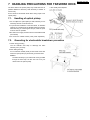
Traverse assembly
Reinstalling traverse assembly
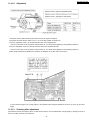
1. Reinstall the traverse assembly to the specified pin of the
unit.
2. Reinstall the flexible cable of the optical pickpup unit and
lock it securely.
8.4.1.
3. Remove the solder of each laser short land of the flexible
cable.
Removing traverse assembly
Caution:
1. Solder the 2 laser short lands on the flexible cable.
Remove the solders completely: otherwise the laser
diode won’t emit light.
2. Unlock the connectors and remove the flexible cables.
4. Reinstall the spindle flexible cable as shown figure.
11