1
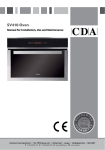
vk700 Compact Steam Oven with
Grill
Manual for Installation, Use and Maintenance
Customer Care Department • The
Group Ltd. • Harby Road • Langar • Nottinghamshire • NG13 9HY
T : 01949 862 012 F : 01949 862 003 E : [email protected] W : www.cda.eu
Important
This appliance must only be used for the purpose for which it is
intended, i.e. domestic cooking, defrosting and reheating foods. Any
other use could be dangerous and may lead to premature failure of
the appliance.
The CDA Group Ltd cannot be held responsible for injuries or losses
caused by incorrect use or installation of this product. Please note
that CDA reserve the right to invalidate the guarantee supplied with
this product following incorrect installation or misuse of the appliance.
User information:
• Ovens become hot during and immediately after use. Ensure you
do not touch the heating elements located inside the appliance.
• The oven door can become very hot during operation.
• After use, please ensure that the appliance is switched off.
• Keep children away from the appliance when in use, and
immediately after use.
• Keep the oven door closed when in use.
Appliance information:
Please enter the details on the appliance rating plate below for
reference, to assist CDA Customer Care in the event of a fault with
your appliance and to register your appliance for guarantee purposes.
Appliance Model
Serial Number
2
CE Declarations of Conformity:
This oven has been designed, constructed and marketed in
compliance with safety requirements of EEC Directive 2006/95/EEC
(Low voltage) and requirements of EMC Directive 2004/108/EEC.
This appliance has been manufactured to the strictest standards and
complies with all applicable legislation, including Electrical safety (LVD)
and Electromagnetic interference compatibility (EMC). Parts intended
to come into contact with food conform to EEC/89/109.4
IMPORTANT INFORMATION FOR CORRECT DISPOSAL OF THE
PRODUCT IN ACCORDANCE WITH EC DIRECTIVE 2002/96/EC.
At the end of its working life, the product must be taken to a special
local authority waste collection centre or to a dealer providing
appliance recycling services. Disposing of a household appliance
separately avoids possible negative consequences for the
environment and health. It also enables the constituent materials to be
recovered, saving both energy and resources.
As a reminder of the need to dispose of household appliances
separately, the product is marked with a crossed-out wheeled dustbin.
3
Important
• Read the user instructions carefully before using the oven for the
first time.
• Follow the instructions for first use of the oven.
• Clean the oven regularly.
• Remove spills as soon as they occur.
• Always use oven gloves when removing shelves and trays from the
oven.
• Do not allow children near the oven when in use.
• Do not allow fat or oils to build up on the oven shelves, grill pan or
oven base.
• Do not place any cooking utensils or plates directly on the oven
base.
• Always grill with the oven door closed.
• Do not grill food containing fat without using the grill pan grid.
• Do not cover the grill pan grid or the oven walls with aluminium foil.
• Do not perform maintenance or cleaning of the oven without first
switching off the electricity supply. If the oven has recently been
used, allow it to cool.
• Do not use abrasive cleaners or powders that will scratch the
surface of the appliance.
• Do ensure that the door is completely closed during cooking to
ensure the seal works properly.
• Do not attempt to repair the internal workings of your oven.
• Steam will escape when the door is opened. Step back from the
appliance and wait until the steam has dissipated.
4
• When opening the appliance, take great care that hot water which
may have collected in the drip tray does not overflow, as this may
cause injury.
• Do not come into contact with hot steam and do not touch the hot
oven sides.
Fitting Out The Appliance
Metal shelf
The metal shelf can be used for
toasting, browning and grilling. It is also
used for steam cooking.
To install the flat shelf, insert it at a
45-degree angle and then position it
horizontally and push it all the way in, to
the end of the grill track.
Fig. 1
To remove the flat shelf, pull it toward
you until it stops and then lift, by pulling
upwards, until it comes completely out
(Fig. 1).
5
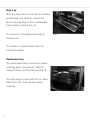
Drip tray
The drip tray can be slid into its location
underneath the shelf to collect the
juices from grilling or the condensate
from steam cooking (Fig. 2).
To remove it, lift slightly and slide it
Fig. 2
toward you.
To reinsert it, slide it back until it is
correctly seated.
Perforated tray
The perforated tray is used for steam
cooking and is positioned, with its
support frame, on the flat grill (Fig. 3).
The drip tray is used with this to catch
drips from the food during steam
cooking.
Fig. 3
6
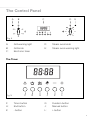
The Control Panel
A
B
C
D
E
Fig. 4
A:
B:
C:
Grill warning light
Grill knob
Electronic timer
D:
E:
Steam oven knob
Steam oven warning light
The Timer
Fig. 5
F:
H:
K:
F
G
Timer button
End button
- button
H
J
G:
J:
L:
K
L
Duration button
Manual button
+ button
7
Before First Use
Cleaning
Before using the oven for the first time we recommend that you clean
it with soapy water, rinse carefully and then heat on the grill setting
at maximum temperature for 30 minutes, with no accessories in the
oven.
A slightly unpleasant smell may be produced, caused by grease
remaining on the oven elements from the production process.
On first electrical connection
On first connection to the electricity supply the oven may give a
continuous beep. In this case, this may be cancelled by turning the
“Steam oven” knob to any position then back to the off position.
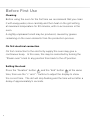
Setting the clock
Press the “Duration” button
and the “End” button
at the same
time, then use the “+” and “-” buttons to adjust the display to show
the correct time. The dot will stop flashing and the time will set after a
delay of approximately 5 seconds.
8
General Settings & Use
Grill
Note: The grill function can not be used at the same time as the
steam oven function.
To turn the grill on
To turn the grill on, rotate the “Grill” knob (either way) to select the
temperature setting required.
To turn the grill off
To turn the grill off, rotate the “Grill” knob (either way) to return it to the
“0” position.
Steam oven
Note: The steam oven function can not be used at the same time as
the grill function.
Note: If the grill function has recently been used allow the oven to
cool back to room temperature before using the steam oven, in order
to avoid compromising the steam cooking process.
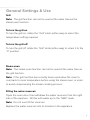
Filling the water reservoir
Open the oven door, then withdraw the water reservoir from the right
side of the aperture. Fill this with water up to the “MAX” mark.
Note: Do not over-fill the reservoir.
Replace the water reservoir into its location in the appliance.
9
Preparation for steam cooking
The metal shelf, perforated tray and drip tray should be fitted into the
oven as described on pages 5 & 6.
To turn the steam oven on
To turn the oven on, rotate the “Steam oven” knob (either way) to
select the cavity temperature as required.
Warning: Scalding risk - When opening the door stand well back and
allow the steam within the oven to dissipate before reaching inside.
To turn the steam oven off
To turn the steam oven off, rotate the “Steam oven” knob (either way)
to return it to the “0” position.
After use
Allow the oven to cool, then wipe the inside of the oven out to remove
condensation and residues remaining from the cooking process.
Leave the door open or ajar to allow the final moisture to evaporate.
Remove and empty the water reservoir, dry it before replacing it in the
appliance.
See pages 14 & 15 for advice on steam defrosting and cooking.
10
Timer and Minute Minder
Programming the steam oven or grill
Timer - Cooking time
This function sets the oven to switch off after a period of time you set,
up to a maximum of 10:00 hours.
Use either the “Grill” knob or the “Steam oven” knob to set the
cooking function you require.
Press the “Duration” button
: The word “AUTO” lights up in the
display and the separator dot flashes. While the display is still
flashing, use the “+” and “-” buttons to set the cooking time: Once the
separator dot stops flashing the cooking time is set.
At the end of the cooking time the oven will switch off and the beeper
will sound. Press any timer button to cancel the beep.
to return the oven to manual mode, the
Press the “Manual” button
word “AUTO” in the display is extinguished.
Timer - End time
This function sets the oven to switch off at a specific time of day that
you set, up to a maximum of 10:00 hours from the current time.
Use either the “Grill” knob or the “Steam oven” knob to set the
cooking function you require.
11
Press the “End” button
: The word “AUTO” lights up in the display
and the separator dot flashes. While the display is still flashing, use
the “+” and “-” buttons to set the cooking time: Once the separator
dot stops flashing the end time is set.
When the end time is reached the oven will switch off and the beeper
will sound. Press any timer button to cancel the beep.
Press the “Manual” button
to return the oven to manual mode, the
word “AUTO” in the display is extinguished.
Programming delayed cooking
This is achieved by programming an end time (when you want the
food ready) and also programming a cooking time (as the recipe).
Cancelling the auto cooking
Auto cooking can be cancelled at any time after it has been set by
pressing the “Manual” button
to return the oven to manual mode,
the word “AUTO” in the display is extinguished.
Minute minder
The minute minder is a timer that is independent of the function of
the oven; it times and sounds a beep but does not affect any oven
functions. This is useful for timing actions that are unrelated to this
appliance, for example timing eggs on the hob.
Press the “Timer” button
: The timer symbol “ ” flashes in the
display and the separator dot flashes. While the display is still
12
flashing, use the “+” and “-” buttons to set the alarm time: Once the
separator dot stops flashing the alarm time is set and the countdown
starts.
During the countdown the display switches back to showing the time
of day. If you want to see how much time is left before the beeper
briefly and the time remaining
sounds, press the “Timer” button
will show on the display for approximately 5 seconds.
At the end of the set time the beeper will sound. Press either the “+”
or “-” button to cancel the beep.
13
Steam Cooking Advice
Patties (spinach. etc.)
place on dish
25 min
In blocks
place on dish
40/45 min
Trout (whole)
place on dish
30 min
Salmon steak
place on dish, turned over half way
through
25 min
Fillets (protected by a cling wrap)
place on dish
15/20 min depending on thickness
Prawns
place on dish
10/12 min
Chicken thighs
place on dish, turned over half way
through
40/45 min
Poultry breast (protected by a film)
25 min
place on dish
25 min
Chops (pork, veal, etc.)
place on dish, protected by a cling
wrap, placed on the grill
25/30 min
Liver cubes (for skewers)
to be separated half way through
55/60 min
Fruit
Sausages
Mixed berries
placed on dish
15 min
Stewed fruit (apple, etc.)
protected by a cling wrap
35/40 min
Pastries
Meats
Fish
Vegetables
Defrosting
Defrosting small portions will be faster than large portions
When partly defrosted, you can turn over the portions.
Protect pastries from water droplets with cling film, or their original
packaging.
Doughnuts
kept in packaging, placed on the grill
15 min
Chocolate croissants
kept in packaging, placed on the grill
15 min
Cooking
Cooking times very on the size, nature and freshness of the food.
To check how well vegetables are cooked, test the thickest part of the
vegetable. If it is soft, then it is cooked.
Arrange shellfish on a grill or glass dish, and add a few aromatic herbs
Arrange seafood on a bed of seaweed
14
Vegetables
Time
Preparation
Artichokes (small)
40 to 45 min.
placed upside down in the dish
Asparagus
35 to 40 min.
for the tips, reduce the cooking time
Broccoli
18 min.
in little flowerets
Carrots
20 to 22 min.
in fine slices
Celeriac
25 to 30 min.
in fine slices
Pumpkin
15 to 20 min.
in cubes
Mushrooms
15 min.
in fine strips
Cabbage
30 to 35 min.
22 min.
30 to 35 min.
Brussels sprouts
Flowers in little bunches
Green shredded
in slices
Courgettes
10 to 15 min.
Chinese artichokes
20 min.
Spinach
20 min.
35 min.
(fresh) stir during cooking
(frozen) stir during cooking
Chicory
30 min
core removed and cut in two
lengthwise
cut in 2
Fennel
22 min.
Green beans
30 to 35 min.
Turnips
30 to 35 min.
Fresh peas
20 to 25 min.
Leeks
25 min.
cut in 2
Potatoes
25 min.
40 to 45 min.
sliced
whole
cubed
•These times depend on the nature, size and freshness of the
vegetables. Follow the instructions given in the “Preparation”
column.
•The cooking time is the same regardless of the quantity to be
cooked. For example: 1 or 4 artichokes, same cooking time.
•To check how well done the food is, test the thickest part of the
vegetable.
15
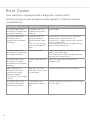
Error Codes
Your machine is equipped with a diagnostic system which
monitors progress and will gives visible signals if it detects unusual
circumstances.
16
Error Message
Probable Error
The process to be done
The green light flashes
twice every 5 seconds with
the beeper sounding.
The door is not shut
properly during steam
cooking.
Shut the door.
The green light flashes
three times every 5
seconds with the beeper
sounding.
Water reservoir not
correctly seated or
Water reservoir empty
or
The “O” ring is missing
from the reservoir exit
tube.
Make sure the water reservoir is correectly
seated and has adequate water in it.
Ensure the “O” ring on the exit tube is present
and has not perished.
If the error persists, isolate the appliance and
contact CDA Customer Care.
The green light flashes
once every 5 seconds with
the beeper sounding.
Boiler pump error.
Switch off the appliance and allow to cool
before switching on again.
If the error persists, isolate the appliance and
contact CDA Customer Care.
The green light flashes
once every 5 seconds
and continous fast beeper
sounding.
Probe or potentiometer
fault.
Isolate the appliance and contact CDA
Customer Care.
Both the green and
red lights illuminated
continuously and the
beeper sounding 5
second blasts at 10 second
intervals.
Both the “Grill” knob
and “Steam oven” knob
are turned on.
Turn one of the knobs to the “0” position.
The green light flashing
rapidly and the beeper
sounding continuously.
The appliance has
experienced a power
cut.
Turn off the cooking function that is in use then
turn it on again.
Care and Maintenance
IMPORTANT:
Always disconnect the appliance from the power supply before
undertaking any cleaning or maintenance.
You should always allow the oven to cool fully after use before
undertaking any cleaning or maintenance.
Changing the oven lamp
• Remove all shelves and the grill pan
from the oven.
• Remove the four screws holding the
steel frame to the light glass (Fig 6)
and remove the glass.
• Carefully remove the old bulb and
insert a new bulb, suitable for high
temperatures (300ºC) having the
following specifications: 230-240V,
50Hz, 25W, G9 fitting.
• Insert the new bulb taking care not
to touch the glass with your hands as
contamination from your fingers can
cause premature failure. Always use
a clean cloth or gloves (Fig 7).
• Reattach the glass cover, taking care
not to pinch the silicone gasket.
• Replace the screws removed earlier
• Replace the oven shelves and grill
pan as necessary.
Fig. 6
Fig. 7
17
Please note:
Bulb replacement is not covered by your guarantee.
Cleaning
You should only use non-abrasive cleaners. Any abrasive cleaners
(including Cif) will scratch the surface and could erase the control
panel markings. You should not use cleaning products with a chlorine
or acidic base.
Any spillages should be cleaned off immediately, especially any
alkaline or acidic substances (lemon juice, vinegar etc.)
Stainless steel
Stainless steel can be effectively cleaned by simply using a dilute
solution of water and mild detergent and drying to a shine with a
clean cloth. Proprietary stainless steel cleaners are available. We
recommend the CDA E-Cloth available from the CDA Sales Team for
cleaning stainless steel surfaces.
Inside the oven
It is recommended that the interior of the oven be cleaned after
every use using suitable products, especially if any spillage has
occurred. The shelves can be removed and washed by hand or in the
dishwasher.
18
Grill
When used regularly, the grill element does not need cleaning as the
intense heat will burn off any splashes. The interior ceiling may need
regular cleaning, which should be done with warm water, detergent
and a sponge. If the grill is not used regularly, it should be run for 10
minutes every month to burn off any splashes, in order to reduce the
risk of fire.
PLEASE NOTE: Steam cleaners must not be used to clean this
appliance.
Do not store flammable material in the oven.
Do not allow grease or food particles to build up around the door.
IMPORTANT:
When correctly installed, your product meets all safety
requirements laid down for this type of product. However, special
care should be taken around the rear or the underneath of the
appliance as these areas are not designed or intended to be
touched and may contain sharp or rough edges that could cause
injury.
19
Installation
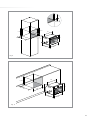
The appliance can be installed under a worktop or in a wall unit (open
or closed) with the appropriate dimensions for recessed installation.
Centre the oven in the unit so as to ensure a minimum distance of
10mm between the appliance and the surrounding unit. The material
of the unit supporting the appliance must be heat resistant (or
covered with a heat resistant material). For greater stability, attach the
oven to the unit with two screws through the holes provided on the
side panels.
If the appliance is to be installed under a worktop, ensure the top rail
has been removed to provide free airflow around the product.
Do not use your appliance immediately after moving it from a
cold location, as condensation may cause a malfunction. Wait
approximately 1-2 hours before use.
20
min 3
min 458
min 450
540
560
min 3
50
455
432
510
594
533
Fig. 8
540
min 460
50
510
560
455
432
533
594
Fig. 9
21
Mains Electricity Connection
Warning! This appliance must be earthed
Fig. 10
We recommend that the appliance is connected by a qualified
electrician, who is a member of the N.I.C.E.I.C. and who will comply
with the I.E.T. and local regulations.
This appliance is intended to be connected to fixed wiring and is
not suitable for connection to a 13A plug or 13A supply.
This appliance is intended to be connected to fixed wiring by a
double pole switch, having a contact separation of at least 3mm in
all poles. The switch must be positioned no further than 2m from the
appliance.
22
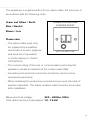
This appliance is supplied with a 3 core mains cable; the wires are in
accordance with the following code:
Green and Yellow = Earth
Blue = Neutral
$/5",%0/,%37)4#(%$
FUSE SPUR OUTLET
Brown = Live
Please note:
• The mains cable must only
be replaced by a qualified
electrician or service engineer
and must be of equivalent
or better rating (i.e. 1.5mm2,
USE
USEAA13
3 AMP FUSE
FUSE
HO5V2V2-F).
• The current rating of the fuse or circuit breaker protecting this
appliance should be marked on the socket outlet (13A).
• Assembly and electrical connection should be carried out by
specialised personnel.
• When installing this product we recommend you seek the help of
another individual. The mains isolation switch must be accessible
after installation.
Mains electrical voltage: 230 – 240Vac, 50Hz
Total rated electrical consumption: 1.2 - 1.3 kW
23
Please contact our Customer Care Department for Service on the details below.
Customer Care Department • The
Group Ltd. • Harby Road • Langar • Nottinghamshire • NG13 9HY
T : 01949 862 012 F : 01949 862 003 E : [email protected] W : www.cda.eu