1
Unpacking the Enable-IT 895 Extended Ethernet Kit
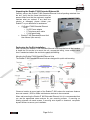
Carefully remove the Enable-IT 895 Extended Ethernet Units all packing materials from
the box. Verify that the items listed below are
present. Make sure that the equipment supplied
matches what you ordered. If any items are
missing or damaged, please contact your
Enable-IT or your distributor for assistance.
•
•
(2) Enable-IT 895 Extended Ethernet
Units
o 5v DC Power adapter
o 5’ Telephone patch cable
o 5’ LAN patch cable
Enable-IT 895 Extended Ethernet Unit
User Manual (this manual)
Performing the On-Site Installation
After removing the Enable-IT 895 Extended Ethernet Units from the box all that remains
to install the unit on-site is to mount the unit, connect the wiring, cross connect voice
lines if needed and attach the end device patch cord cabling.
Mounting the Enable-IT 895 Extended Ethernet Units
The Enable-IT 895 Extended Ethernet Units are designed for quick wall mounting.
Choose a location to mount each of the Enable-IT 895’s where the maximum distance
does not exceed 1,970ft or 600m total between devices to be connected.
When wall-mounting the Enable-IT 895 Extended Ethernet Unit it is recommended that
you use the appropriate screw anchors for your mounting surface. If mounting on
existing plywood use wood screws; if mounting onto drywall or sheetrock, use plastic
drywall anchors to secure your installation.
Page 9 of 13