1
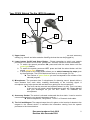
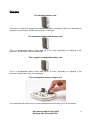
Your CP810 Behind The Ear (BTE) Processor:
1
5
3
2
9
4
7
6
8
1) Upper button: This can be used to change between the microphone and accessory
setting (e.g. telecoil and other assistive listening devices that can be plugged in).
2) Lower button: On/Off and Select Button – Please remember to switch your speech
processor OFF when it is not in use. (please see: “controls” section for more information)
a. To switch the speech processor ON, press and hold the select button until the
green light flashes.
b. To switch the speech processor OFF, press and hold the select button until the
steady orange light disappears.
c. A short press on the select button allows you to switch between the maps given
by the audiologist. The CP810 device can store up to four maps (P1-P4).
The number of green flashes you see corresponds to the number of the
selected program.
3) Microphones: The processor has 2 microphones for detecting sound, placed within a
short distance from each other, enabling directionality of the incoming signal. A
microphone cover helps prevent dirt and dust from getting into the microphones.
The cover can be removed and replaced when it is dirty. This is not easy
to do and you will need a small screwdriver to get it out. Please discuss
with your audiologist as you DO NOT WANT TO DAMAGE the
microphones.
4) Accessory Socket: The socket is situated underneath the silver latch. It can be used to
connect accessories to your speech processor such as:
Monitor earphones, FM systems, TV/Hi-FI or Personal Audio cable
5) The Coil and Magnet: The magnet keeps the coil in place on the head as it attracts to the
magnet in the internal device. It transmits the information coming from the speech
processor to the internal device.
Document produced July 2010
Revision date December 2011
2





![[ITA] RX40 Manuale v1-5](http://vs1.manualzilla.com/store/data/006119954_1-2ba2af64dd7b8b55c335fa8e9797796a-150x150.png)