1
Contents
1
Contents
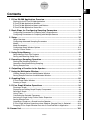
1 E-Con EA-200 Application Overview .............................................................. 1-1
Starting Up the E-Con EA-200 Application .....................................................................
E-Con EA-200 Application Windows ..............................................................................
E-Con EA-200 Application Menus and Buttons ..............................................................
E-Con EA-200 Application Status Bar ............................................................................
1-1
1-1
1-3
1-7
2 Basic Steps for Configuring Sampling Parameters ...................................... 2-1
Configuring Parameters for Sampling with a Single Sensor .......................................... 2-1
Configuring Parameters for Sampling with Multiple Sensors ......................................... 2-7
3 Setup ................................................................................................................. 3-1
Setup Overview .............................................................................................................. 3-1
Configuring Advanced Sampling Parameters ................................................................ 3-2
Modes ............................................................................................................................ 3-3
Mode Parameters ........................................................................................................... 3-5
Configuring Graph Window Options .............................................................................. 3-11
Using a Custom Probe ................................................................................................. 3-12
4 Using Setup Memory ....................................................................................... 4-1
Setup Memory Data File Contents ................................................................................. 4-1
Saving and Recalling Setup Data .................................................................................. 4-1
5 Executing a Sampling Operation .................................................................... 5-1
Starting the Sampling Operation .................................................................................... 5-1
Operations Performed during Sampling ......................................................................... 5-2
Saving Sample Data ...................................................................................................... 5-5
6 Outputting a Function to the Speaker ............................................................ 6-1
7 Using the Multimeter Window ......................................................................... 7-1
Viewing Sample Data on the Multimeter Window .......................................................... 7-1
Saving Sample Data from the Multimeter Window ......................................................... 7-4
8 Graphing Data .................................................................................................. 8-1
E-Con Graph Editor Window .......................................................................................... 8-1
Drawing a Graph ............................................................................................................ 8-5
9 E-Con Graph Window Operations .................................................................. 9-1
Zooming a Graph ........................................................................................................... 9-1
Displaying and Hiding Graph Display Components ....................................................... 9-3
Scrolling a Graph ........................................................................................................... 9-4
Using Trace .................................................................................................................... 9-5
Calculating the Periodic Frequency ................................................................................ 9-6
Analyzing a Graph Using Fourier Series Expansion ...................................................... 9-7
Saving Sample Data ...................................................................................................... 9-9
Outputting a Graph as a Sound from the Speaker ....................................................... 9-13
E-Con Graph Window Operations when Speaker (Sample Data) is Selected ............. 9-14
Dropping E-Con Graph Window Data into a ClassPad Built-in Application ................. 9-15
10 Sensor List ........................................................................................................ 10-1
20031201
20040201