1
EcoSmart Configuration Utility Instructions
EcoTech Marine, LLC
Quick Start
Download Software
The EcoSmart Configuration Utility software and most recent firmware are available for
download. Once downloaded, run the software and follow the on-screen instructions for
software installation.
You will be asked to enter your name and email address. This information will be used
only to contact you in the event of future software and firmware upgrades. This
information is not used for any other purpose.
Connecting Your Radion
Once the software has been installed:
1. Connect the fixture using the supplied USB cable to your computer.
2. Plug any additional units you are configuring into outlet power. Make sure any
additional units are within 25 feet of the USB connected unit.
DO NOT put any Radions face down on a surface that will obstruct airflow to the fan.
DO NOT look directly at the LEDs powering on.
Wait a few moments for your computer to recognize that a USB device is connected.
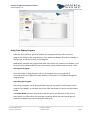
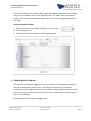
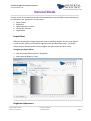
3. Click Refresh Device List button.
Check that all of your Radion(s) are recognized by the EcoSmart Desktop Utility.
© EcoTech Marine, 2011
Issue Date: 12/8/2011
Author: EcoTech Marine
Software Revision
Page 2