1
Quick Start — SVS 100, cont’d
Front Panel
Operation
Cut
Fade
from
Black
Fade
to
Black
Dissolve
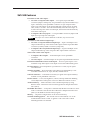
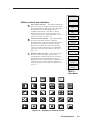
The SVS 100 displays an
assortment of menus on its LCD
screen. By rotating the encoder
knob, the Effects, Genlock, Picture
Controls, and Audio operations
can be adjusted.
Input
Press an input button to select a
video input source.
Effects
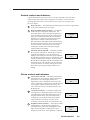
Pressing the effect button and
rotating the encoder knob will
select from among several video
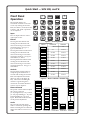
switching effects. See figure 1,
figure 2, and Table A.
Pressing the transition button and
rotating the encoder knob will
select from among several video
switching transitions. See figure 2
and Tables B, C, and D.
Figure 1 — Switching Effects
Pressing the duration button and
rotating the encoder knob will
select from among several video
switching durations. See figure 2
and Table E.
Genlock
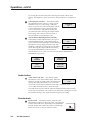
Pressing the horizontal phase or
sub phase genlock button for 2
seconds and rotating the encoder
knob will adjust the horizontal
phase (0 - 255) or sub phase (0 255). The burst lock LED lights
whenever a genlock signal is
connected. See further details in
Genlock setup in chapter 2.
Picture Controls
The picture controls buttons adjust
the color (0 - 100), tint
(0 - 32), brightness (0 - 50), contrast
(0 - 150), top blanking (0 - 16), and
bottom blanking (0 - 16) of an
input. Rotate the encoder knob to
set the picture adjustment.
Audio
The currently selected input’s
audio is selected by pressing this
button. Rotating the encoder knob
adjusts the audio level from -15 to
+9dB.
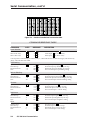
TRANSITION
DURATION
CUT
none
N/A
DISSOLVE
none
see Table E
SOFT
WIPE
see Table B
see Table E
HARD
WIPE
see Table B
see Table E
SOFT
CURTAINS
see Table C
see Table E
HARD
CURTAINS
see Table C
see Table E
SQUARE
see Table D
see Table E
DIAMOND
see Table D
see Table E
CIRCLE
see Table D
see Table E
X
EFFECT
see Table D
see Table E
+
see Table D
see Table E
EFFECT
EFFECT
Figure 2 — Effect - Transition - Duration chart
0.2
SECONDS
CUT
DISSOLVE
0.3
SECONDS
SOFT
WIPE
0.4
SECONDS
0.5
SECONDS
HARD
WIPE
LEFT TO
RIGHT
HORIZ
IN
SOFT
CURTAINS
RIGHT TO
LEFT
HORIZ
OUT
HARD
CURTAINS
TOP TO
BOTTOM
VERTICAL
IN
SQUARE
BOTTOM
TO TOP
VERTICAL
OUT
DIAMOND
TOP RT 2
BTM LT
DIAG RT
IN
CIRCLE
TOP LT 2
BTM RT
DIAG RT
OUT
X
EFFECT
BTM RT 2
TOP LT
DIAG LT
IN
IN
4.9
SECONDS
BTM LT 2
TOP RT
DIAG LT
OUT
OUT
5.0
SECONDS
+
EFFECT
Table A ––
Effect Menus
Table B ––
Transition Menus
Table C ––
Transition Menus
0.6
SECONDS
0.7
SECONDS
4.8
SECONDS
Table D ––
Transition Menus
Table E ––
Duration Menus