1
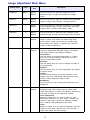
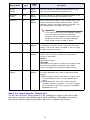
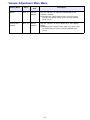
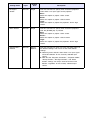
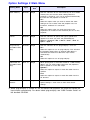
Setting Name
Restore Menu
Defaults
Input
RCVUN
Setting
Unit
Source
Specific
Description
Use this sub-menu to return all of the sub-menu items on
the Input Settings main menu to their initial default
settings.
z Restoring menu defaults when there is no input signal
will restore defaults for the currently selected input
source.
z Note that the “Signal Name Indicator” setting is always
returned to its initial default, regardless of the currently
selected input source.
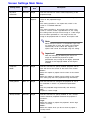
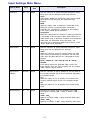
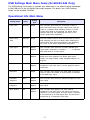
Option Settings 1 Main Menu
Setting Name
Input
Setting
Unit
Description
Menu Position
RCVUN
Single
Use this sub-menu to specify the display position of the
setup menu as either the center or the left side of the
screen.
*:
Select this option to display the setup menu in the center
of the screen.
:
Select this option to display the setup menu on the upper
left corner of the screen.
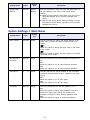
Auto Keystone
Correction
RCVUN
Single
Use this sub-menu to turn auto keystone correction on or
off.
On*:
Select this option to turn on auto keystone correction.
Off:
Select this option to turn off auto keystone correction.
Auto Adjust
RCVUN
Single
Use this sub-menu to specify whether or not auto adjust
should be performed when RGB is selected as the input
source.
On*:
Select this option to turn on auto adjust.
Off:
Select this option to turn off auto adjust.
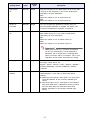
Eco Mode
RCVUN
Single
Use this sub-menu to turn the Eco Mode on or off.
On:
Select this option to reduce lamp brightness and save
power. This setting also reduces the speed of the
projector’s cooling fan, which reduces operation noise.
Off:
Select this option to project at maximum brightness.
24