1
Troubleshooting
Your cable modem should operate continuously without
maintenance. You may leave the modem on even when
you turn off your computer.
Self-help tool
Confirm the cable signal is active
If you have cable TV service, confirm that you are
receiving a signal and that the channels are clear.
Power cycle your modem
The TWC Self-help tool provides easy access to how-to
videos and common troubleshooting steps online 24/7.
Access self-help resources through twc.com/account or
the MyTWC® mobile app for iOS and Android. Select the
“Register for a TWC ID” button that appears on the login
page to complete the one-time registration process. Once
you have successfully logged in:
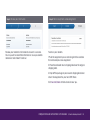
•
Select the “My Account” tab.
Turn off your computer and unplug the power cord to your
modem and router (if applicable). Wait 45 seconds and plug
them back in. When the lights on your modem are solid,
restart your computer.
If the above steps do not resolve your issue, please call
1-877-309-5869 and say, “Internet Technical Support,” or
visit twc.com/easyconnect.
To verify your upload and download speeds, please visit
twc.com/speedtest and follow the instructions on the site.
•
Scroll to “Manage and Troubleshoot Services.”
•
Select the “Troubleshooting” tab.
Additional support
•
Select “Video, Internet or Phone” from the dropdown to display the equipment you would like to
troubleshoot.
•
Select the symptom you are experiencing.
Check coaxial cable and Ethernet connections
If the connection on any of your cables becomes loose,
you will not be able to send or receive data. Make sure all
connections are secure.
If you have any questions during the connection process,
visit us at twc.com/easyconnect for more self-help
information or call us at 1-877-309-5869.
If you need a professional service appointment, there
may be a nominal fee if the resolution is related to an
incomplete or incorrect Easy Connect connection.
FOR QUESTIONS AND ACTIVATION 1-877-309-5869 ^ twc.com/easyconnect | 11