1
Elliptical Total Body
Cross Trainers
O W N E R ’ S M AN U AL
table
of
contents
CHAPTER 1: important safety instructions
1.1
1.2
1.3
1.4
Read and Save These Instructions .....................................................................01
Setting Up the Elliptical Cross Body Trainer .......................................................01
Installation Requirements .................................................................................01
Preventative Maintenance and Cleaning Tips ...................................................... 01
PAGES
CHAPTER 2: using manager preference
2.1
2.2
2.3
2.4
2.5
2.6
Using Manager on the E5x ............................................................................... 02
Using CSAFE on the E5x Console ..................................................................... 02
E5x Console (back side) Access Layout ............................................................. 02
Using Manager on the E5xc ..............................................................................03
Using CSAFE on the E5xc Console .................................................................... 03
E5xc Console (back side) Access Layout ............................................................03
3.1
3.2
3.3
3.4
3.5
3.6
Pausing the Unit ............................................................................................. 04
Console Description ......................................................................................... 04
Manual Operation ............................................................................................ 04
Operating Level Based Programs ....................................................................... 04
Heart Rate Control ...........................................................................................05
Constant Watts ................................................................................................ 05
CHAPTER 4: Using the MX-E5xc elliptical
4.1
4.2
4.3
4.4
4.5
4.6
4.7
Pausing the Unit ............................................................................................. 06
Console Description ......................................................................................... 06
Manual Operation ............................................................................................ 06
Operating Level Based Programs ....................................................................... 06
Fit Test ........................................................................................................... 07
Heart Rate Control ...........................................................................................07
Constant Watts ................................................................................................ 08
CHAPTER 3: using the E5x elliptical
CHAPTER 5: SERIAL NUMBER LOCATION
5.1
5.2
MX-E5x Elliptical Cross Trainer ......................................................................... 09
MX-E5xc Elliptical Cross Trainer ....................................................................... 09
CHAPTER 6: MX-E5x elliptical Specifications, parts and assembly guides
6.1
6.2
6.3
6.4
Model Specifications ....................................................................................... 10
Fasteners and Assembly Tools ...........................................................................11
Assembly Steps ............................................................................................... 12
Optional Entertainment Accessory ..................................................................... 15
CHAPTER 7: MX-E5xc elliptical Specifications, parts and assembly guides
7.1
7.2
7.3
7.4
16
Model Specifications ....................................................................................... Fasteners and Assembly Tools .......................................................................... 17
Assembly Steps ............................................................................................... 18
Optional Entertainment Accessory .....................................................................21
i
CHapter 1: Important Safety Instructions
1.1 read and save these instructions
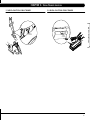
1.2 setting up the elliptical total body CROSS TRAINER
•
This Elliptical Total Body Cross Trainer is intended for commercial use.
To insure your safety and protect the equipment, read all instructions
before operating the MATRIX Elliptical Total Body Cross Trainer.
Assembly instructions have been provided with your Elliptical Total Body
Cross Trainer. For your safety, please read and follow each of the steps in
the assembly guide.
When using an electrical product, basic precautions should always be followed, including the following:
1.3 installation requirements
• Always unplug this equipment from the electrical outlet immediately
after using and before cleaning.
Your Elliptical Total Body Cross Trainer is designed to be self contained and
does not require a power supply to operate.
Your MATRIX Elliptical Total Body Cross Trainer is self-generating (requiring no
external power source) and must be pedaled to power up the console.
caution: Use of the wrong power supply for the entertainment device
may cause damage to your Elliptical Total Body Cross Trainer and/or entertainment device.
•
warning: To reduce the risk of burns, fire, electrical shock or injury to
persons that may be associated with using this product:
• An appliance should never be left unattended when plugged in. Unplug
the entertainment device from outlet when not in use and before putting
on or taking off parts.
• This product must be used for its intended purpose described in this
Owner’s Guide. Do not use other attachments that are not recommended
by the manufacturer. Attachments may cause injury.
To prevent electrical shock, never drop or insert any object into any
opening.
•
Do not remove the side covers. Service should only be done by an
authorized service technician.
•
Never operate the Elliptical Total Body Cross Trainer with the air opening
blocked. Keep the air opening clean, free of lint, hair and the like.
•
Never operate the product if it has a damaged cord or plug, if it is not
working properly, if it has been damaged, or immersed in water. Return the
unit to a service center for examination and repair.
•
Do not carry this unit by the entertainment equipment power cord or use
the cord as a handle.
•
•
Keep hands and loose clothing away from moving parts.
Close supervision is necessary when the Elliptical Total Body Cross
Trainer is used by or near children or disabled persons.
•
•
Do not use outdoors.
Do not operate where aerosol (spray) products are being used or where
oxygen is being administered.
•
• Connect this Elliptical Total Body Cross Trainer entertainment equip
ment to a properly grounded outlet only.
Locate a level, stable surface to position the Elliptical Total Body Cross Trainer. The Elliptical Total Body Cross Trainer has four leveling feet located under
the foot supports. If your Elliptical Total Body Cross Trainer wobbles in the
location where you intended to use it, loosen the lock nut on the adjusting
foot and adjust the feet until stable. Once level, lock the adjusting feet by
tightening the lock nut to the frame.
1.4 Preventative maintenance and cleaning tips
Preventative maintenance and daily cleaning will prolong the life and
look of your matrix Elliptical Total Body Cross Trainer.
Please read and follow these tips.
Position the equipment away from direct sunlight. The intense UV light
can cause discoloration or plastics.
•
•
Locate your equipment in an area with cool temperatures and low humidity.
•
Clean with a soft 100% cotton cloth.
•
Clean with soap and water or other non-ammunia based all purpose cleaners.
• Wipe foot pads, handles, heart rate grips, and handlebars clean after each
use.
Do not pour liquids directly onto your equipment. This can cause dam
age to the equipment and in the same cases electrocution.
•
•
Check pedal motion and stability.
•
Adjust leveling feet when equipment wobbles or rocks.
•
Maintain a clean area around equipment free from dust and dirt.
• To disconnect, turn all entertainment controls to the off position, then
remove plug from outlet.
caution: If you experience chest pain, nausea, dizziness or shortness
of breath, STOP exercising immediately and consult a physician before
continuing.
1
CHapter 2: Using Manager Preference
2.1 using manager mode ON E5X
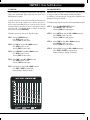
2.2 using csafe on the E5X CONSOLE
Your MATRIX Elliptical Total Body Cross Trainer is designed to allow you to
cutomize settings for your preferences and diagnostics. The Manager Mode can
only be accessed while the Elliptical is powered up. Follow the instructions to
adjust the Elliptical Total Body Cross Trainer computer for your desired setting.
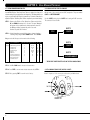
On the back of the console are two RJ45 receptacles. They are marked
CSAFE and entertainment.
STEP 1: Power up the Elliptical Total Body Cross Trainer and hold the
UP and DOWN arrow keys for 3 seconds. The word ‘Manager’
will appear in the alphanumeric window and will enter into
the Manager Setting automatically after 3 seconds.
Continue to pedal until finished.
STEP 2: Select information you would like to view or change from the
following list by using the UP or DOWN arrows. Press SELECT.
Use the CSAFE port to plug in a CSAFE device using an RJ45 connector.
The connection is as follows:
UNIT 1
CPU
Csafe
Manger mode will allow you to view and set the following.
display code: information
Manager P0:
P1:
P2:
P3:
P4:
P5:
P6:
P7:
P8:
P9:
Maximum program time
Default time
Default level
Default weight
Speed
Machine
Cardio Entertainment
Accumulated Distance
Accumulated Time
Software Version
user definable default value min.
Y
Y
Y
Y
Y
Y
Y
Y
95 min
20 min
L1
150 lbs
Miles
BI
On
On
max.
5
95
5
95
L1
L20
80lbs 400lbs
Miles km
BI
re,el
On
off
On
off
UNIT 2
Csafe
UNIT 3
ENTERTAINMENT
* THERE ARE THREE RECEPTICLES ON THE E5X Console ONly
STEP 3: Use UP or DOWN arrows to increase or decrease values.
STEP 4: Press START to save and enter selected values and exit to STEP 2.
2.3 E5X CONSOLE (BACK SIDE) ACCESS LAYOUT:
STEP 5: Exit by pressing START. Screen will reset to Start up.
Below is a layout to all of the access ports on the back of your Matrix Console.
2
CHapter 2: Using Manager Preference
2.4 using manager mode ON E5XC
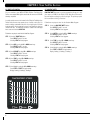
2.5 using csafe on the E5Xc console
Your MATRIX Elliptical Total Body Cross Trainer is designed to allow you to
cutomize settings for your preferences and diagnostics. The Manager Mode
can only be accessed while the Elliptical is powered up. Follow the instructions to adjust the Elliptical Total Body Cross Trainer computer for your desired
setting.
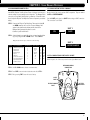
On the back of the console are two RJ45 receptacles. They are marked
CSAFE and entertainment.
STEP 1: Power up the Elliptical Total Body Cross Trainer and hold the UP
and DOWN arrow keys for 3 seconds. The word ‘Manager’ will
appear in the alphanumeric window and will enter into the
Manager Setting automatically after 3 seconds.
Continue to pedal until finished.
Use the CSAFE port to plug in a CSAFE device using an RJ45 connector.
The connection is as follows:
UNIT 1
CPU
Csafe
STEP 2: Select information you would like to view or change from the follow
ing list by using the UP or DOWN arrows. Press SELECT.
Manger mode will allow you to view and set the following.
display code: information
Manager P0:
P1:
P2:
P3:
P4:
P5:
P6:
P7:
P8:
P9:
Maximum program time
Default time
Default level
Default weight
Speed
Machine
Cardio Entertainment
Accumulated Distance
Accumulated Time
Software Version
UNIT 2
user definable default value min.
Y
Y
Y
Y
Y
Y
Y
Y
95 min
20 min
L1
150 lbs
Miles
BI
On
On
max.
5
95
5
95
L1
L20
80lbs 400lbs
Miles
km
BI
re,el
On
off
On
off
entertainment
2.6 E5Xc CONSOLE (BACK SIDE) ACCESS LAYOUT:
Below is a layout to all of the access ports on the back of your Matrix Console.
REPROGRAMMING
CONNECTOR
STEP 3: Use UP or DOWN arrows to increase or decrease values.
STEP 4: Press START to save and enter selected values and exit to STEP 2.
STEP 5: Exit by pressing START. Screen will reset to Start up.
CSAFE
PORT
CSAFE
ENTERTAINMENT
PORT
ENTERTAINMENT
BATTERY
LOCATION
3
CHapter 3: Using The E5x Elliptical
3.1 Pausing the unit
3.3 manual operation
Once you stop pedaling, your console has a 30 second pause feature. You
will know that machine is paused because the console will display
a bouncing green dot. If the dot is not displayed, then the 9-volt battery
located in the back of the console needs to be replaced. Simply remove the
screw to access the battery compartment and replace the 9-volt battery.
Matrix design makes using the programs as easy as a touch of a button.
PROGRAMS
DISPLAY VIEWS
MANUAL
STANDARD
INTERVALS
HIDE
SCREEN
SAVER
ROLLING
FAT BURN
TIME
SPEED
DISTANCE
CALORIES
RPM
STEP 2: Select Time by using the UP or DOWN arrow keys.
Press ENTER or wait 5 seconds.
Selecting START will start program.
STEP 3: Select Level by using UP or DOWN arrow keys.
You can change the level at any time during workout.
Press ENTER or Wait 5 seconds.
Selecting START will start program.
LEVELS
TARGET HR
CONSTANT
WATTS
Manual Mode allows you to enter desired time, level and weight.
STEP 1: Select the manual button.
Press ENTER or wait 5 seconds.
Selecting START will start program.
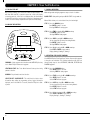
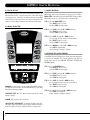
3.2 console description
RANDOM
quick start: Start pedaling and press quick start to begin work out.
WATTS
HEART RATE
STEP 3: Select Weight by using the UP or DOWN arrow keys.
Press START or ENTER to begin workout.
Display, Starting 3, Starting 2, Starting 1
LEVEL
START
ENTER
QUICK START
SELECT SCREEN
HOLD TO RESET
programs: Simple program selection buttons make Matrix Elliptical easy
to use. Matrix Elliptical feature seven programs.
3.4 operating level based programs
Your MATRIX Elliptical Total Body Cross Trainer offers versatile programs
to keep the user motivated. The following instructions will guide you
through simple steps to select intervals, rolling, fat burn and
random programs.
start/quick start: One Touch Quick Start and Start any time during
preference selection.
STEP 1: Select the Program button.
Press ENTER or wait 5 seconds.
Selecting START will start program.
up/down: Easy information and level selection.
STEP 2: Select Time by using the UP or DOWN arrow keys.
Press ENTER or wait 5 seconds.
Select START will start program.
select/select screen/reset : This multi-function button enters
information when setting up programming options, toggles information
displayed, and if held down for 5 seconds, resets the Elliptical to Startup mode.
STEP 3: Select Level by using UP or DOWN arrow keys.
You can change the level at any time during workout.
Press ENTER or Wait 5 seconds.
Select START will start program.
STEP 4: Select Weight by using the UP or DOWN arrow keys.
Press START or ENTER to begin workout.
Display, Starting 3, Starting 2, Starting 1
4
CHapter 3: Using The E5x Elliptical
3.5 Target hR
3.6 constant watts
For your convenience, your matrix fitness Elliptical Total Body Cross
Trainer comes standard with digital contact heart rate sensors and is
polar telemetry compatible.
Constant watts program is a unique program that allows you
to vary your cadence or rpm and the resistance will adjust
accordingly to your selected goal. The quicker you pedal the less
resistance for the goal selected.
Locate the metal sensors on the handrail of the Elliptical Total Body Cross
Trainer. Notice there are two separate pieces of metal on each grip. You
must be making contact with both pieces of each grip to get an accurate
heart rate reading. You can grab these sensors in any program to view your
current heart rate. The Heart Rate readout is located in the lower right
hand corner and is labeled HEART RATE.
Follow these easy steps to enter into the Target HR Program.
STEP 1: Select the Target hr button.
Press ENTER or wait 5 seconds.
Selecting START will start program.
STEP 2: Select age by using the UP or DOWN arrow keys.
Press ENTER or wait 5 seconds.
Selecting START will start program.
STEP 3: Select precent by using UP or DOWN arrow keys.
Press ENTER or Wait 5 seconds.
Selecting START will start program.
Follow these easy steps to enter into the Constant Watts Program.
STEP 1: Select the Constant watts button.
Press Enter or wait 5 seconds.
Selecting START will start program.
STEP 2: Select watts by using the UP or DOWN arrow keys.
Press Enter or wait 5 seconds.
Selecting START will start program.
STEP 3: Select time by using UP or DOWN arrow keys.
Press Enter or wait 5 seconds.
Selecting START will start program.
STEP 4: Select Weight by using the UP or DOWN arrow keys.
Press START or Enter to begin workout.
Display, Starting 3, Starting 2, Starting 1
STEP 4: Select time by using UP or DOWN arrow keys.
Press ENTER or Wait 5 seconds.
Selecting START will start program.
STEP 5: Select Weight by using the UP or DOWN arrow keys.
Press START or ENTER to begin workout.
Display, Starting 3, Starting 2, Starting 1
5
CHapter 4: Using The E5xc Elliptical
4.1 Pausing the unit
4.3 manual operation
Once you stop pedaling, your console has a 30 second pause feature. You
will know that machine is paused because the console will display
a bouncing green dot. If the dot is not displayed, then the 9-volt battery
located in the back of the console needs to be replaced. Simply remove the
screw to access the battery compartment and replace the 9-volt battery.
Matrix design makes using the programs as easy as a touch of a button.
quick start: Start pedaling and press quick start to begin workout.
Manual Mode allows you to enter desired time, level and weight.
4.2 console description
STEP 1: Select the Quickstart button.
Press SELECT or wait 5 seconds.
Selecting START will start program.
STEP 2: Select Time by using the UP or DOWN arrow keys.
Press SELECT or wait 5 seconds.
Selecting START will start program.
STEP 3: Select Level by using UP or DOWN arrow keys.
You can change the level at any time during workout.
Press SELECT or Wait 5 seconds.
Selecting START will start program.
STEP 4: Select WEIGHT by using the UP or DOWN arrow keys.
Press START to begin workout.
Display, Starting 3, Starting 2, Starting 1
4.4 operating level based programs
Your MATRIX Elliptical Total Body Cross Trainer offers versatile programs
to keep the user motivated. The following instructions will guide you
through simple steps to select rolling, intervals, fat burn and
random programs.
STEP 1: Select the program button.
Press SELECT or wait 5 seconds.
Selecting START will start program.
STEP 2: Select Time by using the UP or DOWN arrow keys.
Press SELECT or wait 5 seconds.
Select START will start program.
QUICKSTART
programs: Simple program selection buttons make Matrix Elliptical
Total Body Cross Trainer easy to use. Matrix Matrix Elliptical Total Body
Cross Trainerfeature eight programs.
start/quick start: One Touch Quick Start and Start any time during
preference selection.
up/down: Easy information and level selection.
select/select screen/reset: This multi-function button enters information when setting up programming options, toggles information displayed,
and if held down for 5 seconds, resets the Console to Start-up mode.
6
STEP 3: Select Level by using UP or DOWN arrow keys.
You can change the level at any time during workout.
Press SELECT or Wait 5 seconds.
Select START will start program.
STEP 4: Select Weight by using the UP or DOWN arrow keys.
Press START to begin workout.
Display, Starting 3, Starting 2, Starting 1
CHapter 4: Using The E5xc Elliptical
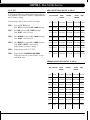
4.5 Fit test
FIT TEST program allows you to measure our fitness level by using one
of two unique tests. Test one takes 12 minutes to complete and test two
take 15 minutes to complete.
Follow these easy steps to enter in the Fit Test Program.
STEP 1:
Select the Fit test button.
Select Test 1 or 2 by using the UP or DOWN arrow keys.
STEP 2: Select AGE by using the UP or DOWN arrow keys.
Press SELECT or wait 5 seconds.
STEP 3: Select gender by using the UP or DOWN arrow keys.
Press SELECT or wait 5 seconds.
STEP 4: Select weight by using the UP or DOWN arrow keys.
Press STart or SELECT to begin workout.
Display, Starting 3, Staring 2, Starting 1.
STEP 5:
Men’s output table for test #1 AND #2
AGE EXCELLENT
ABOVE
AVERAGE
AVERAGE
2200-2399M
BELOW
AVERAGE
POOR
13-14
>2700m
2400-2700m
2100-2199M <2100M
15-16
>2800m
2500-2800m 2300-2499M
2200-2299M <2200M
17-20
>3000m
2700-3000m 2500-2699M
2300-2499M <2300M
20-29
>2800m
2400-2800m 2200-2399M
1600-2199M <1600M
30-39
>2700m
2300-2700m 1900-2299M
1500-1999M <1500M
40-49
>2500m
2100-2500m 1700-2099M
1400-1699M <1400M
50 +
>2400m
2000-2400m 1600-1999M
1300-1599M <1300M
Display will read results of FIT TEST.
STEP 6: Display will read 2:00 MINUTE COOL DOWN.
Display will show totals for time, distance, calories, speed, RPM, watts.
WOMen’s output table for test #1 AND #2
AGE EXCELLENT
ABOVE
AVERAGE
AVERAGE
BELOW
AVERAGE
POOR
13-14
>2000m
1900-2000m 1600-1899M
1500-1599M <1500M
15-16
>2100m
2000-2100m 1700-1999M
1600-1699M <1600M
17-20
>2300m
2100-2300m 1800-2099M
1700-1799M <1700M
20-29
>2700m
2200-2700m 1800-2199M
1500-1799M <1500M
30-39
>2500m
2000-2500m 1700-1999M
1400-1699M <1400M
40-49
>2300m
1900-2300m 1500-1899M
1200-1499M <1200M
50 +
>2200m
1700-2200m 1400-1699M
100-1399M
<1100M
7
CHapter 4: Using The E5xc Elliptical
4.6 heart rate control
4.7 constant watts
For your convenience, your matrix fitness Elliptical Total Body Cross
Trainer comes standard with digital contact heart rate sensors and is polar
telemetry compatible.
Constant watts program is a unique program that allows you to vary
your cadence or rpm and the Elliptical Total Body Cross Trainer resistance will adjust accordingly to your selected goal. The quicker you pedal
the less resistance for the goal selected.
Locate the metal sensors on the handrail of the Elliptical Total Body Cross
Trainer. Notice there are two separate pieces of metal on each grip. You
must be making contact with both pieces of each grip to get an accurate
heart rate reading. You can grab these sensors in any program to view your
current heart rate. The Heart Rate readout is located in the lower right
hand corner and is labeled HEART HR.
Follow these easy steps to enter into the Heart Rate Program.
STEP 1: Select the Target HR button.
Press SELECT or wait 5 seconds.
Selecting START will start program.
STEP 2: Select age by using the UP or DOWN arrow keys.
Press SELECT or wait 5 seconds.
Selecting START will start program.
STEP 3: Select precent by using UP or DOWN arrow keys.
Press SELECT or Wait 5 seconds.
Selecting START will start program.
STEP 4: Select time by using UP or DOWN arrow keys.
Press SELECT or Wait 5 seconds.
Selecting START will start program.
STEP 5: Select Weight by using the UP or DOWN arrow keys.
Press STart or SELECT to begin workout.
Display, Starting 3, Starting 2, Starting 1
8
Follow these easy steps to enter into the Constant Watts Program.
STEP 1: Select the CONSTANT WATTS button.
Press SELECT or wait 5 seconds.
Selecting START will start program.
STEP 2: Select watts by using the UP or DOWN arrow keys.
Press SELECT or wait 5 seconds.
Selecting START will start program.
STEP 3: Select time by using UP or DOWN arrow keys.
Press SELECT or Wait 5 seconds.
Selecting START will start program.
STEP 4: Select Weight by using the UP or DOWN arrow keys.
Press START or SELECT to begin workout.
Display, Starting 3, Starting 2, Starting 1
CHapter 5: Serial Number Location
5.1 MX-E5X Elliptical cross trainer
MX-E5x • Elliptical
SERIAL #
PLACEMENT
5.2 MX-E5Xc Elliptical cross trainer
SERIAL #
PLACEMENT
9
CHapter 6: E5x Elliptical Cross Trainer Specifications, Parts,
and
Assembly Steps
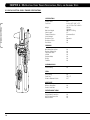
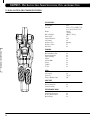
6.1 MX-E5X Elliptical cross trainer specifications
SPECIFICATIONS
Product Name
Foot Print
MX-E5x • Elliptical
Weight
Max User Weight
Stride Length
Frame Construction
Self Contained
Resistance Type
Resistance Levels
Dual Action
E5x
inches = 85” x 29” x 72”
cm = 215.9 x 73.6 x 182.9
350 lbs
158.8 kg
400 lbs = 181 kg
21”
Aluminum/Steel
Yes
Generator
20
Yes
PROGRAMS
One Button Quick Start
Random (20 profiles)
Target Heart Rate
Interval
Constant Watts
Rolling
Fat Burn
Yes
Yes
Yes
Yes
Yes
Yes
Yes
CLEANING BRUSH
Track Cleaning
Yes
PEDAL
Self Leveling
Pedal Size
Distance Between Pedals
Yes
16” x 7”
3.5”
HEART RATE
Wireless Heart Rate
Contact Heat Rate
Yes
Yes
ENTERTAINMENT READY
Coaxial Cable Connection
AC TV Power Connection
Monitor Mount
10
Yes
Yes
Yes
CHapter 6: E5x Elliptical Cross Trainer Specifications, Parts,
and
Assembly Steps
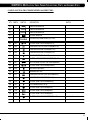
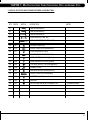
6.2 MX-E5X Elliptical cross trainer Fasteners & Assembly Tools
QTY
PART #
SKETCH
DESCRIPTION
01
4mm ALLEN WRENCH
01
5mm ALLEN WRENCH
01
6mm ALLEN WRENCH
01
SOCKET WRENCH
01
#2 PHILLIPS SCREW DRIVER [ 4.5 x 50 ]
02
Z01
SOCKET HEAD CAP SCREW(M10 x 75)
04
Z02
PAN HEAD PHILLPS DRIVE SCREW(M5 x 15L)
12
Z03
PAN HEAD MACHINE SCREW(M5 x 12L)
02
Z04
PAN HEAD MACHINE SCREW(M5 x 8L)
02
Z05
WAVE WASHER(20.5x29.1.1.5t)
04
Z06
BUTTON HEAD SOCKET CAP SCREW(M8x10L)
02
Z07
BUTTON HEAD SOCKET CAP SCREW(M8x20L)
02
Z08
SOCKET HEAD CAP SCREW(M10x40L)
02
Z09
NYLOK NUT(M10x40L)
02
Z10
BEARING ROD PIN
04
Z11
PAN HEAD PHILLIPS DRIVE SCREW(M4x15L)
12
Z12
SOCKET HEAD CAP SCREW(M8x12L)
08
Z13
SOCKET HEAD CAP SCREW(M6x15L)
08
Z21
FLAT WASHER(6.4x11x1.6t)
06
Z22
SOCKET HEAD CAP SCREW(8x15L)
04
C23
SOCKET HEAD CAP SCREW(8x65L)
04
C26
SOCKET HEAD CAP SCREW(8x35L)
04
N51
BUTTON HEAD MACHINE SCREW(M5 x 12L)
NOTES
Included in console
11
CHapter 6: E5x Elliptical Cross Trainer Specifications, Parts,
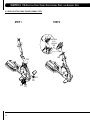
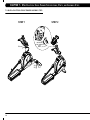
6.3 MX-E5X Elliptical cross trainer assembly steps
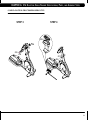
STEP 2
STEP 1
INCLUDED
WITH
CONSOLE
N51
N22
C26
Z01
Z13
Z21
Z12
12
Z13
Z13
and
Assembly Steps
CHapter 6: E5x Elliptical Cross Trainer Specifications, Parts,
and
Assembly Steps
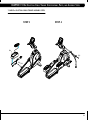
6.3 MX-E5X Elliptical cross trainer assembly steps
STEP 4
STEP 3
Z03
Z04
Z02
Z04
Z07
Z06
Z05
13
CHapter 6: E5x Elliptical Cross Trainer Specifications, Parts,
and
Assembly Steps
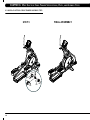
6.3 MX-E5X Elliptical cross trainer assembly steps
STEP 5
FINAL ASSEMBLY
C23
Z11
Z10
Z08
14
Z09
CHapter 6: E5x Elliptical Cross Trainer Specifications, Parts,
and
Assembly Steps
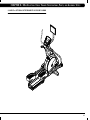
6.4 MX-E5x OPTIONAL ENTERTAINMENT Accessory shown
MX-E5xc • Elliptical
15
CHapter 7: E5xc Elliptical Cross Trainer Specifications, Parts,
and
Assembly Steps
7.1 MX-E5Xc Elliptical cross trainer specifications
SPECIFICATIONS
Product Name
Foot Print
Weight
Max User Weight
Stride Length
Frame Construction
Self-Powered
Resistance Type
Resistance Levels
Dual Action
E5xc
inches = 72”L x 29”W x 71”H
cm = 182.9 x 215.9 x 73.6
281 lbs
158.8 kg
400 lbs = 181 kg
21”
Steel
Yes
Generator
25
Yes
MX-E5xc • Elliptical
PROGRAMS
One Button Quick Start
Random (20 profiles)
Target Heart Rate
Interval
Constant Watts
Rolling
Fat Burn
Fit Test
Yes
Yes
Yes
Yes
Yes
Yes
Yes
Yes
PEDAL
Self Leveling
Pedal Size
Distance Between Pedals
Yes
16” x 7”
3.0”
HEART RATE
Wireless Heart Rate
Contact Heat Rate
Yes
Yes
ENTERTAINMENT READY
Coaxial Cable Connection
AC TV Power Connection
Monitor Mount
16
Yes
Yes
Yes
CHapter 7: E5xc Elliptical Cross Trainer Specifications, Parts,
and
Assembly Steps
7.2 MX-E5Xc Elliptical cross trainer Fasteners & Assembly Tools
QTY
PART #
SKETCH
DESCRIPTION
01
4mm ALLEN WRENCH
01
5mm ALLEN WRENCH
01
6mm ALLEN WRENCH
01
OPEN WRENCH [ 13mm, M8 ]
01
#2 PHILLIPS SCREW DRIVER [ 6x100L ]
10
Z07
NYLON NUT(M8x1.25P)
04
Z10
SOCKET HEAD CAP SCREW(M6x12L)
04
Z11
LOCK WASHER(8.0x13.0x2t)
10
Z01
SOCKET HEAD CAP SCREW(M8x15L)
02
Z02
WAVE WASHER(20.5x29x1.5t)(Plastic)
02
Z08
WAVE WASHER(20.7x29.1x0.3t)(Metal)
08
Z09
FLAT HEAD SOCKET CAP SCREW(M5x10L)
02
E42
CONNECT PLATE
06
Z03
PAN HEAD MACHINE SCREW(M5x10L)
04
Z05
SOCKET HEAD CAP SCREW(65MM)
02
Z06
WASHER(8.2x16x1.0L)
04
Z30
BUSHING
04
N51
BUTTON HEAD MACHINE SCREW(M5 x 12L)
NOTES
Included in console
17
CHapter 7: E5xc Elliptical Cross Trainer Specifications, Parts,
7.3 MX-E5Xc Elliptical cross trainer assembly steps
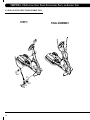
STEP 2
STEP 1
INCLUDED
WITH CONSOLE
N51
Z01
Z11
Z07
18
Z10
and
Assembly Steps
CHapter 7: E5xc Elliptical Cross Trainer Specifications, Parts,
and
Assembly Steps
7.3 MX-E5Xc Elliptical cross trainer assembly steps
STEP 3
STEP 4
Z09
Z05
Z08
Z02
19
CHapter 8: E5xc Elliptical Cross Trainer Specifications, Parts,
and
Assembly Steps
8.3 MX-E5Xc Elliptical cross trainer assembly steps
FINAL ASSEMBLY
STEP 5
Z03
Z07
Z06
Z30
20
Z05 Z03
CHapter 8: E5xc Elliptical Cross Trainer Specifications, Parts,
and
Assembly Steps
8.4 MX-E5Xc OPTIONAL ENTERTAINMENT Accessory shown
21
M ATr ix F i t ne s s s y s t em s c o r p.
1 6 1 0 L andmark Drive C ottage Grove wi 5 3 5 2 7 U S A
T O L L F R E E 8 6 6 . 6 9 3 . 4 8 6 3 w w w. m a t r i x f i t n e s s . c o m FA X 6 0 8 . 8 3 9 . 8 6 8 7
REV. 02