1
Color profile: Disabled
Composite Default screen
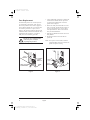
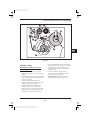
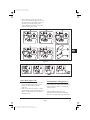
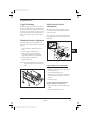
Figure 9
Removing Used Ribbon
Refer to Figure 9.
1. Break the ribbon close to the Ribbon Take-Up
Spindle (A).
2. While holding the Ribbon Take-Up Spindle,
turn the knob (B) clockwise until it stops. This
will cause the Ribbon Release Bars to pivot
down (C), easing the spindle’s “grip” on the
wound ribbon.
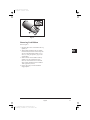
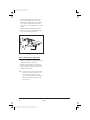
3. Slide the ribbon off of the Ribbon Take-Up
Spindle. Once the used ribbon has been
removed, ensure that the arrow on the knob
aligns with the indented notch in the Ribbon
Take-Up Spindle (see inset).
4. Remove the empty core from the Ribbon
Supply Spindle.
English
E:\jobs\EH91 Zebra\XiIII\XiIII-gb.vp
Wednesday, December 15, 1999 8:55:47 AM
GB
83