1
Connecting the Projector
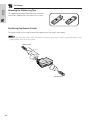
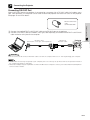
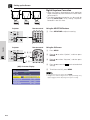
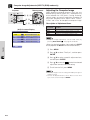
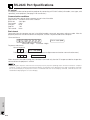
Connecting RS-232C Port
When the RS-232C port on the projector is connected to a computer with an RS-232C cable (null modem, cross
type, sold separately), the computer can be used to control the projector and check the status of the projector.
See pages 43 and 44 for details.
DIN-D-sub RS-232C
cable
QCNW-5288CEZZ
Setup & Connections
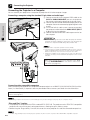
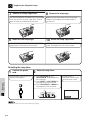
1 Connect the supplied DIN-D-sub RS-232C cable to the RS-232C port on the projector.
2 Connect an RS-232C cable (null modem, cross type, sold separately) to the other end of DIN-D-sub RS-232C
cable and to the serial port on the computer.
RS-232C cable
(null modem, cross type, sold separately)
DIN-D-sub
RS-232C cable
Projector
RS-232C
INPUT 1
Y
/COMPONENT
PB
CAUTION
• Do not connect or disconnect an RS-232C cable to or from the computer while it is on. This may damage your computer.
• The RS-232C function may not operate if your computer port is not correctly set up. Please refer to the operation manual of
the computer for details on setting up.
• A Macintosh adaptor may be required for use with some Macintosh computers. Contact your nearest Authorized SharpVision
Service Center or Dealer.
E-14
PR
AUDIO INPUT
(INPUT 1, 2)