1
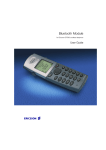
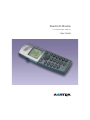
Bluetooth Module
for DT590 Cordless Telephone
User Guide
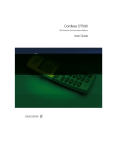
Cover Page Graphic
Place the graphic directly on the page, do not care about
putting it in the text flow. Select Graphics > Properties
and make the following settings:
•
Width: 15,4 cm (Important!)
•
Height: 11,2 cm (May be smaller)
•
Top: 5,3 cm (Important!)
•
Left: -0,3 cm (Important!)
This text should then be hidden.
EN/LZT 103 017 R2A
© Aastra Telecom Sweden AB 2008. All rights reserved.
Table of Contents
Table of Contents
page
Welcome .......................................................... 4
Description ....................................................... 6
Installation ........................................................ 7
Operation ....................................................... 16
Maintenance .................................................. 19
Cordless DT590 Bluetooth
3
Welcome
Welcome
This User Guide shows you how to install the Bluetooth module in
the DT590 cordless phone and how to pair and operate
the telephone with a Bluetooth headset.
The Bluetooth module is placed in the battery compartment and
connected with a connector.
Bluetooth technology replaces the cord between the cordless
phone and the headset. This allows the user to move more freely
and eliminates the risk of a headset cord getting stuck.
Bluetooth module supports the Bluetooth 1.2 standard.
The latest version of this User Guide can also be downloaded from:
http://www.aastra.com
4
Cordless DT590 Bluetooth
Welcome
Copyright
All rights reserved. No parts of this publication may be reproduced,
stored in retrieval systems, or transmitted in any form or by any
means, electronic, mechanical, photocopying, recording or
otherwise, without prior written permission of the publisher except
in accordance with the following terms.
If this publication is made available on Aastra´s homepage, Aastra
gives its consent to downloading and printing copies of the content
provided in this file only for private use and not for redistribution. No
parts of this publication may be subject to alteration, modification
or commercial use. Aastra will not be liable for any damages arising
from use of an illegal modified or altered publication.
Aastra is a registered trademark of Aastra Technologies Limited. All
other trademarks mentioned herein are the property of their
respective owners.
Warranty
AASTRA MAKES NO WARRANTY OF ANY KIND WITH REGARD
TO THIS MATERIAL, INCLUDING, BUT NOT LIMITED TO, THE
IMPLIED WARRANTIES OF MERCHANTABILITY AND FITNESS
FOR A PARTICULAR PURPOSE. Aastra shall not be liable for
errors contained herein nor for incidental or consequential
damages in connection with the furnishing, performance or use of
this material.
Declaration of Conformity
Hereby, Aastra Telecom Sweden AB, Box 42214,
SE-126 17 Stockholm, declares that this telephone is in
conformity with the essential requirements and other relevant
provisions of the R&TTE directive 1999/5/EC.
Details to be found at: http://www.aastra.com/sdoc.
DT590
5
Description
Description
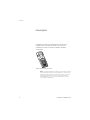
The Bluetooth module is a small flat electronic board with an
integrated antenna moulded into plastic and a connector.
The Bluetooth module can be easily installed in the battery
compartment.
Article number: DPY 901 549/1
Note: To use the Bluetooth module your phone has to fulfill
certain hardware and software requirements. The minimum
hardware version is R2A. The hardware version is found on
the label under the battery (next to the article number
1/DPNANB 240 01/1). For further details please contact
your system administrator.
6
Cordless DT590 Bluetooth
Installation
Installation
Turn off the phone by pressing NO until the display goes blank.
Cordless DT590 Bluetooth
1
Remove the battery cover.
2
Completely remove the foam on the inside of the battery
lid.
3
Connect the Bluetooth module connector to the largest
connector on the phone. As the connector is asymmetric
it is not possible to connect the module in the wrong way.
4
Remove the backing paper from the tape on the
Bluetooth module.
5
Place the Bluetooth module so that it is centred on the
battery and the support at the end of the battery.
6
Close the battery lid.
7
Turn on the phone by pressing NO until the display starts.
7
Installation
8
Cordless DT590 Bluetooth
Installation
Headsets
Since the Bluetooth module supports the Bluetooth 1.2 standard,
any headset that comply to this standard can be connected to the
phone.
Note: As your Bluetooth headset may have more or less
functions than described here, please refer to the user
guide for the Bluetooth headset.
Wear
026
For optimal performance wear the Bluetooth headset and the
phone on the same side of your body. The best audio quality in the
headset is achieved when there are obstructions, including your
body, between the headset and the cordless phone.
Cordless DT590 Bluetooth
9
Installation
Setup
¾
º
º ÜÛ
º ÜÛ
Enable Bluetooth
Press.
Select the “Toolbox” tab.
Select the menu item ”Bluetooth” and confirm.
The following options are available:
•
Enable
•
Headset (greyed out)
Select the menu item ”Enable” and confirm.
The menu options now change to:
•
Disable
•
Headset (active)
The activated Bluetooth function will be indicated by a symbol (
in the info row of the display.
)
Pair and connect a Bluetooth headset
Before a headset can be used a connection (pairing) between the
headset and the phone must be established. Please refer to the
user guide of the headset.
¾
º
º ÜÛ
º ÜÛ
º ÜÛ
10
Place the Bluetooth headset and the phone next to each
other.
Press.
Select the “Toolbox” tab.
Select the menu item ”Bluetooth” and confirm.
Select the menu item ”Headset” and confirm.
Select the menu item ”Add new” and confirm.
Cordless DT590 Bluetooth
Installation
ÜÛ
º ÜÛ
¿ ÜÛ
Put the headset in pairing mode (please refer to the user
guide of the headset) and confirm on the phone.
The phone starts to search for the headset.
When headset is found it is displayed in the phone menu with its
supplier specific name.
Select the headset and confirm.
The pairing starts.
After a few seconds a PIN-code is requested for the Bluetooth
headset.
Enter the PIN-code (please refer to the user guide of the
headset) and confirm.
If the entered PIN is correct “Succeeded” is shown on the phone
display.
The paired headset is displayed in the phone menu with its supplier
name. To change the name please refer to the chapter “Change the
name of Bluetooth headset” on page 15.
º ÜÛ
º ÜÛ
Up to four headsets can be paired to the phone, but only one at a
time can be active.
Select the desired headset and confirm.
The following options are available:
•
Connect
•
Edit name
•
Remove
Select the menu item ”Connect” and confirm.
The selected headset is now active and ready to be used.
Note: A previously activated headset is deactivated
automatically, however it remains paired. To switch
between the paired headsets please refer to chapter
“Activate a Bluetooth headset” on page 12.
A paired headset will be indicated by a symbol (
of the display.
Cordless DT590 Bluetooth
) in the info row
11
Installation
Activate a Bluetooth headset
¾
º
º ÜÛ
º ÜÛ
º ÜÛ
º ÜÛ
This chapter is only relevant when you have paired more than one
headset and you want to switch between them (only one headset
can be active at the time).
Press.
Select the “Toolbox” tab.
Select the menu item ”Bluetooth” and confirm.
Select the menu item ”Headset” and confirm.
Select the desired headset and confirm.
The following options are available:
•
Connect
•
Edit name
•
Remove
Select the menu item ”Connect” and confirm.
The headset is now active and ready to be used.
Note: A previously activated headset is deactivated
automatically, however it remains paired.
12
Cordless DT590 Bluetooth
Installation
Deactivate a Bluetooth headset
¾
º
º ÜÛ
º ÜÛ
º ÜÛ
º ÜÛ
Cordless DT590 Bluetooth
To deactivate the active Bluetooth headset proceed as follows.
Press.
Select the “Toolbox” tab.
Select the menu item ”Bluetooth” and confirm.
Select the menu item ”Headset” and confirm.
Select the desired headset and confirm.
The following options are available:
•
Disconnect
•
Edit name
•
Remove
Select the menu item ”Disconnect” and confirm.
The headset is now deactivated but remains paired and can be
found in the headset menu.
13
Installation
Remove a headset
¾
º
º ÜÛ
º ÜÛ
º ÜÛ
º ÜÛ
14
To remove a Bluetooth Headset proceed as follows
Press.
Select the “Toolbox” tab.
Select the menu item ”Bluetooth” and confirm.
Select the menu item ”Headset” and confirm.
Select the desired headset and confirm.
The following options are available:
•
Disconnect or Connect
•
Edit name
•
Remove
Select the menu item ”Remove” and confirm.
Cordless DT590 Bluetooth
Installation
Change the name of Bluetooth headset
¾
º
º ÜÛ
º ÜÛ
º ÜÛ
º ÜÛ
Cordless DT590 Bluetooth
The bluetooth headset reports its default name to the phone
(normally the type name of the headset). To change the name
proceed as follows.
Press.
Select the “Toolbox” tab.
Select the menu item ”Bluetooth” and confirm.
Select the menu item ”Headset” and confirm.
Select the desired headset and confirm.
The following options are available:
•
Disconnect or Connect
•
Edit name
•
Remove
Select the menu item ”Edit name” and confirm.
To enter a text please refer to chapter “Write Text” in the DT590
user guide.
15
Operation
Operation
¿
Ü
Û
ÚÙ
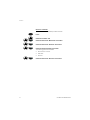
Make a call with the headset
Enter the desired number.
The number is displayed.
Press when the number is correct.
Press when “Transfer call to phone?” is displayed.
The call is transferred to the Bluetooth headset
If you want to use the phone instead, press ÜÛ.
Answer a call with the headset
A ring signal sounds in both the active Bluetooth headset and the
phone to signal an incoming call.
Press the button on the headset, if the call shall be answered
on the headset.
ÜÛ
Or:
Press to answer the call on the phone.
End a call
To end the call press the button on the headset.
ÚÙ
16
Or:
Press.
Cordless DT590 Bluetooth
Operation
Transfer a call from the headset to the phone
º
º ÜÛ
º ÜÛ
To transfer a call from the Bluetooth headset to the phone proceed
as follows:
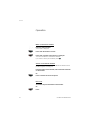
Select the “Ongoing call” tab.
Select the menu item “Audio transfer” and press.
Select the menu item “To phone” and press.
Transfer a call from the phone to the headset
º
º ÜÛ
º ÜÛ
To transfer the call from the phone to the Bluetooth headset
proceed as follows:
Select the “Ongoing call” tab.
Select the menu item “Audio transfer” and press.
Select the headset name and press.
It is also possible to transfer a call to the Bluetooth headset by
pressing the button on the Bluetooth headset.
Cordless DT590 Bluetooth
17
Operation
Operation notice
Accessibility and Voice quality
Bluetooth uses the frequency of 2.45 GHz. WLAN, microwave oven
and other devices that use the same frequency can cause a
disturbance in the Bluetooth headset.
Operation Area
The maximum operating distance between the headset and the
phone is 10 metres according to standard 1.2. The communication
distance between the handset and headset may vary considerably
due to the environment and disturbances from other 2.45 GHz
equipment. Different headsets can also give different
communication distances.
Out of Range
If a connection cannot be made with the connected Bluetooth
headset the call is transferred automatically to the phone.
If the Bluetooth headset and the phone become out of range from
each other the connection is temporarily lost. When the phone and
the headset are in range again, the connection is automatically
established when a call is made or received.
18
Cordless DT590 Bluetooth
Maintenance
Maintenance
Replace the battery
Carefully remove the Bluetooth module from the battery.
Replace the Battery (see chapter “Replacing the battery” on
page 125) and fasten the Bluetooth module again (see chapter
“Installation” on page 7.
Replace the Bluetooth module
The Bluetooth module is not reparable. Ensure that it is properly
disposed of.
Cordless DT590 Bluetooth
19
Maintenance
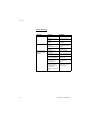
Trouble Shooting
Problem
No headset found
Pairing fails
Connecting fails/
Failed to connect
headset
20
Reason
Headset is turned
off
Headset is out of
battery
Headset is out of
range
Headset is not in
pairing/
discoverable mode
Incorrect PIN
entered
Headset is not
turned on
Headset is out of
range
Link key in headset
has been deleted
Headset is already
connected to
another phone
Too close to a
WLAN area and
headset does not
support the
Bluetooth standard
v1.2
Solution
Turn on the headset
Charge headset
Move headset closer
to phone
Put the headset in
pairing/discoverable
mode *)
Try again and enter
correct PIN *)
Turn on headset
Move headset closer
to phone
Repeat pairing
procedure
Disconnect headset
from the other
phone
Shut down WLAN
equipment or move
out of range.
Cordless DT590 Bluetooth
Maintenance
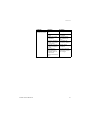
Problem
Headset cannot
connect to phone
Reason
Phone is not turned
on
Phone is out of
range
Bluetooth module
is disabled.
Another headset is
already connected
to the phone.
Link key is missing
in either headset or
phone.
Too close to a
WLAN area and
headset does not
support the
Bluetooth standard
v1.2
Solution
Turn on phone
Move phone closer
to headset
Enable Bluetooth
chip in Bluetooth
menu
Disconnect the
connected headset
Repeat pairing
procedure
Shut down WLAN
equipment or move
out of range.
*) see headset manual for details
Cordless DT590 Bluetooth
21
Notes
Notes
22
Cordless DT590 Bluetooth
Notes
Cordless DT590 Bluetooth
23
Subject to alteration without prior notice.
For questions regarding the product,
please contact your Aastra certified Sales Partner.
Also visit us on http://www.aastra.com
© Aastra Telecom Sweden AB 2008. All rights reserved.
EN/LZT 103 017 R2A