1
English
Using your CD player
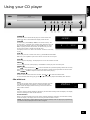
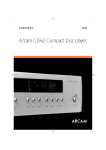
COMPACT DISC PLAYER
CD192
24 BIT/192 kHz UPSAMPLING TECHNOLOGY
LOAD
PLAY
�
POWER
STOP
PAUSE
� � �
1
Press this button to switch the CD player on and off. When first
powered up with no CD installed the display shows ‘No disc’.
LOAD
�
TRACK
POWER
�
�
--NO DISC--
2
To install a CD, press LOAD (or OPEN on the remote control). The
CD tray opens – it accepts 12cm and 8cm discs. Place the CD in the
tray with the label facing uppermost. Press LOAD again (or press
PLAY, or gently push the tray in 5mm) to close the tray. You will
see the total number of tracks and total disc time.
TRACK
8
INDEX
1
MIN
SEC
52.19
1 2 3 4 5
6 7 8
The display returns to ‘0’ after a few seconds. The disc is now ready
to play.
PLAY
3
Press to play the CD. To restart from track 1, press STOP and then PLAY.
Make sure your amplifier’s input source selector is set to the correct input.
STOP
4
Press to stop the CD playing. The display shows ‘0’ and the number of tracks.
PAUSE
5
Press to pause the disc (interrupt play). Press PLAY to resume play from the same point.
SEARCH
6
Press
to search backwards, or
to search forwards for a particular passage within the currently
playing track. If the player is in ‘PAUSE’ mode the search is made at high speed with the sound muted.
Press
,
SKIP TRACK
or PLAY to stop the search action and resume playing.
7
To start a CD with a track other than the first, press
To select another track during play, press
or
or
to locate the desired track.
. The track is played automatically after selection.
CDs with text
Load
You will see the total number of tracks and the total disc time with
‘CD TEXT’ illuminated in the display. The artist and album title
scrolls across the display before returning to show the artist and
total number of tracks.
TRACK
INDEX
ANASTACIA
MIN
SEC
1 2 3 4 5
6 7 8 9 10
11 12
CD TEXT
Play
The track number is briefly displayed, followed by the track title scrolling across the display. The display
returns to showing the track number and time.
Track selection
When a new track is selected, the track number is briefly displayed, followed by the track title scrolling
across the display. The display returns to showing the track number and time.
NOTE: The track title is always displayed when a track is selected, either for playing or programming.
The artist is always displayed when the disc is stopped.
CD192
E-5